

Data sources on a deployed build can be tested directly from Runtime: run a database operation or an SQL query and inspect the response, without wiring it into a workflow first. Use this to validate a data source after deploy or to investigate why an operation misbehaves in an environment.
Where to find it
1
Open the Builds list
In your project, go to Runtime and open the Builds list.
2
Open the build's test menu
On the build you want to test against, open the test actions menu.
3
Pick the test action for your data source
The available entry depends on the data source type configured in the build.
The same menu also offers Test build (run a process from the build) and Test workflow (run an integration workflow) — see the Builds documentation for the full list.
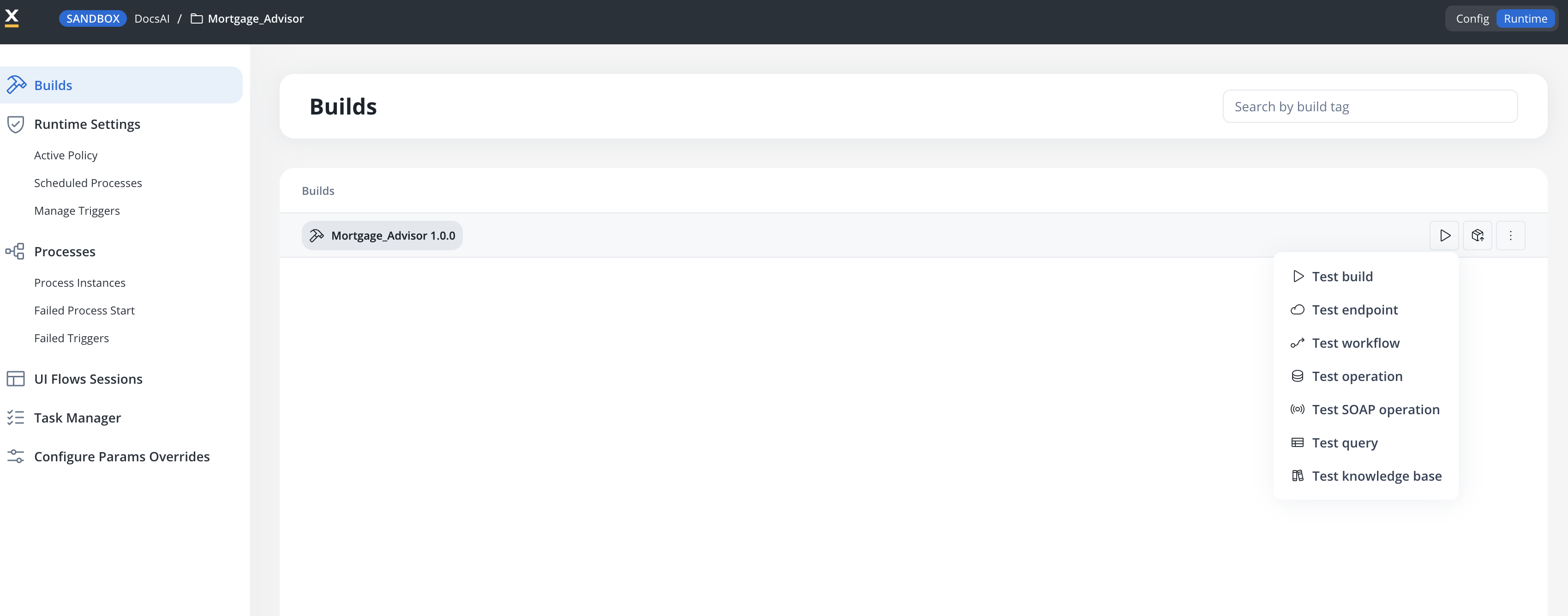
Testing SQL queries (Oracle and PostgreSQL)
Available starting with FlowX.AI 5.9.2
- Pick a query from the selector in the modal header — queries are grouped by data source, and you can filter with Search query. Data sources without queries show No queries available.
- Review or edit the query in the Query Arguments editor (SQL, with autocomplete and a schema preview of the data source’s entities), and fill in any Input Parameters the query uses.
- Click Test. The Response pane shows the result as JSON, along with status, execution time, and size. Failures are shown with the database error message.
Testing database operations (FlowX Database and unmanaged MongoDB)
Test operation opens the equivalent modal for NoSQL data sources: pick an operation from the selector in the modal header (filter with Search operation), provide any input parameters, and click Test to see the operation’s response. The data source’s schema is available for reference from the modal.Browsing documents
SaaS ·Available on SaaS with FlowX.AI . This feature is live on managed (SaaS) deployments now. Self-hosted deployments will receive it with the next LTS release family.
Related resources
FlowX Database
Collections, operations, and usage in workflows
Oracle database
Add an Oracle data source and define queries
PostgreSQL database
Add a PostgreSQL data source and define queries
Testing a knowledge base
The equivalent testing surface for knowledge bases