

Which integration approach should I use?
What can Integration Designer connect to?
In Integration Designer, a data source holds the connection to one external system. Integration workflows call its endpoints or operations, and a process runs a workflow through the Start integration workflow action. For the full walkthrough, see the Integration Designer guide.APIs and web services
RESTful System
Connect to external REST APIs and configure endpoints, authentication, and parameters
SOAP System
Import a WSDL and invoke the discovered operations from workflows (SaaS · 5.10)
Databases
FlowX Database
Store and share structured data across processes and apps, with no external database to manage
Unmanaged MongoDB
Connect to MongoDB instances your organization already manages
Oracle Database
Run saved SQL queries against an Oracle database you manage
PostgreSQL Database
Run saved SQL queries against a PostgreSQL database you manage (SaaS · 5.10)
Db2 Database
Run saved SQL queries against an IBM Db2 database you manage (SaaS · 5.12)
Email and inbound events
Email Trigger
Start process instances when emails arrive in a mailbox monitored over IMAP
Email Sender
Send new emails and replies to received emails from processes over SMTP
Microsoft Outlook
Read and send Outlook emails through the Microsoft Graph API (5.9.1 and later)
Incoming Webhook
Start or resume a process from an external HTTP POST secured with an API key
Files
File Storage
Move files in and out of external FTP, SFTP, S3, or Azure Blob storage
AI tools and context
MCP Integration
Connect Model Context Protocol (MCP) servers so AI agents can use external tools
Knowledge Base
Give AI agents contextual information from documents and data feeds
Other Integration Designer topics
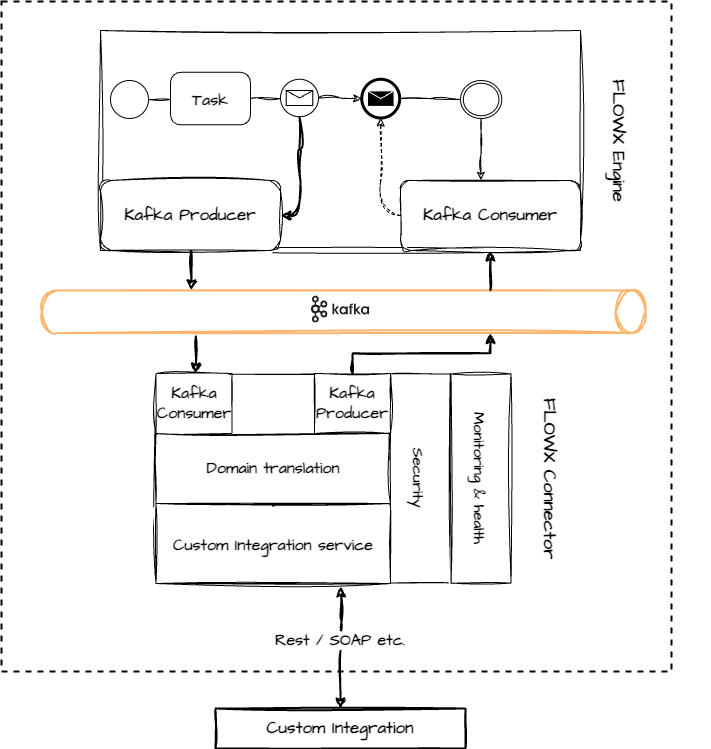
How do custom Kafka connectors work?
Custom connectors are a self-hosted capability. On FlowX.AI SaaS, the Kafka cluster is internal to the platform and a connector you run cannot reach it. On SaaS, use an Integration Designer data source or an Incoming Webhook instead.
1
Build the connector
Develop a microservice that listens for Kafka events, processes the received data, calls the external system, and sends the result back to Kafka. For a Java starting point, use the quickstart connector repository.
2
Send data from the process
In the process definition, add a message send task with an action that sends the required data to the connector’s input topic.
3
Receive the reply
Add a receive message task where the process waits for the connector’s response. The connector must reply on a topic that matches the topic pattern the engine listens on.
How do I test and monitor integrations?
Mock integrations
Test a process flow before every integration is finished, using the mock integrations server
Observability with OpenTelemetry
Trace, measure, and log integration calls across the platform
Related resources
Integration Designer
Data sources, endpoints, and integration workflows in full
Consuming FlowX from external apps
SDKs, REST, webhooks, and Kafka patterns for calling FlowX
Start integration workflow action
Run an integration workflow from a process node
Building a connector
Build and deploy a custom Kafka connector