

Documentation Index
Fetch the complete documentation index at: https://docs.flowx.ai/llms.txt
Use this file to discover all available pages before exploring further.
Overview
Available starting with FlowX.AI 5.6.0
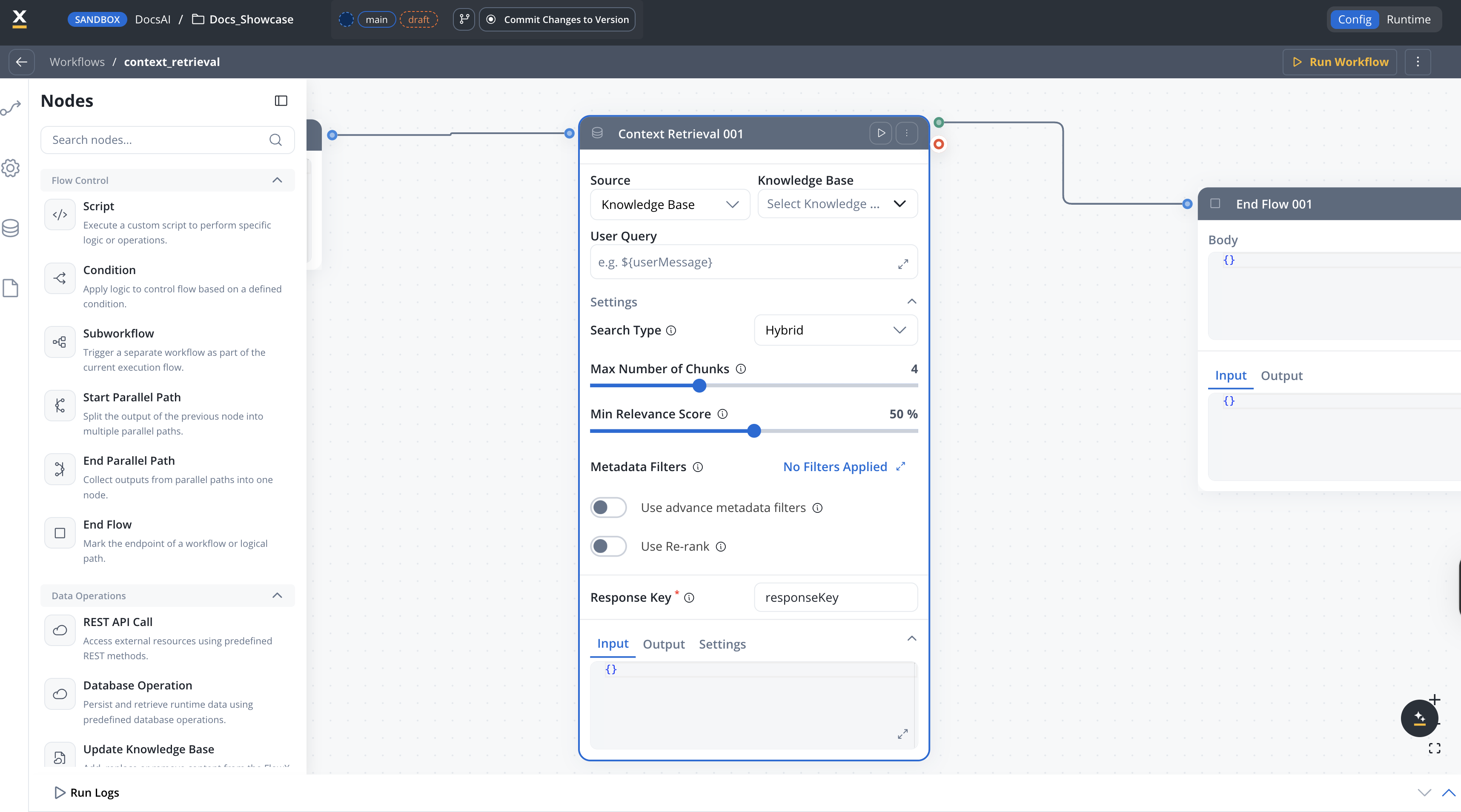
When to use Context Retrieval vs Custom Agent
| Scenario | Recommended node |
|---|---|
| You need the AI to reason about retrieved information and generate a response | Custom Agent with Knowledge Base enabled |
| You want raw chunks to process, filter, or route in your workflow | Context Retrieval |
| You need to combine chunks from multiple Knowledge Bases | Context Retrieval (one per KB) + downstream merge |
| You want a simple question-answer flow with RAG | Custom Agent with Knowledge Base enabled |
Configuration
Knowledge Base
Select one or more Knowledge Base resource references to query.
Source
The source type to query.Options:
KNOWLEDGE_BASE— Search the selected Knowledge Base (default)MEMORY— Search conversation memory
MEMORY option is only available in conversational workflows.Default: KNOWLEDGE_BASESettings
The settings below are available inside the Settings expander on the node configuration panel.Search type
Available starting with FlowX.AI 5.7.0Search type and re-ranking options give you control over how chunks are retrieved from the Knowledge Base.
The strategy used for retrieving context from the Knowledge Base.Options:
Hybrid— Combines semantic and keyword search for balanced results (default)Semantic— Uses vector similarity for meaning-based searchKeywords— Uses traditional keyword matching
HYBRIDQuery parameters
Maximum number of relevant chunks to return. Configurable from 1 to 10.Default:
4Minimum relevance score threshold, expressed as a percentage (0–100). Only chunks with a relevance score above this threshold are returned. Not available when search type is set to Keywords.Default:
50Metadata filters
Opens a query builder modal where you compose conditions as field / operator / value triples. Operators depend on the metadata key type (equals, not equals, contains, in, not in, before, after, exists, etc.). Conditions can be grouped and combined with AND or OR.To filter by store, add a condition on the system metadata key
source.Enhanced in FlowX.AI 5.7.0 — typed operators and AND/OR grouping are now supported. See Filtering by metadata for the full operator list.
Toggle to turn on advanced metadata filter expressions for more complex filtering logic. When turned on, a JSON expression field becomes available for defining property-based filters.Default:
falseRe-ranking
Available starting with FlowX.AI 5.7.0
When turned on, applies a re-ranking model to the retrieved chunks, reordering them by relevance to the query. This can improve result quality at the cost of slightly higher latency.Default:
falseOperation prompt
The operation prompt defines the query text sent to the Knowledge Base. It supports${} placeholder syntax for dynamic values from workflow input and configuration parameters.
Example:
Output format
The Context Retrieval node returns an array of chunk objects. Each chunk contains:| Field | Type | Description |
|---|---|---|
| chunkContent | string | The text content of the retrieved chunk |
| chunkMetadata | object | Metadata associated with the chunk (key-value pairs) |
| relevanceScore | number | Similarity score between the query and the chunk (0–1) |
| contentSource | string | The name of the store the chunk belongs to (field name preserved for API compatibility) |
Example output
Error handling
If the Context Retrieval node fails, the workflow produces aWORKFLOW_NODE_CONTEXT_RETRIEVAL_ERROR error. Common causes include:
Knowledge Base not found
Knowledge Base not found
The referenced Knowledge Base does not exist or is not accessible.Solution: Verify the Knowledge Base exists in your project or dependencies and that you have the required permissions.
Invalid query
Invalid query
The operation prompt resolved to an empty or invalid query.Solution: Check that the
${} placeholders in your operation prompt reference valid input or config variables.Timeout
Timeout
The RAG search exceeded the configured timeout.Solution: The default timeout is 300 seconds (
flowx.ai-service.nodeRunnerTimeoutSeconds). Consider simplifying your query or reducing the topK value.Best practices
Related resources
Knowledge Base overview
Create and manage Knowledge Bases
Using Knowledge Base in workflows
Query Knowledge Bases with Custom Agent nodes
Custom Agent node
AI agents with MCP tools and Knowledge Base access
Integration Designer
Build and manage integration workflows