

Overview
FlowX.AI is an event-driven platform built on specialized microservices that communicate primarily through Apache Kafka. The architecture is organized into distinct layers, each responsible for a specific concern, from process execution and app lifecycle management to authorization, content delivery, and AI-powered automation. All backend services are containerized and deployed on Kubernetes. Client applications connect through an API Gateway that handles OAuth2 token validation and request routing.For detailed database-to-service mapping and storage types, see the Data architecture page.
Architecture overview
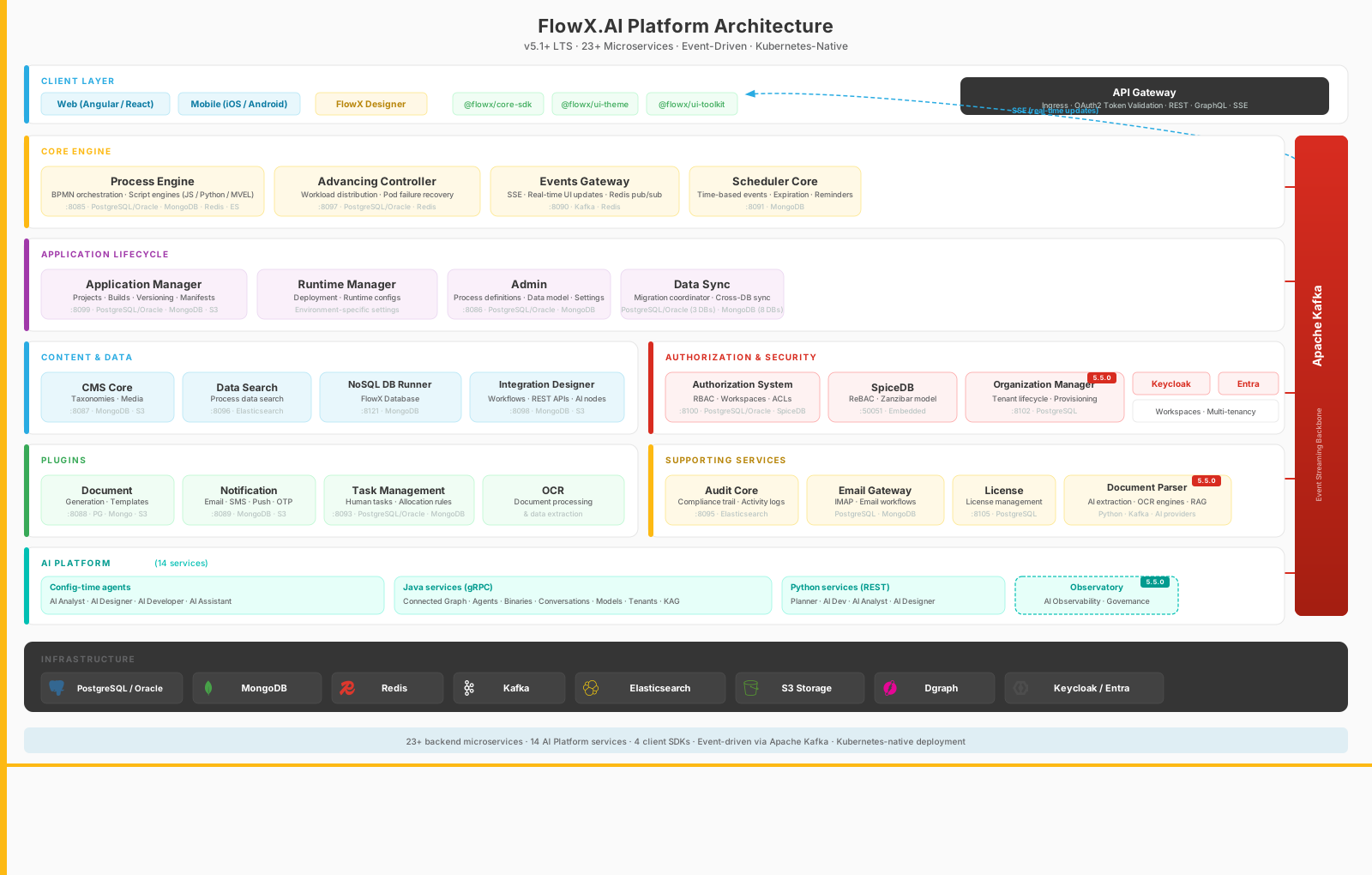
Service quick reference
Looking up a specific database or dependency? Everything is in this table; the sections after it explain each layer and service in detail. All services listen on port 8080, with the management (actuator) port on 8081. SpiceDB serves gRPC on port 50051.SpiceDB is a startup dependency for more services than it serves. The Authorization System, Admin, Application Manager, Audit Core, CMS Core, Document Plugin, Integration Designer, Notification Plugin, Task Management, and Process Engine include
spicedb in their readiness health group, so those pods do not become ready while SpiceDB is unreachable. This includes the Process Engine, which serves runtime traffic but also checks design-time permissions on the process instance and incident endpoints that FlowX Designer calls.FlowX Designer
The FlowX Designer is a collaborative, no-code/full-code web app for building and managing processes, UIs, integrations, and other app components.- BPMN editor: visual process designer built on Fabric.js canvas
- UI designer: drag-and-drop interface builder for web and mobile
- Data model builder: schema design and management
- Integration designer UI: visual workflow builder for external system connections
- Script builder: Monaco-based code editor for business rules (JavaScript, Python, MVEL, Groovy)
- AI features: embedded config-time agents, conversation system, command center
- CMS, theme editor, access management: content, branding, and permissions configuration
FlowX Designer
Core Engine layer
The Core Engine layer handles workflow execution, process orchestration, and real-time event delivery.Process Engine
The Process Engine is the central orchestration service that executes BPMN 2.0 process definitions and manages process instance lifecycles.- Executes business processes and coordinates real-time interactions between users, systems, and data
- Manages process instances from creation through completion
- Supports multiple scripting languages: JavaScript (GraalJS), Python 3 (GraalPy), MVEL, and Groovy
- Dynamically generates and delivers UI components based on process state
process_engine, advancing), MongoDB (app-runtime read), Redis (cache), Elasticsearch (indexing)
Process Engine
Advancing Controller
The Advancing Controller ensures efficient process instance progression, particularly in scaled deployments.- Distributes workload evenly across Process Engine instances
- Redistributes work during scale-up and scale-down
- Prevents process instances from getting stuck if a worker pod fails
- Performs cleanup tasks and monitors worker pod status
advancing)
Advancing Controller
Events Gateway
The Events Gateway centralizes real-time communication between backend services and frontend clients through Server-Sent Events (SSE).- Routes and distributes messages from Kafka topics to appropriate frontend clients
- Enables real-time UI updates without page refreshes or polling
- Uses Redis Streams to ensure messages reach the correct instance holding the SSE connection
Events Gateway
Scheduler Core
The Scheduler Core handles time-based operations within processes.- Sets process expiration dates and reminders
- Triggers time-based events and activities
- Manages recurring tasks and delayed actions
scheduler-core)
Scheduler Core
Application Lifecycle layer
The Application Lifecycle layer manages the full journey from design through build to deployment.Application Manager
The Application Manager handles project lifecycle management.- Creates, updates, and deletes projects and their resources
- Manages versions, manifests, and configurations
- Serves as a proxy for frontend resource requests
- Handles project builds and deployments
app_manager), MongoDB (app-runtime), S3 (applications-bucket)
Projects
Runtime Manager
The Runtime Manager works alongside the Application Manager to deploy and manage apps in runtime environments.- Deploys app builds to runtime environments
- Manages runtime configurations and environment-specific settings
- Monitors and manages active app instances
app_manager shared), MongoDB (app-runtime), Redis (cache)
Admin
The Admin service manages process definitions and platform-wide settings.- Stores and edits process definitions and data models
- Manages user roles and permissions
- Configures system-wide settings
process_engine shared), MongoDB (data-model)
Data Sync
The Data Sync job coordinates database migrations and data synchronization across multiple services.- Manages Liquibase migrations for
app_manager,authorization_system, andprocess_enginedatabases - Synchronizes resource definitions across MongoDB instances (CMS, Scheduler, Task Management, Document Plugin, Notification Plugin, Integration Designer)
Content & Data layer
The Content & Data layer handles taxonomies, search, data persistence, and external system integrations.CMS Core
The CMS Core (Content Management System) manages all taxonomies and structured content within the platform.- Manages enumerations, dropdown options, and categories
- Stores and serves localization content and translations
- Organizes media assets and reference data
cms-core), S3 (media-library-bucket, cms-private-storage-bucket)
Content Management
Data Search
The Data Search service enables search capabilities across process instances using Elasticsearch.- Indexes process data automatically on status changes or at configured trigger points
- Supports filtering by process status, date ranges, and indexed keys
- Enables cross-app data discovery
Data Search
NoSQL DB Runner
The NoSQL DB Runner powers the FlowX Database feature, which stores structured data independently of process instances.- Executes MongoDB operations (find, insert, update, delete)
- Supports both native MongoDB and Azure Cosmos DB (MongoDB API)
- Enables data sharing between different process instances
nosql-db-runner)
FlowX Database
Integration Designer
The Integration Designer provides a visual interface for creating and managing integrations with external systems.- Defines REST API endpoints and authentication methods
- Creates and configures integration workflows with parallel branches
- Maps data between FlowX.AI processes and external systems
- Supports AI nodes for text, document, image, and data processing
integration-designer), PostgreSQL or Oracle (advancing), S3 (workflows-bucket)
Integration Designer
Authorization & Security layer
The Authorization & Security layer provides multi-tenant access control, workspace isolation, and identity management.Authorization System
The Authorization System is the centralized authorization service for the platform.- Manages workspaces, users, groups, roles, and permissions
- Enforces access control lists (ACLs) for fine-grained resource permissions
- Provides RBAC (role-based access control) at organization, workspace, and project levels
- Covers both designer users and runtime end users, through two separate decision engines
authorization_system), SpiceDB (design-time ACL operations)
Two decision engines, one service. Designer users and runtime end users are both managed by the Authorization System, and both are stored in the
authorization_system PostgreSQL database. What differs is how a permission decision is made: designer-time permissions are relationship tuples evaluated in SpiceDB, while runtime permissions are resolved from relational tables in the same PostgreSQL database. The two do not interact at runtime.SpiceDB
SpiceDB is a relationship-based access control (ReBAC) engine inspired by Google’s Zanzibar paper.- Stores and evaluates design-time authorization policies
- Provides consistent, fine-grained permission decisions for Designer access checks
- Supports reverse lookups (finding all resources a user can access)
Scope: design-time permissions only. SpiceDB backs build-time access checks in the FlowX Designer (who can edit which workspace, project, or resource). Runtime permissions, meaning which end users can interact with which solution at execution time, use a separate custom implementation inside the Authorization System that does not call SpiceDB.
SpiceDB ships with the platform rather than being sourced by the customer, but it runs as its own workload and is installed through the SpiceDB operator. See the SpiceDB setup guide for the installation steps.
Multi-tenancy and workspaces
FlowX.AI uses workspaces to provide logical data isolation across the platform. Each workspace operates independently with its own resources (projects, libraries, themes) and access controls. The Authorization System and SpiceDB work together to enforce tenant boundaries while allowing users to belong to multiple workspaces.Workspaces
Identity providers
FlowX.AI delegates authentication to external identity providers. Every request passes through the API Gateway, which validates OAuth2 tokens before allowing access.Keycloak
Azure AD (Entra)
Plugins
Plugins are modular extensions that add domain-specific capabilities to the core platform.Document Plugin
The Document Plugin handles document generation and management.- Generates documents from HTML templates
- Supports file upload, conversion, splitting, combining, and encryption/decryption
- Manages document storage and retrieval
document_plugin), MongoDB (document-plugin, app-runtime read), S3 (qdevlocal-preview-paperflow prefix, temp-bucket)
Notification Plugin
The Notification Plugin manages notifications across multiple channels.- Sends email, SMS, and push notifications
- Handles OTP (one-time password) generation and validation
- Supports notification templates with dynamic content substitution
notification-plugin, app-runtime read), S3 (qdevlocal-preview-paperflow prefix)
Task Management Plugin
The Task Management Plugin handles human task assignment and lifecycle.- Manages task creation, assignment, and completion
- Supports allocation rules and out-of-office delegation
- Provides multi-language localization with substitution tags
process_engine shared), MongoDB (task-management-plugin, app-runtime read)
Task Management
OCR Plugin
The OCR Plugin provides optical character recognition for document processing and data extraction.Plugins
Supporting services
Supporting services provide cross-cutting capabilities such as auditing.Audit Core
The Audit Core service provides a centralized audit trail for all platform activities.- Logs user actions and system events with timestamps, subjects, and status
- Stores audit data in Elasticsearch for efficient querying
- Ingests events from Kafka topic
ai.flowx.core.trigger.save.audit.v1
Audit
AI Platform
The AI Platform extends FlowX.AI with intelligent agents that operate at two levels:- Config-time agents: embedded in the FlowX Designer to help developers and analysts build apps faster (AI Analyst, AI Designer, AI Developer, AI Assistant)
- Business agents: power end-user experiences at runtime, built with the Agent Builder
The AI Platform uses Dgraph as an embedded graph database for AI agent state and knowledge graphs.
AI nodes in Integration Designer
Client SDKs
The FlowX.AI SDKs provide process renderers that display dynamic UIs and orchestrate user interactions on each platform. The SDK architecture uses a framework-agnostic core (@flowx/core-sdk) with platform-specific wrappers.
Angular SDK
@flowx/angular-sdk for Angular applicationsReact SDK
@flowx/react-sdk for React applicationsiOS SDK
Native iOS renderer
Android SDK
Native Android renderer
The SDKs include companion packages for theming (
@flowx/core-theme, plus @flowx/angular-theme or @flowx/react-theme) and UI components (@flowx/angular-ui-toolkit or @flowx/react-ui-toolkit).Service communication
The following diagram shows the typical request flow through the platform:- Client applications initiate processes through the API Gateway using REST calls with an OAuth2 token
- The Process Engine executes the process definition and publishes events to Kafka
- Plugins and integrations consume events, perform their work, and publish results back to Kafka
- The Events Gateway picks up UI update events and pushes them to connected clients via SSE
Infrastructure
FlowX.AI requires the following infrastructure components:- PostgreSQL / Oracle: system of record for process definitions, instance state, and platform configuration
- MongoDB: document storage for runtime configuration, workflow state, and flexible data structures
- Redis: in-memory cache for process definitions and distributed locks
- Apache Kafka: event streaming backbone for most inter-service communication
- Elasticsearch: search indexes for process data and audit logs
- S3-compatible storage: files, documents, and binary assets
- Dgraph: graph database for AI Platform agent state and knowledge graphs (embedded)
Data architecture
Database-to-service mapping and storage details
Third-party components
Supported versions and compatibility matrix
Quick demo
Related resources
Data architecture
Database-to-service mapping and storage types
Third-party components
Supported versions and compatibility matrix
AI nodes in Integration Designer
AI-powered workflow nodes for text, document, image, and data operations
SDKs overview
Web and mobile SDK documentation