

Overview
The Resource Usage Overview in FlowX.AI tracks where and how resources (such as enumerations, media files, processes, and workflows) are referenced throughout your projects. A key column in this overview is the Reference Type, which indicates the type of element that directly contains the reference to a resource.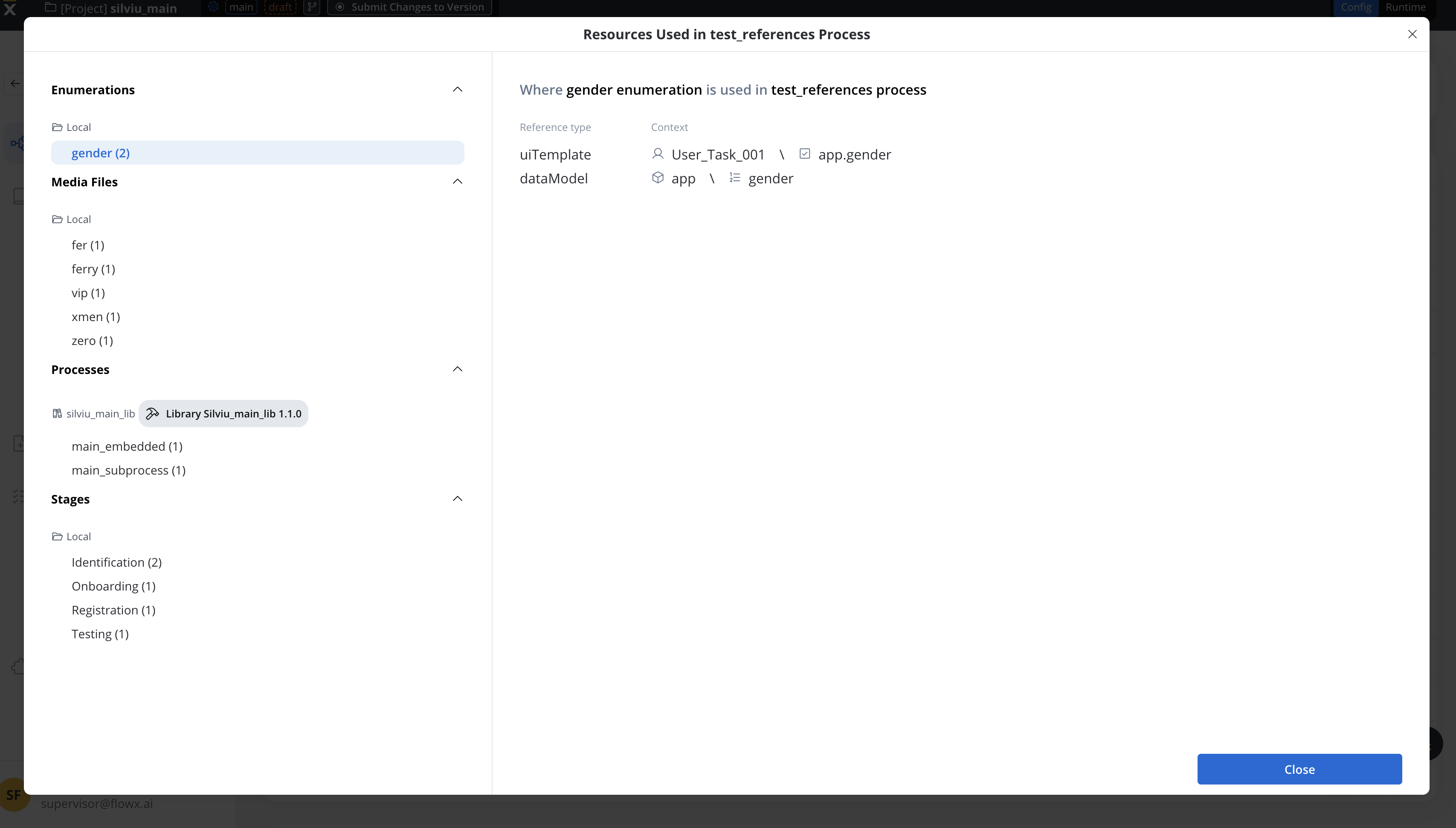
Why reference type matters
Understanding Reference Type helps you:- Identify the exact location of resource references within your project
- Understand dependency chains before modifying or deleting resources
- Navigate directly to the element containing the reference
- Plan impact analysis when updating shared resources
How FlowX.AI identifies references
FlowX.AI identifies resource references through sub-resources—the actual elements that contain references, rather than their parent containers. This distinction is crucial for understanding why certain Reference Type values appear. For example, when an enumeration is used in a User Task node, the reference is technically stored inside the UI Template attached to that User Task—not in the User Task node itself. Therefore, the Reference Type displays UI Template, not “User Task”.Reference type values
Reference type values are derived from two sources in the FlowX data model:- Element Types — The type of element within a service that contains the reference
- Element Path Types — The specific path or context within that element
Element types
Element types identify the owner service, source resource, and the element containing the reference:Element path types
Element path types provide more granular context about where within an element the reference exists.Process node path types
Task management path types
Integration Designer path types
Data model path types
When a resource (like an enumeration) is referenced in a data model attribute, the Reference Type shows the attribute’s data type:UI Template element path types
When a resource is referenced inside a UI Template, the Reference Type shows the specific UI element type:Why UI element types appear as Reference Types
One of the most common questions about the Resource Usage Overview is:“Why does the Reference Type show ‘SELECT’ or ‘IMAGE’ instead of ‘User Task’ when using resources in a User Task?”
The technical explanation
In FlowX.AI’s architecture, UI Templates contain UI elements that hold references to resources like enumerations, media files, and substitution tags. The Reference Type shows the specific UI element type that contains the reference, not the parent node:The rule
This means:Why this design?
This design reflects the actual data model and provides:- Precision — Shows the exact UI element type or data model attribute type that contains the reference
- Consistency — The same UI element type (like
SELECT) produces the same Reference Type regardless of whether it’s in a User Task or Reusable UI - Actionable information — You know immediately what type of component needs to be modified if you want to change the reference
Reference type by resource category
Different resource types generate different Reference Type values based on how they’re used in the platform.Process references
Processes can be referenced from multiple contexts:Hooks reference two processes: the parent process (which triggers the hook) and the triggered process (which runs when the hook fires). Both create separate resource usage entries with Reference Type
hook.Enumeration references
Enumerations are primarily referenced in UI components, data models, and integration systems:Media file references
Media files (images, icons, documents) are referenced in UI Templates:Substitution tag references
Substitution tags are used for dynamic text content and are only referenced in UI Templates:Substitution tags are referenced using the format
@@path.to.SubstitutionTag within UI Template text properties. The Reference Type will show the specific UI element type where the tag is used.Workflow references
Integration workflows can be referenced from:System and endpoint references
Integration systems and their endpoints appear in workflow configurations:Resources not tracked as usages
Some resource types are not used by other resources and therefore don’t appear as Reference Types when viewing other resources:Examples
Example 1: enumeration used inside a User Task
Scenario: You have a “Country” enumeration used in a Select dropdown within a User Task node’s UI. Resource:Countries enumerationLocation: User Task node → UI Template → Select component → Data Source Result in Usage Overview:
Example 2: enumeration used inside a Reusable UI
Scenario: You have a “Document Types” enumeration used in a Select component within a Reusable UI component. Resource:DocumentTypes enumerationLocation: Reusable UI → UI Template → Select component → Data Source Result in Usage Overview:
Notice that both User Task UI and Reusable UI show
SELECT as the Reference Type. This is because the referencing element is a Select component in both cases, regardless of whether it’s in a User Task or Reusable UI.Example 3: workflow referenced in a workflow node
Scenario: An integration workflow “SendNotification” calls another workflow “EmailService” from one of its nodes. Resource:EmailService workflowLocation: Workflow: SendNotification → Workflow Node: CallEmail Result in Usage Overview:
Example 4: data model attribute using ENUM type
Scenario: A data model has an attribute “accountType” with type ENUM referencing the “AccountTypes” enumeration. Resource:AccountTypes enumerationLocation: Process: AccountOpening → Data Model → accountType attribute Result in Usage Overview:
Example 5: media file used in UI Template inside a node
Scenario: A company logo image is used in a Card component header within a User Task. Resource:company_logo.png media fileLocation: User Task node → UI Template → Card → Image component Result in Usage Overview:
How resource usage tracking works
Understanding the technical architecture behind resource usage tracking helps explain why Reference Types appear the way they do.Resource usage data model
When a resource reference is detected, FlowX.AI stores the following information:Operations that affect resource usages
Resource usage entries are created, updated, or deleted when you perform these operations: For UI Templates:- Update UI template properties
- Delete UI template
- Copy/paste UI templates or nodes
- Undo/redo operations
- Import/export processes
- Create, update, or delete actions
- Update node configurations
- Copy/paste nodes
- Import/export processes
- Add or modify attributes with ENUM type
- Delete data model attributes
- Create, update, or delete views
- Create, update, or delete hooks
- Create or delete allocation rules
- Configure workflow nodes
- Set up endpoint enumeration mappings
Understanding the resource hierarchy
To fully understand Reference Types, it helps to understand FlowX.AI’s resource hierarchy:Resources vs sub-resources
Why parent node types never appear as reference types
Parent nodes (like User Task, Service Task, or Call Activity) are containers that hold sub-resources. The actual reference always lives inside a sub-resource:- User Task → contains UI Template (reference is in UI Template)
- Service Task → contains Actions (reference is in Action)
- Call Activity → contains Action configuration (reference is in Action)
Frequently asked questions
Why doesn't Reference Type show 'User Task'?
Why doesn't Reference Type show 'User Task'?
Reference Type reflects the actual element containing the reference, not the parent node. When you use an enumeration in a User Task’s interface, the reference is stored in the UI Template attached to that User Task. Therefore, the Reference Type shows the specific UI element type (like
SELECT or RADIO).The User Task is simply the container node—it doesn’t directly hold the enumeration reference; the UI Template inside it does.Why does everything look like a UI element type?
Why does everything look like a UI element type?
Many resources (enumerations, media files, substitution tags) are primarily used within user interfaces. Since all UI components are defined inside UI Templates—whether those templates are attached to User Tasks, Reusable UI components, or other UI-enabled nodes—the Reference Type shows the specific UI element type (like
SELECT, IMAGE, TEXT, etc.).This is accurate and provides precise information about exactly which UI component contains the reference.Do configuration parameters appear as Reference Types?
Do configuration parameters appear as Reference Types?
No. Configuration parameters are not tracked as resources. They are used as string values within business rules and do not appear in the Resource Usage Overview. The usage of configuration parameters is not set explicitly—they are configured in business rules as strings.
Do substitution tag values appear as Reference Types?
Do substitution tag values appear as Reference Types?
Substitution tags are referenced in UI Templates using the format
@@path.to.SubstitutionTag. When you view the usage of a substitution tag, the Reference Type will show the specific UI element type (like TEXT or BUTTON) where the tag is embedded.Note that substitution tags exist as a single resource per application version, and only their individual values are tracked for usage.How do I find all usages of a resource in User Tasks specifically?
How do I find all usages of a resource in User Tasks specifically?
While the Reference Type shows the specific UI element type, the Reference Path column provides the full context including the parent node. You can use this path to identify which User Tasks contain UI elements that reference your resource.Look for paths like:
Process: [Name] → Node: [UserTaskName] → UI TemplateWhat's the difference between 'action' and specific handler types like 'StartSubProcessHandler'?
What's the difference between 'action' and specific handler types like 'StartSubProcessHandler'?
The Reference Type can show either the general element type (
action) or a more specific path type depending on the context:StartSubProcessHandler— Start subprocess action typeSUBPROCESS_RUN— Call activity (call subprocess) nodeSUBPROCESS_EMBED— Embedded subprocess nodeTASK— Service task nodeUSER_TASK— User task node
Why don't Document and Notification Templates appear in resource usages?
Why don't Document and Notification Templates appear in resource usages?
Document templates and notification templates are referenced by name in Kafka send action configurations, not by resource ID. The actual template resource ID is resolved at runtime by the document and notification services based on the template name and build ID. Because they’re referenced by name (a string value) rather than by resource definition ID, they are not tracked in the Resource Usage Overview.
What happens to resource usages when I create a new application version?
What happens to resource usages when I create a new application version?
When you create a new application version (WIP), the resource usages are cloned from the source version. This ensures that the new version has an accurate picture of all resource references. When you discard a WIP version, its resource usages are also discarded.
What happens to resource usages during import/export?
What happens to resource usages during import/export?
Resource usages are included when exporting applications and are restored during import. The resource definition IDs remain the same when exporting and importing an application, ensuring that the usage tracking remains accurate.
Can I see usages for resources from library dependencies?
Can I see usages for resources from library dependencies?
Yes. When your project uses resources from library dependencies (like enumerations or media files from a shared library), those usages are tracked. The resource usage entry stores both the source location (where the reference exists in your project) and the target resource information (including the library’s application ID).
Summary
The Reference Type in the Resource Usage Overview accurately reflects FlowX.AI’s internal resource model:1
References live in sub-resources
Actual resource references are stored in sub-resources like UI Templates, Actions, and Data Model attributes—not in parent node types.
2
Reference Type shows the container
The Reference Type displays the type of element that directly contains the reference, providing accurate technical information.
3
Parent context is in the path
While the Reference Type shows “UI Template”, the full Reference Path includes parent information like the node name and process for complete context.
4
Consistency across contexts
The same resource used in different contexts (User Task UI vs. Reusable UI) shows the same Reference Type because the referencing element is the same—a UI Template.
- Correctly interpret the Resource Usage Overview
- Plan changes with accurate impact analysis
- Navigate efficiently to the actual location of resource references