

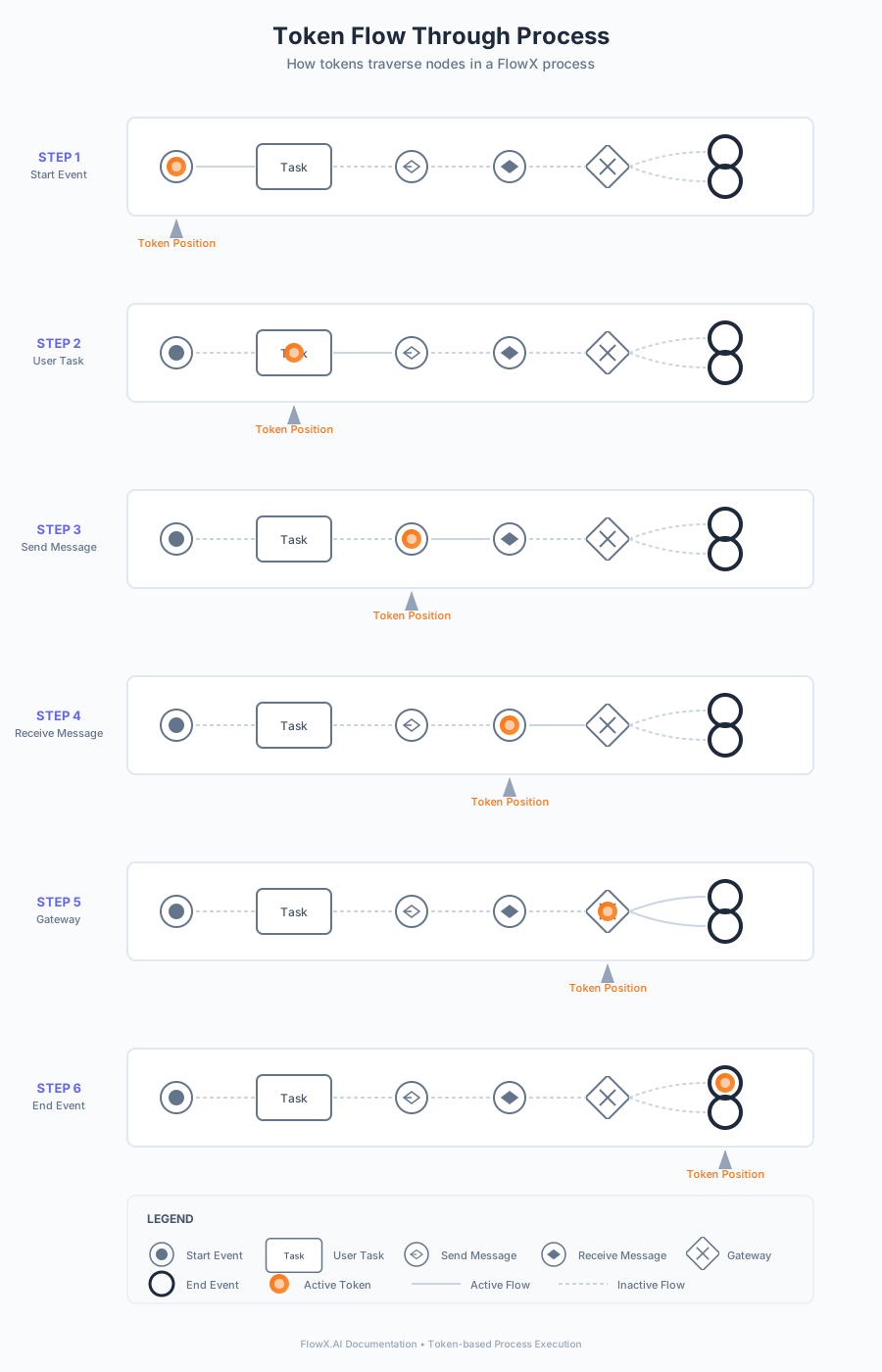
A token advances through a process flow
Viewing tokens
Retrieve the current process instance status using the FlowX Designer. The Designer displays information about tokens related to that process instance and the current nodes they are in.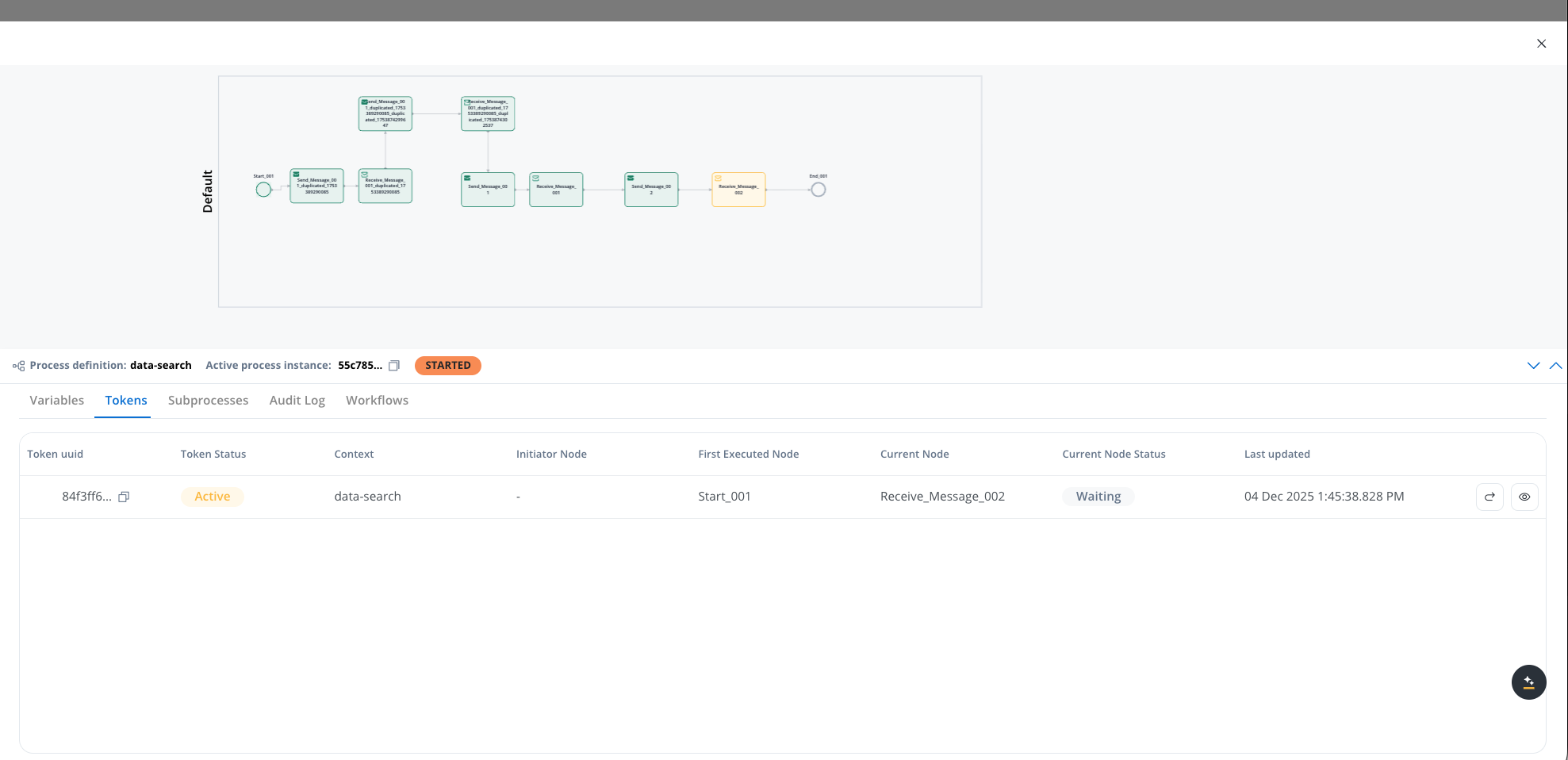
Token view table
The token view lists all tokens of the process instance in a table. Parent and child tokens appear as separate rows; the relationship between them is visible through theparentTokenId field in the token details view.
If parallel gateways are configured in a process, multiple tokens are created, one for each parallel path.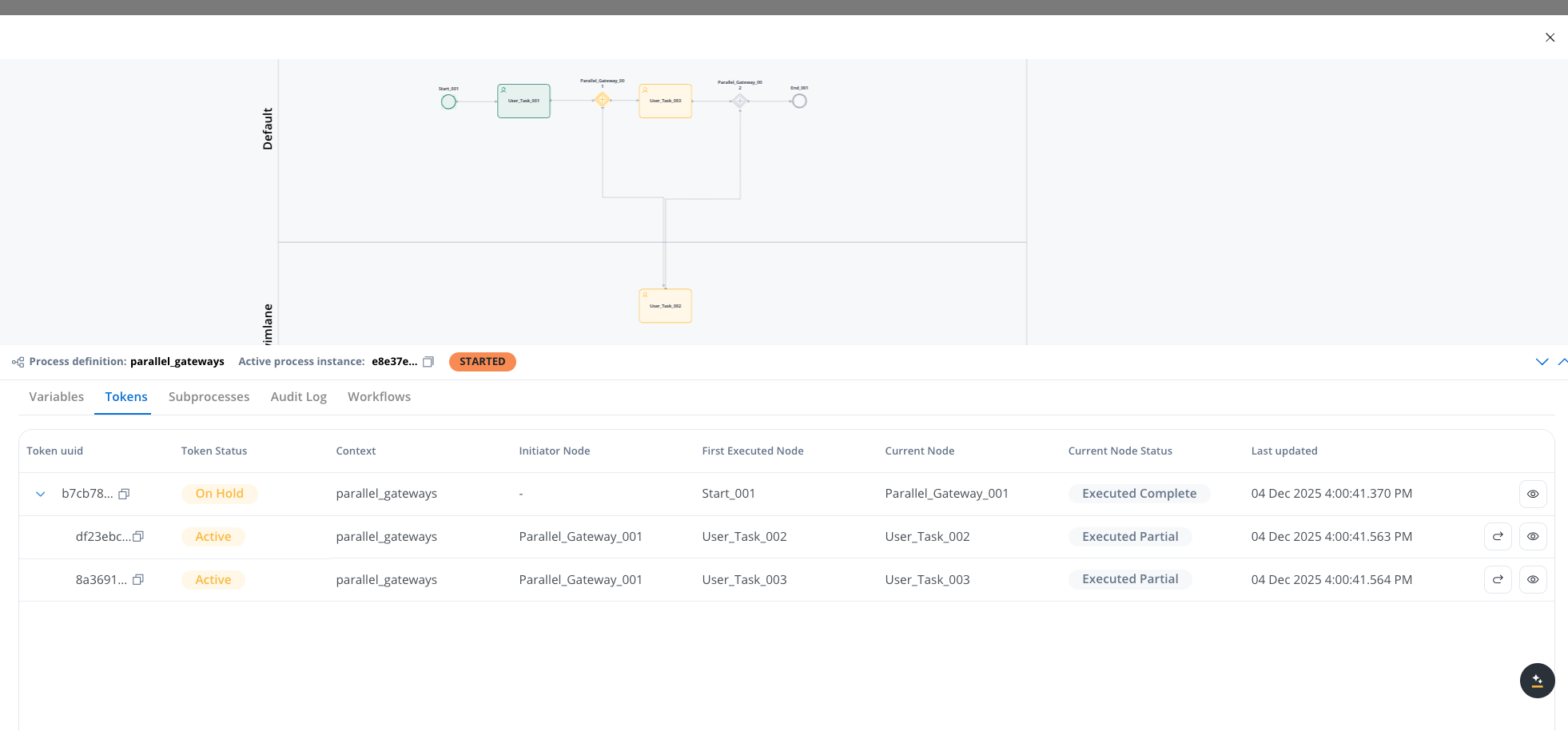

Understanding token status
Token status values
The token status indicates the lifecycle state of a token in the process:ACTIVE
ACTIVE
Token state is active when tokens are created. A parent token reactivates when all child tokens reach the parallel gateway closing node.
INACTIVE
INACTIVE
Child tokens become inactive when they arrive at a parallel gateway closing node. The current token becomes inactive when it reaches a final node.
ABORTED
ABORTED
The current token becomes aborted when it moves backward to redo a series of previous actions in the process. The token resets, and a new token activates.
ON HOLD
ON HOLD
When a parallel split gateway node is reached, the parent token is set to On hold until all child tokens reach the parallel gateway closing node. The parent token does not have a “Retry” action icon until all child tokens finish.
DISMISSED
DISMISSED
The process or subprocess reaches a certain node and is canceled or exited.
EXPIRED
EXPIRED
A defined “expiryTime” in the process definition passes, and the token changes to this status.
TERMINATED
TERMINATED
The process is terminated by a termination request.
Current node status values
The current node status indicates the execution status of the token within its current node:ARRIVED
ARRIVED
The token reaches a new node
EXECUTING
EXECUTING
The token execution starts
EXECUTED_COMPLETE
EXECUTED_COMPLETE
Node actions execute, and all mandatory actions from the node complete
EXECUTED_PARTIAL
EXECUTED_PARTIAL
Node actions execute, but mandatory uncompleted actions remain
WAITING_MESSAGE_EVENT
WAITING_MESSAGE_EVENT
The token reaches an intermediate message catch event node
WAITING_TIMER_EVENT
WAITING_TIMER_EVENT
The token reaches an intermediate timer event node
WAITING_MESSAGE
WAITING_MESSAGE
The token waits for a message from another system
MESSAGE_RECEIVED
MESSAGE_RECEIVED
The message is received
MESSAGE_RESPONSE_TIMED_OUT
MESSAGE_RESPONSE_TIMED_OUT
The message is not received within the set timeframe
ERROR_MESSAGE_RECEIVED
ERROR_MESSAGE_RECEIVED
An error message is received in response to the sent message
Viewing token details
To view more details about a token:1
Open Process status
Click the Process status view button in the FlowX Designer.
2
Select a token
Select a token from the token list.
3
View details
Click the view button (eye icon) to open the detailed token status view.
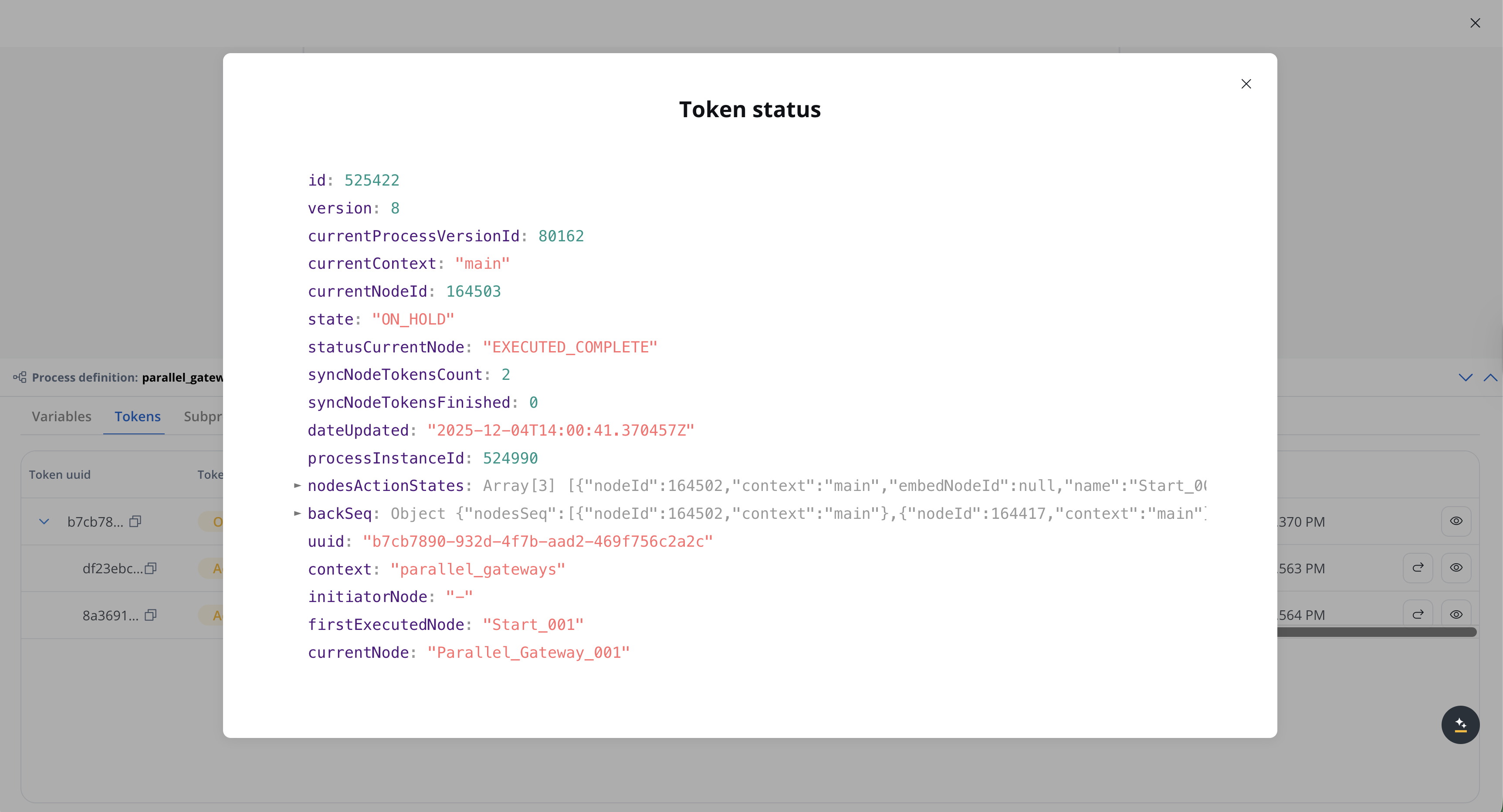
Detailed token status view showing token information, node details, and execution states
Token identification
Token identification
- id: The unique identifier of the token
- version: The version number of the token schema
- parentTokenId: The identifier of the parent token (present for child tokens created by parallel gateways or subprocesses)
- processInstanceId: The identifier of the process instance this token belongs to
Token state
Token state
- state: The current lifecycle state of the token (see Token status values for details)
- statusCurrentNode: The execution status of the token within its current node (see Current node status values for details)
- dateUpdated: The ISO 8601 timestamp indicating when the token was last updated
Node information
Node information
- startNodeId: The identifier of the node where the token execution began
- currentNodeId: The identifier of the node where the token is currently positioned
- currentNodeName: The human-readable name of the current node
- currentNode: Detailed information about the current node object
- embedNodeId: The identifier of the embedded node, if the token is executing within an embedded subprocess
- mainSwimlaneId: The identifier of the main swimlane associated with the token
Process context
Process context
- currentProcessVersionId: The identifier of the process version currently being executed
- currentContext: The current execution context (typically “main” for the main process, or the subprocess name for embedded subprocesses)
Initiator information
Initiator information
- initiatorType: The type of initiator that created this token. Set to
BOUNDARY_EVENTfor tokens started by a boundary event;nullotherwise. - initiatorId: The identifier of the initiator node or event
Synchronization
Synchronization
- syncNodeTokensCount: The total number of synchronized node tokens (used for parallel gateway synchronization)
- syncNodeTokensFinished: The count of synchronized node tokens that have finished execution
Execution history
Execution history
- nodesActionStates: An expandable array containing detailed information about the action states for each node the token has visited. Each entry includes:
- nodeId: The identifier of the node
- context: The execution context (main or subprocess name)
- embedNodeId: The embedded node identifier, if applicable
- name: The name of the node
- backSeq: An expandable object containing backward sequence information for tokens that have moved backward in the process flow:
- nodes: An array of the node identifiers involved in the backward sequence
- nodesSeq: An array of node sequence entries, each carrying the nodeId and the context where it was executed
Additional data
Additional data
- paramValues: Parameter values and process variables associated with the token
The nodesActionStates and backSeq sections are expandable in the detailed token status view. Expand these sections to view comprehensive information about node execution history and backward sequence tracking.