

Documentation Index
Fetch the complete documentation index at: https://docs.flowx.ai/llms.txt
Use this file to discover all available pages before exploring further.
Available starting with FlowX.AI 5.6.0Memory capabilities are available in Chat Driven workflows only.
Overview
Session memory allows AI nodes in conversational workflows to access previous messages from the current conversation. When enabled, FlowX automatically retrieves conversation history and injects it into the LLM’s context — giving the AI agent awareness of what was discussed earlier in the session. Memory is per-session (identified by Chat Session ID) and managed entirely by FlowX. You don’t need to build any memory retrieval logic — just toggle it on per node.Automatic retrieval
Latest 3 message pairs + summary of earlier exchanges retrieved on each message
Smart summarization
Older conversation history is automatically summarized to fit within context limits
Per-node control
Turn on memory per Custom Agent or Intent Classification node with the Use Memory toggle
Memory tab in console
View retrieved memory (raw turns + summary) in the workflow console log
How memory works
User sends a message
The Chat component sends the message +
chatSessionId to the Chat Driven workflow.Memory retrieval
The Start node retrieves conversation history for the session: the latest 3 user/agent message pairs in full, plus a summary of all earlier exchanges.
Context injection
For each node with Use Memory enabled, the retrieved history is appended to the LLM system prompt, giving the AI agent context from prior turns.
Response and storage
After the AI generates a response, the system stores both the user message and the agent response, updating the session memory for the next turn.
Memory structure
The memory injected into the LLM prompt follows this structure:- Recent turns — The latest 3 user/agent message pairs are included in full
- Summary — A compressed summary of all conversation history before the last 3 turns
Enabling memory
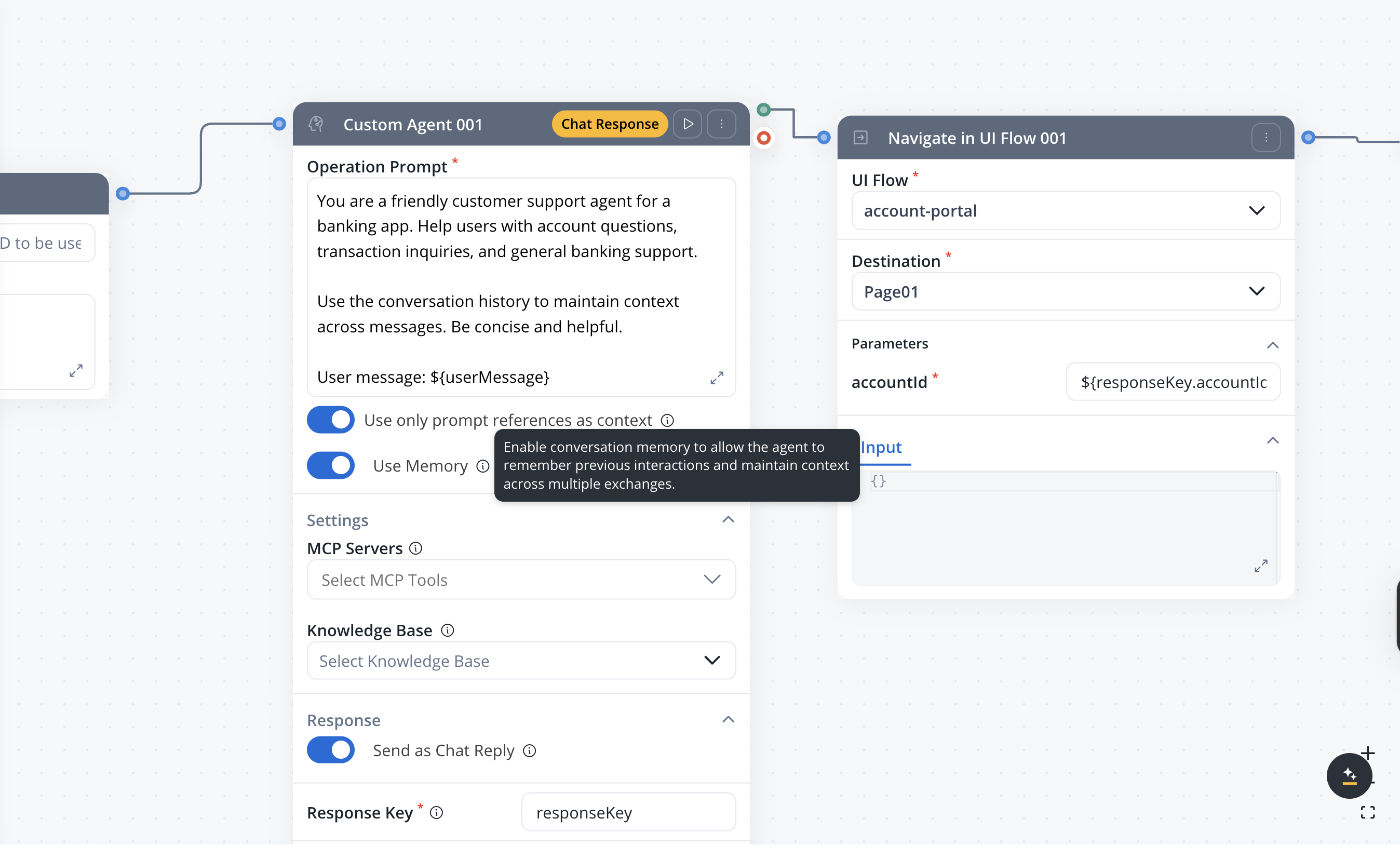
- Custom Agent nodes — for context-aware AI responses
- Intent Classification nodes — for more accurate classification using conversation history
chatSessionId to the AI platform, which retrieves and attaches the conversation history to the LLM call.
Summarization
When a conversation exceeds 3 message turns, FlowX automatically summarizes the older messages using an LLM call. The summarization process:- Collects all messages older than the most recent 3 turns
- Sends them to the LLM with a context extraction prompt
- Stores the resulting summary for future retrieval
- The summary is regenerated on each new message to incorporate the latest context
Summarization happens automatically — there is no configuration needed. The summary prefix
## Previous conversation summary: is prepended to the summary text in the prompt.Debugging memory in the console
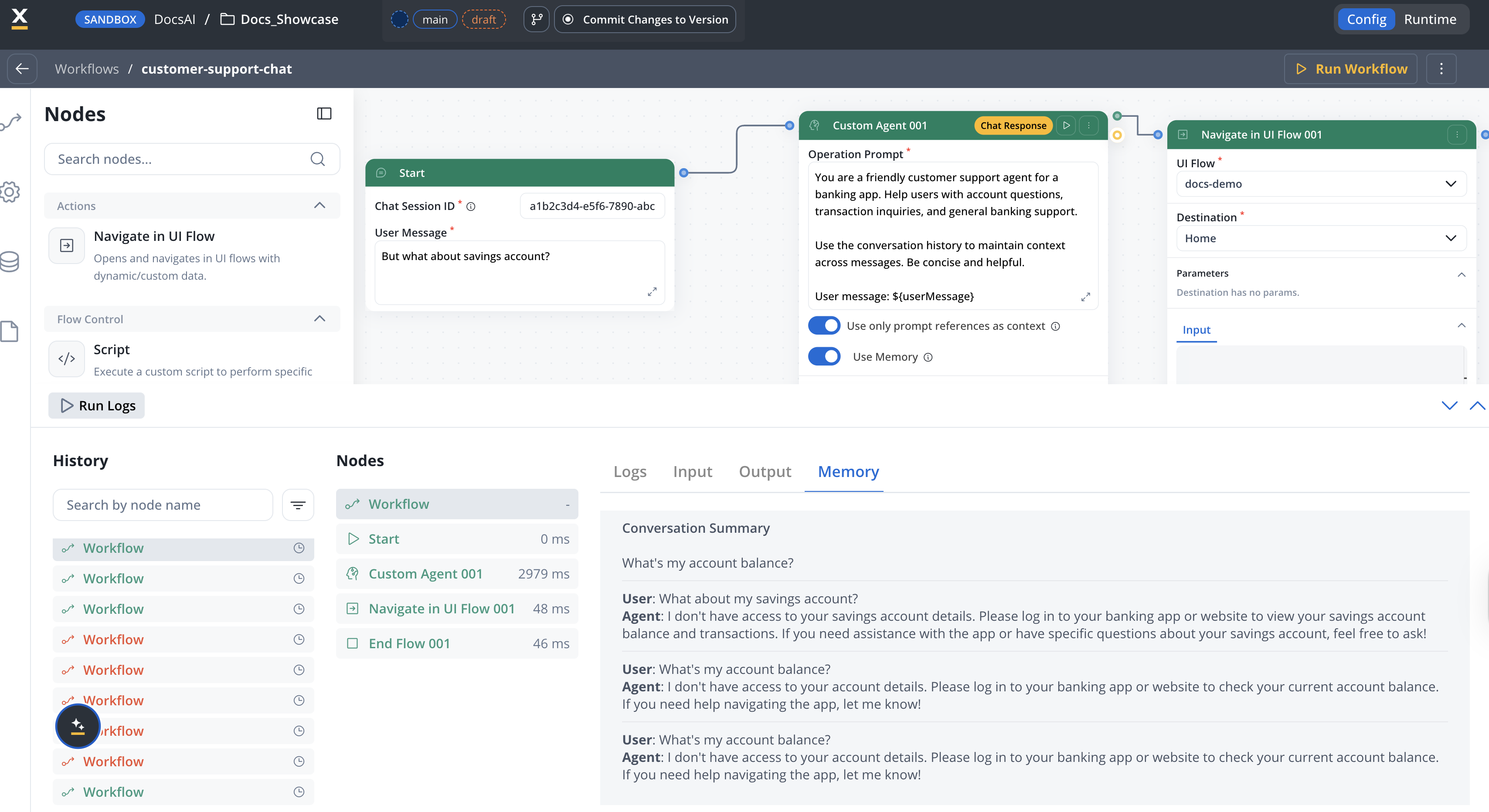
| Level | Tab | Content |
|---|---|---|
| Workflow | Memory tab | Full conversation history and summary sent to the LLM |
| Workflow | Input tab | User Message and Chat Session ID in JSON format |
| Workflow | Output tab | Chat response as text |
| Custom Agent node | Output tab | Node response as text |
Memory use summary
When an AI node with Use Memory enabled completes, the console displays thememoryUseSummary — a snapshot of the conversation context that was available to the LLM. This includes:
- summary — the auto-generated summary of earlier conversation history
- chatMessages — the most recent message pairs (up to 3, excluding the current message) with their
messageId,userMessage, andagentMessage
Storage
| Data | Storage | Details |
|---|---|---|
| Session ID | Browser storage + FlowX Database | Links the client chat instance to the server session |
| Message history | FlowX Database | Complete record of user and agent messages per session |
| Conversation summary | FlowX Database | Auto-generated summary of older conversation turns |
| Session metadata | FlowX Database | Timestamps, workflow reference, user info |
chatSessionId — the same session ID retrieves the same memory across workflow runs. The Chat component manages session IDs automatically.
Limitations
- Memory is session-scoped — there is no cross-session or cross-user memory
- The latest 3 turns are always included in full; older turns are summarized
- Summarization uses an LLM call, which adds latency on the first message after the 3-turn threshold
- Memory cannot be manually edited or cleared from the Designer UI
- Only user messages and agent responses are stored — internal workflow data is excluded
Related resources
Conversational workflows
Full guide to building Chat Driven workflows with memory and intent routing
Chat component
Runtime behavior, session management, and display modes
Intent Classification
Route conversations based on detected user intent with optional memory
Custom Agent node
Configure AI nodes with memory, chat reply, and response settings