

How do the two nodes differ?
A process built for embedding can only be embedded. The runtime rejects a process whose root navigation area is a Parent Process area when it’s started by a Call Activity or a Start Subprocess action (
Could not render subprocess due to root Parent Process Area.), and when it’s started on its own (The process couldn’t start because root navigation area can only be rendered for embedded subprocesses.).Rule of thumb
If the phase brings its own temporary data, use a Call Activity. If the phase mostly reuses data the parent already has, use an embedded subprocess.Recommended pattern: prepare, screen, save
Wrap each user-facing phase between two Call Activities: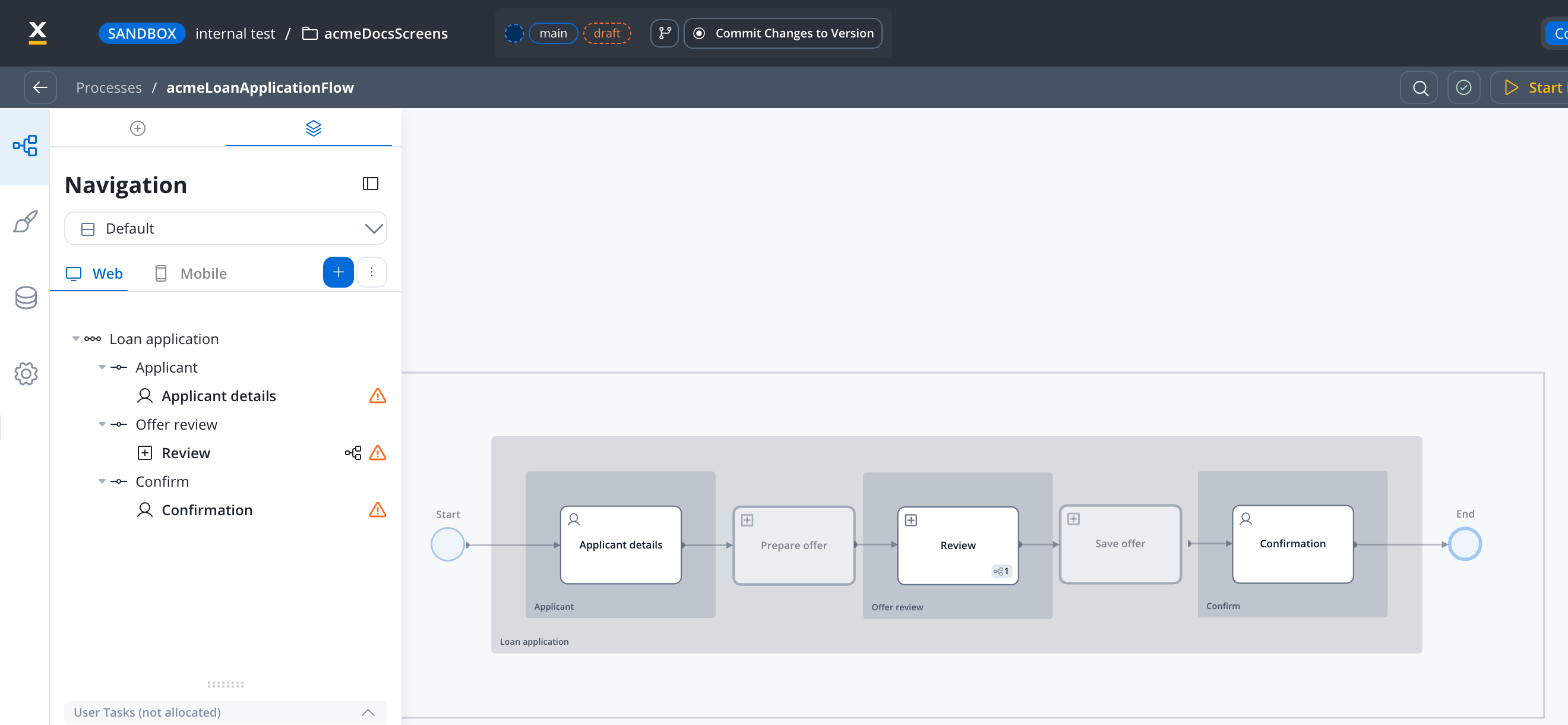
Navigation view of a parent process built with this pattern. The embedded subprocess node (Review) sits in the Offer review step of the stepper. The Prepare offer and Save offer Call Activities aren't assigned to any step.
- Prepare fetches, enriches and computes the data the screen needs. Raw integration responses stay in the child instance, and only the values the screen uses go back to the parent.
- Screen renders the user tasks as steps in the parent’s navigation and works on the parent’s data.
- Save persists or processes what the user entered, again without leaving intermediate data on the parent.
When should I use a Call Activity?
- Integration-heavy phases with no user tasks: calculations, document generation, decision calls, status updates.
- Preparation phases that fetch or compute data before a screen is shown.
- Save phases that persist or process the results of a screen.
- Parallel work over a list: a parallel multi-instance Call Activity starts one subprocess per array item, for example to generate several documents at once.
- Shared utilities called from many processes, such as status updates or error handling. Each caller gets its own instance, so a change to the utility doesn’t change the parent’s data model.
- Transient overlays: an error modal, a confirmation dialog before an irreversible action, or a status message while a long operation runs. The overlay resolves and the user returns to the same place in the journey.
When should I use an embedded subprocess?
- Screens and user tasks that must appear as a named step in the parent’s stepper, tabs or navigation areas.
- Reusable UI fragments that several parent processes show as part of their own journey.
- Error screens that are a step of the journey. If the error screen should appear in the stepper, embed it. If it’s a transient interruption, use a Call Activity.
- Phases where copying data in and out is wasted work. An embedded subprocess shares the parent’s data, so it needs no Copy from Current State, Exclude from Current State or Append Params to Parent Process configuration.
Anti-patterns
One Call Activity per quick integration
Each Call Activity starts a process instance. Wrapping every single backend call in its own Call Activity adds instance overhead and makes the process graph hard to read. Group integrations that always run together into one Call Activity.A subprocess that only starts more subprocesses
Starting a subprocess just to pass parameters and immediately launch several Call Activities from inside it pays the instance cost twice. To run the same work for several inputs, use a parallel multi-instance Call Activity directly from the parent.Embedded subprocesses as integration gateways
An embedded subprocess that wraps integrations and is embedded from many processes couples all of them to the same data keys: any change to the integration lands in every caller’s data model. Move shared integrations into Call Activities, so each caller receives only the output it maps.Circular embedding
Avoid chains where a process embeds a process that, directly or through other subprocesses, embeds the first one again. Use Call Activities for shared utilities, so each call has its own lifecycle and the dependency doesn’t loop back into the parent’s instance.Decision table
Related resources
Call Activity node
Sync and async modes, library subprocesses, parallel multi-instance
Start Embedded Subprocess node
Parent Process area, swimlane rules, configuration steps
Subprocess management
Start modes, parameter inheritance, returning data to the parent
Process design principles
Modal, subprocess and navigation rules for process design