

This action writes data into the parent process data model permanently. To push real-time updates to the parent UI without modifying the data model, use Send data to user interface with Target Process set to Parent. For a comparison of all data passing mechanisms, see Subprocess management - How data flows.
When to use this action
In a synchronous subprocess (Start Async = OFF on the Start Subprocess action), prefer Data Mapping on the Start Subprocess action — it propagates results back to the parent automatically when the subprocess ends, without an extra action. Append Params to Parent Process is the right choice when:- The subprocess runs asynchronously (Start Async = ON on the Start Subprocess action). The parent doesn’t wait for the subprocess to finish, so Data Mapping doesn’t apply — the subprocess must push results to the parent itself.
- The subprocess is long-running (LLM agents, slow integrations, batch jobs) and you want fire-and-forget execution while the user continues in the UI.
Combined with Send data to user interface
To both persist the result AND notify the user’s UI in a single step, attach two actions to the final node of the async subprocess:- Append Params to Parent Process — writes the result into the parent’s data model.
- Send data to user interface with Target Process set to Parent — pushes a UI update over SSE.
Configuring an Append params to parent process
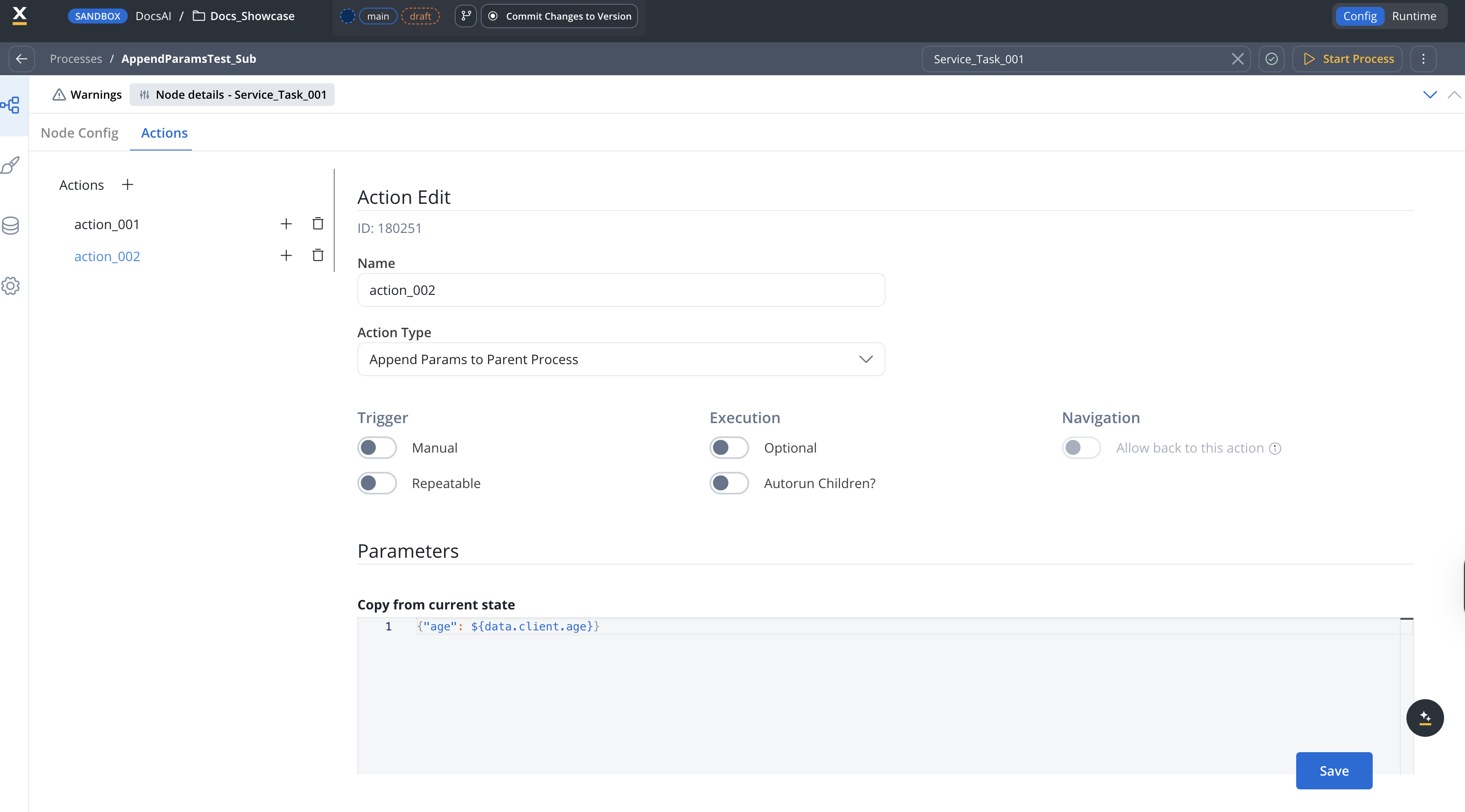
After you create a process designed to be used as a subprocess, you can configure the action. To do this, you need to add an Append Params to Parent Process on a Task node in the subprocess. The following properties must be configured:Action edit
- Name — internal identifier for the action. We recommend defining a naming standard so actions are easy to find.
- Action Type — set to Append Params to Parent Process.
- Manual — when ON, the action runs only after a user triggers it (for example, from a button in a UI Task). When OFF, the action runs automatically as soon as the token reaches the node. For Append Params, leave this OFF in most cases.
- Repeatable — when ON, the action can be triggered multiple times.
- Optional — automatic actions cannot be optional. Manual actions can be optional or required.
- Autorun Children? — when ON, child actions (mandatory and automatic) run immediately after this action finishes.
- Allow back to this action — when ON, the user can return to this action via the back-in-process functionality. The toggle is enabled only when Manual is ON. For details, see Moving a token backwards in a process.
Parameters
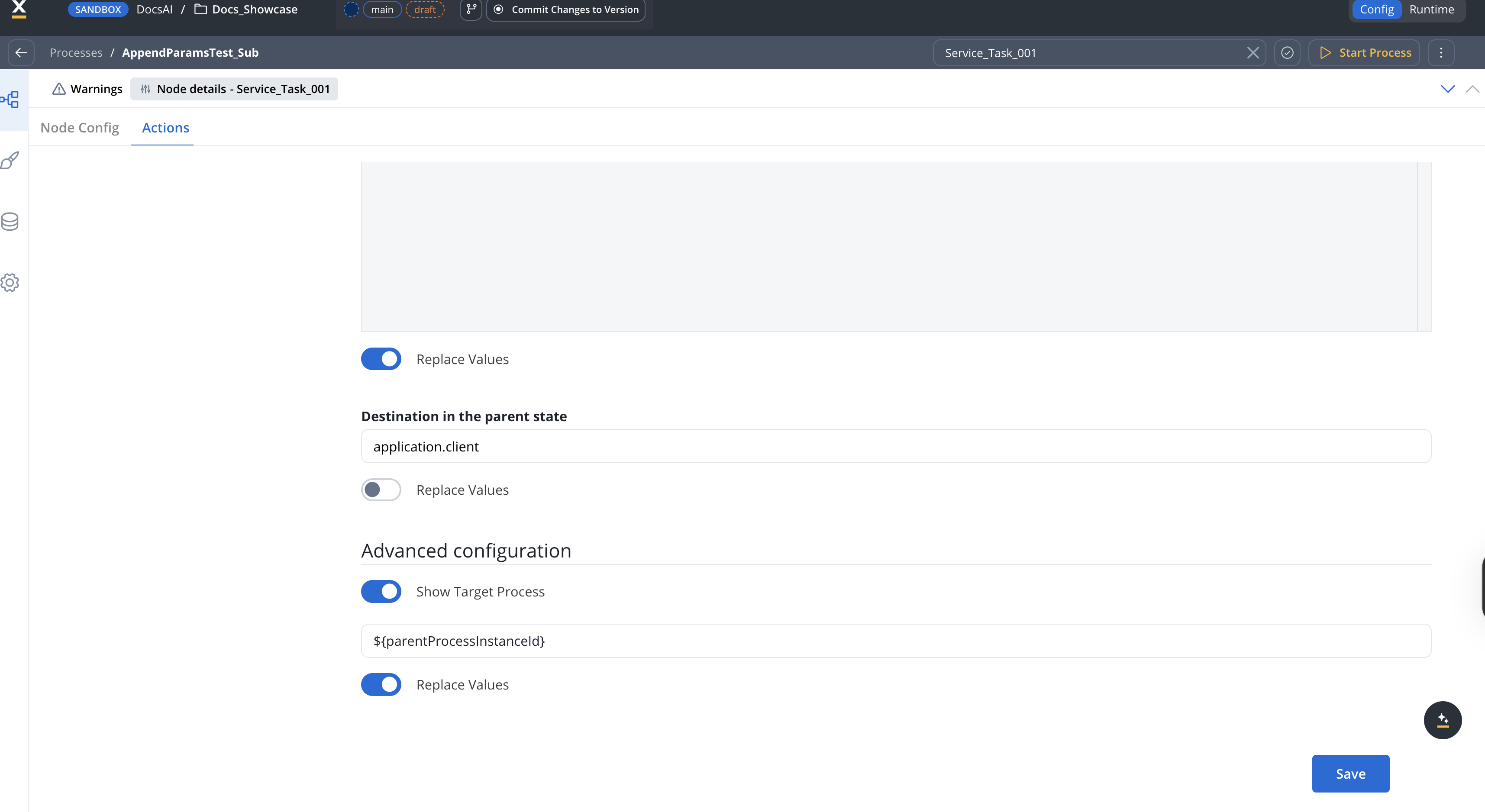
All three fields below are mandatory.- Copy from current state - data that you want to be copied back to the parent process
- Destination in the parent state - on what key to copy the param values
- Show Target Process - ID of the parent process where the params are written. Set this to
${parentProcessInstanceId}if the variable was defined when you started the subprocess. If this value is missing or cannot be parsed as a process instance ID, the action raises aMISSCONFIG_SUBPROCESSincident on the parent process — it does not fail silently.
To recap: if you have a Copy from current state with a simple JSON -
{"age": 17}, that needs to be available in the parent process, on the application.client.age key, you will need to set this field (Destination in the parent state) with application.client, which will be the key to append to in the parent process.Data to send
- Keys - are used when data is sent from the frontend via an action to validate the data (you can find more information in the User Task configuration section)
Example
We have a subprocess that allows us to enter the age of the client on the data.client.age key, and we want to copy the value back to the parent process. The key to which we want to receive this value in the parent process is application.client.age. This is the configuration to apply the above scenario: Parameters- Copy from current state -
{"age": ${data.client.age}}— the JSON payload to send to the parent - Destination in the parent state -
application.client— the key on the parent where the payload is written. Combined with the payload above, the value lands atapplication.client.age. - Show Target Process -
${parentProcessInstanceId}— required, identifies the parent process