

Overview
Personal Information Guard (PII Guard) keeps personal data out of the payloads you send to a model. It works two ways: as a configuration block on every AI workflow node, and as standalone Mask Personal Data and Restore Personal Data nodes you place in a workflow yourself. When the node-level control is turned on, it detects personal data and replaces it with placeholders before the payload reaches the model, then handles the redacted content throughout the node run. Detection and redaction run in the data-privacy AI Platform service; the workflow node calls it synchronously and fails closed — if the service errors, the node stops and no redacted artifact is produced. The node-level control applies to Custom Agent, Intent Classification, Extract Data from File, and all AI Text, Document, Image, and Data Operations nodes.PII Guard is the privacy control inside AI workflows. It is distinct from process-level data anonymization (
FLOWX_DATA_ANONYMIZATION), which redacts process data by role.Available on SaaS with FlowX.AI . This feature is live on managed (SaaS) deployments now. Self-hosted deployments will receive it with the next LTS release family.
PII Guard works two ways: as a node-level control on an AI node, which redacts a payload before it reaches the model and restores it in the response, and as separate mask and restore nodes you place in the workflow yourself. It is distinct from the Knowledge Base Containing Personal Information setting, which keeps a Knowledge Base’s content on-box by indexing it with a local embedding model. A Knowledge Base does not run PII Guard, and PII Guard does not change how a Knowledge Base is embedded. See Knowledge Base overview.
Configuration
The guard is configured per node in the Designer. Turning it on exposes the detection options below. The table describes the node-level control. The Mask Personal Data node offers the same detection options in its own Detection settings panel.Supported entity types (24)
Supported entity types (24)
Universal (8)
EMAIL, PHONE, CREDIT_CARD, IBAN, MAC_ADDRESS, CRYPTO_WALLET, PERSON, ADDRESSRegional — EN (6)SSN, US_PASSPORT, US_BANK_ACCOUNT, US_ITIN, UK_NHS, EU_VAT_IDRegional — RO (10)CNP, CUI, RO_IBAN, RO_PHONE, RO_PASSPORT, RO_ID_CARD, LICENSE_PLATE, HEALTH_CARD, POSTAL_CODE, LANDLINEHow it works
- Input scan runs before the AI request is built, so placeholder substitution and user-message extraction both see redacted data. The system prompt is scanned alongside inputs, because operation-prompt templates may carry PII from earlier nodes.
- Source-file scan runs for document and image AI nodes. The data-privacy service uploads the redacted artifact back to the same storage as the source, so the file path used for the request is swapped without changing the data source binding.
- Output scan runs after the model completes, on a bounded-elastic scheduler so the data-privacy call does not pin the event loop.
- Restoration (deanonymization) — for the node-level control, when an input scan ran the guard keeps the placeholder-to-value mapping for the duration of that node’s run and automatically restores the original values in the model’s response, so downstream nodes and the end user see real data rather than placeholders. When an output scan is also on, PII the model newly introduced is redacted first, so only model-introduced values stay masked. Restoration also holds across chat-driven workflows that carry conversation memory.
- Irreversible redaction for async file flows — asynchronous document-parser flows keep permanent placeholders. Their mapping is never persisted, so values redacted in those flows are not restored.
- System-prompt appender — for Custom Agent nodes with an input scan, the runner appends a non-editable segment teaching the model to treat indexed placeholders like
<EMAIL_1>or<PERSON_2>as opaque tokens and copy them back verbatim. It runs after the prompt scan so its literal tags are not mistaken for PII. - Fail-closed — any error from the data-privacy service stops execution, including a failed restoration (the node halts rather than let placeholder data reach downstream nodes). The error surfaces on the node run log; redacted artifacts are not produced on failure. This describes the node-level control. The standalone Restore Personal Data node behaves differently: see Masking and restoring across several nodes.
Masking and restoring across several nodes
SaaS ·Available on SaaS with FlowX.AI . This feature is live on managed (SaaS) deployments now. Self-hosted deployments will receive it with the next LTS release family.
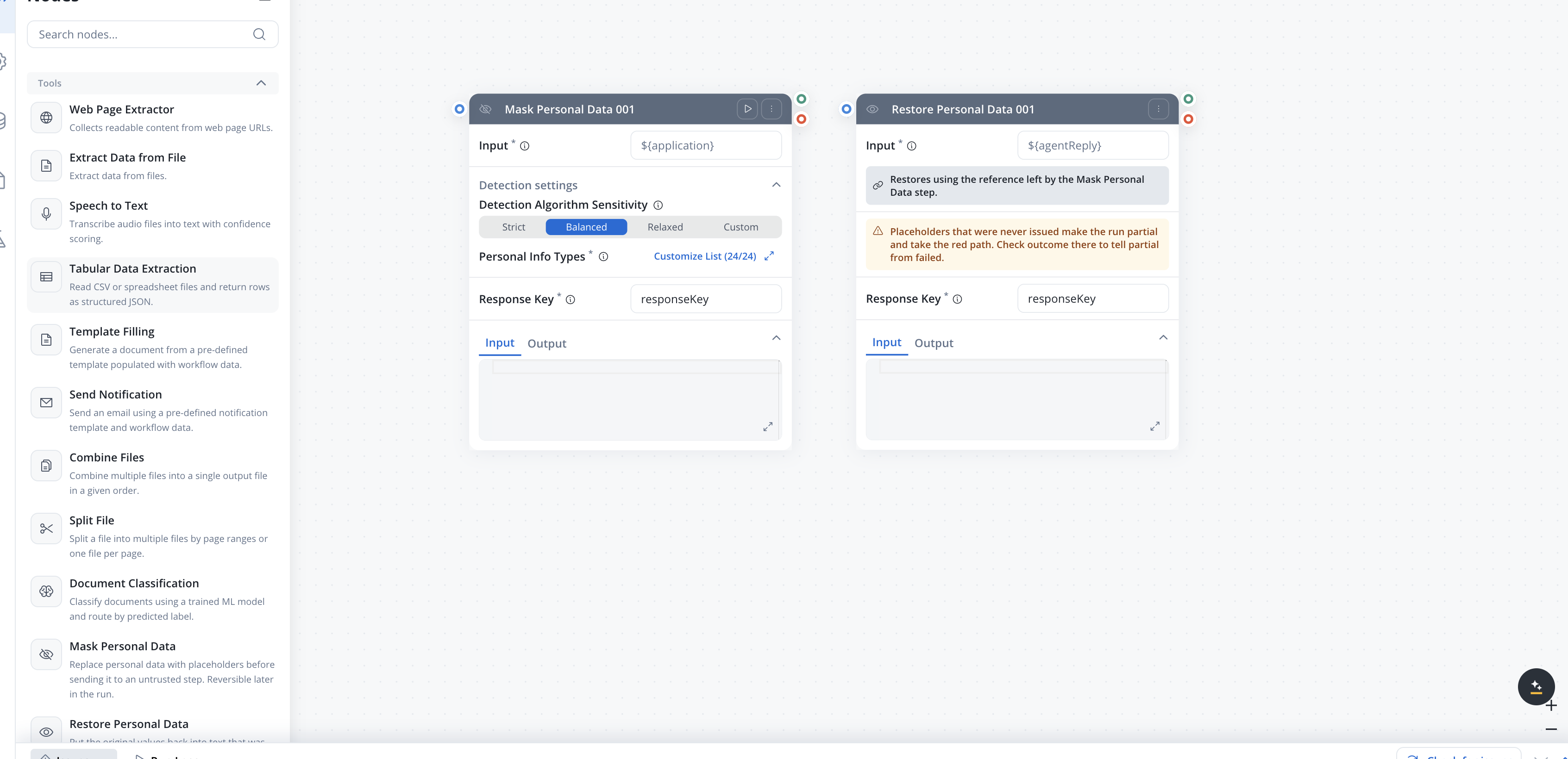
${...} binding such as ${application}. It is a required field on both nodes.
Masking does not overwrite your data. The masked copy is written under the node’s response key and the original value is left untouched, so a later step can still read the unmasked source if it is entitled to.
There is no Detection Target on the Mask node. The node scans the value you point it at, so the direction is fixed rather than offered as a choice. Restore Personal Data has no detection settings at all: it matches the reference the Mask step left behind.
Restoring is optional
Nothing requires a Restore node. The placeholder map belongs to the workflow run and is deleted when that run finishes, fails, or is cancelled, so leaving data masked for the rest of the run is a supported outcome. A retention limit clears the map for runs that end without reaching one of those points.Restore outcomes
Restore Personal Data reports one of three outcomes in the run log, along with the placeholders it matched, the ones it did not find, and any it did not recognise.
A placeholder that the run stored but cannot find in the input does not make the restore partial. A step in between may legitimately have summarised or dropped the text it sat in, so it is reported and nothing more. Only unrecognised tokens change the outcome.
An input that carries no placeholders at all restores as Complete. A record with no personal data in it masks nothing, so an empty map is the normal result rather than a lost one.
The node writes
restored, outcome, and an integrity breakdown under its response key, so a branch can read what happened without parsing the run log.
Use the standalone nodes when the redaction has to span more than one node, and the node-level control when a single AI node’s payload is all that needs protecting. The two mechanisms share the same detection settings and the same entity catalog.
Run-log and detections
Each enabled scan adds apersonalInformationGuard block on the node response:
Each item in
detections carries:
Document and image scans surface the same per-entity detail as text scans, so the run console shows the matched values, replacements, and confidences regardless of which AI node type produced them.
Setup
The data-privacy service connection is configured withFLOWX_DATAPRIVACY_BASEURL and FLOWX_DATAPRIVACY_TIMEOUTSECONDS — see the Integration Designer setup guide.
Related resources
Custom Agent node
Per-node configuration, including the PII Guard toggle
Extract Data from File
PII Guard on document and image extraction nodes
Intent Classification
PII Guard on intent classification nodes
Integration Designer
AI workflow nodes and their configuration