

Documentation Index
Fetch the complete documentation index at: https://docs.flowx.ai/llms.txt
Use this file to discover all available pages before exploring further.
Overview
Knowledge Bases can be integrated into workflows to enable AI agents and Context Retrieval nodes to query them for contextual information when generating responses.Choosing the right approach
There are two ways to query Knowledge Bases in workflows:| Approach | Node | When to use |
|---|---|---|
| Integrated RAG | Custom Agent | You want the AI to retrieve chunks and generate a response in a single step |
| Standalone retrieval | Context Retrieval | You want raw chunks returned without LLM processing, so you can filter, transform, or route them before generation |
Using knowledge bases in custom agent nodes
Custom Agent nodes can query Knowledge Bases to retrieve contextual information when generating responses.Configuring custom agent with knowledge base
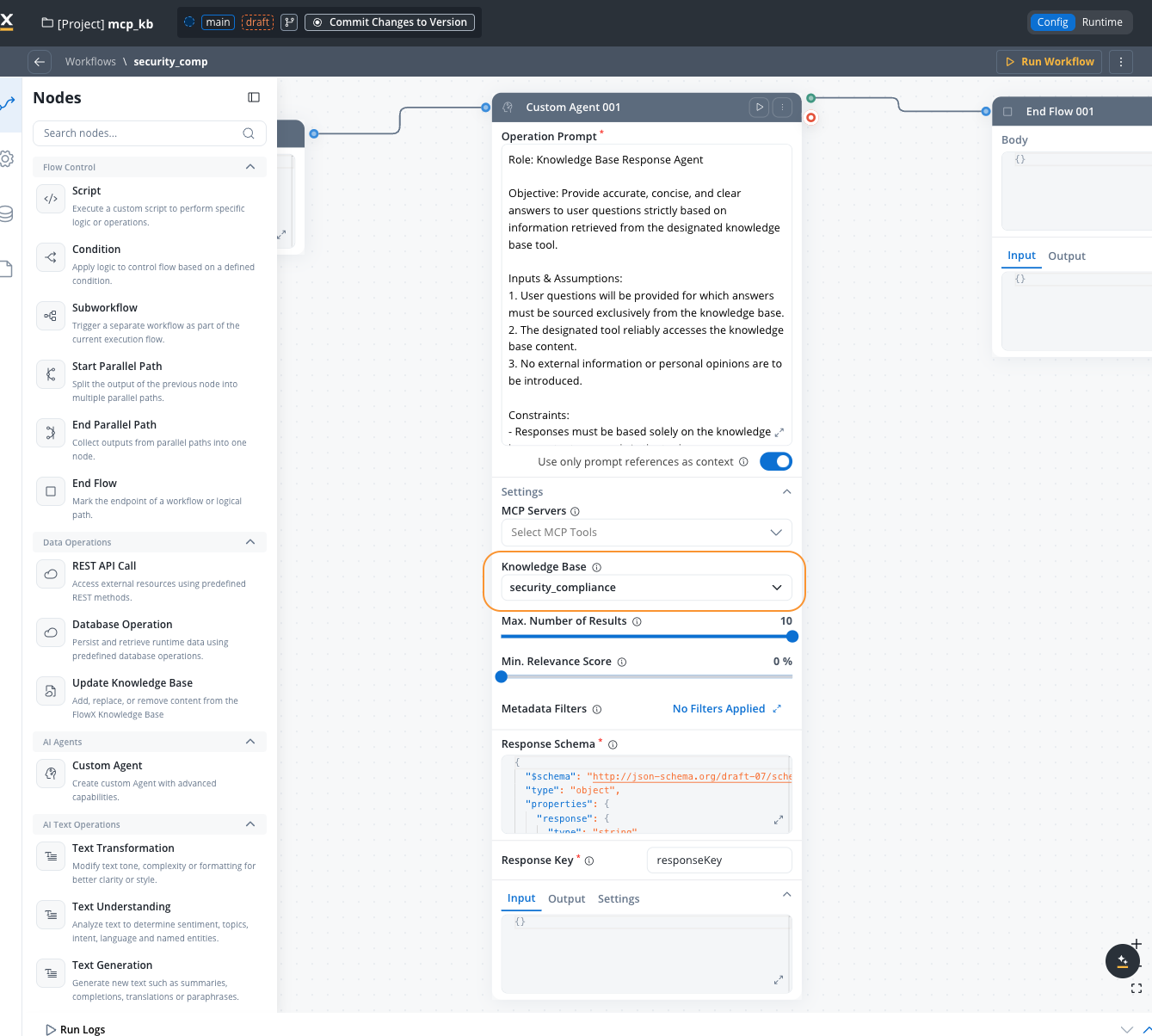
Knowledge base query configuration
Select the Knowledge Base that the agent should query
Maximum number of chunks to retrieve (1-10). Default: 5
Minimum relevance score threshold (0-100%). Only chunks above this score will be included. Default: 70%
Refine retrieved chunks using the query builder. Click the Metadata Filters button to open a modal where you can compose structured filter conditions.Each condition is a field / operator / value triple. Operators vary by metadata key type (equals, not equals, contains, in, not in, before, after, exists, etc.). Conditions can be grouped and combined with AND or OR.To restrict results to a specific store, add a condition on the system metadata key
source.The button label shows how many filters are currently active (e.g., “3 Filters Applied” or “No Filters Applied”).Enhanced in FlowX.AI 5.7.0 — the Metadata Filters modal now supports typed operators, AND/OR logic, and grouping. Earlier releases supported only equality filters combined with AND. See Filtering by metadata for the full operator list.
Toggle ON to enable advanced metadata filter expressions for more complex filtering logic. When turned on, you can write expression-based filters instead of using the structured filter UI.Default:
falseUsing knowledge bases in context retrieval nodes
Available starting with FlowX.AI 5.6.0
Configuring context retrieval with knowledge base
Add Context Retrieval node
Add a Context Retrieval node from the Data Operations category in the workflow editor
Select a source
Choose between Knowledge Base or Memory (Memory is only available in conversational workflows)
Select Knowledge Base
If using Knowledge Base as the source, select a Knowledge Base from the available options
Define the user query
Enter the search query, typically a process variable expression (e.g.,
${userMessage})Context retrieval configuration
The data source to retrieve context from.Options:
- Knowledge Base — search a connected Knowledge Base
- Memory — search conversation memory (conversational workflows only)
Select the Knowledge Base to query. Only visible when Source is set to Knowledge Base.
The search query used to retrieve relevant chunks. Supports process variable expressions.Example:
${userMessage}The strategy used for retrieving context.Options:
- Hybrid (default) — combines semantic and keyword search
- Semantic — vector-based similarity search
- Keywords — traditional keyword matching
How many relevant chunks to return (1-10).Default:
5The threshold a chunk must meet to be included in results (0-100%). Only visible when search type is Hybrid or Semantic.Default:
70%Refine results by filtering chunks based on their metadata properties. Click the button to open the query builder modal where you can compose structured filter conditions.Each condition is a field / operator / value triple. Operators vary by metadata key type (equals, not equals, contains, in, not in, before, after, exists, etc.). Conditions can be grouped and combined with AND or OR.The button label shows how many filters are currently active.
Enhanced in FlowX.AI 5.7.0 — typed operators, AND/OR logic, and grouping are now supported. See Filtering by metadata for the full operator list.
Toggle ON to enable advanced metadata filter expressions for more complex filtering logic.Default:
falseToggle ON to re-rank retrieved chunks before they are returned, improving result quality.Default:
falseHow the agent uses knowledge base
When a Custom Agent node executes with Knowledge Base enabled:- Query generation: The agent analyzes the user’s input and generates a search query
- Chunk retrieval: The Knowledge Base is queried using semantic search
- Relevance filtering: Only chunks meeting the minimum relevance score are returned
- Context inclusion: Retrieved chunks are added to the agent’s context
- Response generation: The agent generates a response using the retrieved information
ReAct model with knowledge base
When using the ReAct (Reasoning and Acting) model, the agent can:- Reason: Determine if Knowledge Base information is needed
- Act: Query the Knowledge Base as a tool
- Iterate: Make multiple queries if needed for comprehensive answers
Viewing Knowledge Base results
Available starting with FlowX.AI 5.6.0
Knowledge Base tab
A Knowledge Base tab appears in the node console (alongside Logs, Input, Output, and Tools) when a node has KB results. For each Knowledge Base queried, the tab displays:| Field | Description |
|---|---|
| Knowledge Base name | The name of the queried KB (links to the KB data source configuration) |
| Number of Results | The topK value used for the query |
| Min. Relevance Score | The minimum relevance threshold (as a percentage) |
| Chunks | Expandable list of retrieved chunks |
- Relevance score — how closely the chunk matches the query (percentage)
- Store — the name of the store the chunk belongs to
- Chunk content — the actual text (expandable, collapsed to 6 lines by default)
- Submitted Content — button to view the full chunk content in an overlay panel
- Metadata — any metadata associated with the chunk (if present)
Example workflows
Dynamic documentation updates
Update product documentation whenever a new release is deployed:Customer support with contextual AI
Use Knowledge Base in a customer support chatbot:Multi-source knowledge ingestion
Aggregate information from multiple systems:Error handling
Common errors and solutions
Store not found
Store not found
Error:
Store "Example" does not exist in Knowledge Base "KB Name"Cause: Attempting to append or replace content in a non-existent storeSolution:- Verify the store name is correct
- Use “Append Content” which creates the store if it doesn’t exist
- Check for typos in store names
Invalid JSON content
Invalid JSON content
Error:
Failed to parse JSON contentCause: The content provided is not valid JSONSolution:- Ensure workflow variables contain valid JSON
- Validate JSON structure before passing to Knowledge Base operation
- Check for special characters that may break JSON formatting
Knowledge Base not accessible
Knowledge Base not accessible
Error:
Knowledge Base "KB Name" not found or not accessibleCause: The Knowledge Base doesn’t exist or you don’t have permissionsSolution:- Verify the Knowledge Base exists in the project or dependencies
- Check access permissions for the Knowledge Base
- Ensure the Knowledge Base is published if using from dependencies
Chunking failed
Chunking failed
Error:
Failed to process content into chunksCause: Error occurred while creating chunks from the contentSolution:- Check console logs for detailed error messages
- Verify the content is in the expected format
- Retry the operation
- Contact support if the issue persists
Best practices
Agent configuration
Relevance score management
Performance
Limitations
Using Context Retrieval nodes
The Context Retrieval node performs a standalone RAG search against a Knowledge Base and returns raw chunks without calling an LLM. This gives you full control over how retrieved information is used in your workflow.When to use Context Retrieval
- You need to inspect or filter chunks before passing them to an AI node
- You want to combine results from multiple Knowledge Bases
- You need chunk metadata (relevance scores, stores) for routing decisions
- You’re building a multi-step RAG pipeline with custom processing between retrieval and generation
Next steps
Managing Content
Understand store management in detail
Related resources
Custom Agent Nodes
Complete guide to Custom Agent nodes
Context Retrieval
Standalone Knowledge Base retrieval without LLM
Integration Designer
Overview of all workflow node types including Context Retrieval
Workflow Data Models
Understanding workflow variables and data