

Infrastructure prerequisites
Before initiating the FlowX.AI Engine, ensure the following infrastructure components are properly installed and configured:- Kafka
- Elasticsearch
- PostgreSQL
- MongoDB
Dependencies
The FlowX Engine interacts with various components critical for its operation:- Database: Primary storage for the engine.
- Redis Server: Used for caching purposes. Refer to Redis Configuration.
- Kafka: Facilitates messaging and event-driven architecture. Details on Configuring Kafka.
Required External Services
- Redis Cluster: Essential for caching process definitions, compiled scripts, and Kafka responses.
- Kafka Cluster: Serves as the communication backbone with external plugins and integration.
Configuration Setup
FlowX.AI Engine utilizes environment variables for configuration. Below are the key environment variables you need to configure:- Database configuration
- Configuring authorization and access roles
- Configuring the data source
- Configuring Redis
- Configuring logging
- Configuring Kafka
- Configuring Elasticsearch connection
- Configuring access roles for processes
Database configuration
PostgreSQL
SPRING_DATASOURCE_URL- Database URL for PostgreSQLSPRING_DATASOURCE_USERNAME- Username for PostgreSQLSPRING_DATASOURCE_PASSWORD- Password for PostgreSQLSPRING_DATASOURCE_DRIVER_CLASS_NAME- Driver class for PostgreSQL
Configuring MongoDB (runtime database - additional data)
The Process Engine requires to connect to Runtime MongoDB instance to access runtime build information. Use the following environment variables for configuration:SPRING_DATA_MONGODB_RUNTIME_URI- URI for connecting to MongoDB for Runtime DB (app-runtime)- Format:
mongodb://${RUNTIME_DB_USERNAME}:${DB_PASSWORD}@<host1>,<host2>,<arbiter-host>:<port>/${DB_NAME}?retryWrites=false
- Format:
RUNTIME_DB_USERNAME:app-runtimeDB_NAME:app-runtime
Dynamic configuration parameters retrieval
The FlowX Engine supports dynamic retrieval of configuration parameters from Kubernetes secrets and ConfigMaps. This feature enables secure management of environment variables and sensitive configuration data without hardcoding values in the application.You can configure multiple secrets and ConfigMaps by incrementing the index number (e.g.,
FLOWX_CONFIG_PARAMS_K8S_SECRETS_1, FLOWX_CONFIG_PARAMS_K8S_CONFIGMAPS_1). Values are overridden based on the order in which the maps are defined.Kubernetes resources setup
To use this configuration, create the following resources in the cluster namespace where the platform operates:- Secret: Name specified in
FLOWX_CONFIG_PARAMS_K8S_SECRETS_0(default:flowx-rt) - ConfigMap: Name specified in
FLOWX_CONFIG_PARAMS_K8S_CONFIGMAPS_0(default:flowx-rt)
Authorization & access roles
This section outlines the OAuth2 configuration settings for securing the Spring application, including resource server settings, security type, and access authorizations.Resource server settings (OAuth2 configuration)
New configuration, starting from v4.1 release, available below.
Service account settings
This section contains the environment variables for configuring process engine service account.
More details about the necessary service account can be found here.
Security configuration
Configuring Kafka
Kafka handles all communication between the FlowX.AI Engine and external plugins and integrations. It is also used for notifying running process instances when certain events occur.Kafka connection settings
Kafka consumer retry settings
Consumer groups & consumer threads configuration
Both a producer and a consumer must be configured:Configuring a Kafka Producer
Configuring a Kafka Consumer
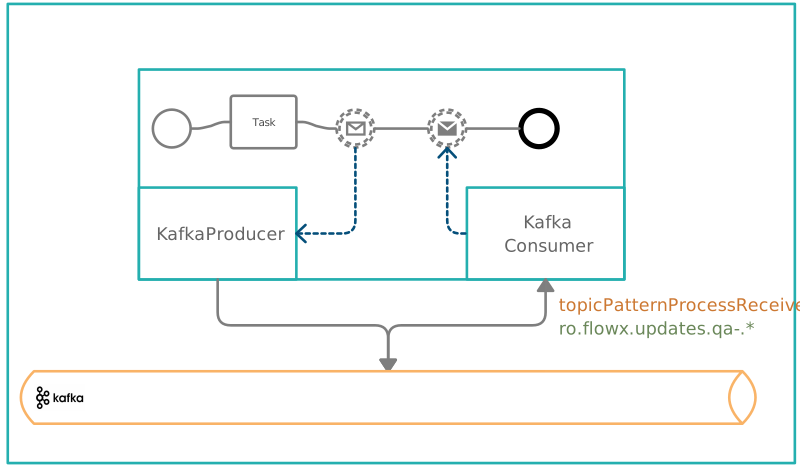
Consumer groups & consumer threads
In Kafka a consumer group is a group of consumers that jointly consume and process messages from one or more Kafka topics. Each consumer group has a unique identifier called a group ID, which is used by Kafka to manage message consumption and distribution among the members of the group. Thread numbers, on the other hand, refer to the number of threads that a consumer application uses to process messages from Kafka. By default, each consumer instance runs in a single thread, which can limit the throughput of message processing. Increasing the number of consumer threads can help to improve the parallelism and efficiency of message consumption, especially when dealing with high message volumes. Both group IDs and thread numbers can be configured in Kafka to optimize the processing of messages according to specific requirements, such as message volume, message type, and processing latency. The configuration related to consumers (group ids and thread numbers) can be configured separately for each message type as it follows:Consumer group configuration
Consumer thread configuration
It is important to know that all the events that start with a configured pattern will be consumed by the Engine. This makes it possible to create a new integration and connect it to the engine without changing the configuration.
Configuring Kafka topics
Topics related to the Task Management plugin
OPERATIONS_IN request example
BULK_IN request example
If you need to send additional keys on the response, attach them in the header, as in the following example, where we used
requestID key.A response should be sent on a 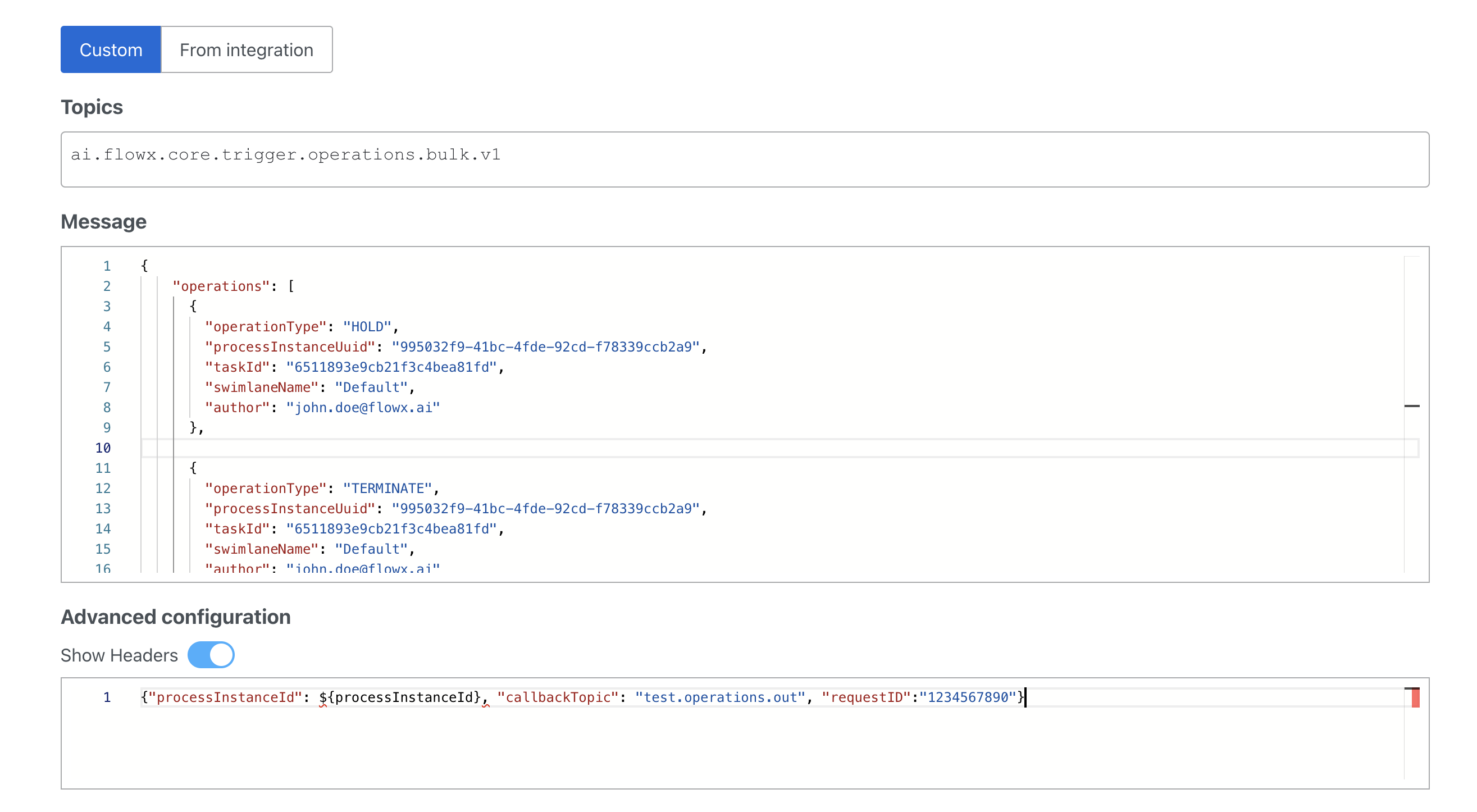
callbackTopic if it is mentioned in the headers, as in the following example:Task manager operations could be the following: assignment, unassignment, hold, unhold, terminate and it is matched with the
...operations.out topic on the engine side. For more information check the Task Management plugin documentation:📄 Task management pluginTopics related to the scheduler extension
SchedulerUsing the scheduler
Topics related to Timer Events
Topics related to the Search Data service
Topics related to the Audit service
Topics related to ES indexing
Processes that can be started by sending messages to a Kafka topic
Topics related to Message Events
Topics related to Events-gateway microservice
Configuring file upload size
The maximum file size allowed for uploads can be set by using the following environment variables:Configuring Elasticsearch connection
The Process Engine uses Elasticsearch for process instance indexing and search capabilities. Configure the connection using these environment variables:For indexing setup, check the Configuring Elasticsearch indexing section.
Connecting the Advancing controller
To use advancing controller, the following env vars are needed forprocess-engine to connect to Advancing Postgres DB:
Configuring the Advancing controller
Advancing controller setup
Configuring cleanup mechanism
This section contains environment variables that configure the scheduler’s behavior, including thread count, cron jobs for data partitioning, process cleanup, and master election.Managing subprocesses expiration
This section details the environment variable that controls the expiration of subprocesses within a parent process. It determines whether subprocesses should terminate when the parent process expires or follow their own expiration settings.Configuring application management
The FlowX helm chart provides a management service with the necessary parameters to integrate with the Prometheus operator. However, this integration is disabled by default.New configuration, starting from v4.1 release, available below. Note that this setup is backwards compatible, it does not affect the configuration from v3.4.x. The configuration files will still work until v4.5 release.
RBAC configuration
Process Engine requires specific RBAC (Role-Based Access Control) permissions to ensure proper access to Kubernetes resources like pods for database lock management. This configuration enables the necessary RBAC rules.rbac.create: Set tofalseto avoid creating additional RBAC resources by default. Custom rules can still be added if required.rbac.rules: Define custom RBAC rules for database locking, as shown below.