

Infrastructure prerequisites
Before installing the FlowX.AI Engine, verify that the following infrastructure components are installed and configured:- Kafka
- Elasticsearch
- PostgreSQL or Oracle
- MongoDB
Dependencies
The FlowX Engine requires the following components:- Database: Primary storage for the engine (PostgreSQL or Oracle)
- Redis Server: Used for caching. See Redis Configuration
- Kafka: Handles messaging and event-driven architecture. See Configuring Kafka
Required external services
- Redis Cluster: Caches process definitions, compiled scripts, and Kafka responses
- Kafka Cluster: Enables communication with external plugins and integrations
Configuration setup
FlowX.AI Engine uses environment variables for configuration. This section covers key configuration areas:- Database configuration
- Authorization & access roles
- Kafka configuration
- File upload size
- Elasticsearch connection
Database configuration
The FlowX Engine supports both PostgreSQL and Oracle as its primary relational database.PostgreSQL
Oracle
Default:
oracle.jdbc.OracleDriver
MongoDB configuration
Configure connection to the Runtime MongoDB instance:Configuration parameters
There are two types of Config Params that can be read from the environment: variables and secrets. There is one provider for variables and secrets extracted from the environment variables, and two providers for the ones extracted from Kubernetes. By default, the variables and secrets are extracted from environment variables (env provider).
Configuration parameters from environment variables (default)
Theenv provider used for variables and secrets extracts them from environment variables. For security reasons, the env provider uses an allow list regex which defaults to FLOWX_CONFIGPARAM_.*. This means only environment variables that match this naming pattern can be read at runtime into configuration params (either as variables or secrets). Feel free to edit it to match the environment variables that you use in your deployment.
Configuration parameters from Kubernetes Secrets and ConfigMaps
Use the following configuration to read Config Params from Kubernetes Secrets and ConfigMaps:
These providers can be configured as follows:
You can configure multiple secrets and ConfigMaps by incrementing the index number (e.g.,
FLOWX_CONFIGPARAMS_PROVIDERS_K8SSECRETS_SECRETSLIST_1, FLOWX_CONFIGPARAMS_PROVIDERS_K8SCONFIGMAPS_CONFIGMAPSLIST_1). Values are overridden based on the order in which the maps are defined.The default provider is env, but there is a built-in allowlist with the regex pattern FLOWX_CONFIGPARAM_.*. This means only configuration parameters that match this naming pattern can be read at runtime, whether they are environment variables or secret variables.Config params cache
Configure caching behavior for configuration parameters to optimize performance:These settings control how long configuration parameters are cached in memory before being refreshed from the source (environment variables, ConfigMaps, or Secrets). Adjust these values based on how frequently your configuration changes and your memory constraints.
Authorization & access roles
This section covers OAuth2 configuration settings for securing the Spring application.Security configuration
Service-to-service authentication
The engine validates incoming tokens with the JWT public key mechanism and authenticates to other FlowX services with a dedicated service account (themainIdentity client registration) in the service-accounts realm:
When deploying with the FlowX Helm chart,
SECURITY_OAUTH2_BASESERVERURL is supplied through the chart value flowx.keycloak.baseServerUrl and the service-account client secrets are injected from the chart-managed Keycloak secret. The remaining values ship as image defaults.Configuring Kafka
Kafka handles all communication between the FlowX.AI Engine, external plugins, and integrations. It also notifies running process instances when certain events occur.Kafka connection settings
Message routing configuration
When
KAFKA_DEFAULT_FX_CONTEXT is set and an event is received on Kafka without an fxContext header, the system will automatically apply the default context value to the message.Kafka consumer retry settings
Consumer groups & consumer threads configuration
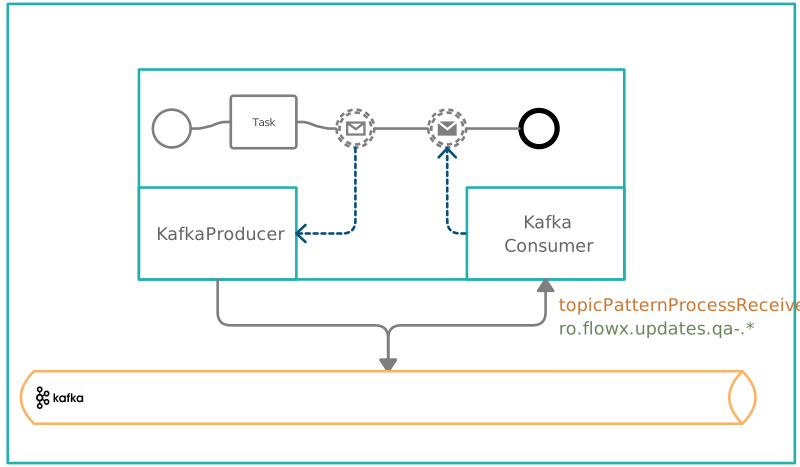
Both a producer and a consumer must be configured:Configuring a Kafka Producer
Configuring a Kafka Consumer
About consumer groups and threads
A consumer group is a set of consumers that jointly consume messages from one or more Kafka topics. Each consumer group has a unique identifier (group ID) that Kafka uses to manage message distribution. Thread numbers refer to the number of threads a consumer application uses to process messages. Increasing thread count can improve parallelism and efficiency, especially with high message volumes.Consumer group configuration
Consumer thread configuration
All events that start with a configured pattern will be consumed by the Engine. This enables you to create new integrations and connect them to the engine without changing the configuration.
Configuring Kafka topics
Topic naming configuration
Core engine topics
Topics related to the Task Management plugin
Topics related to the Notification plugin
The
KAFKA_TOPIC_NOTIFICATION_OUT topic must resolve to the same value as KAFKA_TOPIC_NOTIFICATION_INTERNAL_IN in the Notification plugin configuration.Topics related to the Document plugin
The process-engine receives results from document-plugin operations on topics matching the patternai.flowx.engine.receive.plugin.document.*. The following topics are used for file encryption and decryption operations:
These topics are automatically matched by the Engine’s
KAFKA_TOPIC_PATTERN configuration (default: ai.flowx.engine.receive.*). No additional configuration is required. The topics must be created in your Kafka infrastructure before deployment.OPERATIONS_IN request example
BULK_IN request example
To send additional keys in the response, attach them in the header. For example, you can use a
requestID key.A response should be sent on a 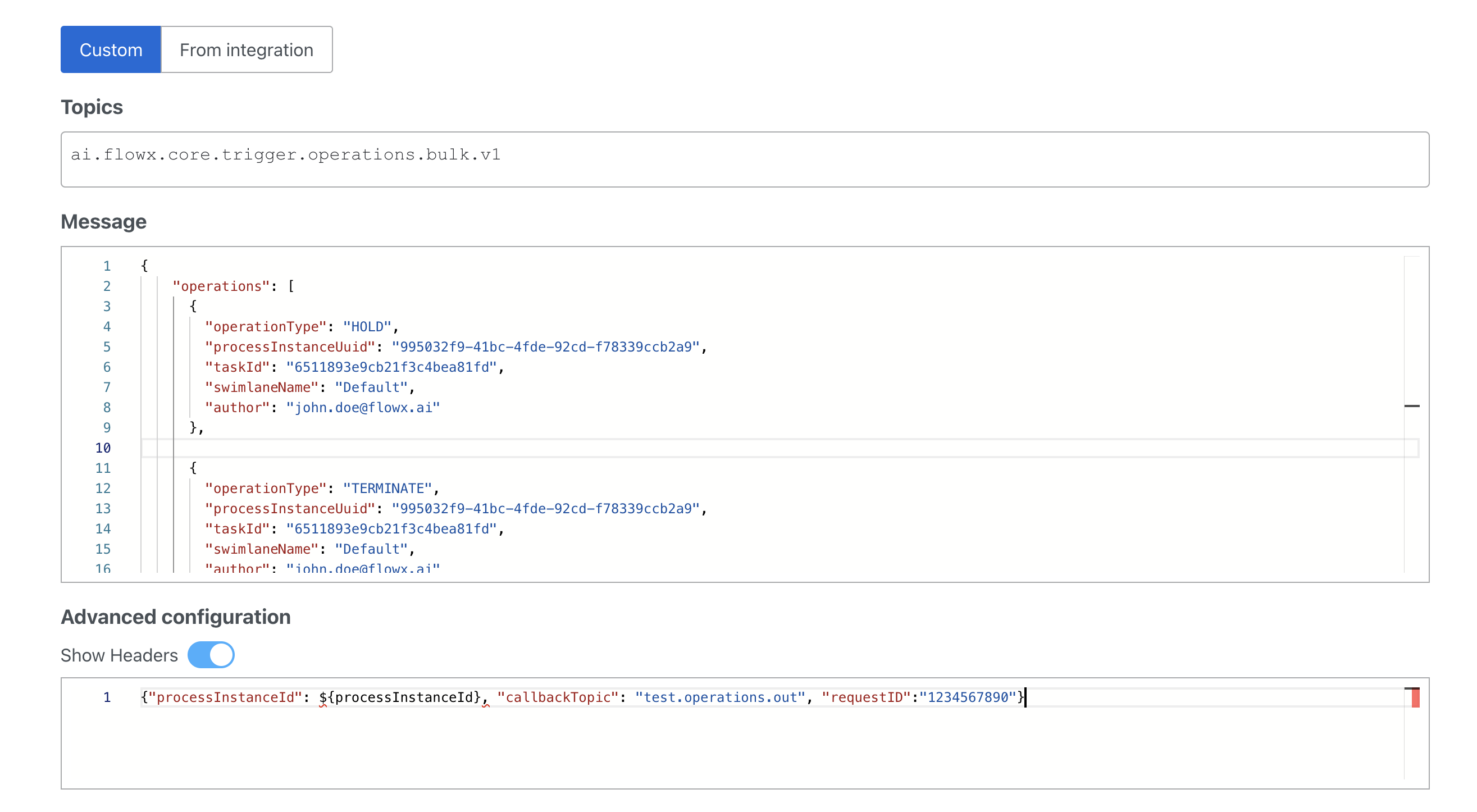
callbackTopic if it is mentioned in the headers:Process operations on this topic include: assignment, unassignment, hold, unhold, terminate. The Task Manager produces the assignment and hold operations on its
...operations.out topic; terminate is available only to direct Kafka producers. For more information, see the Task Management plugin documentation:📄 Task management pluginTopics related to UI flow session updates
Topics related to runtime config params
Available starting with FlowX.AI 5.9.1
When a runtime config param is created, updated, or deleted, Application Manager publishes a change event to this topic. The Engine consumes it and clears the cached build configuration for the affected
workspaceId and appVersionId, then broadcasts the invalidation to its other replicas through a Redis pub/sub channel:
Topics related to resource cache eviction
Available starting with FlowX.AI 5.9.1
Topics related to runtime instance termination
Available starting with FlowX.AI 5.9.1
Topics related to the scheduler extension
Topics related to Timer Events
Topics related to the Search Data service
Topics related to the Audit service
Topics related to Elasticsearch indexing
Processes that can be started by sending messages to a Kafka topic
Topics related to Message Events
Topics related to Events-gateway microservice
Topics related to platform components
Inter-service topic coordination
When configuring FlowX services, ensure the following:- The Engine’s
patternmust match the pattern used by services sending messages to the Engine - The
integrationPatternmust match the pattern used by the Integration Designer - Output topics from one service must match the expected input topics of another service
- Services send to topics matching
ai.flowx.engine.receive.*→ Engine listens - Engine sends to topics matching
ai.flowx.integration.receive.*→ Integration Designer listens
Kafka message size configuration
This setting affects:
- Producer message max bytes
- Producer max request size
- Consumer max partition fetch bytes
Kafka authentication (when using SASL_PLAINTEXT)
For secure environments, enable OAuth authentication with the following environment variables:When using the
kafka-auth profile, the security protocol will automatically be set to SASL_PLAINTEXT and the SASL mechanism will be set to OAUTHBEARER.Configuring Elasticsearch connection
The Process Engine uses Elasticsearch for process instance indexing and search capabilities. Configure the connection using these environment variables:For indexing setup, check the Configuring Elasticsearch indexing section.
Indexing settings
Configuring file upload size
Connecting the Advancing controller
To use the advancing controller, configure the following variables:Configuring the Advancing controller
How the new advancing controller works:
-
Picking threads (
ADVANCING_PICKINGTHREADS): Controls how many worker threads read events from the database. This handles only the picking/reading operations. -
Processing buffer (
ADVANCING_PROCESSINGBUFFERSIZE): Acts as a queue between picking and processing. When the buffer is full, no new events are read. When there’s available space (even just 1 position), that amount of events will be read. -
Processing threads (
ADVANCING_PROCESSINGTHREADS): Controls how many threads process the advancing events in parallel. Events are processed instantly if processing threads are available. If all processing threads are busy, events accumulate in the buffer until it reaches capacity. -
Blocking behavior (
ADVANCING_BLOCKPICKINGIFNOWORKERAVAILABLE): When enabled, prevents picking operations if no worker threads are available, ensuring better resource management.
Advancing controller setup
CAS lib configuration
Configuring cleanup mechanism
Managing subprocesses expiration
Configuring application management
Starting from version 4.1, use the following configuration instead. This setup is backwards compatible until version 5.0.
RBAC configuration
Process Engine requires specific RBAC permissions for proper access to Kubernetes resources:Ingress and CORS
The Process Engine is exposed on both the admin and public hosts, with a dedicated route for runtime process instances on the admin host. Routing is configured through the FlowX Helm chart, which renders either a Kubernetes Ingress (default) or a Gateway API HTTPRoute per service. CORS handling lives in the service code; only the allowed-origins list is deployment-specific.Service routes
Paths are set through
services.process-engine.ingress.<key>.path (or gateway.<key>.paths) in the chart values. The admin and public routes share the same backend route family — the /onboarding prefix is stripped before forwarding so the backend receives /api/....
CORS configuration
Allowed methods, allowed headers (including
Authorization, Content-Type, Fx-Workspace-Id), and credential handling are baked into the service’s application.yaml with safe defaults. Override these only if you have a non-standard requirement.
For the complete route reference, Gateway API HTTPRoute configuration, and route customization, see the ingress configuration guide.
For SSE (Server-Sent Events) communication configuration, refer to the Events Gateway setup guide.
Script engine configuration
The process engine uses a native script engine for executing JavaScript and Python business rules. The native engine runs scripts in separate Node.js and Python worker processes.The
native script engine is the default starting with 5.9.0, replacing the previous GraalVM-based engine. Scripts run in isolated subprocess pools. Starting with 5.9.1, the engine has no service-level provider switch — keeping a business rule on GraalVM is selected per rule in its script editor. See Script engine per rule.Stuck token recovery
Automatically recovers process tokens that get stuck due to transient failures.Troubleshooting
Common issues
Engine fails to start
Engine fails to start
Symptoms: The process-engine pod crashes or restarts repeatedly during startup.Solutions:
- Verify PostgreSQL connectivity and that the database exists and is accessible
- Check Redis connection settings (
SPRING_REDIS_HOST,SPRING_REDIS_PORT) and ensure Redis is running - Confirm Kafka bootstrap servers are reachable (
SPRING_KAFKA_BOOTSTRAPSERVERS) - Review pod logs for specific connection errors — the first failing dependency is usually the root cause
- Ensure all required secrets (database passwords, OAuth credentials) are correctly mounted
Process instances not advancing
Process instances not advancing
Symptoms: Processes get stuck at certain nodes and do not move forward.Solutions:
- Verify the advancing controller is running and properly connected (
ADVANCING_DATASOURCE_JDBCURL) - Check that advancing-related Kafka topics exist and are correctly configured (
KAFKA_TOPIC_PROCESS_NOTIFY_ADVANCE) - Review the advancing controller type (
ADVANCING_TYPE) and thread configuration - Ensure the scheduler extension topics are properly set up for timer-based advances
- Check Kafka consumer group lag for
advanceandscheduler-advancinggroups
Elasticsearch indexing not working
Elasticsearch indexing not working
Symptoms: Process instances are not appearing in search results or the indexing service reports errors.Solutions:
- Confirm
FLOWX_INDEXING_ENABLEDis set totrue - Verify Elasticsearch connection settings (
SPRING_ELASTICSEARCH_REST_URIS, credentials) - Check that the indexing type matches your setup (
FLOWX_INDEXING_TYPE:kafkaorhttp) - If using Kafka indexing, ensure the
KAFKA_TOPIC_PROCESS_INDEX_OUTtopic exists - Verify the Elasticsearch index name and shard configuration are valid
High memory usage
High memory usage
Symptoms: The process-engine pod experiences OOM kills or high memory consumption.Solutions:
- Review Redis caching configuration — large process definitions and compiled scripts are cached in Redis
- Check
ADVANCING_PROCESSINGBUFFERSIZEandADVANCING_PROCESSINGTHREADS— high values increase memory usage - Ensure the cleanup mechanism is enabled (
SCHEDULER_PROCESSCLEANUP_ENABLED) to remove completed process instances - Review Kafka consumer thread counts — each thread consumes memory for message buffering
- Monitor the config params cache settings (
FLOWX_CACHE_CONFIGPARAMS_MAXENTRIES) and reduce if needed
Related resources
Redis Configuration
Cache and session configuration including Sentinel and Cluster modes
Elasticsearch Indexing
Configure process instance indexing and search capabilities
Process Instance Archiving
Archive and manage historical process instance data
Access Roles for Processes
Configure role-based access control for process definitions