The Build feature allows for the creation of deployable packages of a project, encapsulating all its resources into a single unit.
A build is a snapshot of a specific project version, packaged and prepared for deployment to a runtime environment. The concept of builds plays a crucial role in ensuring that the correct version of a project, with all its configurations and dependencies, runs consistently across different environments (for example, Dev, UAT, Production).
You can create multiple versions of a project before creating a build. You can create a build for any committed project version. Once created, a build cannot be edited—you’ll need to create a new project version and generate a new build to incorporate changes.
Project Version is the editable snapshot of a project’s state at a specific point in time. It contains all the resources (like processes, integrations, templates, etc.) and configurations grouped within the project.
A Build is the deployable package of a project version. It is the compiled and immutable state that contains all the project resources transformed into executable components for the runtime environment.
Single Version Rule
A build can only represent a single version of a project. If you have multiple versions of a project, each one can have a unique build. This ensures that you can clearly manage which version of the project is running in a specific environment without conflicts.
Consistency and Deployment
Builds ensure that when you deploy a project to a different environment (like moving from Dev to UAT), the exact configuration, processes, templates, integrations, and all associated resources remain consistent.
Builds are immutable—once created, a build cannot be altered. Any updates require creating a new version of the project and generating a new build.
To create a build from a committed project version:
1
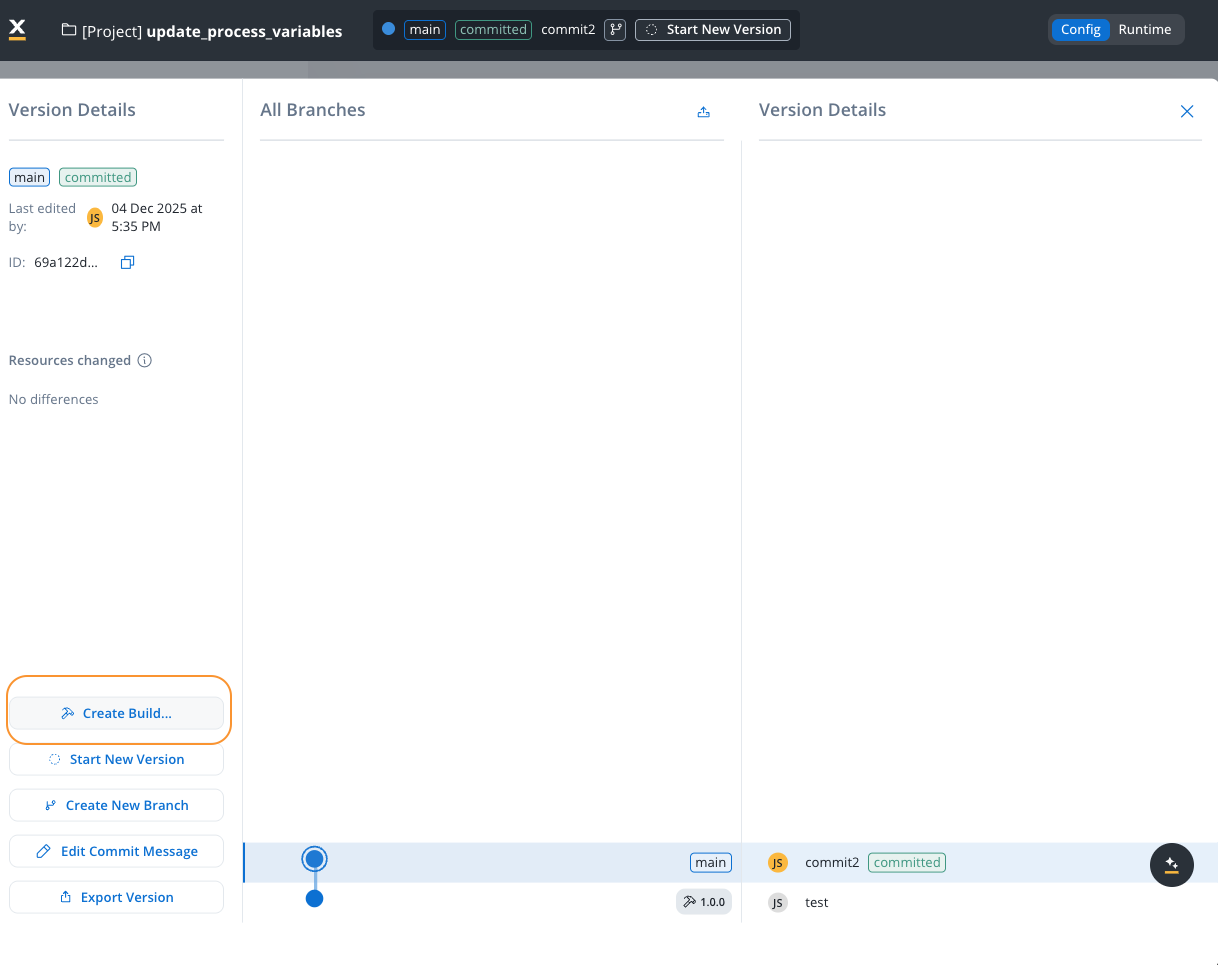
Navigate to Version Details
Access the version details panel for the committed version you want to build. You can only create builds from committed versions, not from draft (WIP) versions.
2
Open Create Build Dialog
Click the Create Build… button in the version details panel. This opens the build creation modal.
Create Build
3
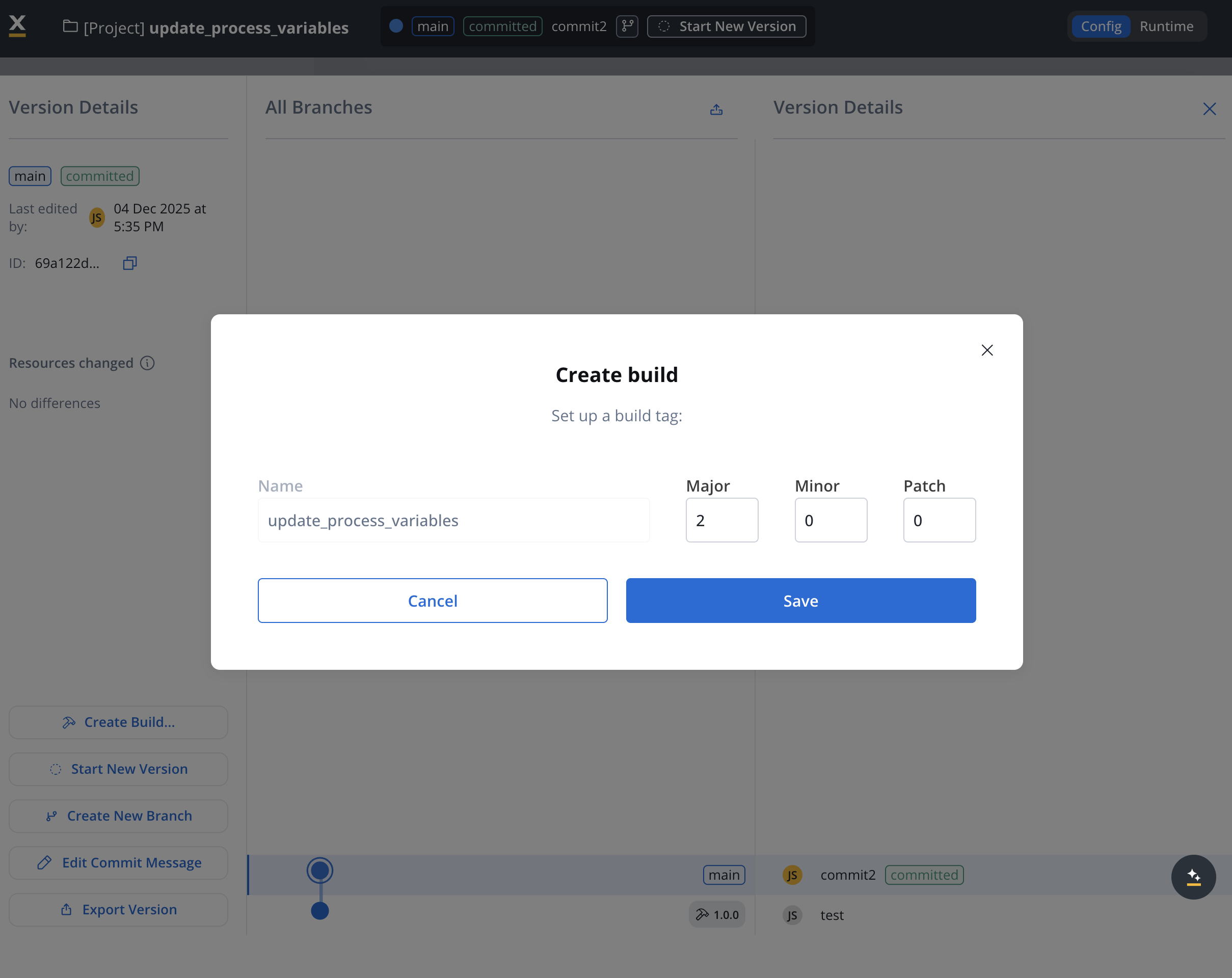
Configure Build Settings
In the Create build modal, configure the following settings:
Name: The build name (defaults to the project name). This helps identify the build in the builds list.
Build Tag Version: Set the semantic version for this build:
Major: Major version number (for example, 1)
Minor: Minor version number (for example, 0)
Patch: Patch version number (for example, 0)
The build tag follows semantic versioning format (for example, 1.0.0) and helps track different builds of the same project version.
4
Save the Build
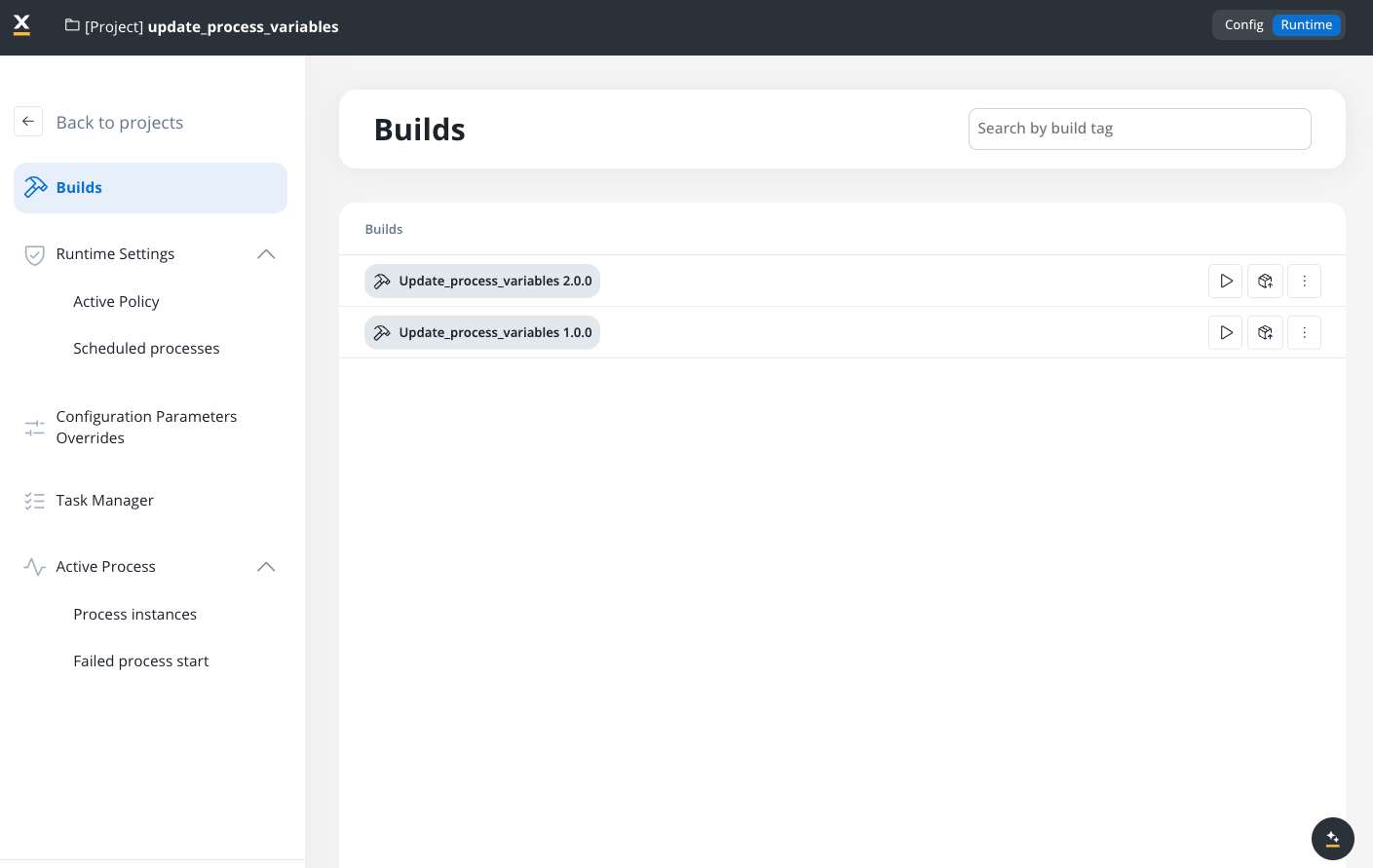
Click Save to create the build. The build is now available in the Builds section and can be deployed to runtime environments.
Each build includes a checksum or identifier to verify its integrity. This ensures that the deployed build matches the expected configuration and no changes have been made post-build.
Runtime Dependency
The runtime environment relies on builds to determine the active project configuration. This means the runtime does not directly interact with the editable project versions but uses builds to maintain stability and reliability.
Version Control
Builds are version-controlled, and each build corresponds to a specific project version. This means you can trace exactly which project configuration is active in a particular environment at any time.
Consistency Across Environments: Builds ensure that the same version of an project runs in different environments, avoiding discrepancies between development and production.
Reduced Errors: Immutable builds reduce the risk of runtime errors caused by unexpected changes.
Simplified Rollbacks: If an issue is detected with a current build, previous builds can be deployed quickly, providing an efficient rollback strategy.
Simplified Deployment: Builds allow for a straightforward deployment process, reducing the complexity of transferring configurations and resources between environments.
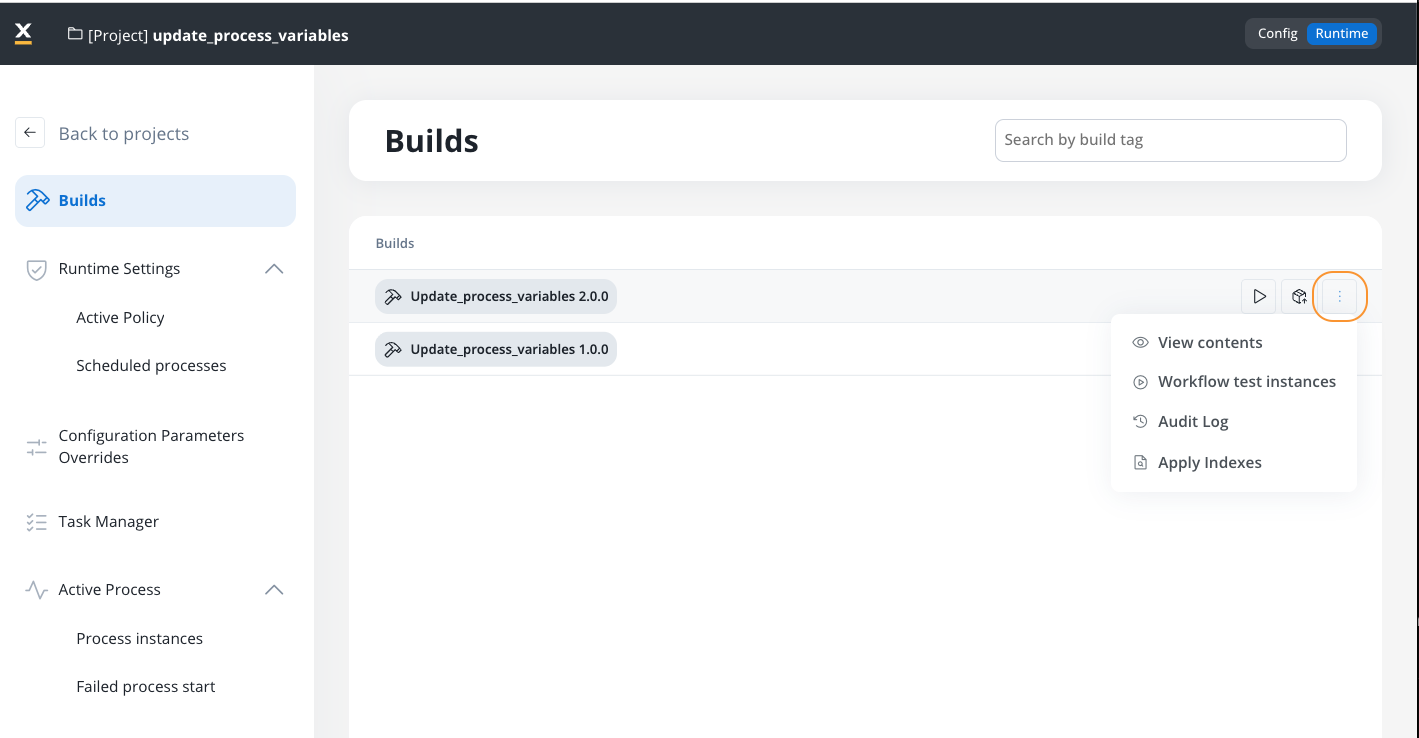
The Builds section provides a centralized interface for viewing and managing all builds for your project. Access this section by navigating to your project, switching to Runtime mode, and selecting Builds from the navigation menu.
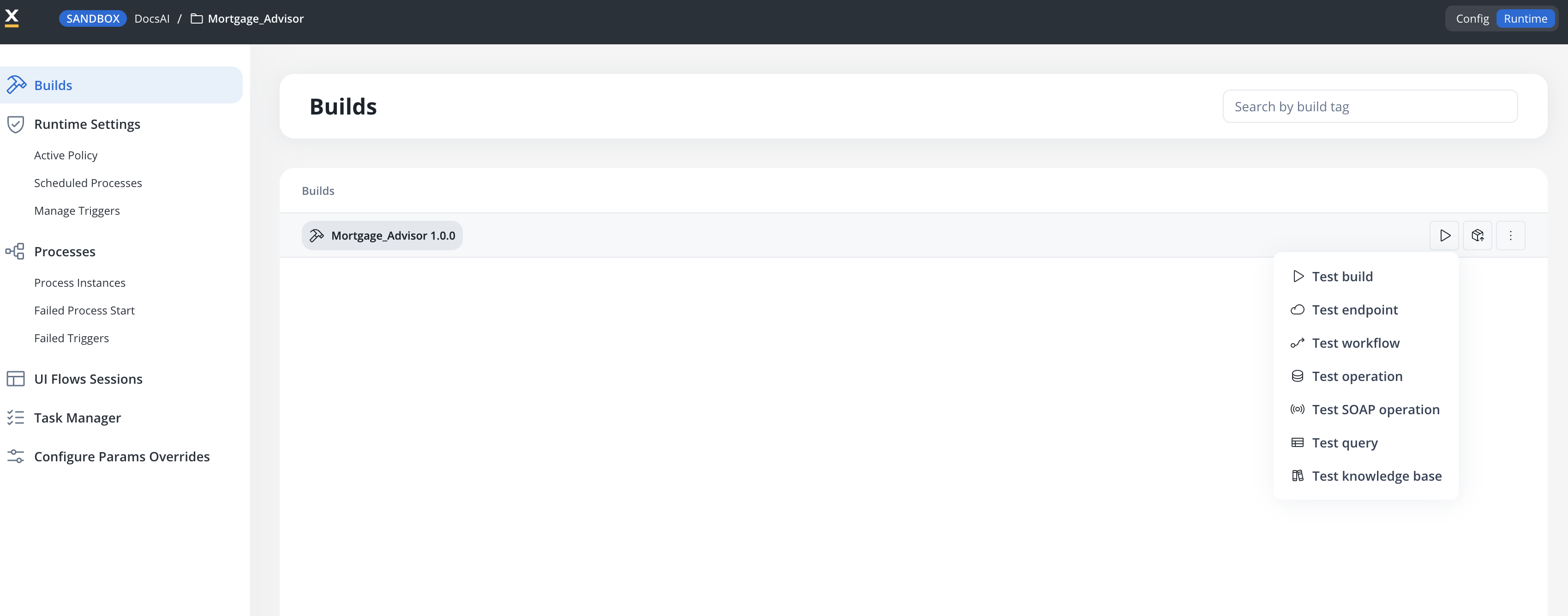
Indexes defined on FlowX Database collections during config time are not automatically applied to the actual MongoDB database. To apply them, use the Apply Indexes action from the build’s context menu (More options → Apply Indexes).Indexes are applied from the build’s snapshot, not from your current configuration. If you add or change indexes, create a new build to capture them and run Apply Indexes on that build. If the indexes are unchanged, you don’t need to re-apply them for every new build — once applied, they stay on the database until you change them or use Drop Indexes.
Only one build per project or library can have indexes applied at a time.
Applying indexes on a new build replaces any previously applied indexes that differ from those in the new build.
To remove all applied indexes from a build, use Drop Indexes from the same menu. Dropping indexes may impact existing query performance.
When you run an integration workflow from a build using the Test workflow action, each run is recorded as a test instance. To review the history of these runs, use the Workflow test instances action from the build’s context menu (More options → Workflow test instances).The action opens a list of workflow test runs for that build, with the following details:
Column
Description
Name
The workflow that was run
Status
The run outcome
Date started
When the run began
Date finished
When the run completed
Select an instance to drill into that run’s details. If no workflows have been run from the build yet, the list is empty.
Use the Search by build tag field to quickly find specific builds by their version tag or name. This is particularly useful when managing multiple builds for the same project.
You can export builds directly from the Builds section. This is useful when you want to transfer a specific build (rather than a version) between environments or workspaces.
1
Navigate to Builds Section
Open FlowX.AI Designer and go to the Projects section
Select your project and navigate to Runtime and then to the Builds section
2
Select Build to Export
Locate the build you want to export in the builds list
Click the Export icon (box with upward arrow) for the desired build
3
Complete Export
In the Export Build modal:
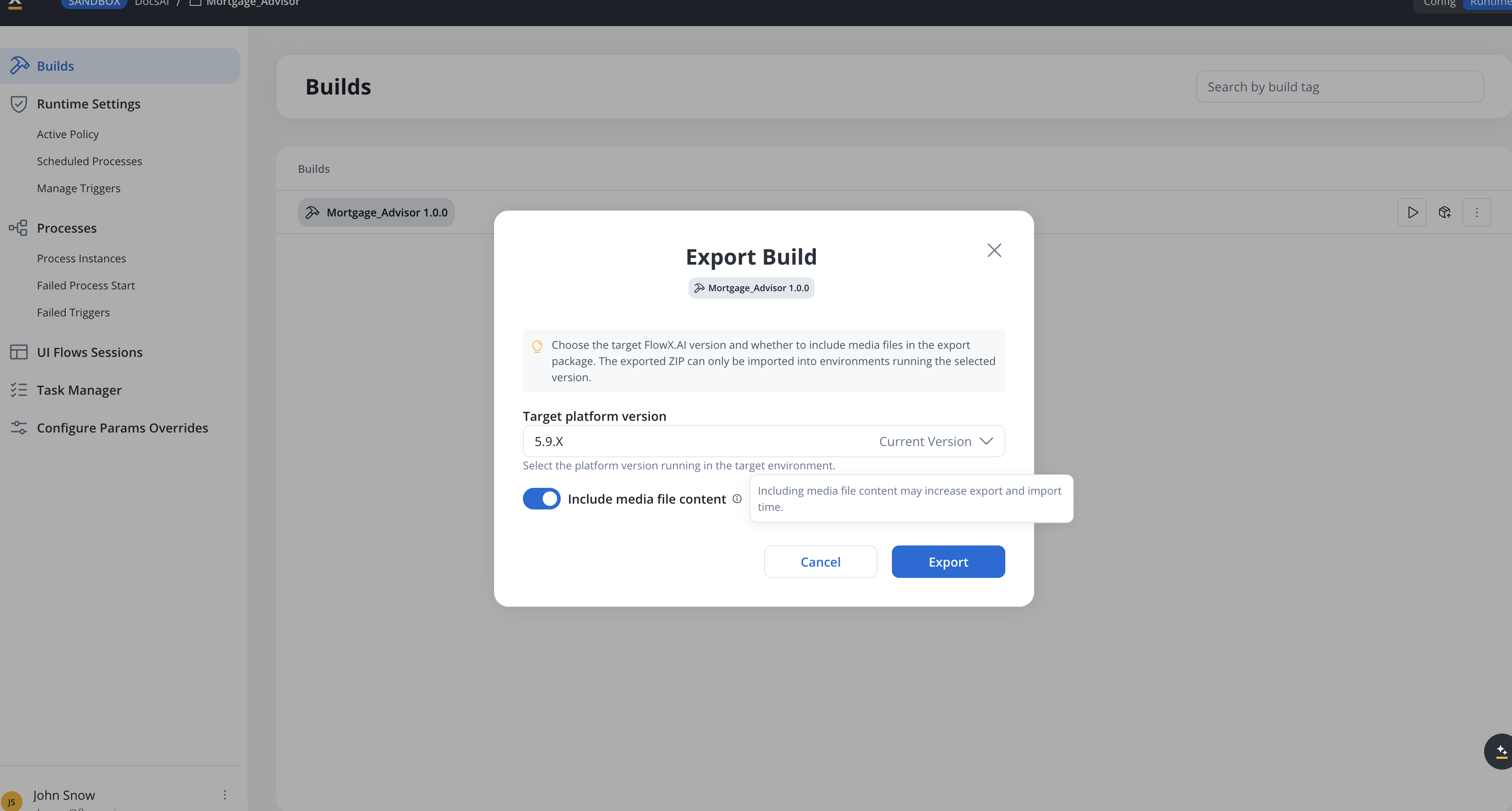
Choose the Target platform version — the platform version running in the target environment. The exported ZIP can only be imported into environments running the selected version; see Cross-version export and import for how content is adapted when targeting an older version.
Toggle Include media file content to bundle media files in the export package. Including media file content may increase export and import time.
Click Export.
The exported build can be imported into other environments or workspaces.
Each build contains a manifest that lists all the resources included, their version IDs, and their resource definitions.
Metadata helps identify which project version the build is derived from, providing traceability.
Separation of Design and Runtime
Builds serve as a bridge between the design (config) view and the runtime view. The config view is where changes are made and managed, while the runtime view uses builds to execute stable, tested versions of projects.
Storage
Builds are stored in a dedicated storage system to ensure they are separate from the editable project versions. This storage supports easy retrieval and deployment of builds.
Imagine you have a project for customer onboarding with multiple processes, templates, and integrations. After completing development and final testing, you:
Submit changes to create Version 1.0 of the project.
Create a build for Version 1.0.
Deploy this build to the UAT environment for final stakeholder review.
If any adjustments are needed, you go back to the project, make changes, and submit them as Version 1.1.
Create a new build for Version 1.1, ensuring that the changes are encapsulated separately from the previous version.
Once everything is approved, you can publish Version 1.1 Build to the Production environment, ensuring all environments are aligned without manual reconfiguration.
The Build feature is essential for managing projects across multiple environments. It provides a clear and organized pathway from development to deployment, ensuring consistency, integrity, and stability throughout the project’s lifecycle.
Last modified on October 30, 2026
{"docsConfig":{"theme":"mint","$schema":"https://mintlify.com/docs.json","name":"FlowX.AI","description":"Comprehensive documentation for FlowX.AI, the AI-driven process automation platform.","colors":{"primary":"#fcb813","light":"#fcb813","dark":"#fcb813"},"logo":{"light":"https://mintcdn.com/flowxai/38fXEM0a7v86Lg2m/logo/light.png?fit=max\u0026auto=format\u0026n=38fXEM0a7v86Lg2m\u0026q=85\u0026s=d767c06cef433b0a02f40a1f4f785eab","dark":"https://mintcdn.com/flowxai/38fXEM0a7v86Lg2m/logo/dark.png?fit=max\u0026auto=format\u0026n=38fXEM0a7v86Lg2m\u0026q=85\u0026s=6b8b8c3e7abd17acf6be8bffce4e599d"},"favicon":"https://mintcdn.com/flowxai/VVxnbzjz7JuL1Ngt/favicon2.svg?fit=max\u0026auto=format\u0026n=VVxnbzjz7JuL1Ngt\u0026q=85\u0026s=ef6a780a1ed3894c7b276bcc7b3c6c69","appearance":{"default":"dark","strict":false},"background":{"decoration":"grid","color":{"light":"#f4f4f5","dark":"#0a0b0d"}},"navbar":{"links":[],"primary":{"type":"button","label":"Academy","href":"https://academy.flowx.ai/"}},"footer":{"socials":{"linkedin":"https://www.linkedin.com/company/flowxai","x":"https://x.com/FlowX_ai","youtube":"https://www.youtube.com/@FlowX_AI"},"links":[{"header":"Documentation","items":[{"label":"Introduction","href":"https://docs.flowx.ai/5.9/docs/introduction"},{"label":"Platform overview","href":"https://docs.flowx.ai/5.9/docs/platform-overview/flowx-architecture"},{"label":"Designer","href":"https://docs.flowx.ai/5.9/docs/flowx-designer/overview"},{"label":"AI Platform","href":"https://docs.flowx.ai/5.9/ai-platform/ai-in-flowx"},{"label":"Use the docs with AI","href":"https://docs.flowx.ai/5.9/docs/getting-started/using-flowx-docs-with-ai"},{"label":"Release notes","href":"https://docs.flowx.ai/release-notes/overview"}]},{"header":"Resources","items":[{"label":"FlowX.AI Academy","href":"https://academy.flowx.ai"},{"label":"Support","href":"https://flowxai.zendesk.com/"}]},{"header":"Company","items":[{"label":"About FlowX.AI","href":"https://www.flowx.ai/about"},{"label":"Contact us","href":"mailto:hello@flowx.ai"},{"label":"Careers","href":"https://apply.workable.com/flowxai"}]},{"header":"Legal","items":[{"label":"Privacy Policy","href":"https://www.flowx.ai/privacy-policy"},{"label":"Cookie Policy","href":"https://www.flowx.ai/cookie-policy"},{"label":"Terms and Conditions","href":"https://www.flowx.ai/terms-and-conditions"}]}]},"search":{"prompt":"Search the docs"},"seo":{"metatags":{"zd-site-verification":"94tteg5ir5of8gkb4twzh"}},"fonts":{"heading":{"family":"Sora"},"body":{"family":"Geist"}},"styling":{"eyebrows":"breadcrumbs","codeblocks":"dark","latex":true},"integrations":{"ga4":{"measurementId":"G-CGW0FVK9YM"}},"banner":{"content":"🚀 [See the latest FlowX.AI releases →](/release-notes/overview)","dismissible":true},"contextual":{"options":["copy","view","chatgpt","claude","perplexity","mcp","cursor","vscode"],"display":"header"},"metadata":{"timestamp":true},"navigation":{"pages":[]}},"deployment":{"deploymentMetadataValue":{"subdomain":"flowxai","hasAudioNarration":false,"actualSubdomain":"flowxai","customDomains":["docs.flowx.ai"],"gitSource":{"type":"github","owner":"flowx-ai","repo":"flowx-docs","deployBranch":"main","contentDirectory":"","isPrivate":true,"mountPath":"","label":""},"chroma":{"liveDeploymentHistoryId":"6ae4c8fd7f8a500a1fd86923","collectionId":"f43bb162-8d91-4fce-8112-9a85f1f82724","schemaVersion":"v3","latestBuiltDeploymentHistoryId":"6ae4c8fd7f8a500a1fd86923"},"feedback":{"thumbs":true,"contextualFeedback":{"allowEmail":true},"agentFeedback":true},"entitlements":{"AI_CHAT":{"status":"ENABLED"},"CONTEXTUAL_FEEDBACK":{"status":"ENABLED"},"CODE_SNIPPET_FEEDBACK":{"status":"ENABLED"},"WEB_MCP":{"status":"ENABLED"},"NARRATION":{"status":"ENABLED"}},"buildId":"6ae4c8fd7f8a500a1fd86923","clientVersion":"0.0.4039","searchFilterCounts":[{"language":"default","tag":"Documentation","count":787},{"language":"default","tag":"Building blocks","count":329},{"language":"default","tag":"Platform deep dive","count":257},{"language":"default","tag":"Setup guides","count":191},{"language":"default","tag":"UI Designer","count":140},{"language":"default","tag":"Release notes","count":137},{"language":"default","tag":"Release Notes","count":137},{"language":"default","tag":"Microservices","count":112},{"language":"default","tag":"Core extensions","count":107},{"language":"default","tag":"Nodes","count":88}],"searchSettings":{"isFiltersEnabled":true}},"assistantConfig":{"enableAskAiButton":false,"enableStarterQuestions":false,"enableContextualStarterQuestions":true,"enableAskAiSearchBar":true,"deflection":{"enabled":true,"type":"email","email":"learning.team@flowx.ai","showHelpButton":true}},"basePath":"","hasChatPermissions":true,"hasWebMcpPermissions":true,"toggles":[{"name":"kill-isr","enabled":true,"variant":{"name":"disabled","enabled":false,"feature_enabled":true},"impressionData":false},{"name":"agent-mintlify-slack","enabled":true,"variant":{"name":"disabled","enabled":false,"feature_enabled":true},"impressionData":false},{"name":"agent-integrations-settings","enabled":true,"variant":{"name":"disabled","enabled":false,"feature_enabled":true},"impressionData":false},{"name":"automations-pr-grouping","enabled":true,"variant":{"name":"disabled","enabled":false,"feature_enabled":true},"impressionData":false},{"name":"custom-prefix","enabled":true,"variant":{"name":"disabled","enabled":false,"feature_enabled":true},"impressionData":false},{"name":"analytics-v7","enabled":true,"variant":{"name":"disabled","enabled":false,"feature_enabled":true},"impressionData":false},{"name":"user-flows-analytics","enabled":true,"variant":{"name":"disabled","enabled":false,"feature_enabled":true},"impressionData":false},{"name":"no-publish-flow","enabled":true,"variant":{"name":"disabled","enabled":false,"feature_enabled":true},"impressionData":false},{"name":"workos-onboarding","enabled":true,"variant":{"name":"disabled","enabled":false,"feature_enabled":true},"impressionData":false},{"name":"llms-txt-v2","enabled":true,"variant":{"name":"disabled","enabled":false,"feature_enabled":true},"impressionData":false},{"name":"snapshot-serving-live","enabled":true,"variant":{"name":"disabled","enabled":false,"feature_enabled":true},"impressionData":false},{"name":"stripTemperatureMiddleware","enabled":true,"variant":{"name":"disabled","enabled":false,"feature_enabled":true},"impressionData":false},{"name":"support-platform-pylon-zendesk","enabled":true,"variant":{"name":"disabled","enabled":false,"feature_enabled":true},"impressionData":false},{"name":"snapshot-serving","enabled":true,"variant":{"name":"disabled","enabled":false,"feature_enabled":true},"impressionData":false},{"name":"instant-rollback","enabled":true,"variant":{"name":"disabled","enabled":false,"feature_enabled":true},"impressionData":false},{"name":"granular-notifications-server","enabled":true,"variant":{"name":"disabled","enabled":false,"feature_enabled":true},"impressionData":false},{"name":"granular-notifications","enabled":true,"variant":{"name":"disabled","enabled":false,"feature_enabled":true},"impressionData":false},{"name":"automations-fable","enabled":true,"variant":{"name":"disabled","enabled":false,"feature_enabled":true},"impressionData":false},{"name":"fixed-ai-action-pricing","enabled":true,"variant":{"name":"disabled","enabled":false,"feature_enabled":true},"impressionData":false},{"name":"automation-resolve-merge-conflict","enabled":true,"variant":{"name":"disabled","enabled":false,"feature_enabled":true},"impressionData":false},{"name":"scoped-publishing","enabled":true,"variant":{"name":"disabled","enabled":false,"feature_enabled":true},"impressionData":false},{"name":"mintql","enabled":true,"variant":{"name":"disabled","enabled":false,"feature_enabled":true},"impressionData":false},{"name":"page-level-analytics","enabled":true,"variant":{"name":"disabled","enabled":false,"feature_enabled":true},"impressionData":false},{"name":"editor-version-history-v2","enabled":true,"variant":{"name":"disabled","enabled":false,"feature_enabled":true},"impressionData":false},{"name":"billing-page-v2","enabled":true,"variant":{"name":"disabled","enabled":false,"feature_enabled":true},"impressionData":false},{"name":"full-page-search","enabled":true,"variant":{"name":"disabled","enabled":false,"feature_enabled":true},"impressionData":false},{"name":"workspace-projects","enabled":true,"variant":{"name":"disabled","enabled":false,"feature_enabled":true},"impressionData":false},{"name":"assistant-v5","enabled":true,"variant":{"name":"disabled","enabled":false,"feature_enabled":true},"impressionData":false},{"name":"byok-sep-25","enabled":true,"variant":{"name":"disabled","enabled":false,"feature_enabled":true},"impressionData":false},{"name":"fork-pr-previews","enabled":true,"variant":{"name":"disabled","enabled":false,"feature_enabled":true},"impressionData":false},{"name":"revalidation-jwt","enabled":true,"variant":{"name":"disabled","enabled":false,"feature_enabled":true},"impressionData":false},{"name":"vite-origin","enabled":true,"variant":{"name":"disabled","enabled":false,"feature_enabled":true},"impressionData":false},{"name":"billing-updated-9-15","enabled":true,"variant":{"name":"disabled","enabled":false,"feature_enabled":true},"impressionData":false},{"name":"workos-sso-scim","enabled":true,"variant":{"name":"disabled","enabled":false,"feature_enabled":true},"impressionData":false},{"name":"hobby-abuse-scan","enabled":true,"variant":{"name":"disabled","enabled":false,"feature_enabled":true},"impressionData":false},{"name":"dashboard-inbox","enabled":true,"variant":{"name":"disabled","enabled":false,"feature_enabled":true},"impressionData":false},{"name":"workos-signup","enabled":true,"variant":{"name":"disabled","enabled":false,"feature_enabled":true},"impressionData":false},{"name":"workos-enabled","enabled":true,"variant":{"name":"disabled","enabled":false,"feature_enabled":true},"impressionData":false},{"name":"approve-review-flow","enabled":true,"variant":{"name":"disabled","enabled":false,"feature_enabled":true},"impressionData":false}],"privacy":{"consentBanner":{"enabled":true}},"googleFontsInlined":true},"customCss":[{"filePath":"custom.css","content":"/* cyrillic-ext */\n@font-face {\n font-family: 'Geist Mono';\n font-style: normal;\n font-weight: 400;\n font-display: swap;\n src: url(/_mintlify/assets/fonts/google/s/geistmono/v6/or3nQ6H-1_WfwkMZI_qYFrodmgPn.woff2) format('woff2');\n unicode-range: U+0460-052F, U+1C80-1C8A, U+20B4, U+2DE0-2DFF, U+A640-A69F, U+FE2E-FE2F;\n}\n/* cyrillic */\n@font-face {\n font-family: 'Geist Mono';\n font-style: normal;\n font-weight: 400;\n font-display: swap;\n src: url(/_mintlify/assets/fonts/google/s/geistmono/v6/or3nQ6H-1_WfwkMZI_qYFrMdmgPn.woff2) format('woff2');\n unicode-range: U+0301, U+0400-045F, U+0490-0491, U+04B0-04B1, U+2116;\n}\n/* symbols2 */\n@font-face {\n font-family: 'Geist Mono';\n font-style: normal;\n font-weight: 400;\n font-display: swap;\n src: url(/_mintlify/assets/fonts/google/s/geistmono/v6/or3nQ6H-1_WfwkMZI_qYFg08vz7ehw.woff2) format('woff2');\n unicode-range: U+2000-2001, U+2004-2008, U+200A, U+23B8-23BD, U+2500-259F;\n}\n/* vietnamese */\n@font-face {\n font-family: 'Geist Mono';\n font-style: normal;\n font-weight: 400;\n font-display: swap;\n src: url(/_mintlify/assets/fonts/google/s/geistmono/v6/or3nQ6H-1_WfwkMZI_qYFrgdmgPn.woff2) format('woff2');\n unicode-range: U+0102-0103, U+0110-0111, U+0128-0129, U+0168-0169, U+01A0-01A1, U+01AF-01B0, U+0300-0301, U+0303-0304, U+0308-0309, U+0323, U+0329, U+1EA0-1EF9, U+20AB;\n}\n/* latin-ext */\n@font-face {\n font-family: 'Geist Mono';\n font-style: normal;\n font-weight: 400;\n font-display: swap;\n src: url(/_mintlify/assets/fonts/google/s/geistmono/v6/or3nQ6H-1_WfwkMZI_qYFrkdmgPn.woff2) format('woff2');\n unicode-range: U+0100-02BA, U+02BD-02C5, U+02C7-02CC, U+02CE-02D7, U+02DD-02FF, U+0304, U+0308, U+0329, U+1D00-1DBF, U+1E00-1E9F, U+1EF2-1EFF, U+2020, U+20A0-20AB, U+20AD-20C4, U+2113, U+2C60-2C7F, U+A720-A7FF;\n}\n/* latin */\n@font-face {\n font-family: 'Geist Mono';\n font-style: normal;\n font-weight: 400;\n font-display: swap;\n src: url(/_mintlify/assets/fonts/google/s/geistmono/v6/or3nQ6H-1_WfwkMZI_qYFrcdmg.woff2) format('woff2');\n unicode-range: U+0000-00FF, U+0131, U+0152-0153, U+02BB-02BC, U+02C6, U+02DA, U+02DC, U+0304, U+0308, U+0329, U+2000-206F, U+20AC, U+2122, U+2191, U+2193, U+2212, U+2215, U+FEFF, U+FFFD;\n}\n/* cyrillic-ext */\n@font-face {\n font-family: 'Geist Mono';\n font-style: normal;\n font-weight: 500;\n font-display: swap;\n src: url(/_mintlify/assets/fonts/google/s/geistmono/v6/or3nQ6H-1_WfwkMZI_qYFrodmgPn.woff2) format('woff2');\n unicode-range: U+0460-052F, U+1C80-1C8A, U+20B4, U+2DE0-2DFF, U+A640-A69F, U+FE2E-FE2F;\n}\n/* cyrillic */\n@font-face {\n font-family: 'Geist Mono';\n font-style: normal;\n font-weight: 500;\n font-display: swap;\n src: url(/_mintlify/assets/fonts/google/s/geistmono/v6/or3nQ6H-1_WfwkMZI_qYFrMdmgPn.woff2) format('woff2');\n unicode-range: U+0301, U+0400-045F, U+0490-0491, U+04B0-04B1, U+2116;\n}\n/* symbols2 */\n@font-face {\n font-family: 'Geist Mono';\n font-style: normal;\n font-weight: 500;\n font-display: swap;\n src: url(/_mintlify/assets/fonts/google/s/geistmono/v6/or3nQ6H-1_WfwkMZI_qYFg08vz7ehw.woff2) format('woff2');\n unicode-range: U+2000-2001, U+2004-2008, U+200A, U+23B8-23BD, U+2500-259F;\n}\n/* vietnamese */\n@font-face {\n font-family: 'Geist Mono';\n font-style: normal;\n font-weight: 500;\n font-display: swap;\n src: url(/_mintlify/assets/fonts/google/s/geistmono/v6/or3nQ6H-1_WfwkMZI_qYFrgdmgPn.woff2) format('woff2');\n unicode-range: U+0102-0103, U+0110-0111, U+0128-0129, U+0168-0169, U+01A0-01A1, U+01AF-01B0, U+0300-0301, U+0303-0304, U+0308-0309, U+0323, U+0329, U+1EA0-1EF9, U+20AB;\n}\n/* latin-ext */\n@font-face {\n font-family: 'Geist Mono';\n font-style: normal;\n font-weight: 500;\n font-display: swap;\n src: url(/_mintlify/assets/fonts/google/s/geistmono/v6/or3nQ6H-1_WfwkMZI_qYFrkdmgPn.woff2) format('woff2');\n unicode-range: U+0100-02BA, U+02BD-02C5, U+02C7-02CC, U+02CE-02D7, U+02DD-02FF, U+0304, U+0308, U+0329, U+1D00-1DBF, U+1E00-1E9F, U+1EF2-1EFF, U+2020, U+20A0-20AB, U+20AD-20C4, U+2113, U+2C60-2C7F, U+A720-A7FF;\n}\n/* latin */\n@font-face {\n font-family: 'Geist Mono';\n font-style: normal;\n font-weight: 500;\n font-display: swap;\n src: url(/_mintlify/assets/fonts/google/s/geistmono/v6/or3nQ6H-1_WfwkMZI_qYFrcdmg.woff2) format('woff2');\n unicode-range: U+0000-00FF, U+0131, U+0152-0153, U+02BB-02BC, U+02C6, U+02DA, U+02DC, U+0304, U+0308, U+0329, U+2000-206F, U+20AC, U+2122, U+2191, U+2193, U+2212, U+2215, U+FEFF, U+FFFD;\n}\n/* cyrillic-ext */\n@font-face {\n font-family: 'Geist Mono';\n font-style: normal;\n font-weight: 600;\n font-display: swap;\n src: url(/_mintlify/assets/fonts/google/s/geistmono/v6/or3nQ6H-1_WfwkMZI_qYFrodmgPn.woff2) format('woff2');\n unicode-range: U+0460-052F, U+1C80-1C8A, U+20B4, U+2DE0-2DFF, U+A640-A69F, U+FE2E-FE2F;\n}\n/* cyrillic */\n@font-face {\n font-family: 'Geist Mono';\n font-style: normal;\n font-weight: 600;\n font-display: swap;\n src: url(/_mintlify/assets/fonts/google/s/geistmono/v6/or3nQ6H-1_WfwkMZI_qYFrMdmgPn.woff2) format('woff2');\n unicode-range: U+0301, U+0400-045F, U+0490-0491, U+04B0-04B1, U+2116;\n}\n/* symbols2 */\n@font-face {\n font-family: 'Geist Mono';\n font-style: normal;\n font-weight: 600;\n font-display: swap;\n src: url(/_mintlify/assets/fonts/google/s/geistmono/v6/or3nQ6H-1_WfwkMZI_qYFg08vz7ehw.woff2) format('woff2');\n unicode-range: U+2000-2001, U+2004-2008, U+200A, U+23B8-23BD, U+2500-259F;\n}\n/* vietnamese */\n@font-face {\n font-family: 'Geist Mono';\n font-style: normal;\n font-weight: 600;\n font-display: swap;\n src: url(/_mintlify/assets/fonts/google/s/geistmono/v6/or3nQ6H-1_WfwkMZI_qYFrgdmgPn.woff2) format('woff2');\n unicode-range: U+0102-0103, U+0110-0111, U+0128-0129, U+0168-0169, U+01A0-01A1, U+01AF-01B0, U+0300-0301, U+0303-0304, U+0308-0309, U+0323, U+0329, U+1EA0-1EF9, U+20AB;\n}\n/* latin-ext */\n@font-face {\n font-family: 'Geist Mono';\n font-style: normal;\n font-weight: 600;\n font-display: swap;\n src: url(/_mintlify/assets/fonts/google/s/geistmono/v6/or3nQ6H-1_WfwkMZI_qYFrkdmgPn.woff2) format('woff2');\n unicode-range: U+0100-02BA, U+02BD-02C5, U+02C7-02CC, U+02CE-02D7, U+02DD-02FF, U+0304, U+0308, U+0329, U+1D00-1DBF, U+1E00-1E9F, U+1EF2-1EFF, U+2020, U+20A0-20AB, U+20AD-20C4, U+2113, U+2C60-2C7F, U+A720-A7FF;\n}\n/* latin */\n@font-face {\n font-family: 'Geist Mono';\n font-style: normal;\n font-weight: 600;\n font-display: swap;\n src: url(/_mintlify/assets/fonts/google/s/geistmono/v6/or3nQ6H-1_WfwkMZI_qYFrcdmg.woff2) format('woff2');\n unicode-range: U+0000-00FF, U+0131, U+0152-0153, U+02BB-02BC, U+02C6, U+02DA, U+02DC, U+0304, U+0308, U+0329, U+2000-206F, U+20AC, U+2122, U+2191, U+2193, U+2212, U+2215, U+FEFF, U+FFFD;\n}\n@keyframes fxh-tick-pulse{0%,to{opacity:1}50%{opacity:.35}}@keyframes fxh-caret-blink{50%{opacity:0}}@keyframes fxh-ln-in{to{opacity:1;transform:none}}@keyframes fxh-rv-in{to{opacity:1;transform:none}}@keyframes fxl-stack-ride{0%{top:0;opacity:0}4%{opacity:1}52%{top:calc(100% - 7px);opacity:1}58%,to{top:calc(100% - 7px);opacity:0}}@keyframes fxl-stack-lit{0%,2%,30%,to{color:var(--fxl-faint)}18%,6%{color:var(--fxl-text)}}@keyframes fxl-stack-tick{0%,2%,30%,to{background:var(--fxl-line)}18%,6%{background:#fcb813}}code,kbd,pre,samp{font-family:\"Geist Mono\",ui-monospace,SFMono-Regular,Menlo,monospace}#topbar-cta-button{color:#131007!important}.label-version{display:inline-block;font-weight:700;color:#fff;background-color:#007bff;padding:.5px 15px;border-radius:12px;box-shadow:0 2px 4px rgba(0,0,0,.1);font-size:.9em;text-transform:uppercase;letter-spacing:.5px;margin-right:5px;transition:background-color .3s ease;text-decoration:none}.label-version:hover{background-color:#0056b3}#banner{background:linear-gradient(90deg,#0a0b0d 0,#0e1013 55%,#2a2310 100%)!important;border-bottom:1px solid rgba(252,184,19,.3);backdrop-filter:saturate(120%)}#banner a{color:#fcb813!important;text-decoration-color:rgba(252,184,19,.55)!important;transition:opacity .2s ease}#banner a:hover{opacity:.85}:root{--flowx-yellow-50:#fff8e7;--flowx-yellow-200:#ffdf92;--flowx-yellow-400:#ffc739;--flowx-yellow-500:#fcb813;--flowx-yellow-800:#8a5e00;--flowx-yellow-900:#6b4e08;--flowx-neutrals-50:#f7f8f9;--flowx-neutrals-100:#e3e8ed;--flowx-neutrals-200:#cbd1db;--flowx-neutrals-300:#a6b0be;--flowx-neutrals-400:#8390a2;--flowx-neutrals-500:#64748b;--flowx-neutrals-700:#475263;--flowx-neutrals-800:#2a313a;--flowx-neutrals-900:#1d232c;--flowx-blue-50:#e6f0fb;--flowx-blue-200:#8abbed;--flowx-blue-700:#004c99;--flowx-blue-900:#002d5b;--flowx-elevation-m:0 8px 16px #1634621a}.cb-wrap{margin-top:32px}.cb-filters{display:flex;flex-wrap:wrap;gap:8px;margin-bottom:24px}.cb-filters input{position:absolute;width:1px;height:1px;overflow:hidden;clip:rect(0 0 0 0);white-space:nowrap}.cb-filters label{cursor:pointer;user-select:none;font-size:12px;line-height:16px;font-weight:600;padding:8px 16px;border-radius:120px;border:1px solid var(--flowx-neutrals-200);color:var(--flowx-neutrals-500);background:0 0;transition:border-color .15s ease,background .15s ease,color .15s ease}.cb-filters label span{margin-left:6px;opacity:.55;font-variant-numeric:tabular-nums}.cb-filters label:hover{border-color:var(--flowx-yellow-500);color:var(--flowx-neutrals-900)}.cb-filters input:checked+label,.dark .cb-filters input:checked+label{background:var(--flowx-yellow-500);border-color:var(--flowx-yellow-500);color:var(--flowx-neutrals-900)}.cb-filters input:focus-visible+label{outline:2px solid var(--flowx-yellow-500);outline-offset:2px}.dark .cb-filters label{border-color:var(--flowx-neutrals-700);color:var(--flowx-neutrals-400)}.dark .cb-filters label:hover{border-color:var(--flowx-yellow-400);color:var(--flowx-neutrals-50)}.cb-grid{display:grid;grid-template-columns:repeat(3,minmax(0,1fr));gap:16px}@media (max-width:1024px){.cb-grid{grid-template-columns:repeat(2,minmax(0,1fr))}}@media (max-width:640px){.cb-grid{grid-template-columns:1fr}}.cb-wrap:has(#cb-conv:checked) .cb-card:not([data-f~=conversational]),.cb-wrap:has(#cb-cookbook:checked) .cb-card:not([data-f~=cookbook]),.cb-wrap:has(#cb-docs:checked) .cb-card:not([data-f~=docs]),.cb-wrap:has(#cb-guide:checked) .cb-card:not([data-f~=guide]),.cb-wrap:has(#cb-integr:checked) .cb-card:not([data-f~=integrations]),.cb-wrap:has(#cb-pattern:checked) .cb-card:not([data-f~=pattern]),.cb-wrap:has(#cb-tutorial:checked) .cb-card:not([data-f~=tutorial]),.cb-wrap:has(#cb-ui:checked) .cb-card:not([data-f~=ui]){display:none}.cb-card{position:relative;display:flex;flex-direction:column;gap:12px;padding:24px;border:1px solid var(--flowx-neutrals-100);border-radius:16px;background:0 0;text-decoration:none!important;transition:border-color .2s ease,transform .2s ease,box-shadow .2s ease}.cb-card::after{content:\"\\2192\";position:absolute;top:20px;right:24px;font-size:14px;line-height:22px;color:var(--flowx-neutrals-300);transition:color .2s ease,transform .2s ease}.cb-card:hover{transform:translateY(-2px);border-color:var(--flowx-yellow-500);box-shadow:var(--flowx-elevation-m)}.cb-card:hover::after{color:var(--flowx-neutrals-900);transform:translateX(4px)}.dark .cb-card{border-color:var(--flowx-neutrals-800)}.dark .cb-card:hover{border-color:var(--flowx-yellow-400);box-shadow:0 8px 16px rgba(0,0,0,.4)}.dark .cb-card:hover::after,.dark .cb-foot a:hover{color:var(--flowx-yellow-400)}@media (prefers-reduced-motion:reduce){.cb-card,.cb-card::after{transition:none}.cb-card:hover,.cb-card:hover::after{transform:none}}.cb-tags{display:flex;flex-wrap:wrap;gap:6px;padding-right:24px}.cb-tag{font-size:10px;line-height:12px;font-weight:600;letter-spacing:.05em;text-transform:uppercase;padding:4px 8px;border-radius:4px;background:var(--flowx-neutrals-50);color:var(--flowx-neutrals-500)}.cb-tag-tut{background:var(--flowx-yellow-50);color:var(--flowx-yellow-800)}.cb-tag-pat{background:var(--flowx-neutrals-900);color:#fff}.cb-tag-cook{background:var(--flowx-yellow-500);color:var(--flowx-neutrals-900)}.cb-tag-gui{background:var(--flowx-blue-50);color:var(--flowx-blue-700)}.dark .cb-tag{background:var(--flowx-neutrals-800);color:var(--flowx-neutrals-400)}.dark .cb-tag-tut{background:var(--flowx-yellow-900);color:var(--flowx-yellow-200)}.dark .cb-tag-pat{background:var(--flowx-neutrals-50);color:var(--flowx-neutrals-900)}.dark .cb-tag-cook{background:var(--flowx-yellow-500);color:var(--flowx-neutrals-900)}.dark .cb-tag-gui{background:var(--flowx-blue-900);color:var(--flowx-blue-200)}.cb-foot a,.cb-title{font-weight:600;color:var(--flowx-neutrals-900)}.cb-title{display:block;font-size:14px;line-height:22px;letter-spacing:-.01em}.dark .cb-foot a,.dark .cb-title{color:var(--flowx-neutrals-50)}.cb-desc{display:block;font-size:12px;line-height:18px;font-weight:400;color:var(--flowx-neutrals-500)}.cb-foot span,.dark .cb-desc{color:var(--flowx-neutrals-400)}.cb-foot{display:flex;flex-wrap:wrap;align-items:baseline;gap:16px;margin-top:40px;padding-top:24px;border-top:1px solid var(--flowx-neutrals-100);font-size:12px;line-height:16px}.dark .cb-foot{border-top-color:var(--flowx-neutrals-800)}.dark .cb-foot span{color:var(--flowx-neutrals-500)}.cb-foot a{text-decoration:none;border-bottom:1px solid var(--flowx-yellow-500);padding-bottom:1px}.cb-foot a:hover{color:var(--flowx-yellow-800)}#content-area:has(.fxh-hero) #header{display:none}main#content-container:has(.fxh-hero){max-width:none}#content-area:has(.fxh-hero){width:100%!important}#content-area:has(.fxh-hero) #content{max-width:none;margin-top:0}#content-area:has(.fxh-hero) #content div[class*=\"--page-padding\"]{--page-padding:0px}#content-area:has(.fxh-hero) #content>:not(.fxh-hero){max-width:1360px;margin-left:auto;margin-right:auto}.fxh-hero{position:relative;text-align:center}@media (min-width:1024px){.fxh-hero{margin-top:-2.5rem}}.fxh-hero__bg{position:sticky;top:0;z-index:0;height:100dvh;overflow:clip;border-radius:18px;background:#0a0b0d;border:1px solid rgba(255,255,255,.08)}.fxh-hero__bg::after,.fxh-hero__bg::before{content:\"\";position:absolute;pointer-events:none}.fxh-hero__bg::before{inset:0;background-image:linear-gradient(rgba(255,255,255,.045) 1px,transparent 1px),linear-gradient(90deg,rgba(255,255,255,.045) 1px,transparent 1px);background-size:56px 56px;-webkit-mask-image:radial-gradient(ellipse at 50% 0,#000 25%,transparent 75%);mask-image:radial-gradient(ellipse at 50% 0,#000 25%,transparent 75%)}.fxh-hero__bg::after{top:-45%;left:25%;width:50%;height:90%;background:radial-gradient(closest-side,rgba(252,184,19,.1),transparent 70%)}.fxh-hero__steps{position:relative;z-index:1;margin-top:-100dvh}.fxh-hero__step{position:relative;min-height:calc(100dvh - 9.5rem);display:grid;grid-template-columns:minmax(0,1fr);align-content:center;padding:48px clamp(24px,5vw,56px) 96px}.fxh-hero__step:not(:first-child){min-height:72dvh;padding-top:48px;padding-bottom:48px}.fxh-hero--single .fxh-hero__bg{position:absolute;inset:0;height:auto;z-index:0}.fxh-hero--single .fxh-hero__steps{margin-top:0}.fxh-hero--single .fxh-hero__step{min-height:calc(100dvh - 9.5rem)}.fxh-hero--slim .fxh-hero__step{min-height:min(46dvh,480px);padding-top:clamp(40px,6vh,64px);padding-bottom:clamp(40px,6vh,64px)}.fxh-step-title{display:block;font-family:\"Sora\",sans-serif;font-size:clamp(1.7rem,3.4vw,2.6rem);font-weight:700;letter-spacing:-.02em;line-height:1.1;color:#f5f5f0;max-width:20ch;margin:0 auto clamp(18px,3vh,28px)}.fxh-vs{display:flex;flex-wrap:wrap;justify-content:center;gap:clamp(9px,1.1vw,14px);max-width:min(780px,100%);margin:clamp(14px,3vh,30px) auto 0;padding:0;list-style:none}.fxh-vs li{display:flex;align-items:center;gap:12px;padding:11px clamp(18px,1.6vw,24px);border:1px solid rgba(255,255,255,.14);background:rgba(255,255,255,.035);-webkit-backdrop-filter:blur(12px);backdrop-filter:blur(12px);border-radius:999px}.fxh-vs__no{font-family:\"Geist Mono\",ui-monospace,SFMono-Regular,Menlo,monospace;font-size:11px;color:rgba(255,255,255,.42)}.fxh-vs__name{font-family:\"Sora\",sans-serif;font-size:clamp(12.5px,1.1vw,15px);font-weight:600;letter-spacing:.01em;color:rgba(255,255,255,.9)}.fxh-scroll{position:absolute;bottom:clamp(20px,4vh,40px);left:50%;transform:translateX(-50%);display:flex;flex-direction:column;align-items:center;gap:8px;font-family:\"Geist Mono\",ui-monospace,SFMono-Regular,Menlo,monospace;font-size:10px;letter-spacing:.3em;text-transform:uppercase;color:rgba(255,255,255,.42)}.fxh-scroll-line{width:1px;height:46px;background:linear-gradient(rgba(255,255,255,.45),transparent)}.fxh-eyebrow{font-family:\"Geist Mono\",ui-monospace,SFMono-Regular,Menlo,monospace;display:inline-flex;align-items:center;gap:12px;font-size:13px;font-weight:400;letter-spacing:.22em;text-transform:uppercase;color:#a3a39a;margin-bottom:28px}.fxh-tick{display:inline-block;width:8px;height:8px;flex-shrink:0;background:#fcb813;animation:fxh-tick-pulse 2.6s ease-in-out infinite}.fxh-title{display:block;font-family:\"Sora\",sans-serif;font-weight:700;letter-spacing:-.02em;line-height:1.08;max-width:920px;margin:0 auto clamp(20px,3vh,28px);text-wrap:balance}.fxh-line{display:block;font-size:clamp(1.7rem,3.4vw,2.7rem);color:#f5f5f0}.fxh-line--dim{color:rgba(244,245,243,.58);margin-top:.06em}.fxh-amber{color:#fcb813}.fxh-sub{display:block;max-width:62ch;margin:0 auto clamp(20px,3vh,28px);font-size:15px;line-height:1.55;color:#b9b9b1}.fxh-cta,.fxh-ctas{justify-content:center}.fxh-ctas{display:flex;flex-wrap:wrap;gap:12px;position:relative}.fxh-cta{display:inline-flex;align-items:center;gap:8px;white-space:nowrap;padding:12px 22px;border-radius:10px;font-size:15px;font-weight:550;text-decoration:none!important;transition:background .2s ease,border-color .2s ease,color .2s ease}.fxh-cta--primary{background:#fcb813;color:#131007!important;font-weight:640}.fxh-cta--primary:hover{background:#ffc739}.fxh-cta--ghost{border:1px solid rgba(255,255,255,.16);color:#f4f5f3!important}.fxh-cta--ghost:hover{border-color:rgba(255,255,255,.42);background:rgba(255,255,255,.04)}.fxh-term,.fxh-term__dots i{border:1px solid rgba(255,255,255,.12)}.fxh-term{position:relative;width:min(680px,100%);margin:clamp(24px,4vh,36px) auto clamp(22px,3.5vh,32px);text-align:left;border-radius:18px;overflow:hidden;background:linear-gradient(180deg,rgba(255,255,255,.1) 0,rgba(255,255,255,.03) 20%,rgba(255,255,255,.01) 60%,rgba(255,255,255,.045) 100%),rgba(10,11,13,.91);box-shadow:0 24px 60px rgba(0,0,0,.5)}.fxh-term__bar{display:flex;align-items:center;gap:16px;padding:14px 22px;font-family:\"Geist Mono\",ui-monospace,SFMono-Regular,Menlo,monospace;font-size:13px;letter-spacing:.06em;color:rgba(255,255,255,.62);border-bottom:1px solid rgba(255,255,255,.12)}.fxh-term__dots{display:inline-flex;gap:7px}.fxh-term__dots i{width:11px;height:11px;border-radius:50%}.fxh-term__body{display:flex;flex-direction:column;gap:14px;padding:24px 26px 26px;font-family:\"Geist Mono\",ui-monospace,SFMono-Regular,Menlo,monospace;font-size:14px}.fxh-term__body p{margin:0;color:rgba(255,255,255,.72)}.fxh-term__prompt{color:#fcb813;margin-right:8px}.fxh-caret{display:inline-block;width:9px;height:1.05em;margin-left:6px;vertical-align:text-bottom;background:rgba(252,184,19,.85);animation:fxh-caret-blink 1.1s steps(1) infinite}.fxh-term__log{display:grid;gap:5px;align-content:start}.fxh-term__log:empty{display:none}.fxh-term__log .ln{display:flex;justify-content:space-between;gap:16px;font-size:12.5px;color:rgba(255,255,255,.58);opacity:0;transform:translateY(6px);animation:fxh-ln-in .45s cubic-bezier(.16,1,.3,1) forwards}.fxh-term__log .ok{color:#fcb813;margin-right:8px}.fxh-term__log .t,.fxh-term__ver{color:rgba(255,255,255,.34)}.fxh-term__ver{margin-left:auto}.fxh-field{position:absolute;inset:0;width:100%;height:100%;pointer-events:none;opacity:.55}#footer a[href*=\"utm_campaign=poweredBy\"],.fxh-hero--live .fxh-hero__bg::before{display:none}.fxh-hero--live .fxh-hero__step:first-child .fxh-ctas,.fxh-hero--live .fxh-hero__step:first-child .fxh-eyebrow,.fxh-hero--live .fxh-hero__step:first-child .fxh-scroll,.fxh-hero--live .fxh-hero__step:first-child .fxh-sub,.fxh-hero--live .fxh-hero__step:first-child .fxh-title{opacity:0;transform:translateY(26px);animation:fxh-rv-in .9s cubic-bezier(.16,1,.3,1) forwards}.fxh-hero--live .fxh-hero__step:first-child .fxh-eyebrow{animation-delay:.15s}.fxh-hero--live .fxh-hero__step:first-child .fxh-title{animation-delay:.26s}.fxh-hero--live .fxh-hero__step:first-child .fxh-sub{animation-delay:.48s}.fxh-hero--live .fxh-hero__step:first-child .fxh-ctas{animation-delay:.59s}.fxh-hero--live .fxh-hero__step:first-child .fxh-scroll{animation-delay:.92s}@media (max-width:640px){.fxh-hero__step{padding:72px 20px}}@media (prefers-reduced-motion:reduce){.fxh-caret,.fxh-tick{animation:none}.fxh-hero--live .fxh-hero__step:first-child .fxh-ctas,.fxh-hero--live .fxh-hero__step:first-child .fxh-eyebrow,.fxh-hero--live .fxh-hero__step:first-child .fxh-scroll,.fxh-hero--live .fxh-hero__step:first-child .fxh-sub,.fxh-hero--live .fxh-hero__step:first-child .fxh-title{animation:none;opacity:1;transform:none}}.cb-grid--2{grid-template-columns:repeat(2,minmax(0,1fr))}@media (max-width:640px){.cb-grid--2{grid-template-columns:1fr}}:root{--fxl-mono:\"Geist Mono\", ui-monospace, SFMono-Regular, Menlo, monospace;--fxl-display:\"Sora\", sans-serif;--fxl-ease:cubic-bezier(0.16, 1, 0.3, 1);--fxl-text:#17181b;--fxl-dim:rgba(23, 24, 27, 0.64);--fxl-faint:rgba(23, 24, 27, 0.44);--fxl-line:rgba(24, 24, 27, 0.12);--fxl-line-soft:rgba(24, 24, 27, 0.07);--fxl-amber-text:#8a5e00;--fxl-bg:#f4f4f5;--fxl-panel:#fcfcfd;--fxl-amber-soft:rgba(252, 184, 19, 0.12)}.dark{--fxl-text:#f4f5f3;--fxl-dim:rgba(244, 245, 243, 0.58);--fxl-faint:rgba(244, 245, 243, 0.34);--fxl-line:rgba(255, 255, 255, 0.08);--fxl-line-soft:rgba(255, 255, 255, 0.05);--fxl-amber-text:#fcb813;--fxl-bg:#0a0b0d;--fxl-panel:#0c0e11;--fxl-amber-soft:rgba(252, 184, 19, 0.08)}.fxl-no{display:flex;align-items:center;gap:12px;font-family:var(--fxl-mono);font-size:12px;letter-spacing:.18em;text-transform:uppercase;color:var(--fxl-faint);margin-top:8px}.fxl-no::after{content:\"\";flex:1;height:1px;background:var(--fxl-line-soft)}.fxl-no+h2{margin-top:10px}.fxl-grid{display:grid;grid-template-columns:repeat(2,1fr);gap:1px;background:var(--fxl-line);border:1px solid var(--fxl-line);border-radius:16px;overflow:hidden}.fxl-cell{position:relative;display:block;background:var(--fxl-panel);padding:clamp(24px,2.6vw,34px);text-decoration:none!important;transition:background .2s ease}.fxl-cell:hover{background:var(--fxl-amber-soft)}.fxl-cell::after{content:\"\\2192\";position:absolute;top:24px;right:26px;font-family:var(--fxl-mono);font-size:14px;color:var(--fxl-faint);transition:color .2s ease,transform .2s ease}.fxl-cell:hover::after{color:var(--fxl-amber-text);transform:translateX(4px)}.fxl-cell__no{display:block;font-family:var(--fxl-mono);font-size:11px;letter-spacing:.2em;color:var(--fxl-amber-text);margin-bottom:14px}.fxl-cell__title{display:block;font-family:var(--fxl-display);font-size:18px;font-weight:600;letter-spacing:-.01em;color:var(--fxl-text);margin-bottom:6px}.fxl-cell__desc{display:block;font-size:13.5px;line-height:1.5;color:var(--fxl-dim);max-width:46ch}.fxl-grid--1{grid-template-columns:1fr}.fxl-grid--3{grid-template-columns:repeat(3,1fr)}@media (max-width:1024px){.fxl-grid--3{grid-template-columns:repeat(2,1fr)}}@media (max-width:640px){.fxl-grid,.fxl-grid--3{grid-template-columns:1fr}}.fxl-cell--eval{grid-column:1/-1;display:grid;grid-template-columns:minmax(0,1fr) minmax(0,1.05fr);gap:32px;align-items:center}.fxl-cell--eval::after{content:none}.fxl-cell--eval:hover{background:var(--fxl-panel)}.fxl-eval__links{display:flex;flex-wrap:wrap;gap:8px 18px;margin-top:18px}.fxl-eval__links a,.fxl-stack{font-family:var(--fxl-mono);font-size:12px}.fxl-eval__links a{color:var(--fxl-amber-text);text-decoration:none!important;border-bottom:1px solid rgba(252,184,19,.45);padding-bottom:1px}.fxl-eval__links a:hover{border-bottom-color:var(--fxl-amber-text)}.fxl-stack{color:var(--fxl-faint)}.fxl-stack__row{position:relative;display:flex;align-items:center;justify-content:space-between;gap:12px;padding:7px 12px 7px 30px;border-bottom:1px solid var(--fxl-line-soft)}.fxl-rails li:last-child,.fxl-stack__row:last-child{border-bottom:none}.fxl-stack__row span:last-child{font-size:10.5px;letter-spacing:.08em;opacity:.8}.fxl-stack__tick{position:absolute;left:10px;top:50%;width:7px;height:7px;margin-top:-3.5px;border-radius:2px;background:var(--fxl-line)}.fxl-stack__client{border:1px solid var(--fxl-line);border-radius:10px;color:var(--fxl-dim)}.fxl-stack__client .fxl-stack__tick{background:#fcb813}.fxl-stack__gw{display:flex;align-items:center;gap:10px;padding:10px 0 10px 30px;font-size:10.5px;letter-spacing:.16em;text-transform:uppercase}.fxl-stack__gw::after{content:\"\";flex:1;height:1px;background:repeating-linear-gradient(90deg,var(--fxl-line) 0 4px,transparent 4px 8px)}.fxl-stack__svc{position:relative;border:1px solid var(--fxl-line);border-radius:10px;overflow:hidden}.fxl-stack__spine{position:absolute;left:13px;top:0;bottom:0;width:1px;background:var(--fxl-line)}.fxl-stack__pulse{position:absolute;left:10px;top:0;width:7px;height:7px;border-radius:50%;background:#fcb813;box-shadow:0 0 0 4px rgba(252,184,19,.18);opacity:0;animation:fxl-stack-ride 6.6s linear infinite}.fxl-stack__svc .fxl-stack__row,.fxl-stack__svc .fxl-stack__tick{animation:6.6s linear infinite}.fxl-stack__svc .fxl-stack__row{animation-name:fxl-stack-lit}.fxl-stack__svc .fxl-stack__tick{animation-name:fxl-stack-tick}.fxl-stack__svc .fxl-stack__row:nth-child(4),.fxl-stack__svc .fxl-stack__row:nth-child(4) .fxl-stack__tick{animation-delay:.55s}.fxl-stack__svc .fxl-stack__row:nth-child(5),.fxl-stack__svc .fxl-stack__row:nth-child(5) .fxl-stack__tick{animation-delay:1.1s}.fxl-stack__svc .fxl-stack__row:nth-child(6),.fxl-stack__svc .fxl-stack__row:nth-child(6) .fxl-stack__tick{animation-delay:1.65s}.fxl-stack__svc .fxl-stack__row:nth-child(7),.fxl-stack__svc .fxl-stack__row:nth-child(7) .fxl-stack__tick{animation-delay:2.2s}.fxl-stack__svc .fxl-stack__row:nth-child(8),.fxl-stack__svc .fxl-stack__row:nth-child(8) .fxl-stack__tick{animation-delay:2.75s}.fxl-stack__foot{display:flex;justify-content:space-between;margin-top:8px;font-size:10.5px;letter-spacing:.14em;text-transform:uppercase}.fxl-rails a:hover,.fxl-stack__bus{color:var(--fxl-amber-text)}@media (prefers-reduced-motion:reduce){.fxl-stack__pulse,.fxl-stack__svc .fxl-stack__row,.fxl-stack__svc .fxl-stack__tick{animation:none}.fxl-stack__svc .fxl-stack__row{color:var(--fxl-dim)}}@media (max-width:768px){.fxl-cell--eval{grid-template-columns:1fr;gap:24px}}.fxl-flow{display:flex;align-items:stretch;gap:14px}.fxl-flow__stage{flex:1;border:1px solid var(--fxl-line);background:var(--fxl-panel);border-radius:14px;padding:20px 22px}.fxl-flow__no{display:block;font-family:var(--fxl-mono);font-size:11px;letter-spacing:.18em;text-transform:uppercase;color:var(--fxl-amber-text);margin-bottom:10px}.fxl-flow__title{display:block;font-family:var(--fxl-display);font-size:15px;font-weight:600;letter-spacing:-.01em;color:var(--fxl-text)}.fxl-flow__desc{display:block;margin-top:6px;font-size:12.5px;line-height:1.5;color:var(--fxl-dim)}.fxl-flow__arrow{align-self:center;flex-shrink:0;font-family:var(--fxl-mono);font-size:16px;color:var(--fxl-amber-text)}@media (max-width:768px){.fxl-flow{flex-direction:column}.fxl-flow__arrow{transform:rotate(90deg)}}.fxl-rails{list-style:none;padding:0;margin:0;font-family:var(--fxl-mono);font-size:13px;color:var(--fxl-dim)}.fxl-rails li{display:flex;align-items:baseline;gap:12px;padding:12px 0;border-bottom:1px solid var(--fxl-line-soft)}.fxl-rails__state{align-self:center;flex-shrink:0;width:7px;height:7px;border-radius:2px;background:#fcb813}.fxl-rails a{color:var(--fxl-text);text-decoration:none;border-bottom:1px solid rgba(252,184,19,.45);padding-bottom:1px;transition:color .15s ease}.fxl-rails em{margin-left:auto;padding-left:16px;flex-shrink:0;font-style:normal;font-size:11px;letter-spacing:.1em;color:var(--fxl-faint)}.fxl-proc{display:grid;grid-template-columns:repeat(4,1fr);gap:1px;list-style:none;padding:0;margin:0;background:var(--fxl-line);border:1px solid var(--fxl-line);border-radius:16px;overflow:hidden}.fxl-proc li{background:var(--fxl-bg);padding:clamp(22px,2.4vw,32px);margin:0}.fxl-proc a,.fxl-proc__no{font-family:var(--fxl-mono);color:var(--fxl-amber-text)}.fxl-proc__no{display:block;font-size:11px;letter-spacing:.2em;margin-bottom:16px}.fxl-proc__title{display:block;font-family:var(--fxl-display);font-size:17px;font-weight:600;letter-spacing:-.01em;color:var(--fxl-text);margin-bottom:8px}.fxl-proc__desc{display:block;font-size:13.5px;line-height:1.55;color:var(--fxl-dim)}.fxl-proc a{display:inline-block;margin-top:12px;font-size:12px;text-decoration:none;border-bottom:1px solid rgba(252,184,19,.45);padding-bottom:1px}.fxl-proc a:hover{border-bottom-color:var(--fxl-amber-text)}@media (max-width:1024px){.fxl-proc{grid-template-columns:repeat(2,1fr)}}@media (max-width:640px){.fxl-proc{grid-template-columns:1fr}}.fxl-reg{border:1px solid var(--fxl-line);background:var(--fxl-panel);border-radius:16px;padding:clamp(16px,2.5vw,28px)}.fxl-reg__hd,.fxl-reg__row{display:grid;grid-template-columns:minmax(180px,1.2fr) 2fr 150px 24px;gap:16px;align-items:baseline;font-family:var(--fxl-mono)}.fxl-reg__hd{font-size:11px;letter-spacing:.08em;color:var(--fxl-faint);padding-bottom:10px}.fxl-reg__hd,.fxl-reg__item{border-bottom:1px solid var(--fxl-line-soft)}.fxl-reg__item:last-child{border-bottom:none}.fxl-reg__toggle{position:absolute;width:1px;height:1px;overflow:hidden;clip:rect(0 0 0 0);white-space:nowrap}.fxl-reg__row{padding:14px 0;cursor:pointer;font-size:12.5px;user-select:none}.fxl-reg__toggle:focus-visible+.fxl-reg__row{outline:2px solid #fcb813;outline-offset:2px}.fxl-reg__type{font-size:10px;letter-spacing:.12em;color:var(--fxl-faint);margin-left:6px}.fxl-reg__type--lts,a.fxl-reg__row:hover .fxl-reg__name{color:var(--fxl-amber-text)}a.fxl-reg__row{text-decoration:none!important;transition:background .15s ease}a.fxl-reg__row:hover{background:var(--fxl-amber-soft)}.fxl-reg__name{color:var(--fxl-text);font-weight:500}.fxl-reg__caps{color:var(--fxl-dim)}.fxl-reg__status{color:var(--fxl-amber-text);white-space:nowrap}.fxl-reg__mark{color:var(--fxl-amber-text);font-size:14px;text-align:right;transition:transform .3s var(--fxl-ease)}.fxl-reg__item:has(.fxl-reg__toggle:checked) .fxl-reg__mark{transform:rotate(45deg)}.fxl-reg__body{display:none;padding:2px 0 18px;font-size:13.5px;line-height:1.6;color:var(--fxl-dim);max-width:72ch}.fxl-reg__item:has(.fxl-reg__toggle:checked) .fxl-reg__body{display:block}.fxl-reg__body p{margin:0 0 8px}.fxl-reg__body strong{color:var(--fxl-text);font-weight:600}@media (max-width:768px){.fxl-reg__hd,.fxl-reg__row{grid-template-columns:1fr 132px 20px;gap:10px}.fxl-reg__caps,.fxl-reg__hd span:nth-child(2){display:none}}.fxl-dgv{display:grid;gap:10px}.fxl-dgv__row{display:grid;grid-template-columns:150px 1fr;gap:18px;align-items:baseline;border:1px solid var(--fxl-line);border-radius:12px;padding:14px 20px}.fxl-dgv__key{font-family:var(--fxl-mono);font-size:12.5px;color:var(--fxl-amber-text)}.fxl-dgv__val{font-size:13.5px;line-height:1.55;color:var(--fxl-dim)}@media (max-width:640px){.fxl-dgv__row{grid-template-columns:1fr;gap:6px}}.fxl-cta{position:relative;overflow:hidden;border-radius:18px;padding:clamp(40px,6vw,64px) clamp(24px,5vw,56px);background:#0a0b0d;border:1px solid rgba(255,255,255,.08);text-align:center}.fxl-cta::before{content:\"\";position:absolute;inset:0;background-image:linear-gradient(rgba(255,255,255,.045) 1px,transparent 1px),linear-gradient(90deg,rgba(255,255,255,.045) 1px,transparent 1px);background-size:56px 56px;-webkit-mask-image:radial-gradient(ellipse at 50% 100%,#000 25%,transparent 75%);mask-image:radial-gradient(ellipse at 50% 100%,#000 25%,transparent 75%);pointer-events:none}.fxl-cta>*{position:relative;z-index:1}.fxl-cta__title{display:block;font-family:var(--fxl-display);font-size:clamp(1.5rem,3vw,2.2rem);font-weight:700;letter-spacing:-.02em;line-height:1.1;color:#f5f5f0;margin-bottom:12px}.fxl-cta__sub{display:block;font-size:14.5px;color:#b9b9b1;max-width:56ch;margin:0 auto 24px}html.fxl-js .rv{opacity:0;transform:translateY(12px);transition:opacity .6s var(--fxl-ease),transform .6s var(--fxl-ease);transition-delay:calc(var(--i, 0)*.06s)}html.fxl-js .rv.in{opacity:1;transform:none}@media (prefers-reduced-motion:reduce){html.fxl-js .rv{opacity:1;transform:none;transition:none}.fxl-rails__state{animation:none}}"}],"page":{"pagePath":"6.x/docs/projects/runtime/builds","slug":"/6.x/docs/projects/runtime/builds","pageMetadata":{"title":"Builds","description":"The Build feature allows for the creation of deployable packages of a project, encapsulating all its resources into a single unit.","owner":"docs","last_reviewed":"2026-08-12T00:00:00.000Z","href":"/6.x/docs/projects/runtime/builds"},"description":{"compiledSource":"\"use strict\";\nconst {jsx: _jsx} = arguments[0];\nconst {useMDXComponents: _provideComponents} = arguments[0];\nfunction _createMdxContent(props) {\n const _components = {\n p: \"p\",\n ..._provideComponents(),\n ...props.components\n };\n return _jsx(_components.p, {\n children: \"The Build feature allows for the creation of deployable packages of a project, encapsulating all its resources into a single unit.\"\n });\n}\nfunction MDXContent(props = {}) {\n const {wrapper: MDXLayout} = {\n ..._provideComponents(),\n ...props.components\n };\n return MDXLayout ? _jsx(MDXLayout, {\n ...props,\n children: _jsx(_createMdxContent, {\n ...props\n })\n }) : _createMdxContent(props);\n}\nreturn {\n default: MDXContent\n};\n","frontmatter":{},"scope":{}},"pageType":"default","mdx":{"mdxSource":{"compiledSource":"\"use strict\";const{Fragment:_Fragment,jsx:_jsx,jsxs:_jsxs}=arguments[0];const{useMDXComponents:_provideComponents}=arguments[0];function _createMdxContent(props){const _components={a:`a`,code:`code`,img:`img`,li:`li`,ol:`ol`,p:`p`,strong:`strong`,tbody:`tbody`,td:`td`,th:`th`,thead:`thead`,tr:`tr`,ul:`ul`,..._provideComponents(),...props.components},{Frame,Heading,Info,Step,Steps,Table}=_components;if(!Frame)_missingMdxReference(`Frame`,true);if(!Heading)_missingMdxReference(`Heading`,true);if(!Info)_missingMdxReference(`Info`,true);if(!Step)_missingMdxReference(`Step`,true);if(!Steps)_missingMdxReference(`Steps`,true);if(!Table)_missingMdxReference(`Table`,true);return _jsxs(_Fragment,{children:[_jsx(_components.p,{children:`A build is a snapshot of a specific project version, packaged and prepared for deployment to a runtime environment. The concept of builds plays a crucial role in ensuring that the correct version of a project, with all its configurations and dependencies, runs consistently across different environments (for example, Dev, UAT, Production).`}),`\n`,_jsx(Info,{children:_jsx(_components.p,{children:`You can create multiple versions of a project before creating a build. You can create a build for any committed project version. Once created, a build cannot be edited—you’ll need to create a new project version and generate a new build to incorporate changes.`})}),`\n`,_jsx(Heading,{level:`4`,id:`key-concepts`,children:`Key concepts`}),`\n`,_jsxs(_components.ol,{children:[`\n`,_jsxs(_components.li,{children:[`\n`,_jsx(_components.p,{children:_jsx(_components.strong,{children:`Project Version vs. Build`})}),`\n`,_jsxs(_components.ul,{children:[`\n`,_jsxs(_components.li,{children:[_jsx(_components.strong,{children:`Project Version`}),` is the editable snapshot of a project’s state at a specific point in time. It contains all the resources (like processes, integrations, templates, etc.) and configurations grouped within the project.`]}),`\n`,_jsxs(_components.li,{children:[`A `,_jsx(_components.strong,{children:`Build`}),` is the deployable package of a project version. It is the compiled and immutable state that contains all the project resources transformed into executable components for the runtime environment.`]}),`\n`]}),`\n`]}),`\n`,_jsxs(_components.li,{children:[`\n`,_jsx(_components.p,{children:_jsx(_components.strong,{children:`Single Version Rule`})}),`\n`,_jsxs(_components.ul,{children:[`\n`,_jsx(_components.li,{children:`A build can only represent a single version of a project. If you have multiple versions of a project, each one can have a unique build. This ensures that you can clearly manage which version of the project is running in a specific environment without conflicts.`}),`\n`]}),`\n`]}),`\n`,_jsxs(_components.li,{children:[`\n`,_jsx(_components.p,{children:_jsx(_components.strong,{children:`Consistency and Deployment`})}),`\n`,_jsxs(_components.ul,{children:[`\n`,_jsx(_components.li,{children:`Builds ensure that when you deploy a project to a different environment (like moving from Dev to UAT), the exact configuration, processes, templates, integrations, and all associated resources remain consistent.`}),`\n`,_jsx(_components.li,{children:`Builds are immutable—once created, a build cannot be altered. Any updates require creating a new version of the project and generating a new build.`}),`\n`]}),`\n`]}),`\n`]}),`\n`,_jsx(Heading,{level:`3`,id:`creating-a-build`,children:`Creating a build`}),`\n`,_jsx(_components.p,{children:`To create a build from a committed project version:`}),`\n`,_jsxs(Steps,{children:[_jsx(Step,{title:`Navigate to Version Details`,children:_jsx(_components.p,{children:`Access the version details panel for the committed version you want to build. You can only create builds from committed versions, not from draft (WIP) versions.`})}),_jsxs(Step,{title:`Open Create Build Dialog`,children:[_jsxs(_components.p,{children:[`Click the `,_jsx(_components.strong,{children:`Create Build…`}),` button in the version details panel. This opens the build creation modal.`]}),_jsx(Frame,{caption:`Create Build`,children:_jsx(_components.p,{children:_jsx(_components.img,{src:`https://s3.eu-west-1.amazonaws.com/docx.flowx.ai/5.x/create_build.png`,alt:`Create Build`})})})]}),_jsxs(Step,{title:`Configure Build Settings`,children:[_jsxs(_components.p,{children:[`In the `,_jsx(_components.strong,{children:`Create build`}),` modal, configure the following settings:`]}),_jsxs(_components.ul,{children:[`\n`,_jsxs(_components.li,{children:[_jsx(_components.strong,{children:`Name`}),`: The build name (defaults to the project name). This helps identify the build in the builds list.`]}),`\n`,_jsxs(_components.li,{children:[_jsx(_components.strong,{children:`Build Tag Version`}),`: Set the semantic version for this build:`,`\n`,_jsxs(_components.ul,{children:[`\n`,_jsxs(_components.li,{children:[_jsx(_components.strong,{children:`Major`}),`: Major version number (for example, `,_jsx(_components.code,{children:`1`}),`)`]}),`\n`,_jsxs(_components.li,{children:[_jsx(_components.strong,{children:`Minor`}),`: Minor version number (for example, `,_jsx(_components.code,{children:`0`}),`)`]}),`\n`,_jsxs(_components.li,{children:[_jsx(_components.strong,{children:`Patch`}),`: Patch version number (for example, `,_jsx(_components.code,{children:`0`}),`)`]}),`\n`]}),`\n`]}),`\n`]}),_jsxs(_components.p,{children:[`The build tag follows semantic versioning format (for example, `,_jsx(_components.code,{children:`1.0.0`}),`) and helps track different builds of the same project version.`]})]}),_jsx(Step,{title:`Save the Build`,children:_jsxs(_components.p,{children:[`Click `,_jsx(_components.strong,{children:`Save`}),` to create the build. The build is now available in the Builds section and can be deployed to runtime environments.`]})})]}),`\n`,_jsx(Frame,{children:_jsx(_components.p,{children:_jsx(_components.img,{src:`https://s3.eu-west-1.amazonaws.com/docx.flowx.ai/5.x/create_build_modal.png`,alt:`Create Build Modal`})})}),`\n`,_jsx(Heading,{level:`3`,id:`build-immutability`,children:`Build immutability`}),`\n`,_jsx(_components.p,{children:`Once a build is created, it becomes immutable—you cannot modify its contents. This ensures:`}),`\n`,_jsxs(_components.ul,{children:[`\n`,_jsxs(_components.li,{children:[_jsx(_components.strong,{children:`Consistency`}),`: The same build behaves identically across all environments`]}),`\n`,_jsxs(_components.li,{children:[_jsx(_components.strong,{children:`Traceability`}),`: You can always identify exactly which project version is running`]}),`\n`,_jsxs(_components.li,{children:[_jsx(_components.strong,{children:`Stability`}),`: Prevents accidental changes that could affect production systems`]}),`\n`]}),`\n`,_jsx(_components.p,{children:`To incorporate changes into a build:`}),`\n`,_jsxs(_components.ol,{children:[`\n`,_jsx(_components.li,{children:`Make your changes in the project (creating a new draft version)`}),`\n`,_jsx(_components.li,{children:`Commit the changes to create a new project version`}),`\n`,_jsx(_components.li,{children:`Create a new build from the updated committed version`}),`\n`]}),`\n`,_jsx(Heading,{level:`3`,id:`key-features`,children:`Key features`}),`\n`,_jsxs(_components.ol,{children:[`\n`,_jsxs(_components.li,{children:[`\n`,_jsx(_components.p,{children:_jsx(_components.strong,{children:`Checksum and Integrity`})}),`\n`,_jsxs(_components.ul,{children:[`\n`,_jsx(_components.li,{children:`Each build includes a checksum or identifier to verify its integrity. This ensures that the deployed build matches the expected configuration and no changes have been made post-build.`}),`\n`]}),`\n`]}),`\n`,_jsxs(_components.li,{children:[`\n`,_jsx(_components.p,{children:_jsx(_components.strong,{children:`Runtime Dependency`})}),`\n`,_jsxs(_components.ul,{children:[`\n`,_jsx(_components.li,{children:`The runtime environment relies on builds to determine the active project configuration. This means the runtime does not directly interact with the editable project versions but uses builds to maintain stability and reliability.`}),`\n`]}),`\n`]}),`\n`,_jsxs(_components.li,{children:[`\n`,_jsx(_components.p,{children:_jsx(_components.strong,{children:`Version Control`})}),`\n`,_jsxs(_components.ul,{children:[`\n`,_jsx(_components.li,{children:`Builds are version-controlled, and each build corresponds to a specific project version. This means you can trace exactly which project configuration is active in a particular environment at any time.`}),`\n`]}),`\n`]}),`\n`]}),`\n`,_jsx(Heading,{level:`4`,id:`benefits`,children:`Benefits`}),`\n`,_jsxs(_components.ul,{children:[`\n`,_jsxs(_components.li,{children:[_jsx(_components.strong,{children:`Consistency Across Environments`}),`: Builds ensure that the same version of an project runs in different environments, avoiding discrepancies between development and production.`]}),`\n`,_jsxs(_components.li,{children:[_jsx(_components.strong,{children:`Reduced Errors`}),`: Immutable builds reduce the risk of runtime errors caused by unexpected changes.`]}),`\n`,_jsxs(_components.li,{children:[_jsx(_components.strong,{children:`Simplified Rollbacks`}),`: If an issue is detected with a current build, previous builds can be deployed quickly, providing an efficient rollback strategy.`]}),`\n`,_jsxs(_components.li,{children:[_jsx(_components.strong,{children:`Simplified Deployment`}),`: Builds allow for a straightforward deployment process, reducing the complexity of transferring configurations and resources between environments.`]}),`\n`]}),`\n`,_jsx(Heading,{level:`3`,id:`managing-builds`,children:`Managing builds`}),`\n`,_jsxs(_components.p,{children:[`The `,_jsx(_components.strong,{children:`Builds`}),` section provides a centralized interface for viewing and managing all builds for your project. Access this section by navigating to your project, switching to `,_jsx(_components.strong,{children:`Runtime`}),` mode, and selecting `,_jsx(_components.strong,{children:`Builds`}),` from the navigation menu.`]}),`\n`,_jsx(Frame,{children:_jsx(_components.p,{children:_jsx(_components.img,{src:`https://s3.eu-west-1.amazonaws.com/docx.flowx.ai/5.x/builds_interface.png`,alt:`Builds Interface`})})}),`\n`,_jsx(Heading,{level:`4`,id:`builds-list`,children:`Builds list`}),`\n`,_jsx(_components.p,{children:`The builds list displays all builds created for the project, showing:`}),`\n`,_jsxs(_components.ul,{children:[`\n`,_jsxs(_components.li,{children:[_jsx(_components.strong,{children:`Build name and version`}),`: Displays the build name and tag version (for example, `,_jsx(_components.code,{children:`Update_process_variables 1.0.0`}),`)`]}),`\n`,_jsxs(_components.li,{children:[_jsx(_components.strong,{children:`Build actions`}),`: Each build entry provides quick access to:`,`\n`,_jsxs(_components.ul,{children:[`\n`,_jsxs(_components.li,{children:[_jsx(_components.strong,{children:`Play/Run`}),`: Test the build with options to:`,`\n`,_jsxs(_components.ul,{children:[`\n`,_jsxs(_components.li,{children:[_jsx(_components.strong,{children:`Test build`}),` - run a process from the build`]}),`\n`,_jsxs(_components.li,{children:[_jsx(_components.strong,{children:`Test endpoint`}),` - call a REST data source endpoint`]}),`\n`,_jsxs(_components.li,{children:[_jsx(_components.strong,{children:`Test workflow`}),` - run an integration workflow`]}),`\n`,_jsxs(_components.li,{children:[_jsx(_components.strong,{children:`Test operation`}),` - run a FlowX Database or unmanaged MongoDB operation; see `,_jsx(_components.a,{href:`/6.x/docs/platform-deep-dive/integrations/testing-data-sources`,children:`Testing data sources from Runtime`})]}),`\n`,_jsxs(_components.li,{children:[_jsx(_components.strong,{children:`Test SOAP operation`}),` - run a SOAP system operation; see `,_jsx(_components.a,{href:`/6.x/docs/platform-deep-dive/integrations/soap-system#testing-an-operation`,children:`SOAP system`})]}),`\n`,_jsxs(_components.li,{children:[_jsx(_components.strong,{children:`Test query`}),` - run an Oracle or PostgreSQL query; see `,_jsx(_components.a,{href:`/6.x/docs/platform-deep-dive/integrations/testing-data-sources`,children:`Testing data sources from Runtime`})]}),`\n`,_jsxs(_components.li,{children:[_jsx(_components.strong,{children:`Test knowledge base`}),` - test knowledge base operations; see `,_jsx(_components.a,{href:`/6.x/docs/platform-deep-dive/integrations/knowledge-base-integration/testing-knowledge-base`,children:`Testing a knowledge base`})]}),`\n`]}),`\n`]}),`\n`]}),`\n`,_jsx(Frame,{children:_jsx(_components.p,{children:_jsx(_components.img,{src:`https://s3.eu-west-1.amazonaws.com/docx.flowx.ai/5.9/test_build_options.png`,alt:`Build test actions menu`})})}),`\n`,_jsxs(_components.ul,{children:[`\n`,_jsxs(_components.li,{children:[_jsx(_components.strong,{children:`Export`}),`: Export the build for transfer to other environments or workspaces`]}),`\n`,_jsxs(_components.li,{children:[_jsx(_components.strong,{children:`More options`}),`: Additional actions via the context menu:`]}),`\n`]}),`\n`,_jsx(Frame,{children:_jsx(_components.p,{children:_jsx(_components.img,{src:`https://s3.eu-west-1.amazonaws.com/docx.flowx.ai/5.x/builds_ctx.png`,alt:`Build Actions`})})}),`\n`,_jsxs(_components.ul,{children:[`\n`,_jsx(_components.li,{children:`View contents`}),`\n`,_jsx(_components.li,{children:`Workflow test instances`}),`\n`,_jsx(_components.li,{children:`Audit log`}),`\n`,_jsx(_components.li,{children:`Apply indexes`}),`\n`,_jsx(_components.li,{children:`Drop indexes`}),`\n`]}),`\n`]}),`\n`]}),`\n`,_jsx(Heading,{level:`4`,id:`apply-indexes`,children:`Apply indexes`}),`\n`,_jsxs(_components.p,{children:[`Indexes defined on `,_jsx(_components.a,{href:`/6.x/docs/platform-deep-dive/integrations/flowx-database`,children:`FlowX Database`}),` collections during config time are not automatically applied to the actual MongoDB database. To apply them, use the `,_jsx(_components.strong,{children:`Apply Indexes`}),` action from the build’s context menu (`,_jsx(_components.strong,{children:`More options → Apply Indexes`}),`).`]}),`\n`,_jsxs(_components.p,{children:[`Indexes are applied from the build’s snapshot, not from your current configuration. If you add or change indexes, create a new build to capture them and run `,_jsx(_components.strong,{children:`Apply Indexes`}),` on that build. If the indexes are unchanged, you don’t need to re-apply them for every new build — once applied, they stay on the database until you change them or use `,_jsx(_components.strong,{children:`Drop Indexes`}),`.`]}),`\n`,_jsx(Info,{children:_jsxs(_components.ul,{children:[`\n`,_jsxs(_components.li,{children:[`Only `,_jsx(_components.strong,{children:`one build`}),` per project or library can have indexes applied at a time.`]}),`\n`,_jsxs(_components.li,{children:[`Applying indexes on a new build `,_jsx(_components.strong,{children:`replaces`}),` any previously applied indexes that differ from those in the new build.`]}),`\n`,_jsxs(_components.li,{children:[`To remove all applied indexes from a build, use `,_jsx(_components.strong,{children:`Drop Indexes`}),` from the same menu. Dropping indexes may impact existing query performance.`]}),`\n`]})}),`\n`,_jsx(Heading,{level:`4`,id:`workflow-test-instances`,children:`Workflow test instances`}),`\n`,_jsxs(_components.p,{children:[`When you run an integration workflow from a build using the `,_jsx(_components.strong,{children:`Test workflow`}),` action, each run is recorded as a test instance. To review the history of these runs, use the `,_jsx(_components.strong,{children:`Workflow test instances`}),` action from the build’s context menu (`,_jsx(_components.strong,{children:`More options → Workflow test instances`}),`).`]}),`\n`,_jsx(_components.p,{children:`The action opens a list of workflow test runs for that build, with the following details:`}),`\n`,_jsxs(Table,{children:[_jsx(_components.thead,{children:_jsxs(_components.tr,{children:[_jsx(_components.th,{children:`Column`}),_jsx(_components.th,{children:`Description`})]})}),_jsxs(_components.tbody,{children:[_jsxs(_components.tr,{children:[_jsx(_components.td,{children:_jsx(_components.strong,{children:`Name`})}),_jsx(_components.td,{children:`The workflow that was run`})]}),_jsxs(_components.tr,{children:[_jsx(_components.td,{children:_jsx(_components.strong,{children:`Status`})}),_jsx(_components.td,{children:`The run outcome`})]}),_jsxs(_components.tr,{children:[_jsx(_components.td,{children:_jsx(_components.strong,{children:`Date started`})}),_jsx(_components.td,{children:`When the run began`})]}),_jsxs(_components.tr,{children:[_jsx(_components.td,{children:_jsx(_components.strong,{children:`Date finished`})}),_jsx(_components.td,{children:`When the run completed`})]})]})]}),`\n`,_jsx(_components.p,{children:`Select an instance to drill into that run’s details. If no workflows have been run from the build yet, the list is empty.`}),`\n`,_jsx(Heading,{level:`4`,id:`searching-builds`,children:`Searching builds`}),`\n`,_jsxs(_components.p,{children:[`Use the `,_jsx(_components.strong,{children:`Search by build tag`}),` field to quickly find specific builds by their version tag or name. This is particularly useful when managing multiple builds for the same project.`]}),`\n`,_jsx(Heading,{level:`3`,id:`exporting-builds`,children:`Exporting builds`}),`\n`,_jsxs(_components.p,{children:[`You can export builds directly from the `,_jsx(_components.strong,{children:`Builds`}),` section. This is useful when you want to transfer a specific build (rather than a version) between environments or workspaces.`]}),`\n`,_jsxs(Steps,{children:[_jsx(Step,{title:`Navigate to Builds Section`,children:_jsxs(_components.ol,{children:[`\n`,_jsxs(_components.li,{children:[`Open `,_jsx(_components.strong,{children:`FlowX.AI Designer`}),` and go to the `,_jsx(_components.strong,{children:`Projects`}),` section`]}),`\n`,_jsxs(_components.li,{children:[`Select your project and navigate to `,_jsx(_components.strong,{children:`Runtime`}),` and then to the `,_jsx(_components.strong,{children:`Builds`}),` section`]}),`\n`]})}),_jsx(Step,{title:`Select Build to Export`,children:_jsxs(_components.ol,{children:[`\n`,_jsx(_components.li,{children:`Locate the build you want to export in the builds list`}),`\n`,_jsxs(_components.li,{children:[`Click the `,_jsx(_components.strong,{children:`Export`}),` icon (box with upward arrow) for the desired build`]}),`\n`]})}),_jsxs(Step,{title:`Complete Export`,children:[_jsxs(_components.p,{children:[`In the `,_jsx(_components.strong,{children:`Export Build`}),` modal:`]}),_jsxs(_components.ol,{children:[`\n`,_jsxs(_components.li,{children:[`Choose the `,_jsx(_components.strong,{children:`Target platform version`}),` — the platform version running in the target environment. The exported ZIP can only be imported into environments running the selected version; see `,_jsx(_components.a,{href:`/6.x/docs/flowx-designer/managing-a-project-flow/export-import-a-process-definition#cross-version-export-and-import`,children:`Cross-version export and import`}),` for how content is adapted when targeting an older version.`]}),`\n`,_jsxs(_components.li,{children:[`Toggle `,_jsx(_components.strong,{children:`Include media file content`}),` to bundle media files in the export package. Including media file content may increase export and import time.`]}),`\n`,_jsxs(_components.li,{children:[`Click `,_jsx(_components.strong,{children:`Export`}),`.`]}),`\n`]}),_jsx(_components.p,{children:`The exported build can be imported into other environments or workspaces.`})]})]}),`\n`,_jsx(Frame,{children:_jsx(_components.p,{children:_jsx(_components.img,{src:`https://s3.eu-west-1.amazonaws.com/docx.flowx.ai/5.9/export_build.png`,alt:`Export Build modal with target platform version and media content options`})})}),`\n`,_jsx(Info,{children:_jsxs(_components.p,{children:[`For detailed information about importing exported builds, see the `,_jsx(_components.a,{href:`/6.x/docs/flowx-designer/managing-a-project-flow/export-import-a-process-definition`,children:`Export/Import documentation`}),`.`]})}),`\n`,_jsx(Heading,{level:`3`,id:`technical-details`,children:`Technical details`}),`\n`,_jsxs(_components.ol,{children:[`\n`,_jsxs(_components.li,{children:[`\n`,_jsx(_components.p,{children:_jsx(_components.strong,{children:`Manifest and Metadata`})}),`\n`,_jsxs(_components.ul,{children:[`\n`,_jsx(_components.li,{children:`Each build contains a manifest that lists all the resources included, their version IDs, and their resource definitions.`}),`\n`,_jsx(_components.li,{children:`Metadata helps identify which project version the build is derived from, providing traceability.`}),`\n`]}),`\n`]}),`\n`,_jsxs(_components.li,{children:[`\n`,_jsx(_components.p,{children:_jsx(_components.strong,{children:`Separation of Design and Runtime`})}),`\n`,_jsxs(_components.ul,{children:[`\n`,_jsx(_components.li,{children:`Builds serve as a bridge between the design (config) view and the runtime view. The config view is where changes are made and managed, while the runtime view uses builds to execute stable, tested versions of projects.`}),`\n`]}),`\n`]}),`\n`,_jsxs(_components.li,{children:[`\n`,_jsx(_components.p,{children:_jsx(_components.strong,{children:`Storage`})}),`\n`,_jsxs(_components.ul,{children:[`\n`,_jsx(_components.li,{children:`Builds are stored in a dedicated storage system to ensure they are separate from the editable project versions. This storage supports easy retrieval and deployment of builds.`}),`\n`]}),`\n`]}),`\n`]}),`\n`,_jsx(Heading,{level:`4`,id:`example-use-case`,children:`Example use case`}),`\n`,_jsx(_components.p,{children:`Imagine you have a project for customer onboarding with multiple processes, templates, and integrations. After completing development and final testing, you:`}),`\n`,_jsxs(_components.ul,{children:[`\n`,_jsxs(_components.li,{children:[`Submit changes to create `,_jsx(_components.strong,{children:`Version 1.0`}),` of the project.`]}),`\n`,_jsxs(_components.li,{children:[`Create a build for `,_jsx(_components.strong,{children:`Version 1.0`}),`.`]}),`\n`,_jsx(_components.li,{children:`Deploy this build to the UAT environment for final stakeholder review.`}),`\n`,_jsxs(_components.li,{children:[`If any adjustments are needed, you go back to the project, make changes, and submit them as `,_jsx(_components.strong,{children:`Version 1.1`}),`.`]}),`\n`,_jsxs(_components.li,{children:[`Create a new build for `,_jsx(_components.strong,{children:`Version 1.1`}),`, ensuring that the changes are encapsulated separately from the previous version.`]}),`\n`]}),`\n`,_jsxs(_components.p,{children:[`Once everything is approved, you can publish `,_jsx(_components.strong,{children:`Version 1.1 Build`}),` to the Production environment, ensuring all environments are aligned without manual reconfiguration.`]}),`\n`,_jsx(Heading,{level:`4`,id:`conclusion`,children:`Conclusion`}),`\n`,_jsx(_components.p,{children:`The Build feature is essential for managing projects across multiple environments. It provides a clear and organized pathway from development to deployment, ensuring consistency, integrity, and stability throughout the project’s lifecycle.`})]})}function MDXContent(props={}){const{wrapper:MDXLayout}={..._provideComponents(),...props.components};return MDXLayout?_jsx(MDXLayout,{...props,children:_jsx(_createMdxContent,{...props})}):_createMdxContent(props)}return{default:MDXContent};function _missingMdxReference(id,component){throw new Error(`Expected `+(component?`component`:`object`)+\" `\"+id+\"` to be defined: you likely forgot to import, pass, or provide it.\")}","frontmatter":{},"scope":{"codeStyling":"dark","config":{},"pageMetadata":{"title":"Builds","description":"The Build feature allows for the creation of deployable packages of a project, encapsulating all its resources into a single unit.","owner":"docs","last_reviewed":"2026-08-12T00:00:00.000Z","href":"/6.x/docs/projects/runtime/builds"}}},"mdxSourceWithNoJs":null},"mdxExtracts":{"tableOfContents":[{"title":"Key concepts","slug":"key-concepts","depth":4,"children":[]},{"title":"Creating a build","slug":"creating-a-build","depth":3,"children":[]},{"title":"Build immutability","slug":"build-immutability","depth":3,"children":[]},{"title":"Key features","slug":"key-features","depth":3,"children":[]},{"title":"Benefits","slug":"benefits","depth":4,"children":[]},{"title":"Managing builds","slug":"managing-builds","depth":3,"children":[]},{"title":"Builds list","slug":"builds-list","depth":4,"children":[]},{"title":"Apply indexes","slug":"apply-indexes","depth":4,"children":[]},{"title":"Workflow test instances","slug":"workflow-test-instances","depth":4,"children":[]},{"title":"Searching builds","slug":"searching-builds","depth":4,"children":[]},{"title":"Exporting builds","slug":"exporting-builds","depth":3,"children":[]},{"title":"Technical details","slug":"technical-details","depth":3,"children":[]},{"title":"Example use case","slug":"example-use-case","depth":4,"children":[]},{"title":"Conclusion","slug":"conclusion","depth":4,"children":[]}],"codeExamples":{}},"jsLinks":["/_mintlify/custom/flowxai/9795f3937492dd76/snippets/zendesk-verification.js","/_mintlify/custom/flowxai/93d12cb97573b7cd/snippets/intro-hero.js","/_mintlify/custom/flowxai/90103fefc8b4bea0/snippets/footer-horizon.js"],"subdomain":"flowxai","siteName":"FlowX.AI","title":"Builds - FlowX.AI","relatedPagesConfig":{"enabled":true,"limit":5,"mode":"automatic"},"contextualStarterQuestions":[{"_id":"6ae4be3c2e85ccd8a8a6d353","deploymentId":"694954a421c35c020852b639","questionText":"Can I edit a build?","status":"active","generatedBy":"contextual","path":"6.x/docs/projects/runtime/builds","createdAt":"2026-10-30T15:56:44.725Z","updatedAt":"2026-10-30T15:56:44.725Z","__v":0},{"_id":"6ae4be3c2e85ccd8a8a6d352","deploymentId":"694954a421c35c020852b639","questionText":"How do I create a build?","status":"active","generatedBy":"contextual","path":"6.x/docs/projects/runtime/builds","createdAt":"2026-10-30T15:56:44.725Z","updatedAt":"2026-10-30T15:56:44.725Z","__v":0},{"_id":"6ae4be3c2e85ccd8a8a6d351","deploymentId":"694954a421c35c020852b639","questionText":"What is a build?","status":"active","generatedBy":"contextual","path":"6.x/docs/projects/runtime/builds","createdAt":"2026-10-30T15:56:44.725Z","updatedAt":"2026-10-30T15:56:44.725Z","__v":0}],"navMaps":{"firstHrefInVersion":{"v6.x":{"href":"/6.x/docs/projects/runtime/builds","matchLevel":0},"v5.9.x":{"href":"/5.9/docs/projects/runtime/builds","matchLevel":1},"v5.1.x":{"href":"/5.1/docs/projects/runtime/builds","matchLevel":1},"v4.7.x":{"href":"/4.7.x/docs/projects/runtime/builds","matchLevel":1},"v4.1.x":{"href":"/4.1.x/docs/introduction","matchLevel":4},"v3.x":{"href":"/3.x/docs/introduction","matchLevel":4}},"firstHrefInLanguage":{}},"lastModified":"2026-10-30T15:55:57.540Z","gitLastModified":"2026-10-30T15:55:04.000Z","originalFileLocation":"6.x/docs/projects/runtime/builds.mdx"},"headHtml":"\u003cscript data-mint-head>(function(){var d=document.documentElement,p=null;if(!p){try{p=localStorage.getItem(\"isDarkMode\")}catch(e){}if(p==='true')p='dark';else if(p==='false')p='light';if(p!=='light'\u0026\u0026p!=='dark'\u0026\u0026p!=='system')p=\"dark\"}var r=p==='system'?(matchMedia(\"(prefers-color-scheme: dark)\").matches?'dark':'light'):p;d.classList.remove(r==='dark'?'light':'dark');d.classList.add(r);d.setAttribute(\"data-theme-preference\",p)})();\u003c/script>\u003cmeta data-mint-head name=\"description\" content=\"The Build feature allows for the creation of deployable packages of a project, encapsulating all its resources into a single unit.\">\u003cmeta data-mint-head name=\"application-name\" content=\"FlowX.AI\">\u003cmeta data-mint-head name=\"generator\" content=\"Mintlify\">\u003clink data-mint-head rel=\"icon\" type=\"image/png\" sizes=\"192x192\" href=\"/mintlify-assets/_mintlify/favicons/flowxai/tLAtpK66JQ6LptNv/_generated/favicon/android-chrome-192x192.png\" media=\"(prefers-color-scheme: light)\">\u003clink data-mint-head rel=\"apple-touch-icon\" type=\"image/png\" sizes=\"180x180\" href=\"/mintlify-assets/_mintlify/favicons/flowxai/tLAtpK66JQ6LptNv/_generated/favicon/apple-touch-icon.png\">\u003clink data-mint-head rel=\"icon\" type=\"image/png\" sizes=\"16x16\" href=\"/mintlify-assets/_mintlify/favicons/flowxai/tLAtpK66JQ6LptNv/_generated/favicon/favicon-16x16.png\" media=\"(prefers-color-scheme: light)\">\u003clink data-mint-head rel=\"icon\" type=\"image/png\" sizes=\"32x32\" href=\"/mintlify-assets/_mintlify/favicons/flowxai/tLAtpK66JQ6LptNv/_generated/favicon/favicon-32x32.png\" media=\"(prefers-color-scheme: light)\">\u003clink data-mint-head rel=\"shortcut icon\" type=\"image/x-icon\" href=\"/mintlify-assets/_mintlify/favicons/flowxai/tLAtpK66JQ6LptNv/_generated/favicon/favicon.ico\" media=\"(prefers-color-scheme: light)\">\u003clink data-mint-head rel=\"icon\" type=\"image/png\" sizes=\"192x192\" href=\"/mintlify-assets/_mintlify/favicons/flowxai/tLAtpK66JQ6LptNv/_generated/favicon-dark/android-chrome-192x192.png\" media=\"(prefers-color-scheme: dark)\">\u003clink data-mint-head rel=\"icon\" type=\"image/png\" sizes=\"16x16\" href=\"/mintlify-assets/_mintlify/favicons/flowxai/tLAtpK66JQ6LptNv/_generated/favicon-dark/favicon-16x16.png\" media=\"(prefers-color-scheme: dark)\">\u003clink data-mint-head rel=\"icon\" type=\"image/png\" sizes=\"32x32\" href=\"/mintlify-assets/_mintlify/favicons/flowxai/tLAtpK66JQ6LptNv/_generated/favicon-dark/favicon-32x32.png\" media=\"(prefers-color-scheme: dark)\">\u003clink data-mint-head rel=\"shortcut icon\" type=\"image/x-icon\" href=\"/mintlify-assets/_mintlify/favicons/flowxai/tLAtpK66JQ6LptNv/_generated/favicon-dark/favicon.ico\" media=\"(prefers-color-scheme: dark)\">\u003cmeta data-mint-head property=\"og:title\" content=\"Builds - FlowX.AI\">\u003cmeta data-mint-head property=\"og:description\" content=\"The Build feature allows for the creation of deployable packages of a project, encapsulating all its resources into a single unit.\">\u003cmeta data-mint-head property=\"og:site_name\" content=\"FlowX.AI\">\u003cmeta data-mint-head property=\"og:url\" content=\"https://docs.flowx.ai/6.x/docs/projects/runtime/builds\">\u003cmeta data-mint-head property=\"og:type\" content=\"website\">\u003cmeta data-mint-head property=\"og:image\" content=\"https://flowxai.mintlify.app/_mintlify/api/og/v2?division=Runtime\u0026amp;title=Builds\u0026amp;description=The+Build+feature+allows+for+the+creation+of+deployable+packages+of+a+project%2C+encapsulating+all+its+resources+into+a+single+unit.\u0026amp;theme=021ad2ee1834111be160e8a7\u0026amp;signature=4dc7fa8b4253d3b6754f79e27cefd71a74ce263ebd4c5f17a7730935c721a0bd\">\u003cmeta data-mint-head property=\"og:image:width\" content=\"1200\">\u003cmeta data-mint-head property=\"og:image:height\" content=\"630\">\u003cmeta data-mint-head name=\"twitter:card\" content=\"summary_large_image\">\u003cmeta data-mint-head name=\"twitter:title\" content=\"Builds - FlowX.AI\">\u003cmeta data-mint-head name=\"twitter:description\" content=\"The Build feature allows for the creation of deployable packages of a project, encapsulating all its resources into a single unit.\">\u003cmeta data-mint-head name=\"twitter:image\" content=\"https://flowxai.mintlify.app/_mintlify/api/og/v2?division=Runtime\u0026amp;title=Builds\u0026amp;description=The+Build+feature+allows+for+the+creation+of+deployable+packages+of+a+project%2C+encapsulating+all+its+resources+into+a+single+unit.\u0026amp;theme=021ad2ee1834111be160e8a7\u0026amp;signature=4dc7fa8b4253d3b6754f79e27cefd71a74ce263ebd4c5f17a7730935c721a0bd\">\u003cmeta data-mint-head name=\"twitter:image:width\" content=\"1200\">\u003cmeta data-mint-head name=\"twitter:image:height\" content=\"630\">\u003cmeta data-mint-head name=\"msapplication-config\" content=\"/mintlify-assets/_mintlify/favicons/flowxai/tLAtpK66JQ6LptNv/_generated/favicon/browserconfig.xml\">\u003cmeta data-mint-head name=\"apple-mobile-web-app-title\" content=\"FlowX.AI\">\u003cmeta data-mint-head name=\"msapplication-TileColor\" content=\"#fcb813\">\u003cmeta data-mint-head name=\"zd-site-verification\" content=\"94tteg5ir5of8gkb4twzh\">\u003clink data-mint-head rel=\"canonical\" href=\"https://docs.flowx.ai/6.x/docs/projects/runtime/builds\">\u003clink data-mint-head rel=\"alternate\" type=\"application/xml\" href=\"/sitemap.xml\">\u003clink data-mint-head rel=\"alternate\" type=\"text/markdown\" href=\"/6.x/docs/projects/runtime/builds.md\">\u003cscript data-mint-head type=\"application/ld+json\">{\"@context\":\"https://schema.org\",\"@graph\":[{\"@type\":\"Organization\",\"@id\":\"https://docs.flowx.ai/#organization\",\"name\":\"FlowX.AI\",\"url\":\"https://docs.flowx.ai\",\"logo\":{\"@type\":\"ImageObject\",\"url\":\"https://mintcdn.com/flowxai/38fXEM0a7v86Lg2m/logo/light.png?fit=max\u0026auto=format\u0026n=38fXEM0a7v86Lg2m\u0026q=85\u0026s=d767c06cef433b0a02f40a1f4f785eab\"}},{\"@type\":\"WebSite\",\"@id\":\"https://docs.flowx.ai#website\",\"name\":\"FlowX.AI\",\"url\":\"https://docs.flowx.ai\",\"publisher\":{\"@id\":\"https://docs.flowx.ai/#organization\"}},{\"@type\":\"WebPage\",\"@id\":\"https://docs.flowx.ai/6.x/docs/projects/runtime/builds#webpage\",\"url\":\"https://docs.flowx.ai/6.x/docs/projects/runtime/builds\",\"name\":\"Builds\",\"description\":\"The Build feature allows for the creation of deployable packages of a project, encapsulating all its resources into a single unit.\",\"dateModified\":\"2026-10-30T15:55:04.000Z\",\"isPartOf\":{\"@id\":\"https://docs.flowx.ai#website\"},\"breadcrumb\":{\"@id\":\"https://docs.flowx.ai/6.x/docs/projects/runtime/builds#breadcrumb\"}},{\"@type\":\"BreadcrumbList\",\"@id\":\"https://docs.flowx.ai/6.x/docs/projects/runtime/builds#breadcrumb\",\"itemListElement\":[{\"@type\":\"ListItem\",\"position\":1,\"name\":\"Building projects\",\"item\":\"https://docs.flowx.ai/6.x/docs/projects/workspaces\"},{\"@type\":\"ListItem\",\"position\":2,\"name\":\"Builds\",\"item\":\"https://docs.flowx.ai/6.x/docs/projects/runtime/builds\"}]},{\"@type\":[\"Article\",\"TechArticle\"],\"@id\":\"https://docs.flowx.ai/6.x/docs/projects/runtime/builds#article\",\"headline\":\"Builds\",\"name\":\"Builds\",\"description\":\"The Build feature allows for the creation of deployable packages of a project, encapsulating all its resources into a single unit.\",\"url\":\"https://docs.flowx.ai/6.x/docs/projects/runtime/builds\",\"mainEntityOfPage\":{\"@id\":\"https://docs.flowx.ai/6.x/docs/projects/runtime/builds#webpage\"},\"dateModified\":\"2026-10-30T15:55:04.000Z\",\"publisher\":{\"@id\":\"https://docs.flowx.ai/#organization\"},\"isPartOf\":{\"@id\":\"https://docs.flowx.ai#website\"}}]}\u003c/script>\u003cscript data-mint-head type=\"application/ld+json\">{\"@context\":\"https://schema.org\",\"@type\":\"WebSite\",\"name\":\"FlowX.AI\",\"creator\":{\"@type\":\"Organization\",\"name\":\"Mintlify\",\"url\":\"https://mintlify.com\"}}\u003c/script>","siteName":"FlowX.AI","nav":{"global":null,"versions":[{"version":"v6.x","tag":"Preview","tabs":[{"tab":"Documentation","icon":"book","groups":[{"group":"Getting Started","pages":[{"title":"FlowX.AI documentation","icon":"book-open","mode":"wide","href":"/6.x/docs/introduction"},{"title":"Tutorial: Build a credit card application","sidebarTitle":"Build your first process","icon":"rocket","href":"/6.x/docs/getting-started/building-your-first-proc"},{"title":"Tutorial: Build your first workflow","sidebarTitle":"Build your first workflow","icon":"diagram-next","href":"/6.x/docs/getting-started/building-your-first-workflow"},{"title":"Tutorial: Build your first UI Flow","sidebarTitle":"Build your first UI Flow","icon":"browser","href":"/6.x/docs/getting-started/building-your-first-ui-flow"},{"title":"Glossary","icon":"book","href":"/6.x/docs/getting-started/glossary"},{"title":"Using FlowX docs with AI assistants","icon":"robot","href":"/6.x/docs/getting-started/using-flowx-docs-with-ai"}]},{"group":"Concepts","pages":[{"title":"FlowX.AI architecture: services, layers, and data flow","sidebarTitle":"FlowX.AI architecture","icon":"diagram-project","href":"/6.x/docs/platform-overview/flowx-architecture"},{"title":"FlowX.AI data architecture: which service uses which store","sidebarTitle":"Data architecture","icon":"database","href":"/6.x/docs/platform-overview/data-architecture"},{"title":"Security","icon":"shield-check","href":"/6.x/docs/platform-overview/security"},{"title":"Intro to BPMN","icon":"diagram-project","href":"/6.x/docs/platform-overview/frameworks-and-standards/business-process-industry-standards/intro-to-bpmn"},{"group":"Infrastructure technologies","icon":"server","pages":[{"title":"Intro to Elasticsearch","href":"/6.x/docs/platform-overview/frameworks-and-standards/event-driven-architecture-frameworks/intro-to-elasticsearch"},{"title":"Intro to Kafka concepts","href":"/6.x/docs/platform-overview/frameworks-and-standards/event-driven-architecture-frameworks/intro-to-kafka-concepts"},{"title":"Intro to Kubernetes","href":"/6.x/docs/platform-overview/frameworks-and-standards/event-driven-architecture-frameworks/intro-to-kubernetes"},{"title":"Intro to NGINX","href":"/6.x/docs/platform-overview/frameworks-and-standards/event-driven-architecture-frameworks/intro-to-nginx"},{"title":"Intro to Redis","href":"/6.x/docs/platform-overview/frameworks-and-standards/event-driven-architecture-frameworks/intro-to-redis"}]}]},{"group":"FlowX.AI Designer","pages":[{"title":"FlowX.AI Designer","icon":"pen-ruler","href":"/6.x/docs/flowx-designer/overview"},{"title":"Notification center","icon":"bell","href":"/6.x/docs/flowx-designer/notification-center"},{"group":"Design Assets","icon":"pen","pages":[{"title":"Themes","href":"/6.x/docs/flowx-designer/design-assets/themes"},{"title":"Fonts","href":"/6.x/docs/flowx-designer/design-assets/font-files"},{"title":"Global Media Library","href":"/6.x/docs/flowx-designer/design-assets/global-media-library"}]},{"group":"Managing a project flow","icon":"arrow-progress","pages":[{"title":"Creating a new project","href":"/6.x/docs/flowx-designer/managing-a-project-flow/creating-a-project"},{"title":"Creating and managing process definitions","href":"/6.x/docs/flowx-designer/managing-a-project-flow/creating-a-new-process-definition"},{"title":"Adding a new node","href":"/6.x/docs/flowx-designer/managing-a-project-flow/adding-a-new-node"},{"title":"Adding an action to a node","href":"/6.x/docs/flowx-designer/managing-a-project-flow/adding-an-action-to-a-node"},{"title":"Handling decisions in the flow","href":"/6.x/docs/flowx-designer/managing-a-project-flow/handling-decisions-in-the-flow"},{"title":"Adding parallel flow branches","href":"/6.x/docs/flowx-designer/managing-a-project-flow/adding-more-flow-branches"},{"title":"Creating a user interface","href":"/6.x/docs/flowx-designer/managing-a-project-flow/creating-a-user-interface"},{"title":"Moving a token backwards in a process","href":"/6.x/docs/flowx-designer/managing-a-project-flow/moving-a-token-backwards-in-a-process"},{"title":"Exporting and importing projects","href":"/6.x/docs/flowx-designer/managing-a-project-flow/export-import-a-process-definition"},{"title":"Initiating/starting processes","href":"/6.x/docs/flowx-designer/managing-a-project-flow/starting-a-process"}]}]},{"group":"Building projects","pages":[{"title":"Workspaces","icon":"building-columns","href":"/6.x/docs/projects/workspaces"},{"title":"Resources","icon":"building-wheat","href":"/6.x/docs/projects/resources"},{"title":"Reference types in resources usage","icon":"link","href":"/6.x/docs/projects/reference-types"},{"group":"Configuration","icon":"box","pages":[{"title":"Projects","href":"/6.x/docs/projects/managing-applications/application"},{"title":"Libraries","href":"/6.x/docs/projects/managing-applications/libraries"},{"title":"Versioning","href":"/6.x/docs/projects/managing-applications/versioning"},{"title":"Checking a version for issues","icon":"triangle-exclamation","href":"/6.x/docs/projects/managing-applications/checking-for-issues"},{"title":"Dependencies","description":"Manage dependencies between projects and libraries to enable resource sharing, modular development, and version control across your FlowX applications","href":"/6.x/docs/projects/managing-applications/dependencies"}]},{"group":"Runtime","icon":"play","pages":[{"title":"Builds","href":"/6.x/docs/projects/runtime/builds"},{"title":"Active policy","description":"The Active policy defines the strategy for selecting which build version of a project is active in the runtime environment.","href":"/6.x/docs/projects/runtime/active-policy"},{"title":"Configuration parameters overrides","href":"/6.x/docs/projects/runtime/configuration-parameters-overrides"},{"group":"Active process","pages":[{"title":"Process instance","href":"/6.x/docs/projects/runtime/active-process/process-instance"},{"title":"Update process variables","href":"/6.x/docs/projects/runtime/active-process/update-process-variables"},{"title":"Migrate process instances","href":"/6.x/docs/projects/runtime/active-process/migrate-process-instances"},{"title":"Move tokens","href":"/6.x/docs/projects/runtime/active-process/move-token"},{"title":"Failed process start (exceptions)","href":"/6.x/docs/projects/runtime/active-process/failed-process-start"}]},{"title":"Schedules","href":"/6.x/docs/projects/runtime/scheduled-processes"},{"title":"Manage Triggers","href":"/6.x/docs/projects/runtime/manage-triggers"},{"title":"Workflow instances","icon":"diagram-project","href":"/6.x/docs/projects/runtime/workflow-instances"},{"title":"UI Flow Sessions","href":"/6.x/docs/projects/runtime/ui-flow-sessions"}]}]},{"group":"Building blocks","pages":[{"group":"Processes","icon":"network-wired","pages":[{"title":"Process Designer","href":"/6.x/docs/building-blocks/process/process"},{"title":"Process definition","href":"/6.x/docs/building-blocks/process/process-definition"},{"title":"Permission-based expressions","href":"/6.x/docs/building-blocks/process/permission-based-expressions"},{"title":"Process data model","href":"/6.x/docs/building-blocks/process/data-model"},{"title":"Data mappers","href":"/6.x/docs/building-blocks/process/data-mappers"},{"title":"Passing data between nodes","href":"/6.x/docs/building-blocks/process/passing-data-between-nodes"},{"title":"Subprocess management","href":"/6.x/docs/building-blocks/process/subprocess"},{"title":"Navigation areas","href":"/6.x/docs/building-blocks/process/navigation-areas"},{"title":"Navigation best practices","href":"/6.x/docs/building-blocks/process/navigation-best-practices"},{"title":"Process design principles","href":"/6.x/docs/building-blocks/process/design-principles"}]},{"group":"Nodes","icon":"circle-nodes","pages":[{"title":"Process nodes (BPMN)","href":"/6.x/docs/building-blocks/node/node"},{"title":"Start/end nodes","href":"/6.x/docs/building-blocks/node/start-end-node"},{"title":"Send message/receive message tasks","href":"/6.x/docs/building-blocks/node/message-send-received-task-node"},{"title":"Service Task node","href":"/6.x/docs/building-blocks/node/task-node"},{"title":"User task node","href":"/6.x/docs/building-blocks/node/user-task-node"},{"title":"Exclusive gateway","href":"/6.x/docs/building-blocks/node/exclusive-gateway-node"},{"title":"Parallel gateway","href":"/6.x/docs/building-blocks/node/parallel-gateway"},{"group":"Call subprocess tasks","pages":[{"title":"Call activity node","href":"/6.x/docs/building-blocks/node/call-subprocess-tasks/call-activity-node"},{"title":"Start embedded subprocess","href":"/6.x/docs/building-blocks/node/call-subprocess-tasks/start-embedded-subprocess"}]},{"group":"Message events","pages":[{"title":"Message Events","href":"/6.x/docs/building-blocks/node/message-events/message-events"},{"title":"Message Start Event","href":"/6.x/docs/building-blocks/node/message-events/message-catch-start-event"},{"group":"Message intermediate events","pages":[{"title":"Message intermediate events overview","href":"/6.x/docs/building-blocks/node/message-events/message-intermediate/message-intermediate"},{"title":"Message throw intermediate event","href":"/6.x/docs/building-blocks/node/message-events/message-intermediate/message-throw-intermediate-event"},{"title":"Message catch intermediate event","href":"/6.x/docs/building-blocks/node/message-events/message-intermediate/message-catch-intermediate-event"},{"title":"Intermediate message events in business processes","href":"/6.x/docs/building-blocks/node/message-events/message-intermediate/example-intermediate-message-events"}]},{"title":"Message catch boundary events","href":"/6.x/docs/building-blocks/node/message-events/message-catch-boundary-event"}]},{"group":"Timer events","pages":[{"title":"Timer events","href":"/6.x/docs/building-blocks/node/timer-events/timer-events"},{"title":"Timer start event","href":"/6.x/docs/building-blocks/node/timer-events/timer-start-event"},{"title":"Timer Intermediate Event (interrupting)","href":"/6.x/docs/building-blocks/node/timer-events/timer-intermediate-event"},{"title":"Timer boundary event","href":"/6.x/docs/building-blocks/node/timer-events/timer-boundary-event"},{"title":"Timer expressions","href":"/6.x/docs/building-blocks/node/timer-events/timer-expressions"}]},{"title":"Error events","href":"/6.x/docs/building-blocks/node/error-events"}]},{"group":"Actions","icon":"bolt","pages":[{"title":"Node actions","href":"/6.x/docs/building-blocks/actions/actions"},{"group":"Business rule actions","pages":[{"title":"Business rules types","href":"/6.x/docs/building-blocks/actions/business-rule-action/business-rule-action"},{"title":"Extracting additional data in business rules","href":"/6.x/docs/building-blocks/actions/business-rule-action/extracting-additional-data"}]},{"title":"Send data to user interface","href":"/6.x/docs/building-blocks/actions/send-data-to-user-interface"},{"title":"Upload file action","href":"/6.x/docs/building-blocks/actions/upload-file-action"},{"title":"Start subprocess action","href":"/6.x/docs/building-blocks/actions/start-subprocess-action"},{"title":"Append params to parent process","href":"/6.x/docs/building-blocks/actions/append-params-to-parent-process"},{"title":"Kafka send action","href":"/6.x/docs/building-blocks/actions/kafka-send-action"},{"title":"Start integration workflow action","href":"/6.x/docs/building-blocks/actions/start-integration-workflow"},{"title":"Start new project instance","href":"/6.x/docs/building-blocks/actions/start-new-project-instance"},{"title":"Send notification action","href":"/6.x/docs/building-blocks/actions/send-notification-action"}]},{"group":"UI Designer","icon":"paintbrush","pages":[{"title":"UI Designer","href":"/6.x/docs/building-blocks/ui-designer/ui-designer"},{"title":"Platform-specific considerations","href":"/6.x/docs/building-blocks/ui-designer/platform-considerations"},{"title":"Screen configuration guide","href":"/6.x/docs/building-blocks/ui-designer/screen-configuration-guide"},{"title":"UI Designer best practices","href":"/6.x/docs/building-blocks/ui-designer/best-practices"},{"group":"Root components","pages":[{"title":"Root Components in UI Design","href":"/6.x/docs/building-blocks/ui-designer/ui-component-types/root-components/root-components"},{"title":"Container","href":"/6.x/docs/building-blocks/ui-designer/ui-component-types/root-components/container"},{"title":"Card","href":"/6.x/docs/building-blocks/ui-designer/ui-component-types/root-components/card"},{"title":"Custom component","href":"/6.x/docs/building-blocks/ui-designer/ui-component-types/root-components/custom"},{"title":"Global Header and Footer","href":"/6.x/docs/building-blocks/ui-designer/ui-component-types/root-components/global-header-footer"}]},{"group":"Collections UI elements","pages":[{"title":"Collection","href":"/6.x/docs/building-blocks/ui-designer/ui-component-types/collection/collection"},{"title":"Collection Prototype","href":"/6.x/docs/building-blocks/ui-designer/ui-component-types/collection/collection-prototype"}]},{"group":"Form elements","pages":[{"title":"Input field","href":"/6.x/docs/building-blocks/ui-designer/ui-component-types/form-elements/input-form-field"},{"title":"Text area","href":"/6.x/docs/building-blocks/ui-designer/ui-component-types/form-elements/text-area"},{"title":"Single Select","href":"/6.x/docs/building-blocks/ui-designer/ui-component-types/form-elements/select-form-field"},{"title":"Multi select","href":"/6.x/docs/building-blocks/ui-designer/ui-component-types/form-elements/multi-select"},{"title":"Checkbox","href":"/6.x/docs/building-blocks/ui-designer/ui-component-types/form-elements/checkbox-form-field"},{"title":"Radio","href":"/6.x/docs/building-blocks/ui-designer/ui-component-types/form-elements/radio-form-field"},{"title":"Switch","href":"/6.x/docs/building-blocks/ui-designer/ui-component-types/form-elements/switch-form-field"},{"title":"Datepicker","href":"/6.x/docs/building-blocks/ui-designer/ui-component-types/form-elements/datepicker-form-field"},{"title":"Slider","href":"/6.x/docs/building-blocks/ui-designer/ui-component-types/form-elements/slider"},{"title":"Segmented button","href":"/6.x/docs/building-blocks/ui-designer/ui-component-types/form-elements/segmented-button"}]},{"title":"Buttons","href":"/6.x/docs/building-blocks/ui-designer/ui-component-types/buttons"},{"title":"Multiple file upload","href":"/6.x/docs/building-blocks/ui-designer/ui-component-types/multiple-file-upload"},{"title":"File preview","href":"/6.x/docs/building-blocks/ui-designer/ui-component-types/file-preview"},{"title":"File download","href":"/6.x/docs/building-blocks/ui-designer/ui-component-types/file-download"},{"title":"Table","href":"/6.x/docs/building-blocks/ui-designer/ui-component-types/table"},{"title":"Image","href":"/6.x/docs/building-blocks/ui-designer/ui-component-types/image"},{"title":"Indicators","href":"/6.x/docs/building-blocks/ui-designer/ui-component-types/indicators"},{"title":"Typography","href":"/6.x/docs/building-blocks/ui-designer/ui-component-types/typography"},{"title":"Chat","href":"/6.x/docs/building-blocks/ui-designer/ui-component-types/chat"},{"title":"Markdown","href":"/6.x/docs/building-blocks/ui-designer/ui-component-types/markdown"},{"title":"Separator","href":"/6.x/docs/building-blocks/ui-designer/ui-component-types/separator"},{"title":"Progress bar","href":"/6.x/docs/building-blocks/ui-designer/ui-component-types/progress-bar"},{"title":"Tooltip","href":"/6.x/docs/building-blocks/ui-designer/ui-component-types/tooltip"},{"title":"Event Handlers","href":"/6.x/docs/building-blocks/ui-designer/event-handlers"},{"title":"Validators","href":"/6.x/docs/building-blocks/ui-designer/validators"},{"title":"Dynamic \u0026 computed values","href":"/6.x/docs/building-blocks/ui-designer/dynamic-and-computed-values"},{"title":"Localization and internationalization","href":"/6.x/docs/building-blocks/ui-designer/localization-and-i18n"},{"title":"Layout configuration","href":"/6.x/docs/building-blocks/ui-designer/layout-configuration"},{"title":"Conditional styling","href":"/6.x/docs/building-blocks/ui-designer/conditional-styling"}]},{"title":"UI Flows","icon":"file-pen","href":"/6.x/docs/building-blocks/ui-flows"},{"title":"Combine UI Flows, processes, and workflows","sidebarTitle":"Combine UI Flows, processes, and workflows","icon":"diagram-project","href":"/6.x/docs/building-blocks/combining-ui-flows-processes-and-workflows"},{"title":"Project data model","icon":"square-binary","href":"/6.x/docs/building-blocks/project-data-model"},{"title":"Token","icon":"coins","href":"/6.x/docs/building-blocks/token"},{"title":"Supported scripts","icon":"file-code","href":"/6.x/docs/building-blocks/supported-scripts"},{"group":"Reusable resources","icon":"puzzle-piece","pages":[{"title":"Reusable Functions","href":"/6.x/docs/building-blocks/reusable-resources/reusable-functions"},{"title":"Reusable UI Templates","href":"/6.x/docs/building-blocks/reusable-resources/reusable-ui"},{"title":"Custom Components","href":"/6.x/docs/building-blocks/reusable-resources/custom-components"}]}]},{"group":"Platform deep dive","pages":[{"group":"Core components","icon":"puzzle","pages":[{"title":"FlowX.AI Engine","href":"/6.x/docs/platform-deep-dive/core-components/flowx-engine"},{"title":"FlowX.AI Advancing Controller","href":"/6.x/docs/platform-deep-dive/core-components/advancing-controller"},{"title":"FlowX.AI Events Gateway","href":"/6.x/docs/platform-deep-dive/core-components/events-gateway"}]},{"group":"Core extensions","icon":"puzzle-piece","pages":[{"group":"Content management","pages":[{"title":"FlowX.AI CMS","href":"/6.x/docs/platform-deep-dive/core-extensions/content-management/content-management"},{"title":"Enumerations","href":"/6.x/docs/platform-deep-dive/core-extensions/content-management/enumerations"},{"title":"Substitution tags","href":"/6.x/docs/platform-deep-dive/core-extensions/content-management/substitution-tags"},{"title":"Media library","href":"/6.x/docs/platform-deep-dive/core-extensions/content-management/media-library"},{"group":"Document Templates","pages":[{"title":"Document Templates","href":"/6.x/docs/platform-deep-dive/core-extensions/content-management/documents-plugin/documents-plugin-overview"},{"title":"Generating documents","href":"/6.x/docs/platform-deep-dive/core-extensions/content-management/documents-plugin/generating-from-html-templates"},{"title":"Managing templates","href":"/6.x/docs/platform-deep-dive/core-extensions/content-management/documents-plugin/managing-html-templates"},{"title":"Creating and uploading a new document","href":"/6.x/docs/platform-deep-dive/core-extensions/content-management/documents-plugin/uploading-a-new-document"},{"title":"Converting files","href":"/6.x/docs/platform-deep-dive/core-extensions/content-management/documents-plugin/converting-documents-to-different-formats"},{"title":"Splitting documents","href":"/6.x/docs/platform-deep-dive/core-extensions/content-management/documents-plugin/splitting-a-document"},{"title":"Combining files","href":"/6.x/docs/platform-deep-dive/core-extensions/content-management/documents-plugin/combining-files"},{"title":"Deleting files","href":"/6.x/docs/platform-deep-dive/core-extensions/content-management/documents-plugin/deleting-a-file"},{"title":"Getting URLs","href":"/6.x/docs/platform-deep-dive/core-extensions/content-management/documents-plugin/getting-urls-to-documents"},{"title":"Listing stored files","href":"/6.x/docs/platform-deep-dive/core-extensions/content-management/documents-plugin/listing-stored-files"},{"title":"Encrypting and decrypting files","href":"/6.x/docs/platform-deep-dive/core-extensions/content-management/documents-plugin/encrypting-decrypting-files"}]},{"group":"Notification Templates","pages":[{"title":"Notification Templates","href":"/6.x/docs/platform-deep-dive/core-extensions/content-management/notifications-plugin/notifications-plugin-overview"},{"title":"Managing notification templates","href":"/6.x/docs/platform-deep-dive/core-extensions/content-management/notifications-plugin/managing-notification-templates"},{"title":"Sending a notification","href":"/6.x/docs/platform-deep-dive/core-extensions/content-management/notifications-plugin/sending-a-notification"},{"title":"Sending an email","href":"/6.x/docs/platform-deep-dive/core-extensions/content-management/notifications-plugin/sending-an-email-with-attachments"},{"title":"Forwarding notifications","href":"/6.x/docs/platform-deep-dive/core-extensions/content-management/notifications-plugin/forwarding-notifications-to-an-external-system"},{"group":"OTP flow","pages":[{"title":"Handling OTP","href":"/6.x/docs/platform-deep-dive/core-extensions/content-management/notifications-plugin/otp-flow/otp-flow"},{"title":"Generate OTP","href":"/6.x/docs/platform-deep-dive/core-extensions/content-management/notifications-plugin/otp-flow/generate-otp"},{"title":"Validate OTP","href":"/6.x/docs/platform-deep-dive/core-extensions/content-management/notifications-plugin/otp-flow/validate-otp"}]}]}]},{"group":"Task management","pages":[{"title":"Task management","href":"/6.x/docs/platform-deep-dive/core-extensions/task-management/task-management-overview"},{"title":"Task Management localization","href":"/6.x/docs/platform-deep-dive/core-extensions/task-management/task-management-localization"},{"title":"Using allocation rules","href":"/6.x/docs/platform-deep-dive/core-extensions/task-management/using-allocation-rules"},{"title":"Using out of office records","href":"/6.x/docs/platform-deep-dive/core-extensions/task-management/using-out-of-office-records"},{"title":"Using stages","href":"/6.x/docs/platform-deep-dive/core-extensions/task-management/using-stages"}]},{"title":"Configuration parameters","href":"/6.x/docs/platform-deep-dive/core-extensions/configuration-parameters"},{"title":"FlowX.AI Audit","href":"/6.x/docs/platform-deep-dive/core-extensions/audit"},{"title":"FlowX.AI Scheduler","href":"/6.x/docs/platform-deep-dive/core-extensions/scheduler"},{"title":"FlowX.AI Data Search","href":"/6.x/docs/platform-deep-dive/core-extensions/search-data-service"}]},{"group":"Plugins","icon":"puzzle-piece-simple","pages":[{"title":"FlowX custom plugins","href":"/6.x/docs/platform-deep-dive/plugins/custom-plugins"},{"title":"OCR plugin","href":"/6.x/docs/platform-deep-dive/plugins/custom-plugins/ocr-plugin"},{"group":"Reporting plugin","pages":[{"title":"Reporting plugin","href":"/6.x/docs/platform-deep-dive/plugins/custom-plugins/reporting/reporting-overview"},{"title":"Authorization \u0026 access roles","href":"/6.x/docs/platform-deep-dive/plugins/custom-plugins/reporting/access-and-authorization"}]},{"title":"WYSIWYG editor","href":"/6.x/docs/platform-deep-dive/plugins/wysiwyg"}]},{"group":"Integrations","icon":"link","pages":[{"title":"Choose how to connect FlowX.AI to external systems","sidebarTitle":"Overview","href":"/6.x/docs/platform-deep-dive/integrations/integrations-overview"},{"title":"Consuming FlowX from external apps","href":"/6.x/docs/platform-deep-dive/integrations/consuming-flowx-from-external-apps"},{"title":"Finding identifiers and parameters","href":"/6.x/docs/platform-deep-dive/integrations/finding-identifiers-and-parameters"},{"group":"Integration Designer","pages":[{"title":"Integration Designer","href":"/6.x/docs/platform-deep-dive/integrations/integration-designer"},{"title":"Workflow data model","href":"/6.x/docs/platform-deep-dive/integrations/workflow-data-models"},{"title":"Custom Agent node","href":"/6.x/docs/platform-deep-dive/integrations/custom-agent-node"},{"title":"Deep Research node","href":"/6.x/docs/platform-deep-dive/integrations/deep-research-node"},{"title":"Document classifiers","href":"/6.x/docs/platform-deep-dive/integrations/document-classifiers"},{"title":"Proxy connections","href":"/6.x/docs/platform-deep-dive/integrations/proxy-connections"},{"group":"MCP Integration","pages":[{"title":"MCP integration","href":"/6.x/docs/platform-deep-dive/integrations/mcp-integration/mcp-integration-overview"},{"title":"MCP Data Sources","href":"/6.x/docs/platform-deep-dive/integrations/mcp-integration/adding-mcp-data-source"}]},{"group":"Knowledge Base Integration","pages":[{"title":"Knowledge Base integration","href":"/6.x/docs/platform-deep-dive/integrations/knowledge-base-integration/knowledge-base-overview"},{"title":"Managing stores","href":"/6.x/docs/platform-deep-dive/integrations/knowledge-base-integration/managing-content"},{"title":"Using Knowledge Base in workflows","href":"/6.x/docs/platform-deep-dive/integrations/knowledge-base-integration/using-knowledge-base-in-workflows"},{"title":"Testing a knowledge base","href":"/6.x/docs/platform-deep-dive/integrations/knowledge-base-integration/testing-knowledge-base"}]}]},{"group":"Data sources","pages":[{"title":"FlowX Database","href":"/6.x/docs/platform-deep-dive/integrations/flowx-database"},{"title":"Unmanaged MongoDB","href":"/6.x/docs/platform-deep-dive/integrations/unmanaged-mongodb"},{"title":"Oracle Database","href":"/6.x/docs/platform-deep-dive/integrations/oracle-database"},{"title":"PostgreSQL Database","href":"/6.x/docs/platform-deep-dive/integrations/postgresql-database"},{"title":"Db2 Database","href":"/6.x/docs/platform-deep-dive/integrations/db2-database"},{"title":"Testing data sources from Runtime","href":"/6.x/docs/platform-deep-dive/integrations/testing-data-sources"},{"title":"SOAP System","href":"/6.x/docs/platform-deep-dive/integrations/soap-system"},{"title":"File Storage","href":"/6.x/docs/platform-deep-dive/integrations/file-storage"},{"title":"Email Trigger","href":"/6.x/docs/platform-deep-dive/integrations/email-trigger"},{"title":"Email Sender","href":"/6.x/docs/platform-deep-dive/integrations/email-sender"},{"title":"Microsoft Outlook","href":"/6.x/docs/platform-deep-dive/integrations/microsoft-outlook-data-source"},{"title":"Incoming Webhooks","href":"/6.x/docs/platform-deep-dive/integrations/incoming-webhooks"}]},{"group":"Custom integrations","pages":[{"title":"Building a connector","href":"/6.x/docs/platform-deep-dive/integrations/building-a-connector"},{"title":"Creating a Kafka consumer","href":"/6.x/docs/platform-deep-dive/integrations/creating-a-kafka-consumer"},{"title":"Creating a Kafka producer","href":"/6.x/docs/platform-deep-dive/integrations/creating-a-kafka-producer"}]},{"group":"Testing \u0026 monitoring","pages":[{"title":"Mock integrations","href":"/6.x/docs/platform-deep-dive/integrations/mock-integrations"},{"title":"Observability with OpenTelemetry","href":"/6.x/docs/platform-deep-dive/integrations/open-telemetry"}]}]},{"title":"Third-party components","icon":"cube","href":"/6.x/docs/platform-deep-dive/third-party-components"},{"title":"Accessibility","icon":"universal-access","href":"/6.x/docs/platform-deep-dive/accessibility"},{"group":"User roles management","icon":"user","pages":[{"title":"Swimlanes","href":"/6.x/docs/platform-deep-dive/user-roles-management/swimlanes"},{"title":"Business filters","href":"/6.x/docs/platform-deep-dive/user-roles-management/business-filters"},{"title":"Anonymous runtime access","href":"/6.x/docs/platform-deep-dive/user-roles-management/anonymous-runtime-access"}]}]},{"group":"Resources","pages":[{"title":"Error glossary","icon":"circle-exclamation","href":"/6.x/docs/resources/error-glossary"}]},{"group":"API reference","pages":[{"group":"Start processes","pages":[{"title":"Get Build Info","api":"GET https://admin.devmain.flowxai.dev/rtm/api/runtime/wks/{workspaceId}/app/{appId}/build/info","href":"/6.x/docs/api/start-process/get-build-info"},{"title":"Get build info by process instance","api":"GET {BASE_URL}/api/runtime/process-instance/{processInstanceUuid}/build/info","href":"/6.x/docs/api/start-process/build-info-by-process-instance"},{"title":"Get build info by UI flow session","api":"GET {BASE_URL}/api/runtime/ui-flow-session/{uiFlowSessionUuid}/build/info","href":"/6.x/docs/api/start-process/build-info-by-ui-flow-session"},{"title":"Start process by workspace, app, and process name","api":"POST {BASE_URL}/api/runtime/wks/{workspaceId}/app/{appId}/process-name/{processName}/start","href":"/6.x/docs/api/start-process/start-by-process-name"},{"title":"Start process by build id and process name","api":"POST https://admin.devmain.flowxai.dev/rtm/api/runtime/app/{appId}/build/{buildId}/process-name/{processDefinitionName}/start","href":"/6.x/docs/api/start-process/rest2"},{"title":"Start process and copy data from another instance","api":"POST {BASE_URL}/api/runtime/wks/{workspaceId}/app/{appId}/process-name/{processName}/start/copyDataFrom/{processInstanceId}","href":"/6.x/docs/api/start-process/start-with-copy-data"},{"title":"Start process from UI with resource definition and inherit values","api":"POST {BASE_URL}/api/runtime/wks/{workspaceId}/app/{appId}/rdi/{resourceDefinitionId}/start/inherit-from/{processInstanceId}","href":"/6.x/docs/api/start-process/start-process-rdi-inherit"}]},{"group":"Mocks","pages":[{"title":"Add new Kafka exchange mock","api":"POST {MOCK_ADAPTER_URL}/api/kafka-exchanges/","href":"/6.x/docs/api/mocks/add-kafka-mock"},{"title":"View Kafka Exchanges","api":"GET {MOCK_ADAPTER_URL}/api/kafka-exchanges","href":"/6.x/docs/api/mocks/view-kafka-exchanges"}]},{"group":"Storage","pages":[{"title":"List storage buckets","api":"GET {{documentUrl}}/internal/storage/buckets","href":"/6.x/docs/api/storage/list-buckets"},{"title":"List objects in a bucket","api":"GET {{documentURL}}/internal/storage/buckets/{BUCKET_NAME}","href":"/6.x/docs/api/storage/list-objects-in-buckets"},{"title":"Download a file","api":"GET documentURL/internal/storage/download","href":"/6.x/docs/api/storage/download-file"}]},{"title":"Clear cache","api":"POST {{baseUrlAdmin}}/api/internal/cache/clear","href":"/6.x/docs/api/clear-cache"},{"title":"Force platform rescan","api":"GET {baseUrl}/api/platform/discover","href":"/6.x/docs/api/force-rescan"},{"title":"MCP API Reference","href":"/6.x/docs/api/mcp-api-reference"}]}]},{"tab":"AI Platform","icon":"robot","pages":[{"title":"AI Platform","href":"/6.x/ai-platform/ai-in-flowx"}]},{"tab":"SDKs","icon":"code","pages":[{"title":"SDKs","href":"/6.x/sdks/sdks-overview"}]},{"tab":"Release notes","icon":"newspaper","pages":[{"title":"Release notes","href":"/release-notes/overview"}]},{"tab":"Cookbooks","icon":"utensils","pages":[{"title":"Cookbooks","href":"/6.x/cookbooks/overview"}]},{"tab":"Observatory","icon":"telescope","pages":[{"title":"Observatory","href":"/6.x/observatory/overview"}]},{"tab":"FlowX SaaS","icon":"cloud","pages":[{"title":"FlowX SaaS","href":"/6.x/docs/saas/saas-overview"}]},{"tab":"Setup guides","icon":"screwdriver-wrench","pages":[{"title":"Setup guides","href":"/6.x/setup-guides/migrate-to-flowx-ai-helm-chart"}]}]},{"version":"v5.9.x","default":true,"tag":"Latest LTS","pages":[{"title":"v5.9.x","href":"/5.9/docs/projects/runtime/builds"}]},{"version":"v5.1.x","tag":"LTS","pages":[{"title":"v5.1.x","href":"/5.1/docs/projects/runtime/builds"}]},{"version":"v4.7.x","tag":"Legacy","pages":[{"title":"v4.7.x","href":"/4.7.x/docs/projects/runtime/builds"}]},{"version":"v4.1.x","tag":"Legacy","pages":[{"title":"v4.1.x","href":"/4.1.x/docs/introduction"}]},{"version":"v3.x","tag":"Legacy","pages":[{"title":"v3.x","href":"/3.x/docs/introduction"}]}]},"basePath":"","title":"Builds - FlowX.AI","buildId":"dpl_77Hw7ZuAABM8E3WMbYAf2ohQCr3v","deploymentId":"dpl_77Hw7ZuAABM8E3WMbYAf2ohQCr3v","dynamics":["10e4515597","07c022d89b","a74be98ba7"],"chunks":["BannerMarkdown-Br4Fx2_Z.js","dist-ptfS1uB_.js","lib-DuNMoZ05.js","lib-B8HbPgcC.js","clsx-rIpTdK8h.js","html-void-elements-mCSPHezU.js","katex-YMM-FMeD.js","marked.esm-CZWythHk.js","Frame-CNMfPRAk.js","DynamicMarkdown-D9cdbgj9.js","zoom-image-lightbox-CqbnXZMj.js","lightbox-handle-r17bVUz3.js"]}