Learn how to transfer projects between environments using the export and import functionality in FlowX.AI Designer.
Moving projects between environments is a common requirement in enterprise software development. FlowX.AI provides export and import functionality to help you promote your projects from development to testing and production environments.
In recent versions of FlowX.AI, the export/import functionality has moved from the process definition level to the project level, allowing for more comprehensive and consistent transfers between environments.
Export and import are driven from the Designer UI. There is no public REST API to import a process definition or project programmatically — drive the workflow through the Designer.
Modern versions of FlowX.AI use project-level export and import operations rather than process-level ones. This approach ensures that the resources and configurations belonging to the project are transferred together, maintaining the integrity of your application.
Whether the libraries a project depends on travel with the export depends on what you export:
Project version export: records library dependencies only as references to specific library builds. The libraries themselves are not included, so the target environment must already contain those library builds — otherwise the import succeeds but the dependencies land as broken references.
Build export: also packages the builds of the libraries the project depends on, including transitive dependencies. Importing the build imports those library builds as well; library builds that already exist in the target environment are skipped.
A project version export that targets the platform version your environment runs now packages the same content a build export does:
Library dependencies: the builds of the libraries the project depends on are exported and packed into the version archive. On import, library builds that already exist in the target environment are reused, and the others are imported with the version.
Theme: the project’s default theme is included, unless it is the system theme. On import, the theme is created in the target environment only if it does not exist there yet. A theme that already exists there is left unchanged, because other project versions can use it.
A version export is therefore self-contained, and you no longer need to import the library builds into the target environment first.If a library build cannot be exported, the version export fails and names the dependency that failed. If a bundled library build cannot be imported, the version import fails and is rolled back. Library builds that did import are kept, so a retry reuses them.
An export that targets the older 5.9.x LTS line keeps the older format: library dependencies are recorded only as references and the theme is not included, because 5.9.x cannot read the bundled content. Pre-stage the library builds in the target environment before you import such an export.
This documentation covers the updated project export/import approach. If you’re using an older version of FlowX.AI that still handles exports at the process definition level, some details may differ.
You can export projects from the version details panel. This allows you to export specific committed versions with granular control over what’s included in the export.
1
Navigate to Version Details
Open FlowX.AI Designer and go to the Projects section
Select the project you want to export
Navigate to the version details panel for the specific committed version you want to export
2
Initiate Export
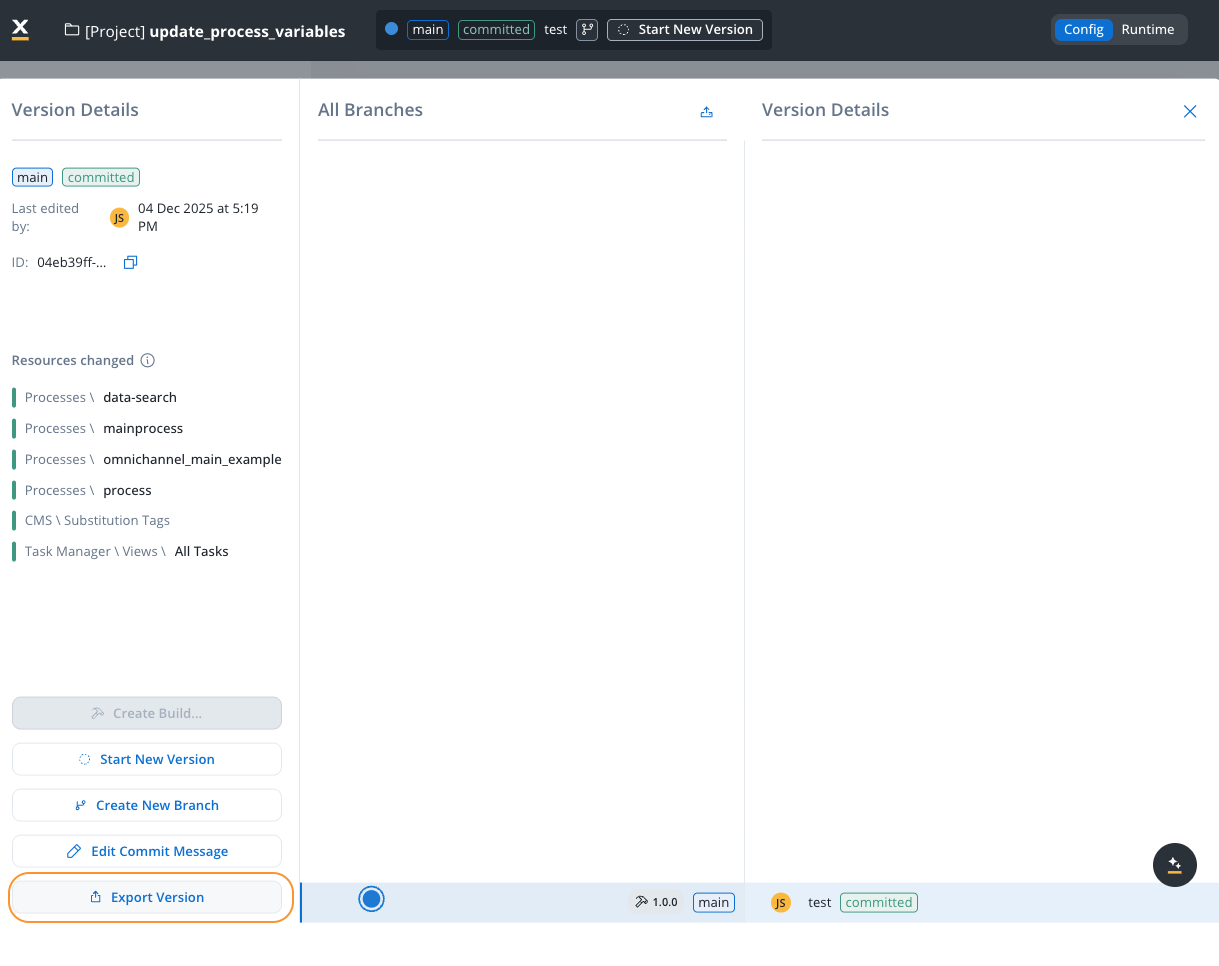
In the version details panel, locate the Export Version button
Click Export Version to open the export dialog
Export Version button in the Version Details panel
3
Choose the target version and options
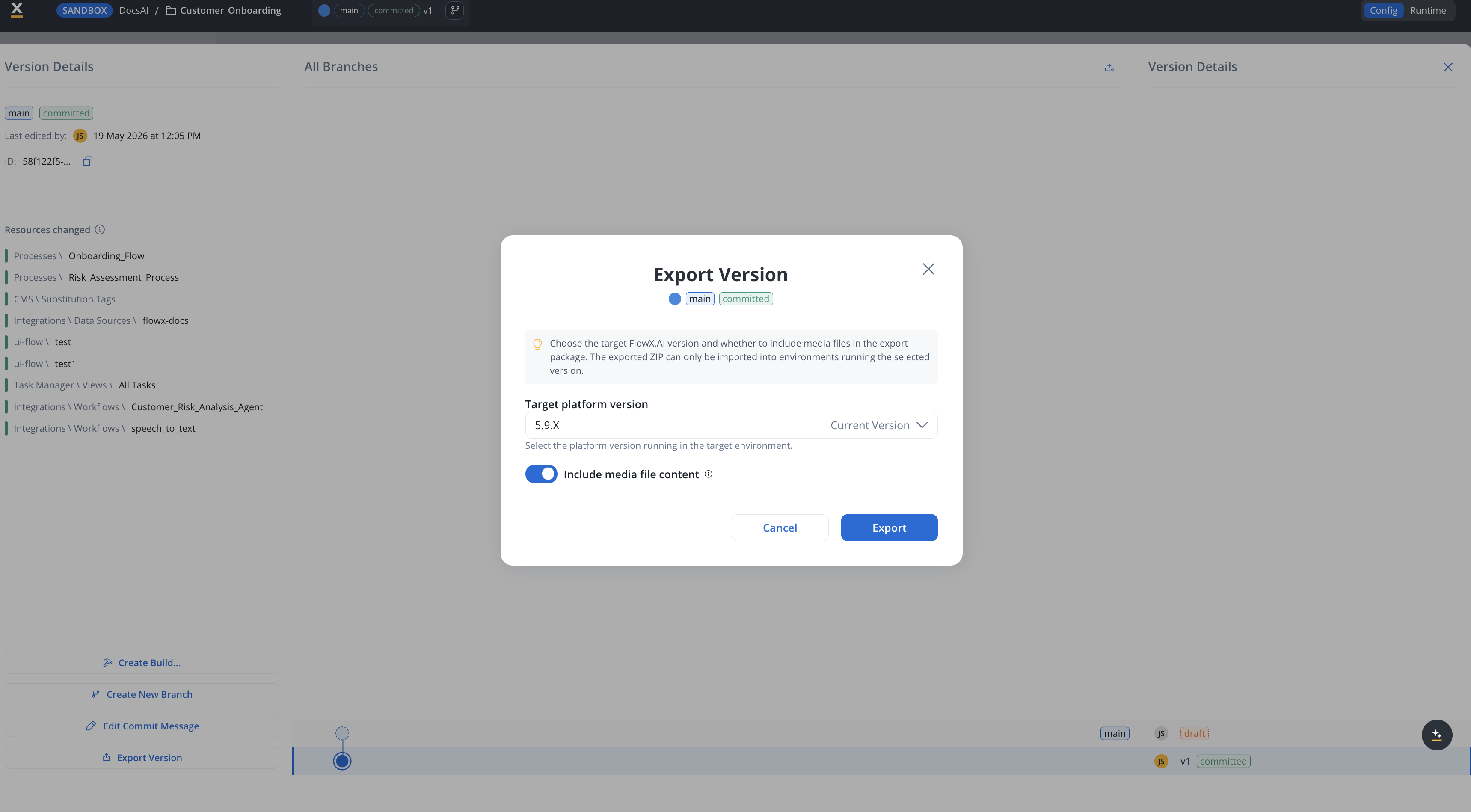
In the Export Version dialog, set two things:
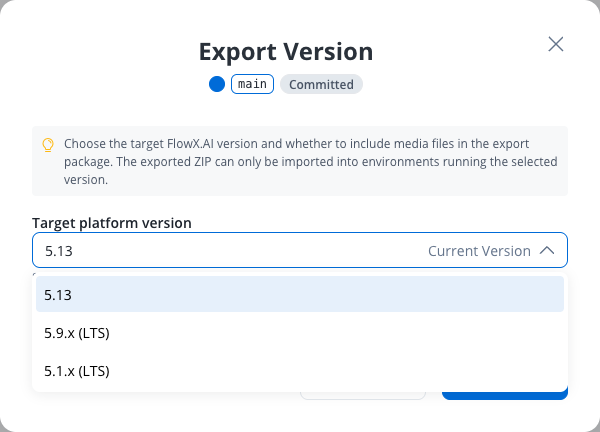
Target platform version - the platform version running in the environment you’ll import into. It defaults to Current Version (the version you’re exporting from). To import into an environment on a different LTS line (for example, a 5.9.x environment), select that version here. The exported ZIP can only be imported into environments running the selected version. See Cross-version export and import.
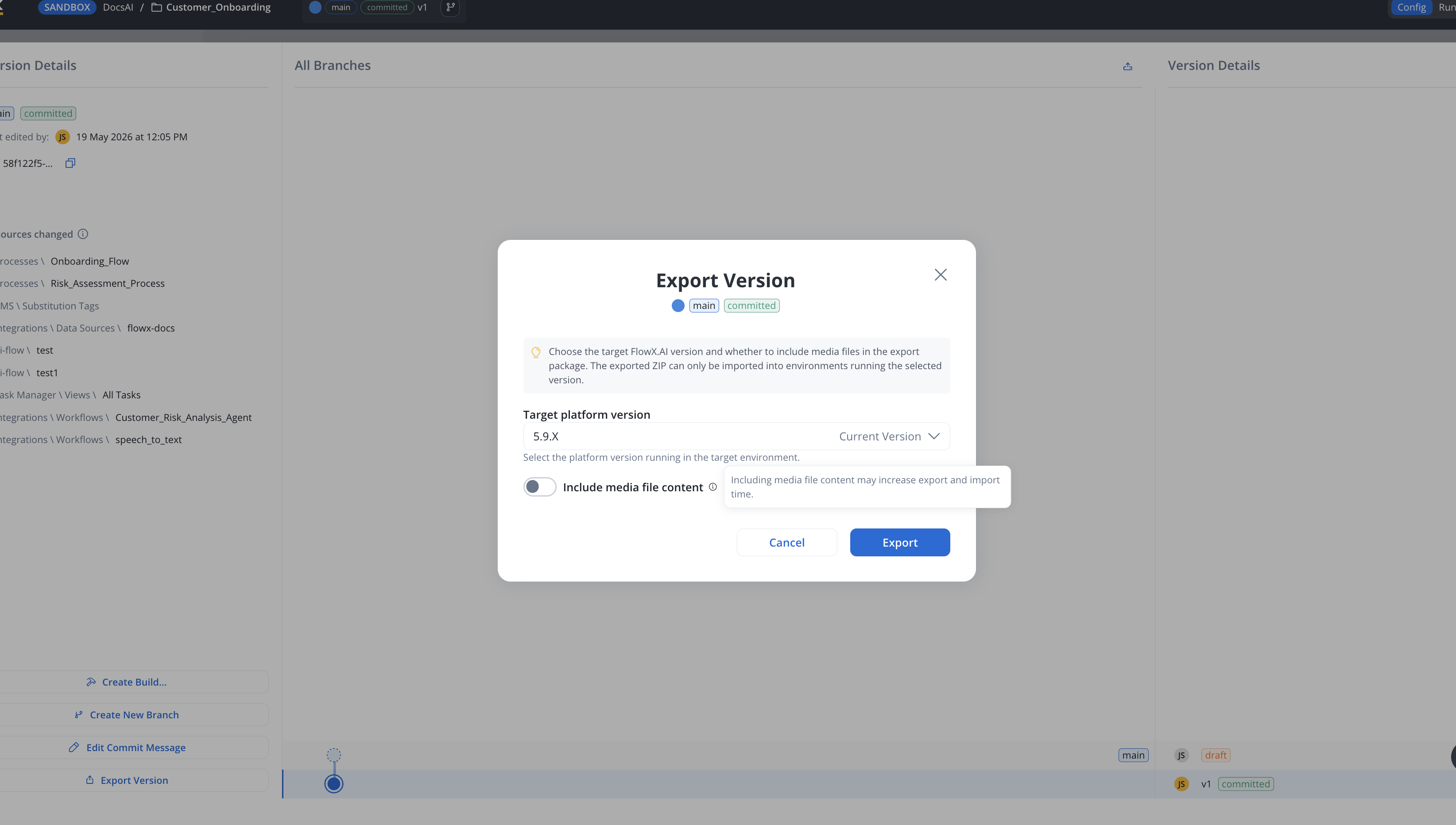
Include media file content - toggle ON to bundle media assets (for example, images and documents) into the export package. Toggle OFF to export only the project structure and configuration, which produces a smaller file and a faster import.
Including media file content may significantly increase the export file size and the time required to import the version in another environment. Only include it if the target environment needs those assets.
Export Version dialog with the Target platform version selector
Include media file content option
4
Complete the Export
Click Export to generate the export package
The system generates a downloadable file containing your project version
Save this file to your local system
Use a clear naming convention for your export files to help identify their contents later, such as [project-name]_[version]_[environment]_[date].zip.
For more information about versioning and managing project versions, see the Versioning documentation.
Knowledge Base stores are exported as definitions only. A version export carries the Knowledge Base data-source configuration (system, endpoints, metadata keys), but not the store contents — uploaded documents and their indexed embeddings stay on the source workspace. After importing on another workspace or environment, the stores appear empty: re-upload and re-index the content there. The media file content option above covers media assets, not Knowledge Base content.
In the Export Version and Export Build dialogs, Target platform version lists the platform version your environment runs by its version number, for example 6.0, marked Current Version and pre-selected. The older LTS line you can export for is listed as 5.9.x. Keep the pre-selected version when the target environment runs the same platform version, or pick 5.9.x for a 5.9.x environment, as described in Cross-version export and import.The downloaded ZIP is named after the package it contains:
Version export: {project-name}_{version-id}_flowx{target-version}_{media}.zip
{version-id} is the last 12 characters of the version ID, {target-version} is the target platform version you selected, and {media} is media or no-media depending on the Include media file content toggle. Characters in the project name other than letters, numbers, . and - are replaced with -. Exporting the same version or build with the same options always produces the same file name, so you can tell from the name alone which export files contain the same package.
You can also export builds directly from the Builds section. This is useful when you want to transfer a specific build (rather than a version) between environments.
1
Navigate to Builds Section
Open FlowX.AI Designer and go to the Projects section
Select your project and navigate to Runtime and then to the Builds section
2
Select Build to Export
Locate the build you want to export in the builds list
Click the Export icon (box with upward arrow) for the desired build
3
Complete Export
The build export follows the same process as version export, including the target platform version and media file content options. The exported build can be imported into other environments or workspaces.
Builds are immutable snapshots of committed project versions. When exporting a build, you’re exporting a deployable package that can be directly used in runtime environments. For more information about builds, see the Builds documentation.
Open FlowX.AI Designer in the target environment and go to the Projects section.
2
Open the Import menu
Click the three-dots (kebab) menu at the top right of the Projects list and choose one of:
Import Version — restores a project version (and its full version history) into the target environment. Use this when promoting work between environments.
Import Build — imports a build (an immutable snapshot of a committed version) into the Builds section. Use this when promoting a deployable package.
The menu only shows the items you have permission for.
You can also start an Import Version from inside an open project: open the All Branches view in the Version Details panel and click the upload icon in the panel header. This is functionally equivalent to Import Version from the Projects list.
3
Select the .zip file
The Designer opens your operating system’s file chooser. Select the .zip you exported earlier and confirm.
4
Wait for the import to complete
The import runs asynchronously. A notification tells you when the import starts and is replaced with the result, such as imported, failed, or timed out; see What sends a notification. There is no in-app preview, no confirmation dialog, and no manual conflict-resolution step between picking the file and the import completing — see Import scenarios below for what happens when the target environment already has the project.
If the target environment has versions on the same lineage as the import file, those versions are silently stashed during the import. There is no preview or confirmation step before this happens. See Existing project with additional versions for the consequences and the recommended workflow.
When importing a project, you may encounter different scenarios depending on whether the project already exists in the target environment and what versions are present.
If the project exists but doesn’t have versions beyond those in the import file, the system will update the existing project with any changes from the import file.
Importing restores the version history and parent–child relationships exactly as they exist in the import file. There is no merge functionality on import.
Versions become stashed, not merged
If the target environment has versions on the same lineage that are not in the import file, those versions become stashed: they remain in the database but are no longer accessible in the Designer. There is no UI to retrieve stashed versions — recovery requires direct database intervention by FlowX support and is not always feasible.
Importing on top of diverged work is destructive. If two environments committed different versions on the same branch, importing one over the other stashes the target version. The previous content cannot be restored from the Designer. Always export the target project before importing on top of it, and contact FlowX support if recovery is needed.
Recommended workflow: Use a separate branch per environment. On import, new branches are added alongside existing ones instead of overwriting versions on a shared lineage.
You can import the same project into multiple workspaces on the same environment. This removes the previous limitation that restricted a project (identified by its UUID) to exist in only one workspace per environment.
Cross-Workspace Import
Import a project build (and optionally a version) into a different workspace on the same environment. The imported project maintains its own independent lifecycle with separate active policies and access controls.
Key behaviors for cross-workspace import:
Aspect
Behavior
Lifecycle
The imported project has its own independent lifecycle in the new workspace
Active Policy
The imported build is automatically set as the active policy, regardless of what was active in the original workspace
Access Controls
Separate access controls and policies are defined for each workspace
No Impact on Original
The import does not affect the original project’s settings, policies, or process instances
User Access
Workspace users must be granted appropriate project rights (for example, project viewer) to interact with the imported project
Process Instances
Process instances are workspace-specific; the imported project starts with no instances until processes run in the new workspace
Database
Projects across workspaces on the same environment share the same database
Use case: Use this feature to represent different operational environments (UAT, Staging, Pre-production) as separate workspaces on a single FlowX deployment, reducing infrastructure and DevOps costs.
Workspaces documentation
Learn more about cross-workspace project management
Available starting with FlowX.AI 5.9.0Environments are not always on the same platform version. During a phased upgrade, lower environments (dev, test) are usually upgraded first, while upper environments (staging, production) stay on the previous version until the upgrade is validated and scheduled. Cross-version compatibility lets you export a project version or build from a higher platform version in a format that an environment running a lower platform version can import — so you can still ship fixes to an environment that hasn’t been upgraded yet.
When a problem is found in an upper environment during an upgrade window, the source-of-truth project version often already lives on an upgraded environment. Cross-version export and import lets you deliver the fix to the older environment without rolling back the upgrade on lower environments or rushing the upgrade of the upper ones.A 5.9.x export imports into a newer platform version with no extra steps. Going the other way is the case that needs handling — a newer export reaches a 5.9.x environment only when it is produced targeting 5.9.x, which is what this section covers.
Available starting with FlowX.AI 5.9.4When you import a project build or version exported from an older line, the imported theme is completed from the destination environment’s system theme. Theme components and tokens introduced after the export was taken are filled in, so newer components are not left unthemed. Values already set in the exported file are never overwritten, at any depth, so your customizations survive.Icons are not carried in the export file. Theme components reference them by key, and those assets are seeded per environment, so the destination environment supplies them.
Cross-version compatibility is supported between the platform version your environment runs and the 5.9.x LTS line, and is patch-agnostic in each supported direction: any 5.9.x export imports into this version, and an export that targets 5.9.x imports into any 5.9.x patch. The target version is chosen at export time; an export left on the current version cannot be imported into 5.9.x.
5.1.x is no longer a supported export target, and an export made on 5.1.x can’t be imported. A project version, build, or single resource exported from 5.1.x is refused before anything is stored, with this message:
This export was made on a FlowX version older than 5.9, which is no longer supported. Export it again from 5.9 or later.
To move content from a 5.1.x environment, import the 5.1.x export into a 5.9.x environment first, then export it again from there.
A cross-version export works only when the exported content stays within what the target (lower) platform version can understand. When you export targeting an older version, resources whose type doesn’t exist on that version are handled automatically:
Incompatible resources are excluded from the export and from the manifest, rather than failing the export.
A whole workflow is excluded when it uses something 5.9 can’t read. On a 5.9-targeted export, a workflow is left out if it contains a node type that 5.9 doesn’t have, a Deep Research AI node, an AI node that retrieves context from uploaded files, a knowledge base node that deletes or restores entries, a data source on a SOAP, PostgreSQL, or DB2 system, or a webhook or email trigger payload attribute in its data model. 5.9 would roll back the whole import on any of these, so the workflow is excluded instead of partially exported.
Resources that reference an excluded resource are still exported. Their usages are kept as-is and point to the now-missing resource; references are not removed and dependents are not cascade-excluded.
The excluded resources are listed in a separate manifest_excluded.json file in the archive. Kept resources stay in manifest.json. The excluded-list file is informational only and is ignored on import.
The export still imports successfully into the older environment.
Keep the fix on the upgraded environment limited to functionality that also exists on the older target version. Resource types, properties, or behaviors introduced after the target version cannot be carried over — they are excluded from the export and must wait until the target environment itself is upgraded.As a rule of thumb, the lowest platform version in the export/import path defines the set of functionality usable for that fix. As long as the fix uses only features available on the target version, the round trip is lossless.
Consider a phased upgrade where the lower environments are already on 6.0 but production is still on 5.9:
Environment
Platform version
dev
6.0
uat
6.0
production
5.9
A defect is reported in production (still on 5.9) and must be fixed before production is upgraded. The source-of-truth project version now lives on the upgraded dev/uat environments.
1
Apply the fix on the upgraded environment
Make the change in the project version on dev/uat (6.0), keeping it strictly within functionality that also exists on 5.9 — no resources, nodes, actions, or fields introduced after 5.9.
2
Validate the fix
Test the change on the upgraded environment as usual.
3
Export targeting the lower version
Export the project version or build targeting 5.9.x so the artifact is produced in a format the 5.9 runtime can import. Anything incompatible with 5.9 is excluded and listed in manifest_excluded.json, so you can review or rework it before proceeding.
4
Import into production
Import the compatible artifact into the 5.9 production environment. The fix is applied without upgrading production or rolling back the upgrade on dev/uat.
Provided the fix uses only functionality available in 5.9, no information is lost in the round trip. Anything that depends on post-5.9 functionality cannot be carried over and must wait until production is upgraded.
Plan your promotion path - Establish a clear workflow for moving from development to testing to production
Use consistent naming - Name your projects, versions, and export files consistently across environments
Pre-stage library dependencies for version imports - For any export that targets 5.9.x, a project version export records its library dependencies only as references to specific library builds; unlike a build export, it does not bundle the libraries themselves (see Version exports that bundle dependencies for exports that target the current version). Make sure those library builds already exist in the target environment before importing a version, or the import succeeds but the dependencies land as broken references.
Test after import - Always validate your project in the new environment after import
Version control - Consider using external version control systems in addition to FlowX.AI’s built-in versioning
Incremental imports - For large projects, consider importing incrementally rather than all at once
Export the target project before importing - Importing on top of diverged work stashes the target version, and stashed versions cannot be recovered from the Designer. Exporting the target first gives you a recovery point.
Issue: An export from a newer environment contains resources that the older target environment does not support.Solution: Export targeting the older platform version by selecting the target version when you export. A cross-version export automatically excludes resources that the target version can’t interpret and records them in a separate excluded-resources file inside the archive. The export imports successfully; review the excluded list and adjust any resources that referenced them. An export left on the current version cannot be imported into 5.9.x, and an export made on 5.1.x cannot be imported at all. See Cross-version export and import.
Missing Dependencies
Issue: Imported project references libraries or resources not present in the target environment.Solution: Import the required library builds into the target environment before importing the project version (when the export targets 5.9.x, a version archive references library builds but does not contain them; a build archive does include them), or update the project to use libraries already available in the target. Dependencies that can’t be resolved on import are flagged as broken references, and resources that use them become broken links.
Conflict Resolution
Issue: Conflicts between imported versions and existing versions.Solution: Carefully review the differences and decide whether to overwrite or preserve existing versions. Consider merging changes manually for complex conflicts.
Environment-Specific Configurations
Issue: Hard-coded environment-specific values in processes or configurations.Solution: Use environment variables and configuration parameters instead of hard-coded values to ease transitions between environments.
Ensure all process definitions, UI components, and other resources imported correctly
Configure Environment Settings
Adjust any environment-specific settings for the new environment
Test Process Flows
Validate that all process flows work as expected in the new environment
Create a Build
Create a build from your imported project for deployment
Last modified on October 30, 2026
{"docsConfig":{"theme":"mint","$schema":"https://mintlify.com/docs.json","name":"FlowX.AI","description":"Comprehensive documentation for FlowX.AI, the AI-driven process automation platform.","colors":{"primary":"#fcb813","light":"#fcb813","dark":"#fcb813"},"logo":{"light":"https://mintcdn.com/flowxai/38fXEM0a7v86Lg2m/logo/light.png?fit=max\u0026auto=format\u0026n=38fXEM0a7v86Lg2m\u0026q=85\u0026s=d767c06cef433b0a02f40a1f4f785eab","dark":"https://mintcdn.com/flowxai/38fXEM0a7v86Lg2m/logo/dark.png?fit=max\u0026auto=format\u0026n=38fXEM0a7v86Lg2m\u0026q=85\u0026s=6b8b8c3e7abd17acf6be8bffce4e599d"},"favicon":"https://mintcdn.com/flowxai/VVxnbzjz7JuL1Ngt/favicon2.svg?fit=max\u0026auto=format\u0026n=VVxnbzjz7JuL1Ngt\u0026q=85\u0026s=ef6a780a1ed3894c7b276bcc7b3c6c69","appearance":{"default":"dark","strict":false},"background":{"decoration":"grid","color":{"light":"#f4f4f5","dark":"#0a0b0d"}},"navbar":{"links":[],"primary":{"type":"button","label":"Academy","href":"https://academy.flowx.ai/"}},"footer":{"socials":{"linkedin":"https://www.linkedin.com/company/flowxai","x":"https://x.com/FlowX_ai","youtube":"https://www.youtube.com/@FlowX_AI"},"links":[{"header":"Documentation","items":[{"label":"Introduction","href":"https://docs.flowx.ai/5.9/docs/introduction"},{"label":"Platform overview","href":"https://docs.flowx.ai/5.9/docs/platform-overview/flowx-architecture"},{"label":"Designer","href":"https://docs.flowx.ai/5.9/docs/flowx-designer/overview"},{"label":"AI Platform","href":"https://docs.flowx.ai/5.9/ai-platform/ai-in-flowx"},{"label":"Use the docs with AI","href":"https://docs.flowx.ai/5.9/docs/getting-started/using-flowx-docs-with-ai"},{"label":"Release notes","href":"https://docs.flowx.ai/release-notes/overview"}]},{"header":"Resources","items":[{"label":"FlowX.AI Academy","href":"https://academy.flowx.ai"},{"label":"Support","href":"https://flowxai.zendesk.com/"}]},{"header":"Company","items":[{"label":"About FlowX.AI","href":"https://www.flowx.ai/about"},{"label":"Contact us","href":"mailto:hello@flowx.ai"},{"label":"Careers","href":"https://apply.workable.com/flowxai"}]},{"header":"Legal","items":[{"label":"Privacy Policy","href":"https://www.flowx.ai/privacy-policy"},{"label":"Cookie Policy","href":"https://www.flowx.ai/cookie-policy"},{"label":"Terms and Conditions","href":"https://www.flowx.ai/terms-and-conditions"}]}]},"search":{"prompt":"Search the docs"},"seo":{"metatags":{"zd-site-verification":"94tteg5ir5of8gkb4twzh"}},"fonts":{"heading":{"family":"Sora"},"body":{"family":"Geist"}},"styling":{"eyebrows":"breadcrumbs","codeblocks":"dark","latex":true},"integrations":{"ga4":{"measurementId":"G-CGW0FVK9YM"}},"banner":{"content":"🚀 [See the latest FlowX.AI releases →](/release-notes/overview)","dismissible":true},"contextual":{"options":["copy","view","chatgpt","claude","perplexity","mcp","cursor","vscode"],"display":"header"},"metadata":{"timestamp":true},"navigation":{"pages":[]}},"deployment":{"deploymentMetadataValue":{"subdomain":"flowxai","hasAudioNarration":false,"actualSubdomain":"flowxai","customDomains":["docs.flowx.ai"],"gitSource":{"type":"github","owner":"flowx-ai","repo":"flowx-docs","deployBranch":"main","contentDirectory":"","isPrivate":true,"mountPath":"","label":""},"chroma":{"liveDeploymentHistoryId":"6ae4c8fd7f8a500a1fd86923","collectionId":"f43bb162-8d91-4fce-8112-9a85f1f82724","schemaVersion":"v3","latestBuiltDeploymentHistoryId":"6ae4c8fd7f8a500a1fd86923"},"feedback":{"thumbs":true,"contextualFeedback":{"allowEmail":true},"agentFeedback":true},"entitlements":{"AI_CHAT":{"status":"ENABLED"},"CONTEXTUAL_FEEDBACK":{"status":"ENABLED"},"CODE_SNIPPET_FEEDBACK":{"status":"ENABLED"},"WEB_MCP":{"status":"ENABLED"},"NARRATION":{"status":"ENABLED"}},"buildId":"6ae4c8fd7f8a500a1fd86923","clientVersion":"0.0.4039","searchFilterCounts":[{"language":"default","tag":"Documentation","count":787},{"language":"default","tag":"Building blocks","count":329},{"language":"default","tag":"Platform deep dive","count":257},{"language":"default","tag":"Setup guides","count":191},{"language":"default","tag":"UI Designer","count":140},{"language":"default","tag":"Release notes","count":137},{"language":"default","tag":"Release Notes","count":137},{"language":"default","tag":"Microservices","count":112},{"language":"default","tag":"Core extensions","count":107},{"language":"default","tag":"Nodes","count":88}],"searchSettings":{"isFiltersEnabled":true}},"assistantConfig":{"enableAskAiButton":false,"enableStarterQuestions":false,"enableContextualStarterQuestions":true,"enableAskAiSearchBar":true,"deflection":{"enabled":true,"type":"email","email":"learning.team@flowx.ai","showHelpButton":true}},"basePath":"","hasChatPermissions":true,"hasWebMcpPermissions":true,"toggles":[{"name":"kill-isr","enabled":true,"variant":{"name":"disabled","enabled":false,"feature_enabled":true},"impressionData":false},{"name":"agent-mintlify-slack","enabled":true,"variant":{"name":"disabled","enabled":false,"feature_enabled":true},"impressionData":false},{"name":"agent-integrations-settings","enabled":true,"variant":{"name":"disabled","enabled":false,"feature_enabled":true},"impressionData":false},{"name":"automations-pr-grouping","enabled":true,"variant":{"name":"disabled","enabled":false,"feature_enabled":true},"impressionData":false},{"name":"custom-prefix","enabled":true,"variant":{"name":"disabled","enabled":false,"feature_enabled":true},"impressionData":false},{"name":"analytics-v7","enabled":true,"variant":{"name":"disabled","enabled":false,"feature_enabled":true},"impressionData":false},{"name":"user-flows-analytics","enabled":true,"variant":{"name":"disabled","enabled":false,"feature_enabled":true},"impressionData":false},{"name":"no-publish-flow","enabled":true,"variant":{"name":"disabled","enabled":false,"feature_enabled":true},"impressionData":false},{"name":"workos-onboarding","enabled":true,"variant":{"name":"disabled","enabled":false,"feature_enabled":true},"impressionData":false},{"name":"llms-txt-v2","enabled":true,"variant":{"name":"disabled","enabled":false,"feature_enabled":true},"impressionData":false},{"name":"snapshot-serving-live","enabled":true,"variant":{"name":"disabled","enabled":false,"feature_enabled":true},"impressionData":false},{"name":"stripTemperatureMiddleware","enabled":true,"variant":{"name":"disabled","enabled":false,"feature_enabled":true},"impressionData":false},{"name":"support-platform-pylon-zendesk","enabled":true,"variant":{"name":"disabled","enabled":false,"feature_enabled":true},"impressionData":false},{"name":"snapshot-serving","enabled":true,"variant":{"name":"disabled","enabled":false,"feature_enabled":true},"impressionData":false},{"name":"instant-rollback","enabled":true,"variant":{"name":"disabled","enabled":false,"feature_enabled":true},"impressionData":false},{"name":"granular-notifications-server","enabled":true,"variant":{"name":"disabled","enabled":false,"feature_enabled":true},"impressionData":false},{"name":"granular-notifications","enabled":true,"variant":{"name":"disabled","enabled":false,"feature_enabled":true},"impressionData":false},{"name":"automations-fable","enabled":true,"variant":{"name":"disabled","enabled":false,"feature_enabled":true},"impressionData":false},{"name":"fixed-ai-action-pricing","enabled":true,"variant":{"name":"disabled","enabled":false,"feature_enabled":true},"impressionData":false},{"name":"automation-resolve-merge-conflict","enabled":true,"variant":{"name":"disabled","enabled":false,"feature_enabled":true},"impressionData":false},{"name":"scoped-publishing","enabled":true,"variant":{"name":"disabled","enabled":false,"feature_enabled":true},"impressionData":false},{"name":"mintql","enabled":true,"variant":{"name":"disabled","enabled":false,"feature_enabled":true},"impressionData":false},{"name":"page-level-analytics","enabled":true,"variant":{"name":"disabled","enabled":false,"feature_enabled":true},"impressionData":false},{"name":"editor-version-history-v2","enabled":true,"variant":{"name":"disabled","enabled":false,"feature_enabled":true},"impressionData":false},{"name":"billing-page-v2","enabled":true,"variant":{"name":"disabled","enabled":false,"feature_enabled":true},"impressionData":false},{"name":"full-page-search","enabled":true,"variant":{"name":"disabled","enabled":false,"feature_enabled":true},"impressionData":false},{"name":"workspace-projects","enabled":true,"variant":{"name":"disabled","enabled":false,"feature_enabled":true},"impressionData":false},{"name":"assistant-v5","enabled":true,"variant":{"name":"disabled","enabled":false,"feature_enabled":true},"impressionData":false},{"name":"byok-sep-25","enabled":true,"variant":{"name":"disabled","enabled":false,"feature_enabled":true},"impressionData":false},{"name":"fork-pr-previews","enabled":true,"variant":{"name":"disabled","enabled":false,"feature_enabled":true},"impressionData":false},{"name":"revalidation-jwt","enabled":true,"variant":{"name":"disabled","enabled":false,"feature_enabled":true},"impressionData":false},{"name":"vite-origin","enabled":true,"variant":{"name":"disabled","enabled":false,"feature_enabled":true},"impressionData":false},{"name":"billing-updated-9-15","enabled":true,"variant":{"name":"disabled","enabled":false,"feature_enabled":true},"impressionData":false},{"name":"workos-sso-scim","enabled":true,"variant":{"name":"disabled","enabled":false,"feature_enabled":true},"impressionData":false},{"name":"hobby-abuse-scan","enabled":true,"variant":{"name":"disabled","enabled":false,"feature_enabled":true},"impressionData":false},{"name":"dashboard-inbox","enabled":true,"variant":{"name":"disabled","enabled":false,"feature_enabled":true},"impressionData":false},{"name":"workos-signup","enabled":true,"variant":{"name":"disabled","enabled":false,"feature_enabled":true},"impressionData":false},{"name":"workos-enabled","enabled":true,"variant":{"name":"disabled","enabled":false,"feature_enabled":true},"impressionData":false},{"name":"approve-review-flow","enabled":true,"variant":{"name":"disabled","enabled":false,"feature_enabled":true},"impressionData":false}],"privacy":{"consentBanner":{"enabled":true}},"googleFontsInlined":true},"customCss":[{"filePath":"custom.css","content":"/* cyrillic-ext */\n@font-face {\n font-family: 'Geist Mono';\n font-style: normal;\n font-weight: 400;\n font-display: swap;\n src: url(/_mintlify/assets/fonts/google/s/geistmono/v6/or3nQ6H-1_WfwkMZI_qYFrodmgPn.woff2) format('woff2');\n unicode-range: U+0460-052F, U+1C80-1C8A, U+20B4, U+2DE0-2DFF, U+A640-A69F, U+FE2E-FE2F;\n}\n/* cyrillic */\n@font-face {\n font-family: 'Geist Mono';\n font-style: normal;\n font-weight: 400;\n font-display: swap;\n src: url(/_mintlify/assets/fonts/google/s/geistmono/v6/or3nQ6H-1_WfwkMZI_qYFrMdmgPn.woff2) format('woff2');\n unicode-range: U+0301, U+0400-045F, U+0490-0491, U+04B0-04B1, U+2116;\n}\n/* symbols2 */\n@font-face {\n font-family: 'Geist Mono';\n font-style: normal;\n font-weight: 400;\n font-display: swap;\n src: url(/_mintlify/assets/fonts/google/s/geistmono/v6/or3nQ6H-1_WfwkMZI_qYFg08vz7ehw.woff2) format('woff2');\n unicode-range: U+2000-2001, U+2004-2008, U+200A, U+23B8-23BD, U+2500-259F;\n}\n/* vietnamese */\n@font-face {\n font-family: 'Geist Mono';\n font-style: normal;\n font-weight: 400;\n font-display: swap;\n src: url(/_mintlify/assets/fonts/google/s/geistmono/v6/or3nQ6H-1_WfwkMZI_qYFrgdmgPn.woff2) format('woff2');\n unicode-range: U+0102-0103, U+0110-0111, U+0128-0129, U+0168-0169, U+01A0-01A1, U+01AF-01B0, U+0300-0301, U+0303-0304, U+0308-0309, U+0323, U+0329, U+1EA0-1EF9, U+20AB;\n}\n/* latin-ext */\n@font-face {\n font-family: 'Geist Mono';\n font-style: normal;\n font-weight: 400;\n font-display: swap;\n src: url(/_mintlify/assets/fonts/google/s/geistmono/v6/or3nQ6H-1_WfwkMZI_qYFrkdmgPn.woff2) format('woff2');\n unicode-range: U+0100-02BA, U+02BD-02C5, U+02C7-02CC, U+02CE-02D7, U+02DD-02FF, U+0304, U+0308, U+0329, U+1D00-1DBF, U+1E00-1E9F, U+1EF2-1EFF, U+2020, U+20A0-20AB, U+20AD-20C4, U+2113, U+2C60-2C7F, U+A720-A7FF;\n}\n/* latin */\n@font-face {\n font-family: 'Geist Mono';\n font-style: normal;\n font-weight: 400;\n font-display: swap;\n src: url(/_mintlify/assets/fonts/google/s/geistmono/v6/or3nQ6H-1_WfwkMZI_qYFrcdmg.woff2) format('woff2');\n unicode-range: U+0000-00FF, U+0131, U+0152-0153, U+02BB-02BC, U+02C6, U+02DA, U+02DC, U+0304, U+0308, U+0329, U+2000-206F, U+20AC, U+2122, U+2191, U+2193, U+2212, U+2215, U+FEFF, U+FFFD;\n}\n/* cyrillic-ext */\n@font-face {\n font-family: 'Geist Mono';\n font-style: normal;\n font-weight: 500;\n font-display: swap;\n src: url(/_mintlify/assets/fonts/google/s/geistmono/v6/or3nQ6H-1_WfwkMZI_qYFrodmgPn.woff2) format('woff2');\n unicode-range: U+0460-052F, U+1C80-1C8A, U+20B4, U+2DE0-2DFF, U+A640-A69F, U+FE2E-FE2F;\n}\n/* cyrillic */\n@font-face {\n font-family: 'Geist Mono';\n font-style: normal;\n font-weight: 500;\n font-display: swap;\n src: url(/_mintlify/assets/fonts/google/s/geistmono/v6/or3nQ6H-1_WfwkMZI_qYFrMdmgPn.woff2) format('woff2');\n unicode-range: U+0301, U+0400-045F, U+0490-0491, U+04B0-04B1, U+2116;\n}\n/* symbols2 */\n@font-face {\n font-family: 'Geist Mono';\n font-style: normal;\n font-weight: 500;\n font-display: swap;\n src: url(/_mintlify/assets/fonts/google/s/geistmono/v6/or3nQ6H-1_WfwkMZI_qYFg08vz7ehw.woff2) format('woff2');\n unicode-range: U+2000-2001, U+2004-2008, U+200A, U+23B8-23BD, U+2500-259F;\n}\n/* vietnamese */\n@font-face {\n font-family: 'Geist Mono';\n font-style: normal;\n font-weight: 500;\n font-display: swap;\n src: url(/_mintlify/assets/fonts/google/s/geistmono/v6/or3nQ6H-1_WfwkMZI_qYFrgdmgPn.woff2) format('woff2');\n unicode-range: U+0102-0103, U+0110-0111, U+0128-0129, U+0168-0169, U+01A0-01A1, U+01AF-01B0, U+0300-0301, U+0303-0304, U+0308-0309, U+0323, U+0329, U+1EA0-1EF9, U+20AB;\n}\n/* latin-ext */\n@font-face {\n font-family: 'Geist Mono';\n font-style: normal;\n font-weight: 500;\n font-display: swap;\n src: url(/_mintlify/assets/fonts/google/s/geistmono/v6/or3nQ6H-1_WfwkMZI_qYFrkdmgPn.woff2) format('woff2');\n unicode-range: U+0100-02BA, U+02BD-02C5, U+02C7-02CC, U+02CE-02D7, U+02DD-02FF, U+0304, U+0308, U+0329, U+1D00-1DBF, U+1E00-1E9F, U+1EF2-1EFF, U+2020, U+20A0-20AB, U+20AD-20C4, U+2113, U+2C60-2C7F, U+A720-A7FF;\n}\n/* latin */\n@font-face {\n font-family: 'Geist Mono';\n font-style: normal;\n font-weight: 500;\n font-display: swap;\n src: url(/_mintlify/assets/fonts/google/s/geistmono/v6/or3nQ6H-1_WfwkMZI_qYFrcdmg.woff2) format('woff2');\n unicode-range: U+0000-00FF, U+0131, U+0152-0153, U+02BB-02BC, U+02C6, U+02DA, U+02DC, U+0304, U+0308, U+0329, U+2000-206F, U+20AC, U+2122, U+2191, U+2193, U+2212, U+2215, U+FEFF, U+FFFD;\n}\n/* cyrillic-ext */\n@font-face {\n font-family: 'Geist Mono';\n font-style: normal;\n font-weight: 600;\n font-display: swap;\n src: url(/_mintlify/assets/fonts/google/s/geistmono/v6/or3nQ6H-1_WfwkMZI_qYFrodmgPn.woff2) format('woff2');\n unicode-range: U+0460-052F, U+1C80-1C8A, U+20B4, U+2DE0-2DFF, U+A640-A69F, U+FE2E-FE2F;\n}\n/* cyrillic */\n@font-face {\n font-family: 'Geist Mono';\n font-style: normal;\n font-weight: 600;\n font-display: swap;\n src: url(/_mintlify/assets/fonts/google/s/geistmono/v6/or3nQ6H-1_WfwkMZI_qYFrMdmgPn.woff2) format('woff2');\n unicode-range: U+0301, U+0400-045F, U+0490-0491, U+04B0-04B1, U+2116;\n}\n/* symbols2 */\n@font-face {\n font-family: 'Geist Mono';\n font-style: normal;\n font-weight: 600;\n font-display: swap;\n src: url(/_mintlify/assets/fonts/google/s/geistmono/v6/or3nQ6H-1_WfwkMZI_qYFg08vz7ehw.woff2) format('woff2');\n unicode-range: U+2000-2001, U+2004-2008, U+200A, U+23B8-23BD, U+2500-259F;\n}\n/* vietnamese */\n@font-face {\n font-family: 'Geist Mono';\n font-style: normal;\n font-weight: 600;\n font-display: swap;\n src: url(/_mintlify/assets/fonts/google/s/geistmono/v6/or3nQ6H-1_WfwkMZI_qYFrgdmgPn.woff2) format('woff2');\n unicode-range: U+0102-0103, U+0110-0111, U+0128-0129, U+0168-0169, U+01A0-01A1, U+01AF-01B0, U+0300-0301, U+0303-0304, U+0308-0309, U+0323, U+0329, U+1EA0-1EF9, U+20AB;\n}\n/* latin-ext */\n@font-face {\n font-family: 'Geist Mono';\n font-style: normal;\n font-weight: 600;\n font-display: swap;\n src: url(/_mintlify/assets/fonts/google/s/geistmono/v6/or3nQ6H-1_WfwkMZI_qYFrkdmgPn.woff2) format('woff2');\n unicode-range: U+0100-02BA, U+02BD-02C5, U+02C7-02CC, U+02CE-02D7, U+02DD-02FF, U+0304, U+0308, U+0329, U+1D00-1DBF, U+1E00-1E9F, U+1EF2-1EFF, U+2020, U+20A0-20AB, U+20AD-20C4, U+2113, U+2C60-2C7F, U+A720-A7FF;\n}\n/* latin */\n@font-face {\n font-family: 'Geist Mono';\n font-style: normal;\n font-weight: 600;\n font-display: swap;\n src: url(/_mintlify/assets/fonts/google/s/geistmono/v6/or3nQ6H-1_WfwkMZI_qYFrcdmg.woff2) format('woff2');\n unicode-range: U+0000-00FF, U+0131, U+0152-0153, U+02BB-02BC, U+02C6, U+02DA, U+02DC, U+0304, U+0308, U+0329, U+2000-206F, U+20AC, U+2122, U+2191, U+2193, U+2212, U+2215, U+FEFF, U+FFFD;\n}\n@keyframes fxh-tick-pulse{0%,to{opacity:1}50%{opacity:.35}}@keyframes fxh-caret-blink{50%{opacity:0}}@keyframes fxh-ln-in{to{opacity:1;transform:none}}@keyframes fxh-rv-in{to{opacity:1;transform:none}}@keyframes fxl-stack-ride{0%{top:0;opacity:0}4%{opacity:1}52%{top:calc(100% - 7px);opacity:1}58%,to{top:calc(100% - 7px);opacity:0}}@keyframes fxl-stack-lit{0%,2%,30%,to{color:var(--fxl-faint)}18%,6%{color:var(--fxl-text)}}@keyframes fxl-stack-tick{0%,2%,30%,to{background:var(--fxl-line)}18%,6%{background:#fcb813}}code,kbd,pre,samp{font-family:\"Geist Mono\",ui-monospace,SFMono-Regular,Menlo,monospace}#topbar-cta-button{color:#131007!important}.label-version{display:inline-block;font-weight:700;color:#fff;background-color:#007bff;padding:.5px 15px;border-radius:12px;box-shadow:0 2px 4px rgba(0,0,0,.1);font-size:.9em;text-transform:uppercase;letter-spacing:.5px;margin-right:5px;transition:background-color .3s ease;text-decoration:none}.label-version:hover{background-color:#0056b3}#banner{background:linear-gradient(90deg,#0a0b0d 0,#0e1013 55%,#2a2310 100%)!important;border-bottom:1px solid rgba(252,184,19,.3);backdrop-filter:saturate(120%)}#banner a{color:#fcb813!important;text-decoration-color:rgba(252,184,19,.55)!important;transition:opacity .2s ease}#banner a:hover{opacity:.85}:root{--flowx-yellow-50:#fff8e7;--flowx-yellow-200:#ffdf92;--flowx-yellow-400:#ffc739;--flowx-yellow-500:#fcb813;--flowx-yellow-800:#8a5e00;--flowx-yellow-900:#6b4e08;--flowx-neutrals-50:#f7f8f9;--flowx-neutrals-100:#e3e8ed;--flowx-neutrals-200:#cbd1db;--flowx-neutrals-300:#a6b0be;--flowx-neutrals-400:#8390a2;--flowx-neutrals-500:#64748b;--flowx-neutrals-700:#475263;--flowx-neutrals-800:#2a313a;--flowx-neutrals-900:#1d232c;--flowx-blue-50:#e6f0fb;--flowx-blue-200:#8abbed;--flowx-blue-700:#004c99;--flowx-blue-900:#002d5b;--flowx-elevation-m:0 8px 16px #1634621a}.cb-wrap{margin-top:32px}.cb-filters{display:flex;flex-wrap:wrap;gap:8px;margin-bottom:24px}.cb-filters input{position:absolute;width:1px;height:1px;overflow:hidden;clip:rect(0 0 0 0);white-space:nowrap}.cb-filters label{cursor:pointer;user-select:none;font-size:12px;line-height:16px;font-weight:600;padding:8px 16px;border-radius:120px;border:1px solid var(--flowx-neutrals-200);color:var(--flowx-neutrals-500);background:0 0;transition:border-color .15s ease,background .15s ease,color .15s ease}.cb-filters label span{margin-left:6px;opacity:.55;font-variant-numeric:tabular-nums}.cb-filters label:hover{border-color:var(--flowx-yellow-500);color:var(--flowx-neutrals-900)}.cb-filters input:checked+label,.dark .cb-filters input:checked+label{background:var(--flowx-yellow-500);border-color:var(--flowx-yellow-500);color:var(--flowx-neutrals-900)}.cb-filters input:focus-visible+label{outline:2px solid var(--flowx-yellow-500);outline-offset:2px}.dark .cb-filters label{border-color:var(--flowx-neutrals-700);color:var(--flowx-neutrals-400)}.dark .cb-filters label:hover{border-color:var(--flowx-yellow-400);color:var(--flowx-neutrals-50)}.cb-grid{display:grid;grid-template-columns:repeat(3,minmax(0,1fr));gap:16px}@media (max-width:1024px){.cb-grid{grid-template-columns:repeat(2,minmax(0,1fr))}}@media (max-width:640px){.cb-grid{grid-template-columns:1fr}}.cb-wrap:has(#cb-conv:checked) .cb-card:not([data-f~=conversational]),.cb-wrap:has(#cb-cookbook:checked) .cb-card:not([data-f~=cookbook]),.cb-wrap:has(#cb-docs:checked) .cb-card:not([data-f~=docs]),.cb-wrap:has(#cb-guide:checked) .cb-card:not([data-f~=guide]),.cb-wrap:has(#cb-integr:checked) .cb-card:not([data-f~=integrations]),.cb-wrap:has(#cb-pattern:checked) .cb-card:not([data-f~=pattern]),.cb-wrap:has(#cb-tutorial:checked) .cb-card:not([data-f~=tutorial]),.cb-wrap:has(#cb-ui:checked) .cb-card:not([data-f~=ui]){display:none}.cb-card{position:relative;display:flex;flex-direction:column;gap:12px;padding:24px;border:1px solid var(--flowx-neutrals-100);border-radius:16px;background:0 0;text-decoration:none!important;transition:border-color .2s ease,transform .2s ease,box-shadow .2s ease}.cb-card::after{content:\"\\2192\";position:absolute;top:20px;right:24px;font-size:14px;line-height:22px;color:var(--flowx-neutrals-300);transition:color .2s ease,transform .2s ease}.cb-card:hover{transform:translateY(-2px);border-color:var(--flowx-yellow-500);box-shadow:var(--flowx-elevation-m)}.cb-card:hover::after{color:var(--flowx-neutrals-900);transform:translateX(4px)}.dark .cb-card{border-color:var(--flowx-neutrals-800)}.dark .cb-card:hover{border-color:var(--flowx-yellow-400);box-shadow:0 8px 16px rgba(0,0,0,.4)}.dark .cb-card:hover::after,.dark .cb-foot a:hover{color:var(--flowx-yellow-400)}@media (prefers-reduced-motion:reduce){.cb-card,.cb-card::after{transition:none}.cb-card:hover,.cb-card:hover::after{transform:none}}.cb-tags{display:flex;flex-wrap:wrap;gap:6px;padding-right:24px}.cb-tag{font-size:10px;line-height:12px;font-weight:600;letter-spacing:.05em;text-transform:uppercase;padding:4px 8px;border-radius:4px;background:var(--flowx-neutrals-50);color:var(--flowx-neutrals-500)}.cb-tag-tut{background:var(--flowx-yellow-50);color:var(--flowx-yellow-800)}.cb-tag-pat{background:var(--flowx-neutrals-900);color:#fff}.cb-tag-cook{background:var(--flowx-yellow-500);color:var(--flowx-neutrals-900)}.cb-tag-gui{background:var(--flowx-blue-50);color:var(--flowx-blue-700)}.dark .cb-tag{background:var(--flowx-neutrals-800);color:var(--flowx-neutrals-400)}.dark .cb-tag-tut{background:var(--flowx-yellow-900);color:var(--flowx-yellow-200)}.dark .cb-tag-pat{background:var(--flowx-neutrals-50);color:var(--flowx-neutrals-900)}.dark .cb-tag-cook{background:var(--flowx-yellow-500);color:var(--flowx-neutrals-900)}.dark .cb-tag-gui{background:var(--flowx-blue-900);color:var(--flowx-blue-200)}.cb-foot a,.cb-title{font-weight:600;color:var(--flowx-neutrals-900)}.cb-title{display:block;font-size:14px;line-height:22px;letter-spacing:-.01em}.dark .cb-foot a,.dark .cb-title{color:var(--flowx-neutrals-50)}.cb-desc{display:block;font-size:12px;line-height:18px;font-weight:400;color:var(--flowx-neutrals-500)}.cb-foot span,.dark .cb-desc{color:var(--flowx-neutrals-400)}.cb-foot{display:flex;flex-wrap:wrap;align-items:baseline;gap:16px;margin-top:40px;padding-top:24px;border-top:1px solid var(--flowx-neutrals-100);font-size:12px;line-height:16px}.dark .cb-foot{border-top-color:var(--flowx-neutrals-800)}.dark .cb-foot span{color:var(--flowx-neutrals-500)}.cb-foot a{text-decoration:none;border-bottom:1px solid var(--flowx-yellow-500);padding-bottom:1px}.cb-foot a:hover{color:var(--flowx-yellow-800)}#content-area:has(.fxh-hero) #header{display:none}main#content-container:has(.fxh-hero){max-width:none}#content-area:has(.fxh-hero){width:100%!important}#content-area:has(.fxh-hero) #content{max-width:none;margin-top:0}#content-area:has(.fxh-hero) #content div[class*=\"--page-padding\"]{--page-padding:0px}#content-area:has(.fxh-hero) #content>:not(.fxh-hero){max-width:1360px;margin-left:auto;margin-right:auto}.fxh-hero{position:relative;text-align:center}@media (min-width:1024px){.fxh-hero{margin-top:-2.5rem}}.fxh-hero__bg{position:sticky;top:0;z-index:0;height:100dvh;overflow:clip;border-radius:18px;background:#0a0b0d;border:1px solid rgba(255,255,255,.08)}.fxh-hero__bg::after,.fxh-hero__bg::before{content:\"\";position:absolute;pointer-events:none}.fxh-hero__bg::before{inset:0;background-image:linear-gradient(rgba(255,255,255,.045) 1px,transparent 1px),linear-gradient(90deg,rgba(255,255,255,.045) 1px,transparent 1px);background-size:56px 56px;-webkit-mask-image:radial-gradient(ellipse at 50% 0,#000 25%,transparent 75%);mask-image:radial-gradient(ellipse at 50% 0,#000 25%,transparent 75%)}.fxh-hero__bg::after{top:-45%;left:25%;width:50%;height:90%;background:radial-gradient(closest-side,rgba(252,184,19,.1),transparent 70%)}.fxh-hero__steps{position:relative;z-index:1;margin-top:-100dvh}.fxh-hero__step{position:relative;min-height:calc(100dvh - 9.5rem);display:grid;grid-template-columns:minmax(0,1fr);align-content:center;padding:48px clamp(24px,5vw,56px) 96px}.fxh-hero__step:not(:first-child){min-height:72dvh;padding-top:48px;padding-bottom:48px}.fxh-hero--single .fxh-hero__bg{position:absolute;inset:0;height:auto;z-index:0}.fxh-hero--single .fxh-hero__steps{margin-top:0}.fxh-hero--single .fxh-hero__step{min-height:calc(100dvh - 9.5rem)}.fxh-hero--slim .fxh-hero__step{min-height:min(46dvh,480px);padding-top:clamp(40px,6vh,64px);padding-bottom:clamp(40px,6vh,64px)}.fxh-step-title{display:block;font-family:\"Sora\",sans-serif;font-size:clamp(1.7rem,3.4vw,2.6rem);font-weight:700;letter-spacing:-.02em;line-height:1.1;color:#f5f5f0;max-width:20ch;margin:0 auto clamp(18px,3vh,28px)}.fxh-vs{display:flex;flex-wrap:wrap;justify-content:center;gap:clamp(9px,1.1vw,14px);max-width:min(780px,100%);margin:clamp(14px,3vh,30px) auto 0;padding:0;list-style:none}.fxh-vs li{display:flex;align-items:center;gap:12px;padding:11px clamp(18px,1.6vw,24px);border:1px solid rgba(255,255,255,.14);background:rgba(255,255,255,.035);-webkit-backdrop-filter:blur(12px);backdrop-filter:blur(12px);border-radius:999px}.fxh-vs__no{font-family:\"Geist Mono\",ui-monospace,SFMono-Regular,Menlo,monospace;font-size:11px;color:rgba(255,255,255,.42)}.fxh-vs__name{font-family:\"Sora\",sans-serif;font-size:clamp(12.5px,1.1vw,15px);font-weight:600;letter-spacing:.01em;color:rgba(255,255,255,.9)}.fxh-scroll{position:absolute;bottom:clamp(20px,4vh,40px);left:50%;transform:translateX(-50%);display:flex;flex-direction:column;align-items:center;gap:8px;font-family:\"Geist Mono\",ui-monospace,SFMono-Regular,Menlo,monospace;font-size:10px;letter-spacing:.3em;text-transform:uppercase;color:rgba(255,255,255,.42)}.fxh-scroll-line{width:1px;height:46px;background:linear-gradient(rgba(255,255,255,.45),transparent)}.fxh-eyebrow{font-family:\"Geist Mono\",ui-monospace,SFMono-Regular,Menlo,monospace;display:inline-flex;align-items:center;gap:12px;font-size:13px;font-weight:400;letter-spacing:.22em;text-transform:uppercase;color:#a3a39a;margin-bottom:28px}.fxh-tick{display:inline-block;width:8px;height:8px;flex-shrink:0;background:#fcb813;animation:fxh-tick-pulse 2.6s ease-in-out infinite}.fxh-title{display:block;font-family:\"Sora\",sans-serif;font-weight:700;letter-spacing:-.02em;line-height:1.08;max-width:920px;margin:0 auto clamp(20px,3vh,28px);text-wrap:balance}.fxh-line{display:block;font-size:clamp(1.7rem,3.4vw,2.7rem);color:#f5f5f0}.fxh-line--dim{color:rgba(244,245,243,.58);margin-top:.06em}.fxh-amber{color:#fcb813}.fxh-sub{display:block;max-width:62ch;margin:0 auto clamp(20px,3vh,28px);font-size:15px;line-height:1.55;color:#b9b9b1}.fxh-cta,.fxh-ctas{justify-content:center}.fxh-ctas{display:flex;flex-wrap:wrap;gap:12px;position:relative}.fxh-cta{display:inline-flex;align-items:center;gap:8px;white-space:nowrap;padding:12px 22px;border-radius:10px;font-size:15px;font-weight:550;text-decoration:none!important;transition:background .2s ease,border-color .2s ease,color .2s ease}.fxh-cta--primary{background:#fcb813;color:#131007!important;font-weight:640}.fxh-cta--primary:hover{background:#ffc739}.fxh-cta--ghost{border:1px solid rgba(255,255,255,.16);color:#f4f5f3!important}.fxh-cta--ghost:hover{border-color:rgba(255,255,255,.42);background:rgba(255,255,255,.04)}.fxh-term,.fxh-term__dots i{border:1px solid rgba(255,255,255,.12)}.fxh-term{position:relative;width:min(680px,100%);margin:clamp(24px,4vh,36px) auto clamp(22px,3.5vh,32px);text-align:left;border-radius:18px;overflow:hidden;background:linear-gradient(180deg,rgba(255,255,255,.1) 0,rgba(255,255,255,.03) 20%,rgba(255,255,255,.01) 60%,rgba(255,255,255,.045) 100%),rgba(10,11,13,.91);box-shadow:0 24px 60px rgba(0,0,0,.5)}.fxh-term__bar{display:flex;align-items:center;gap:16px;padding:14px 22px;font-family:\"Geist Mono\",ui-monospace,SFMono-Regular,Menlo,monospace;font-size:13px;letter-spacing:.06em;color:rgba(255,255,255,.62);border-bottom:1px solid rgba(255,255,255,.12)}.fxh-term__dots{display:inline-flex;gap:7px}.fxh-term__dots i{width:11px;height:11px;border-radius:50%}.fxh-term__body{display:flex;flex-direction:column;gap:14px;padding:24px 26px 26px;font-family:\"Geist Mono\",ui-monospace,SFMono-Regular,Menlo,monospace;font-size:14px}.fxh-term__body p{margin:0;color:rgba(255,255,255,.72)}.fxh-term__prompt{color:#fcb813;margin-right:8px}.fxh-caret{display:inline-block;width:9px;height:1.05em;margin-left:6px;vertical-align:text-bottom;background:rgba(252,184,19,.85);animation:fxh-caret-blink 1.1s steps(1) infinite}.fxh-term__log{display:grid;gap:5px;align-content:start}.fxh-term__log:empty{display:none}.fxh-term__log .ln{display:flex;justify-content:space-between;gap:16px;font-size:12.5px;color:rgba(255,255,255,.58);opacity:0;transform:translateY(6px);animation:fxh-ln-in .45s cubic-bezier(.16,1,.3,1) forwards}.fxh-term__log .ok{color:#fcb813;margin-right:8px}.fxh-term__log .t,.fxh-term__ver{color:rgba(255,255,255,.34)}.fxh-term__ver{margin-left:auto}.fxh-field{position:absolute;inset:0;width:100%;height:100%;pointer-events:none;opacity:.55}#footer a[href*=\"utm_campaign=poweredBy\"],.fxh-hero--live .fxh-hero__bg::before{display:none}.fxh-hero--live .fxh-hero__step:first-child .fxh-ctas,.fxh-hero--live .fxh-hero__step:first-child .fxh-eyebrow,.fxh-hero--live .fxh-hero__step:first-child .fxh-scroll,.fxh-hero--live .fxh-hero__step:first-child .fxh-sub,.fxh-hero--live .fxh-hero__step:first-child .fxh-title{opacity:0;transform:translateY(26px);animation:fxh-rv-in .9s cubic-bezier(.16,1,.3,1) forwards}.fxh-hero--live .fxh-hero__step:first-child .fxh-eyebrow{animation-delay:.15s}.fxh-hero--live .fxh-hero__step:first-child .fxh-title{animation-delay:.26s}.fxh-hero--live .fxh-hero__step:first-child .fxh-sub{animation-delay:.48s}.fxh-hero--live .fxh-hero__step:first-child .fxh-ctas{animation-delay:.59s}.fxh-hero--live .fxh-hero__step:first-child .fxh-scroll{animation-delay:.92s}@media (max-width:640px){.fxh-hero__step{padding:72px 20px}}@media (prefers-reduced-motion:reduce){.fxh-caret,.fxh-tick{animation:none}.fxh-hero--live .fxh-hero__step:first-child .fxh-ctas,.fxh-hero--live .fxh-hero__step:first-child .fxh-eyebrow,.fxh-hero--live .fxh-hero__step:first-child .fxh-scroll,.fxh-hero--live .fxh-hero__step:first-child .fxh-sub,.fxh-hero--live .fxh-hero__step:first-child .fxh-title{animation:none;opacity:1;transform:none}}.cb-grid--2{grid-template-columns:repeat(2,minmax(0,1fr))}@media (max-width:640px){.cb-grid--2{grid-template-columns:1fr}}:root{--fxl-mono:\"Geist Mono\", ui-monospace, SFMono-Regular, Menlo, monospace;--fxl-display:\"Sora\", sans-serif;--fxl-ease:cubic-bezier(0.16, 1, 0.3, 1);--fxl-text:#17181b;--fxl-dim:rgba(23, 24, 27, 0.64);--fxl-faint:rgba(23, 24, 27, 0.44);--fxl-line:rgba(24, 24, 27, 0.12);--fxl-line-soft:rgba(24, 24, 27, 0.07);--fxl-amber-text:#8a5e00;--fxl-bg:#f4f4f5;--fxl-panel:#fcfcfd;--fxl-amber-soft:rgba(252, 184, 19, 0.12)}.dark{--fxl-text:#f4f5f3;--fxl-dim:rgba(244, 245, 243, 0.58);--fxl-faint:rgba(244, 245, 243, 0.34);--fxl-line:rgba(255, 255, 255, 0.08);--fxl-line-soft:rgba(255, 255, 255, 0.05);--fxl-amber-text:#fcb813;--fxl-bg:#0a0b0d;--fxl-panel:#0c0e11;--fxl-amber-soft:rgba(252, 184, 19, 0.08)}.fxl-no{display:flex;align-items:center;gap:12px;font-family:var(--fxl-mono);font-size:12px;letter-spacing:.18em;text-transform:uppercase;color:var(--fxl-faint);margin-top:8px}.fxl-no::after{content:\"\";flex:1;height:1px;background:var(--fxl-line-soft)}.fxl-no+h2{margin-top:10px}.fxl-grid{display:grid;grid-template-columns:repeat(2,1fr);gap:1px;background:var(--fxl-line);border:1px solid var(--fxl-line);border-radius:16px;overflow:hidden}.fxl-cell{position:relative;display:block;background:var(--fxl-panel);padding:clamp(24px,2.6vw,34px);text-decoration:none!important;transition:background .2s ease}.fxl-cell:hover{background:var(--fxl-amber-soft)}.fxl-cell::after{content:\"\\2192\";position:absolute;top:24px;right:26px;font-family:var(--fxl-mono);font-size:14px;color:var(--fxl-faint);transition:color .2s ease,transform .2s ease}.fxl-cell:hover::after{color:var(--fxl-amber-text);transform:translateX(4px)}.fxl-cell__no{display:block;font-family:var(--fxl-mono);font-size:11px;letter-spacing:.2em;color:var(--fxl-amber-text);margin-bottom:14px}.fxl-cell__title{display:block;font-family:var(--fxl-display);font-size:18px;font-weight:600;letter-spacing:-.01em;color:var(--fxl-text);margin-bottom:6px}.fxl-cell__desc{display:block;font-size:13.5px;line-height:1.5;color:var(--fxl-dim);max-width:46ch}.fxl-grid--1{grid-template-columns:1fr}.fxl-grid--3{grid-template-columns:repeat(3,1fr)}@media (max-width:1024px){.fxl-grid--3{grid-template-columns:repeat(2,1fr)}}@media (max-width:640px){.fxl-grid,.fxl-grid--3{grid-template-columns:1fr}}.fxl-cell--eval{grid-column:1/-1;display:grid;grid-template-columns:minmax(0,1fr) minmax(0,1.05fr);gap:32px;align-items:center}.fxl-cell--eval::after{content:none}.fxl-cell--eval:hover{background:var(--fxl-panel)}.fxl-eval__links{display:flex;flex-wrap:wrap;gap:8px 18px;margin-top:18px}.fxl-eval__links a,.fxl-stack{font-family:var(--fxl-mono);font-size:12px}.fxl-eval__links a{color:var(--fxl-amber-text);text-decoration:none!important;border-bottom:1px solid rgba(252,184,19,.45);padding-bottom:1px}.fxl-eval__links a:hover{border-bottom-color:var(--fxl-amber-text)}.fxl-stack{color:var(--fxl-faint)}.fxl-stack__row{position:relative;display:flex;align-items:center;justify-content:space-between;gap:12px;padding:7px 12px 7px 30px;border-bottom:1px solid var(--fxl-line-soft)}.fxl-rails li:last-child,.fxl-stack__row:last-child{border-bottom:none}.fxl-stack__row span:last-child{font-size:10.5px;letter-spacing:.08em;opacity:.8}.fxl-stack__tick{position:absolute;left:10px;top:50%;width:7px;height:7px;margin-top:-3.5px;border-radius:2px;background:var(--fxl-line)}.fxl-stack__client{border:1px solid var(--fxl-line);border-radius:10px;color:var(--fxl-dim)}.fxl-stack__client .fxl-stack__tick{background:#fcb813}.fxl-stack__gw{display:flex;align-items:center;gap:10px;padding:10px 0 10px 30px;font-size:10.5px;letter-spacing:.16em;text-transform:uppercase}.fxl-stack__gw::after{content:\"\";flex:1;height:1px;background:repeating-linear-gradient(90deg,var(--fxl-line) 0 4px,transparent 4px 8px)}.fxl-stack__svc{position:relative;border:1px solid var(--fxl-line);border-radius:10px;overflow:hidden}.fxl-stack__spine{position:absolute;left:13px;top:0;bottom:0;width:1px;background:var(--fxl-line)}.fxl-stack__pulse{position:absolute;left:10px;top:0;width:7px;height:7px;border-radius:50%;background:#fcb813;box-shadow:0 0 0 4px rgba(252,184,19,.18);opacity:0;animation:fxl-stack-ride 6.6s linear infinite}.fxl-stack__svc .fxl-stack__row,.fxl-stack__svc .fxl-stack__tick{animation:6.6s linear infinite}.fxl-stack__svc .fxl-stack__row{animation-name:fxl-stack-lit}.fxl-stack__svc .fxl-stack__tick{animation-name:fxl-stack-tick}.fxl-stack__svc .fxl-stack__row:nth-child(4),.fxl-stack__svc .fxl-stack__row:nth-child(4) .fxl-stack__tick{animation-delay:.55s}.fxl-stack__svc .fxl-stack__row:nth-child(5),.fxl-stack__svc .fxl-stack__row:nth-child(5) .fxl-stack__tick{animation-delay:1.1s}.fxl-stack__svc .fxl-stack__row:nth-child(6),.fxl-stack__svc .fxl-stack__row:nth-child(6) .fxl-stack__tick{animation-delay:1.65s}.fxl-stack__svc .fxl-stack__row:nth-child(7),.fxl-stack__svc .fxl-stack__row:nth-child(7) .fxl-stack__tick{animation-delay:2.2s}.fxl-stack__svc .fxl-stack__row:nth-child(8),.fxl-stack__svc .fxl-stack__row:nth-child(8) .fxl-stack__tick{animation-delay:2.75s}.fxl-stack__foot{display:flex;justify-content:space-between;margin-top:8px;font-size:10.5px;letter-spacing:.14em;text-transform:uppercase}.fxl-rails a:hover,.fxl-stack__bus{color:var(--fxl-amber-text)}@media (prefers-reduced-motion:reduce){.fxl-stack__pulse,.fxl-stack__svc .fxl-stack__row,.fxl-stack__svc .fxl-stack__tick{animation:none}.fxl-stack__svc .fxl-stack__row{color:var(--fxl-dim)}}@media (max-width:768px){.fxl-cell--eval{grid-template-columns:1fr;gap:24px}}.fxl-flow{display:flex;align-items:stretch;gap:14px}.fxl-flow__stage{flex:1;border:1px solid var(--fxl-line);background:var(--fxl-panel);border-radius:14px;padding:20px 22px}.fxl-flow__no{display:block;font-family:var(--fxl-mono);font-size:11px;letter-spacing:.18em;text-transform:uppercase;color:var(--fxl-amber-text);margin-bottom:10px}.fxl-flow__title{display:block;font-family:var(--fxl-display);font-size:15px;font-weight:600;letter-spacing:-.01em;color:var(--fxl-text)}.fxl-flow__desc{display:block;margin-top:6px;font-size:12.5px;line-height:1.5;color:var(--fxl-dim)}.fxl-flow__arrow{align-self:center;flex-shrink:0;font-family:var(--fxl-mono);font-size:16px;color:var(--fxl-amber-text)}@media (max-width:768px){.fxl-flow{flex-direction:column}.fxl-flow__arrow{transform:rotate(90deg)}}.fxl-rails{list-style:none;padding:0;margin:0;font-family:var(--fxl-mono);font-size:13px;color:var(--fxl-dim)}.fxl-rails li{display:flex;align-items:baseline;gap:12px;padding:12px 0;border-bottom:1px solid var(--fxl-line-soft)}.fxl-rails__state{align-self:center;flex-shrink:0;width:7px;height:7px;border-radius:2px;background:#fcb813}.fxl-rails a{color:var(--fxl-text);text-decoration:none;border-bottom:1px solid rgba(252,184,19,.45);padding-bottom:1px;transition:color .15s ease}.fxl-rails em{margin-left:auto;padding-left:16px;flex-shrink:0;font-style:normal;font-size:11px;letter-spacing:.1em;color:var(--fxl-faint)}.fxl-proc{display:grid;grid-template-columns:repeat(4,1fr);gap:1px;list-style:none;padding:0;margin:0;background:var(--fxl-line);border:1px solid var(--fxl-line);border-radius:16px;overflow:hidden}.fxl-proc li{background:var(--fxl-bg);padding:clamp(22px,2.4vw,32px);margin:0}.fxl-proc a,.fxl-proc__no{font-family:var(--fxl-mono);color:var(--fxl-amber-text)}.fxl-proc__no{display:block;font-size:11px;letter-spacing:.2em;margin-bottom:16px}.fxl-proc__title{display:block;font-family:var(--fxl-display);font-size:17px;font-weight:600;letter-spacing:-.01em;color:var(--fxl-text);margin-bottom:8px}.fxl-proc__desc{display:block;font-size:13.5px;line-height:1.55;color:var(--fxl-dim)}.fxl-proc a{display:inline-block;margin-top:12px;font-size:12px;text-decoration:none;border-bottom:1px solid rgba(252,184,19,.45);padding-bottom:1px}.fxl-proc a:hover{border-bottom-color:var(--fxl-amber-text)}@media (max-width:1024px){.fxl-proc{grid-template-columns:repeat(2,1fr)}}@media (max-width:640px){.fxl-proc{grid-template-columns:1fr}}.fxl-reg{border:1px solid var(--fxl-line);background:var(--fxl-panel);border-radius:16px;padding:clamp(16px,2.5vw,28px)}.fxl-reg__hd,.fxl-reg__row{display:grid;grid-template-columns:minmax(180px,1.2fr) 2fr 150px 24px;gap:16px;align-items:baseline;font-family:var(--fxl-mono)}.fxl-reg__hd{font-size:11px;letter-spacing:.08em;color:var(--fxl-faint);padding-bottom:10px}.fxl-reg__hd,.fxl-reg__item{border-bottom:1px solid var(--fxl-line-soft)}.fxl-reg__item:last-child{border-bottom:none}.fxl-reg__toggle{position:absolute;width:1px;height:1px;overflow:hidden;clip:rect(0 0 0 0);white-space:nowrap}.fxl-reg__row{padding:14px 0;cursor:pointer;font-size:12.5px;user-select:none}.fxl-reg__toggle:focus-visible+.fxl-reg__row{outline:2px solid #fcb813;outline-offset:2px}.fxl-reg__type{font-size:10px;letter-spacing:.12em;color:var(--fxl-faint);margin-left:6px}.fxl-reg__type--lts,a.fxl-reg__row:hover .fxl-reg__name{color:var(--fxl-amber-text)}a.fxl-reg__row{text-decoration:none!important;transition:background .15s ease}a.fxl-reg__row:hover{background:var(--fxl-amber-soft)}.fxl-reg__name{color:var(--fxl-text);font-weight:500}.fxl-reg__caps{color:var(--fxl-dim)}.fxl-reg__status{color:var(--fxl-amber-text);white-space:nowrap}.fxl-reg__mark{color:var(--fxl-amber-text);font-size:14px;text-align:right;transition:transform .3s var(--fxl-ease)}.fxl-reg__item:has(.fxl-reg__toggle:checked) .fxl-reg__mark{transform:rotate(45deg)}.fxl-reg__body{display:none;padding:2px 0 18px;font-size:13.5px;line-height:1.6;color:var(--fxl-dim);max-width:72ch}.fxl-reg__item:has(.fxl-reg__toggle:checked) .fxl-reg__body{display:block}.fxl-reg__body p{margin:0 0 8px}.fxl-reg__body strong{color:var(--fxl-text);font-weight:600}@media (max-width:768px){.fxl-reg__hd,.fxl-reg__row{grid-template-columns:1fr 132px 20px;gap:10px}.fxl-reg__caps,.fxl-reg__hd span:nth-child(2){display:none}}.fxl-dgv{display:grid;gap:10px}.fxl-dgv__row{display:grid;grid-template-columns:150px 1fr;gap:18px;align-items:baseline;border:1px solid var(--fxl-line);border-radius:12px;padding:14px 20px}.fxl-dgv__key{font-family:var(--fxl-mono);font-size:12.5px;color:var(--fxl-amber-text)}.fxl-dgv__val{font-size:13.5px;line-height:1.55;color:var(--fxl-dim)}@media (max-width:640px){.fxl-dgv__row{grid-template-columns:1fr;gap:6px}}.fxl-cta{position:relative;overflow:hidden;border-radius:18px;padding:clamp(40px,6vw,64px) clamp(24px,5vw,56px);background:#0a0b0d;border:1px solid rgba(255,255,255,.08);text-align:center}.fxl-cta::before{content:\"\";position:absolute;inset:0;background-image:linear-gradient(rgba(255,255,255,.045) 1px,transparent 1px),linear-gradient(90deg,rgba(255,255,255,.045) 1px,transparent 1px);background-size:56px 56px;-webkit-mask-image:radial-gradient(ellipse at 50% 100%,#000 25%,transparent 75%);mask-image:radial-gradient(ellipse at 50% 100%,#000 25%,transparent 75%);pointer-events:none}.fxl-cta>*{position:relative;z-index:1}.fxl-cta__title{display:block;font-family:var(--fxl-display);font-size:clamp(1.5rem,3vw,2.2rem);font-weight:700;letter-spacing:-.02em;line-height:1.1;color:#f5f5f0;margin-bottom:12px}.fxl-cta__sub{display:block;font-size:14.5px;color:#b9b9b1;max-width:56ch;margin:0 auto 24px}html.fxl-js .rv{opacity:0;transform:translateY(12px);transition:opacity .6s var(--fxl-ease),transform .6s var(--fxl-ease);transition-delay:calc(var(--i, 0)*.06s)}html.fxl-js .rv.in{opacity:1;transform:none}@media (prefers-reduced-motion:reduce){html.fxl-js .rv{opacity:1;transform:none;transition:none}.fxl-rails__state{animation:none}}"}],"page":{"pagePath":"6.x/docs/flowx-designer/managing-a-project-flow/export-import-a-process-definition","slug":"/6.x/docs/flowx-designer/managing-a-project-flow/export-import-a-process-definition","pageMetadata":{"title":"Exporting and importing projects","description":"Learn how to transfer projects between environments using the export and import functionality in FlowX.AI Designer.","keywords":"export project, import project, export process, import process, project transfer, environment promotion, json export, process definition export, process definition import","owner":"docs","last_reviewed":"2026-10-29T00:00:00.000Z","href":"/6.x/docs/flowx-designer/managing-a-project-flow/export-import-a-process-definition"},"description":{"compiledSource":"\"use strict\";\nconst {jsx: _jsx} = arguments[0];\nconst {useMDXComponents: _provideComponents} = arguments[0];\nfunction _createMdxContent(props) {\n const _components = {\n p: \"p\",\n ..._provideComponents(),\n ...props.components\n };\n return _jsx(_components.p, {\n children: \"Learn how to transfer projects between environments using the export and import functionality in FlowX.AI Designer.\"\n });\n}\nfunction MDXContent(props = {}) {\n const {wrapper: MDXLayout} = {\n ..._provideComponents(),\n ...props.components\n };\n return MDXLayout ? _jsx(MDXLayout, {\n ...props,\n children: _jsx(_createMdxContent, {\n ...props\n })\n }) : _createMdxContent(props);\n}\nreturn {\n default: MDXContent\n};\n","frontmatter":{},"scope":{}},"pageType":"default","mdx":{"mdxSource":{"compiledSource":"\"use strict\";const{Fragment:_Fragment,jsx:_jsx,jsxs:_jsxs}=arguments[0];const{useMDXComponents:_provideComponents}=arguments[0];function _createMdxContent(props){const _components={a:`a`,code:`code`,hr:`hr`,img:`img`,li:`li`,ol:`ol`,p:`p`,pre:`pre`,span:`span`,strong:`strong`,tbody:`tbody`,td:`td`,th:`th`,thead:`thead`,tr:`tr`,ul:`ul`,..._provideComponents(),...props.components},{Accordion,AccordionGroup,Card,CardGroup,CodeBlock,Frame,Heading,Info,Note,Step,Steps,Table,Tip,Warning}=_components;if(!Accordion)_missingMdxReference(`Accordion`,true);if(!AccordionGroup)_missingMdxReference(`AccordionGroup`,true);if(!Card)_missingMdxReference(`Card`,true);if(!CardGroup)_missingMdxReference(`CardGroup`,true);if(!CodeBlock)_missingMdxReference(`CodeBlock`,true);if(!Frame)_missingMdxReference(`Frame`,true);if(!Heading)_missingMdxReference(`Heading`,true);if(!Info)_missingMdxReference(`Info`,true);if(!Note)_missingMdxReference(`Note`,true);if(!Step)_missingMdxReference(`Step`,true);if(!Steps)_missingMdxReference(`Steps`,true);if(!Table)_missingMdxReference(`Table`,true);if(!Tip)_missingMdxReference(`Tip`,true);if(!Warning)_missingMdxReference(`Warning`,true);return _jsxs(_Fragment,{children:[_jsx(_components.p,{children:`Moving projects between environments is a common requirement in enterprise software development. FlowX.AI provides export and import functionality to help you promote your projects from development to testing and production environments.`}),`\n`,_jsx(Info,{children:_jsx(_components.p,{children:`In recent versions of FlowX.AI, the export/import functionality has moved from the process definition level to the project level, allowing for more comprehensive and consistent transfers between environments.`})}),`\n`,_jsx(Note,{children:_jsxs(_components.p,{children:[`Export and import are driven from the `,_jsx(_components.strong,{children:`Designer UI`}),`. There is no public REST API to import a process definition or project programmatically — drive the workflow through the Designer.`]})}),`\n`,_jsx(Heading,{level:`2`,id:`project-vs-process-export/import`,children:`Project vs. process export/import`}),`\n`,_jsx(Card,{title:`Project-Level Operations`,icon:`folder-tree`,children:_jsxs(_components.p,{children:[`Modern versions of FlowX.AI use `,_jsx(_components.strong,{children:`project-level`}),` export and import operations rather than process-level ones. This approach ensures that the resources and configurations belonging to the project are transferred together, maintaining the integrity of your application.`]})}),`\n`,_jsx(Heading,{level:`3`,id:`how-library-dependencies-are-handled`,children:`How library dependencies are handled`}),`\n`,_jsx(_components.p,{children:`Whether the libraries a project depends on travel with the export depends on what you export:`}),`\n`,_jsxs(_components.ul,{children:[`\n`,_jsxs(_components.li,{children:[_jsx(_components.strong,{children:`Project version export`}),`: records library dependencies only as `,_jsx(_components.strong,{children:`references`}),` to specific library builds. The libraries themselves are not included, so the target environment must already contain those library builds — otherwise the import succeeds but the dependencies land as broken references.`]}),`\n`,_jsxs(_components.li,{children:[_jsx(_components.strong,{children:`Build export`}),`: also `,_jsx(_components.strong,{children:`packages the builds of the libraries`}),` the project depends on, including transitive dependencies. Importing the build imports those library builds as well; library builds that already exist in the target environment are skipped.`]}),`\n`]}),`\n`,_jsx(Heading,{level:`4`,id:`version-exports-that-bundle-dependencies`,children:`Version exports that bundle dependencies`}),`\n`,_jsx(_components.p,{children:`A project version export that targets the platform version your environment runs now packages the same content a build export does:`}),`\n`,_jsxs(_components.ul,{children:[`\n`,_jsxs(_components.li,{children:[_jsx(_components.strong,{children:`Library dependencies`}),`: the builds of the libraries the project depends on are exported and packed into the version archive. On import, library builds that already exist in the target environment are reused, and the others are imported with the version.`]}),`\n`,_jsxs(_components.li,{children:[_jsx(_components.strong,{children:`Theme`}),`: the project’s default theme is included, unless it is the system theme. On import, the theme is created in the target environment only if it does not exist there yet. A theme that already exists there is left unchanged, because other project versions can use it.`]}),`\n`]}),`\n`,_jsx(_components.p,{children:`A version export is therefore self-contained, and you no longer need to import the library builds into the target environment first.`}),`\n`,_jsx(_components.p,{children:`If a library build cannot be exported, the version export fails and names the dependency that failed. If a bundled library build cannot be imported, the version import fails and is rolled back. Library builds that did import are kept, so a retry reuses them.`}),`\n`,_jsx(Note,{children:_jsxs(_components.p,{children:[`An export that targets the older `,_jsx(_components.strong,{children:`5.9.x`}),` LTS line keeps the older format: library dependencies are recorded only as references and the theme is not included, because 5.9.x cannot read the bundled content. Pre-stage the library builds in the target environment before you import such an export.`]})}),`\n`,_jsx(Note,{children:_jsx(_components.p,{children:`This documentation covers the updated project export/import approach. If you’re using an older version of FlowX.AI that still handles exports at the process definition level, some details may differ.`})}),`\n`,_jsx(Heading,{level:`2`,id:`exporting-a-project`,children:`Exporting a project`}),`\n`,_jsx(_components.p,{children:`You can export projects from the version details panel. This allows you to export specific committed versions with granular control over what’s included in the export.`}),`\n`,_jsxs(Steps,{children:[_jsx(Step,{title:`Navigate to Version Details`,children:_jsxs(_components.ol,{children:[`\n`,_jsxs(_components.li,{children:[`Open `,_jsx(_components.strong,{children:`FlowX.AI Designer`}),` and go to the `,_jsx(_components.strong,{children:`Projects`}),` section`]}),`\n`,_jsx(_components.li,{children:`Select the project you want to export`}),`\n`,_jsx(_components.li,{children:`Navigate to the version details panel for the specific committed version you want to export`}),`\n`]})}),_jsxs(Step,{title:`Initiate Export`,children:[_jsxs(_components.ol,{children:[`\n`,_jsxs(_components.li,{children:[`In the version details panel, locate the `,_jsx(_components.strong,{children:`Export Version`}),` button`]}),`\n`,_jsxs(_components.li,{children:[`Click `,_jsx(_components.strong,{children:`Export Version`}),` to open the export dialog`]}),`\n`]}),_jsx(Frame,{caption:`Export Version button in the Version Details panel`,children:_jsx(_components.p,{children:_jsx(_components.img,{src:`https://s3.eu-west-1.amazonaws.com/docx.flowx.ai/5.x/export_version.png`,alt:`Export Version button`})})})]}),_jsxs(Step,{title:`Choose the target version and options`,children:[_jsxs(_components.p,{children:[`In the `,_jsx(_components.strong,{children:`Export Version`}),` dialog, set two things:`]}),_jsxs(_components.ul,{children:[`\n`,_jsxs(_components.li,{children:[_jsx(_components.strong,{children:`Target platform version`}),` - the platform version running in the environment you’ll import into. It defaults to `,_jsx(_components.strong,{children:`Current Version`}),` (the version you’re exporting from). To import into an environment on a different LTS line (for example, a 5.9.x environment), select that version here. The exported ZIP can only be imported into environments running the selected version. See `,_jsx(_components.a,{href:`#cross-version-export-and-import`,children:`Cross-version export and import`}),`.`]}),`\n`,_jsxs(_components.li,{children:[_jsx(_components.strong,{children:`Include media file content`}),` - toggle `,_jsx(_components.strong,{children:`ON`}),` to bundle media assets (for example, images and documents) into the export package. Toggle `,_jsx(_components.strong,{children:`OFF`}),` to export only the project structure and configuration, which produces a smaller file and a faster import.`]}),`\n`]}),_jsx(Warning,{children:_jsx(_components.p,{children:`Including media file content may significantly increase the export file size and the time required to import the version in another environment. Only include it if the target environment needs those assets.`})}),_jsx(Frame,{caption:`Export Version dialog with the Target platform version selector`,children:_jsx(_components.p,{children:_jsx(_components.img,{src:`https://s3.eu-west-1.amazonaws.com/docx.flowx.ai/legal/export_version_modal.png`,alt:`Target platform version selector`})})}),_jsx(Frame,{caption:`Include media file content option`,children:_jsx(_components.p,{children:_jsx(_components.img,{src:`https://s3.eu-west-1.amazonaws.com/docx.flowx.ai/include_media_file_content_Modal.png`,alt:`Include media file content`})})})]}),_jsxs(Step,{title:`Complete the Export`,children:[_jsxs(_components.ol,{children:[`\n`,_jsxs(_components.li,{children:[`Click `,_jsx(_components.strong,{children:`Export`}),` to generate the export package`]}),`\n`,_jsx(_components.li,{children:`The system generates a downloadable file containing your project version`}),`\n`,_jsx(_components.li,{children:`Save this file to your local system`}),`\n`]}),_jsx(Tip,{children:_jsxs(_components.p,{children:[`Use a clear naming convention for your export files to help identify their contents later, such as `,_jsx(_components.code,{children:`[project-name]_[version]_[environment]_[date].zip`}),`.`]})})]})]}),`\n`,_jsx(Info,{children:_jsxs(_components.p,{children:[`For more information about versioning and managing project versions, see the `,_jsx(_components.a,{href:`/6.x/docs/projects/managing-applications/versioning#exporting-versions`,children:`Versioning documentation`}),`.`]})}),`\n`,_jsx(Warning,{children:_jsxs(_components.p,{children:[_jsx(_components.strong,{children:`Knowledge Base stores are exported as definitions only.`}),` A version export carries the Knowledge Base data-source configuration (system, endpoints, metadata keys), but not the store contents — uploaded documents and their indexed embeddings stay on the source workspace. After importing on another workspace or environment, the stores appear empty: re-upload and re-index the content there. The media file content option above covers media assets, not Knowledge Base content.`]})}),`\n`,_jsx(Heading,{level:`3`,id:`target-version-and-export-file-name`,children:`Target version and export file name`}),`\n`,_jsx(Frame,{children:_jsx(_components.p,{children:_jsx(_components.img,{src:`https://s3.eu-west-1.amazonaws.com/docx.flowx.ai/5.9/export-version-target-platform.png`,alt:`Export Version dialog with the Target platform version dropdown open, listing 5.13 marked Current Version and the 5.9.x and 5.1.x LTS lines`})})}),`\n`,_jsxs(_components.p,{children:[`In the `,_jsx(_components.strong,{children:`Export Version`}),` and `,_jsx(_components.strong,{children:`Export Build`}),` dialogs, `,_jsx(_components.strong,{children:`Target platform version`}),` lists the platform version your environment runs by its version number, for example `,_jsx(_components.code,{children:`6.0`}),`, marked `,_jsx(_components.strong,{children:`Current Version`}),` and pre-selected. The older LTS line you can export for is listed as `,_jsx(_components.code,{children:`5.9.x`}),`. Keep the pre-selected version when the target environment runs the same platform version, or pick `,_jsx(_components.code,{children:`5.9.x`}),` for a 5.9.x environment, as described in `,_jsx(_components.a,{href:`#cross-version-export-and-import`,children:`Cross-version export and import`}),`.`]}),`\n`,_jsx(_components.p,{children:`The downloaded ZIP is named after the package it contains:`}),`\n`,_jsxs(_components.ul,{children:[`\n`,_jsxs(_components.li,{children:[_jsx(_components.strong,{children:`Version export`}),`: `,_jsx(_components.code,{children:`{project-name}_{version-id}_flowx{target-version}_{media}.zip`})]}),`\n`,_jsxs(_components.li,{children:[_jsx(_components.strong,{children:`Build export`}),`: `,_jsx(_components.code,{children:`{project-name}_{build-tag}_flowx{target-version}_{media}.zip`})]}),`\n`]}),`\n`,_jsxs(_components.p,{children:[_jsx(_components.code,{children:`{version-id}`}),` is the last 12 characters of the version ID, `,_jsx(_components.code,{children:`{target-version}`}),` is the target platform version you selected, and `,_jsx(_components.code,{children:`{media}`}),` is `,_jsx(_components.code,{children:`media`}),` or `,_jsx(_components.code,{children:`no-media`}),` depending on the `,_jsx(_components.strong,{children:`Include media file content`}),` toggle. Characters in the project name other than letters, numbers, `,_jsx(_components.code,{children:`.`}),` and `,_jsx(_components.code,{children:`-`}),` are replaced with `,_jsx(_components.code,{children:`-`}),`. Exporting the same version or build with the same options always produces the same file name, so you can tell from the name alone which export files contain the same package.`]}),`\n`,_jsx(Heading,{level:`3`,id:`exporting-builds`,children:`Exporting builds`}),`\n`,_jsxs(_components.p,{children:[`You can also export builds directly from the `,_jsx(_components.strong,{children:`Builds`}),` section. This is useful when you want to transfer a specific build (rather than a version) between environments.`]}),`\n`,_jsxs(Steps,{children:[_jsx(Step,{title:`Navigate to Builds Section`,children:_jsxs(_components.ol,{children:[`\n`,_jsxs(_components.li,{children:[`Open `,_jsx(_components.strong,{children:`FlowX.AI Designer`}),` and go to the `,_jsx(_components.strong,{children:`Projects`}),` section`]}),`\n`,_jsxs(_components.li,{children:[`Select your project and navigate to `,_jsx(_components.strong,{children:`Runtime`}),` and then to the `,_jsx(_components.strong,{children:`Builds`}),` section`]}),`\n`]})}),_jsx(Step,{title:`Select Build to Export`,children:_jsxs(_components.ol,{children:[`\n`,_jsx(_components.li,{children:`Locate the build you want to export in the builds list`}),`\n`,_jsxs(_components.li,{children:[`Click the `,_jsx(_components.strong,{children:`Export`}),` icon (box with upward arrow) for the desired build`]}),`\n`]})}),_jsx(Step,{title:`Complete Export`,children:_jsx(_components.p,{children:`The build export follows the same process as version export, including the target platform version and media file content options. The exported build can be imported into other environments or workspaces.`})})]}),`\n`,_jsx(Info,{children:_jsxs(_components.p,{children:[`Builds are immutable snapshots of committed project versions. When exporting a build, you’re exporting a deployable package that can be directly used in runtime environments. For more information about builds, see the `,_jsx(_components.a,{href:`/6.x/docs/projects/runtime/builds`,children:`Builds documentation`}),`.`]})}),`\n`,_jsx(Heading,{level:`2`,id:`importing-a-project`,children:`Importing a project`}),`\n`,_jsxs(Steps,{children:[_jsx(Step,{title:`Open the Projects section`,children:_jsxs(_components.p,{children:[`Open `,_jsx(_components.strong,{children:`FlowX.AI Designer`}),` in the target environment and go to the `,_jsx(_components.strong,{children:`Projects`}),` section.`]})}),_jsxs(Step,{title:`Open the Import menu`,children:[_jsx(_components.p,{children:`Click the three-dots (kebab) menu at the top right of the Projects list and choose one of:`}),_jsxs(_components.ul,{children:[`\n`,_jsxs(_components.li,{children:[_jsx(_components.strong,{children:`Import Version`}),` — restores a project version (and its full version history) into the target environment. Use this when promoting work between environments.`]}),`\n`,_jsxs(_components.li,{children:[_jsx(_components.strong,{children:`Import Build`}),` — imports a build (an immutable snapshot of a committed version) into the `,_jsx(_components.strong,{children:`Builds`}),` section. Use this when promoting a deployable package.`]}),`\n`]}),_jsx(_components.p,{children:`The menu only shows the items you have permission for.`}),_jsx(Tip,{children:_jsxs(_components.p,{children:[`You can also start an `,_jsx(_components.strong,{children:`Import Version`}),` from inside an open project: open the `,_jsx(_components.strong,{children:`All Branches`}),` view in the Version Details panel and click the upload icon in the panel header. This is functionally equivalent to `,_jsx(_components.strong,{children:`Import Version`}),` from the Projects list.`]})})]}),_jsx(Step,{title:`Select the .zip file`,children:_jsxs(_components.p,{children:[`The Designer opens your operating system’s file chooser. Select the `,_jsx(_components.code,{children:`.zip`}),` you exported earlier and confirm.`]})}),_jsx(Step,{title:`Wait for the import to complete`,children:_jsxs(_components.p,{children:[`The import runs asynchronously. A notification tells you when the import starts and is replaced with the result, such as imported, failed, or timed out; see `,_jsx(_components.a,{href:`/6.x/docs/flowx-designer/notification-center#what-sends-a-notification`,children:`What sends a notification`}),`. There is no in-app preview, no confirmation dialog, and no manual conflict-resolution step between picking the file and the import completing — see `,_jsx(_components.a,{href:`#import-scenarios`,children:`Import scenarios`}),` below for what happens when the target environment already has the project.`]})})]}),`\n`,_jsx(Warning,{children:_jsxs(_components.p,{children:[`If the target environment has versions on the same lineage as the import file, those versions are silently stashed during the import. There is no preview or confirmation step before this happens. See `,_jsx(_components.a,{href:`#existing-project-with-additional-versions`,children:`Existing project with additional versions`}),` for the consequences and the recommended workflow.`]})}),`\n`,_jsx(Heading,{level:`2`,id:`import-scenarios`,children:`Import scenarios`}),`\n`,_jsx(_components.p,{children:`When importing a project, you may encounter different scenarios depending on whether the project already exists in the target environment and what versions are present.`}),`\n`,_jsx(Heading,{level:`3`,id:`new-project-import`,children:`New project import`}),`\n`,_jsx(Card,{title:`New project`,icon:`plus`,children:_jsx(_components.p,{children:`If the project does not exist in the target environment, it will be created with all its resources, and you’ll see all versions from the export file.`})}),`\n`,_jsx(Heading,{level:`3`,id:`existing-project-with-no-additional-versions`,children:`Existing project with no additional versions`}),`\n`,_jsx(Card,{title:`Update Existing Project`,icon:`arrows-rotate`,children:_jsx(_components.p,{children:`If the project exists but doesn’t have versions beyond those in the import file, the system will update the existing project with any changes from the import file.`})}),`\n`,_jsx(Heading,{level:`3`,id:`existing-project-with-additional-versions`,children:`Existing project with additional versions`}),`\n`,_jsxs(_components.p,{children:[`Importing restores the version history and parent–child relationships exactly as they exist in the import file. `,_jsx(_components.strong,{children:`There is no merge functionality on import.`})]}),`\n`,_jsx(Card,{title:`Versions become stashed, not merged`,icon:`triangle-exclamation`,children:_jsxs(_components.p,{children:[`If the target environment has versions on the same lineage that are not in the import file, those versions become `,_jsx(_components.strong,{children:`stashed`}),`: they remain in the database but are no longer accessible in the Designer. There is no UI to retrieve stashed versions — recovery requires direct database intervention by FlowX support and is not always feasible.`]})}),`\n`,_jsx(Warning,{children:_jsxs(_components.p,{children:[_jsx(_components.strong,{children:`Importing on top of diverged work is destructive.`}),` If two environments committed different versions on the same branch, importing one over the other stashes the target version. The previous content cannot be restored from the Designer. Always export the target project before importing on top of it, and contact FlowX support if recovery is needed.`]})}),`\n`,_jsx(Tip,{children:_jsxs(_components.p,{children:[_jsx(_components.strong,{children:`Recommended workflow:`}),` Use a separate branch per environment. On import, new branches are added alongside existing ones instead of overwriting versions on a shared lineage.`]})}),`\n`,_jsx(Heading,{level:`3`,id:`cross-workspace-import`,children:`Cross-workspace import`}),`\n`,_jsx(_components.p,{children:`You can import the same project into multiple workspaces on the same environment. This removes the previous limitation that restricted a project (identified by its UUID) to exist in only one workspace per environment.`}),`\n`,_jsx(Card,{title:`Cross-Workspace Import`,icon:`layer-group`,children:_jsx(_components.p,{children:`Import a project build (and optionally a version) into a different workspace on the same environment. The imported project maintains its own independent lifecycle with separate active policies and access controls.`})}),`\n`,_jsx(_components.p,{children:_jsx(_components.strong,{children:`Key behaviors for cross-workspace import:`})}),`\n`,_jsxs(Table,{children:[_jsx(_components.thead,{children:_jsxs(_components.tr,{children:[_jsx(_components.th,{children:`Aspect`}),_jsx(_components.th,{children:`Behavior`})]})}),_jsxs(_components.tbody,{children:[_jsxs(_components.tr,{children:[_jsx(_components.td,{children:_jsx(_components.strong,{children:`Lifecycle`})}),_jsx(_components.td,{children:`The imported project has its own independent lifecycle in the new workspace`})]}),_jsxs(_components.tr,{children:[_jsx(_components.td,{children:_jsx(_components.strong,{children:`Active Policy`})}),_jsx(_components.td,{children:`The imported build is automatically set as the active policy, regardless of what was active in the original workspace`})]}),_jsxs(_components.tr,{children:[_jsx(_components.td,{children:_jsx(_components.strong,{children:`Access Controls`})}),_jsx(_components.td,{children:`Separate access controls and policies are defined for each workspace`})]}),_jsxs(_components.tr,{children:[_jsx(_components.td,{children:_jsx(_components.strong,{children:`No Impact on Original`})}),_jsx(_components.td,{children:`The import does not affect the original project’s settings, policies, or process instances`})]}),_jsxs(_components.tr,{children:[_jsx(_components.td,{children:_jsx(_components.strong,{children:`User Access`})}),_jsx(_components.td,{children:`Workspace users must be granted appropriate project rights (for example, project viewer) to interact with the imported project`})]}),_jsxs(_components.tr,{children:[_jsx(_components.td,{children:_jsx(_components.strong,{children:`Process Instances`})}),_jsx(_components.td,{children:`Process instances are workspace-specific; the imported project starts with no instances until processes run in the new workspace`})]}),_jsxs(_components.tr,{children:[_jsx(_components.td,{children:_jsx(_components.strong,{children:`Database`})}),_jsx(_components.td,{children:`Projects across workspaces on the same environment share the same database`})]})]})]}),`\n`,_jsx(Tip,{children:_jsxs(_components.p,{children:[_jsx(_components.strong,{children:`Use case`}),`: Use this feature to represent different operational environments (UAT, Staging, Pre-production) as separate workspaces on a single FlowX deployment, reducing infrastructure and DevOps costs.`]})}),`\n`,_jsx(Card,{title:`Workspaces documentation`,href:`/6.x/docs/projects/workspaces#cross-workspace-project-import`,icon:`building-columns`,children:_jsx(_components.p,{children:`Learn more about cross-workspace project management`})}),`\n`,_jsx(_components.hr,{}),`\n`,_jsx(Heading,{level:`2`,id:`cross-version-export-and-import`,children:`Cross-version export and import`}),`\n`,_jsxs(Info,{children:[_jsx(_components.p,{children:_jsx(_components.strong,{children:`Available starting with FlowX.AI 5.9.0`})}),_jsxs(_components.p,{children:[`Environments are not always on the same platform version. During a phased upgrade, lower environments (dev, test) are usually upgraded first, while upper environments (staging, production) stay on the previous version until the upgrade is validated and scheduled. Cross-version compatibility lets you export a project version or build from a higher platform version in a format that an environment running a `,_jsx(_components.strong,{children:`lower`}),` platform version can import — so you can still ship fixes to an environment that hasn’t been upgraded yet.`]})]}),`\n`,_jsx(_components.p,{children:`When a problem is found in an upper environment during an upgrade window, the source-of-truth project version often already lives on an upgraded environment. Cross-version export and import lets you deliver the fix to the older environment without rolling back the upgrade on lower environments or rushing the upgrade of the upper ones.`}),`\n`,_jsxs(_components.p,{children:[`A 5.9.x export imports into a newer platform version with no extra steps. Going the other way is the case that needs handling — a newer export reaches a 5.9.x environment only when it is produced `,_jsx(_components.strong,{children:`targeting`}),` 5.9.x, which is what this section covers.`]}),`\n`,_jsxs(Info,{children:[_jsx(_components.p,{children:_jsx(_components.strong,{children:`Available starting with FlowX.AI 5.9.4`})}),_jsx(_components.p,{children:`When you import a project build or version exported from an older line, the imported theme is completed from the destination environment’s system theme. Theme components and tokens introduced after the export was taken are filled in, so newer components are not left unthemed. Values already set in the exported file are never overwritten, at any depth, so your customizations survive.`}),_jsx(_components.p,{children:`Icons are not carried in the export file. Theme components reference them by key, and those assets are seeded per environment, so the destination environment supplies them.`})]}),`\n`,_jsxs(_components.p,{children:[`Cross-version compatibility is supported between the platform version your environment runs and the `,_jsx(_components.strong,{children:`5.9.x`}),` LTS line, and is patch-agnostic in each supported direction: any 5.9.x export imports into this version, and an export `,_jsx(_components.strong,{children:`that targets 5.9.x`}),` imports into any 5.9.x patch. The target version is chosen at export time; an export left on the current version cannot be imported into 5.9.x.`]}),`\n`,_jsx(Heading,{level:`3`,id:`exports-from-5-1-x`,children:`Exports from 5.1.x`}),`\n`,_jsx(Info,{children:_jsx(_components.p,{children:_jsx(_components.strong,{children:`Available starting with FlowX.AI 6.0.0`})})}),`\n`,_jsx(_components.p,{children:`5.1.x is no longer a supported export target, and an export made on 5.1.x can’t be imported. A project version, build, or single resource exported from 5.1.x is refused before anything is stored, with this message:`}),`\n`,_jsx(CodeBlock,{numberOfLines:`2`,language:`text`,children:_jsx(_components.pre,{className:`shiki shiki-themes dark-plus dark-plus`,style:{backgroundColor:`#0B0C0E`,\"--shiki-dark-bg\":`#0B0C0E`,color:`#D4D4D4`,\"--shiki-dark\":`#D4D4D4`},language:`text`,children:_jsxs(_components.code,{language:`text`,numberOfLines:`2`,children:[_jsx(_components.span,{className:`line`,children:_jsx(_components.span,{children:`This export was made on a FlowX version older than 5.9, which is no longer supported. Export it again from 5.9 or later.`})}),`\n`,_jsx(_components.span,{className:`line`,children:_jsx(_components.span,{})})]})})}),`\n`,_jsx(_components.p,{children:`To move content from a 5.1.x environment, import the 5.1.x export into a 5.9.x environment first, then export it again from there.`}),`\n`,_jsx(Heading,{level:`3`,id:`when-to-use-it`,children:`When to use it`}),`\n`,_jsxs(_components.p,{children:[`Use cross-version export and import when `,_jsx(_components.strong,{children:`all`}),` of the following are true:`]}),`\n`,_jsxs(_components.ul,{children:[`\n`,_jsx(_components.li,{children:`Lower environments (for example, dev and test) have already been upgraded to a newer platform version.`}),`\n`,_jsx(_components.li,{children:`One or more upper environments (for example, staging or production) are still on an older platform version.`}),`\n`,_jsx(_components.li,{children:`A fix or change must be delivered to an upper environment before it is upgraded.`}),`\n`]}),`\n`,_jsx(Heading,{level:`3`,id:`how-incompatible-content-is-handled`,children:`How incompatible content is handled`}),`\n`,_jsxs(_components.p,{children:[`A cross-version export works only when the exported content stays within what the `,_jsx(_components.strong,{children:`target (lower) platform version`}),` can understand. When you export targeting an older version, resources whose type doesn’t exist on that version are handled automatically:`]}),`\n`,_jsxs(_components.ul,{children:[`\n`,_jsxs(_components.li,{children:[_jsx(_components.strong,{children:`Incompatible resources are excluded`}),` from the export and from the manifest, rather than failing the export.`]}),`\n`,_jsxs(_components.li,{children:[_jsx(_components.strong,{children:`A whole workflow is excluded when it uses something 5.9 can’t read.`}),` On a 5.9-targeted export, a workflow is left out if it contains a node type that 5.9 doesn’t have, a Deep Research AI node, an AI node that retrieves context from uploaded files, a knowledge base node that deletes or restores entries, a data source on a SOAP, PostgreSQL, or DB2 system, or a webhook or email trigger payload attribute in its data model. 5.9 would roll back the whole import on any of these, so the workflow is excluded instead of partially exported.`]}),`\n`]}),`\n`,_jsxs(_components.ul,{children:[`\n`,_jsxs(_components.li,{children:[_jsx(_components.strong,{children:`Resources that reference an excluded resource are still exported.`}),` Their usages are kept as-is and point to the now-missing resource; references are not removed and dependents are not cascade-excluded.`]}),`\n`,_jsxs(_components.li,{children:[_jsx(_components.strong,{children:`The excluded resources are listed`}),` in a separate `,_jsx(_components.code,{children:`manifest_excluded.json`}),` file in the archive. Kept resources stay in `,_jsx(_components.code,{children:`manifest.json`}),`. The excluded-list file is informational only and is ignored on import.`]}),`\n`,_jsxs(_components.li,{children:[_jsx(_components.strong,{children:`The export still imports successfully`}),` into the older environment.`]}),`\n`]}),`\n`,_jsxs(Warning,{children:[_jsx(_components.p,{children:`Keep the fix on the upgraded environment limited to functionality that also exists on the older target version. Resource types, properties, or behaviors introduced after the target version cannot be carried over — they are excluded from the export and must wait until the target environment itself is upgraded.`}),_jsxs(_components.p,{children:[`As a rule of thumb, the `,_jsx(_components.strong,{children:`lowest`}),` platform version in the export/import path defines the set of functionality usable for that fix. As long as the fix uses only features available on the target version, the round trip is lossless.`]})]}),`\n`,_jsx(Heading,{level:`3`,id:`example-hotfix-to-production-on-an-older-version`,children:`Example: hotfix to production on an older version`}),`\n`,_jsx(_components.p,{children:`Consider a phased upgrade where the lower environments are already on 6.0 but production is still on 5.9:`}),`\n`,_jsxs(Table,{children:[_jsx(_components.thead,{children:_jsxs(_components.tr,{children:[_jsx(_components.th,{children:`Environment`}),_jsx(_components.th,{children:`Platform version`})]})}),_jsxs(_components.tbody,{children:[_jsxs(_components.tr,{children:[_jsx(_components.td,{children:`dev`}),_jsx(_components.td,{\"data-numeric\":`true`,children:`6.0`})]}),_jsxs(_components.tr,{children:[_jsx(_components.td,{children:`uat`}),_jsx(_components.td,{\"data-numeric\":`true`,children:`6.0`})]}),_jsxs(_components.tr,{children:[_jsx(_components.td,{children:`production`}),_jsx(_components.td,{\"data-numeric\":`true`,children:`5.9`})]})]})]}),`\n`,_jsx(_components.p,{children:`A defect is reported in production (still on 5.9) and must be fixed before production is upgraded. The source-of-truth project version now lives on the upgraded dev/uat environments.`}),`\n`,_jsxs(Steps,{children:[_jsx(Step,{title:`Apply the fix on the upgraded environment`,children:_jsx(_components.p,{children:`Make the change in the project version on dev/uat (6.0), keeping it strictly within functionality that also exists on 5.9 — no resources, nodes, actions, or fields introduced after 5.9.`})}),_jsx(Step,{title:`Validate the fix`,children:_jsx(_components.p,{children:`Test the change on the upgraded environment as usual.`})}),_jsx(Step,{title:`Export targeting the lower version`,children:_jsxs(_components.p,{children:[`Export the project version or build targeting 5.9.x so the artifact is produced in a format the 5.9 runtime can import. Anything incompatible with 5.9 is excluded and listed in `,_jsx(_components.code,{children:`manifest_excluded.json`}),`, so you can review or rework it before proceeding.`]})}),_jsx(Step,{title:`Import into production`,children:_jsx(_components.p,{children:`Import the compatible artifact into the 5.9 production environment. The fix is applied without upgrading production or rolling back the upgrade on dev/uat.`})})]}),`\n`,_jsx(_components.p,{children:`Provided the fix uses only functionality available in 5.9, no information is lost in the round trip. Anything that depends on post-5.9 functionality cannot be carried over and must wait until production is upgraded.`}),`\n`,_jsx(Heading,{level:`3`,id:`limitations`,children:`Limitations`}),`\n`,_jsxs(_components.ul,{children:[`\n`,_jsxs(_components.li,{children:[`A cross-version export is only as capable as the `,_jsx(_components.strong,{children:`target`}),` version. Newer functionality cannot be downgraded into an older runtime.`]}),`\n`,_jsx(_components.li,{children:`This mechanism delivers fixes to a not-yet-upgraded environment during an upgrade window. It is not a substitute for upgrading the upper environments.`}),`\n`,_jsx(_components.li,{children:`Always validate the imported build on the target environment, since the fix was authored and tested on a different platform version.`}),`\n`]}),`\n`,_jsx(_components.hr,{}),`\n`,_jsx(Heading,{level:`2`,id:`best-practices-for-export/import`,children:`Best practices for export/import`}),`\n`,_jsxs(Tip,{children:[_jsx(_components.p,{children:_jsx(_components.strong,{children:`When transferring projects between environments:`})}),_jsxs(_components.ul,{children:[`\n`,_jsxs(_components.li,{children:[_jsx(_components.strong,{children:`Plan your promotion path`}),` - Establish a clear workflow for moving from development to testing to production`]}),`\n`,_jsxs(_components.li,{children:[_jsx(_components.strong,{children:`Use consistent naming`}),` - Name your projects, versions, and export files consistently across environments`]}),`\n`,_jsxs(_components.li,{children:[_jsx(_components.strong,{children:`Pre-stage library dependencies for version imports`}),` - For any export that targets 5.9.x, a project `,_jsx(_components.strong,{children:`version`}),` export records its library dependencies only as references to specific library builds; unlike a build export, it does not bundle the libraries themselves (see `,_jsx(_components.a,{href:`#version-exports-that-bundle-dependencies`,children:`Version exports that bundle dependencies`}),` for exports that target the current version). Make sure those library builds already exist in the target environment before importing a version, or the import succeeds but the dependencies land as broken references.`]}),`\n`,_jsxs(_components.li,{children:[_jsx(_components.strong,{children:`Test after import`}),` - Always validate your project in the new environment after import`]}),`\n`,_jsxs(_components.li,{children:[_jsx(_components.strong,{children:`Version control`}),` - Consider using external version control systems in addition to FlowX.AI’s built-in versioning`]}),`\n`,_jsxs(_components.li,{children:[_jsx(_components.strong,{children:`Incremental imports`}),` - For large projects, consider importing incrementally rather than all at once`]}),`\n`,_jsxs(_components.li,{children:[_jsx(_components.strong,{children:`Export the target project before importing`}),` - Importing on top of diverged work stashes the target version, and stashed versions cannot be recovered from the Designer. Exporting the target first gives you a recovery point.`]}),`\n`]})]}),`\n`,_jsx(Heading,{level:`2`,id:`common-issues-and-solutions`,children:`Common issues and solutions`}),`\n`,_jsxs(AccordionGroup,{children:[_jsxs(Accordion,{title:`Version Compatibility`,id:`version-compatibility`,children:[_jsxs(_components.p,{children:[_jsx(_components.strong,{children:`Issue`}),`: An export from a newer environment contains resources that the older target environment does not support.`]}),_jsxs(_components.p,{children:[_jsx(_components.strong,{children:`Solution`}),`: Export `,_jsx(_components.strong,{children:`targeting`}),` the older platform version by selecting the target version when you export. A cross-version export automatically excludes resources that the target version can’t interpret and records them in a separate excluded-resources file inside the archive. The export imports successfully; review the excluded list and adjust any resources that referenced them. An export left on the current version cannot be imported into 5.9.x, and an export made on 5.1.x cannot be imported at all. See `,_jsx(_components.a,{href:`#cross-version-export-and-import`,children:`Cross-version export and import`}),`.`]})]}),_jsxs(Accordion,{title:`Missing Dependencies`,id:`missing-dependencies`,children:[_jsxs(_components.p,{children:[_jsx(_components.strong,{children:`Issue`}),`: Imported project references libraries or resources not present in the target environment.`]}),_jsxs(_components.p,{children:[_jsx(_components.strong,{children:`Solution`}),`: Import the required library builds into the target environment before importing the project version (when the export targets 5.9.x, a version archive references library builds but does not contain them; a build archive does include them), or update the project to use libraries already available in the target. Dependencies that can’t be resolved on import are flagged as broken references, and resources that use them become broken links.`]})]}),_jsxs(Accordion,{title:`Conflict Resolution`,id:`conflict-resolution`,children:[_jsxs(_components.p,{children:[_jsx(_components.strong,{children:`Issue`}),`: Conflicts between imported versions and existing versions.`]}),_jsxs(_components.p,{children:[_jsx(_components.strong,{children:`Solution`}),`: Carefully review the differences and decide whether to overwrite or preserve existing versions. Consider merging changes manually for complex conflicts.`]})]}),_jsxs(Accordion,{title:`Environment-Specific Configurations`,id:`environment-specific-configurations`,children:[_jsxs(_components.p,{children:[_jsx(_components.strong,{children:`Issue`}),`: Hard-coded environment-specific values in processes or configurations.`]}),_jsxs(_components.p,{children:[_jsx(_components.strong,{children:`Solution`}),`: Use environment variables and configuration parameters instead of hard-coded values to ease transitions between environments.`]})]})]}),`\n`,_jsx(Heading,{level:`2`,id:`next-steps`,children:`Next steps`}),`\n`,_jsx(_components.p,{children:`After importing your project, you should:`}),`\n`,_jsxs(CardGroup,{cols:2,children:[_jsx(Card,{title:`Verify Project Resources`,icon:`check`,children:_jsx(_components.p,{children:`Ensure all process definitions, UI components, and other resources imported correctly`})}),_jsx(Card,{title:`Configure Environment Settings`,icon:`sliders`,children:_jsx(_components.p,{children:`Adjust any environment-specific settings for the new environment`})}),_jsx(Card,{title:`Test Process Flows`,icon:`vial`,children:_jsx(_components.p,{children:`Validate that all process flows work as expected in the new environment`})}),_jsx(Card,{title:`Create a Build`,icon:`box`,children:_jsx(_components.p,{children:`Create a build from your imported project for deployment`})})]})]})}function MDXContent(props={}){const{wrapper:MDXLayout}={..._provideComponents(),...props.components};return MDXLayout?_jsx(MDXLayout,{...props,children:_jsx(_createMdxContent,{...props})}):_createMdxContent(props)}return{default:MDXContent};function _missingMdxReference(id,component){throw new Error(`Expected `+(component?`component`:`object`)+\" `\"+id+\"` to be defined: you likely forgot to import, pass, or provide it.\")}","frontmatter":{},"scope":{"codeStyling":"dark","config":{},"pageMetadata":{"title":"Exporting and importing projects","description":"Learn how to transfer projects between environments using the export and import functionality in FlowX.AI Designer.","keywords":"export project, import project, export process, import process, project transfer, environment promotion, json export, process definition export, process definition import","owner":"docs","last_reviewed":"2026-10-29T00:00:00.000Z","href":"/6.x/docs/flowx-designer/managing-a-project-flow/export-import-a-process-definition"}}},"mdxSourceWithNoJs":null},"mdxExtracts":{"tableOfContents":[{"title":"Project vs. process export/import","slug":"project-vs-process-export/import","depth":2,"children":[{"title":"How library dependencies are handled","slug":"how-library-dependencies-are-handled","depth":3,"children":[]},{"title":"Version exports that bundle dependencies","slug":"version-exports-that-bundle-dependencies","depth":4,"children":[]}]},{"title":"Exporting a project","slug":"exporting-a-project","depth":2,"children":[{"title":"Target version and export file name","slug":"target-version-and-export-file-name","depth":3,"children":[]},{"title":"Exporting builds","slug":"exporting-builds","depth":3,"children":[]}]},{"title":"Importing a project","slug":"importing-a-project","depth":2,"children":[]},{"title":"Import scenarios","slug":"import-scenarios","depth":2,"children":[{"title":"New project import","slug":"new-project-import","depth":3,"children":[]},{"title":"Existing project with no additional versions","slug":"existing-project-with-no-additional-versions","depth":3,"children":[]},{"title":"Existing project with additional versions","slug":"existing-project-with-additional-versions","depth":3,"children":[]},{"title":"Cross-workspace import","slug":"cross-workspace-import","depth":3,"children":[]}]},{"title":"Cross-version export and import","slug":"cross-version-export-and-import","depth":2,"children":[{"title":"Exports from 5.1.x","slug":"exports-from-5-1-x","depth":3,"children":[]},{"title":"When to use it","slug":"when-to-use-it","depth":3,"children":[]},{"title":"How incompatible content is handled","slug":"how-incompatible-content-is-handled","depth":3,"children":[]},{"title":"Example: hotfix to production on an older version","slug":"example-hotfix-to-production-on-an-older-version","depth":3,"children":[]},{"title":"Limitations","slug":"limitations","depth":3,"children":[]}]},{"title":"Best practices for export/import","slug":"best-practices-for-export/import","depth":2,"children":[]},{"title":"Common issues and solutions","slug":"common-issues-and-solutions","depth":2,"children":[]},{"title":"Next steps","slug":"next-steps","depth":2,"children":[]}],"codeExamples":{}},"jsLinks":["/_mintlify/custom/flowxai/9795f3937492dd76/snippets/zendesk-verification.js","/_mintlify/custom/flowxai/93d12cb97573b7cd/snippets/intro-hero.js","/_mintlify/custom/flowxai/90103fefc8b4bea0/snippets/footer-horizon.js"],"subdomain":"flowxai","siteName":"FlowX.AI","title":"Exporting and importing projects - FlowX.AI","relatedPagesConfig":{"enabled":true,"limit":5,"mode":"automatic"},"contextualStarterQuestions":[{"_id":"6ae4be452e85ccd8a8a6d6a9","deploymentId":"694954a421c35c020852b639","questionText":"How do I export a project?","status":"active","generatedBy":"contextual","path":"6.x/docs/flowx-designer/managing-a-project-flow/export-import-a-process-definition","createdAt":"2026-10-30T15:56:53.443Z","updatedAt":"2026-10-30T15:56:53.443Z","__v":0}],"navMaps":{"firstHrefInVersion":{"v6.x":{"href":"/6.x/docs/flowx-designer/managing-a-project-flow/export-import-a-process-definition","matchLevel":0},"v5.9.x":{"href":"/5.9/docs/flowx-designer/managing-a-project-flow/export-import-a-process-definition","matchLevel":1},"v5.1.x":{"href":"/5.1/docs/flowx-designer/managing-a-project-flow/export-import-a-process-definition","matchLevel":1},"v4.7.x":{"href":"/4.7.x/docs/flowx-designer/managing-a-project-flow/export-import-a-process-definition","matchLevel":1},"v4.1.x":{"href":"/4.1.x/docs/flowx-designer/overview","matchLevel":2},"v3.x":{"href":"/3.x/docs/flowx-designer/overview","matchLevel":2}},"firstHrefInLanguage":{}},"lastModified":"2026-10-30T15:55:57.647Z","gitLastModified":"2026-10-30T15:55:04.000Z","originalFileLocation":"6.x/docs/flowx-designer/managing-a-project-flow/export-import-a-process-definition.mdx"},"headHtml":"\u003cscript data-mint-head>(function(){var d=document.documentElement,p=null;if(!p){try{p=localStorage.getItem(\"isDarkMode\")}catch(e){}if(p==='true')p='dark';else if(p==='false')p='light';if(p!=='light'\u0026\u0026p!=='dark'\u0026\u0026p!=='system')p=\"dark\"}var r=p==='system'?(matchMedia(\"(prefers-color-scheme: dark)\").matches?'dark':'light'):p;d.classList.remove(r==='dark'?'light':'dark');d.classList.add(r);d.setAttribute(\"data-theme-preference\",p)})();\u003c/script>\u003cmeta data-mint-head name=\"description\" content=\"Learn how to transfer projects between environments using the export and import functionality in FlowX.AI Designer.\">\u003cmeta data-mint-head name=\"application-name\" content=\"FlowX.AI\">\u003cmeta data-mint-head name=\"generator\" content=\"Mintlify\">\u003clink data-mint-head rel=\"icon\" type=\"image/png\" sizes=\"192x192\" href=\"/mintlify-assets/_mintlify/favicons/flowxai/tLAtpK66JQ6LptNv/_generated/favicon/android-chrome-192x192.png\" media=\"(prefers-color-scheme: light)\">\u003clink data-mint-head rel=\"apple-touch-icon\" type=\"image/png\" sizes=\"180x180\" href=\"/mintlify-assets/_mintlify/favicons/flowxai/tLAtpK66JQ6LptNv/_generated/favicon/apple-touch-icon.png\">\u003clink data-mint-head rel=\"icon\" type=\"image/png\" sizes=\"16x16\" href=\"/mintlify-assets/_mintlify/favicons/flowxai/tLAtpK66JQ6LptNv/_generated/favicon/favicon-16x16.png\" media=\"(prefers-color-scheme: light)\">\u003clink data-mint-head rel=\"icon\" type=\"image/png\" sizes=\"32x32\" href=\"/mintlify-assets/_mintlify/favicons/flowxai/tLAtpK66JQ6LptNv/_generated/favicon/favicon-32x32.png\" media=\"(prefers-color-scheme: light)\">\u003clink data-mint-head rel=\"shortcut icon\" type=\"image/x-icon\" href=\"/mintlify-assets/_mintlify/favicons/flowxai/tLAtpK66JQ6LptNv/_generated/favicon/favicon.ico\" media=\"(prefers-color-scheme: light)\">\u003clink data-mint-head rel=\"icon\" type=\"image/png\" sizes=\"192x192\" href=\"/mintlify-assets/_mintlify/favicons/flowxai/tLAtpK66JQ6LptNv/_generated/favicon-dark/android-chrome-192x192.png\" media=\"(prefers-color-scheme: dark)\">\u003clink data-mint-head rel=\"icon\" type=\"image/png\" sizes=\"16x16\" href=\"/mintlify-assets/_mintlify/favicons/flowxai/tLAtpK66JQ6LptNv/_generated/favicon-dark/favicon-16x16.png\" media=\"(prefers-color-scheme: dark)\">\u003clink data-mint-head rel=\"icon\" type=\"image/png\" sizes=\"32x32\" href=\"/mintlify-assets/_mintlify/favicons/flowxai/tLAtpK66JQ6LptNv/_generated/favicon-dark/favicon-32x32.png\" media=\"(prefers-color-scheme: dark)\">\u003clink data-mint-head rel=\"shortcut icon\" type=\"image/x-icon\" href=\"/mintlify-assets/_mintlify/favicons/flowxai/tLAtpK66JQ6LptNv/_generated/favicon-dark/favicon.ico\" media=\"(prefers-color-scheme: dark)\">\u003cmeta data-mint-head property=\"og:title\" content=\"Exporting and importing projects - FlowX.AI\">\u003cmeta data-mint-head property=\"og:description\" content=\"Learn how to transfer projects between environments using the export and import functionality in FlowX.AI Designer.\">\u003cmeta data-mint-head property=\"og:site_name\" content=\"FlowX.AI\">\u003cmeta data-mint-head property=\"og:url\" content=\"https://docs.flowx.ai/6.x/docs/flowx-designer/managing-a-project-flow/export-import-a-process-definition\">\u003cmeta data-mint-head property=\"og:type\" content=\"website\">\u003cmeta data-mint-head property=\"og:image\" content=\"https://flowxai.mintlify.app/_mintlify/api/og/v2?division=Managing+a+project+flow\u0026amp;title=Exporting+and+importing+projects\u0026amp;description=Learn+how+to+transfer+projects+between+environments+using+the+export+and+import+functionality+in+FlowX.AI+Designer.\u0026amp;theme=021ad2ee1834111be160e8a7\u0026amp;signature=979543ca30813c4ec5d6a4d594d12a49ad4f1569a055bfc429bb282d6dc7a382\">\u003cmeta data-mint-head property=\"og:image:width\" content=\"1200\">\u003cmeta data-mint-head property=\"og:image:height\" content=\"630\">\u003cmeta data-mint-head name=\"twitter:card\" content=\"summary_large_image\">\u003cmeta data-mint-head name=\"twitter:title\" content=\"Exporting and importing projects - FlowX.AI\">\u003cmeta data-mint-head name=\"twitter:description\" content=\"Learn how to transfer projects between environments using the export and import functionality in FlowX.AI Designer.\">\u003cmeta data-mint-head name=\"twitter:image\" content=\"https://flowxai.mintlify.app/_mintlify/api/og/v2?division=Managing+a+project+flow\u0026amp;title=Exporting+and+importing+projects\u0026amp;description=Learn+how+to+transfer+projects+between+environments+using+the+export+and+import+functionality+in+FlowX.AI+Designer.\u0026amp;theme=021ad2ee1834111be160e8a7\u0026amp;signature=979543ca30813c4ec5d6a4d594d12a49ad4f1569a055bfc429bb282d6dc7a382\">\u003cmeta data-mint-head name=\"twitter:image:width\" content=\"1200\">\u003cmeta data-mint-head name=\"twitter:image:height\" content=\"630\">\u003cmeta data-mint-head name=\"msapplication-config\" content=\"/mintlify-assets/_mintlify/favicons/flowxai/tLAtpK66JQ6LptNv/_generated/favicon/browserconfig.xml\">\u003cmeta data-mint-head name=\"apple-mobile-web-app-title\" content=\"FlowX.AI\">\u003cmeta data-mint-head name=\"msapplication-TileColor\" content=\"#fcb813\">\u003cmeta data-mint-head name=\"zd-site-verification\" content=\"94tteg5ir5of8gkb4twzh\">\u003clink data-mint-head rel=\"canonical\" href=\"https://docs.flowx.ai/6.x/docs/flowx-designer/managing-a-project-flow/export-import-a-process-definition\">\u003clink data-mint-head rel=\"alternate\" type=\"application/xml\" href=\"/sitemap.xml\">\u003clink data-mint-head rel=\"alternate\" type=\"text/markdown\" href=\"/6.x/docs/flowx-designer/managing-a-project-flow/export-import-a-process-definition.md\">\u003cscript data-mint-head type=\"application/ld+json\">{\"@context\":\"https://schema.org\",\"@graph\":[{\"@type\":\"Organization\",\"@id\":\"https://docs.flowx.ai/#organization\",\"name\":\"FlowX.AI\",\"url\":\"https://docs.flowx.ai\",\"logo\":{\"@type\":\"ImageObject\",\"url\":\"https://mintcdn.com/flowxai/38fXEM0a7v86Lg2m/logo/light.png?fit=max\u0026auto=format\u0026n=38fXEM0a7v86Lg2m\u0026q=85\u0026s=d767c06cef433b0a02f40a1f4f785eab\"}},{\"@type\":\"WebSite\",\"@id\":\"https://docs.flowx.ai#website\",\"name\":\"FlowX.AI\",\"url\":\"https://docs.flowx.ai\",\"publisher\":{\"@id\":\"https://docs.flowx.ai/#organization\"}},{\"@type\":\"WebPage\",\"@id\":\"https://docs.flowx.ai/6.x/docs/flowx-designer/managing-a-project-flow/export-import-a-process-definition#webpage\",\"url\":\"https://docs.flowx.ai/6.x/docs/flowx-designer/managing-a-project-flow/export-import-a-process-definition\",\"name\":\"Exporting and importing projects\",\"description\":\"Learn how to transfer projects between environments using the export and import functionality in FlowX.AI Designer.\",\"dateModified\":\"2026-10-30T15:55:04.000Z\",\"isPartOf\":{\"@id\":\"https://docs.flowx.ai#website\"},\"breadcrumb\":{\"@id\":\"https://docs.flowx.ai/6.x/docs/flowx-designer/managing-a-project-flow/export-import-a-process-definition#breadcrumb\"}},{\"@type\":\"BreadcrumbList\",\"@id\":\"https://docs.flowx.ai/6.x/docs/flowx-designer/managing-a-project-flow/export-import-a-process-definition#breadcrumb\",\"itemListElement\":[{\"@type\":\"ListItem\",\"position\":1,\"name\":\"FlowX.AI Designer\",\"item\":\"https://docs.flowx.ai/6.x/docs/flowx-designer/overview\"},{\"@type\":\"ListItem\",\"position\":2,\"name\":\"Managing a project flow\",\"item\":\"https://docs.flowx.ai/6.x/docs/flowx-designer/managing-a-project-flow/creating-a-project\"},{\"@type\":\"ListItem\",\"position\":3,\"name\":\"Exporting and importing projects\",\"item\":\"https://docs.flowx.ai/6.x/docs/flowx-designer/managing-a-project-flow/export-import-a-process-definition\"}]},{\"@type\":[\"Article\",\"TechArticle\"],\"@id\":\"https://docs.flowx.ai/6.x/docs/flowx-designer/managing-a-project-flow/export-import-a-process-definition#article\",\"headline\":\"Exporting and importing projects\",\"name\":\"Exporting and importing projects\",\"description\":\"Learn how to transfer projects between environments using the export and import functionality in FlowX.AI Designer.\",\"url\":\"https://docs.flowx.ai/6.x/docs/flowx-designer/managing-a-project-flow/export-import-a-process-definition\",\"mainEntityOfPage\":{\"@id\":\"https://docs.flowx.ai/6.x/docs/flowx-designer/managing-a-project-flow/export-import-a-process-definition#webpage\"},\"dateModified\":\"2026-10-30T15:55:04.000Z\",\"publisher\":{\"@id\":\"https://docs.flowx.ai/#organization\"},\"isPartOf\":{\"@id\":\"https://docs.flowx.ai#website\"}}]}\u003c/script>\u003cscript data-mint-head type=\"application/ld+json\">{\"@context\":\"https://schema.org\",\"@type\":\"WebSite\",\"name\":\"FlowX.AI\",\"creator\":{\"@type\":\"Organization\",\"name\":\"Mintlify\",\"url\":\"https://mintlify.com\"}}\u003c/script>","siteName":"FlowX.AI","nav":{"global":null,"versions":[{"version":"v6.x","tag":"Preview","tabs":[{"tab":"Documentation","icon":"book","groups":[{"group":"Getting Started","pages":[{"title":"FlowX.AI documentation","icon":"book-open","mode":"wide","href":"/6.x/docs/introduction"},{"title":"Tutorial: Build a credit card application","sidebarTitle":"Build your first process","icon":"rocket","href":"/6.x/docs/getting-started/building-your-first-proc"},{"title":"Tutorial: Build your first workflow","sidebarTitle":"Build your first workflow","icon":"diagram-next","href":"/6.x/docs/getting-started/building-your-first-workflow"},{"title":"Tutorial: Build your first UI Flow","sidebarTitle":"Build your first UI Flow","icon":"browser","href":"/6.x/docs/getting-started/building-your-first-ui-flow"},{"title":"Glossary","icon":"book","href":"/6.x/docs/getting-started/glossary"},{"title":"Using FlowX docs with AI assistants","icon":"robot","href":"/6.x/docs/getting-started/using-flowx-docs-with-ai"}]},{"group":"Concepts","pages":[{"title":"FlowX.AI architecture: services, layers, and data flow","sidebarTitle":"FlowX.AI architecture","icon":"diagram-project","href":"/6.x/docs/platform-overview/flowx-architecture"},{"title":"FlowX.AI data architecture: which service uses which store","sidebarTitle":"Data architecture","icon":"database","href":"/6.x/docs/platform-overview/data-architecture"},{"title":"Security","icon":"shield-check","href":"/6.x/docs/platform-overview/security"},{"title":"Intro to BPMN","icon":"diagram-project","href":"/6.x/docs/platform-overview/frameworks-and-standards/business-process-industry-standards/intro-to-bpmn"},{"group":"Infrastructure technologies","icon":"server","pages":[{"title":"Intro to Elasticsearch","href":"/6.x/docs/platform-overview/frameworks-and-standards/event-driven-architecture-frameworks/intro-to-elasticsearch"},{"title":"Intro to Kafka concepts","href":"/6.x/docs/platform-overview/frameworks-and-standards/event-driven-architecture-frameworks/intro-to-kafka-concepts"},{"title":"Intro to Kubernetes","href":"/6.x/docs/platform-overview/frameworks-and-standards/event-driven-architecture-frameworks/intro-to-kubernetes"},{"title":"Intro to NGINX","href":"/6.x/docs/platform-overview/frameworks-and-standards/event-driven-architecture-frameworks/intro-to-nginx"},{"title":"Intro to Redis","href":"/6.x/docs/platform-overview/frameworks-and-standards/event-driven-architecture-frameworks/intro-to-redis"}]}]},{"group":"FlowX.AI Designer","pages":[{"title":"FlowX.AI Designer","icon":"pen-ruler","href":"/6.x/docs/flowx-designer/overview"},{"title":"Notification center","icon":"bell","href":"/6.x/docs/flowx-designer/notification-center"},{"group":"Design Assets","icon":"pen","pages":[{"title":"Themes","href":"/6.x/docs/flowx-designer/design-assets/themes"},{"title":"Fonts","href":"/6.x/docs/flowx-designer/design-assets/font-files"},{"title":"Global Media Library","href":"/6.x/docs/flowx-designer/design-assets/global-media-library"}]},{"group":"Managing a project flow","icon":"arrow-progress","pages":[{"title":"Creating a new project","href":"/6.x/docs/flowx-designer/managing-a-project-flow/creating-a-project"},{"title":"Creating and managing process definitions","href":"/6.x/docs/flowx-designer/managing-a-project-flow/creating-a-new-process-definition"},{"title":"Adding a new node","href":"/6.x/docs/flowx-designer/managing-a-project-flow/adding-a-new-node"},{"title":"Adding an action to a node","href":"/6.x/docs/flowx-designer/managing-a-project-flow/adding-an-action-to-a-node"},{"title":"Handling decisions in the flow","href":"/6.x/docs/flowx-designer/managing-a-project-flow/handling-decisions-in-the-flow"},{"title":"Adding parallel flow branches","href":"/6.x/docs/flowx-designer/managing-a-project-flow/adding-more-flow-branches"},{"title":"Creating a user interface","href":"/6.x/docs/flowx-designer/managing-a-project-flow/creating-a-user-interface"},{"title":"Moving a token backwards in a process","description":"Learn how to implement \"Back\" functionality in your processes to allow users to return to previous steps while preserving data.","href":"/6.x/docs/flowx-designer/managing-a-project-flow/moving-a-token-backwards-in-a-process"},{"title":"Exporting and importing projects","href":"/6.x/docs/flowx-designer/managing-a-project-flow/export-import-a-process-definition"},{"title":"Initiating/starting processes","description":"Learn the different methods for starting process instances in FlowX.AI, including user interaction, automated triggers, and system integration options.","href":"/6.x/docs/flowx-designer/managing-a-project-flow/starting-a-process"}]}]},{"group":"Building projects","pages":[{"title":"Workspaces","icon":"building-columns","href":"/6.x/docs/projects/workspaces"},{"title":"Resources","icon":"building-wheat","href":"/6.x/docs/projects/resources"},{"title":"Reference types in resources usage","icon":"link","href":"/6.x/docs/projects/reference-types"},{"group":"Configuration","icon":"box","pages":[{"title":"Projects","href":"/6.x/docs/projects/managing-applications/application"},{"title":"Libraries","href":"/6.x/docs/projects/managing-applications/libraries"},{"title":"Versioning","href":"/6.x/docs/projects/managing-applications/versioning"},{"title":"Checking a version for issues","icon":"triangle-exclamation","href":"/6.x/docs/projects/managing-applications/checking-for-issues"},{"title":"Dependencies","href":"/6.x/docs/projects/managing-applications/dependencies"}]},{"group":"Runtime","icon":"play","pages":[{"title":"Builds","href":"/6.x/docs/projects/runtime/builds"},{"title":"Active policy","href":"/6.x/docs/projects/runtime/active-policy"},{"title":"Configuration parameters overrides","href":"/6.x/docs/projects/runtime/configuration-parameters-overrides"},{"group":"Active process","pages":[{"title":"Process instance","href":"/6.x/docs/projects/runtime/active-process/process-instance"},{"title":"Update process variables","href":"/6.x/docs/projects/runtime/active-process/update-process-variables"},{"title":"Migrate process instances","href":"/6.x/docs/projects/runtime/active-process/migrate-process-instances"},{"title":"Move tokens","href":"/6.x/docs/projects/runtime/active-process/move-token"},{"title":"Failed process start (exceptions)","href":"/6.x/docs/projects/runtime/active-process/failed-process-start"}]},{"title":"Schedules","href":"/6.x/docs/projects/runtime/scheduled-processes"},{"title":"Manage Triggers","href":"/6.x/docs/projects/runtime/manage-triggers"},{"title":"Workflow instances","icon":"diagram-project","href":"/6.x/docs/projects/runtime/workflow-instances"},{"title":"UI Flow Sessions","href":"/6.x/docs/projects/runtime/ui-flow-sessions"}]}]},{"group":"Building blocks","pages":[{"group":"Processes","icon":"network-wired","pages":[{"title":"Process Designer","href":"/6.x/docs/building-blocks/process/process"},{"title":"Process definition","href":"/6.x/docs/building-blocks/process/process-definition"},{"title":"Permission-based expressions","href":"/6.x/docs/building-blocks/process/permission-based-expressions"},{"title":"Process data model","href":"/6.x/docs/building-blocks/process/data-model"},{"title":"Data mappers","href":"/6.x/docs/building-blocks/process/data-mappers"},{"title":"Passing data between nodes","href":"/6.x/docs/building-blocks/process/passing-data-between-nodes"},{"title":"Subprocess management","href":"/6.x/docs/building-blocks/process/subprocess"},{"title":"Navigation areas","href":"/6.x/docs/building-blocks/process/navigation-areas"},{"title":"Navigation best practices","href":"/6.x/docs/building-blocks/process/navigation-best-practices"},{"title":"Process design principles","href":"/6.x/docs/building-blocks/process/design-principles"}]},{"group":"Nodes","icon":"circle-nodes","pages":[{"title":"Process nodes (BPMN)","href":"/6.x/docs/building-blocks/node/node"},{"title":"Start/end nodes","href":"/6.x/docs/building-blocks/node/start-end-node"},{"title":"Send message/receive message tasks","href":"/6.x/docs/building-blocks/node/message-send-received-task-node"},{"title":"Service Task node","href":"/6.x/docs/building-blocks/node/task-node"},{"title":"User task node","href":"/6.x/docs/building-blocks/node/user-task-node"},{"title":"Exclusive gateway","href":"/6.x/docs/building-blocks/node/exclusive-gateway-node"},{"title":"Parallel gateway","href":"/6.x/docs/building-blocks/node/parallel-gateway"},{"group":"Call subprocess tasks","pages":[{"title":"Call activity node","href":"/6.x/docs/building-blocks/node/call-subprocess-tasks/call-activity-node"},{"title":"Start embedded subprocess","href":"/6.x/docs/building-blocks/node/call-subprocess-tasks/start-embedded-subprocess"}]},{"group":"Message events","pages":[{"title":"Message Events","href":"/6.x/docs/building-blocks/node/message-events/message-events"},{"title":"Message Start Event","href":"/6.x/docs/building-blocks/node/message-events/message-catch-start-event"},{"group":"Message intermediate events","pages":[{"title":"Message intermediate events overview","href":"/6.x/docs/building-blocks/node/message-events/message-intermediate/message-intermediate"},{"title":"Message throw intermediate event","href":"/6.x/docs/building-blocks/node/message-events/message-intermediate/message-throw-intermediate-event"},{"title":"Message catch intermediate event","href":"/6.x/docs/building-blocks/node/message-events/message-intermediate/message-catch-intermediate-event"},{"title":"Intermediate message events in business processes","href":"/6.x/docs/building-blocks/node/message-events/message-intermediate/example-intermediate-message-events"}]},{"title":"Message catch boundary events","href":"/6.x/docs/building-blocks/node/message-events/message-catch-boundary-event"}]},{"group":"Timer events","pages":[{"title":"Timer events","href":"/6.x/docs/building-blocks/node/timer-events/timer-events"},{"title":"Timer start event","href":"/6.x/docs/building-blocks/node/timer-events/timer-start-event"},{"title":"Timer Intermediate Event (interrupting)","href":"/6.x/docs/building-blocks/node/timer-events/timer-intermediate-event"},{"title":"Timer boundary event","href":"/6.x/docs/building-blocks/node/timer-events/timer-boundary-event"},{"title":"Timer expressions","href":"/6.x/docs/building-blocks/node/timer-events/timer-expressions"}]},{"title":"Error events","href":"/6.x/docs/building-blocks/node/error-events"}]},{"group":"Actions","icon":"bolt","pages":[{"title":"Node actions","href":"/6.x/docs/building-blocks/actions/actions"},{"group":"Business rule actions","pages":[{"title":"Business rules types","href":"/6.x/docs/building-blocks/actions/business-rule-action/business-rule-action"},{"title":"Extracting additional data in business rules","href":"/6.x/docs/building-blocks/actions/business-rule-action/extracting-additional-data"}]},{"title":"Send data to user interface","href":"/6.x/docs/building-blocks/actions/send-data-to-user-interface"},{"title":"Upload file action","href":"/6.x/docs/building-blocks/actions/upload-file-action"},{"title":"Start subprocess action","href":"/6.x/docs/building-blocks/actions/start-subprocess-action"},{"title":"Append params to parent process","href":"/6.x/docs/building-blocks/actions/append-params-to-parent-process"},{"title":"Kafka send action","href":"/6.x/docs/building-blocks/actions/kafka-send-action"},{"title":"Start integration workflow action","href":"/6.x/docs/building-blocks/actions/start-integration-workflow"},{"title":"Start new project instance","href":"/6.x/docs/building-blocks/actions/start-new-project-instance"},{"title":"Send notification action","href":"/6.x/docs/building-blocks/actions/send-notification-action"}]},{"group":"UI Designer","icon":"paintbrush","pages":[{"title":"UI Designer","href":"/6.x/docs/building-blocks/ui-designer/ui-designer"},{"title":"Platform-specific considerations","href":"/6.x/docs/building-blocks/ui-designer/platform-considerations"},{"title":"Screen configuration guide","href":"/6.x/docs/building-blocks/ui-designer/screen-configuration-guide"},{"title":"UI Designer best practices","href":"/6.x/docs/building-blocks/ui-designer/best-practices"},{"group":"Root components","pages":[{"title":"Root Components in UI Design","href":"/6.x/docs/building-blocks/ui-designer/ui-component-types/root-components/root-components"},{"title":"Container","href":"/6.x/docs/building-blocks/ui-designer/ui-component-types/root-components/container"},{"title":"Card","href":"/6.x/docs/building-blocks/ui-designer/ui-component-types/root-components/card"},{"title":"Custom component","href":"/6.x/docs/building-blocks/ui-designer/ui-component-types/root-components/custom"},{"title":"Global Header and Footer","href":"/6.x/docs/building-blocks/ui-designer/ui-component-types/root-components/global-header-footer"}]},{"group":"Collections UI elements","pages":[{"title":"Collection","href":"/6.x/docs/building-blocks/ui-designer/ui-component-types/collection/collection"},{"title":"Collection Prototype","href":"/6.x/docs/building-blocks/ui-designer/ui-component-types/collection/collection-prototype"}]},{"group":"Form elements","pages":[{"title":"Input field","href":"/6.x/docs/building-blocks/ui-designer/ui-component-types/form-elements/input-form-field"},{"title":"Text area","href":"/6.x/docs/building-blocks/ui-designer/ui-component-types/form-elements/text-area"},{"title":"Single Select","href":"/6.x/docs/building-blocks/ui-designer/ui-component-types/form-elements/select-form-field"},{"title":"Multi select","href":"/6.x/docs/building-blocks/ui-designer/ui-component-types/form-elements/multi-select"},{"title":"Checkbox","href":"/6.x/docs/building-blocks/ui-designer/ui-component-types/form-elements/checkbox-form-field"},{"title":"Radio","href":"/6.x/docs/building-blocks/ui-designer/ui-component-types/form-elements/radio-form-field"},{"title":"Switch","href":"/6.x/docs/building-blocks/ui-designer/ui-component-types/form-elements/switch-form-field"},{"title":"Datepicker","href":"/6.x/docs/building-blocks/ui-designer/ui-component-types/form-elements/datepicker-form-field"},{"title":"Slider","href":"/6.x/docs/building-blocks/ui-designer/ui-component-types/form-elements/slider"},{"title":"Segmented button","href":"/6.x/docs/building-blocks/ui-designer/ui-component-types/form-elements/segmented-button"}]},{"title":"Buttons","href":"/6.x/docs/building-blocks/ui-designer/ui-component-types/buttons"},{"title":"Multiple file upload","href":"/6.x/docs/building-blocks/ui-designer/ui-component-types/multiple-file-upload"},{"title":"File preview","href":"/6.x/docs/building-blocks/ui-designer/ui-component-types/file-preview"},{"title":"File download","href":"/6.x/docs/building-blocks/ui-designer/ui-component-types/file-download"},{"title":"Table","href":"/6.x/docs/building-blocks/ui-designer/ui-component-types/table"},{"title":"Image","href":"/6.x/docs/building-blocks/ui-designer/ui-component-types/image"},{"title":"Indicators","href":"/6.x/docs/building-blocks/ui-designer/ui-component-types/indicators"},{"title":"Typography","href":"/6.x/docs/building-blocks/ui-designer/ui-component-types/typography"},{"title":"Chat","href":"/6.x/docs/building-blocks/ui-designer/ui-component-types/chat"},{"title":"Markdown","href":"/6.x/docs/building-blocks/ui-designer/ui-component-types/markdown"},{"title":"Separator","href":"/6.x/docs/building-blocks/ui-designer/ui-component-types/separator"},{"title":"Progress bar","href":"/6.x/docs/building-blocks/ui-designer/ui-component-types/progress-bar"},{"title":"Tooltip","href":"/6.x/docs/building-blocks/ui-designer/ui-component-types/tooltip"},{"title":"Event Handlers","href":"/6.x/docs/building-blocks/ui-designer/event-handlers"},{"title":"Validators","href":"/6.x/docs/building-blocks/ui-designer/validators"},{"title":"Dynamic \u0026 computed values","href":"/6.x/docs/building-blocks/ui-designer/dynamic-and-computed-values"},{"title":"Localization and internationalization","href":"/6.x/docs/building-blocks/ui-designer/localization-and-i18n"},{"title":"Layout configuration","href":"/6.x/docs/building-blocks/ui-designer/layout-configuration"},{"title":"Conditional styling","href":"/6.x/docs/building-blocks/ui-designer/conditional-styling"}]},{"title":"UI Flows","icon":"file-pen","href":"/6.x/docs/building-blocks/ui-flows"},{"title":"Combine UI Flows, processes, and workflows","sidebarTitle":"Combine UI Flows, processes, and workflows","icon":"diagram-project","href":"/6.x/docs/building-blocks/combining-ui-flows-processes-and-workflows"},{"title":"Project data model","icon":"square-binary","href":"/6.x/docs/building-blocks/project-data-model"},{"title":"Token","icon":"coins","href":"/6.x/docs/building-blocks/token"},{"title":"Supported scripts","icon":"file-code","href":"/6.x/docs/building-blocks/supported-scripts"},{"group":"Reusable resources","icon":"puzzle-piece","pages":[{"title":"Reusable Functions","href":"/6.x/docs/building-blocks/reusable-resources/reusable-functions"},{"title":"Reusable UI Templates","href":"/6.x/docs/building-blocks/reusable-resources/reusable-ui"},{"title":"Custom Components","href":"/6.x/docs/building-blocks/reusable-resources/custom-components"}]}]},{"group":"Platform deep dive","pages":[{"group":"Core components","icon":"puzzle","pages":[{"title":"FlowX.AI Engine","href":"/6.x/docs/platform-deep-dive/core-components/flowx-engine"},{"title":"FlowX.AI Advancing Controller","href":"/6.x/docs/platform-deep-dive/core-components/advancing-controller"},{"title":"FlowX.AI Events Gateway","href":"/6.x/docs/platform-deep-dive/core-components/events-gateway"}]},{"group":"Core extensions","icon":"puzzle-piece","pages":[{"group":"Content management","pages":[{"title":"FlowX.AI CMS","href":"/6.x/docs/platform-deep-dive/core-extensions/content-management/content-management"},{"title":"Enumerations","href":"/6.x/docs/platform-deep-dive/core-extensions/content-management/enumerations"},{"title":"Substitution tags","href":"/6.x/docs/platform-deep-dive/core-extensions/content-management/substitution-tags"},{"title":"Media library","href":"/6.x/docs/platform-deep-dive/core-extensions/content-management/media-library"},{"group":"Document Templates","pages":[{"title":"Document Templates","href":"/6.x/docs/platform-deep-dive/core-extensions/content-management/documents-plugin/documents-plugin-overview"},{"title":"Generating documents","href":"/6.x/docs/platform-deep-dive/core-extensions/content-management/documents-plugin/generating-from-html-templates"},{"title":"Managing templates","href":"/6.x/docs/platform-deep-dive/core-extensions/content-management/documents-plugin/managing-html-templates"},{"title":"Creating and uploading a new document","href":"/6.x/docs/platform-deep-dive/core-extensions/content-management/documents-plugin/uploading-a-new-document"},{"title":"Converting files","href":"/6.x/docs/platform-deep-dive/core-extensions/content-management/documents-plugin/converting-documents-to-different-formats"},{"title":"Splitting documents","href":"/6.x/docs/platform-deep-dive/core-extensions/content-management/documents-plugin/splitting-a-document"},{"title":"Combining files","href":"/6.x/docs/platform-deep-dive/core-extensions/content-management/documents-plugin/combining-files"},{"title":"Deleting files","href":"/6.x/docs/platform-deep-dive/core-extensions/content-management/documents-plugin/deleting-a-file"},{"title":"Getting URLs","href":"/6.x/docs/platform-deep-dive/core-extensions/content-management/documents-plugin/getting-urls-to-documents"},{"title":"Listing stored files","href":"/6.x/docs/platform-deep-dive/core-extensions/content-management/documents-plugin/listing-stored-files"},{"title":"Encrypting and decrypting files","href":"/6.x/docs/platform-deep-dive/core-extensions/content-management/documents-plugin/encrypting-decrypting-files"}]},{"group":"Notification Templates","pages":[{"title":"Notification Templates","href":"/6.x/docs/platform-deep-dive/core-extensions/content-management/notifications-plugin/notifications-plugin-overview"},{"title":"Managing notification templates","href":"/6.x/docs/platform-deep-dive/core-extensions/content-management/notifications-plugin/managing-notification-templates"},{"title":"Sending a notification","href":"/6.x/docs/platform-deep-dive/core-extensions/content-management/notifications-plugin/sending-a-notification"},{"title":"Sending an email","href":"/6.x/docs/platform-deep-dive/core-extensions/content-management/notifications-plugin/sending-an-email-with-attachments"},{"title":"Forwarding notifications","href":"/6.x/docs/platform-deep-dive/core-extensions/content-management/notifications-plugin/forwarding-notifications-to-an-external-system"},{"group":"OTP flow","pages":[{"title":"Handling OTP","href":"/6.x/docs/platform-deep-dive/core-extensions/content-management/notifications-plugin/otp-flow/otp-flow"},{"title":"Generate OTP","href":"/6.x/docs/platform-deep-dive/core-extensions/content-management/notifications-plugin/otp-flow/generate-otp"},{"title":"Validate OTP","href":"/6.x/docs/platform-deep-dive/core-extensions/content-management/notifications-plugin/otp-flow/validate-otp"}]}]}]},{"group":"Task management","pages":[{"title":"Task management","href":"/6.x/docs/platform-deep-dive/core-extensions/task-management/task-management-overview"},{"title":"Task Management localization","href":"/6.x/docs/platform-deep-dive/core-extensions/task-management/task-management-localization"},{"title":"Using allocation rules","href":"/6.x/docs/platform-deep-dive/core-extensions/task-management/using-allocation-rules"},{"title":"Using out of office records","href":"/6.x/docs/platform-deep-dive/core-extensions/task-management/using-out-of-office-records"},{"title":"Using stages","href":"/6.x/docs/platform-deep-dive/core-extensions/task-management/using-stages"}]},{"title":"Configuration parameters","href":"/6.x/docs/platform-deep-dive/core-extensions/configuration-parameters"},{"title":"FlowX.AI Audit","href":"/6.x/docs/platform-deep-dive/core-extensions/audit"},{"title":"FlowX.AI Scheduler","href":"/6.x/docs/platform-deep-dive/core-extensions/scheduler"},{"title":"FlowX.AI Data Search","href":"/6.x/docs/platform-deep-dive/core-extensions/search-data-service"}]},{"group":"Plugins","icon":"puzzle-piece-simple","pages":[{"title":"FlowX custom plugins","href":"/6.x/docs/platform-deep-dive/plugins/custom-plugins"},{"title":"OCR plugin","href":"/6.x/docs/platform-deep-dive/plugins/custom-plugins/ocr-plugin"},{"group":"Reporting plugin","pages":[{"title":"Reporting plugin","href":"/6.x/docs/platform-deep-dive/plugins/custom-plugins/reporting/reporting-overview"},{"title":"Authorization \u0026 access roles","href":"/6.x/docs/platform-deep-dive/plugins/custom-plugins/reporting/access-and-authorization"}]},{"title":"WYSIWYG editor","href":"/6.x/docs/platform-deep-dive/plugins/wysiwyg"}]},{"group":"Integrations","icon":"link","pages":[{"title":"Choose how to connect FlowX.AI to external systems","sidebarTitle":"Overview","href":"/6.x/docs/platform-deep-dive/integrations/integrations-overview"},{"title":"Consuming FlowX from external apps","href":"/6.x/docs/platform-deep-dive/integrations/consuming-flowx-from-external-apps"},{"title":"Finding identifiers and parameters","href":"/6.x/docs/platform-deep-dive/integrations/finding-identifiers-and-parameters"},{"group":"Integration Designer","pages":[{"title":"Integration Designer","href":"/6.x/docs/platform-deep-dive/integrations/integration-designer"},{"title":"Workflow data model","href":"/6.x/docs/platform-deep-dive/integrations/workflow-data-models"},{"title":"Custom Agent node","href":"/6.x/docs/platform-deep-dive/integrations/custom-agent-node"},{"title":"Deep Research node","href":"/6.x/docs/platform-deep-dive/integrations/deep-research-node"},{"title":"Document classifiers","href":"/6.x/docs/platform-deep-dive/integrations/document-classifiers"},{"title":"Proxy connections","href":"/6.x/docs/platform-deep-dive/integrations/proxy-connections"},{"group":"MCP Integration","pages":[{"title":"MCP integration","href":"/6.x/docs/platform-deep-dive/integrations/mcp-integration/mcp-integration-overview"},{"title":"MCP Data Sources","href":"/6.x/docs/platform-deep-dive/integrations/mcp-integration/adding-mcp-data-source"}]},{"group":"Knowledge Base Integration","pages":[{"title":"Knowledge Base integration","href":"/6.x/docs/platform-deep-dive/integrations/knowledge-base-integration/knowledge-base-overview"},{"title":"Managing stores","href":"/6.x/docs/platform-deep-dive/integrations/knowledge-base-integration/managing-content"},{"title":"Using Knowledge Base in workflows","href":"/6.x/docs/platform-deep-dive/integrations/knowledge-base-integration/using-knowledge-base-in-workflows"},{"title":"Testing a knowledge base","href":"/6.x/docs/platform-deep-dive/integrations/knowledge-base-integration/testing-knowledge-base"}]}]},{"group":"Data sources","pages":[{"title":"FlowX Database","href":"/6.x/docs/platform-deep-dive/integrations/flowx-database"},{"title":"Unmanaged MongoDB","href":"/6.x/docs/platform-deep-dive/integrations/unmanaged-mongodb"},{"title":"Oracle Database","href":"/6.x/docs/platform-deep-dive/integrations/oracle-database"},{"title":"PostgreSQL Database","href":"/6.x/docs/platform-deep-dive/integrations/postgresql-database"},{"title":"Db2 Database","href":"/6.x/docs/platform-deep-dive/integrations/db2-database"},{"title":"Testing data sources from Runtime","href":"/6.x/docs/platform-deep-dive/integrations/testing-data-sources"},{"title":"SOAP System","href":"/6.x/docs/platform-deep-dive/integrations/soap-system"},{"title":"File Storage","href":"/6.x/docs/platform-deep-dive/integrations/file-storage"},{"title":"Email Trigger","href":"/6.x/docs/platform-deep-dive/integrations/email-trigger"},{"title":"Email Sender","href":"/6.x/docs/platform-deep-dive/integrations/email-sender"},{"title":"Microsoft Outlook","href":"/6.x/docs/platform-deep-dive/integrations/microsoft-outlook-data-source"},{"title":"Incoming Webhooks","href":"/6.x/docs/platform-deep-dive/integrations/incoming-webhooks"}]},{"group":"Custom integrations","pages":[{"title":"Building a connector","href":"/6.x/docs/platform-deep-dive/integrations/building-a-connector"},{"title":"Creating a Kafka consumer","href":"/6.x/docs/platform-deep-dive/integrations/creating-a-kafka-consumer"},{"title":"Creating a Kafka producer","href":"/6.x/docs/platform-deep-dive/integrations/creating-a-kafka-producer"}]},{"group":"Testing \u0026 monitoring","pages":[{"title":"Mock integrations","href":"/6.x/docs/platform-deep-dive/integrations/mock-integrations"},{"title":"Observability with OpenTelemetry","href":"/6.x/docs/platform-deep-dive/integrations/open-telemetry"}]}]},{"title":"Third-party components","icon":"cube","href":"/6.x/docs/platform-deep-dive/third-party-components"},{"title":"Accessibility","icon":"universal-access","href":"/6.x/docs/platform-deep-dive/accessibility"},{"group":"User roles management","icon":"user","pages":[{"title":"Swimlanes","href":"/6.x/docs/platform-deep-dive/user-roles-management/swimlanes"},{"title":"Business filters","href":"/6.x/docs/platform-deep-dive/user-roles-management/business-filters"},{"title":"Anonymous runtime access","href":"/6.x/docs/platform-deep-dive/user-roles-management/anonymous-runtime-access"}]}]},{"group":"Resources","pages":[{"title":"Error glossary","icon":"circle-exclamation","href":"/6.x/docs/resources/error-glossary"}]},{"group":"API reference","pages":[{"group":"Start processes","pages":[{"title":"Get Build Info","api":"GET https://admin.devmain.flowxai.dev/rtm/api/runtime/wks/{workspaceId}/app/{appId}/build/info","href":"/6.x/docs/api/start-process/get-build-info"},{"title":"Get build info by process instance","api":"GET {BASE_URL}/api/runtime/process-instance/{processInstanceUuid}/build/info","href":"/6.x/docs/api/start-process/build-info-by-process-instance"},{"title":"Get build info by UI flow session","api":"GET {BASE_URL}/api/runtime/ui-flow-session/{uiFlowSessionUuid}/build/info","href":"/6.x/docs/api/start-process/build-info-by-ui-flow-session"},{"title":"Start process by workspace, app, and process name","api":"POST {BASE_URL}/api/runtime/wks/{workspaceId}/app/{appId}/process-name/{processName}/start","href":"/6.x/docs/api/start-process/start-by-process-name"},{"title":"Start process by build id and process name","api":"POST https://admin.devmain.flowxai.dev/rtm/api/runtime/app/{appId}/build/{buildId}/process-name/{processDefinitionName}/start","href":"/6.x/docs/api/start-process/rest2"},{"title":"Start process and copy data from another instance","api":"POST {BASE_URL}/api/runtime/wks/{workspaceId}/app/{appId}/process-name/{processName}/start/copyDataFrom/{processInstanceId}","href":"/6.x/docs/api/start-process/start-with-copy-data"},{"title":"Start process from UI with resource definition and inherit values","api":"POST {BASE_URL}/api/runtime/wks/{workspaceId}/app/{appId}/rdi/{resourceDefinitionId}/start/inherit-from/{processInstanceId}","href":"/6.x/docs/api/start-process/start-process-rdi-inherit"}]},{"group":"Mocks","pages":[{"title":"Add new Kafka exchange mock","api":"POST {MOCK_ADAPTER_URL}/api/kafka-exchanges/","href":"/6.x/docs/api/mocks/add-kafka-mock"},{"title":"View Kafka Exchanges","api":"GET {MOCK_ADAPTER_URL}/api/kafka-exchanges","href":"/6.x/docs/api/mocks/view-kafka-exchanges"}]},{"group":"Storage","pages":[{"title":"List storage buckets","api":"GET {{documentUrl}}/internal/storage/buckets","href":"/6.x/docs/api/storage/list-buckets"},{"title":"List objects in a bucket","api":"GET {{documentURL}}/internal/storage/buckets/{BUCKET_NAME}","href":"/6.x/docs/api/storage/list-objects-in-buckets"},{"title":"Download a file","api":"GET documentURL/internal/storage/download","href":"/6.x/docs/api/storage/download-file"}]},{"title":"Clear cache","api":"POST {{baseUrlAdmin}}/api/internal/cache/clear","href":"/6.x/docs/api/clear-cache"},{"title":"Force platform rescan","api":"GET {baseUrl}/api/platform/discover","href":"/6.x/docs/api/force-rescan"},{"title":"MCP API Reference","href":"/6.x/docs/api/mcp-api-reference"}]}]},{"tab":"AI Platform","icon":"robot","pages":[{"title":"AI Platform","href":"/6.x/ai-platform/ai-in-flowx"}]},{"tab":"SDKs","icon":"code","pages":[{"title":"SDKs","href":"/6.x/sdks/sdks-overview"}]},{"tab":"Release notes","icon":"newspaper","pages":[{"title":"Release notes","href":"/release-notes/overview"}]},{"tab":"Cookbooks","icon":"utensils","pages":[{"title":"Cookbooks","href":"/6.x/cookbooks/overview"}]},{"tab":"Observatory","icon":"telescope","pages":[{"title":"Observatory","href":"/6.x/observatory/overview"}]},{"tab":"FlowX SaaS","icon":"cloud","pages":[{"title":"FlowX SaaS","href":"/6.x/docs/saas/saas-overview"}]},{"tab":"Setup guides","icon":"screwdriver-wrench","pages":[{"title":"Setup guides","href":"/6.x/setup-guides/migrate-to-flowx-ai-helm-chart"}]}]},{"version":"v5.9.x","default":true,"tag":"Latest LTS","pages":[{"title":"v5.9.x","href":"/5.9/docs/flowx-designer/managing-a-project-flow/export-import-a-process-definition"}]},{"version":"v5.1.x","tag":"LTS","pages":[{"title":"v5.1.x","href":"/5.1/docs/flowx-designer/managing-a-project-flow/export-import-a-process-definition"}]},{"version":"v4.7.x","tag":"Legacy","pages":[{"title":"v4.7.x","href":"/4.7.x/docs/flowx-designer/managing-a-project-flow/export-import-a-process-definition"}]},{"version":"v4.1.x","tag":"Legacy","pages":[{"title":"v4.1.x","href":"/4.1.x/docs/flowx-designer/overview"}]},{"version":"v3.x","tag":"Legacy","pages":[{"title":"v3.x","href":"/3.x/docs/flowx-designer/overview"}]}]},"basePath":"","title":"Exporting and importing projects - FlowX.AI","buildId":"dpl_77Hw7ZuAABM8E3WMbYAf2ohQCr3v","deploymentId":"dpl_77Hw7ZuAABM8E3WMbYAf2ohQCr3v","dynamics":["10e4515597","07c022d89b","a74be98ba7"],"chunks":["BannerMarkdown-Br4Fx2_Z.js","dist-ptfS1uB_.js","lib-DuNMoZ05.js","lib-B8HbPgcC.js","clsx-rIpTdK8h.js","html-void-elements-mCSPHezU.js","katex-YMM-FMeD.js","marked.esm-CZWythHk.js","Frame-CNMfPRAk.js","DynamicMarkdown-D9cdbgj9.js","zoom-image-lightbox-CqbnXZMj.js","lightbox-handle-r17bVUz3.js"]}