Connect to Microsoft Outlook via MS Graph API to read and send emails directly from your FlowX.AI processes, using Azure AD authentication for native Outlook integration.
Microsoft Outlook is a data source type in Integration Designer that provides native Outlook connectivity through the Microsoft Graph API. Unlike the Email Trigger (IMAP) and Email Sender (SMTP) data sources, Microsoft Outlook uses Azure AD authentication and the MS Graph API for a unified read and send experience.Use cases include:
Email-triggered workflows: Automatically start processes when emails arrive in an Outlook mailbox
Customer communication: Send emails and replies directly from business processes
Document processing: Trigger workflows when emails with attachments are received
Unified inbox management: Read and send from the same data source configuration
Microsoft Outlook supports three scope modes:
Read Emails — monitor a mailbox and trigger processes
Send Emails — send emails from processes via notification templates
Read & Send Emails — both capabilities in a single data source
When to use Microsoft Outlook vs Email Trigger / Email Sender
FlowX.AI offers two ways to connect to email: Microsoft Outlook (MS Graph API) and Email Trigger / Email Sender (IMAP/SMTP). Choose based on your mail provider and requirements.
Microsoft Outlook
Email Trigger + Email Sender
Protocol
MS Graph API
IMAP (read) + SMTP (send)
Authentication
Azure AD (client credentials)
Username + password / app password
Read + Send
Single data source (Read & Send scope)
Two separate data sources
Reply threading
Native — uses MS Graph message ID to maintain conversation threads
Manual — requires Message-ID header forwarding
Provider support
Microsoft 365 / Outlook only
Any IMAP/SMTP-compatible mail server
Best for
Organizations using Microsoft 365
Gmail, self-hosted mail servers, or mixed environments
If your organization uses Microsoft 365, the Outlook data source is the recommended approach. It simplifies configuration by combining read and send into a single data source with Azure AD authentication.
Create an app registration in Azure AD with the required MS Graph permissions for your scope.
2
Create a Microsoft Outlook data source
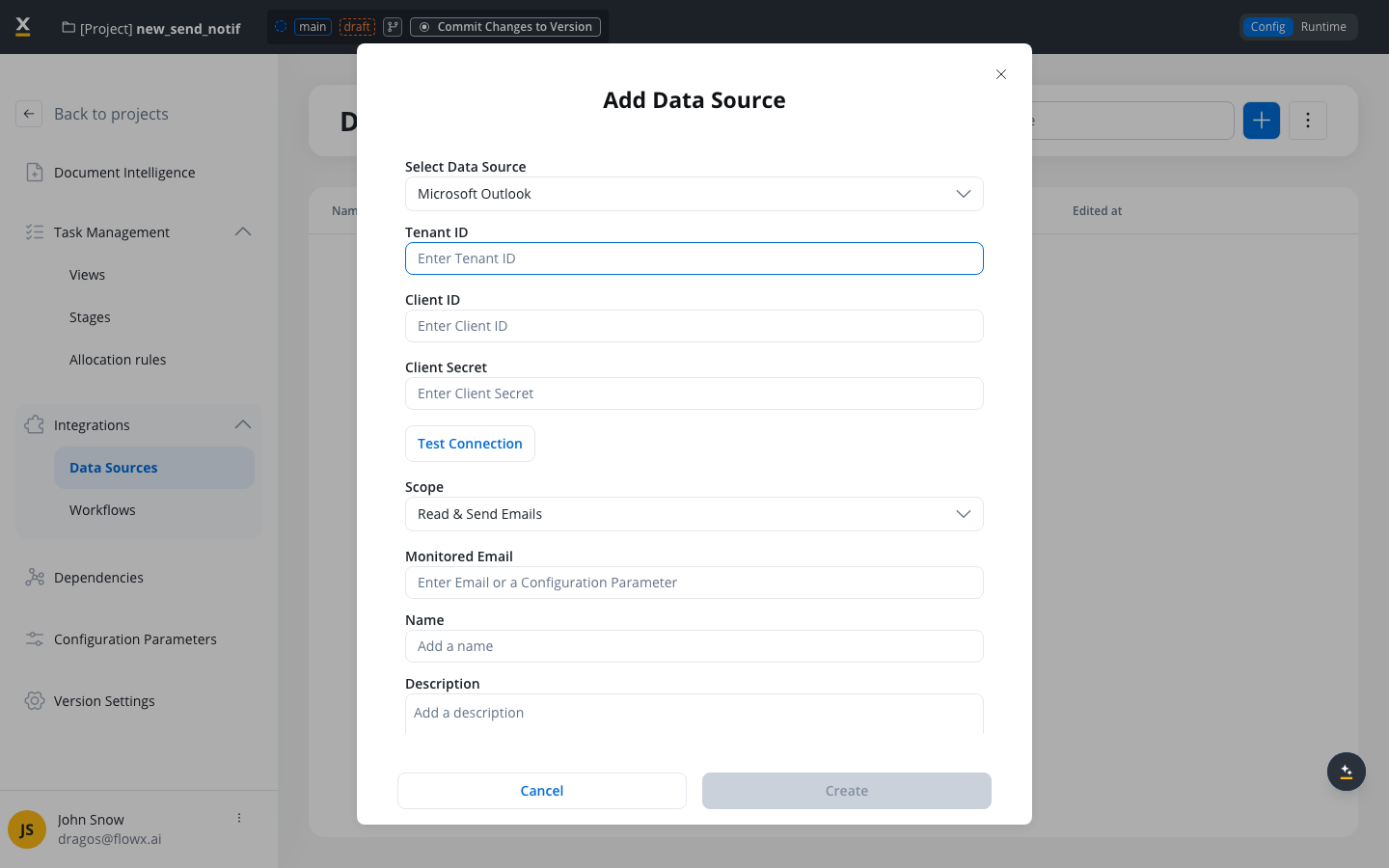
Configure the connection in Integration Designer with your Azure AD credentials and select the desired scope.
3
Connect to processes
For Read scope: link to a Message Start Event node and activate from Manage Triggers.
For Send scope: link to a notification template and use the Send Notification action.
4
Process emails
FlowX.AI monitors the mailbox (Read) or sends emails (Send) through the MS Graph API.
Before configuring a Microsoft Outlook data source, ensure you have:
Access to Integration Designer with appropriate permissions
An Azure AD app registration with the required MS Graph API permissions:
Scope
Required permissions (any one)
Read Emails
Mail.Read, Mail.ReadBasic, or Mail.ReadWrite
Send Emails
Mail.Send or Mail.ReadWrite
Read & Send Emails
One read permission + one send permission
Azure AD credentials: Tenant ID, Client ID, and a Client Secret (or, starting with 5.9.1, a certificate — see Step 2)
MS Graph permissions must be configured as Application permissions (not Delegated) in your Azure AD app registration, since the connection uses client credentials flow.
Available starting with FlowX.AI 5.9.1. Authenticate to Microsoft Graph with a certificate instead of a client secret. When you turn this ON, the Client Secret above is ignored and the certificate is used to authenticate. Configure:
Certificate type — how the certificate is provided: Base64 (paste the encoded certificate content) or Path (a path to the certificate file reachable by the integration).
Format — the certificate format: PEM or PKCS12.
Password — the certificate password. Required only when the format is PKCS12.
This field accepts configuration parameters. Store the certificate content or path and the password in configuration parameters and reference them with ${configParam} syntax.
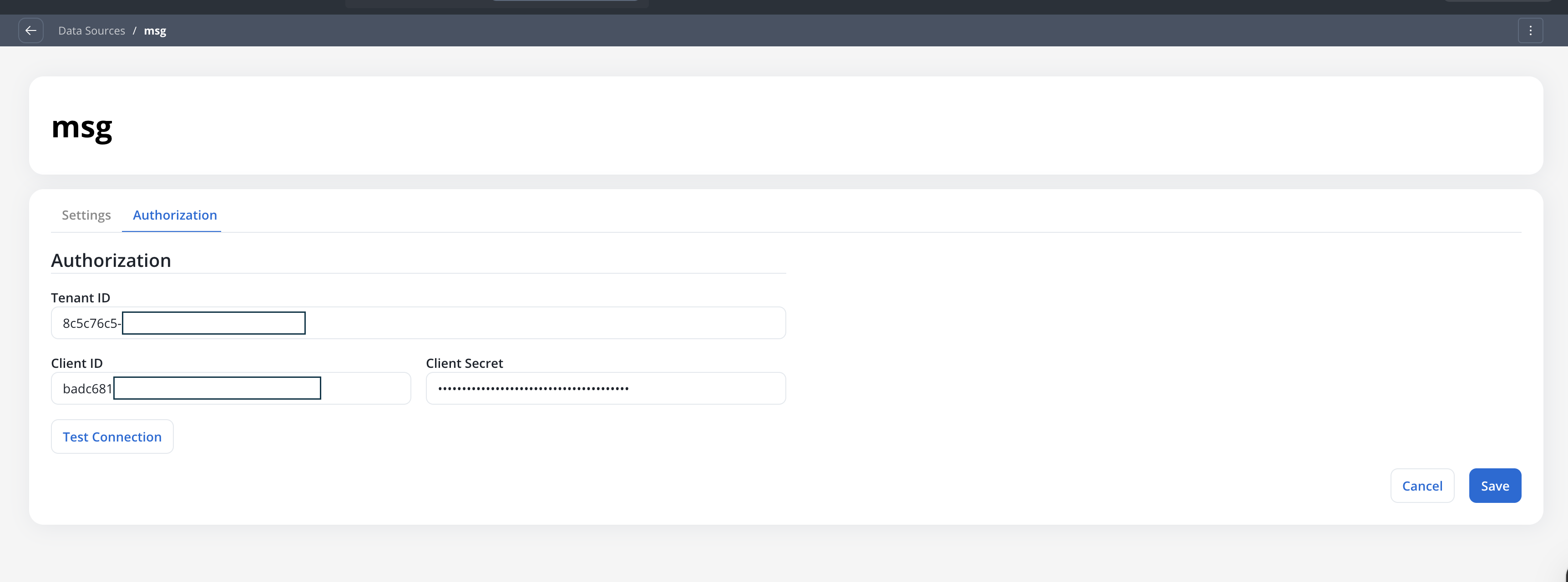
Click the Test Connection button to verify your Azure AD credentials:
Result
Message
Action
✅ Success
”Established connection”
Proceed to configure scope
❌ Error
”Failed to establish connection”
Check Azure AD credentials and permissions
The data source can be created even if the test connection fails. If the test fails on creation, you will be redirected to the Authorization tab with a failed connection message instead of the Settings page.
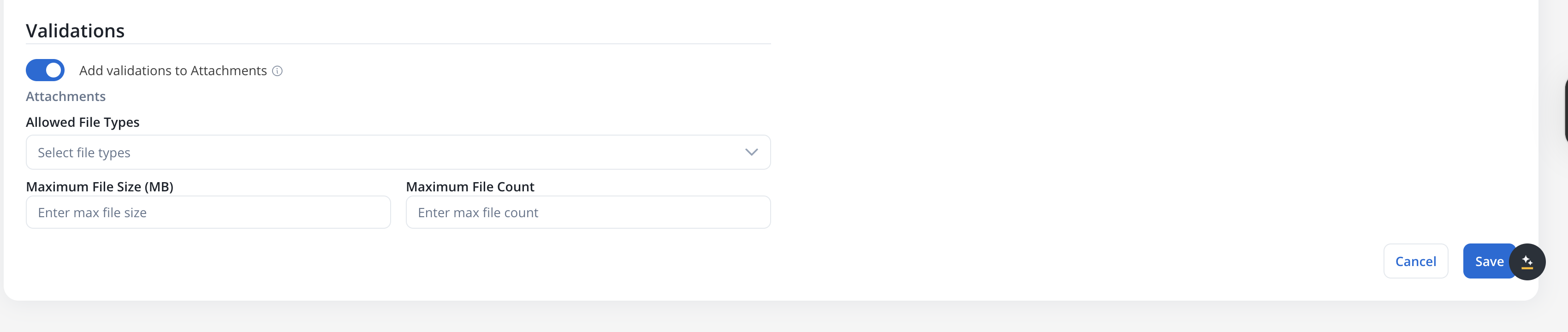
Restrict which attachment file types are accepted:Earlier releases selected allowed types from the file type categories below.
Type
Extensions
PDF
.pdf
DOCUMENT
.doc, .docx, .txt
IMAGE
.png, .jpg, .jpeg, .tif, .tiff, .gif
EXCEL
.xls, .xlsx, .csv
ZIP
.zip
Leave empty to accept all file types.
Individual file extensionsAllowed File Types selects individual file extensions instead of these categories. The categories no longer exist in the runtime, so the table above serves only as a reference for what each one used to cover.Selected extensions are stored as bare uppercase values without a leading dot (PDF, DOCX). Input is tolerant of case and of a leading dot, and existing data sources are migrated automatically, with each stored category expanded into the individual extensions it covered.
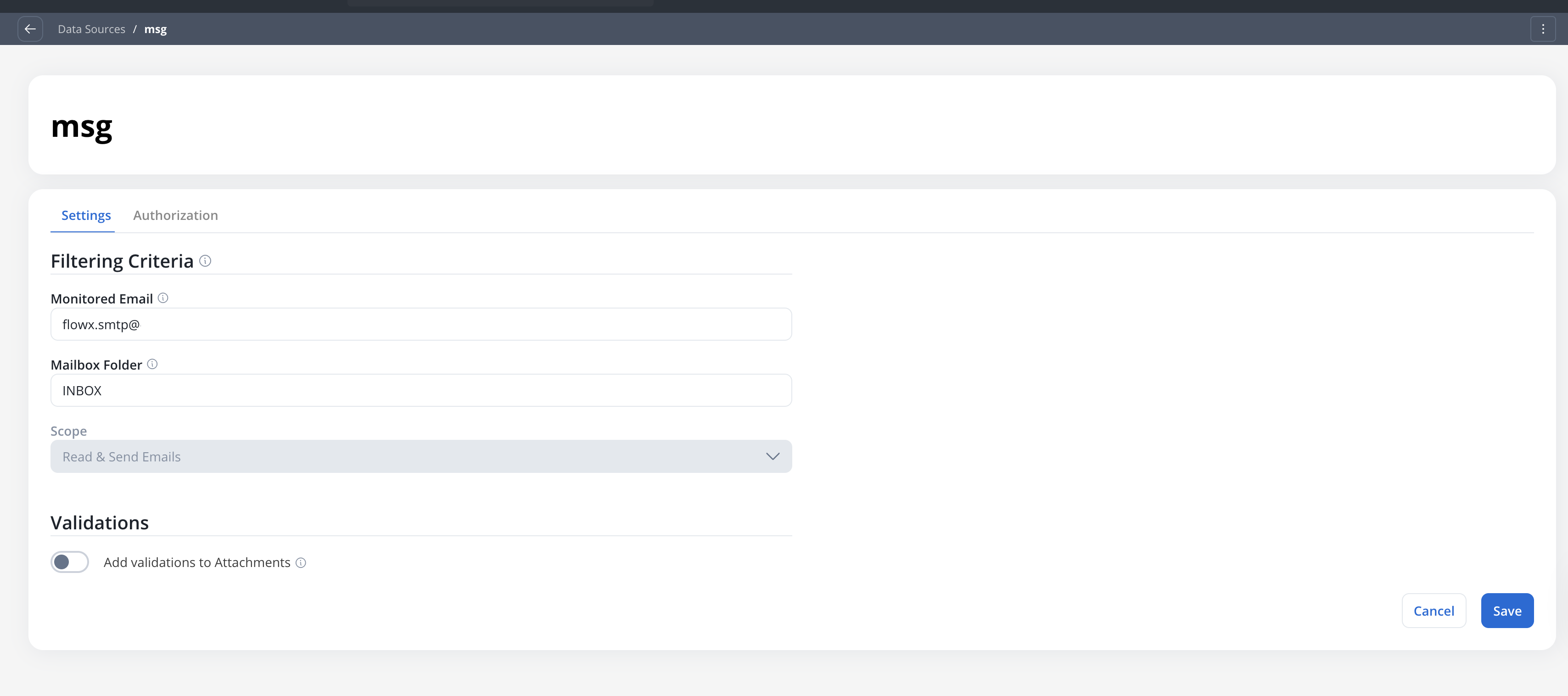
Displays the scope selected during creation. This field is read-only.
Send-only data sources do not display the Mailbox Folder or Attachment Validations fields, since those apply only to the Read scope. Sent emails are automatically saved to the Sent Items folder.
Available starting with FlowX.AI 5.9.1. Use a certificate instead of the client secret. When turned ON, the Client Secret is ignored. Set the Certificate type (Base64 or Path), the Format (PEM or PKCS12), and, for PKCS12, the certificate Password. See Step 2: Configure authentication for details.
Click Test Connection to verify the credentials. The test validates both the authentication and the required MS Graph permissions for the configured scope.
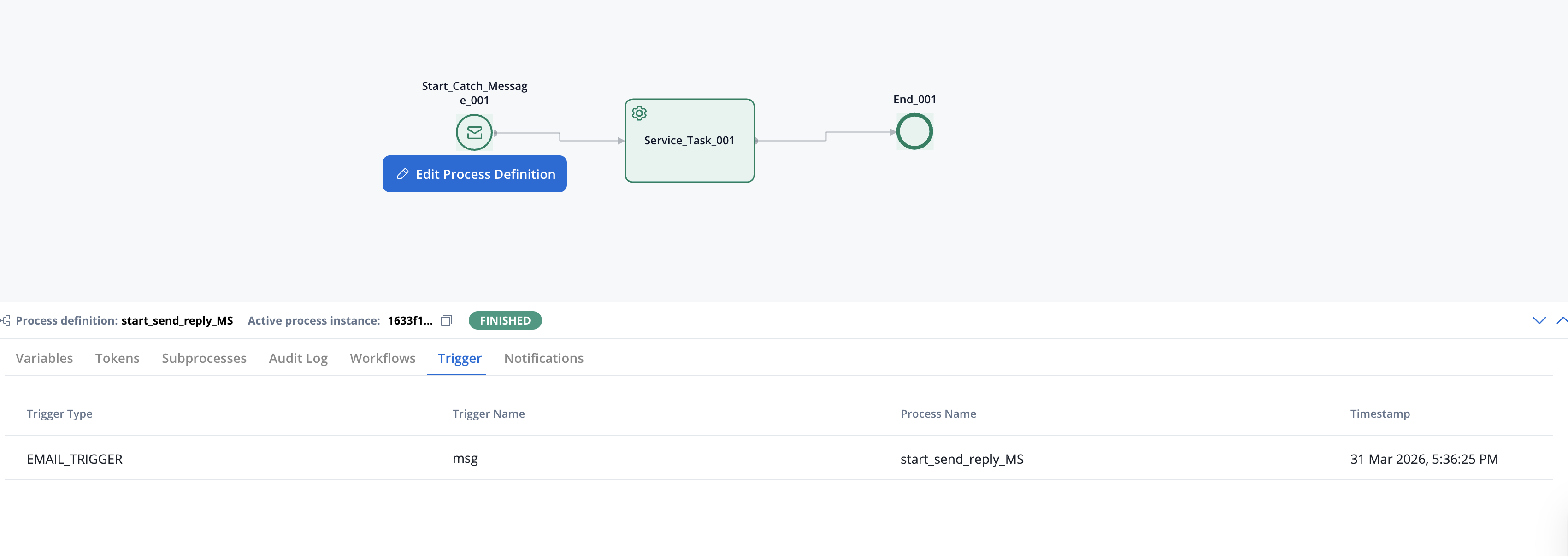
Open your process definition and add a Message Start Event (Start Catch Message) node.
2
Select Microsoft Outlook as trigger type
In the node configuration, set Trigger Type to Microsoft Outlook. Then select the Microsoft Outlook data source (only data sources with Read or Read & Send scope are shown).
3
Activate the trigger
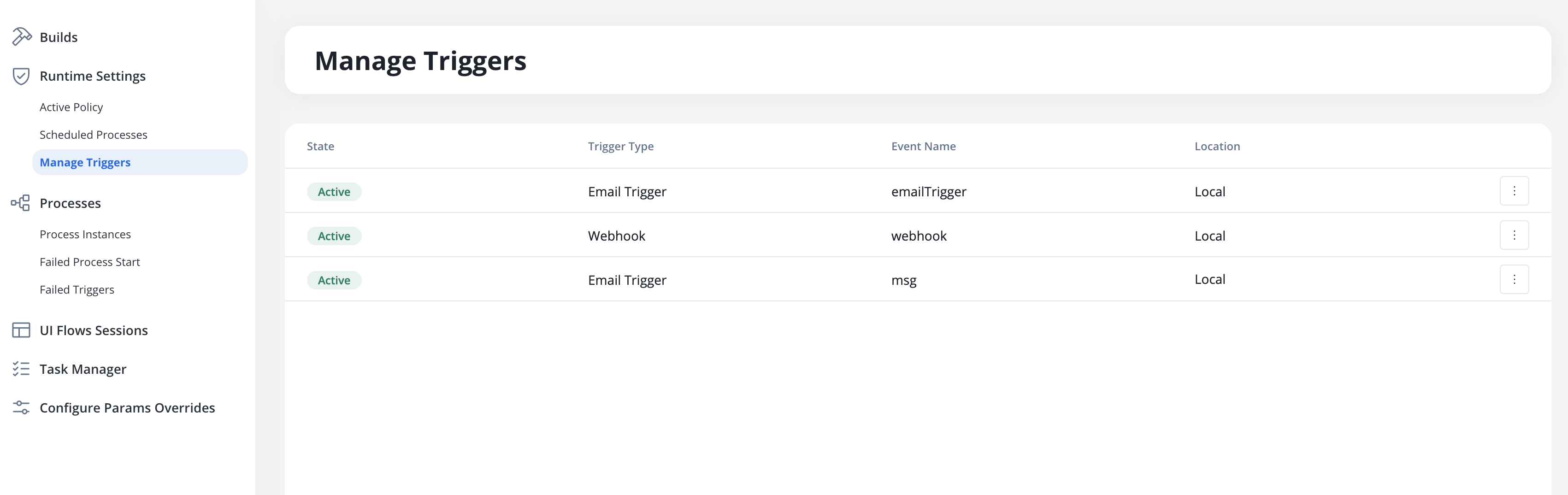
Navigate to Runtime Settings → Manage Triggers and activate the trigger.
The trigger must be activated from Manage Triggers in Runtime Settings before email monitoring begins.
The Microsoft Outlook data source polls for new emails every 30 seconds by default, using the same polling scheduler as the Email Trigger (configurable via EMAIL_GATEWAY_IMAP_POLLING_INTERVAL). Each polling cycle processes up to 50 messages (configurable via EMAIL_GATEWAY_MS_GRAPH_MAX_MESSAGES_PER_POLL). Emails with the same timestamp as the last processed email are deduplicated automatically using their internet message ID.
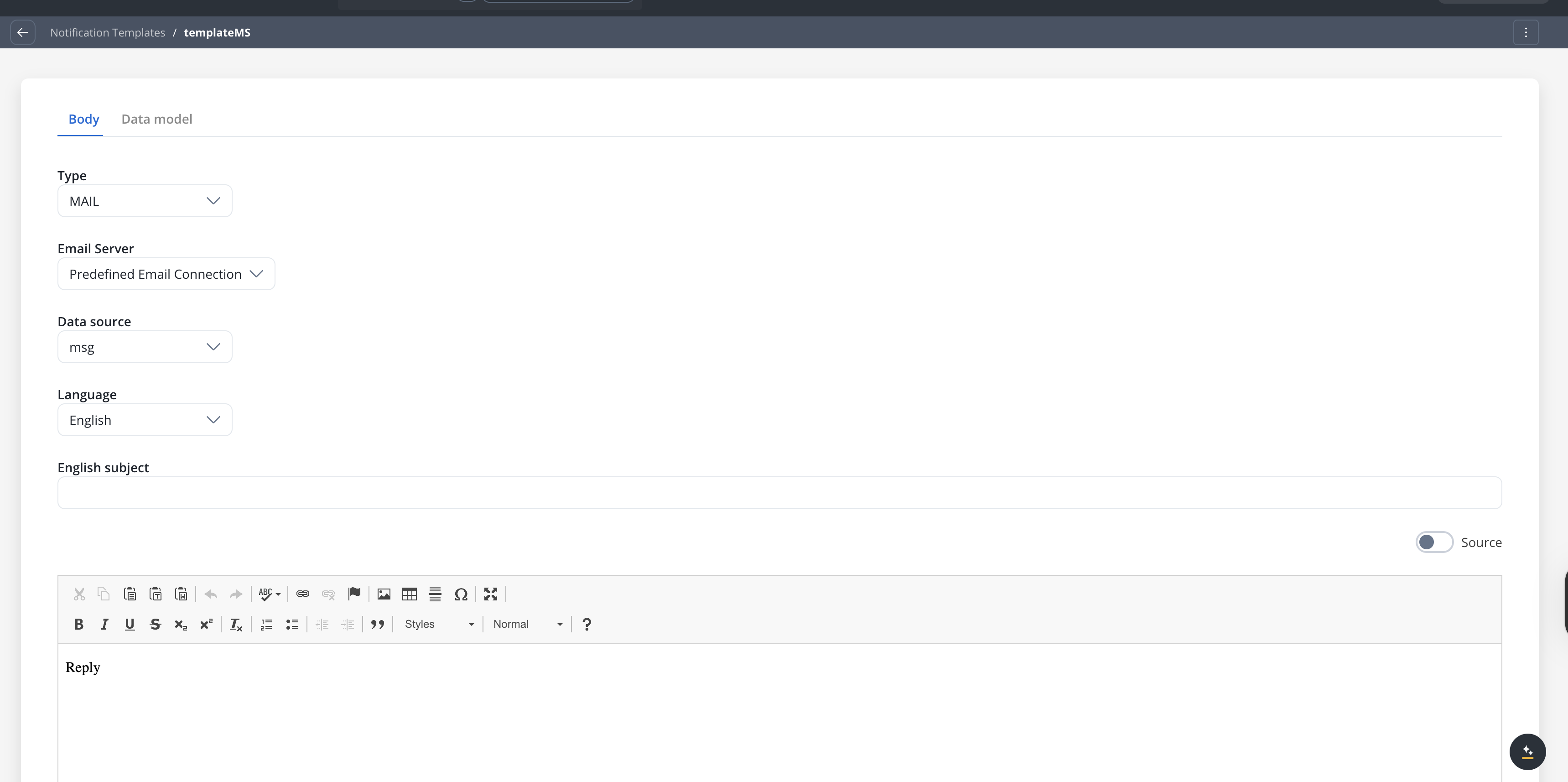
Open a notification template and set Email Server to Predefined Email Connection. Select the Microsoft Outlook data source (only data sources with Send or Read & Send scope are shown).
2
Add a Send Notification action
Add a Send Notification action to a process node and select the notification template.
Microsoft Outlook supports replying to emails received via the Read scope, maintaining the original conversation thread in the recipient’s inbox.
1
Configure the Send Notification action
Add a Send Notification action to a process node. In the action configuration, turn on the Reply to received emails toggle.
2
Set the Reply to Email Header
Specify the process key that holds the original email’s header parameters (e.g., emailMessage.headerParams). This is required when the reply toggle is on.
3
Configure recipients (optional)
By default, the reply is sent to the original sender. You can override this by adding explicit Receivers, CC, or BCC addresses. Duplicate recipients are automatically removed.
The reply mechanism uses the x-ms-graph-message-id header from the original email to thread the reply correctly. If this header is not available, the system falls back to the standard Message-ID header and looks up the original message via the MS Graph API. Sent replies are automatically saved to the Sent Items folder.
When emails fail validation or processing errors occur, they appear in the Failed Triggers section under Runtime Settings.Failed triggers display the timestamp, trigger name, cause type, context (e.g., sender address), and detailed error messages. Click a row to open the details page with full diagnostic information.
Message: “The file {filename} could not be uploaded because it is not on the list of permitted file types.”Resolution: Update the Allowed File Types in the data source Settings tab, or ask the sender to use an accepted format.
Message: “{filename} is too large. Maximum allowed: 25 MB”Resolution: The attachment exceeds the configured maximum file size. Ask the sender to reduce the file size.
Message: “File limit exceeded. For this trigger there is a limit of {limit} per email.”Resolution: The email has more attachments than allowed. Ask the sender to split attachments across multiple emails.
Message: “MS Graph connection failed: [error details]”Resolution: Azure AD credentials may have expired or been revoked. The system retries once on 401/403 errors by refreshing the cached client. If the retry also fails, go to the Authorization tab, verify the Tenant ID, Client ID, and Client Secret, and click Test Connection. Regenerate the client secret in Azure AD if it has expired.
Message: “MS Graph application is missing required permissions: [list]. Please add these as Application permissions in Azure AD and grant admin consent.”Resolution: The Azure AD app registration is missing one or more required MS Graph permissions. Add the listed permissions as Application permissions (not Delegated) in the Azure portal and ensure admin consent has been granted.
This example walks through a complete email-triggered workflow: an email with an attachment arrives, the process extracts and classifies the document, then replies to the sender with a confirmation.
1
Create a Microsoft Outlook data source
Configure a data source with Read & Send Emails scope, pointed at your intake mailbox (e.g., documents@company.com). Set attachment validations to accept PDF and DOCUMENT types with a 25 MB size limit.
2
Design the process
Create a process with a Message Start Event node configured to trigger from the Outlook data source. The email data is available in process variables under emailMessage.
3
Access email data in downstream nodes
Use the email schema fields in Script or Business Rule nodes to route the process:
// Access email fields in a Script nodevar subject = input.get("emailMessage").get("subject");var sender = input.get("emailMessage").get("sender");var attachments = input.get("emailMessage").get("fileAttachments");// Route based on subject keywordsif (subject.contains("invoice")) { output.put("documentType", "INVOICE");} else { output.put("documentType", "GENERAL");}
4
Process the attachment
Use the fileAttachments[].downloadPath to retrieve the file from the Document Plugin for classification, data extraction, or storage.
5
Reply to the sender
Add a Send Notification action with the Reply to received emails toggle turned on. Set the reply header to emailMessage.headerParams. The reply is threaded under the original email in the sender’s inbox.
6
Activate the trigger
Navigate to Runtime Settings → Manage Triggers and activate the trigger to begin monitoring.
Configure IMAP connections to trigger processes from incoming emails
Email Sender
Configure SMTP connections to send emails from processes
Send Notification Action
Send emails and reply to received emails from process nodes
Message Start Event
Configure message-based and email-based process triggers
Integration Designer
Learn about other data source types and workflow creation
Configuration Parameters
Use environment variables for flexible configurations
Last modified on October 30, 2026
{"docsConfig":{"theme":"mint","$schema":"https://mintlify.com/docs.json","name":"FlowX.AI","description":"Comprehensive documentation for FlowX.AI, the AI-driven process automation platform.","colors":{"primary":"#fcb813","light":"#fcb813","dark":"#fcb813"},"logo":{"light":"https://mintcdn.com/flowxai/38fXEM0a7v86Lg2m/logo/light.png?fit=max\u0026auto=format\u0026n=38fXEM0a7v86Lg2m\u0026q=85\u0026s=d767c06cef433b0a02f40a1f4f785eab","dark":"https://mintcdn.com/flowxai/38fXEM0a7v86Lg2m/logo/dark.png?fit=max\u0026auto=format\u0026n=38fXEM0a7v86Lg2m\u0026q=85\u0026s=6b8b8c3e7abd17acf6be8bffce4e599d"},"favicon":"https://mintcdn.com/flowxai/VVxnbzjz7JuL1Ngt/favicon2.svg?fit=max\u0026auto=format\u0026n=VVxnbzjz7JuL1Ngt\u0026q=85\u0026s=ef6a780a1ed3894c7b276bcc7b3c6c69","appearance":{"default":"dark","strict":false},"background":{"decoration":"grid","color":{"light":"#f4f4f5","dark":"#0a0b0d"}},"navbar":{"links":[],"primary":{"type":"button","label":"Academy","href":"https://academy.flowx.ai/"}},"footer":{"socials":{"linkedin":"https://www.linkedin.com/company/flowxai","x":"https://x.com/FlowX_ai","youtube":"https://www.youtube.com/@FlowX_AI"},"links":[{"header":"Documentation","items":[{"label":"Introduction","href":"https://docs.flowx.ai/5.9/docs/introduction"},{"label":"Platform overview","href":"https://docs.flowx.ai/5.9/docs/platform-overview/flowx-architecture"},{"label":"Designer","href":"https://docs.flowx.ai/5.9/docs/flowx-designer/overview"},{"label":"AI Platform","href":"https://docs.flowx.ai/5.9/ai-platform/ai-in-flowx"},{"label":"Use the docs with AI","href":"https://docs.flowx.ai/5.9/docs/getting-started/using-flowx-docs-with-ai"},{"label":"Release notes","href":"https://docs.flowx.ai/release-notes/overview"}]},{"header":"Resources","items":[{"label":"FlowX.AI Academy","href":"https://academy.flowx.ai"},{"label":"Support","href":"https://flowxai.zendesk.com/"}]},{"header":"Company","items":[{"label":"About FlowX.AI","href":"https://www.flowx.ai/about"},{"label":"Contact us","href":"mailto:hello@flowx.ai"},{"label":"Careers","href":"https://apply.workable.com/flowxai"}]},{"header":"Legal","items":[{"label":"Privacy Policy","href":"https://www.flowx.ai/privacy-policy"},{"label":"Cookie Policy","href":"https://www.flowx.ai/cookie-policy"},{"label":"Terms and Conditions","href":"https://www.flowx.ai/terms-and-conditions"}]}]},"search":{"prompt":"Search the docs"},"seo":{"metatags":{"zd-site-verification":"94tteg5ir5of8gkb4twzh"}},"fonts":{"heading":{"family":"Sora"},"body":{"family":"Geist"}},"styling":{"eyebrows":"breadcrumbs","codeblocks":"dark","latex":true},"integrations":{"ga4":{"measurementId":"G-CGW0FVK9YM"}},"banner":{"content":"🚀 [See the latest FlowX.AI releases →](/release-notes/overview)","dismissible":true},"contextual":{"options":["copy","view","chatgpt","claude","perplexity","mcp","cursor","vscode"],"display":"header"},"metadata":{"timestamp":true},"navigation":{"pages":[]}},"deployment":{"deploymentMetadataValue":{"subdomain":"flowxai","hasAudioNarration":false,"actualSubdomain":"flowxai","customDomains":["docs.flowx.ai"],"gitSource":{"type":"github","owner":"flowx-ai","repo":"flowx-docs","deployBranch":"main","contentDirectory":"","isPrivate":true,"mountPath":"","label":""},"chroma":{"liveDeploymentHistoryId":"6ae4c8fd7f8a500a1fd86923","collectionId":"f43bb162-8d91-4fce-8112-9a85f1f82724","schemaVersion":"v3","latestBuiltDeploymentHistoryId":"6ae4c8fd7f8a500a1fd86923"},"feedback":{"thumbs":true,"contextualFeedback":{"allowEmail":true},"agentFeedback":true},"entitlements":{"AI_CHAT":{"status":"ENABLED"},"CONTEXTUAL_FEEDBACK":{"status":"ENABLED"},"CODE_SNIPPET_FEEDBACK":{"status":"ENABLED"},"WEB_MCP":{"status":"ENABLED"},"NARRATION":{"status":"ENABLED"}},"buildId":"6ae4c8fd7f8a500a1fd86923","clientVersion":"0.0.4039","searchFilterCounts":[{"language":"default","tag":"Documentation","count":787},{"language":"default","tag":"Building blocks","count":329},{"language":"default","tag":"Platform deep dive","count":257},{"language":"default","tag":"Setup guides","count":191},{"language":"default","tag":"UI Designer","count":140},{"language":"default","tag":"Release notes","count":137},{"language":"default","tag":"Release Notes","count":137},{"language":"default","tag":"Microservices","count":112},{"language":"default","tag":"Core extensions","count":107},{"language":"default","tag":"Nodes","count":88}],"searchSettings":{"isFiltersEnabled":true}},"assistantConfig":{"enableAskAiButton":false,"enableStarterQuestions":false,"enableContextualStarterQuestions":true,"enableAskAiSearchBar":true,"deflection":{"enabled":true,"type":"email","email":"learning.team@flowx.ai","showHelpButton":true}},"basePath":"","hasChatPermissions":true,"hasWebMcpPermissions":true,"toggles":[{"name":"kill-isr","enabled":true,"variant":{"name":"disabled","enabled":false,"feature_enabled":true},"impressionData":false},{"name":"agent-mintlify-slack","enabled":true,"variant":{"name":"disabled","enabled":false,"feature_enabled":true},"impressionData":false},{"name":"agent-integrations-settings","enabled":true,"variant":{"name":"disabled","enabled":false,"feature_enabled":true},"impressionData":false},{"name":"automations-pr-grouping","enabled":true,"variant":{"name":"disabled","enabled":false,"feature_enabled":true},"impressionData":false},{"name":"custom-prefix","enabled":true,"variant":{"name":"disabled","enabled":false,"feature_enabled":true},"impressionData":false},{"name":"analytics-v7","enabled":true,"variant":{"name":"disabled","enabled":false,"feature_enabled":true},"impressionData":false},{"name":"user-flows-analytics","enabled":true,"variant":{"name":"disabled","enabled":false,"feature_enabled":true},"impressionData":false},{"name":"no-publish-flow","enabled":true,"variant":{"name":"disabled","enabled":false,"feature_enabled":true},"impressionData":false},{"name":"workos-onboarding","enabled":true,"variant":{"name":"disabled","enabled":false,"feature_enabled":true},"impressionData":false},{"name":"llms-txt-v2","enabled":true,"variant":{"name":"disabled","enabled":false,"feature_enabled":true},"impressionData":false},{"name":"snapshot-serving-live","enabled":true,"variant":{"name":"disabled","enabled":false,"feature_enabled":true},"impressionData":false},{"name":"stripTemperatureMiddleware","enabled":true,"variant":{"name":"disabled","enabled":false,"feature_enabled":true},"impressionData":false},{"name":"support-platform-pylon-zendesk","enabled":true,"variant":{"name":"disabled","enabled":false,"feature_enabled":true},"impressionData":false},{"name":"snapshot-serving","enabled":true,"variant":{"name":"disabled","enabled":false,"feature_enabled":true},"impressionData":false},{"name":"instant-rollback","enabled":true,"variant":{"name":"disabled","enabled":false,"feature_enabled":true},"impressionData":false},{"name":"granular-notifications-server","enabled":true,"variant":{"name":"disabled","enabled":false,"feature_enabled":true},"impressionData":false},{"name":"granular-notifications","enabled":true,"variant":{"name":"disabled","enabled":false,"feature_enabled":true},"impressionData":false},{"name":"automations-fable","enabled":true,"variant":{"name":"disabled","enabled":false,"feature_enabled":true},"impressionData":false},{"name":"fixed-ai-action-pricing","enabled":true,"variant":{"name":"disabled","enabled":false,"feature_enabled":true},"impressionData":false},{"name":"automation-resolve-merge-conflict","enabled":true,"variant":{"name":"disabled","enabled":false,"feature_enabled":true},"impressionData":false},{"name":"scoped-publishing","enabled":true,"variant":{"name":"disabled","enabled":false,"feature_enabled":true},"impressionData":false},{"name":"mintql","enabled":true,"variant":{"name":"disabled","enabled":false,"feature_enabled":true},"impressionData":false},{"name":"page-level-analytics","enabled":true,"variant":{"name":"disabled","enabled":false,"feature_enabled":true},"impressionData":false},{"name":"editor-version-history-v2","enabled":true,"variant":{"name":"disabled","enabled":false,"feature_enabled":true},"impressionData":false},{"name":"billing-page-v2","enabled":true,"variant":{"name":"disabled","enabled":false,"feature_enabled":true},"impressionData":false},{"name":"full-page-search","enabled":true,"variant":{"name":"disabled","enabled":false,"feature_enabled":true},"impressionData":false},{"name":"workspace-projects","enabled":true,"variant":{"name":"disabled","enabled":false,"feature_enabled":true},"impressionData":false},{"name":"assistant-v5","enabled":true,"variant":{"name":"disabled","enabled":false,"feature_enabled":true},"impressionData":false},{"name":"byok-sep-25","enabled":true,"variant":{"name":"disabled","enabled":false,"feature_enabled":true},"impressionData":false},{"name":"fork-pr-previews","enabled":true,"variant":{"name":"disabled","enabled":false,"feature_enabled":true},"impressionData":false},{"name":"revalidation-jwt","enabled":true,"variant":{"name":"disabled","enabled":false,"feature_enabled":true},"impressionData":false},{"name":"vite-origin","enabled":true,"variant":{"name":"disabled","enabled":false,"feature_enabled":true},"impressionData":false},{"name":"billing-updated-9-15","enabled":true,"variant":{"name":"disabled","enabled":false,"feature_enabled":true},"impressionData":false},{"name":"workos-sso-scim","enabled":true,"variant":{"name":"disabled","enabled":false,"feature_enabled":true},"impressionData":false},{"name":"hobby-abuse-scan","enabled":true,"variant":{"name":"disabled","enabled":false,"feature_enabled":true},"impressionData":false},{"name":"dashboard-inbox","enabled":true,"variant":{"name":"disabled","enabled":false,"feature_enabled":true},"impressionData":false},{"name":"workos-signup","enabled":true,"variant":{"name":"disabled","enabled":false,"feature_enabled":true},"impressionData":false},{"name":"workos-enabled","enabled":true,"variant":{"name":"disabled","enabled":false,"feature_enabled":true},"impressionData":false},{"name":"approve-review-flow","enabled":true,"variant":{"name":"disabled","enabled":false,"feature_enabled":true},"impressionData":false}],"privacy":{"consentBanner":{"enabled":true}},"googleFontsInlined":true},"customCss":[{"filePath":"custom.css","content":"/* cyrillic-ext */\n@font-face {\n font-family: 'Geist Mono';\n font-style: normal;\n font-weight: 400;\n font-display: swap;\n src: url(/_mintlify/assets/fonts/google/s/geistmono/v6/or3nQ6H-1_WfwkMZI_qYFrodmgPn.woff2) format('woff2');\n unicode-range: U+0460-052F, U+1C80-1C8A, U+20B4, U+2DE0-2DFF, U+A640-A69F, U+FE2E-FE2F;\n}\n/* cyrillic */\n@font-face {\n font-family: 'Geist Mono';\n font-style: normal;\n font-weight: 400;\n font-display: swap;\n src: url(/_mintlify/assets/fonts/google/s/geistmono/v6/or3nQ6H-1_WfwkMZI_qYFrMdmgPn.woff2) format('woff2');\n unicode-range: U+0301, U+0400-045F, U+0490-0491, U+04B0-04B1, U+2116;\n}\n/* symbols2 */\n@font-face {\n font-family: 'Geist Mono';\n font-style: normal;\n font-weight: 400;\n font-display: swap;\n src: url(/_mintlify/assets/fonts/google/s/geistmono/v6/or3nQ6H-1_WfwkMZI_qYFg08vz7ehw.woff2) format('woff2');\n unicode-range: U+2000-2001, U+2004-2008, U+200A, U+23B8-23BD, U+2500-259F;\n}\n/* vietnamese */\n@font-face {\n font-family: 'Geist Mono';\n font-style: normal;\n font-weight: 400;\n font-display: swap;\n src: url(/_mintlify/assets/fonts/google/s/geistmono/v6/or3nQ6H-1_WfwkMZI_qYFrgdmgPn.woff2) format('woff2');\n unicode-range: U+0102-0103, U+0110-0111, U+0128-0129, U+0168-0169, U+01A0-01A1, U+01AF-01B0, U+0300-0301, U+0303-0304, U+0308-0309, U+0323, U+0329, U+1EA0-1EF9, U+20AB;\n}\n/* latin-ext */\n@font-face {\n font-family: 'Geist Mono';\n font-style: normal;\n font-weight: 400;\n font-display: swap;\n src: url(/_mintlify/assets/fonts/google/s/geistmono/v6/or3nQ6H-1_WfwkMZI_qYFrkdmgPn.woff2) format('woff2');\n unicode-range: U+0100-02BA, U+02BD-02C5, U+02C7-02CC, U+02CE-02D7, U+02DD-02FF, U+0304, U+0308, U+0329, U+1D00-1DBF, U+1E00-1E9F, U+1EF2-1EFF, U+2020, U+20A0-20AB, U+20AD-20C4, U+2113, U+2C60-2C7F, U+A720-A7FF;\n}\n/* latin */\n@font-face {\n font-family: 'Geist Mono';\n font-style: normal;\n font-weight: 400;\n font-display: swap;\n src: url(/_mintlify/assets/fonts/google/s/geistmono/v6/or3nQ6H-1_WfwkMZI_qYFrcdmg.woff2) format('woff2');\n unicode-range: U+0000-00FF, U+0131, U+0152-0153, U+02BB-02BC, U+02C6, U+02DA, U+02DC, U+0304, U+0308, U+0329, U+2000-206F, U+20AC, U+2122, U+2191, U+2193, U+2212, U+2215, U+FEFF, U+FFFD;\n}\n/* cyrillic-ext */\n@font-face {\n font-family: 'Geist Mono';\n font-style: normal;\n font-weight: 500;\n font-display: swap;\n src: url(/_mintlify/assets/fonts/google/s/geistmono/v6/or3nQ6H-1_WfwkMZI_qYFrodmgPn.woff2) format('woff2');\n unicode-range: U+0460-052F, U+1C80-1C8A, U+20B4, U+2DE0-2DFF, U+A640-A69F, U+FE2E-FE2F;\n}\n/* cyrillic */\n@font-face {\n font-family: 'Geist Mono';\n font-style: normal;\n font-weight: 500;\n font-display: swap;\n src: url(/_mintlify/assets/fonts/google/s/geistmono/v6/or3nQ6H-1_WfwkMZI_qYFrMdmgPn.woff2) format('woff2');\n unicode-range: U+0301, U+0400-045F, U+0490-0491, U+04B0-04B1, U+2116;\n}\n/* symbols2 */\n@font-face {\n font-family: 'Geist Mono';\n font-style: normal;\n font-weight: 500;\n font-display: swap;\n src: url(/_mintlify/assets/fonts/google/s/geistmono/v6/or3nQ6H-1_WfwkMZI_qYFg08vz7ehw.woff2) format('woff2');\n unicode-range: U+2000-2001, U+2004-2008, U+200A, U+23B8-23BD, U+2500-259F;\n}\n/* vietnamese */\n@font-face {\n font-family: 'Geist Mono';\n font-style: normal;\n font-weight: 500;\n font-display: swap;\n src: url(/_mintlify/assets/fonts/google/s/geistmono/v6/or3nQ6H-1_WfwkMZI_qYFrgdmgPn.woff2) format('woff2');\n unicode-range: U+0102-0103, U+0110-0111, U+0128-0129, U+0168-0169, U+01A0-01A1, U+01AF-01B0, U+0300-0301, U+0303-0304, U+0308-0309, U+0323, U+0329, U+1EA0-1EF9, U+20AB;\n}\n/* latin-ext */\n@font-face {\n font-family: 'Geist Mono';\n font-style: normal;\n font-weight: 500;\n font-display: swap;\n src: url(/_mintlify/assets/fonts/google/s/geistmono/v6/or3nQ6H-1_WfwkMZI_qYFrkdmgPn.woff2) format('woff2');\n unicode-range: U+0100-02BA, U+02BD-02C5, U+02C7-02CC, U+02CE-02D7, U+02DD-02FF, U+0304, U+0308, U+0329, U+1D00-1DBF, U+1E00-1E9F, U+1EF2-1EFF, U+2020, U+20A0-20AB, U+20AD-20C4, U+2113, U+2C60-2C7F, U+A720-A7FF;\n}\n/* latin */\n@font-face {\n font-family: 'Geist Mono';\n font-style: normal;\n font-weight: 500;\n font-display: swap;\n src: url(/_mintlify/assets/fonts/google/s/geistmono/v6/or3nQ6H-1_WfwkMZI_qYFrcdmg.woff2) format('woff2');\n unicode-range: U+0000-00FF, U+0131, U+0152-0153, U+02BB-02BC, U+02C6, U+02DA, U+02DC, U+0304, U+0308, U+0329, U+2000-206F, U+20AC, U+2122, U+2191, U+2193, U+2212, U+2215, U+FEFF, U+FFFD;\n}\n/* cyrillic-ext */\n@font-face {\n font-family: 'Geist Mono';\n font-style: normal;\n font-weight: 600;\n font-display: swap;\n src: url(/_mintlify/assets/fonts/google/s/geistmono/v6/or3nQ6H-1_WfwkMZI_qYFrodmgPn.woff2) format('woff2');\n unicode-range: U+0460-052F, U+1C80-1C8A, U+20B4, U+2DE0-2DFF, U+A640-A69F, U+FE2E-FE2F;\n}\n/* cyrillic */\n@font-face {\n font-family: 'Geist Mono';\n font-style: normal;\n font-weight: 600;\n font-display: swap;\n src: url(/_mintlify/assets/fonts/google/s/geistmono/v6/or3nQ6H-1_WfwkMZI_qYFrMdmgPn.woff2) format('woff2');\n unicode-range: U+0301, U+0400-045F, U+0490-0491, U+04B0-04B1, U+2116;\n}\n/* symbols2 */\n@font-face {\n font-family: 'Geist Mono';\n font-style: normal;\n font-weight: 600;\n font-display: swap;\n src: url(/_mintlify/assets/fonts/google/s/geistmono/v6/or3nQ6H-1_WfwkMZI_qYFg08vz7ehw.woff2) format('woff2');\n unicode-range: U+2000-2001, U+2004-2008, U+200A, U+23B8-23BD, U+2500-259F;\n}\n/* vietnamese */\n@font-face {\n font-family: 'Geist Mono';\n font-style: normal;\n font-weight: 600;\n font-display: swap;\n src: url(/_mintlify/assets/fonts/google/s/geistmono/v6/or3nQ6H-1_WfwkMZI_qYFrgdmgPn.woff2) format('woff2');\n unicode-range: U+0102-0103, U+0110-0111, U+0128-0129, U+0168-0169, U+01A0-01A1, U+01AF-01B0, U+0300-0301, U+0303-0304, U+0308-0309, U+0323, U+0329, U+1EA0-1EF9, U+20AB;\n}\n/* latin-ext */\n@font-face {\n font-family: 'Geist Mono';\n font-style: normal;\n font-weight: 600;\n font-display: swap;\n src: url(/_mintlify/assets/fonts/google/s/geistmono/v6/or3nQ6H-1_WfwkMZI_qYFrkdmgPn.woff2) format('woff2');\n unicode-range: U+0100-02BA, U+02BD-02C5, U+02C7-02CC, U+02CE-02D7, U+02DD-02FF, U+0304, U+0308, U+0329, U+1D00-1DBF, U+1E00-1E9F, U+1EF2-1EFF, U+2020, U+20A0-20AB, U+20AD-20C4, U+2113, U+2C60-2C7F, U+A720-A7FF;\n}\n/* latin */\n@font-face {\n font-family: 'Geist Mono';\n font-style: normal;\n font-weight: 600;\n font-display: swap;\n src: url(/_mintlify/assets/fonts/google/s/geistmono/v6/or3nQ6H-1_WfwkMZI_qYFrcdmg.woff2) format('woff2');\n unicode-range: U+0000-00FF, U+0131, U+0152-0153, U+02BB-02BC, U+02C6, U+02DA, U+02DC, U+0304, U+0308, U+0329, U+2000-206F, U+20AC, U+2122, U+2191, U+2193, U+2212, U+2215, U+FEFF, U+FFFD;\n}\n@keyframes fxh-tick-pulse{0%,to{opacity:1}50%{opacity:.35}}@keyframes fxh-caret-blink{50%{opacity:0}}@keyframes fxh-ln-in{to{opacity:1;transform:none}}@keyframes fxh-rv-in{to{opacity:1;transform:none}}@keyframes fxl-stack-ride{0%{top:0;opacity:0}4%{opacity:1}52%{top:calc(100% - 7px);opacity:1}58%,to{top:calc(100% - 7px);opacity:0}}@keyframes fxl-stack-lit{0%,2%,30%,to{color:var(--fxl-faint)}18%,6%{color:var(--fxl-text)}}@keyframes fxl-stack-tick{0%,2%,30%,to{background:var(--fxl-line)}18%,6%{background:#fcb813}}code,kbd,pre,samp{font-family:\"Geist Mono\",ui-monospace,SFMono-Regular,Menlo,monospace}#topbar-cta-button{color:#131007!important}.label-version{display:inline-block;font-weight:700;color:#fff;background-color:#007bff;padding:.5px 15px;border-radius:12px;box-shadow:0 2px 4px rgba(0,0,0,.1);font-size:.9em;text-transform:uppercase;letter-spacing:.5px;margin-right:5px;transition:background-color .3s ease;text-decoration:none}.label-version:hover{background-color:#0056b3}#banner{background:linear-gradient(90deg,#0a0b0d 0,#0e1013 55%,#2a2310 100%)!important;border-bottom:1px solid rgba(252,184,19,.3);backdrop-filter:saturate(120%)}#banner a{color:#fcb813!important;text-decoration-color:rgba(252,184,19,.55)!important;transition:opacity .2s ease}#banner a:hover{opacity:.85}:root{--flowx-yellow-50:#fff8e7;--flowx-yellow-200:#ffdf92;--flowx-yellow-400:#ffc739;--flowx-yellow-500:#fcb813;--flowx-yellow-800:#8a5e00;--flowx-yellow-900:#6b4e08;--flowx-neutrals-50:#f7f8f9;--flowx-neutrals-100:#e3e8ed;--flowx-neutrals-200:#cbd1db;--flowx-neutrals-300:#a6b0be;--flowx-neutrals-400:#8390a2;--flowx-neutrals-500:#64748b;--flowx-neutrals-700:#475263;--flowx-neutrals-800:#2a313a;--flowx-neutrals-900:#1d232c;--flowx-blue-50:#e6f0fb;--flowx-blue-200:#8abbed;--flowx-blue-700:#004c99;--flowx-blue-900:#002d5b;--flowx-elevation-m:0 8px 16px #1634621a}.cb-wrap{margin-top:32px}.cb-filters{display:flex;flex-wrap:wrap;gap:8px;margin-bottom:24px}.cb-filters input{position:absolute;width:1px;height:1px;overflow:hidden;clip:rect(0 0 0 0);white-space:nowrap}.cb-filters label{cursor:pointer;user-select:none;font-size:12px;line-height:16px;font-weight:600;padding:8px 16px;border-radius:120px;border:1px solid var(--flowx-neutrals-200);color:var(--flowx-neutrals-500);background:0 0;transition:border-color .15s ease,background .15s ease,color .15s ease}.cb-filters label span{margin-left:6px;opacity:.55;font-variant-numeric:tabular-nums}.cb-filters label:hover{border-color:var(--flowx-yellow-500);color:var(--flowx-neutrals-900)}.cb-filters input:checked+label,.dark .cb-filters input:checked+label{background:var(--flowx-yellow-500);border-color:var(--flowx-yellow-500);color:var(--flowx-neutrals-900)}.cb-filters input:focus-visible+label{outline:2px solid var(--flowx-yellow-500);outline-offset:2px}.dark .cb-filters label{border-color:var(--flowx-neutrals-700);color:var(--flowx-neutrals-400)}.dark .cb-filters label:hover{border-color:var(--flowx-yellow-400);color:var(--flowx-neutrals-50)}.cb-grid{display:grid;grid-template-columns:repeat(3,minmax(0,1fr));gap:16px}@media (max-width:1024px){.cb-grid{grid-template-columns:repeat(2,minmax(0,1fr))}}@media (max-width:640px){.cb-grid{grid-template-columns:1fr}}.cb-wrap:has(#cb-conv:checked) .cb-card:not([data-f~=conversational]),.cb-wrap:has(#cb-cookbook:checked) .cb-card:not([data-f~=cookbook]),.cb-wrap:has(#cb-docs:checked) .cb-card:not([data-f~=docs]),.cb-wrap:has(#cb-guide:checked) .cb-card:not([data-f~=guide]),.cb-wrap:has(#cb-integr:checked) .cb-card:not([data-f~=integrations]),.cb-wrap:has(#cb-pattern:checked) .cb-card:not([data-f~=pattern]),.cb-wrap:has(#cb-tutorial:checked) .cb-card:not([data-f~=tutorial]),.cb-wrap:has(#cb-ui:checked) .cb-card:not([data-f~=ui]){display:none}.cb-card{position:relative;display:flex;flex-direction:column;gap:12px;padding:24px;border:1px solid var(--flowx-neutrals-100);border-radius:16px;background:0 0;text-decoration:none!important;transition:border-color .2s ease,transform .2s ease,box-shadow .2s ease}.cb-card::after{content:\"\\2192\";position:absolute;top:20px;right:24px;font-size:14px;line-height:22px;color:var(--flowx-neutrals-300);transition:color .2s ease,transform .2s ease}.cb-card:hover{transform:translateY(-2px);border-color:var(--flowx-yellow-500);box-shadow:var(--flowx-elevation-m)}.cb-card:hover::after{color:var(--flowx-neutrals-900);transform:translateX(4px)}.dark .cb-card{border-color:var(--flowx-neutrals-800)}.dark .cb-card:hover{border-color:var(--flowx-yellow-400);box-shadow:0 8px 16px rgba(0,0,0,.4)}.dark .cb-card:hover::after,.dark .cb-foot a:hover{color:var(--flowx-yellow-400)}@media (prefers-reduced-motion:reduce){.cb-card,.cb-card::after{transition:none}.cb-card:hover,.cb-card:hover::after{transform:none}}.cb-tags{display:flex;flex-wrap:wrap;gap:6px;padding-right:24px}.cb-tag{font-size:10px;line-height:12px;font-weight:600;letter-spacing:.05em;text-transform:uppercase;padding:4px 8px;border-radius:4px;background:var(--flowx-neutrals-50);color:var(--flowx-neutrals-500)}.cb-tag-tut{background:var(--flowx-yellow-50);color:var(--flowx-yellow-800)}.cb-tag-pat{background:var(--flowx-neutrals-900);color:#fff}.cb-tag-cook{background:var(--flowx-yellow-500);color:var(--flowx-neutrals-900)}.cb-tag-gui{background:var(--flowx-blue-50);color:var(--flowx-blue-700)}.dark .cb-tag{background:var(--flowx-neutrals-800);color:var(--flowx-neutrals-400)}.dark .cb-tag-tut{background:var(--flowx-yellow-900);color:var(--flowx-yellow-200)}.dark .cb-tag-pat{background:var(--flowx-neutrals-50);color:var(--flowx-neutrals-900)}.dark .cb-tag-cook{background:var(--flowx-yellow-500);color:var(--flowx-neutrals-900)}.dark .cb-tag-gui{background:var(--flowx-blue-900);color:var(--flowx-blue-200)}.cb-foot a,.cb-title{font-weight:600;color:var(--flowx-neutrals-900)}.cb-title{display:block;font-size:14px;line-height:22px;letter-spacing:-.01em}.dark .cb-foot a,.dark .cb-title{color:var(--flowx-neutrals-50)}.cb-desc{display:block;font-size:12px;line-height:18px;font-weight:400;color:var(--flowx-neutrals-500)}.cb-foot span,.dark .cb-desc{color:var(--flowx-neutrals-400)}.cb-foot{display:flex;flex-wrap:wrap;align-items:baseline;gap:16px;margin-top:40px;padding-top:24px;border-top:1px solid var(--flowx-neutrals-100);font-size:12px;line-height:16px}.dark .cb-foot{border-top-color:var(--flowx-neutrals-800)}.dark .cb-foot span{color:var(--flowx-neutrals-500)}.cb-foot a{text-decoration:none;border-bottom:1px solid var(--flowx-yellow-500);padding-bottom:1px}.cb-foot a:hover{color:var(--flowx-yellow-800)}#content-area:has(.fxh-hero) #header{display:none}main#content-container:has(.fxh-hero){max-width:none}#content-area:has(.fxh-hero){width:100%!important}#content-area:has(.fxh-hero) #content{max-width:none;margin-top:0}#content-area:has(.fxh-hero) #content div[class*=\"--page-padding\"]{--page-padding:0px}#content-area:has(.fxh-hero) #content>:not(.fxh-hero){max-width:1360px;margin-left:auto;margin-right:auto}.fxh-hero{position:relative;text-align:center}@media (min-width:1024px){.fxh-hero{margin-top:-2.5rem}}.fxh-hero__bg{position:sticky;top:0;z-index:0;height:100dvh;overflow:clip;border-radius:18px;background:#0a0b0d;border:1px solid rgba(255,255,255,.08)}.fxh-hero__bg::after,.fxh-hero__bg::before{content:\"\";position:absolute;pointer-events:none}.fxh-hero__bg::before{inset:0;background-image:linear-gradient(rgba(255,255,255,.045) 1px,transparent 1px),linear-gradient(90deg,rgba(255,255,255,.045) 1px,transparent 1px);background-size:56px 56px;-webkit-mask-image:radial-gradient(ellipse at 50% 0,#000 25%,transparent 75%);mask-image:radial-gradient(ellipse at 50% 0,#000 25%,transparent 75%)}.fxh-hero__bg::after{top:-45%;left:25%;width:50%;height:90%;background:radial-gradient(closest-side,rgba(252,184,19,.1),transparent 70%)}.fxh-hero__steps{position:relative;z-index:1;margin-top:-100dvh}.fxh-hero__step{position:relative;min-height:calc(100dvh - 9.5rem);display:grid;grid-template-columns:minmax(0,1fr);align-content:center;padding:48px clamp(24px,5vw,56px) 96px}.fxh-hero__step:not(:first-child){min-height:72dvh;padding-top:48px;padding-bottom:48px}.fxh-hero--single .fxh-hero__bg{position:absolute;inset:0;height:auto;z-index:0}.fxh-hero--single .fxh-hero__steps{margin-top:0}.fxh-hero--single .fxh-hero__step{min-height:calc(100dvh - 9.5rem)}.fxh-hero--slim .fxh-hero__step{min-height:min(46dvh,480px);padding-top:clamp(40px,6vh,64px);padding-bottom:clamp(40px,6vh,64px)}.fxh-step-title{display:block;font-family:\"Sora\",sans-serif;font-size:clamp(1.7rem,3.4vw,2.6rem);font-weight:700;letter-spacing:-.02em;line-height:1.1;color:#f5f5f0;max-width:20ch;margin:0 auto clamp(18px,3vh,28px)}.fxh-vs{display:flex;flex-wrap:wrap;justify-content:center;gap:clamp(9px,1.1vw,14px);max-width:min(780px,100%);margin:clamp(14px,3vh,30px) auto 0;padding:0;list-style:none}.fxh-vs li{display:flex;align-items:center;gap:12px;padding:11px clamp(18px,1.6vw,24px);border:1px solid rgba(255,255,255,.14);background:rgba(255,255,255,.035);-webkit-backdrop-filter:blur(12px);backdrop-filter:blur(12px);border-radius:999px}.fxh-vs__no{font-family:\"Geist Mono\",ui-monospace,SFMono-Regular,Menlo,monospace;font-size:11px;color:rgba(255,255,255,.42)}.fxh-vs__name{font-family:\"Sora\",sans-serif;font-size:clamp(12.5px,1.1vw,15px);font-weight:600;letter-spacing:.01em;color:rgba(255,255,255,.9)}.fxh-scroll{position:absolute;bottom:clamp(20px,4vh,40px);left:50%;transform:translateX(-50%);display:flex;flex-direction:column;align-items:center;gap:8px;font-family:\"Geist Mono\",ui-monospace,SFMono-Regular,Menlo,monospace;font-size:10px;letter-spacing:.3em;text-transform:uppercase;color:rgba(255,255,255,.42)}.fxh-scroll-line{width:1px;height:46px;background:linear-gradient(rgba(255,255,255,.45),transparent)}.fxh-eyebrow{font-family:\"Geist Mono\",ui-monospace,SFMono-Regular,Menlo,monospace;display:inline-flex;align-items:center;gap:12px;font-size:13px;font-weight:400;letter-spacing:.22em;text-transform:uppercase;color:#a3a39a;margin-bottom:28px}.fxh-tick{display:inline-block;width:8px;height:8px;flex-shrink:0;background:#fcb813;animation:fxh-tick-pulse 2.6s ease-in-out infinite}.fxh-title{display:block;font-family:\"Sora\",sans-serif;font-weight:700;letter-spacing:-.02em;line-height:1.08;max-width:920px;margin:0 auto clamp(20px,3vh,28px);text-wrap:balance}.fxh-line{display:block;font-size:clamp(1.7rem,3.4vw,2.7rem);color:#f5f5f0}.fxh-line--dim{color:rgba(244,245,243,.58);margin-top:.06em}.fxh-amber{color:#fcb813}.fxh-sub{display:block;max-width:62ch;margin:0 auto clamp(20px,3vh,28px);font-size:15px;line-height:1.55;color:#b9b9b1}.fxh-cta,.fxh-ctas{justify-content:center}.fxh-ctas{display:flex;flex-wrap:wrap;gap:12px;position:relative}.fxh-cta{display:inline-flex;align-items:center;gap:8px;white-space:nowrap;padding:12px 22px;border-radius:10px;font-size:15px;font-weight:550;text-decoration:none!important;transition:background .2s ease,border-color .2s ease,color .2s ease}.fxh-cta--primary{background:#fcb813;color:#131007!important;font-weight:640}.fxh-cta--primary:hover{background:#ffc739}.fxh-cta--ghost{border:1px solid rgba(255,255,255,.16);color:#f4f5f3!important}.fxh-cta--ghost:hover{border-color:rgba(255,255,255,.42);background:rgba(255,255,255,.04)}.fxh-term,.fxh-term__dots i{border:1px solid rgba(255,255,255,.12)}.fxh-term{position:relative;width:min(680px,100%);margin:clamp(24px,4vh,36px) auto clamp(22px,3.5vh,32px);text-align:left;border-radius:18px;overflow:hidden;background:linear-gradient(180deg,rgba(255,255,255,.1) 0,rgba(255,255,255,.03) 20%,rgba(255,255,255,.01) 60%,rgba(255,255,255,.045) 100%),rgba(10,11,13,.91);box-shadow:0 24px 60px rgba(0,0,0,.5)}.fxh-term__bar{display:flex;align-items:center;gap:16px;padding:14px 22px;font-family:\"Geist Mono\",ui-monospace,SFMono-Regular,Menlo,monospace;font-size:13px;letter-spacing:.06em;color:rgba(255,255,255,.62);border-bottom:1px solid rgba(255,255,255,.12)}.fxh-term__dots{display:inline-flex;gap:7px}.fxh-term__dots i{width:11px;height:11px;border-radius:50%}.fxh-term__body{display:flex;flex-direction:column;gap:14px;padding:24px 26px 26px;font-family:\"Geist Mono\",ui-monospace,SFMono-Regular,Menlo,monospace;font-size:14px}.fxh-term__body p{margin:0;color:rgba(255,255,255,.72)}.fxh-term__prompt{color:#fcb813;margin-right:8px}.fxh-caret{display:inline-block;width:9px;height:1.05em;margin-left:6px;vertical-align:text-bottom;background:rgba(252,184,19,.85);animation:fxh-caret-blink 1.1s steps(1) infinite}.fxh-term__log{display:grid;gap:5px;align-content:start}.fxh-term__log:empty{display:none}.fxh-term__log .ln{display:flex;justify-content:space-between;gap:16px;font-size:12.5px;color:rgba(255,255,255,.58);opacity:0;transform:translateY(6px);animation:fxh-ln-in .45s cubic-bezier(.16,1,.3,1) forwards}.fxh-term__log .ok{color:#fcb813;margin-right:8px}.fxh-term__log .t,.fxh-term__ver{color:rgba(255,255,255,.34)}.fxh-term__ver{margin-left:auto}.fxh-field{position:absolute;inset:0;width:100%;height:100%;pointer-events:none;opacity:.55}#footer a[href*=\"utm_campaign=poweredBy\"],.fxh-hero--live .fxh-hero__bg::before{display:none}.fxh-hero--live .fxh-hero__step:first-child .fxh-ctas,.fxh-hero--live .fxh-hero__step:first-child .fxh-eyebrow,.fxh-hero--live .fxh-hero__step:first-child .fxh-scroll,.fxh-hero--live .fxh-hero__step:first-child .fxh-sub,.fxh-hero--live .fxh-hero__step:first-child .fxh-title{opacity:0;transform:translateY(26px);animation:fxh-rv-in .9s cubic-bezier(.16,1,.3,1) forwards}.fxh-hero--live .fxh-hero__step:first-child .fxh-eyebrow{animation-delay:.15s}.fxh-hero--live .fxh-hero__step:first-child .fxh-title{animation-delay:.26s}.fxh-hero--live .fxh-hero__step:first-child .fxh-sub{animation-delay:.48s}.fxh-hero--live .fxh-hero__step:first-child .fxh-ctas{animation-delay:.59s}.fxh-hero--live .fxh-hero__step:first-child .fxh-scroll{animation-delay:.92s}@media (max-width:640px){.fxh-hero__step{padding:72px 20px}}@media (prefers-reduced-motion:reduce){.fxh-caret,.fxh-tick{animation:none}.fxh-hero--live .fxh-hero__step:first-child .fxh-ctas,.fxh-hero--live .fxh-hero__step:first-child .fxh-eyebrow,.fxh-hero--live .fxh-hero__step:first-child .fxh-scroll,.fxh-hero--live .fxh-hero__step:first-child .fxh-sub,.fxh-hero--live .fxh-hero__step:first-child .fxh-title{animation:none;opacity:1;transform:none}}.cb-grid--2{grid-template-columns:repeat(2,minmax(0,1fr))}@media (max-width:640px){.cb-grid--2{grid-template-columns:1fr}}:root{--fxl-mono:\"Geist Mono\", ui-monospace, SFMono-Regular, Menlo, monospace;--fxl-display:\"Sora\", sans-serif;--fxl-ease:cubic-bezier(0.16, 1, 0.3, 1);--fxl-text:#17181b;--fxl-dim:rgba(23, 24, 27, 0.64);--fxl-faint:rgba(23, 24, 27, 0.44);--fxl-line:rgba(24, 24, 27, 0.12);--fxl-line-soft:rgba(24, 24, 27, 0.07);--fxl-amber-text:#8a5e00;--fxl-bg:#f4f4f5;--fxl-panel:#fcfcfd;--fxl-amber-soft:rgba(252, 184, 19, 0.12)}.dark{--fxl-text:#f4f5f3;--fxl-dim:rgba(244, 245, 243, 0.58);--fxl-faint:rgba(244, 245, 243, 0.34);--fxl-line:rgba(255, 255, 255, 0.08);--fxl-line-soft:rgba(255, 255, 255, 0.05);--fxl-amber-text:#fcb813;--fxl-bg:#0a0b0d;--fxl-panel:#0c0e11;--fxl-amber-soft:rgba(252, 184, 19, 0.08)}.fxl-no{display:flex;align-items:center;gap:12px;font-family:var(--fxl-mono);font-size:12px;letter-spacing:.18em;text-transform:uppercase;color:var(--fxl-faint);margin-top:8px}.fxl-no::after{content:\"\";flex:1;height:1px;background:var(--fxl-line-soft)}.fxl-no+h2{margin-top:10px}.fxl-grid{display:grid;grid-template-columns:repeat(2,1fr);gap:1px;background:var(--fxl-line);border:1px solid var(--fxl-line);border-radius:16px;overflow:hidden}.fxl-cell{position:relative;display:block;background:var(--fxl-panel);padding:clamp(24px,2.6vw,34px);text-decoration:none!important;transition:background .2s ease}.fxl-cell:hover{background:var(--fxl-amber-soft)}.fxl-cell::after{content:\"\\2192\";position:absolute;top:24px;right:26px;font-family:var(--fxl-mono);font-size:14px;color:var(--fxl-faint);transition:color .2s ease,transform .2s ease}.fxl-cell:hover::after{color:var(--fxl-amber-text);transform:translateX(4px)}.fxl-cell__no{display:block;font-family:var(--fxl-mono);font-size:11px;letter-spacing:.2em;color:var(--fxl-amber-text);margin-bottom:14px}.fxl-cell__title{display:block;font-family:var(--fxl-display);font-size:18px;font-weight:600;letter-spacing:-.01em;color:var(--fxl-text);margin-bottom:6px}.fxl-cell__desc{display:block;font-size:13.5px;line-height:1.5;color:var(--fxl-dim);max-width:46ch}.fxl-grid--1{grid-template-columns:1fr}.fxl-grid--3{grid-template-columns:repeat(3,1fr)}@media (max-width:1024px){.fxl-grid--3{grid-template-columns:repeat(2,1fr)}}@media (max-width:640px){.fxl-grid,.fxl-grid--3{grid-template-columns:1fr}}.fxl-cell--eval{grid-column:1/-1;display:grid;grid-template-columns:minmax(0,1fr) minmax(0,1.05fr);gap:32px;align-items:center}.fxl-cell--eval::after{content:none}.fxl-cell--eval:hover{background:var(--fxl-panel)}.fxl-eval__links{display:flex;flex-wrap:wrap;gap:8px 18px;margin-top:18px}.fxl-eval__links a,.fxl-stack{font-family:var(--fxl-mono);font-size:12px}.fxl-eval__links a{color:var(--fxl-amber-text);text-decoration:none!important;border-bottom:1px solid rgba(252,184,19,.45);padding-bottom:1px}.fxl-eval__links a:hover{border-bottom-color:var(--fxl-amber-text)}.fxl-stack{color:var(--fxl-faint)}.fxl-stack__row{position:relative;display:flex;align-items:center;justify-content:space-between;gap:12px;padding:7px 12px 7px 30px;border-bottom:1px solid var(--fxl-line-soft)}.fxl-rails li:last-child,.fxl-stack__row:last-child{border-bottom:none}.fxl-stack__row span:last-child{font-size:10.5px;letter-spacing:.08em;opacity:.8}.fxl-stack__tick{position:absolute;left:10px;top:50%;width:7px;height:7px;margin-top:-3.5px;border-radius:2px;background:var(--fxl-line)}.fxl-stack__client{border:1px solid var(--fxl-line);border-radius:10px;color:var(--fxl-dim)}.fxl-stack__client .fxl-stack__tick{background:#fcb813}.fxl-stack__gw{display:flex;align-items:center;gap:10px;padding:10px 0 10px 30px;font-size:10.5px;letter-spacing:.16em;text-transform:uppercase}.fxl-stack__gw::after{content:\"\";flex:1;height:1px;background:repeating-linear-gradient(90deg,var(--fxl-line) 0 4px,transparent 4px 8px)}.fxl-stack__svc{position:relative;border:1px solid var(--fxl-line);border-radius:10px;overflow:hidden}.fxl-stack__spine{position:absolute;left:13px;top:0;bottom:0;width:1px;background:var(--fxl-line)}.fxl-stack__pulse{position:absolute;left:10px;top:0;width:7px;height:7px;border-radius:50%;background:#fcb813;box-shadow:0 0 0 4px rgba(252,184,19,.18);opacity:0;animation:fxl-stack-ride 6.6s linear infinite}.fxl-stack__svc .fxl-stack__row,.fxl-stack__svc .fxl-stack__tick{animation:6.6s linear infinite}.fxl-stack__svc .fxl-stack__row{animation-name:fxl-stack-lit}.fxl-stack__svc .fxl-stack__tick{animation-name:fxl-stack-tick}.fxl-stack__svc .fxl-stack__row:nth-child(4),.fxl-stack__svc .fxl-stack__row:nth-child(4) .fxl-stack__tick{animation-delay:.55s}.fxl-stack__svc .fxl-stack__row:nth-child(5),.fxl-stack__svc .fxl-stack__row:nth-child(5) .fxl-stack__tick{animation-delay:1.1s}.fxl-stack__svc .fxl-stack__row:nth-child(6),.fxl-stack__svc .fxl-stack__row:nth-child(6) .fxl-stack__tick{animation-delay:1.65s}.fxl-stack__svc .fxl-stack__row:nth-child(7),.fxl-stack__svc .fxl-stack__row:nth-child(7) .fxl-stack__tick{animation-delay:2.2s}.fxl-stack__svc .fxl-stack__row:nth-child(8),.fxl-stack__svc .fxl-stack__row:nth-child(8) .fxl-stack__tick{animation-delay:2.75s}.fxl-stack__foot{display:flex;justify-content:space-between;margin-top:8px;font-size:10.5px;letter-spacing:.14em;text-transform:uppercase}.fxl-rails a:hover,.fxl-stack__bus{color:var(--fxl-amber-text)}@media (prefers-reduced-motion:reduce){.fxl-stack__pulse,.fxl-stack__svc .fxl-stack__row,.fxl-stack__svc .fxl-stack__tick{animation:none}.fxl-stack__svc .fxl-stack__row{color:var(--fxl-dim)}}@media (max-width:768px){.fxl-cell--eval{grid-template-columns:1fr;gap:24px}}.fxl-flow{display:flex;align-items:stretch;gap:14px}.fxl-flow__stage{flex:1;border:1px solid var(--fxl-line);background:var(--fxl-panel);border-radius:14px;padding:20px 22px}.fxl-flow__no{display:block;font-family:var(--fxl-mono);font-size:11px;letter-spacing:.18em;text-transform:uppercase;color:var(--fxl-amber-text);margin-bottom:10px}.fxl-flow__title{display:block;font-family:var(--fxl-display);font-size:15px;font-weight:600;letter-spacing:-.01em;color:var(--fxl-text)}.fxl-flow__desc{display:block;margin-top:6px;font-size:12.5px;line-height:1.5;color:var(--fxl-dim)}.fxl-flow__arrow{align-self:center;flex-shrink:0;font-family:var(--fxl-mono);font-size:16px;color:var(--fxl-amber-text)}@media (max-width:768px){.fxl-flow{flex-direction:column}.fxl-flow__arrow{transform:rotate(90deg)}}.fxl-rails{list-style:none;padding:0;margin:0;font-family:var(--fxl-mono);font-size:13px;color:var(--fxl-dim)}.fxl-rails li{display:flex;align-items:baseline;gap:12px;padding:12px 0;border-bottom:1px solid var(--fxl-line-soft)}.fxl-rails__state{align-self:center;flex-shrink:0;width:7px;height:7px;border-radius:2px;background:#fcb813}.fxl-rails a{color:var(--fxl-text);text-decoration:none;border-bottom:1px solid rgba(252,184,19,.45);padding-bottom:1px;transition:color .15s ease}.fxl-rails em{margin-left:auto;padding-left:16px;flex-shrink:0;font-style:normal;font-size:11px;letter-spacing:.1em;color:var(--fxl-faint)}.fxl-proc{display:grid;grid-template-columns:repeat(4,1fr);gap:1px;list-style:none;padding:0;margin:0;background:var(--fxl-line);border:1px solid var(--fxl-line);border-radius:16px;overflow:hidden}.fxl-proc li{background:var(--fxl-bg);padding:clamp(22px,2.4vw,32px);margin:0}.fxl-proc a,.fxl-proc__no{font-family:var(--fxl-mono);color:var(--fxl-amber-text)}.fxl-proc__no{display:block;font-size:11px;letter-spacing:.2em;margin-bottom:16px}.fxl-proc__title{display:block;font-family:var(--fxl-display);font-size:17px;font-weight:600;letter-spacing:-.01em;color:var(--fxl-text);margin-bottom:8px}.fxl-proc__desc{display:block;font-size:13.5px;line-height:1.55;color:var(--fxl-dim)}.fxl-proc a{display:inline-block;margin-top:12px;font-size:12px;text-decoration:none;border-bottom:1px solid rgba(252,184,19,.45);padding-bottom:1px}.fxl-proc a:hover{border-bottom-color:var(--fxl-amber-text)}@media (max-width:1024px){.fxl-proc{grid-template-columns:repeat(2,1fr)}}@media (max-width:640px){.fxl-proc{grid-template-columns:1fr}}.fxl-reg{border:1px solid var(--fxl-line);background:var(--fxl-panel);border-radius:16px;padding:clamp(16px,2.5vw,28px)}.fxl-reg__hd,.fxl-reg__row{display:grid;grid-template-columns:minmax(180px,1.2fr) 2fr 150px 24px;gap:16px;align-items:baseline;font-family:var(--fxl-mono)}.fxl-reg__hd{font-size:11px;letter-spacing:.08em;color:var(--fxl-faint);padding-bottom:10px}.fxl-reg__hd,.fxl-reg__item{border-bottom:1px solid var(--fxl-line-soft)}.fxl-reg__item:last-child{border-bottom:none}.fxl-reg__toggle{position:absolute;width:1px;height:1px;overflow:hidden;clip:rect(0 0 0 0);white-space:nowrap}.fxl-reg__row{padding:14px 0;cursor:pointer;font-size:12.5px;user-select:none}.fxl-reg__toggle:focus-visible+.fxl-reg__row{outline:2px solid #fcb813;outline-offset:2px}.fxl-reg__type{font-size:10px;letter-spacing:.12em;color:var(--fxl-faint);margin-left:6px}.fxl-reg__type--lts,a.fxl-reg__row:hover .fxl-reg__name{color:var(--fxl-amber-text)}a.fxl-reg__row{text-decoration:none!important;transition:background .15s ease}a.fxl-reg__row:hover{background:var(--fxl-amber-soft)}.fxl-reg__name{color:var(--fxl-text);font-weight:500}.fxl-reg__caps{color:var(--fxl-dim)}.fxl-reg__status{color:var(--fxl-amber-text);white-space:nowrap}.fxl-reg__mark{color:var(--fxl-amber-text);font-size:14px;text-align:right;transition:transform .3s var(--fxl-ease)}.fxl-reg__item:has(.fxl-reg__toggle:checked) .fxl-reg__mark{transform:rotate(45deg)}.fxl-reg__body{display:none;padding:2px 0 18px;font-size:13.5px;line-height:1.6;color:var(--fxl-dim);max-width:72ch}.fxl-reg__item:has(.fxl-reg__toggle:checked) .fxl-reg__body{display:block}.fxl-reg__body p{margin:0 0 8px}.fxl-reg__body strong{color:var(--fxl-text);font-weight:600}@media (max-width:768px){.fxl-reg__hd,.fxl-reg__row{grid-template-columns:1fr 132px 20px;gap:10px}.fxl-reg__caps,.fxl-reg__hd span:nth-child(2){display:none}}.fxl-dgv{display:grid;gap:10px}.fxl-dgv__row{display:grid;grid-template-columns:150px 1fr;gap:18px;align-items:baseline;border:1px solid var(--fxl-line);border-radius:12px;padding:14px 20px}.fxl-dgv__key{font-family:var(--fxl-mono);font-size:12.5px;color:var(--fxl-amber-text)}.fxl-dgv__val{font-size:13.5px;line-height:1.55;color:var(--fxl-dim)}@media (max-width:640px){.fxl-dgv__row{grid-template-columns:1fr;gap:6px}}.fxl-cta{position:relative;overflow:hidden;border-radius:18px;padding:clamp(40px,6vw,64px) clamp(24px,5vw,56px);background:#0a0b0d;border:1px solid rgba(255,255,255,.08);text-align:center}.fxl-cta::before{content:\"\";position:absolute;inset:0;background-image:linear-gradient(rgba(255,255,255,.045) 1px,transparent 1px),linear-gradient(90deg,rgba(255,255,255,.045) 1px,transparent 1px);background-size:56px 56px;-webkit-mask-image:radial-gradient(ellipse at 50% 100%,#000 25%,transparent 75%);mask-image:radial-gradient(ellipse at 50% 100%,#000 25%,transparent 75%);pointer-events:none}.fxl-cta>*{position:relative;z-index:1}.fxl-cta__title{display:block;font-family:var(--fxl-display);font-size:clamp(1.5rem,3vw,2.2rem);font-weight:700;letter-spacing:-.02em;line-height:1.1;color:#f5f5f0;margin-bottom:12px}.fxl-cta__sub{display:block;font-size:14.5px;color:#b9b9b1;max-width:56ch;margin:0 auto 24px}html.fxl-js .rv{opacity:0;transform:translateY(12px);transition:opacity .6s var(--fxl-ease),transform .6s var(--fxl-ease);transition-delay:calc(var(--i, 0)*.06s)}html.fxl-js .rv.in{opacity:1;transform:none}@media (prefers-reduced-motion:reduce){html.fxl-js .rv{opacity:1;transform:none;transition:none}.fxl-rails__state{animation:none}}"}],"page":{"pagePath":"6.x/docs/platform-deep-dive/integrations/microsoft-outlook-data-source","slug":"/6.x/docs/platform-deep-dive/integrations/microsoft-outlook-data-source","pageMetadata":{"title":"Microsoft Outlook","description":"Connect to Microsoft Outlook via MS Graph API to read and send emails directly from your FlowX.AI processes, using Azure AD authentication for native Outlook integration.","owner":"docs","last_reviewed":"2026-10-29T00:00:00.000Z","href":"/6.x/docs/platform-deep-dive/integrations/microsoft-outlook-data-source"},"description":{"compiledSource":"\"use strict\";\nconst {jsx: _jsx} = arguments[0];\nconst {useMDXComponents: _provideComponents} = arguments[0];\nfunction _createMdxContent(props) {\n const _components = {\n p: \"p\",\n ..._provideComponents(),\n ...props.components\n };\n return _jsx(_components.p, {\n children: \"Connect to Microsoft Outlook via MS Graph API to read and send emails directly from your FlowX.AI processes, using Azure AD authentication for native Outlook integration.\"\n });\n}\nfunction MDXContent(props = {}) {\n const {wrapper: MDXLayout} = {\n ..._provideComponents(),\n ...props.components\n };\n return MDXLayout ? _jsx(MDXLayout, {\n ...props,\n children: _jsx(_createMdxContent, {\n ...props\n })\n }) : _createMdxContent(props);\n}\nreturn {\n default: MDXContent\n};\n","frontmatter":{},"scope":{}},"pageType":"default","mdx":{"mdxSource":{"compiledSource":"\"use strict\";const{Fragment:_Fragment,jsx:_jsx,jsxs:_jsxs}=arguments[0];const{useMDXComponents:_provideComponents}=arguments[0];function _createMdxContent(props){const _components={a:`a`,code:`code`,hr:`hr`,img:`img`,li:`li`,ol:`ol`,p:`p`,pre:`pre`,span:`span`,strong:`strong`,tbody:`tbody`,td:`td`,th:`th`,thead:`thead`,tr:`tr`,ul:`ul`,..._provideComponents(),...props.components},{Accordion,AccordionGroup,Card,CardGroup,CodeBlock,Frame,Heading,Info,ParamField,Step,Steps,Tab,Table,Tabs,Tip,Warning}=_components;if(!Accordion)_missingMdxReference(`Accordion`,true);if(!AccordionGroup)_missingMdxReference(`AccordionGroup`,true);if(!Card)_missingMdxReference(`Card`,true);if(!CardGroup)_missingMdxReference(`CardGroup`,true);if(!CodeBlock)_missingMdxReference(`CodeBlock`,true);if(!Frame)_missingMdxReference(`Frame`,true);if(!Heading)_missingMdxReference(`Heading`,true);if(!Info)_missingMdxReference(`Info`,true);if(!ParamField)_missingMdxReference(`ParamField`,true);if(!Step)_missingMdxReference(`Step`,true);if(!Steps)_missingMdxReference(`Steps`,true);if(!Tab)_missingMdxReference(`Tab`,true);if(!Table)_missingMdxReference(`Table`,true);if(!Tabs)_missingMdxReference(`Tabs`,true);if(!Tip)_missingMdxReference(`Tip`,true);if(!Warning)_missingMdxReference(`Warning`,true);return _jsxs(_Fragment,{children:[_jsx(Heading,{level:`2`,id:`overview`,children:`Overview`}),`\n`,_jsxs(_components.p,{children:[`Microsoft Outlook is a data source type in Integration Designer that provides native Outlook connectivity through the Microsoft Graph API. Unlike the `,_jsx(_components.a,{href:`/6.x/docs/platform-deep-dive/integrations/email-trigger`,children:`Email Trigger`}),` (IMAP) and `,_jsx(_components.a,{href:`/6.x/docs/platform-deep-dive/integrations/email-sender`,children:`Email Sender`}),` (SMTP) data sources, Microsoft Outlook uses Azure AD authentication and the MS Graph API for a unified read and send experience.`]}),`\n`,_jsx(_components.p,{children:`Use cases include:`}),`\n`,_jsxs(_components.ul,{children:[`\n`,_jsxs(_components.li,{children:[_jsx(_components.strong,{children:`Email-triggered workflows`}),`: Automatically start processes when emails arrive in an Outlook mailbox`]}),`\n`,_jsxs(_components.li,{children:[_jsx(_components.strong,{children:`Customer communication`}),`: Send emails and replies directly from business processes`]}),`\n`,_jsxs(_components.li,{children:[_jsx(_components.strong,{children:`Document processing`}),`: Trigger workflows when emails with attachments are received`]}),`\n`,_jsxs(_components.li,{children:[_jsx(_components.strong,{children:`Unified inbox management`}),`: Read and send from the same data source configuration`]}),`\n`]}),`\n`,_jsxs(Info,{children:[_jsx(_components.p,{children:`Microsoft Outlook supports three scope modes:`}),_jsxs(_components.ul,{children:[`\n`,_jsxs(_components.li,{children:[_jsx(_components.strong,{children:`Read Emails`}),` — monitor a mailbox and trigger processes`]}),`\n`,_jsxs(_components.li,{children:[_jsx(_components.strong,{children:`Send Emails`}),` — send emails from processes via notification templates`]}),`\n`,_jsxs(_components.li,{children:[_jsx(_components.strong,{children:`Read \u0026 Send Emails`}),` — both capabilities in a single data source`]}),`\n`]})]}),`\n`,_jsx(Heading,{level:`3`,id:`when-to-use-microsoft-outlook-vs-email-trigger-/-email-sender`,children:`When to use Microsoft Outlook vs Email Trigger / Email Sender`}),`\n`,_jsxs(_components.p,{children:[`FlowX.AI offers two ways to connect to email: `,_jsx(_components.strong,{children:`Microsoft Outlook`}),` (MS Graph API) and `,_jsx(_components.strong,{children:`Email Trigger`}),` / `,_jsx(_components.strong,{children:`Email Sender`}),` (IMAP/SMTP). Choose based on your mail provider and requirements.`]}),`\n`,_jsxs(Table,{children:[_jsx(_components.thead,{children:_jsxs(_components.tr,{children:[_jsx(_components.th,{}),_jsx(_components.th,{children:`Microsoft Outlook`}),_jsx(_components.th,{children:`Email Trigger + Email Sender`})]})}),_jsxs(_components.tbody,{children:[_jsxs(_components.tr,{children:[_jsx(_components.td,{children:_jsx(_components.strong,{children:`Protocol`})}),_jsx(_components.td,{children:`MS Graph API`}),_jsx(_components.td,{children:`IMAP (read) + SMTP (send)`})]}),_jsxs(_components.tr,{children:[_jsx(_components.td,{children:_jsx(_components.strong,{children:`Authentication`})}),_jsx(_components.td,{children:`Azure AD (client credentials)`}),_jsx(_components.td,{children:`Username + password / app password`})]}),_jsxs(_components.tr,{children:[_jsx(_components.td,{children:_jsx(_components.strong,{children:`Read + Send`})}),_jsx(_components.td,{children:`Single data source (Read \u0026 Send scope)`}),_jsx(_components.td,{children:`Two separate data sources`})]}),_jsxs(_components.tr,{children:[_jsx(_components.td,{children:_jsx(_components.strong,{children:`Reply threading`})}),_jsx(_components.td,{children:`Native — uses MS Graph message ID to maintain conversation threads`}),_jsxs(_components.td,{children:[`Manual — requires `,_jsx(_components.code,{children:`Message-ID`}),` header forwarding`]})]}),_jsxs(_components.tr,{children:[_jsx(_components.td,{children:_jsx(_components.strong,{children:`Provider support`})}),_jsx(_components.td,{children:`Microsoft 365 / Outlook only`}),_jsx(_components.td,{children:`Any IMAP/SMTP-compatible mail server`})]}),_jsxs(_components.tr,{children:[_jsx(_components.td,{children:_jsx(_components.strong,{children:`Best for`})}),_jsx(_components.td,{children:`Organizations using Microsoft 365`}),_jsx(_components.td,{children:`Gmail, self-hosted mail servers, or mixed environments`})]})]})]}),`\n`,_jsx(Tip,{children:_jsx(_components.p,{children:`If your organization uses Microsoft 365, the Outlook data source is the recommended approach. It simplifies configuration by combining read and send into a single data source with Azure AD authentication.`})}),`\n`,_jsx(_components.hr,{}),`\n`,_jsx(Heading,{level:`2`,id:`how-it-works`,children:`How it works`}),`\n`,_jsxs(Steps,{children:[_jsx(Step,{title:`Register an Azure AD app`,children:_jsx(_components.p,{children:`Create an app registration in Azure AD with the required MS Graph permissions for your scope.`})}),_jsx(Step,{title:`Create a Microsoft Outlook data source`,children:_jsx(_components.p,{children:`Configure the connection in Integration Designer with your Azure AD credentials and select the desired scope.`})}),_jsx(Step,{title:`Connect to processes`,children:_jsxs(_components.p,{children:[`For `,_jsx(_components.strong,{children:`Read`}),` scope: link to a Message Start Event node and activate from Manage Triggers.\nFor `,_jsx(_components.strong,{children:`Send`}),` scope: link to a notification template and use the Send Notification action.`]})}),_jsx(Step,{title:`Process emails`,children:_jsx(_components.p,{children:`FlowX.AI monitors the mailbox (Read) or sends emails (Send) through the MS Graph API.`})})]}),`\n`,_jsx(_components.hr,{}),`\n`,_jsx(Heading,{level:`2`,id:`creating-a-microsoft-outlook-data-source`,children:`Creating a Microsoft Outlook data source`}),`\n`,_jsx(Frame,{children:_jsx(_components.p,{children:_jsx(_components.img,{src:`https://s3.eu-west-1.amazonaws.com/docx.flowx.ai/5.5/ds_outlook_form.png`,alt:`Add Data Source - Microsoft Outlook`})})}),`\n`,_jsx(Heading,{level:`3`,id:`prerequisites`,children:`Prerequisites`}),`\n`,_jsx(_components.p,{children:`Before configuring a Microsoft Outlook data source, ensure you have:`}),`\n`,_jsxs(_components.ul,{children:[`\n`,_jsx(_components.li,{children:`Access to Integration Designer with appropriate permissions`}),`\n`,_jsx(_components.li,{children:`An Azure AD app registration with the required MS Graph API permissions:`}),`\n`]}),`\n`,_jsxs(Table,{children:[_jsx(_components.thead,{children:_jsxs(_components.tr,{children:[_jsx(_components.th,{children:`Scope`}),_jsx(_components.th,{children:`Required permissions (any one)`})]})}),_jsxs(_components.tbody,{children:[_jsxs(_components.tr,{children:[_jsx(_components.td,{children:_jsx(_components.strong,{children:`Read Emails`})}),_jsxs(_components.td,{children:[_jsx(_components.code,{children:`Mail.Read`}),`, `,_jsx(_components.code,{children:`Mail.ReadBasic`}),`, or `,_jsx(_components.code,{children:`Mail.ReadWrite`})]})]}),_jsxs(_components.tr,{children:[_jsx(_components.td,{children:_jsx(_components.strong,{children:`Send Emails`})}),_jsxs(_components.td,{children:[_jsx(_components.code,{children:`Mail.Send`}),` or `,_jsx(_components.code,{children:`Mail.ReadWrite`})]})]}),_jsxs(_components.tr,{children:[_jsx(_components.td,{children:_jsx(_components.strong,{children:`Read \u0026 Send Emails`})}),_jsx(_components.td,{children:`One read permission + one send permission`})]})]})]}),`\n`,_jsxs(_components.ul,{children:[`\n`,_jsxs(_components.li,{children:[`Azure AD credentials: `,_jsx(_components.strong,{children:`Tenant ID`}),`, `,_jsx(_components.strong,{children:`Client ID`}),`, and a `,_jsx(_components.strong,{children:`Client Secret`}),` (or, starting with 5.9.1, a `,_jsx(_components.strong,{children:`certificate`}),` — see `,_jsx(_components.a,{href:`#step-2-configure-authentication`,children:`Step 2`}),`)`]}),`\n`]}),`\n`,_jsx(Warning,{children:_jsxs(_components.p,{children:[`MS Graph permissions must be configured as `,_jsx(_components.strong,{children:`Application permissions`}),` (not Delegated) in your Azure AD app registration, since the connection uses client credentials flow.`]})}),`\n`,_jsx(Heading,{level:`3`,id:`step-1-access-integration-designer`,children:`Step 1: Access Integration Designer`}),`\n`,_jsxs(_components.ol,{children:[`\n`,_jsxs(_components.li,{children:[`Navigate to `,_jsx(_components.strong,{children:`FlowX Designer`}),` → `,_jsx(_components.strong,{children:`Your workspace`}),` → `,_jsx(_components.strong,{children:`Projects`}),` → `,_jsx(_components.strong,{children:`Your project`}),` → `,_jsx(_components.strong,{children:`Integrations`}),` → `,_jsx(_components.strong,{children:`Data Sources`})]}),`\n`,_jsxs(_components.li,{children:[`Click the `,_jsx(_components.strong,{children:`+`}),` button to open the `,_jsx(_components.strong,{children:`Add Data Source`}),` dialog`]}),`\n`,_jsxs(_components.li,{children:[`Select `,_jsx(_components.strong,{children:`Microsoft Outlook`}),` as the data source type`]}),`\n`]}),`\n`,_jsx(Heading,{level:`3`,id:`step-2-configure-authentication`,children:`Step 2: Configure authentication`}),`\n`,_jsxs(ParamField,{path:`Tenant ID`,type:`string`,required:true,id:`param-tenant-id`,children:[_jsx(_components.p,{children:`The Azure AD tenant ID for your organization.`}),_jsx(Tip,{children:_jsxs(_components.p,{children:[`This field accepts configuration parameters. Use `,_jsx(_components.code,{children:\"${configParam}\"}),` syntax to reference environment-specific values.`]})})]}),`\n`,_jsxs(ParamField,{path:`Client ID`,type:`string`,required:true,id:`param-client-id`,children:[_jsx(_components.p,{children:`The application (client) ID from your Azure AD app registration.`}),_jsx(Tip,{children:_jsx(_components.p,{children:`This field accepts configuration parameters for environment-specific credentials.`})})]}),`\n`,_jsxs(ParamField,{path:`Client Secret`,type:`string`,required:true,id:`param-client-secret`,children:[_jsx(_components.p,{children:`The client secret generated in your Azure AD app registration.`}),_jsx(Tip,{children:_jsxs(_components.p,{children:[`Store sensitive credentials in configuration parameters and reference them here using `,_jsx(_components.code,{children:\"${configParam}\"}),` syntax.`]})})]}),`\n`,_jsxs(ParamField,{path:`Use certificate`,type:`boolean`,id:`param-use-certificate`,children:[_jsxs(_components.p,{children:[_jsx(_components.strong,{children:`Available starting with FlowX.AI 5.9.1.`}),` Authenticate to Microsoft Graph with a certificate instead of a client secret. When you turn this `,_jsx(_components.strong,{children:`ON`}),`, the `,_jsx(_components.strong,{children:`Client Secret`}),` above is ignored and the certificate is used to authenticate. Configure:`]}),_jsxs(_components.ul,{children:[`\n`,_jsxs(_components.li,{children:[_jsx(_components.strong,{children:`Certificate type`}),` — how the certificate is provided: `,_jsx(_components.strong,{children:`Base64`}),` (paste the encoded certificate content) or `,_jsx(_components.strong,{children:`Path`}),` (a path to the certificate file reachable by the integration).`]}),`\n`,_jsxs(_components.li,{children:[_jsx(_components.strong,{children:`Format`}),` — the certificate format: `,_jsx(_components.strong,{children:`PEM`}),` or `,_jsx(_components.strong,{children:`PKCS12`}),`.`]}),`\n`,_jsxs(_components.li,{children:[_jsx(_components.strong,{children:`Password`}),` — the certificate password. Required only when the format is `,_jsx(_components.strong,{children:`PKCS12`}),`.`]}),`\n`]}),_jsx(Tip,{children:_jsxs(_components.p,{children:[`This field accepts configuration parameters. Store the certificate content or path and the password in configuration parameters and reference them with `,_jsx(_components.code,{children:\"${configParam}\"}),` syntax.`]})})]}),`\n`,_jsx(Heading,{level:`3`,id:`step-3-test-the-connection`,children:`Step 3: Test the connection`}),`\n`,_jsxs(_components.p,{children:[`Click the `,_jsx(_components.strong,{children:`Test Connection`}),` button to verify your Azure AD credentials:`]}),`\n`,_jsxs(Table,{children:[_jsx(_components.thead,{children:_jsxs(_components.tr,{children:[_jsx(_components.th,{children:`Result`}),_jsx(_components.th,{children:`Message`}),_jsx(_components.th,{children:`Action`})]})}),_jsxs(_components.tbody,{children:[_jsxs(_components.tr,{children:[_jsx(_components.td,{children:`✅ Success`}),_jsx(_components.td,{children:`”Established connection”`}),_jsx(_components.td,{children:`Proceed to configure scope`})]}),_jsxs(_components.tr,{children:[_jsx(_components.td,{children:`❌ Error`}),_jsx(_components.td,{children:`”Failed to establish connection”`}),_jsx(_components.td,{children:`Check Azure AD credentials and permissions`})]})]})]}),`\n`,_jsx(Info,{children:_jsxs(_components.p,{children:[`The data source can be created even if the test connection fails. If the test fails on creation, you will be redirected to the `,_jsx(_components.strong,{children:`Authorization`}),` tab with a failed connection message instead of the `,_jsx(_components.strong,{children:`Settings`}),` page.`]})}),`\n`,_jsx(Heading,{level:`3`,id:`step-4-configure-scope-and-email`,children:`Step 4: Configure scope and email`}),`\n`,_jsxs(ParamField,{path:`Scope`,type:`select`,required:true,id:`param-scope`,children:[_jsx(_components.p,{children:`The email capabilities for this data source:`}),_jsxs(Table,{children:[_jsx(_components.thead,{children:_jsxs(_components.tr,{children:[_jsx(_components.th,{children:`Option`}),_jsx(_components.th,{children:`Description`})]})}),_jsxs(_components.tbody,{children:[_jsxs(_components.tr,{children:[_jsx(_components.td,{children:_jsx(_components.strong,{children:`Read Emails`})}),_jsx(_components.td,{children:`Monitor a mailbox and trigger processes when emails arrive`})]}),_jsxs(_components.tr,{children:[_jsx(_components.td,{children:_jsx(_components.strong,{children:`Send Emails`})}),_jsx(_components.td,{children:`Send emails from processes via notification templates`})]}),_jsxs(_components.tr,{children:[_jsx(_components.td,{children:_jsx(_components.strong,{children:`Read \u0026 Send Emails`})}),_jsx(_components.td,{children:`Both read and send capabilities`})]})]})]})]}),`\n`,_jsxs(ParamField,{path:`Email Address`,type:`string`,required:true,id:`param-email-address`,children:[_jsx(_components.p,{children:`The email address of the mailbox to monitor or send from.`}),_jsxs(_components.p,{children:[_jsx(_components.strong,{children:`Validation:`}),` Must be a valid email format.`]}),_jsx(Tip,{children:_jsx(_components.p,{children:`This field accepts configuration parameters for environment-specific values.`})})]}),`\n`,_jsx(Heading,{level:`3`,id:`step-5-name-and-description`,children:`Step 5: Name and description`}),`\n`,_jsxs(ParamField,{path:`Name`,type:`string`,required:true,id:`param-name`,children:[_jsx(_components.p,{children:`A unique, descriptive name for the Microsoft Outlook data source.`}),_jsx(_components.p,{children:_jsx(_components.strong,{children:`Validation rules:`})}),_jsxs(_components.ul,{children:[`\n`,_jsx(_components.li,{children:`Required field`}),`\n`,_jsx(_components.li,{children:`Must be unique within the project`}),`\n`,_jsxs(_components.li,{children:[`Only letters, numbers, and these characters allowed: `,_jsx(_components.code,{children:`[]`}),`, `,_jsx(_components.code,{children:`()`}),`, `,_jsx(_components.code,{children:`.`}),`, `,_jsx(_components.code,{children:`_`}),`, `,_jsx(_components.code,{children:`-`})]}),`\n`,_jsx(_components.li,{children:`Minimum 3 characters, maximum 50 characters`}),`\n`]})]}),`\n`,_jsx(ParamField,{path:`Description`,type:`string`,id:`param-description`,children:_jsx(_components.p,{children:`Optional description explaining the purpose of this data source.`})}),`\n`,_jsxs(_components.p,{children:[`Click `,_jsx(_components.strong,{children:`Create`}),` to save the data source.`]}),`\n`,_jsx(_components.hr,{}),`\n`,_jsx(Heading,{level:`2`,id:`settings-page`,children:`Settings page`}),`\n`,_jsxs(_components.p,{children:[`After creating the data source, configure monitoring and validation settings in the `,_jsx(_components.strong,{children:`Settings`}),` tab. The available settings depend on the selected scope.`]}),`\n`,_jsx(Frame,{children:_jsx(_components.p,{children:_jsx(_components.img,{src:`https://s3.eu-west-1.amazonaws.com/docx.flowx.ai/5.6/ms_outlook_settings.png`,alt:`Microsoft Outlook - Settings tab`})})}),`\n`,_jsx(Heading,{level:`3`,id:`read-scope-settings`,children:`Read scope settings`}),`\n`,_jsxs(_components.p,{children:[`For data sources with `,_jsx(_components.strong,{children:`Read Emails`}),` or `,_jsx(_components.strong,{children:`Read \u0026 Send Emails`}),` scope:`]}),`\n`,_jsx(Heading,{level:`4`,id:`filtering-criteria`,children:`Filtering criteria`}),`\n`,_jsxs(ParamField,{path:`Email Address`,type:`string`,id:`param-email-address-1`,children:[_jsx(_components.p,{children:`The email address that will be monitored. Editable after creation.`}),_jsx(Tip,{children:_jsx(_components.p,{children:`This field accepts configuration parameters.`})})]}),`\n`,_jsxs(ParamField,{path:`Mailbox Folder`,type:`string`,id:`param-mailbox-folder`,children:[_jsx(_components.p,{children:`The mailbox folder to monitor for incoming emails.`}),_jsxs(_components.p,{children:[_jsx(_components.strong,{children:`Default:`}),` `,_jsx(_components.code,{children:`Inbox`})]}),_jsx(_components.p,{children:`Supported well-known folder names:`}),_jsxs(_components.ul,{children:[`\n`,_jsxs(_components.li,{children:[_jsx(_components.code,{children:`Inbox`}),`, `,_jsx(_components.code,{children:`Sent`}),`, `,_jsx(_components.code,{children:`Drafts`}),`, `,_jsx(_components.code,{children:`Deleted`}),`, `,_jsx(_components.code,{children:`Junk`}),`, `,_jsx(_components.code,{children:`Archive`}),`, `,_jsx(_components.code,{children:`Outbox`})]}),`\n`]}),_jsx(Tip,{children:_jsx(_components.p,{children:`This field accepts configuration parameters for environment-specific folder names.`})})]}),`\n`,_jsx(ParamField,{path:`Scope`,type:`string`,disabled:true,id:`param-scope-1`,children:_jsx(_components.p,{children:`Displays the scope selected during creation. This field is read-only.`})}),`\n`,_jsx(Heading,{level:`4`,id:`attachment-validations`,children:`Attachment validations`}),`\n`,_jsxs(_components.p,{children:[`Toggle `,_jsx(_components.strong,{children:`ON`}),` the `,_jsx(_components.strong,{children:`Add validations to Attachments`}),` option to configure validation rules for incoming email attachments.`]}),`\n`,_jsx(Frame,{children:_jsx(_components.p,{children:_jsx(_components.img,{src:`https://s3.eu-west-1.amazonaws.com/docx.flowx.ai/5.6/ms_outlook_validations.png`,alt:`Microsoft Outlook - Attachment validations`})})}),`\n`,_jsx(Info,{children:_jsxs(_components.p,{children:[`If any validation fails, the email will not be processed and a warning will appear in the `,_jsx(_components.strong,{children:`Failed Triggers`}),` section in Runtime.`]})}),`\n`,_jsxs(ParamField,{path:`Allowed File Types`,type:`array`,id:`param-allowed-file-types`,children:[_jsx(_components.p,{children:`Restrict which attachment file types are accepted:`}),_jsx(_components.p,{children:`Earlier releases selected allowed types from the file type categories below.`}),_jsxs(Table,{children:[_jsx(_components.thead,{children:_jsxs(_components.tr,{children:[_jsx(_components.th,{children:`Type`}),_jsx(_components.th,{children:`Extensions`})]})}),_jsxs(_components.tbody,{children:[_jsxs(_components.tr,{children:[_jsx(_components.td,{children:`PDF`}),_jsx(_components.td,{children:_jsx(_components.code,{children:`.pdf`})})]}),_jsxs(_components.tr,{children:[_jsx(_components.td,{children:`DOCUMENT`}),_jsxs(_components.td,{children:[_jsx(_components.code,{children:`.doc`}),`, `,_jsx(_components.code,{children:`.docx`}),`, `,_jsx(_components.code,{children:`.txt`})]})]}),_jsxs(_components.tr,{children:[_jsx(_components.td,{children:`IMAGE`}),_jsxs(_components.td,{children:[_jsx(_components.code,{children:`.png`}),`, `,_jsx(_components.code,{children:`.jpg`}),`, `,_jsx(_components.code,{children:`.jpeg`}),`, `,_jsx(_components.code,{children:`.tif`}),`, `,_jsx(_components.code,{children:`.tiff`}),`, `,_jsx(_components.code,{children:`.gif`})]})]}),_jsxs(_components.tr,{children:[_jsx(_components.td,{children:`EXCEL`}),_jsxs(_components.td,{children:[_jsx(_components.code,{children:`.xls`}),`, `,_jsx(_components.code,{children:`.xlsx`}),`, `,_jsx(_components.code,{children:`.csv`})]})]}),_jsxs(_components.tr,{children:[_jsx(_components.td,{children:`ZIP`}),_jsx(_components.td,{children:_jsx(_components.code,{children:`.zip`})})]})]})]}),_jsx(Info,{children:_jsx(_components.p,{children:`Leave empty to accept all file types.`})}),_jsxs(Info,{children:[_jsx(_components.p,{children:_jsx(_components.strong,{children:`Individual file extensions`})}),_jsxs(_components.p,{children:[_jsx(_components.strong,{children:`Allowed File Types`}),` selects individual file extensions instead of these categories. The categories no longer exist in the runtime, so the table above serves only as a reference for what each one used to cover.`]}),_jsxs(_components.p,{children:[`Selected extensions are stored as bare uppercase values without a leading dot (`,_jsx(_components.code,{children:`PDF`}),`, `,_jsx(_components.code,{children:`DOCX`}),`). Input is tolerant of case and of a leading dot, and existing data sources are migrated automatically, with each stored category expanded into the individual extensions it covered.`]})]})]}),`\n`,_jsxs(ParamField,{path:`Maximum File Size`,type:`number`,id:`param-maximum-file-size`,children:[_jsx(_components.p,{children:`Maximum allowed size per attachment file.`}),_jsxs(_components.p,{children:[_jsx(_components.strong,{children:`Maximum:`}),` 25 MB`]})]}),`\n`,_jsx(ParamField,{path:`Maximum File Count`,type:`number`,id:`param-maximum-file-count`,children:_jsx(_components.p,{children:`Maximum number of attachments allowed per email.`})}),`\n`,_jsx(Tip,{children:_jsx(_components.p,{children:`All fields in the Settings section accept configuration parameters, enabling environment-specific configurations.`})}),`\n`,_jsx(Heading,{level:`3`,id:`send-scope-settings`,children:`Send scope settings`}),`\n`,_jsxs(_components.p,{children:[`For data sources with `,_jsx(_components.strong,{children:`Send Emails`}),` scope only, the Settings tab shows a simplified view:`]}),`\n`,_jsx(ParamField,{path:`Email Address`,type:`string`,id:`param-email-address-2`,children:_jsx(_components.p,{children:`The email address used as the sender (“From” address) for outgoing emails.`})}),`\n`,_jsx(ParamField,{path:`Scope`,type:`string`,disabled:true,id:`param-scope-2`,children:_jsx(_components.p,{children:`Displays the scope selected during creation. This field is read-only.`})}),`\n`,_jsx(Info,{children:_jsxs(_components.p,{children:[`Send-only data sources do not display the `,_jsx(_components.strong,{children:`Mailbox Folder`}),` or `,_jsx(_components.strong,{children:`Attachment Validations`}),` fields, since those apply only to the Read scope. Sent emails are automatically saved to the Sent Items folder.`]})}),`\n`,_jsx(_components.hr,{}),`\n`,_jsx(Heading,{level:`2`,id:`authorization-page`,children:`Authorization page`}),`\n`,_jsx(Frame,{children:_jsx(_components.p,{children:_jsx(_components.img,{src:`https://s3.eu-west-1.amazonaws.com/docx.flowx.ai/5.6/ms_outlook_auth.png`,alt:`Microsoft Outlook - Authorization tab`})})}),`\n`,_jsxs(_components.p,{children:[`The `,_jsx(_components.strong,{children:`Authorization`}),` tab displays the Azure AD credentials and allows you to update them or re-test the connection:`]}),`\n`,_jsx(ParamField,{path:`Tenant ID`,type:`string`,required:true,id:`param-tenant-id-1`,children:_jsx(_components.p,{children:`Azure AD tenant ID.`})}),`\n`,_jsx(ParamField,{path:`Client ID`,type:`string`,required:true,id:`param-client-id-1`,children:_jsx(_components.p,{children:`Azure AD application (client) ID.`})}),`\n`,_jsx(ParamField,{path:`Client Secret`,type:`string`,required:true,id:`param-client-secret-1`,children:_jsx(_components.p,{children:`Azure AD client secret.`})}),`\n`,_jsx(ParamField,{path:`Use certificate`,type:`boolean`,id:`param-use-certificate-1`,children:_jsxs(_components.p,{children:[_jsx(_components.strong,{children:`Available starting with FlowX.AI 5.9.1.`}),` Use a certificate instead of the client secret. When turned `,_jsx(_components.strong,{children:`ON`}),`, the `,_jsx(_components.strong,{children:`Client Secret`}),` is ignored. Set the `,_jsx(_components.strong,{children:`Certificate type`}),` (`,_jsx(_components.strong,{children:`Base64`}),` or `,_jsx(_components.strong,{children:`Path`}),`), the `,_jsx(_components.strong,{children:`Format`}),` (`,_jsx(_components.strong,{children:`PEM`}),` or `,_jsx(_components.strong,{children:`PKCS12`}),`), and, for PKCS12, the certificate `,_jsx(_components.strong,{children:`Password`}),`. See `,_jsx(_components.a,{href:`#step-2-configure-authentication`,children:`Step 2: Configure authentication`}),` for details.`]})}),`\n`,_jsxs(_components.p,{children:[`Click `,_jsx(_components.strong,{children:`Test Connection`}),` to verify the credentials. The test validates both the authentication and the required MS Graph permissions for the configured scope.`]}),`\n`,_jsx(_components.hr,{}),`\n`,_jsx(Heading,{level:`2`,id:`connecting-to-processes`,children:`Connecting to processes`}),`\n`,_jsx(Heading,{level:`3`,id:`reading-emails-process-trigger`,children:`Reading emails (process trigger)`}),`\n`,_jsx(_components.p,{children:`To trigger processes when emails arrive:`}),`\n`,_jsxs(Steps,{children:[_jsx(Step,{title:`Configure the Message Start Event`,children:_jsxs(_components.p,{children:[`Open your process definition and add a `,_jsx(_components.strong,{children:`Message Start Event`}),` (Start Catch Message) node.`]})}),_jsx(Step,{title:`Select Microsoft Outlook as trigger type`,children:_jsxs(_components.p,{children:[`In the node configuration, set `,_jsx(_components.strong,{children:`Trigger Type`}),` to `,_jsx(_components.strong,{children:`Microsoft Outlook`}),`. Then select the Microsoft Outlook data source (only data sources with `,_jsx(_components.strong,{children:`Read`}),` or `,_jsx(_components.strong,{children:`Read \u0026 Send`}),` scope are shown).`]})}),_jsx(Step,{title:`Activate the trigger`,children:_jsxs(_components.p,{children:[`Navigate to `,_jsx(_components.strong,{children:`Runtime Settings`}),` → `,_jsx(_components.strong,{children:`Manage Triggers`}),` and activate the trigger.`]})})]}),`\n`,_jsx(Frame,{children:_jsx(_components.p,{children:_jsx(_components.img,{src:`https://s3.eu-west-1.amazonaws.com/docx.flowx.ai/5.6/email_trigger.png`,alt:`Message Start Event - Microsoft Outlook trigger`})})}),`\n`,_jsx(Warning,{children:_jsxs(_components.p,{children:[`The trigger must be activated from `,_jsx(_components.strong,{children:`Manage Triggers`}),` in Runtime Settings before email monitoring begins.`]})}),`\n`,_jsx(Info,{children:_jsxs(_components.p,{children:[`The Microsoft Outlook data source polls for new emails every `,_jsx(_components.strong,{children:`30 seconds`}),` by default, using the same polling scheduler as the Email Trigger (configurable via `,_jsx(_components.code,{children:`EMAIL_GATEWAY_IMAP_POLLING_INTERVAL`}),`). Each polling cycle processes up to `,_jsx(_components.strong,{children:`50 messages`}),` (configurable via `,_jsx(_components.code,{children:`EMAIL_GATEWAY_MS_GRAPH_MAX_MESSAGES_PER_POLL`}),`). Emails with the same timestamp as the last processed email are deduplicated automatically using their internet message ID.`]})}),`\n`,_jsx(Heading,{level:`3`,id:`sending-emails-notification-template`,children:`Sending emails (notification template)`}),`\n`,_jsx(_components.p,{children:`To send emails from processes:`}),`\n`,_jsxs(Steps,{children:[_jsx(Step,{title:`Link to a notification template`,children:_jsxs(_components.p,{children:[`Open a notification template and set `,_jsx(_components.strong,{children:`Email Server`}),` to `,_jsx(_components.strong,{children:`Predefined Email Connection`}),`. Select the Microsoft Outlook data source (only data sources with `,_jsx(_components.strong,{children:`Send`}),` or `,_jsx(_components.strong,{children:`Read \u0026 Send`}),` scope are shown).`]})}),_jsx(Step,{title:`Add a Send Notification action`,children:_jsxs(_components.p,{children:[`Add a `,_jsx(_components.a,{href:`/6.x/docs/building-blocks/actions/send-notification-action`,children:`Send Notification`}),` action to a process node and select the notification template.`]})})]}),`\n`,_jsx(Frame,{children:_jsx(_components.p,{children:_jsx(_components.img,{src:`https://s3.eu-west-1.amazonaws.com/docx.flowx.ai/5.6/template.png`,alt:`Notification template - Outlook data source`})})}),`\n`,_jsx(Heading,{level:`3`,id:`replying-to-received-emails`,children:`Replying to received emails`}),`\n`,_jsx(_components.p,{children:`Microsoft Outlook supports replying to emails received via the Read scope, maintaining the original conversation thread in the recipient’s inbox.`}),`\n`,_jsxs(Steps,{children:[_jsx(Step,{title:`Configure the Send Notification action`,children:_jsxs(_components.p,{children:[`Add a `,_jsx(_components.a,{href:`/6.x/docs/building-blocks/actions/send-notification-action`,children:`Send Notification`}),` action to a process node. In the action configuration, turn on the `,_jsx(_components.strong,{children:`Reply to received emails`}),` toggle.`]})}),_jsx(Step,{title:`Set the Reply to Email Header`,children:_jsxs(_components.p,{children:[`Specify the process key that holds the original email’s header parameters (e.g., `,_jsx(_components.code,{children:`emailMessage.headerParams`}),`). This is required when the reply toggle is on.`]})}),_jsx(Step,{title:`Configure recipients (optional)`,children:_jsxs(_components.p,{children:[`By default, the reply is sent to the original sender. You can override this by adding explicit `,_jsx(_components.strong,{children:`Receivers`}),`, `,_jsx(_components.strong,{children:`CC`}),`, or `,_jsx(_components.strong,{children:`BCC`}),` addresses. Duplicate recipients are automatically removed.`]})})]}),`\n`,_jsx(Info,{children:_jsxs(_components.p,{children:[`The reply mechanism uses the `,_jsx(_components.code,{children:`x-ms-graph-message-id`}),` header from the original email to thread the reply correctly. If this header is not available, the system falls back to the standard `,_jsx(_components.code,{children:`Message-ID`}),` header and looks up the original message via the MS Graph API. Sent replies are automatically saved to the Sent Items folder.`]})}),`\n`,_jsx(_components.hr,{}),`\n`,_jsx(Heading,{level:`2`,id:`email-data-schema`,children:`Email data schema`}),`\n`,_jsx(_components.p,{children:`When an email triggers a process, the following data structure is available in your process variables:`}),`\n`,_jsx(CodeBlock,{filename:``,numberOfLines:`18`,language:`json`,children:_jsx(_components.pre,{className:`shiki shiki-themes dark-plus dark-plus`,style:{backgroundColor:`#0B0C0E`,\"--shiki-dark-bg\":`#0B0C0E`,color:`#D4D4D4`,\"--shiki-dark\":`#D4D4D4`},language:`json`,children:_jsxs(_components.code,{language:`json`,numberOfLines:`18`,children:[_jsx(_components.span,{className:`line`,children:_jsx(_components.span,{style:{color:`#D4D4D4`,\"--shiki-dark\":`#D4D4D4`},children:`{`})}),`\n`,_jsxs(_components.span,{className:`line`,children:[_jsx(_components.span,{style:{color:`#9CDCFE`,\"--shiki-dark\":`#9CDCFE`},children:` \"emailMessage\"`}),_jsx(_components.span,{style:{color:`#D4D4D4`,\"--shiki-dark\":`#D4D4D4`},children:`: {`})]}),`\n`,_jsxs(_components.span,{className:`line`,children:[_jsx(_components.span,{style:{color:`#9CDCFE`,\"--shiki-dark\":`#9CDCFE`},children:` \"subject\"`}),_jsx(_components.span,{style:{color:`#D4D4D4`,\"--shiki-dark\":`#D4D4D4`},children:`: `}),_jsx(_components.span,{style:{color:`#CE9178`,\"--shiki-dark\":`#CE9178`},children:`\"Support Request #12345\"`}),_jsx(_components.span,{style:{color:`#D4D4D4`,\"--shiki-dark\":`#D4D4D4`},children:`,`})]}),`\n`,_jsxs(_components.span,{className:`line`,children:[_jsx(_components.span,{style:{color:`#9CDCFE`,\"--shiki-dark\":`#9CDCFE`},children:` \"dateTime\"`}),_jsx(_components.span,{style:{color:`#D4D4D4`,\"--shiki-dark\":`#D4D4D4`},children:`: `}),_jsx(_components.span,{style:{color:`#CE9178`,\"--shiki-dark\":`#CE9178`},children:`\"2026-01-15T10:30:00Z\"`}),_jsx(_components.span,{style:{color:`#D4D4D4`,\"--shiki-dark\":`#D4D4D4`},children:`,`})]}),`\n`,_jsxs(_components.span,{className:`line`,children:[_jsx(_components.span,{style:{color:`#9CDCFE`,\"--shiki-dark\":`#9CDCFE`},children:` \"sender\"`}),_jsx(_components.span,{style:{color:`#D4D4D4`,\"--shiki-dark\":`#D4D4D4`},children:`: `}),_jsx(_components.span,{style:{color:`#CE9178`,\"--shiki-dark\":`#CE9178`},children:`\"customer@example.com\"`}),_jsx(_components.span,{style:{color:`#D4D4D4`,\"--shiki-dark\":`#D4D4D4`},children:`,`})]}),`\n`,_jsxs(_components.span,{className:`line`,children:[_jsx(_components.span,{style:{color:`#9CDCFE`,\"--shiki-dark\":`#9CDCFE`},children:` \"body\"`}),_jsx(_components.span,{style:{color:`#D4D4D4`,\"--shiki-dark\":`#D4D4D4`},children:`: `}),_jsx(_components.span,{style:{color:`#CE9178`,\"--shiki-dark\":`#CE9178`},children:`\"Email body content...\"`}),_jsx(_components.span,{style:{color:`#D4D4D4`,\"--shiki-dark\":`#D4D4D4`},children:`,`})]}),`\n`,_jsxs(_components.span,{className:`line`,children:[_jsx(_components.span,{style:{color:`#9CDCFE`,\"--shiki-dark\":`#9CDCFE`},children:` \"fileAttachments\"`}),_jsx(_components.span,{style:{color:`#D4D4D4`,\"--shiki-dark\":`#D4D4D4`},children:`: [`})]}),`\n`,_jsx(_components.span,{className:`line`,children:_jsx(_components.span,{style:{color:`#D4D4D4`,\"--shiki-dark\":`#D4D4D4`},children:` {`})}),`\n`,_jsxs(_components.span,{className:`line`,children:[_jsx(_components.span,{style:{color:`#9CDCFE`,\"--shiki-dark\":`#9CDCFE`},children:` \"filePath\"`}),_jsx(_components.span,{style:{color:`#D4D4D4`,\"--shiki-dark\":`#D4D4D4`},children:`: `}),_jsx(_components.span,{style:{color:`#CE9178`,\"--shiki-dark\":`#CE9178`},children:`\"email-attachments/proc-123/invoice.pdf\"`}),_jsx(_components.span,{style:{color:`#D4D4D4`,\"--shiki-dark\":`#D4D4D4`},children:`,`})]}),`\n`,_jsxs(_components.span,{className:`line`,children:[_jsx(_components.span,{style:{color:`#9CDCFE`,\"--shiki-dark\":`#9CDCFE`},children:` \"downloadPath\"`}),_jsx(_components.span,{style:{color:`#D4D4D4`,\"--shiki-dark\":`#D4D4D4`},children:`: `}),_jsx(_components.span,{style:{color:`#CE9178`,\"--shiki-dark\":`#CE9178`},children:`\"internal/files/uuid-456/download\"`})]}),`\n`,_jsx(_components.span,{className:`line`,children:_jsx(_components.span,{style:{color:`#D4D4D4`,\"--shiki-dark\":`#D4D4D4`},children:` }`})}),`\n`,_jsx(_components.span,{className:`line`,children:_jsx(_components.span,{style:{color:`#D4D4D4`,\"--shiki-dark\":`#D4D4D4`},children:` ],`})}),`\n`,_jsxs(_components.span,{className:`line`,children:[_jsx(_components.span,{style:{color:`#9CDCFE`,\"--shiki-dark\":`#9CDCFE`},children:` \"headerParams\"`}),_jsx(_components.span,{style:{color:`#D4D4D4`,\"--shiki-dark\":`#D4D4D4`},children:`: {`})]}),`\n`,_jsxs(_components.span,{className:`line`,children:[_jsx(_components.span,{style:{color:`#9CDCFE`,\"--shiki-dark\":`#9CDCFE`},children:` \"Message-ID\"`}),_jsx(_components.span,{style:{color:`#D4D4D4`,\"--shiki-dark\":`#D4D4D4`},children:`: `}),_jsx(_components.span,{style:{color:`#CE9178`,\"--shiki-dark\":`#CE9178`},children:`\"\u003cabc123@example.com>\"`}),_jsx(_components.span,{style:{color:`#D4D4D4`,\"--shiki-dark\":`#D4D4D4`},children:`,`})]}),`\n`,_jsxs(_components.span,{className:`line`,children:[_jsx(_components.span,{style:{color:`#9CDCFE`,\"--shiki-dark\":`#9CDCFE`},children:` \"x-ms-graph-message-id\"`}),_jsx(_components.span,{style:{color:`#D4D4D4`,\"--shiki-dark\":`#D4D4D4`},children:`: `}),_jsx(_components.span,{style:{color:`#CE9178`,\"--shiki-dark\":`#CE9178`},children:`\"AAMk...\"`})]}),`\n`,_jsx(_components.span,{className:`line`,children:_jsx(_components.span,{style:{color:`#D4D4D4`,\"--shiki-dark\":`#D4D4D4`},children:` }`})}),`\n`,_jsx(_components.span,{className:`line`,children:_jsx(_components.span,{style:{color:`#D4D4D4`,\"--shiki-dark\":`#D4D4D4`},children:` }`})}),`\n`,_jsx(_components.span,{className:`line`,children:_jsx(_components.span,{style:{color:`#D4D4D4`,\"--shiki-dark\":`#D4D4D4`},children:`}`})}),`\n`]})})}),`\n`,_jsx(Heading,{level:`3`,id:`schema-fields`,children:`Schema fields`}),`\n`,_jsxs(Table,{children:[_jsx(_components.thead,{children:_jsxs(_components.tr,{children:[_jsx(_components.th,{children:`Field`}),_jsx(_components.th,{children:`Type`}),_jsx(_components.th,{children:`Description`})]})}),_jsxs(_components.tbody,{children:[_jsxs(_components.tr,{children:[_jsx(_components.td,{children:_jsx(_components.code,{children:`subject`})}),_jsx(_components.td,{children:`string`}),_jsx(_components.td,{children:`Email subject line`})]}),_jsxs(_components.tr,{children:[_jsx(_components.td,{children:_jsx(_components.code,{children:`dateTime`})}),_jsx(_components.td,{children:`string (ISO 8601)`}),_jsx(_components.td,{children:`Timestamp when email was received`})]}),_jsxs(_components.tr,{children:[_jsx(_components.td,{children:_jsx(_components.code,{children:`sender`})}),_jsx(_components.td,{children:`string`}),_jsx(_components.td,{children:`Sender’s email address`})]}),_jsxs(_components.tr,{children:[_jsx(_components.td,{children:_jsx(_components.code,{children:`body`})}),_jsx(_components.td,{children:`string`}),_jsx(_components.td,{children:`Email body content`})]}),_jsxs(_components.tr,{children:[_jsx(_components.td,{children:_jsx(_components.code,{children:`fileAttachments`})}),_jsx(_components.td,{children:`array`}),_jsx(_components.td,{children:`List of attachment metadata objects`})]}),_jsxs(_components.tr,{children:[_jsx(_components.td,{children:_jsx(_components.code,{children:`fileAttachments[].filePath`})}),_jsx(_components.td,{children:`string`}),_jsx(_components.td,{children:`Storage path in Document Plugin`})]}),_jsxs(_components.tr,{children:[_jsx(_components.td,{children:_jsx(_components.code,{children:`fileAttachments[].downloadPath`})}),_jsx(_components.td,{children:`string`}),_jsx(_components.td,{children:`API path to download the file`})]}),_jsxs(_components.tr,{children:[_jsx(_components.td,{children:_jsx(_components.code,{children:`headerParams.Message-ID`})}),_jsx(_components.td,{children:`string`}),_jsx(_components.td,{children:`Standard email message identifier`})]}),_jsxs(_components.tr,{children:[_jsx(_components.td,{children:_jsx(_components.code,{children:`headerParams.x-ms-graph-message-id`})}),_jsx(_components.td,{children:`string`}),_jsx(_components.td,{children:`MS Graph message ID (used for replies)`})]})]})]}),`\n`,_jsx(_components.hr,{}),`\n`,_jsx(Heading,{level:`2`,id:`managing-triggers-at-runtime`,children:`Managing triggers at runtime`}),`\n`,_jsx(Heading,{level:`3`,id:`manage-triggers`,children:`Manage Triggers`}),`\n`,_jsxs(_components.p,{children:[`Navigate to `,_jsx(_components.strong,{children:`Runtime`}),` → `,_jsx(_components.strong,{children:`Runtime Settings`}),` → `,_jsx(_components.strong,{children:`Manage Triggers`}),` to view and control Microsoft Outlook email triggers.`]}),`\n`,_jsx(Frame,{children:_jsx(_components.p,{children:_jsx(_components.img,{src:`https://s3.eu-west-1.amazonaws.com/docx.flowx.ai/5.6/triggers.png`,alt:`Manage Triggers - Microsoft Outlook`})})}),`\n`,_jsxs(Table,{children:[_jsx(_components.thead,{children:_jsxs(_components.tr,{children:[_jsx(_components.th,{children:`Column`}),_jsx(_components.th,{children:`Description`})]})}),_jsxs(_components.tbody,{children:[_jsxs(_components.tr,{children:[_jsx(_components.td,{children:_jsx(_components.strong,{children:`State`})}),_jsxs(_components.td,{children:[`Current status: `,_jsx(_components.code,{children:`Active`}),` or `,_jsx(_components.code,{children:`Deactivated`})]})]}),_jsxs(_components.tr,{children:[_jsx(_components.td,{children:_jsx(_components.strong,{children:`Trigger Type`})}),_jsx(_components.td,{children:`”Email Trigger” for Microsoft Outlook email triggers`})]}),_jsxs(_components.tr,{children:[_jsx(_components.td,{children:_jsx(_components.strong,{children:`Event Name`})}),_jsx(_components.td,{children:`The Microsoft Outlook data source name`})]}),_jsxs(_components.tr,{children:[_jsx(_components.td,{children:_jsx(_components.strong,{children:`Location`})}),_jsxs(_components.td,{children:[_jsx(_components.code,{children:`Local`}),`, or the library project the trigger comes from`]})]})]})]}),`\n`,_jsx(Heading,{level:`3`,id:`activation-requirements`,children:`Activation requirements`}),`\n`,_jsx(_components.p,{children:`For a Microsoft Outlook trigger to appear in Manage Triggers:`}),`\n`,_jsxs(_components.ol,{children:[`\n`,_jsxs(_components.li,{children:[`Microsoft Outlook data source must be created with `,_jsx(_components.strong,{children:`Read`}),` or `,_jsx(_components.strong,{children:`Read \u0026 Send`}),` scope`]}),`\n`,_jsx(_components.li,{children:`Data source must be linked to a Message Start Event node`}),`\n`,_jsxs(_components.li,{children:[`The process must be part of a build in the `,_jsx(_components.strong,{children:`Active Policy`})]}),`\n`]}),`\n`,_jsx(Heading,{level:`3`,id:`failed-triggers`,children:`Failed Triggers`}),`\n`,_jsxs(_components.p,{children:[`When emails fail validation or processing errors occur, they appear in the `,_jsx(_components.strong,{children:`Failed Triggers`}),` section under `,_jsx(_components.strong,{children:`Runtime Settings`}),`.`]}),`\n`,_jsx(_components.p,{children:`Failed triggers display the timestamp, trigger name, cause type, context (e.g., sender address), and detailed error messages. Click a row to open the details page with full diagnostic information.`}),`\n`,_jsx(Heading,{level:`4`,id:`common-failure-causes`,children:`Common failure causes`}),`\n`,_jsxs(Tabs,{children:[_jsxs(Tab,{title:`File type not permitted`,id:`file-type-not-permitted`,children:[_jsxs(_components.p,{children:[_jsx(_components.strong,{children:`Message:`}),` “The file `,_jsx(_components.code,{children:`{filename}`}),` could not be uploaded because it is not on the list of permitted file types.”`]}),_jsxs(_components.p,{children:[_jsx(_components.strong,{children:`Resolution:`}),` Update the `,_jsx(_components.strong,{children:`Allowed File Types`}),` in the data source Settings tab, or ask the sender to use an accepted format.`]})]}),_jsxs(Tab,{title:`File size exceeded`,id:`file-size-exceeded`,children:[_jsxs(_components.p,{children:[_jsx(_components.strong,{children:`Message:`}),` “`,_jsx(_components.code,{children:`{filename}`}),` is too large. Maximum allowed: 25 MB”`]}),_jsxs(_components.p,{children:[_jsx(_components.strong,{children:`Resolution:`}),` The attachment exceeds the configured maximum file size. Ask the sender to reduce the file size.`]})]}),_jsxs(Tab,{title:`File count exceeded`,id:`file-count-exceeded`,children:[_jsxs(_components.p,{children:[_jsx(_components.strong,{children:`Message:`}),` “File limit exceeded. For this trigger there is a limit of `,_jsx(_components.code,{children:`{limit}`}),` per email.”`]}),_jsxs(_components.p,{children:[_jsx(_components.strong,{children:`Resolution:`}),` The email has more attachments than allowed. Ask the sender to split attachments across multiple emails.`]})]}),_jsxs(Tab,{title:`Authentication failure`,id:`authentication-failure`,children:[_jsxs(_components.p,{children:[_jsx(_components.strong,{children:`Message:`}),` “MS Graph connection failed: [error details]”`]}),_jsxs(_components.p,{children:[_jsx(_components.strong,{children:`Resolution:`}),` Azure AD credentials may have expired or been revoked. The system retries once on 401/403 errors by refreshing the cached client. If the retry also fails, go to the `,_jsx(_components.strong,{children:`Authorization`}),` tab, verify the Tenant ID, Client ID, and Client Secret, and click `,_jsx(_components.strong,{children:`Test Connection`}),`. Regenerate the client secret in Azure AD if it has expired.`]})]}),_jsxs(Tab,{title:`Missing permissions`,id:`missing-permissions`,children:[_jsxs(_components.p,{children:[_jsx(_components.strong,{children:`Message:`}),` “MS Graph application is missing required permissions: [list]. Please add these as Application permissions in Azure AD and grant admin consent.”`]}),_jsxs(_components.p,{children:[_jsx(_components.strong,{children:`Resolution:`}),` The Azure AD app registration is missing one or more required MS Graph permissions. Add the listed permissions as `,_jsx(_components.strong,{children:`Application permissions`}),` (not Delegated) in the Azure portal and ensure `,_jsx(_components.strong,{children:`admin consent`}),` has been granted.`]})]})]}),`\n`,_jsx(_components.hr,{}),`\n`,_jsx(Heading,{level:`2`,id:`use-case-document-processing-with-auto-reply`,children:`Use case: document processing with auto-reply`}),`\n`,_jsx(_components.p,{children:`This example walks through a complete email-triggered workflow: an email with an attachment arrives, the process extracts and classifies the document, then replies to the sender with a confirmation.`}),`\n`,_jsxs(Steps,{children:[_jsx(Step,{title:`Create a Microsoft Outlook data source`,children:_jsxs(_components.p,{children:[`Configure a data source with `,_jsx(_components.strong,{children:`Read \u0026 Send Emails`}),` scope, pointed at your intake mailbox (e.g., `,_jsx(_components.code,{children:`documents@company.com`}),`). Set attachment validations to accept PDF and DOCUMENT types with a 25 MB size limit.`]})}),_jsx(Step,{title:`Design the process`,children:_jsxs(_components.p,{children:[`Create a process with a `,_jsx(_components.strong,{children:`Message Start Event`}),` node configured to trigger from the Outlook data source. The email data is available in process variables under `,_jsx(_components.code,{children:`emailMessage`}),`.`]})}),_jsxs(Step,{title:`Access email data in downstream nodes`,children:[_jsx(_components.p,{children:`Use the email schema fields in Script or Business Rule nodes to route the process:`}),_jsx(CodeBlock,{filename:``,numberOfLines:`11`,language:`javascript`,children:_jsx(_components.pre,{className:`shiki shiki-themes dark-plus dark-plus`,style:{backgroundColor:`#0B0C0E`,\"--shiki-dark-bg\":`#0B0C0E`,color:`#D4D4D4`,\"--shiki-dark\":`#D4D4D4`},language:`javascript`,children:_jsxs(_components.code,{language:`javascript`,numberOfLines:`11`,children:[_jsx(_components.span,{className:`line`,children:_jsx(_components.span,{style:{color:`#6A9955`,\"--shiki-dark\":`#6A9955`},children:`// Access email fields in a Script node`})}),`\n`,_jsxs(_components.span,{className:`line`,children:[_jsx(_components.span,{style:{color:`#569CD6`,\"--shiki-dark\":`#569CD6`},children:`var`}),_jsx(_components.span,{style:{color:`#9CDCFE`,\"--shiki-dark\":`#9CDCFE`},children:` subject`}),_jsx(_components.span,{style:{color:`#D4D4D4`,\"--shiki-dark\":`#D4D4D4`},children:` = `}),_jsx(_components.span,{style:{color:`#9CDCFE`,\"--shiki-dark\":`#9CDCFE`},children:`input`}),_jsx(_components.span,{style:{color:`#D4D4D4`,\"--shiki-dark\":`#D4D4D4`},children:`.`}),_jsx(_components.span,{style:{color:`#DCDCAA`,\"--shiki-dark\":`#DCDCAA`},children:`get`}),_jsx(_components.span,{style:{color:`#D4D4D4`,\"--shiki-dark\":`#D4D4D4`},children:`(`}),_jsx(_components.span,{style:{color:`#CE9178`,\"--shiki-dark\":`#CE9178`},children:`\"emailMessage\"`}),_jsx(_components.span,{style:{color:`#D4D4D4`,\"--shiki-dark\":`#D4D4D4`},children:`).`}),_jsx(_components.span,{style:{color:`#DCDCAA`,\"--shiki-dark\":`#DCDCAA`},children:`get`}),_jsx(_components.span,{style:{color:`#D4D4D4`,\"--shiki-dark\":`#D4D4D4`},children:`(`}),_jsx(_components.span,{style:{color:`#CE9178`,\"--shiki-dark\":`#CE9178`},children:`\"subject\"`}),_jsx(_components.span,{style:{color:`#D4D4D4`,\"--shiki-dark\":`#D4D4D4`},children:`);`})]}),`\n`,_jsxs(_components.span,{className:`line`,children:[_jsx(_components.span,{style:{color:`#569CD6`,\"--shiki-dark\":`#569CD6`},children:`var`}),_jsx(_components.span,{style:{color:`#9CDCFE`,\"--shiki-dark\":`#9CDCFE`},children:` sender`}),_jsx(_components.span,{style:{color:`#D4D4D4`,\"--shiki-dark\":`#D4D4D4`},children:` = `}),_jsx(_components.span,{style:{color:`#9CDCFE`,\"--shiki-dark\":`#9CDCFE`},children:`input`}),_jsx(_components.span,{style:{color:`#D4D4D4`,\"--shiki-dark\":`#D4D4D4`},children:`.`}),_jsx(_components.span,{style:{color:`#DCDCAA`,\"--shiki-dark\":`#DCDCAA`},children:`get`}),_jsx(_components.span,{style:{color:`#D4D4D4`,\"--shiki-dark\":`#D4D4D4`},children:`(`}),_jsx(_components.span,{style:{color:`#CE9178`,\"--shiki-dark\":`#CE9178`},children:`\"emailMessage\"`}),_jsx(_components.span,{style:{color:`#D4D4D4`,\"--shiki-dark\":`#D4D4D4`},children:`).`}),_jsx(_components.span,{style:{color:`#DCDCAA`,\"--shiki-dark\":`#DCDCAA`},children:`get`}),_jsx(_components.span,{style:{color:`#D4D4D4`,\"--shiki-dark\":`#D4D4D4`},children:`(`}),_jsx(_components.span,{style:{color:`#CE9178`,\"--shiki-dark\":`#CE9178`},children:`\"sender\"`}),_jsx(_components.span,{style:{color:`#D4D4D4`,\"--shiki-dark\":`#D4D4D4`},children:`);`})]}),`\n`,_jsxs(_components.span,{className:`line`,children:[_jsx(_components.span,{style:{color:`#569CD6`,\"--shiki-dark\":`#569CD6`},children:`var`}),_jsx(_components.span,{style:{color:`#9CDCFE`,\"--shiki-dark\":`#9CDCFE`},children:` attachments`}),_jsx(_components.span,{style:{color:`#D4D4D4`,\"--shiki-dark\":`#D4D4D4`},children:` = `}),_jsx(_components.span,{style:{color:`#9CDCFE`,\"--shiki-dark\":`#9CDCFE`},children:`input`}),_jsx(_components.span,{style:{color:`#D4D4D4`,\"--shiki-dark\":`#D4D4D4`},children:`.`}),_jsx(_components.span,{style:{color:`#DCDCAA`,\"--shiki-dark\":`#DCDCAA`},children:`get`}),_jsx(_components.span,{style:{color:`#D4D4D4`,\"--shiki-dark\":`#D4D4D4`},children:`(`}),_jsx(_components.span,{style:{color:`#CE9178`,\"--shiki-dark\":`#CE9178`},children:`\"emailMessage\"`}),_jsx(_components.span,{style:{color:`#D4D4D4`,\"--shiki-dark\":`#D4D4D4`},children:`).`}),_jsx(_components.span,{style:{color:`#DCDCAA`,\"--shiki-dark\":`#DCDCAA`},children:`get`}),_jsx(_components.span,{style:{color:`#D4D4D4`,\"--shiki-dark\":`#D4D4D4`},children:`(`}),_jsx(_components.span,{style:{color:`#CE9178`,\"--shiki-dark\":`#CE9178`},children:`\"fileAttachments\"`}),_jsx(_components.span,{style:{color:`#D4D4D4`,\"--shiki-dark\":`#D4D4D4`},children:`);`})]}),`\n`,_jsx(_components.span,{className:`line`}),`\n`,_jsx(_components.span,{className:`line`,children:_jsx(_components.span,{style:{color:`#6A9955`,\"--shiki-dark\":`#6A9955`},children:`// Route based on subject keywords`})}),`\n`,_jsxs(_components.span,{className:`line`,children:[_jsx(_components.span,{style:{color:`#C586C0`,\"--shiki-dark\":`#C586C0`},children:`if`}),_jsx(_components.span,{style:{color:`#D4D4D4`,\"--shiki-dark\":`#D4D4D4`},children:` (`}),_jsx(_components.span,{style:{color:`#9CDCFE`,\"--shiki-dark\":`#9CDCFE`},children:`subject`}),_jsx(_components.span,{style:{color:`#D4D4D4`,\"--shiki-dark\":`#D4D4D4`},children:`.`}),_jsx(_components.span,{style:{color:`#DCDCAA`,\"--shiki-dark\":`#DCDCAA`},children:`contains`}),_jsx(_components.span,{style:{color:`#D4D4D4`,\"--shiki-dark\":`#D4D4D4`},children:`(`}),_jsx(_components.span,{style:{color:`#CE9178`,\"--shiki-dark\":`#CE9178`},children:`\"invoice\"`}),_jsx(_components.span,{style:{color:`#D4D4D4`,\"--shiki-dark\":`#D4D4D4`},children:`)) {`})]}),`\n`,_jsxs(_components.span,{className:`line`,children:[_jsx(_components.span,{style:{color:`#9CDCFE`,\"--shiki-dark\":`#9CDCFE`},children:` output`}),_jsx(_components.span,{style:{color:`#D4D4D4`,\"--shiki-dark\":`#D4D4D4`},children:`.`}),_jsx(_components.span,{style:{color:`#DCDCAA`,\"--shiki-dark\":`#DCDCAA`},children:`put`}),_jsx(_components.span,{style:{color:`#D4D4D4`,\"--shiki-dark\":`#D4D4D4`},children:`(`}),_jsx(_components.span,{style:{color:`#CE9178`,\"--shiki-dark\":`#CE9178`},children:`\"documentType\"`}),_jsx(_components.span,{style:{color:`#D4D4D4`,\"--shiki-dark\":`#D4D4D4`},children:`, `}),_jsx(_components.span,{style:{color:`#CE9178`,\"--shiki-dark\":`#CE9178`},children:`\"INVOICE\"`}),_jsx(_components.span,{style:{color:`#D4D4D4`,\"--shiki-dark\":`#D4D4D4`},children:`);`})]}),`\n`,_jsxs(_components.span,{className:`line`,children:[_jsx(_components.span,{style:{color:`#D4D4D4`,\"--shiki-dark\":`#D4D4D4`},children:`} `}),_jsx(_components.span,{style:{color:`#C586C0`,\"--shiki-dark\":`#C586C0`},children:`else`}),_jsx(_components.span,{style:{color:`#D4D4D4`,\"--shiki-dark\":`#D4D4D4`},children:` {`})]}),`\n`,_jsxs(_components.span,{className:`line`,children:[_jsx(_components.span,{style:{color:`#9CDCFE`,\"--shiki-dark\":`#9CDCFE`},children:` output`}),_jsx(_components.span,{style:{color:`#D4D4D4`,\"--shiki-dark\":`#D4D4D4`},children:`.`}),_jsx(_components.span,{style:{color:`#DCDCAA`,\"--shiki-dark\":`#DCDCAA`},children:`put`}),_jsx(_components.span,{style:{color:`#D4D4D4`,\"--shiki-dark\":`#D4D4D4`},children:`(`}),_jsx(_components.span,{style:{color:`#CE9178`,\"--shiki-dark\":`#CE9178`},children:`\"documentType\"`}),_jsx(_components.span,{style:{color:`#D4D4D4`,\"--shiki-dark\":`#D4D4D4`},children:`, `}),_jsx(_components.span,{style:{color:`#CE9178`,\"--shiki-dark\":`#CE9178`},children:`\"GENERAL\"`}),_jsx(_components.span,{style:{color:`#D4D4D4`,\"--shiki-dark\":`#D4D4D4`},children:`);`})]}),`\n`,_jsx(_components.span,{className:`line`,children:_jsx(_components.span,{style:{color:`#D4D4D4`,\"--shiki-dark\":`#D4D4D4`},children:`}`})}),`\n`]})})})]}),_jsx(Step,{title:`Process the attachment`,children:_jsxs(_components.p,{children:[`Use the `,_jsx(_components.code,{children:`fileAttachments[].downloadPath`}),` to retrieve the file from the Document Plugin for classification, data extraction, or storage.`]})}),_jsx(Step,{title:`Reply to the sender`,children:_jsxs(_components.p,{children:[`Add a `,_jsx(_components.strong,{children:`Send Notification`}),` action with the `,_jsx(_components.strong,{children:`Reply to received emails`}),` toggle turned on. Set the reply header to `,_jsx(_components.code,{children:`emailMessage.headerParams`}),`. The reply is threaded under the original email in the sender’s inbox.`]})}),_jsx(Step,{title:`Activate the trigger`,children:_jsxs(_components.p,{children:[`Navigate to `,_jsx(_components.strong,{children:`Runtime Settings`}),` → `,_jsx(_components.strong,{children:`Manage Triggers`}),` and activate the trigger to begin monitoring.`]})})]}),`\n`,_jsx(_components.hr,{}),`\n`,_jsx(Heading,{level:`2`,id:`best-practices`,children:`Best practices`}),`\n`,_jsxs(CardGroup,{cols:2,children:[_jsx(Card,{title:`Use configuration parameters`,icon:`gear`,children:_jsx(_components.p,{children:`Store Azure AD credentials (Tenant ID, Client ID, Client Secret) in configuration parameters for secure, environment-specific management.`})}),_jsx(Card,{title:`Set appropriate validations`,icon:`shield-check`,children:_jsx(_components.p,{children:`Configure file type, size, and count limits for Read scope to prevent processing of unwanted or oversized attachments.`})}),_jsx(Card,{title:`Monitor failed triggers`,icon:`triangle-exclamation`,children:_jsx(_components.p,{children:`Regularly review the Failed Triggers section to identify issues with email processing or connection problems.`})}),_jsx(Card,{title:`Use least-privilege permissions`,icon:`lock`,children:_jsxs(_components.p,{children:[`Grant only the minimum required MS Graph permissions for your scope. Use `,_jsx(_components.code,{children:`Mail.Read`}),` instead of `,_jsx(_components.code,{children:`Mail.ReadWrite`}),` if you only need read access.`]})})]}),`\n`,_jsx(_components.hr,{}),`\n`,_jsx(Heading,{level:`2`,id:`troubleshooting`,children:`Troubleshooting`}),`\n`,_jsxs(AccordionGroup,{children:[_jsxs(Accordion,{title:`Connection test fails`,icon:`circle-exclamation`,id:`connection-test-fails`,children:[_jsx(_components.p,{children:`Common causes:`}),_jsxs(_components.ul,{children:[`\n`,_jsxs(_components.li,{children:[_jsx(_components.strong,{children:`Invalid credentials`}),`: Verify Tenant ID, Client ID, and Client Secret in Azure AD`]}),`\n`,_jsxs(_components.li,{children:[_jsx(_components.strong,{children:`Missing permissions`}),`: Ensure the app registration has the required MS Graph application permissions`]}),`\n`,_jsxs(_components.li,{children:[_jsx(_components.strong,{children:`Permissions not consented`}),`: Admin consent may be required for application permissions`]}),`\n`,_jsxs(_components.li,{children:[_jsx(_components.strong,{children:`Expired client secret`}),`: Generate a new client secret in Azure AD`]}),`\n`]})]}),_jsxs(Accordion,{title:`Emails not triggering processes`,icon:`circle-exclamation`,id:`emails-not-triggering-processes`,children:[_jsx(_components.p,{children:`Check:`}),_jsxs(_components.ol,{children:[`\n`,_jsxs(_components.li,{children:[`Does the data source have `,_jsx(_components.strong,{children:`Read`}),` or `,_jsx(_components.strong,{children:`Read \u0026 Send`}),` scope?`]}),`\n`,_jsxs(_components.li,{children:[`Is the trigger `,_jsx(_components.strong,{children:`Active`}),` in Manage Triggers?`]}),`\n`,_jsx(_components.li,{children:`Is the correct mailbox folder configured?`}),`\n`,_jsx(_components.li,{children:`Do incoming emails pass attachment validation rules?`}),`\n`,_jsx(_components.li,{children:`Review Failed Triggers for error details`}),`\n`]})]}),_jsxs(Accordion,{title:`Emails not sending`,icon:`circle-exclamation`,id:`emails-not-sending`,children:[_jsx(_components.p,{children:`Check:`}),_jsxs(_components.ol,{children:[`\n`,_jsxs(_components.li,{children:[`Does the data source have `,_jsx(_components.strong,{children:`Send`}),` or `,_jsx(_components.strong,{children:`Read \u0026 Send`}),` scope?`]}),`\n`,_jsx(_components.li,{children:`Is the data source linked to a notification template?`}),`\n`,_jsxs(_components.li,{children:[`Is the notification template’s `,_jsx(_components.strong,{children:`Email Server`}),` set to `,_jsx(_components.strong,{children:`Predefined Email Connection`}),`?`]}),`\n`,_jsxs(_components.li,{children:[`Does the Azure AD app have `,_jsx(_components.code,{children:`Mail.Send`}),` permission?`]}),`\n`,_jsx(_components.li,{children:`Review process instance logs for error details`}),`\n`]})]}),_jsxs(Accordion,{title:`Permission errors`,icon:`circle-exclamation`,id:`permission-errors`,children:[_jsxs(_components.p,{children:[`Required MS Graph `,_jsx(_components.strong,{children:`application permissions`}),` by scope:`]}),_jsxs(Table,{children:[_jsx(_components.thead,{children:_jsxs(_components.tr,{children:[_jsx(_components.th,{children:`Scope`}),_jsx(_components.th,{children:`Required permission`})]})}),_jsxs(_components.tbody,{children:[_jsxs(_components.tr,{children:[_jsx(_components.td,{children:`Read`}),_jsxs(_components.td,{children:[_jsx(_components.code,{children:`Mail.Read`}),`, `,_jsx(_components.code,{children:`Mail.ReadBasic`}),`, or `,_jsx(_components.code,{children:`Mail.ReadWrite`})]})]}),_jsxs(_components.tr,{children:[_jsx(_components.td,{children:`Send`}),_jsxs(_components.td,{children:[_jsx(_components.code,{children:`Mail.Send`}),` or `,_jsx(_components.code,{children:`Mail.ReadWrite`})]})]})]})]}),_jsx(_components.p,{children:`Ensure:`}),_jsxs(_components.ul,{children:[`\n`,_jsxs(_components.li,{children:[`Permissions are set as `,_jsx(_components.strong,{children:`Application`}),` (not Delegated)`]}),`\n`,_jsxs(_components.li,{children:[_jsx(_components.strong,{children:`Admin consent`}),` has been granted`]}),`\n`,_jsx(_components.li,{children:`The app registration is in the correct Azure AD tenant`}),`\n`]})]})]}),`\n`,_jsx(_components.hr,{}),`\n`,_jsx(Heading,{level:`2`,id:`related-resources`,children:`Related resources`}),`\n`,_jsxs(CardGroup,{cols:2,children:[_jsx(Card,{title:`Email Trigger`,icon:`envelope-open-text`,href:`/6.x/docs/platform-deep-dive/integrations/email-trigger`,children:_jsx(_components.p,{children:`Configure IMAP connections to trigger processes from incoming emails`})}),_jsx(Card,{title:`Email Sender`,icon:`paper-plane`,href:`/6.x/docs/platform-deep-dive/integrations/email-sender`,children:_jsx(_components.p,{children:`Configure SMTP connections to send emails from processes`})}),_jsx(Card,{title:`Send Notification Action`,icon:`envelope`,href:`/6.x/docs/building-blocks/actions/send-notification-action`,children:_jsx(_components.p,{children:`Send emails and reply to received emails from process nodes`})}),_jsx(Card,{title:`Message Start Event`,icon:`play`,href:`/6.x/docs/building-blocks/node/message-events/message-catch-start-event`,children:_jsx(_components.p,{children:`Configure message-based and email-based process triggers`})}),_jsx(Card,{title:`Integration Designer`,icon:`puzzle-piece`,href:`/6.x/docs/platform-deep-dive/integrations/integration-designer`,children:_jsx(_components.p,{children:`Learn about other data source types and workflow creation`})}),_jsx(Card,{title:`Configuration Parameters`,icon:`sliders`,href:`/6.x/docs/platform-deep-dive/core-extensions/configuration-parameters`,children:_jsx(_components.p,{children:`Use environment variables for flexible configurations`})})]})]})}function MDXContent(props={}){const{wrapper:MDXLayout}={..._provideComponents(),...props.components};return MDXLayout?_jsx(MDXLayout,{...props,children:_jsx(_createMdxContent,{...props})}):_createMdxContent(props)}return{default:MDXContent};function _missingMdxReference(id,component){throw new Error(`Expected `+(component?`component`:`object`)+\" `\"+id+\"` to be defined: you likely forgot to import, pass, or provide it.\")}","frontmatter":{},"scope":{"codeStyling":"dark","config":{},"pageMetadata":{"title":"Microsoft Outlook","description":"Connect to Microsoft Outlook via MS Graph API to read and send emails directly from your FlowX.AI processes, using Azure AD authentication for native Outlook integration.","owner":"docs","last_reviewed":"2026-10-29T00:00:00.000Z","href":"/6.x/docs/platform-deep-dive/integrations/microsoft-outlook-data-source"}}},"mdxSourceWithNoJs":null},"mdxExtracts":{"tableOfContents":[{"title":"Overview","slug":"overview","depth":2,"children":[{"title":"When to use Microsoft Outlook vs Email Trigger / Email Sender","slug":"when-to-use-microsoft-outlook-vs-email-trigger-/-email-sender","depth":3,"children":[]}]},{"title":"How it works","slug":"how-it-works","depth":2,"children":[]},{"title":"Creating a Microsoft Outlook data source","slug":"creating-a-microsoft-outlook-data-source","depth":2,"children":[{"title":"Prerequisites","slug":"prerequisites","depth":3,"children":[]},{"title":"Step 1: Access Integration Designer","slug":"step-1-access-integration-designer","depth":3,"children":[]},{"title":"Step 2: Configure authentication","slug":"step-2-configure-authentication","depth":3,"children":[]},{"title":"Step 3: Test the connection","slug":"step-3-test-the-connection","depth":3,"children":[]},{"title":"Step 4: Configure scope and email","slug":"step-4-configure-scope-and-email","depth":3,"children":[]},{"title":"Step 5: Name and description","slug":"step-5-name-and-description","depth":3,"children":[]}]},{"title":"Settings page","slug":"settings-page","depth":2,"children":[{"title":"Read scope settings","slug":"read-scope-settings","depth":3,"children":[]},{"title":"Filtering criteria","slug":"filtering-criteria","depth":4,"children":[]},{"title":"Attachment validations","slug":"attachment-validations","depth":4,"children":[]},{"title":"Send scope settings","slug":"send-scope-settings","depth":3,"children":[]}]},{"title":"Authorization page","slug":"authorization-page","depth":2,"children":[]},{"title":"Connecting to processes","slug":"connecting-to-processes","depth":2,"children":[{"title":"Reading emails (process trigger)","slug":"reading-emails-process-trigger","depth":3,"children":[]},{"title":"Sending emails (notification template)","slug":"sending-emails-notification-template","depth":3,"children":[]},{"title":"Replying to received emails","slug":"replying-to-received-emails","depth":3,"children":[]}]},{"title":"Email data schema","slug":"email-data-schema","depth":2,"children":[{"title":"Schema fields","slug":"schema-fields","depth":3,"children":[]}]},{"title":"Managing triggers at runtime","slug":"managing-triggers-at-runtime","depth":2,"children":[{"title":"Manage Triggers","slug":"manage-triggers","depth":3,"children":[]},{"title":"Activation requirements","slug":"activation-requirements","depth":3,"children":[]},{"title":"Failed Triggers","slug":"failed-triggers","depth":3,"children":[]},{"title":"Common failure causes","slug":"common-failure-causes","depth":4,"children":[]}]},{"title":"Use case: document processing with auto-reply","slug":"use-case-document-processing-with-auto-reply","depth":2,"children":[]},{"title":"Best practices","slug":"best-practices","depth":2,"children":[]},{"title":"Troubleshooting","slug":"troubleshooting","depth":2,"children":[]},{"title":"Related resources","slug":"related-resources","depth":2,"children":[]}],"codeExamples":{}},"jsLinks":["/_mintlify/custom/flowxai/9795f3937492dd76/snippets/zendesk-verification.js","/_mintlify/custom/flowxai/93d12cb97573b7cd/snippets/intro-hero.js","/_mintlify/custom/flowxai/90103fefc8b4bea0/snippets/footer-horizon.js"],"subdomain":"flowxai","siteName":"FlowX.AI","title":"Microsoft Outlook - FlowX.AI","relatedPagesConfig":{"enabled":true,"limit":5,"mode":"automatic"},"contextualStarterQuestions":[{"_id":"6ae4be402e85ccd8a8a6d49b","deploymentId":"694954a421c35c020852b639","questionText":"When should I use Outlook vs IMAP?","status":"active","generatedBy":"contextual","path":"6.x/docs/platform-deep-dive/integrations/microsoft-outlook-data-source","createdAt":"2026-10-30T15:56:48.104Z","updatedAt":"2026-10-30T15:56:48.104Z","__v":0},{"_id":"6ae4be402e85ccd8a8a6d49a","deploymentId":"694954a421c35c020852b639","questionText":"What are the three scope modes?","status":"active","generatedBy":"contextual","path":"6.x/docs/platform-deep-dive/integrations/microsoft-outlook-data-source","createdAt":"2026-10-30T15:56:48.104Z","updatedAt":"2026-10-30T15:56:48.104Z","__v":0},{"_id":"6ae4be402e85ccd8a8a6d499","deploymentId":"694954a421c35c020852b639","questionText":"How do I set up Microsoft Outlook?","status":"active","generatedBy":"contextual","path":"6.x/docs/platform-deep-dive/integrations/microsoft-outlook-data-source","createdAt":"2026-10-30T15:56:48.104Z","updatedAt":"2026-10-30T15:56:48.104Z","__v":0}],"navMaps":{"firstHrefInVersion":{"v6.x":{"href":"/6.x/docs/platform-deep-dive/integrations/microsoft-outlook-data-source","matchLevel":0},"v5.9.x":{"href":"/5.9/docs/platform-deep-dive/integrations/microsoft-outlook-data-source","matchLevel":1},"v5.1.x":{"href":"/5.1/docs/platform-deep-dive/core-components/flowx-engine","matchLevel":2},"v4.7.x":{"href":"/4.7.x/docs/platform-deep-dive/core-components/flowx-engine","matchLevel":2},"v4.1.x":{"href":"/4.1.x/docs/platform-deep-dive/core-components/flowx-engine","matchLevel":2},"v3.x":{"href":"/3.x/docs/platform-deep-dive/core-components/flowx-engine","matchLevel":2}},"firstHrefInLanguage":{}},"lastModified":"2026-10-30T15:55:57.578Z","gitLastModified":"2026-10-30T15:55:04.000Z","originalFileLocation":"6.x/docs/platform-deep-dive/integrations/microsoft-outlook-data-source.mdx"},"headHtml":"\u003cscript data-mint-head>(function(){var d=document.documentElement,p=null;if(!p){try{p=localStorage.getItem(\"isDarkMode\")}catch(e){}if(p==='true')p='dark';else if(p==='false')p='light';if(p!=='light'\u0026\u0026p!=='dark'\u0026\u0026p!=='system')p=\"dark\"}var r=p==='system'?(matchMedia(\"(prefers-color-scheme: dark)\").matches?'dark':'light'):p;d.classList.remove(r==='dark'?'light':'dark');d.classList.add(r);d.setAttribute(\"data-theme-preference\",p)})();\u003c/script>\u003cmeta data-mint-head name=\"description\" content=\"Connect to Microsoft Outlook via MS Graph API to read and send emails directly from your FlowX.AI processes, using Azure AD authentication for native Outlook integration.\">\u003cmeta data-mint-head name=\"application-name\" content=\"FlowX.AI\">\u003cmeta data-mint-head name=\"generator\" content=\"Mintlify\">\u003clink data-mint-head rel=\"icon\" type=\"image/png\" sizes=\"192x192\" href=\"/mintlify-assets/_mintlify/favicons/flowxai/tLAtpK66JQ6LptNv/_generated/favicon/android-chrome-192x192.png\" media=\"(prefers-color-scheme: light)\">\u003clink data-mint-head rel=\"apple-touch-icon\" type=\"image/png\" sizes=\"180x180\" href=\"/mintlify-assets/_mintlify/favicons/flowxai/tLAtpK66JQ6LptNv/_generated/favicon/apple-touch-icon.png\">\u003clink data-mint-head rel=\"icon\" type=\"image/png\" sizes=\"16x16\" href=\"/mintlify-assets/_mintlify/favicons/flowxai/tLAtpK66JQ6LptNv/_generated/favicon/favicon-16x16.png\" media=\"(prefers-color-scheme: light)\">\u003clink data-mint-head rel=\"icon\" type=\"image/png\" sizes=\"32x32\" href=\"/mintlify-assets/_mintlify/favicons/flowxai/tLAtpK66JQ6LptNv/_generated/favicon/favicon-32x32.png\" media=\"(prefers-color-scheme: light)\">\u003clink data-mint-head rel=\"shortcut icon\" type=\"image/x-icon\" href=\"/mintlify-assets/_mintlify/favicons/flowxai/tLAtpK66JQ6LptNv/_generated/favicon/favicon.ico\" media=\"(prefers-color-scheme: light)\">\u003clink data-mint-head rel=\"icon\" type=\"image/png\" sizes=\"192x192\" href=\"/mintlify-assets/_mintlify/favicons/flowxai/tLAtpK66JQ6LptNv/_generated/favicon-dark/android-chrome-192x192.png\" media=\"(prefers-color-scheme: dark)\">\u003clink data-mint-head rel=\"icon\" type=\"image/png\" sizes=\"16x16\" href=\"/mintlify-assets/_mintlify/favicons/flowxai/tLAtpK66JQ6LptNv/_generated/favicon-dark/favicon-16x16.png\" media=\"(prefers-color-scheme: dark)\">\u003clink data-mint-head rel=\"icon\" type=\"image/png\" sizes=\"32x32\" href=\"/mintlify-assets/_mintlify/favicons/flowxai/tLAtpK66JQ6LptNv/_generated/favicon-dark/favicon-32x32.png\" media=\"(prefers-color-scheme: dark)\">\u003clink data-mint-head rel=\"shortcut icon\" type=\"image/x-icon\" href=\"/mintlify-assets/_mintlify/favicons/flowxai/tLAtpK66JQ6LptNv/_generated/favicon-dark/favicon.ico\" media=\"(prefers-color-scheme: dark)\">\u003cmeta data-mint-head property=\"og:title\" content=\"Microsoft Outlook - FlowX.AI\">\u003cmeta data-mint-head property=\"og:description\" content=\"Connect to Microsoft Outlook via MS Graph API to read and send emails directly from your FlowX.AI processes, using Azure AD authentication for native Outlook integration.\">\u003cmeta data-mint-head property=\"og:site_name\" content=\"FlowX.AI\">\u003cmeta data-mint-head property=\"og:url\" content=\"https://docs.flowx.ai/6.x/docs/platform-deep-dive/integrations/microsoft-outlook-data-source\">\u003cmeta data-mint-head property=\"og:type\" content=\"website\">\u003cmeta data-mint-head property=\"og:image\" content=\"https://flowxai.mintlify.app/_mintlify/api/og/v2?division=Data+sources\u0026amp;title=Microsoft+Outlook\u0026amp;description=Connect+to+Microsoft+Outlook+via+MS+Graph+API+to+read+and+send+emails+directly+from+your+FlowX.AI+processes%2C+using+Azure+AD+authentication+for+native+Outlook+in\u0026amp;theme=021ad2ee1834111be160e8a7\u0026amp;signature=d93fd2e84ada8bb7167b8499c9e8a8ec8ecd144bee74ed486811c25b8a53da63\">\u003cmeta data-mint-head property=\"og:image:width\" content=\"1200\">\u003cmeta data-mint-head property=\"og:image:height\" content=\"630\">\u003cmeta data-mint-head name=\"twitter:card\" content=\"summary_large_image\">\u003cmeta data-mint-head name=\"twitter:title\" content=\"Microsoft Outlook - FlowX.AI\">\u003cmeta data-mint-head name=\"twitter:description\" content=\"Connect to Microsoft Outlook via MS Graph API to read and send emails directly from your FlowX.AI processes, using Azure AD authentication for native Outlook integration.\">\u003cmeta data-mint-head name=\"twitter:image\" content=\"https://flowxai.mintlify.app/_mintlify/api/og/v2?division=Data+sources\u0026amp;title=Microsoft+Outlook\u0026amp;description=Connect+to+Microsoft+Outlook+via+MS+Graph+API+to+read+and+send+emails+directly+from+your+FlowX.AI+processes%2C+using+Azure+AD+authentication+for+native+Outlook+in\u0026amp;theme=021ad2ee1834111be160e8a7\u0026amp;signature=d93fd2e84ada8bb7167b8499c9e8a8ec8ecd144bee74ed486811c25b8a53da63\">\u003cmeta data-mint-head name=\"twitter:image:width\" content=\"1200\">\u003cmeta data-mint-head name=\"twitter:image:height\" content=\"630\">\u003cmeta data-mint-head name=\"msapplication-config\" content=\"/mintlify-assets/_mintlify/favicons/flowxai/tLAtpK66JQ6LptNv/_generated/favicon/browserconfig.xml\">\u003cmeta data-mint-head name=\"apple-mobile-web-app-title\" content=\"FlowX.AI\">\u003cmeta data-mint-head name=\"msapplication-TileColor\" content=\"#fcb813\">\u003cmeta data-mint-head name=\"zd-site-verification\" content=\"94tteg5ir5of8gkb4twzh\">\u003clink data-mint-head rel=\"canonical\" href=\"https://docs.flowx.ai/6.x/docs/platform-deep-dive/integrations/microsoft-outlook-data-source\">\u003clink data-mint-head rel=\"alternate\" type=\"application/xml\" href=\"/sitemap.xml\">\u003clink data-mint-head rel=\"alternate\" type=\"text/markdown\" href=\"/6.x/docs/platform-deep-dive/integrations/microsoft-outlook-data-source.md\">\u003cscript data-mint-head type=\"application/ld+json\">{\"@context\":\"https://schema.org\",\"@graph\":[{\"@type\":\"Organization\",\"@id\":\"https://docs.flowx.ai/#organization\",\"name\":\"FlowX.AI\",\"url\":\"https://docs.flowx.ai\",\"logo\":{\"@type\":\"ImageObject\",\"url\":\"https://mintcdn.com/flowxai/38fXEM0a7v86Lg2m/logo/light.png?fit=max\u0026auto=format\u0026n=38fXEM0a7v86Lg2m\u0026q=85\u0026s=d767c06cef433b0a02f40a1f4f785eab\"}},{\"@type\":\"WebSite\",\"@id\":\"https://docs.flowx.ai#website\",\"name\":\"FlowX.AI\",\"url\":\"https://docs.flowx.ai\",\"publisher\":{\"@id\":\"https://docs.flowx.ai/#organization\"}},{\"@type\":\"WebPage\",\"@id\":\"https://docs.flowx.ai/6.x/docs/platform-deep-dive/integrations/microsoft-outlook-data-source#webpage\",\"url\":\"https://docs.flowx.ai/6.x/docs/platform-deep-dive/integrations/microsoft-outlook-data-source\",\"name\":\"Microsoft Outlook\",\"description\":\"Connect to Microsoft Outlook via MS Graph API to read and send emails directly from your FlowX.AI processes, using Azure AD authentication for native Outlook integration.\",\"dateModified\":\"2026-10-30T15:55:04.000Z\",\"isPartOf\":{\"@id\":\"https://docs.flowx.ai#website\"},\"breadcrumb\":{\"@id\":\"https://docs.flowx.ai/6.x/docs/platform-deep-dive/integrations/microsoft-outlook-data-source#breadcrumb\"}},{\"@type\":\"BreadcrumbList\",\"@id\":\"https://docs.flowx.ai/6.x/docs/platform-deep-dive/integrations/microsoft-outlook-data-source#breadcrumb\",\"itemListElement\":[{\"@type\":\"ListItem\",\"position\":1,\"name\":\"Platform deep dive\",\"item\":\"https://docs.flowx.ai/6.x/docs/platform-deep-dive/core-components/flowx-engine\"},{\"@type\":\"ListItem\",\"position\":2,\"name\":\"Integrations\",\"item\":\"https://docs.flowx.ai/6.x/docs/platform-deep-dive/integrations/integrations-overview\"},{\"@type\":\"ListItem\",\"position\":3,\"name\":\"Data sources\",\"item\":\"https://docs.flowx.ai/6.x/docs/platform-deep-dive/integrations/flowx-database\"},{\"@type\":\"ListItem\",\"position\":4,\"name\":\"Microsoft Outlook\",\"item\":\"https://docs.flowx.ai/6.x/docs/platform-deep-dive/integrations/microsoft-outlook-data-source\"}]},{\"@type\":[\"Article\",\"TechArticle\"],\"@id\":\"https://docs.flowx.ai/6.x/docs/platform-deep-dive/integrations/microsoft-outlook-data-source#article\",\"headline\":\"Microsoft Outlook\",\"name\":\"Microsoft Outlook\",\"description\":\"Connect to Microsoft Outlook via MS Graph API to read and send emails directly from your FlowX.AI processes, using Azure AD authentication for native Outlook integration.\",\"url\":\"https://docs.flowx.ai/6.x/docs/platform-deep-dive/integrations/microsoft-outlook-data-source\",\"mainEntityOfPage\":{\"@id\":\"https://docs.flowx.ai/6.x/docs/platform-deep-dive/integrations/microsoft-outlook-data-source#webpage\"},\"dateModified\":\"2026-10-30T15:55:04.000Z\",\"publisher\":{\"@id\":\"https://docs.flowx.ai/#organization\"},\"isPartOf\":{\"@id\":\"https://docs.flowx.ai#website\"}}]}\u003c/script>\u003cscript data-mint-head type=\"application/ld+json\">{\"@context\":\"https://schema.org\",\"@type\":\"WebSite\",\"name\":\"FlowX.AI\",\"creator\":{\"@type\":\"Organization\",\"name\":\"Mintlify\",\"url\":\"https://mintlify.com\"}}\u003c/script>","siteName":"FlowX.AI","nav":{"global":null,"versions":[{"version":"v6.x","tag":"Preview","tabs":[{"tab":"Documentation","icon":"book","groups":[{"group":"Getting Started","pages":[{"title":"FlowX.AI documentation","icon":"book-open","mode":"wide","href":"/6.x/docs/introduction"},{"title":"Tutorial: Build a credit card application","sidebarTitle":"Build your first process","icon":"rocket","href":"/6.x/docs/getting-started/building-your-first-proc"},{"title":"Tutorial: Build your first workflow","sidebarTitle":"Build your first workflow","icon":"diagram-next","href":"/6.x/docs/getting-started/building-your-first-workflow"},{"title":"Tutorial: Build your first UI Flow","sidebarTitle":"Build your first UI Flow","icon":"browser","href":"/6.x/docs/getting-started/building-your-first-ui-flow"},{"title":"Glossary","icon":"book","href":"/6.x/docs/getting-started/glossary"},{"title":"Using FlowX docs with AI assistants","icon":"robot","href":"/6.x/docs/getting-started/using-flowx-docs-with-ai"}]},{"group":"Concepts","pages":[{"title":"FlowX.AI architecture: services, layers, and data flow","sidebarTitle":"FlowX.AI architecture","icon":"diagram-project","href":"/6.x/docs/platform-overview/flowx-architecture"},{"title":"FlowX.AI data architecture: which service uses which store","sidebarTitle":"Data architecture","icon":"database","href":"/6.x/docs/platform-overview/data-architecture"},{"title":"Security","icon":"shield-check","href":"/6.x/docs/platform-overview/security"},{"title":"Intro to BPMN","icon":"diagram-project","href":"/6.x/docs/platform-overview/frameworks-and-standards/business-process-industry-standards/intro-to-bpmn"},{"group":"Infrastructure technologies","icon":"server","pages":[{"title":"Intro to Elasticsearch","href":"/6.x/docs/platform-overview/frameworks-and-standards/event-driven-architecture-frameworks/intro-to-elasticsearch"},{"title":"Intro to Kafka concepts","href":"/6.x/docs/platform-overview/frameworks-and-standards/event-driven-architecture-frameworks/intro-to-kafka-concepts"},{"title":"Intro to Kubernetes","href":"/6.x/docs/platform-overview/frameworks-and-standards/event-driven-architecture-frameworks/intro-to-kubernetes"},{"title":"Intro to NGINX","href":"/6.x/docs/platform-overview/frameworks-and-standards/event-driven-architecture-frameworks/intro-to-nginx"},{"title":"Intro to Redis","href":"/6.x/docs/platform-overview/frameworks-and-standards/event-driven-architecture-frameworks/intro-to-redis"}]}]},{"group":"FlowX.AI Designer","pages":[{"title":"FlowX.AI Designer","icon":"pen-ruler","href":"/6.x/docs/flowx-designer/overview"},{"title":"Notification center","icon":"bell","href":"/6.x/docs/flowx-designer/notification-center"},{"group":"Design Assets","icon":"pen","pages":[{"title":"Themes","href":"/6.x/docs/flowx-designer/design-assets/themes"},{"title":"Fonts","href":"/6.x/docs/flowx-designer/design-assets/font-files"},{"title":"Global Media Library","href":"/6.x/docs/flowx-designer/design-assets/global-media-library"}]},{"group":"Managing a project flow","icon":"arrow-progress","pages":[{"title":"Creating a new project","href":"/6.x/docs/flowx-designer/managing-a-project-flow/creating-a-project"},{"title":"Creating and managing process definitions","href":"/6.x/docs/flowx-designer/managing-a-project-flow/creating-a-new-process-definition"},{"title":"Adding a new node","href":"/6.x/docs/flowx-designer/managing-a-project-flow/adding-a-new-node"},{"title":"Adding an action to a node","href":"/6.x/docs/flowx-designer/managing-a-project-flow/adding-an-action-to-a-node"},{"title":"Handling decisions in the flow","href":"/6.x/docs/flowx-designer/managing-a-project-flow/handling-decisions-in-the-flow"},{"title":"Adding parallel flow branches","href":"/6.x/docs/flowx-designer/managing-a-project-flow/adding-more-flow-branches"},{"title":"Creating a user interface","href":"/6.x/docs/flowx-designer/managing-a-project-flow/creating-a-user-interface"},{"title":"Moving a token backwards in a process","href":"/6.x/docs/flowx-designer/managing-a-project-flow/moving-a-token-backwards-in-a-process"},{"title":"Exporting and importing projects","href":"/6.x/docs/flowx-designer/managing-a-project-flow/export-import-a-process-definition"},{"title":"Initiating/starting processes","href":"/6.x/docs/flowx-designer/managing-a-project-flow/starting-a-process"}]}]},{"group":"Building projects","pages":[{"title":"Workspaces","icon":"building-columns","href":"/6.x/docs/projects/workspaces"},{"title":"Resources","icon":"building-wheat","href":"/6.x/docs/projects/resources"},{"title":"Reference types in resources usage","icon":"link","href":"/6.x/docs/projects/reference-types"},{"group":"Configuration","icon":"box","pages":[{"title":"Projects","href":"/6.x/docs/projects/managing-applications/application"},{"title":"Libraries","href":"/6.x/docs/projects/managing-applications/libraries"},{"title":"Versioning","href":"/6.x/docs/projects/managing-applications/versioning"},{"title":"Checking a version for issues","icon":"triangle-exclamation","href":"/6.x/docs/projects/managing-applications/checking-for-issues"},{"title":"Dependencies","href":"/6.x/docs/projects/managing-applications/dependencies"}]},{"group":"Runtime","icon":"play","pages":[{"title":"Builds","href":"/6.x/docs/projects/runtime/builds"},{"title":"Active policy","href":"/6.x/docs/projects/runtime/active-policy"},{"title":"Configuration parameters overrides","href":"/6.x/docs/projects/runtime/configuration-parameters-overrides"},{"group":"Active process","pages":[{"title":"Process instance","href":"/6.x/docs/projects/runtime/active-process/process-instance"},{"title":"Update process variables","href":"/6.x/docs/projects/runtime/active-process/update-process-variables"},{"title":"Migrate process instances","href":"/6.x/docs/projects/runtime/active-process/migrate-process-instances"},{"title":"Move tokens","href":"/6.x/docs/projects/runtime/active-process/move-token"},{"title":"Failed process start (exceptions)","href":"/6.x/docs/projects/runtime/active-process/failed-process-start"}]},{"title":"Schedules","href":"/6.x/docs/projects/runtime/scheduled-processes"},{"title":"Manage Triggers","href":"/6.x/docs/projects/runtime/manage-triggers"},{"title":"Workflow instances","icon":"diagram-project","href":"/6.x/docs/projects/runtime/workflow-instances"},{"title":"UI Flow Sessions","href":"/6.x/docs/projects/runtime/ui-flow-sessions"}]}]},{"group":"Building blocks","pages":[{"group":"Processes","icon":"network-wired","pages":[{"title":"Process Designer","href":"/6.x/docs/building-blocks/process/process"},{"title":"Process definition","href":"/6.x/docs/building-blocks/process/process-definition"},{"title":"Permission-based expressions","href":"/6.x/docs/building-blocks/process/permission-based-expressions"},{"title":"Process data model","href":"/6.x/docs/building-blocks/process/data-model"},{"title":"Data mappers","href":"/6.x/docs/building-blocks/process/data-mappers"},{"title":"Passing data between nodes","href":"/6.x/docs/building-blocks/process/passing-data-between-nodes"},{"title":"Subprocess management","href":"/6.x/docs/building-blocks/process/subprocess"},{"title":"Navigation areas","href":"/6.x/docs/building-blocks/process/navigation-areas"},{"title":"Navigation best practices","href":"/6.x/docs/building-blocks/process/navigation-best-practices"},{"title":"Process design principles","href":"/6.x/docs/building-blocks/process/design-principles"}]},{"group":"Nodes","icon":"circle-nodes","pages":[{"title":"Process nodes (BPMN)","href":"/6.x/docs/building-blocks/node/node"},{"title":"Start/end nodes","href":"/6.x/docs/building-blocks/node/start-end-node"},{"title":"Send message/receive message tasks","href":"/6.x/docs/building-blocks/node/message-send-received-task-node"},{"title":"Service Task node","href":"/6.x/docs/building-blocks/node/task-node"},{"title":"User task node","href":"/6.x/docs/building-blocks/node/user-task-node"},{"title":"Exclusive gateway","href":"/6.x/docs/building-blocks/node/exclusive-gateway-node"},{"title":"Parallel gateway","href":"/6.x/docs/building-blocks/node/parallel-gateway"},{"group":"Call subprocess tasks","pages":[{"title":"Call activity node","href":"/6.x/docs/building-blocks/node/call-subprocess-tasks/call-activity-node"},{"title":"Start embedded subprocess","href":"/6.x/docs/building-blocks/node/call-subprocess-tasks/start-embedded-subprocess"}]},{"group":"Message events","pages":[{"title":"Message Events","href":"/6.x/docs/building-blocks/node/message-events/message-events"},{"title":"Message Start Event","href":"/6.x/docs/building-blocks/node/message-events/message-catch-start-event"},{"group":"Message intermediate events","pages":[{"title":"Message intermediate events overview","href":"/6.x/docs/building-blocks/node/message-events/message-intermediate/message-intermediate"},{"title":"Message throw intermediate event","href":"/6.x/docs/building-blocks/node/message-events/message-intermediate/message-throw-intermediate-event"},{"title":"Message catch intermediate event","href":"/6.x/docs/building-blocks/node/message-events/message-intermediate/message-catch-intermediate-event"},{"title":"Intermediate message events in business processes","href":"/6.x/docs/building-blocks/node/message-events/message-intermediate/example-intermediate-message-events"}]},{"title":"Message catch boundary events","href":"/6.x/docs/building-blocks/node/message-events/message-catch-boundary-event"}]},{"group":"Timer events","pages":[{"title":"Timer events","href":"/6.x/docs/building-blocks/node/timer-events/timer-events"},{"title":"Timer start event","href":"/6.x/docs/building-blocks/node/timer-events/timer-start-event"},{"title":"Timer Intermediate Event (interrupting)","href":"/6.x/docs/building-blocks/node/timer-events/timer-intermediate-event"},{"title":"Timer boundary event","href":"/6.x/docs/building-blocks/node/timer-events/timer-boundary-event"},{"title":"Timer expressions","href":"/6.x/docs/building-blocks/node/timer-events/timer-expressions"}]},{"title":"Error events","href":"/6.x/docs/building-blocks/node/error-events"}]},{"group":"Actions","icon":"bolt","pages":[{"title":"Node actions","href":"/6.x/docs/building-blocks/actions/actions"},{"group":"Business rule actions","pages":[{"title":"Business rules types","href":"/6.x/docs/building-blocks/actions/business-rule-action/business-rule-action"},{"title":"Extracting additional data in business rules","href":"/6.x/docs/building-blocks/actions/business-rule-action/extracting-additional-data"}]},{"title":"Send data to user interface","href":"/6.x/docs/building-blocks/actions/send-data-to-user-interface"},{"title":"Upload file action","href":"/6.x/docs/building-blocks/actions/upload-file-action"},{"title":"Start subprocess action","href":"/6.x/docs/building-blocks/actions/start-subprocess-action"},{"title":"Append params to parent process","href":"/6.x/docs/building-blocks/actions/append-params-to-parent-process"},{"title":"Kafka send action","href":"/6.x/docs/building-blocks/actions/kafka-send-action"},{"title":"Start integration workflow action","href":"/6.x/docs/building-blocks/actions/start-integration-workflow"},{"title":"Start new project instance","href":"/6.x/docs/building-blocks/actions/start-new-project-instance"},{"title":"Send notification action","href":"/6.x/docs/building-blocks/actions/send-notification-action"}]},{"group":"UI Designer","icon":"paintbrush","pages":[{"title":"UI Designer","href":"/6.x/docs/building-blocks/ui-designer/ui-designer"},{"title":"Platform-specific considerations","href":"/6.x/docs/building-blocks/ui-designer/platform-considerations"},{"title":"Screen configuration guide","href":"/6.x/docs/building-blocks/ui-designer/screen-configuration-guide"},{"title":"UI Designer best practices","href":"/6.x/docs/building-blocks/ui-designer/best-practices"},{"group":"Root components","pages":[{"title":"Root Components in UI Design","href":"/6.x/docs/building-blocks/ui-designer/ui-component-types/root-components/root-components"},{"title":"Container","href":"/6.x/docs/building-blocks/ui-designer/ui-component-types/root-components/container"},{"title":"Card","href":"/6.x/docs/building-blocks/ui-designer/ui-component-types/root-components/card"},{"title":"Custom component","href":"/6.x/docs/building-blocks/ui-designer/ui-component-types/root-components/custom"},{"title":"Global Header and Footer","href":"/6.x/docs/building-blocks/ui-designer/ui-component-types/root-components/global-header-footer"}]},{"group":"Collections UI elements","pages":[{"title":"Collection","href":"/6.x/docs/building-blocks/ui-designer/ui-component-types/collection/collection"},{"title":"Collection Prototype","href":"/6.x/docs/building-blocks/ui-designer/ui-component-types/collection/collection-prototype"}]},{"group":"Form elements","pages":[{"title":"Input field","href":"/6.x/docs/building-blocks/ui-designer/ui-component-types/form-elements/input-form-field"},{"title":"Text area","href":"/6.x/docs/building-blocks/ui-designer/ui-component-types/form-elements/text-area"},{"title":"Single Select","href":"/6.x/docs/building-blocks/ui-designer/ui-component-types/form-elements/select-form-field"},{"title":"Multi select","href":"/6.x/docs/building-blocks/ui-designer/ui-component-types/form-elements/multi-select"},{"title":"Checkbox","href":"/6.x/docs/building-blocks/ui-designer/ui-component-types/form-elements/checkbox-form-field"},{"title":"Radio","href":"/6.x/docs/building-blocks/ui-designer/ui-component-types/form-elements/radio-form-field"},{"title":"Switch","href":"/6.x/docs/building-blocks/ui-designer/ui-component-types/form-elements/switch-form-field"},{"title":"Datepicker","href":"/6.x/docs/building-blocks/ui-designer/ui-component-types/form-elements/datepicker-form-field"},{"title":"Slider","href":"/6.x/docs/building-blocks/ui-designer/ui-component-types/form-elements/slider"},{"title":"Segmented button","href":"/6.x/docs/building-blocks/ui-designer/ui-component-types/form-elements/segmented-button"}]},{"title":"Buttons","href":"/6.x/docs/building-blocks/ui-designer/ui-component-types/buttons"},{"title":"Multiple file upload","href":"/6.x/docs/building-blocks/ui-designer/ui-component-types/multiple-file-upload"},{"title":"File preview","href":"/6.x/docs/building-blocks/ui-designer/ui-component-types/file-preview"},{"title":"File download","href":"/6.x/docs/building-blocks/ui-designer/ui-component-types/file-download"},{"title":"Table","href":"/6.x/docs/building-blocks/ui-designer/ui-component-types/table"},{"title":"Image","href":"/6.x/docs/building-blocks/ui-designer/ui-component-types/image"},{"title":"Indicators","href":"/6.x/docs/building-blocks/ui-designer/ui-component-types/indicators"},{"title":"Typography","href":"/6.x/docs/building-blocks/ui-designer/ui-component-types/typography"},{"title":"Chat","href":"/6.x/docs/building-blocks/ui-designer/ui-component-types/chat"},{"title":"Markdown","href":"/6.x/docs/building-blocks/ui-designer/ui-component-types/markdown"},{"title":"Separator","href":"/6.x/docs/building-blocks/ui-designer/ui-component-types/separator"},{"title":"Progress bar","href":"/6.x/docs/building-blocks/ui-designer/ui-component-types/progress-bar"},{"title":"Tooltip","href":"/6.x/docs/building-blocks/ui-designer/ui-component-types/tooltip"},{"title":"Event Handlers","href":"/6.x/docs/building-blocks/ui-designer/event-handlers"},{"title":"Validators","href":"/6.x/docs/building-blocks/ui-designer/validators"},{"title":"Dynamic \u0026 computed values","href":"/6.x/docs/building-blocks/ui-designer/dynamic-and-computed-values"},{"title":"Localization and internationalization","href":"/6.x/docs/building-blocks/ui-designer/localization-and-i18n"},{"title":"Layout configuration","href":"/6.x/docs/building-blocks/ui-designer/layout-configuration"},{"title":"Conditional styling","href":"/6.x/docs/building-blocks/ui-designer/conditional-styling"}]},{"title":"UI Flows","icon":"file-pen","href":"/6.x/docs/building-blocks/ui-flows"},{"title":"Combine UI Flows, processes, and workflows","sidebarTitle":"Combine UI Flows, processes, and workflows","icon":"diagram-project","href":"/6.x/docs/building-blocks/combining-ui-flows-processes-and-workflows"},{"title":"Project data model","icon":"square-binary","href":"/6.x/docs/building-blocks/project-data-model"},{"title":"Token","icon":"coins","href":"/6.x/docs/building-blocks/token"},{"title":"Supported scripts","icon":"file-code","href":"/6.x/docs/building-blocks/supported-scripts"},{"group":"Reusable resources","icon":"puzzle-piece","pages":[{"title":"Reusable Functions","href":"/6.x/docs/building-blocks/reusable-resources/reusable-functions"},{"title":"Reusable UI Templates","href":"/6.x/docs/building-blocks/reusable-resources/reusable-ui"},{"title":"Custom Components","href":"/6.x/docs/building-blocks/reusable-resources/custom-components"}]}]},{"group":"Platform deep dive","pages":[{"group":"Core components","icon":"puzzle","pages":[{"title":"FlowX.AI Engine","href":"/6.x/docs/platform-deep-dive/core-components/flowx-engine"},{"title":"FlowX.AI Advancing Controller","href":"/6.x/docs/platform-deep-dive/core-components/advancing-controller"},{"title":"FlowX.AI Events Gateway","href":"/6.x/docs/platform-deep-dive/core-components/events-gateway"}]},{"group":"Core extensions","icon":"puzzle-piece","pages":[{"group":"Content management","pages":[{"title":"FlowX.AI CMS","href":"/6.x/docs/platform-deep-dive/core-extensions/content-management/content-management"},{"title":"Enumerations","href":"/6.x/docs/platform-deep-dive/core-extensions/content-management/enumerations"},{"title":"Substitution tags","href":"/6.x/docs/platform-deep-dive/core-extensions/content-management/substitution-tags"},{"title":"Media library","href":"/6.x/docs/platform-deep-dive/core-extensions/content-management/media-library"},{"group":"Document Templates","pages":[{"title":"Document Templates","href":"/6.x/docs/platform-deep-dive/core-extensions/content-management/documents-plugin/documents-plugin-overview"},{"title":"Generating documents","href":"/6.x/docs/platform-deep-dive/core-extensions/content-management/documents-plugin/generating-from-html-templates"},{"title":"Managing templates","href":"/6.x/docs/platform-deep-dive/core-extensions/content-management/documents-plugin/managing-html-templates"},{"title":"Creating and uploading a new document","href":"/6.x/docs/platform-deep-dive/core-extensions/content-management/documents-plugin/uploading-a-new-document"},{"title":"Converting files","href":"/6.x/docs/platform-deep-dive/core-extensions/content-management/documents-plugin/converting-documents-to-different-formats"},{"title":"Splitting documents","href":"/6.x/docs/platform-deep-dive/core-extensions/content-management/documents-plugin/splitting-a-document"},{"title":"Combining files","href":"/6.x/docs/platform-deep-dive/core-extensions/content-management/documents-plugin/combining-files"},{"title":"Deleting files","href":"/6.x/docs/platform-deep-dive/core-extensions/content-management/documents-plugin/deleting-a-file"},{"title":"Getting URLs","href":"/6.x/docs/platform-deep-dive/core-extensions/content-management/documents-plugin/getting-urls-to-documents"},{"title":"Listing stored files","href":"/6.x/docs/platform-deep-dive/core-extensions/content-management/documents-plugin/listing-stored-files"},{"title":"Encrypting and decrypting files","href":"/6.x/docs/platform-deep-dive/core-extensions/content-management/documents-plugin/encrypting-decrypting-files"}]},{"group":"Notification Templates","pages":[{"title":"Notification Templates","href":"/6.x/docs/platform-deep-dive/core-extensions/content-management/notifications-plugin/notifications-plugin-overview"},{"title":"Managing notification templates","href":"/6.x/docs/platform-deep-dive/core-extensions/content-management/notifications-plugin/managing-notification-templates"},{"title":"Sending a notification","href":"/6.x/docs/platform-deep-dive/core-extensions/content-management/notifications-plugin/sending-a-notification"},{"title":"Sending an email","href":"/6.x/docs/platform-deep-dive/core-extensions/content-management/notifications-plugin/sending-an-email-with-attachments"},{"title":"Forwarding notifications","href":"/6.x/docs/platform-deep-dive/core-extensions/content-management/notifications-plugin/forwarding-notifications-to-an-external-system"},{"group":"OTP flow","pages":[{"title":"Handling OTP","href":"/6.x/docs/platform-deep-dive/core-extensions/content-management/notifications-plugin/otp-flow/otp-flow"},{"title":"Generate OTP","href":"/6.x/docs/platform-deep-dive/core-extensions/content-management/notifications-plugin/otp-flow/generate-otp"},{"title":"Validate OTP","href":"/6.x/docs/platform-deep-dive/core-extensions/content-management/notifications-plugin/otp-flow/validate-otp"}]}]}]},{"group":"Task management","pages":[{"title":"Task management","href":"/6.x/docs/platform-deep-dive/core-extensions/task-management/task-management-overview"},{"title":"Task Management localization","href":"/6.x/docs/platform-deep-dive/core-extensions/task-management/task-management-localization"},{"title":"Using allocation rules","href":"/6.x/docs/platform-deep-dive/core-extensions/task-management/using-allocation-rules"},{"title":"Using out of office records","href":"/6.x/docs/platform-deep-dive/core-extensions/task-management/using-out-of-office-records"},{"title":"Using stages","href":"/6.x/docs/platform-deep-dive/core-extensions/task-management/using-stages"}]},{"title":"Configuration parameters","href":"/6.x/docs/platform-deep-dive/core-extensions/configuration-parameters"},{"title":"FlowX.AI Audit","href":"/6.x/docs/platform-deep-dive/core-extensions/audit"},{"title":"FlowX.AI Scheduler","href":"/6.x/docs/platform-deep-dive/core-extensions/scheduler"},{"title":"FlowX.AI Data Search","href":"/6.x/docs/platform-deep-dive/core-extensions/search-data-service"}]},{"group":"Plugins","icon":"puzzle-piece-simple","pages":[{"title":"FlowX custom plugins","href":"/6.x/docs/platform-deep-dive/plugins/custom-plugins"},{"title":"OCR plugin","href":"/6.x/docs/platform-deep-dive/plugins/custom-plugins/ocr-plugin"},{"group":"Reporting plugin","pages":[{"title":"Reporting plugin","href":"/6.x/docs/platform-deep-dive/plugins/custom-plugins/reporting/reporting-overview"},{"title":"Authorization \u0026 access roles","href":"/6.x/docs/platform-deep-dive/plugins/custom-plugins/reporting/access-and-authorization"}]},{"title":"WYSIWYG editor","href":"/6.x/docs/platform-deep-dive/plugins/wysiwyg"}]},{"group":"Integrations","icon":"link","pages":[{"title":"Choose how to connect FlowX.AI to external systems","sidebarTitle":"Overview","href":"/6.x/docs/platform-deep-dive/integrations/integrations-overview"},{"title":"Consuming FlowX from external apps","href":"/6.x/docs/platform-deep-dive/integrations/consuming-flowx-from-external-apps"},{"title":"Finding identifiers and parameters","href":"/6.x/docs/platform-deep-dive/integrations/finding-identifiers-and-parameters"},{"group":"Integration Designer","pages":[{"title":"Integration Designer","href":"/6.x/docs/platform-deep-dive/integrations/integration-designer"},{"title":"Workflow data model","href":"/6.x/docs/platform-deep-dive/integrations/workflow-data-models"},{"title":"Custom Agent node","href":"/6.x/docs/platform-deep-dive/integrations/custom-agent-node"},{"title":"Deep Research node","href":"/6.x/docs/platform-deep-dive/integrations/deep-research-node"},{"title":"Document classifiers","href":"/6.x/docs/platform-deep-dive/integrations/document-classifiers"},{"title":"Proxy connections","href":"/6.x/docs/platform-deep-dive/integrations/proxy-connections"},{"group":"MCP Integration","pages":[{"title":"MCP integration","href":"/6.x/docs/platform-deep-dive/integrations/mcp-integration/mcp-integration-overview"},{"title":"MCP Data Sources","href":"/6.x/docs/platform-deep-dive/integrations/mcp-integration/adding-mcp-data-source"}]},{"group":"Knowledge Base Integration","pages":[{"title":"Knowledge Base integration","href":"/6.x/docs/platform-deep-dive/integrations/knowledge-base-integration/knowledge-base-overview"},{"title":"Managing stores","href":"/6.x/docs/platform-deep-dive/integrations/knowledge-base-integration/managing-content"},{"title":"Using Knowledge Base in workflows","href":"/6.x/docs/platform-deep-dive/integrations/knowledge-base-integration/using-knowledge-base-in-workflows"},{"title":"Testing a knowledge base","href":"/6.x/docs/platform-deep-dive/integrations/knowledge-base-integration/testing-knowledge-base"}]}]},{"group":"Data sources","pages":[{"title":"FlowX Database","href":"/6.x/docs/platform-deep-dive/integrations/flowx-database"},{"title":"Unmanaged MongoDB","href":"/6.x/docs/platform-deep-dive/integrations/unmanaged-mongodb"},{"title":"Oracle Database","href":"/6.x/docs/platform-deep-dive/integrations/oracle-database"},{"title":"PostgreSQL Database","href":"/6.x/docs/platform-deep-dive/integrations/postgresql-database"},{"title":"Db2 Database","href":"/6.x/docs/platform-deep-dive/integrations/db2-database"},{"title":"Testing data sources from Runtime","href":"/6.x/docs/platform-deep-dive/integrations/testing-data-sources"},{"title":"SOAP System","href":"/6.x/docs/platform-deep-dive/integrations/soap-system"},{"title":"File Storage","href":"/6.x/docs/platform-deep-dive/integrations/file-storage"},{"title":"Email Trigger","href":"/6.x/docs/platform-deep-dive/integrations/email-trigger"},{"title":"Email Sender","description":"Configure SMTP email connections as data sources to send emails directly from your FlowX.AI processes, including replies to received emails and new outbound messages.","href":"/6.x/docs/platform-deep-dive/integrations/email-sender"},{"title":"Microsoft Outlook","href":"/6.x/docs/platform-deep-dive/integrations/microsoft-outlook-data-source"},{"title":"Incoming Webhooks","description":"Start a FlowX process from an external HTTP POST, or resume a running process instance and inject the POST payload into it. Secured with API keys, event-driven, no polling.","href":"/6.x/docs/platform-deep-dive/integrations/incoming-webhooks"}]},{"group":"Custom integrations","pages":[{"title":"Building a connector","href":"/6.x/docs/platform-deep-dive/integrations/building-a-connector"},{"title":"Creating a Kafka consumer","href":"/6.x/docs/platform-deep-dive/integrations/creating-a-kafka-consumer"},{"title":"Creating a Kafka producer","href":"/6.x/docs/platform-deep-dive/integrations/creating-a-kafka-producer"}]},{"group":"Testing \u0026 monitoring","pages":[{"title":"Mock integrations","href":"/6.x/docs/platform-deep-dive/integrations/mock-integrations"},{"title":"Observability with OpenTelemetry","href":"/6.x/docs/platform-deep-dive/integrations/open-telemetry"}]}]},{"title":"Third-party components","icon":"cube","href":"/6.x/docs/platform-deep-dive/third-party-components"},{"title":"Accessibility","icon":"universal-access","href":"/6.x/docs/platform-deep-dive/accessibility"},{"group":"User roles management","icon":"user","pages":[{"title":"Swimlanes","href":"/6.x/docs/platform-deep-dive/user-roles-management/swimlanes"},{"title":"Business filters","href":"/6.x/docs/platform-deep-dive/user-roles-management/business-filters"},{"title":"Anonymous runtime access","href":"/6.x/docs/platform-deep-dive/user-roles-management/anonymous-runtime-access"}]}]},{"group":"Resources","pages":[{"title":"Error glossary","icon":"circle-exclamation","href":"/6.x/docs/resources/error-glossary"}]},{"group":"API reference","pages":[{"group":"Start processes","pages":[{"title":"Get Build Info","api":"GET https://admin.devmain.flowxai.dev/rtm/api/runtime/wks/{workspaceId}/app/{appId}/build/info","href":"/6.x/docs/api/start-process/get-build-info"},{"title":"Get build info by process instance","api":"GET {BASE_URL}/api/runtime/process-instance/{processInstanceUuid}/build/info","href":"/6.x/docs/api/start-process/build-info-by-process-instance"},{"title":"Get build info by UI flow session","api":"GET {BASE_URL}/api/runtime/ui-flow-session/{uiFlowSessionUuid}/build/info","href":"/6.x/docs/api/start-process/build-info-by-ui-flow-session"},{"title":"Start process by workspace, app, and process name","api":"POST {BASE_URL}/api/runtime/wks/{workspaceId}/app/{appId}/process-name/{processName}/start","href":"/6.x/docs/api/start-process/start-by-process-name"},{"title":"Start process by build id and process name","api":"POST https://admin.devmain.flowxai.dev/rtm/api/runtime/app/{appId}/build/{buildId}/process-name/{processDefinitionName}/start","href":"/6.x/docs/api/start-process/rest2"},{"title":"Start process and copy data from another instance","api":"POST {BASE_URL}/api/runtime/wks/{workspaceId}/app/{appId}/process-name/{processName}/start/copyDataFrom/{processInstanceId}","href":"/6.x/docs/api/start-process/start-with-copy-data"},{"title":"Start process from UI with resource definition and inherit values","api":"POST {BASE_URL}/api/runtime/wks/{workspaceId}/app/{appId}/rdi/{resourceDefinitionId}/start/inherit-from/{processInstanceId}","href":"/6.x/docs/api/start-process/start-process-rdi-inherit"}]},{"group":"Mocks","pages":[{"title":"Add new Kafka exchange mock","api":"POST {MOCK_ADAPTER_URL}/api/kafka-exchanges/","href":"/6.x/docs/api/mocks/add-kafka-mock"},{"title":"View Kafka Exchanges","api":"GET {MOCK_ADAPTER_URL}/api/kafka-exchanges","href":"/6.x/docs/api/mocks/view-kafka-exchanges"}]},{"group":"Storage","pages":[{"title":"List storage buckets","api":"GET {{documentUrl}}/internal/storage/buckets","href":"/6.x/docs/api/storage/list-buckets"},{"title":"List objects in a bucket","api":"GET {{documentURL}}/internal/storage/buckets/{BUCKET_NAME}","href":"/6.x/docs/api/storage/list-objects-in-buckets"},{"title":"Download a file","api":"GET documentURL/internal/storage/download","href":"/6.x/docs/api/storage/download-file"}]},{"title":"Clear cache","api":"POST {{baseUrlAdmin}}/api/internal/cache/clear","href":"/6.x/docs/api/clear-cache"},{"title":"Force platform rescan","api":"GET {baseUrl}/api/platform/discover","href":"/6.x/docs/api/force-rescan"},{"title":"MCP API Reference","href":"/6.x/docs/api/mcp-api-reference"}]}]},{"tab":"AI Platform","icon":"robot","pages":[{"title":"AI Platform","href":"/6.x/ai-platform/ai-in-flowx"}]},{"tab":"SDKs","icon":"code","pages":[{"title":"SDKs","href":"/6.x/sdks/sdks-overview"}]},{"tab":"Release notes","icon":"newspaper","pages":[{"title":"Release notes","href":"/release-notes/overview"}]},{"tab":"Cookbooks","icon":"utensils","pages":[{"title":"Cookbooks","href":"/6.x/cookbooks/overview"}]},{"tab":"Observatory","icon":"telescope","pages":[{"title":"Observatory","href":"/6.x/observatory/overview"}]},{"tab":"FlowX SaaS","icon":"cloud","pages":[{"title":"FlowX SaaS","href":"/6.x/docs/saas/saas-overview"}]},{"tab":"Setup guides","icon":"screwdriver-wrench","pages":[{"title":"Setup guides","href":"/6.x/setup-guides/migrate-to-flowx-ai-helm-chart"}]}]},{"version":"v5.9.x","default":true,"tag":"Latest LTS","pages":[{"title":"v5.9.x","href":"/5.9/docs/platform-deep-dive/integrations/microsoft-outlook-data-source"}]},{"version":"v5.1.x","tag":"LTS","pages":[{"title":"v5.1.x","href":"/5.1/docs/platform-deep-dive/core-components/flowx-engine"}]},{"version":"v4.7.x","tag":"Legacy","pages":[{"title":"v4.7.x","href":"/4.7.x/docs/platform-deep-dive/core-components/flowx-engine"}]},{"version":"v4.1.x","tag":"Legacy","pages":[{"title":"v4.1.x","href":"/4.1.x/docs/platform-deep-dive/core-components/flowx-engine"}]},{"version":"v3.x","tag":"Legacy","pages":[{"title":"v3.x","href":"/3.x/docs/platform-deep-dive/core-components/flowx-engine"}]}]},"basePath":"","title":"Microsoft Outlook - FlowX.AI","buildId":"dpl_77Hw7ZuAABM8E3WMbYAf2ohQCr3v","deploymentId":"dpl_77Hw7ZuAABM8E3WMbYAf2ohQCr3v","dynamics":["10e4515597","07c022d89b","a74be98ba7"],"chunks":["BannerMarkdown-Br4Fx2_Z.js","dist-ptfS1uB_.js","lib-DuNMoZ05.js","lib-B8HbPgcC.js","clsx-rIpTdK8h.js","html-void-elements-mCSPHezU.js","katex-YMM-FMeD.js","marked.esm-CZWythHk.js","Frame-CNMfPRAk.js","DynamicMarkdown-D9cdbgj9.js","zoom-image-lightbox-CqbnXZMj.js","lightbox-handle-r17bVUz3.js"]}