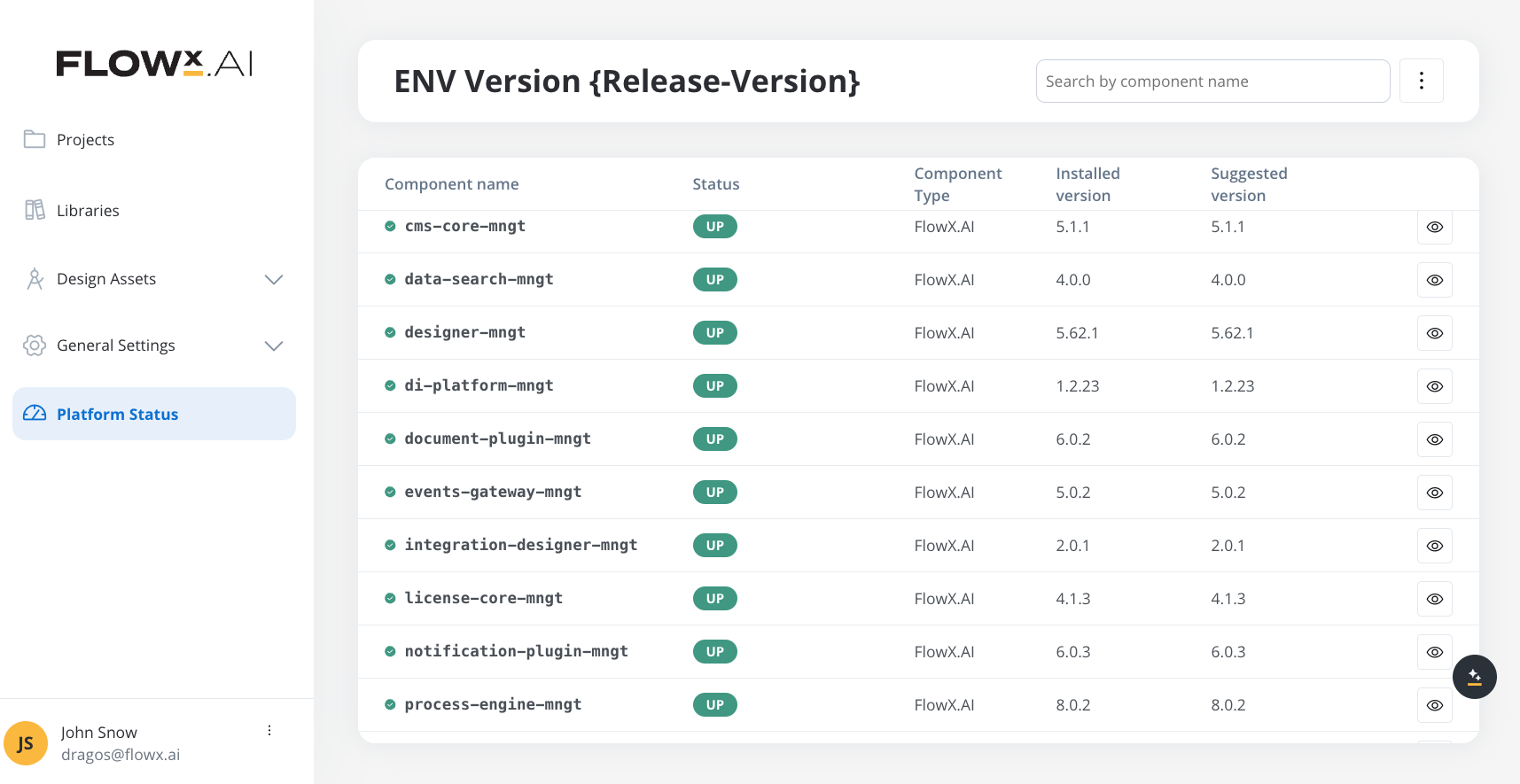
After upgrading to a new platform version, always ensure that your installed component versions match the versions specified in the release notes. To verify this, navigate to FlowX.AI Designer > Platform Status.
Component versions
| Component | 5.7.0 | 5.6.0 | 5.5.0 | 5.4.0 | 5.3.0 | 5.2.0 |
|---|
| process-engine | 10.87.0 | 10.77.0 | 10.60.0 | 10.38.0 | 10.29.0 | 10.12.0 |
| admin | 10.74.0 | 10.66.0 | 10.53.0 | 10.38.0 | 10.26.1 | 10.12.0 |
| designer | 10.143.1 | 10.127.3 | 10.91.0 | 10.59.1 | 10.32.4 | 10.12.1 |
| cms-core | 10.51.0 | 10.43.0 | 10.35.0 | 10.22.0 | 10.16.0 | 10.7.0 |
| scheduler-core | 10.38.0 | 10.31.0 | 10.25.0 | 10.15.0 | 10.11.1 | 10.4.1 |
| events-gateway | 10.40.0 | 10.33.1 | 10.27.0 | 10.17.0 | 10.12.1 | 10.4.1 |
| notification-plugin | 10.49.0 | 10.42.1 | 10.35.0 | 10.22.0 | 10.17.0 | 10.7.0 |
| document-plugin | 10.57.0 | 10.46.0 | 10.35.0 | 10.23.0 | 10.16.0 | 10.6.0 |
| task-management-plugin | 10.48.0 | 10.41.1 | 10.35.0 | 10.25.0 | 10.18.0 | 10.7.0 |
| data-search | 10.37.0 | 10.30.1 | 10.25.0 | 10.14.0 | 10.10.1 | 10.4.1 |
| audit-core | 10.47.0 | 10.40.0 | 10.31.0 | 10.21.0 | 10.15.1 | 10.6.0 |
| advancing-controller | 10.38.0 | 10.33.1 | 10.27.0 | 10.16.0 | 10.11.0 | 10.4.1 |
| integration-designer | 10.101.0 | 10.84.0 | 10.63.0 | 10.38.0 | 10.24.0 | 10.8.0 |
| application-manager | 10.78.0 | 10.69.1 | 10.53.0 | 10.37.0 | 10.24.0 | 10.11.0 |
| runtime-manager | 10.78.0 | 10.69.1 | 10.53.0 | 10.37.0 | 10.24.0 | 10.11.0 |
| data-sync | 10.44.0 | 10.38.0 | 10.31.1 | 10.20.1 | 10.14.1 | 10.3.1 |
| authorization-system | 10.60.0 | 10.51.0 | 10.42.1 | 10.28.0 | 10.18.1 | 10.7.0 |
| nosql-db-runner | 10.41.0 | 10.34.0 | 10.27.0 | 10.17.0 | 10.10.1 | 10.4.1 |
| email-gateway | 10.40.0 | 10.32.1 | 10.24.0 | 10.9.0 | - | - |
| organization-manager | 10.34.0 | 10.26.1 | 10.19.2 | - | - | - |
| webhook-gateway | 10.8.0 | 10.1.1 | - | - | - | - |
| license | 10.28.0 | - | - | - | - | - |
Embedded components
Renderers
| Component | 5.7.0 | 5.6.0 | 5.5.0 | 5.4.0 | 5.3.0 | 5.2.0 |
|---|
| @flowx/angular-sdk | 10.143.1 | 10.127.3 | 10.68.0 | 10.59.1 | 10.32.4 | 10.12.1 |
| @flowx/angular-theme | 10.143.1 | 10.127.3 | 10.68.0 | 10.59.1 | 10.32.4 | 10.12.1 |
| @flowx/angular-ui-toolkit | 10.143.1 | 10.127.3 | 10.68.0 | 10.59.1 | 10.32.4 | 10.12.1 |
| @flowx/react-sdk | 10.143.1 | 10.127.3 | 10.68.0 | 10.59.1 | 10.32.4 | 10.12.1 |
| @flowx/react-theme | 10.143.1 | 10.127.3 | 10.68.0 | 10.59.1 | 10.32.4 | 10.12.1 |
| @flowx/react-ui-toolkit | 10.143.1 | 10.127.3 | 10.68.0 | 10.59.1 | 10.32.4 | 10.12.1 |
| @flowx/core-sdk | 10.143.1 | 10.127.3 | 10.68.0 | 10.59.1 | 10.32.4 | 10.12.1 |
| @flowx/core-theme | 10.143.1 | 10.127.3 | 10.68.0 | 10.59.1 | 10.32.4 | 10.12.1 |
| iOS renderer | 10.3.0 | 10.3.0 | 10.3.0 | 10.2.0 | 10.1.0 | 10.0.0 |
| Android renderer | 10.3.0 | 10.3.0 | 10.3.0 | 10.2.0 | 10.1.0 | 10.0.0 |
Plugins
| Component | 5.7.0 | 5.6.0 | 5.5.0 | 5.4.0 | 5.3.0 | 5.2.0 |
|---|
| ocr-plugin | 1.0.17 | 1.0.17 | 1.0.17 | 1.0.17 | 1.0.17 | 1.0.17 |
| reporting-plugin | 0.2.3 | 0.2.3 | 0.2.3 | 0.2.3 | 0.2.3 | 0.2.3 |
| Component | 5.7.0 | 5.6.0 | 5.5.0 | 5.4.0 | 5.3.0 | 5.2.0 |
|---|
| ai-assistant | | 10.2.3 | 10.1.2 | 10.1.2 | 10.1.1 | 10.0.1 |
| di-platform | | 10.3.0 | 10.2.6 | 10.2.5 | 10.2.5 | 10.2.0 |
| ai-platform-ai-developer | | 10.6.0 | TBD | 10.1.3 | 10.1.3 | 10.0.1 |
| ai-platform-connected-graph | | 10.6.0 | TBD | 10.1.3 | 10.1.3 | 10.0.1 |
| ai-platform-knowledge-graph | | 10.6.0 | TBD | 10.1.3 | 10.1.3 | 10.0.1 |
| ai-platform-agents | | 10.6.0 | TBD | 10.1.3 | 10.1.3 | 10.0.1 |
| ai-platform-conversations | | 10.6.0 | TBD | 10.1.3 | 10.1.3 | 10.0.1 |
| ai-platform-tenants | | 10.6.0 | TBD | 10.1.3 | 10.1.3 | 10.0.1 |
| ai-platform-planner | | 10.6.0 | TBD | 10.1.3 | 10.1.3 | 10.0.1 |
| ai-platform-ai-analyst | | 10.6.0 | TBD | 10.1.3 | 10.1.3 | 10.0.1 |
| ai-platform-ai-designer | | 10.6.0 | TBD | 10.1.3 | 10.1.3 | 10.0.1 |
| ai-platform-agent-builder | | 10.6.0 | TBD | 10.1.3 | 10.1.3 | 10.0.1 |
| ai-platform-binaries | | 10.6.0 | TBD | 10.1.3 | 10.1.3 | 10.0.1 |
| knowledgebase | | 10.6.0 | TBD | - | - | - |
| knowledgebase-rag | | 10.6.0 | 10.2.0 | - | - | - |
| knowledgebase-indexer-v2 | | 10.6.0 | 10.2.0 | - | - | - |
| mcp | | 10.6.0 | 10.2.0 | - | - | - |
| doc-converter | | 10.2.2 | - | - | - | - |
| doc-parser | | 10.5.1 | - | - | - | - |
Note: The ai-platform-models service has been removed in 5.7.0. LLM provider and model configuration has moved to the AI Providers UI within the Organization Manager.
Third-party recommended component versions
| FlowX.AI Version | 3rd Party Dependency | Supported Versions |
|---|
| 5.7.0 | Keycloak | 26+ |
| 5.7.0 | Kafka | 3.8 - 3.9 |
| 5.7.0 | PostgreSQL | 16 - 17 |
| 5.7.0 | Oracle Database | 21c, 23ai |
| 5.7.0 | MongoDB | 7 - 8 |
| 5.7.0 | Redis | 7.4 - 8.0 |
| 5.7.0 | Angular (Web SDK) | 19.2 |
| 5.7.0 | React (Web SDK) | 18.x |
The following versions of third-party dependencies are no longer supported:
- Keycloak versions older than 26
- Kafka versions older than 3.8
- Redis versions older than 7.4
Self-hosted deployment changes
First on-premises release since 5.4.0. This section covers critical configuration changes for self-hosted (on-premises) deployments.
Supported upgrade paths
| Source version | Path | Notes |
|---|
| Fresh install | Supported | Guided setup flow on first launch. See Organization Manager setup. |
| 5.1.x LTS | Supported | Requires Organization ID on all 19 services. Liquibase migrates active process instances and realm data. Inactive instances require separate handling by FlowX. See details below. |
| 5.2 - 5.4 | FlowX-assisted only | These versions may have partial realm or organization changes. Contact your FlowX representative for a custom migration plan. Do not follow the 5.1.x upgrade path. |
| 5.5 - 5.6 | SaaS only | These were SaaS-only releases with no on-premises deployment. |
Organization ID (mandatory for upgrades)
The Organization ID is how FlowX identifies your installation. How it is obtained depends on your deployment path:
- Fresh install: The Organization ID is created automatically during the guided setup flow (Designer first-launch screen). No manual configuration needed.
- Upgrade from 5.1.x: FlowX registers your organization in the SaaS licensing infrastructure and provides an Organization ID (UUID). Set
ORGANIZATION_ID on all 19 services before deploying 5.7.0 images — Liquibase migrations use it to replace the default organization.
# Example — set on every service
ORGANIZATION_ID: "26ef7b5f-b463-4375-88c8-xxxxxxxxxxxx"  # UUID provided by FlowX
Do not deploy 5.7.0 images without setting ORGANIZATION_ID on upgrade scenarios. Services will fail to start if Liquibase migrations cannot find the organization ID.
Active vs inactive instances. Liquibase migrations automatically update the Organization ID on active process instances only. Inactive or archived instances require separate migration handled by the FlowX team during guided deployment. Contact your FlowX representative for details.
License service (new)
Self-hosted deployments must configure the License service to connect to FlowX SaaS for license validation and usage reporting. See the License service setup guide for complete configuration.
IAM / Keycloak changes
FlowX.AI now uses a two-realm architecture in Keycloak and JWT public key validation (replacing opaque-token introspection). These changes were introduced in 5.5.0 (SaaS) and are now relevant for self-hosted deployments.
- Token validation:
security.type switches from oauth2 to jwt-public-key on all services
- Service accounts realm: A dedicated realm (
00000002-0002-4002-8002-000000000002) holds all service account clients, separate from the user realm
- Organization manager: Now a required dependency for all services (provides realm resolution)
flowx-platform-authorize client: No longer needed — remove from Keycloak- Master realm credentials: The authorization-system service needs Keycloak admin access for realm migrations. If you cannot provide admin credentials, see Manual Keycloak configuration.
- SMTP: Must be configured in Keycloak for password reset and user invitations
For complete IAM setup instructions, see the Configuring an IAM solution guide.
Environment info deprecation
The Configure Environment Info feature (PATCH /api/platform/environment) is deprecated and removed. Environment name is now set during organization registration. The following are no longer used:
FLOWX_CLIENT_NAME environment variableFLOWX_ENVIRONMENT_NAME environment variableenvironmentDetails section in the /api/init response
Kafka integration changes
Fx-Organization-Id header (mandatory)
All FlowX Kafka consumers now validate the Fx-Organization-Id header on every incoming message. Messages without this header are rejected with a non-retryable MissingKafkaHeaderException.
Action required for custom Kafka integrations. If you have custom Kafka producers that publish directly to FlowX topics (starting processes, sending task events, responding to engine requests), you must add the Fx-Organization-Id header to every message. Set it to the Organization UUID (ORGANIZATION_ID value).producerRecord.headers().add("Fx-Organization-Id",
organizationId.getBytes(StandardCharsets.UTF_8));
New Kafka topics
| Topic | Environment Variable | Producer | Consumer | Description |
|---|
ai.flowx.llm.config.changed.v1 | KAFKA_TOPIC_LLM_CONFIG_CHANGED | organization-manager | integration-designer, AI Python services | Broadcast when LLM provider or model configuration changes at the organization level |
Environment variables
Environment variable names follow Spring relaxed binding conventions. For example, the YAML property security.oauth2.sa-realm maps to the environment variable SECURITY_OAUTH2_SAREALM (dots become underscores, hyphens are removed, all uppercase).
New environment variables
| Environment Variable | Description | Default Value | Component |
|---|
ORGANIZATION_ID | Organization UUID provided by FlowX. Required on all services for upgrades. Fresh installs get this automatically via the setup flow. | - | all services |
FLOWX_LICENSE_KEY | License key for FlowX SaaS connection | - | license |
FLOWX_LICENSE_AUTHSERVERURL | FlowX SaaS auth URL | - | license |
FLOWX_LICENSE_SERVERURL | FlowX SaaS license API URL | - | license |
FLOWX_ORG_MANAGER_URL | Organization Manager service URL for LLM provider configuration. Required on all Python AI services. | - | planner, ai-developer, ai-analyst, ai-designer, agent-builder, knowledgebase-rag, embedder, knowledgebase |
SECURITY_MASTERREALM_CLIENTID | Master realm admin client ID for Keycloak management | admin-cli | authorization-system |
SECURITY_MASTERREALM_NAME | Keycloak master realm name | master | authorization-system |
SECURITY_MASTERREALM_ADMIN_USERNAME | Keycloak admin username for realm migrations | - | authorization-system |
SECURITY_MASTERREALM_ADMIN_PASSWORD | Keycloak admin password for realm migrations | - | authorization-system |
SECURITY_OAUTH2_SAREALM | Service accounts realm ID | 00000002-0002-4002-8002-000000000002 | all services |
FLOWX_LIB_SECURITY_SERVICES_ORGANIZATIONMANAGER_BASEURL | Organization manager URL for security lib | http://organization-manager:80 | all services |
FLOWX_SPEECH_TO_TEXT_BASE_URL | Base URL for the Speech-to-Text service | http://speech-to-text:80 | integration-designer |
KAFKA_TOPIC_LLM_CONFIG_CHANGED | Topic for LLM config change notifications | ai.flowx.llm.config.changed.v1 | organization-manager |
LLM_ENCRYPTION_MASTER_KEY | Encryption key for LLM provider API keys at rest. Change from default in production. | default-dev-key-change-in-prod | organization-manager |
Removed environment variables
For upgrades: Remove these variables only after the Liquibase migrations have completed successfully. If you remove them before starting services for the first time on 5.7.0, the migrations may fail. The recommended sequence is: (1) add new variables, (2) deploy 5.7.0 images, (3) let migrations run, (4) verify services are healthy, (5) remove old variables in a follow-up deployment.
| Environment Variable | Reason | Component |
|---|
FLOWX_CLIENT_NAME | Replaced by org code from registration | process-engine |
FLOWX_ENVIRONMENT_NAME | Replaced by env name from registration | process-engine |
AI_SERVICE_MODELS_ENDPOINT | The Models microservice (port 9104) has been removed. LLM provider and model configuration has moved to the AI Providers UI. Remove this service from your deployment. | ai-platform (all Python services) |
SECURITY_OAUTH2_REALM | Replaced by per-organization realm resolution. | all services |
SECURITY_OAUTH2_CLIENT_CLIENTID | Opaque-token introspection client no longer needed. | all services |
SECURITY_OAUTH2_CLIENT_CLIENTSECRET | Opaque-token introspection client secret no longer needed. | all services |
SPRING_SECURITY_OAUTH2_RESOURCESERVER_OPAQUETOKEN_* | Entire opaque-token introspection config removed. | all services |