

ORGANIZATION_ID Liquibase parameter on services that backfill organization_id columns, the new license microservice that connects self-hosted deployments to FlowX SaaS, the deployment-time env vars that replace the legacy “Configure Environment Info” UI, and the organization registration step at first launch.
ORGANIZATION_ID: where it is actually required
ORGANIZATION_ID is a Liquibase parameter used to backfill new organization_id columns on existing tables. It is NOT a service-wide config. Only the services that ship a Liquibase changeset reading ${organization-id} consume it.
Set the UUID issued by FlowX (see Prerequisites) on these 9 services:
application-managerauthorization-systemcms-coredocument-pluginintegration-designernotification-pluginorganization-managerprocess-enginescheduler-core
ORGANIZATION_ID set in a non-SaaS deployment. Behavior depends on the deployment scenario:
The remaining services (
admin, advancing-controller, audit-core, data-search, data-sync, email-gateway, events-gateway, license, nosql-db-runner, runtime-manager, task-management-plugin, webhook-gateway) do NOT declare ORGANIZATION_ID as a Liquibase parameter. Setting it on those is harmless but unnecessary.
The license service uses a separate env var
The license service does NOT read the Liquibase ORGANIZATION_ID parameter. Instead, it consumes FLOWX_LICENSE_ORGANIZATIONID at runtime as the OAuth client-id for the FlowX SaaS license handshake.
Both env vars carry the same UUID value, but they bind to different Spring properties on different services. See the next section for the full license service env var table.
Liquibase migration
When you boot 5.9.x for the first time against your 5.1.x databases:- Active process instances are migrated automatically. The default organization is replaced with your registered Organization UUID.
- Inactive and archived process instances are not migrated automatically. FlowX provides custom migration scripts on demand. Request these from your FlowX representative before resuming runtime traffic, otherwise inactive instances will not be visible to users post-upgrade.
The license microservice
5.9.x ships a license service (PostgreSQL + Redis + Kafka + SpiceDB) that connects self-hosted deployments to FlowX SaaS for:
- License validation against the registered Organization UUID.
- Usage reporting (process instances, active users, AI usage counters).
- Receipt of license events (renewal, expiry, plan changes).
The
license service authenticates against two Keycloak instances. Inbound authentication uses the self-hosted Keycloak (configured via SECURITY_OAUTH2_BASE_SERVER_URL like every other service). Outbound calls to FlowX SaaS use a separate OAuth client, configured via the FLOWX_LICENSE_* env vars above.Required self-hosted env vars
The legacy environment-info UI is no longer available. Its values move to deployment-time env vars, set on the services below:Env var naming convention. Spring relaxed binding accepts both the canonical UPPER_SNAKE form (
FLOWX_DEFAULT_DESIGNER_HOMEURI) and the squished form (FLOWX_DEFAULT_DESIGNER_HOMEURI). Examples in this guide use the canonical form to match the k8s base templates; if you copy env vars from an older Helm chart and see the squished form, both bind to the same property.authorization-system service requires master-realm admin credentials and service-account secrets. See Authentication & IAM migration for the full list.
Creating the self-hosted organization
FlowX licensing provisions the organization and license for your deployment. After the platform is deployed, the Designer’s first-time Environment Setup wizard captures the environment name and organization-admin credentials, then completes provisioning automatically.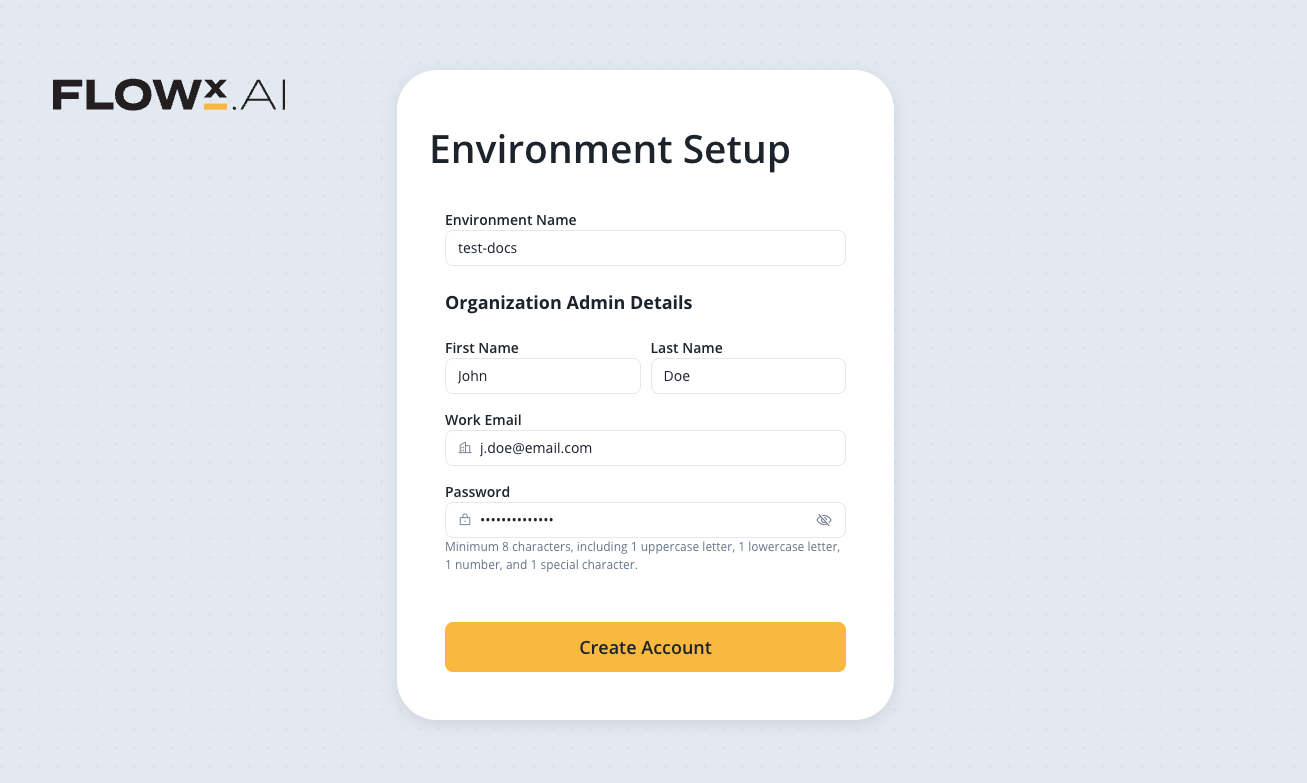
Deprecated: “Configure Environment Info”
The Configure Environment Info UI in Designer is no longer available. Environment naming now happens during organization registration with FlowX. The following API surface is changed; update any custom client tooling that relied on it:PATCH /api/platform/environment. Endpoint removed.
Verify the configuration
After services boot on 5.9.x, confirm:Every service shows the new Organization UUID in its startup logs (search for
ORGANIZATION_ID log lines).Designer → Platform Status shows all components at their 5.9.x target versions.
Liquibase migrations completed on every service. No service is in a “migration pending” state.
The
license service is reachable from your network to FlowX SaaS. License validation succeeds and usage events are being published.LLM_ENCRYPTION_MASTER_KEY is set to a non-default value before any LLM provider is configured.Related resources
v5.9.0 deployment guidelines
Component versions, third-party dependency versions, and the complete env var diff.
License engine setup
Full license service setup including PostgreSQL, Redis, and Kafka topology.
Organization manager setup
Deeper reference for organization-manager configuration.
Authentication & IAM migration
Prerequisite. The Keycloak transition that supports this configuration.