Documentation Index
Fetch the complete documentation index at: https://docs.flowx.ai/llms.txt
Use this file to discover all available pages before exploring further.
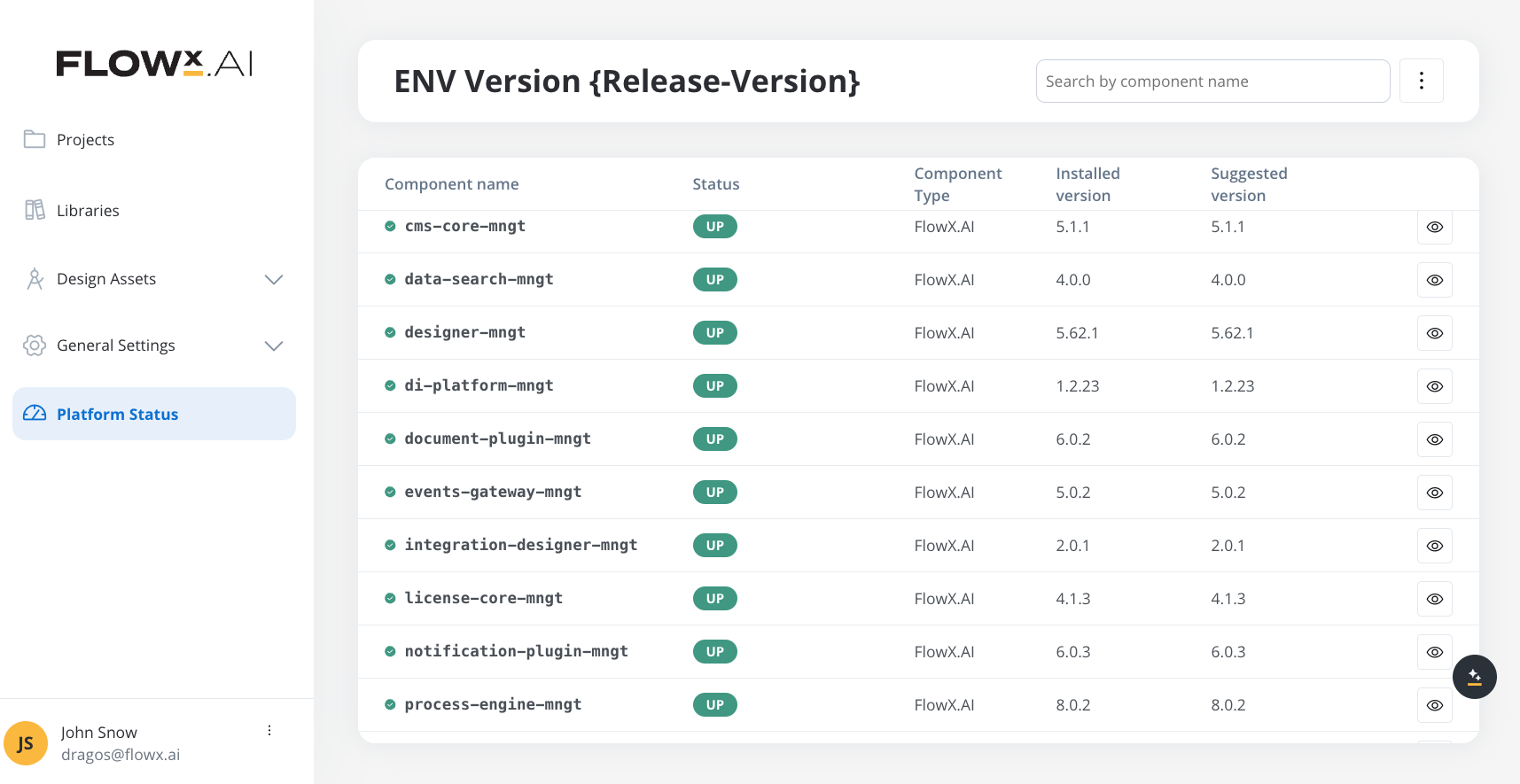
After upgrading to a new platform version, always ensure that your installed component versions match the versions specified in the release notes. To verify this, navigate to FlowX.AI Designer > Platform Status.
Upgrading from 5.1.x LTS? This page describes the steady-state 5.9.0 deployment. For the architecture delta, deprecation list, and upgrade steps, see Migrating from 5.1 LTS. Component versions
The following tables list component versions per FlowX.AI release. Verify your installed versions against the 5.9.0 column in FlowX.AI Designer → Platform Status.
| Component | 5.9.0 | 5.8.0 | 5.7.0 | 5.6.0 | 5.5.0 | 5.4.0 |
|---|
| process-engine | 10.135.0 | 10.106.0 | 10.96.0 | 10.77.0 | 10.60.0 | 10.38.0 |
| admin | 10.116.0 | 10.93.0 | 10.83.0 | 10.66.0 | 10.53.0 | 10.38.0 |
| designer | 10.230.2 | 10.181.0 | 10.164.0 | 10.127.3 | 10.91.0 | 10.59.1 |
| cms-core | 10.86.0 | 10.67.0 | 10.58.0 | 10.43.0 | 10.35.0 | 10.22.0 |
| scheduler-core | 10.70.0 | 10.53.0 | 10.45.0 | 10.31.0 | 10.25.0 | 10.15.0 |
| events-gateway | 10.72.0 | 10.55.0 | 10.47.0 | 10.33.1 | 10.27.0 | 10.17.0 |
| notification-plugin | 10.83.0 | 10.64.0 | 10.56.0 | 10.42.1 | 10.35.0 | 10.22.0 |
| document-plugin | 10.94.0 | 10.75.0 | 10.64.0 | 10.46.0 | 10.35.0 | 10.23.0 |
| task-management-plugin | 10.84.0 | 10.66.0 | 10.57.0 | 10.41.1 | 10.35.0 | 10.25.0 |
| data-search | 10.69.0 | 10.52.0 | 10.44.0 | 10.30.1 | 10.25.0 | 10.14.0 |
| audit-core | 10.79.0 | 10.63.0 | 10.54.0 | 10.40.0 | 10.31.0 | 10.21.0 |
| advancing-controller | 10.73.0 | 10.55.0 | 10.45.0 | 10.33.1 | 10.27.0 | 10.16.0 |
| integration-designer | 10.162.0 | 10.128.0 | 10.113.0 | 10.84.0 | 10.63.0 | 10.38.0 |
| application-manager | 10.123.0 | 10.97.0 | 10.88.0 | 10.69.1 | 10.53.0 | 10.37.0 |
| runtime-manager | 10.123.0 | 10.97.0 | 10.88.0 | 10.69.1 | 10.53.0 | 10.37.0 |
| data-sync | 10.81.0 | 10.58.0 | 10.50.0 | 10.38.0 | 10.31.1 | 10.20.1 |
| authorization-system | 10.96.1 | 10.77.0 | 10.68.0 | 10.51.0 | 10.42.1 | 10.28.0 |
| nosql-db-runner | 10.75.0 | 10.56.0 | 10.48.0 | 10.34.0 | 10.27.0 | 10.17.0 |
| email-gateway | 10.74.0 | 10.56.0 | 10.47.0 | 10.32.1 | 10.24.0 | 10.9.0 |
| organization-manager | 10.71.0 | 10.53.0 | 10.44.0 | 10.26.1 | 10.19.2 | - |
| webhook-gateway | 10.44.0 | 10.25.0 | 10.15.0 | 10.1.1 | - | - |
| file-gateway | 10.8.0 | - | - | - | - | - |
| ai-gateway | 10.7.0 | - | - | - | - | - |
| license | 10.63.0 | 10.46.0 | 10.36.0 | - | - | - |
| flowx-docs | - | - | - | - | - | - |
| react-saas | - | - | - | - | - | - |
Embedded components
Renderers
| Component | 5.9.0 | 5.8.0 | 5.7.0 | 5.6.0 | 5.5.0 | 5.4.0 |
|---|
| @flowx/angular-sdk | 10.230.2 | 10.181.0 | 10.164.0 | 10.127.3 | 10.68.0 | 10.59.1 |
| @flowx/angular-theme | 10.230.2 | 10.181.0 | 10.164.0 | 10.127.3 | 10.68.0 | 10.59.1 |
| @flowx/angular-ui-toolkit | 10.230.2 | 10.181.0 | 10.164.0 | 10.127.3 | 10.68.0 | 10.59.1 |
| @flowx/react-sdk | 10.230.2 | 10.181.0 | 10.164.0 | 10.127.3 | 10.68.0 | 10.59.1 |
| @flowx/react-theme | 10.230.2 | 10.181.0 | 10.164.0 | 10.127.3 | 10.68.0 | 10.59.1 |
| @flowx/react-ui-toolkit | 10.230.2 | 10.181.0 | 10.164.0 | 10.127.3 | 10.68.0 | 10.59.1 |
| @flowx/react-native-sdk | 10.230.2 | - | - | - | - | - |
| @flowx/react-native-theme | 10.230.2 | - | - | - | - | - |
| @flowx/react-native-ui-toolkit | 10.230.2 | - | - | - | - | - |
| @flowx/core-sdk | 10.230.2 | 10.181.0 | 10.164.0 | 10.127.3 | 10.68.0 | 10.59.1 |
| @flowx/core-theme | 10.230.2 | 10.181.0 | 10.164.0 | 10.127.3 | 10.68.0 | 10.59.1 |
| iOS renderer | 10.4.1 | 10.3.0 | 10.3.0 | 10.3.0 | 10.3.0 | 10.2.0 |
| Android renderer | 10.5.0 | 10.3.0 | 10.3.0 | 10.3.0 | 10.3.0 | 10.2.0 |
Plugins
| Component | 5.9.0 | 5.8.0 | 5.7.0 | 5.6.0 | 5.5.0 | 5.4.0 |
|---|
| ocr-plugin | 1.0.19 | 1.0.17 | 1.0.17 | 1.0.17 | 1.0.17 | 1.0.17 |
| reporting-plugin | 0.2.6 | 0.2.3 | 0.2.3 | 0.2.3 | 0.2.3 | 0.2.3 |
| Component | 5.9.0 | 5.8.0 | 5.7.0 | 5.6.0 | 5.5.0 | 5.4.0 |
|---|
| di-platform | 10.3.1 | 10.3.0 | 10.3.0 | 10.3.0 | 10.2.6 | 10.2.5 |
| ai-platform-ai-assistant | 10.7.0 | 10.7.0 | 10.6.2 | - | - | - |
| ai-platform-ai-analyst | 10.7.0 | 10.7.0 | 10.6.2 | 10.6.0 | 10.4.0 | 10.1.3 |
| ai-platform-ai-designer | 10.7.0 | 10.7.0 | 10.6.2 | 10.6.0 | 10.4.0 | 10.1.3 |
| ai-platform-ai-developer | 10.7.0 | 10.7.0 | 10.6.2 | 10.6.0 | 10.4.0 | 10.1.3 |
| ai-platform-planner | 10.7.0 | 10.7.0 | 10.6.2 | 10.6.0 | 10.4.0 | 10.1.3 |
| ai-platform-agent-builder | 10.7.0 | 10.7.0 | 10.6.2 | 10.6.0 | 10.4.0 | 10.1.3 |
| embedder | 10.7.0 | 10.7.0 | 10.6.2 | - | - | - |
| knowledgebase-rag | 10.7.0 | 10.7.0 | 10.6.2 | 10.6.0 | 10.2.0 | - |
| knowledgebase-indexer-v2 | 10.7.0 | 10.7.0 | 10.6.2 | 10.6.0 | 10.2.0 | - |
Standalone AI services
Separate repositories under flowx-ai/, installed independently from the AI Platform umbrella chart.
| Component | 5.9.0 | 5.8.0 | 5.7.0 | 5.6.0 | 5.5.0 | 5.4.0 |
|---|
| doc-parser | 10.9.0 | 10.7.0 | 10.6.2 | 10.5.1 | - | - |
| doc-converter | 10.2.3 | 10.2.3 | 10.2.3 | 10.2.2 | - | - |
| web-crawler | 10.3.5 | 10.3.5 | 10.3.2 | - | - | - |
| data-privacy | 10.1.0 | 10.1.0 | 10.0.8 | - | - | - |
| speech-to-text | 10.3.4 | TBD | TBD | - | - | - |
| evals-judge | 10.1.1 | - | - | - | - | - |
| modpod | 10.0.7 | 10.0.7 | 10.0.7 | - | - | - |
| ai-observatory | 10.3.2 | - | - | - | - | - |
Third-party recommended component versions
| FlowX.AI Version | 3rd Party Dependency | Supported Versions | Dropped |
|---|
| 5.9.0 | Keycloak | 26+ | |
| 5.9.0 | Kafka | 3.9 - 4.2 | 3.8 |
| 5.9.0 | PostgreSQL | 16 - 18 | |
| 5.9.0 | Oracle Database | 21c, 23ai | |
| 5.9.0 | MongoDB | 7 - 8 | |
| 5.9.0 | Redis | 8+ | Versions older than 8 |
| 5.9.0 | Elasticsearch Sink Connector (*) | 15+ | |
| 5.9.0 | Angular (Web SDK) | 19.2 | |
| 5.9.0 | React (Web SDK) | 18.x | |
LTS support policy. FlowX 5.9.x LTS family is supported for 2 years. Within that window, support for any third-party dependency is contingent on that dependency remaining supported by its upstream vendor. Once a version reaches upstream end-of-life, it is removed from the supported list and customers are expected to upgrade to a still-supported version, even if the FlowX LTS itself remains supported.
Kafka topics
Document-plugin archive and extract listeners
5.9.0 exposes four Kafka topics for the document-plugin archive and extract operations. Both follow the encrypt/decrypt trigger and reply pattern: document-plugin consumes the trigger.*.file topic and process-engine consumes the matching engine.receive.*.file.results reply.
| Topic | Producer | Consumer |
|---|
ai.flowx.plugin.document.trigger.archive.file.v1 | process-engine | document-plugin |
ai.flowx.engine.receive.plugin.document.archive.file.results.v1 | document-plugin | process-engine |
ai.flowx.plugin.document.trigger.extract.file.v1 | process-engine | document-plugin |
ai.flowx.engine.receive.plugin.document.extract.file.results.v1 | document-plugin | process-engine |
KAFKA_TOPIC_FILE_ARCHIVE_IN, KAFKA_TOPIC_FILE_ARCHIVE_OUT, KAFKA_TOPIC_FILE_EXTRACT_IN, KAFKA_TOPIC_FILE_EXTRACT_OUT). See Documents plugin setup → File archive / File extract. Two new thread-pool entries are added: KAFKA_CONSUMER_THREAD_POOLS_THREADPOOLGENERIC_THREAD_COUNT_PER_CONTAINER_FILEARCHIVEIN and ..._FILEEXTRACTIN, both defaulting to 5.
Environment variables
A configuration that blocks startup is a required configuration. If a service fails to start and its logs report a missing or empty configuration value, treat that value as required and provide it, even when it is not flagged as required here. These guides document the most common variables; they are not an exhaustive list of every value your deployment topology requires.
Data-sync: Keycloak admin credentials
The data-sync job provisions FlowX-managed end-user groups and runtime roles in Keycloak on first run, using the Keycloak admin API. Configure the following on the data-sync job:
| Environment Variable | Description | Default Value | Component |
|---|
FLOWX_OPENID_PROVIDER | OpenID provider type. Set to keycloak (the only supported provider). | - | data-sync |
FLOWX_OPENID_SERVER_URL | Base URL of the Keycloak server, including the /auth/ path. | - | data-sync |
FLOWX_OPENID_USER | Username of a Keycloak admin account that can manage groups and roles in the FlowX realm. | - | data-sync |
FLOWX_OPENID_PASSWORD | Password for the admin account above. Store in a Kubernetes Secret. | - | data-sync |
FLOWX_OPENID_CLIENT_ID | Keycloak admin client used to obtain the admin token. Typically admin-cli for standard Keycloak deployments. Must be set explicitly. There is no default. | - | data-sync |
Anonymous service account: shared client secret
5.9.x introduces a single shared service-account client, flowx-anonymous-sa, used by FlowX backend services for inter-service calls on anonymous (unauthenticated) runtime flows. One client secret is reused across all consumers — it must be provided in two places.
On authorization-system — passed to Liquibase so the client is provisioned with the correct secret when FlowX manages Keycloak:
| Environment Variable | Description | Default Value | Component |
|---|
SPRING_LIQUIBASE_PARAMETERS_SECRETS_SERVICE_ACCOUNTS_FLOWX_ANONYMOUS_SA | Client secret used by Liquibase to create the flowx-anonymous-sa client in the service-accounts realm at first boot. Required when SECURITY_KEYCLOAKADMINENABLED=true. | - | authorization-system |
anonymousidentity alias resolves the same secret at runtime:
| Environment Variable | Description | Default Value | Component |
|---|
SPRING_SECURITY_OAUTH2_CLIENT_REGISTRATION_ANONYMOUSIDENTITY_CLIENT_SECRET | Client secret for the anonymousidentity registration. Must be the same value across every service — it is a single shared service account. | - | admin, application-manager, authorization-system, document-plugin, email-gateway, events-gateway, file-gateway, integration-designer, license, mock-server, nosql-db-runner, organization-manager, process-engine, runtime-manager, scheduler, task-management-plugin, webhook-gateway |
This is a secret. Store it in your secrets management solution (e.g., Kubernetes Secret, Vault) and reference it from there. Never commit it to version control.
flowx-anonymous-sa client, SA_FLOWX_ANONYMOUS realm role, manual-configuration recipe for deployments without Keycloak admin access), see Manual Keycloak configuration.
Knowledgebase-rag: Qdrant search tuning
Two env vars control the fanout of dense and sparse Qdrant queries inside the knowledgebase-rag service. Defaults are tunable per environment.
| Environment Variable | Description | Default Value | Component |
|---|
QDRANT_PREFETCH_LIMIT | Maximum points returned by each dense/sparse prefetch stage in a hybrid search before fusion. | 100 | knowledgebase-rag |
QDRANT_FUSION_LIMIT | Maximum points returned after RRF fusion (hybrid search) or by a single-stage dense/keyword search. Caps the reranker input. | 80 | knowledgebase-rag |
Integration-designer: XML response handling
Two properties control how integration-designer handles XML response bodies on REST endpoints. Defaults are safe; raise the size cap only if upstream services return very large XML bodies that must be parsed inline.
| Spring Property | Environment Variable | Description | Default Value | Component |
|---|
integration.response.xml-auto-parse.enabled | INTEGRATION_RESPONSE_XML_AUTO_PARSE_ENABLED | Kill-switch. When false, XML responses are returned as raw strings instead of parsed maps. | true | integration-designer |
integration.response.xml.max-bytes | INTEGRATION_RESPONSE_XML_MAX_BYTES | XML bodies larger than this byte limit are returned as raw strings without parsing. | 5242880 (5 MiB) | integration-designer |
CORS handling: APPLICATION_CORS_ALLOW_ORIGIN
CORS is enforced at the application layer. Each backend service exposed via admin or public URLs reads its allowed-origin list from a single environment variable. Allowed methods, allowed headers (including Authorization, Content-Type, Fx-Workspace-Id), and credential handling are baked into each service’s application.yaml with safe defaults. Only APPLICATION_CORS_ALLOW_ORIGIN is deployment-specific.
| Environment Variable | Description | Default Value | Component |
|---|
APPLICATION_CORS_ALLOW_ORIGIN | Comma-separated list of origins allowed to call this service from the browser. Supports wildcard subdomains (https://*.yourcompany.com). Must include every Designer, runtime renderer, and integration domain that calls FlowX APIs. | - | admin, ai-gateway, application-manager, audit-core, authorization-system, cms-core, document-plugin, events-gateway, file-gateway, integration-designer, license, notification-plugin, organization-manager, process-engine, runtime-manager, task-management-plugin, webhook-gateway |
Process-engine and integration-designer: native script engine
The default script engine for JavaScript and Python execution is a native subprocess pool. Scripts run in isolated Node.js and Python worker processes.
| Environment Variable | Description | Default Value | Component |
|---|
APPLICATION_SCRIPT_ENGINE_PROVIDER | Script engine provider | native | process-engine, integration-designer |
APPLICATION_SCRIPT_ENGINE_NATIVEENGINE_JS_POOLSIZE | Node.js worker pool size | 16 | process-engine, integration-designer |
APPLICATION_SCRIPT_ENGINE_NATIVEENGINE_JS_EXECUTIONTIMEOUTMS | JS script execution timeout (ms) | 5000 | process-engine, integration-designer |
APPLICATION_SCRIPT_ENGINE_NATIVEENGINE_PYTHON_POOLSIZE | Python worker pool size | 8 | process-engine, integration-designer |
APPLICATION_SCRIPT_ENGINE_NATIVEENGINE_PYTHON_EXECUTIONTIMEOUTMS | Python script execution timeout (ms) | 10000 | process-engine, integration-designer |
APPLICATION_SCRIPT_ENGINE_PROVIDER=graalvm on both services.