Do not forget, when upgrading to a new platform version, always ensure that your installed component versions match the versions specified in the release notes. To verify this, navigate to FLOWX.AI Designer > Platform Status.
After upgrading to 3.4.7 FlowX.AI release, it is not possible to import old process definitions into the new platform release (exported from releases < 3.4.7).
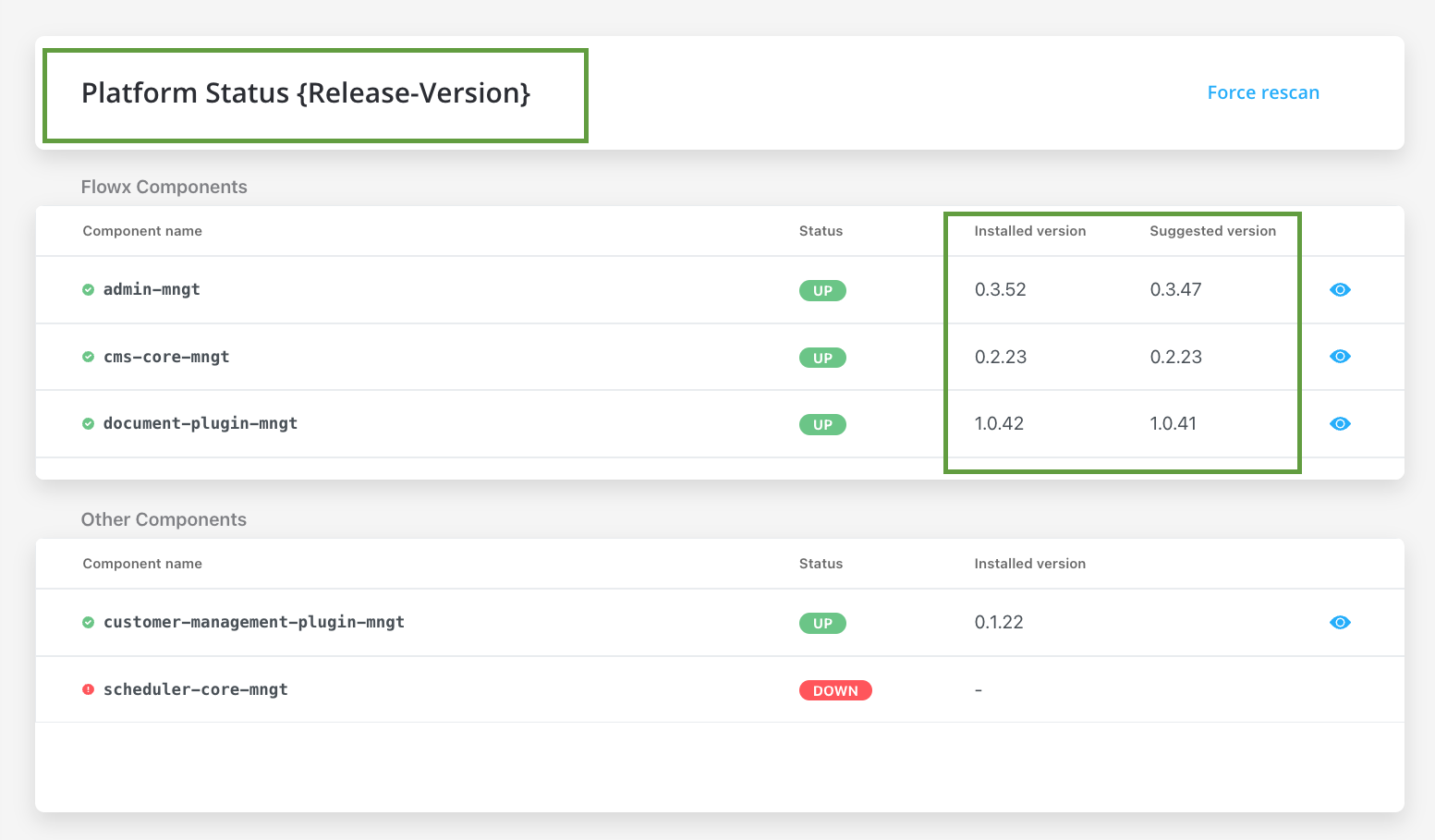
Component versions
| 🧩 | 3.4.7 | 3.4.6 | 3.4.5 | 3.4.4 | 3.4.3 | 3.4.2 | 3.4.1 | 3.4.0 | 3.3.0 | 3.2.0 | 3.1.0 | 3.0.0 | 2.14.0 | 2.13.0 | 2.12.0 | 2.11.0 | 2.10.0 |
|---|
| process-engine | 4.3.5-2v11 | 4.3.5-2v6 | 4.3.5-2v2 | 4.3.5-2v1 | 4.3.5 | 4.3.2 | 4.3.1 | 4.1.0 | 3.6.0 | 2.2.1 | 2.1.2 | 2.0.7 | 0.4.104 | 0.4.95 | 0.4.90 | 0.4.83 | 0.4.60 |
| admin | 3.3.19-6 | 3.3.19-4 | 3.3.19-3 | 3.3.19-1 | 3.3.19 | 3.3.10 | 3.3.7 | 3.1.1 | 2.5.2 | 2.2.2 | 2.1.3 | 2.0.8 | 0.3.119 | 0.3.103 | 0.3.92 | 0.3.81 | 0.3.60 |
| designer | 3.35.18-5 | 3.35.18-3 | 3.35.18-2 | 3.35.18-1 | 3.35.18 | 3.35.9 | 3.35.6 | 3.33.2 | 3.28.11 | 3.21.1 | 3.15.1 | 3.2.1 | 2.78.4-1 | 2.63.6 | 2.60.7 | 2.48.9 | 2.39.2 |
| @flowx/ui-sdk | 3.35.18-5 | 3.35.18-3 | 3.35.18-2 | 3.35.18-1 | 3.35.18 | 3.35.9 | 3.35.6 | 3.33.2 | 3.28.11 | 3.21.1 | 3.15.1 | 3.2.1 | n/a | n/a | n/a | n/a | n/a |
| @flowx/ui-toolkit | 3.35.18-5 | 3.35.18-3 | 3.35.18-2 | 3.35.18-1 | 3.35.18 | 3.35.9 | 3.35.6 | 3.33.2 | 3.28.11 | 3.21.1 | 3.15.1 | 3.2.1 | n/a | n/a | n/a | n/a | n/a |
| @flowx/ui-theme | 3.35.18-5 | 3.35.18-3 | 3.35.18-2 | 3.35.18-1 | 3.35.18 | 3.35.9 | 3.35.6 | 3.33.2 | 3.28.11 | 3.21.1 | 3.15.1 | 3.2.1 | n/a | n/a | n/a | n/a | n/a |
| paperflow-web-components | 3.35.18-5 | 3.35.18-3 | 3.35.18-2 | 3.35.18-1 | 3.35.18 | 3.35.9 | 3.35.6 | 3.33.2 | 3.28.11 | 3.21.1 | 3.15.1 | 3.2.1 | 2.78.4-1 | 2.63.6 | 2.60.7 | 0.2.10 | 0.2.10 |
| flowx-process-renderer | - | - | - | - | - | - | - | - | - | - | - | - | 2.78.4-1 | 2.63.6 | 2.60.7 | 2.48.9 | 2.39.2 |
| cms-core | 1.3.9 | 1.3.9 | 1.3.9 | 1.3.9 | 1.3.9 | 1.3.9 | 1.3.9 | 1.3.6 | 1.3.0 | 1.2.0 | 1.0.3 | 1.0.2 | 0.2.38 | 0.2.36 | 0.2.33 | 0.2.30 | 0.2.25 |
| scheduler-core | 1.2.4 | 1.2.4 | 1.2.4 | 1.2.4 | 1.2.4 | 1.2.4 | 1.2.4 | 1.1.0 | 1.0.4 | 1.0.4 | 1.0.4 | 1.0.1 | 0.0.34 | 0.0.34 | 0.0.34 | 0.0.33 | 0.0.28 |
| events-gateway | 1.1.0 | 1.1.0 | 1.1.0 | 1.1.0 | 1.1.0 | 1.1.0 | 1.1.0 | 1.0.6 | 1.0.2 | - | - | - | - | - | - | - | - |
| notification-plugin | 2.0.9 | 2.0.9 | 2.0.9 | 2.0.9 | 2.0.9 | 2.0.8 | 2.0.8 | 2.0.5 | 2.0.4 | 2.0.4 | 2.0.3 | 2.0.1 | 1.0.206 | 1.0.206 | 1.0.206 | 1.0.205 | 1.0.200 |
| document-plugin | 2.0.10-1 | 2.0.10 | 2.0.10 | 2.0.10 | 2.0.10 | 2.0.8 | 2.0.8 | 2.0.6 | 2.0.4 | 2.0.3 | 2.0.3 | 2.0.2 | 1.0.53 | 1.0.53 | 1.0.53 | 1.0.52 | 1.0.47 |
| ocr-plugin | 1.0.15 | 1.0.12 | 1.0.12 | 1.0.12 | 1.0.12 | 1.0.12 | 1.0.12 | 1.0.8 | 1.0.8 | 1.0.2 | 0.1.33 | 0.1.33 | 0.1.33 | 0.1.33 | 0.1.5 | 0.1.5 | 0.1.5 |
| license-core | 1.1.0 | 1.0.7 | 1.0.7 | 1.0.7 | 1.0.7 | 1.0.7 | 1.0.7 | 1.0.4 | 1.0.2 | 1.0.2 | 1.0.2 | 1.0.1 | 0.1.28 | 0.1.28 | 0.1.28 | 0.1.27 | 0.1.23 |
| customer-management-plugin | 0.2.8 | 0.2.8 | 0.2.8 | 0.2.8 | 0.2.8 | 0.2.8 | 0.2.8 | 0.2.6 | 0.2.4 | 0.2.3 | 0.2.3 | 0.2.1 | 0.1.28 | 0.1.28 | 0.1.28 | 0.1.27 | 0.1.23 |
| task-management-plugin | 3.0.3 | 3.0.3 | 3.0.3 | 3.0.3 | 3.0.3 | 3.0.3 | 3.0.3 | 3.0.0 | 2.1.2 | 1.0.4 | 1.0.4 | 1.0.1 | 0.0.42 | 0.0.42 | 0.0.40 | 0.0.37 | 0.0.29 |
| data-search | 0.2.8 | 0.2.8 | 0.2.8 | 0.2.6 | 0.2.6 | 0.2.6 | 0.2.6 | 0.2.3 | 0.2.0 | 0.1.4 | 0.1.4 | 0.1.3 | 0.0.8 | 0.0.8 | 0.0.6 | n/a | n/a |
| audit-core | 2.2.0 | 2.2.0 | 2.2.0 | 2.2.0 | 2.2.0 | 2.1.3 | 2.1.3 | 2.1.0 | 1.0.6 | 1.0.5 | 1.0.4 | 1.0.1 | 0.0.8 | 0.0.5 | n/a | n/a | n/a |
| reporting-plugin | 0.1.2 | 0.1.2 | 0.1.2 | 0.1.2 | 0.1.2 | 0.1.2 | 0.1.2 | 0.1.2 | 0.0.40 | 0.0.40 | 0.0.40 | 0.0.39 | 0.0.39 | n/a | n/a | n/a | n/a |
| advancing-controller | 0.3.5-1 | 0.3.5 | 0.3.5 | 0.3.5 | 0.3.5 | 0.3.5 | 0.3.5 | 0.3.2 | 0.3.0 | 0.1.4 | 0.1.4 | 0.1.2 | 0.0.6 | n/a | n/a | n/a | n/a |
| iOS renderer | 2.3.0 | 2.3.0 | 2.3.0 | 2.3.0 | 2.3.0 | 2.3.0 | 2.3.0 | 2.3.0 | 2.1.0 | 2.0.1 | 2.0.0 | 2.0.0 | n/a | n/a | n/a | n/a | n/a |
| Android renderer | 2.1.4 | 2.1.4 | 2.1.4 | 2.1.4 | 2.1.4 | 2.1.4 | 2.1.4 | 2.1.4 | 2.0.1 | 2.0.1 | 2.0.1 | 2.0.1 | n/a | n/a | n/a | n/a | n/a |
With the release of FLOWX.AI 3.0, there have been some changes that you need to be aware when upgrading to the latest version:
- The
flowx-process-renderer has been migrated to @flowx\ui-sdk.
- As of FlowX v4.0, the
paperflow-web-components library will be deprecated. Instead, the new components can be found in @flowx/ui-toolkit.
Third-party recommended component versions
| FLOWX.AI Platform Version | Component name | Recommended versions (tested versions) |
|---|
| 3.4.7 | Keycloak | 18.x |
| 3.4.7 | Kafka | 3.2.3 |
| 3.4.7 | PostgreSQL | 14.3.0 |
| 3.4.7 | MongoDB | 5.0.8 |
| 3.4.7 | Redis | 6.2.6 |
| 3.4.7 | Elasticsearch | 7.17 |
| 3.4.7 | OracleDB | 19.8.0.0.0 |
| 3.4.7 | Angular (Web SDK) | 15.0.0 |
FlowX.AI supports any listed version of the prerequisite third-party components in the table above.For optimal performance and reliability, our internal QA process validates new releases using specific versions as indicated in the provided table.
While exploring alternative versions that suit your company’s specific requirements, we recommend referring to the compatibility matrix for guidance.In the unlikely event that you encounter any compatibility issues with FlowX.AI, please open a support ticket here, and our dedicated team will address and resolve any identified bugs following our standard support process.Compatibility Matrix:
- FLOWX.AI Platform: Recommended and tested versions
- Third-Party Components: Supported versions based on specific requirements and client preferences
Additional Configuration
Process Engine
Introducing a new environment variable designed to facilitate the coordinated or independent expiration of subprocesses within a parent process.
| Environment Variable | Default Value | Explanation |
|---|
FLOWX_PROCESS_EXPIRE_SUBPROCESSES | true | When set to true, expiration of a parent process triggers simultaneous expiration of all associated subprocesses |
Documents Plugin
The DPI value for the PDF to JPEG conversion can now be configured via the FLOWX_CONVERT_DPI environment variable.
| Environment Variable | Default Value | Explanation |
|---|
FLOWX_CONVERT_DPI | 150 | Sets the DPI (dots per inch) for PDF to JPEG conversion. Higher values result in higher resolution images. |
OCR Plugin
The following environment variables were introduced to control the acceptable aspect ratio range for recognizing signed documents in OCR processes. Here’s a brief description of each:
| Environment Variable | Definition | Default Value |
|---|
OCR_SIGNATURE_MAX_RATIO | This variable sets the maximum acceptable aspect ratio for a signed scanned document (the OCR plugin will recognize a signature only if the document ratio is greater than or equal to the specified minimum ratio) | 1.43 |
OCR_SIGNATURE_MIN_RATIO | This variable sets the minimum acceptable aspect ratio for a signed scanned document (in this context, the OCR plugin will consider a detected signature only if the document aspect ratio is less than or equal to the specified maximum ratio) | 1.39 |
The plugin has been tested with aspect ratio values between 1.38 and 1.43. However, caution is advised when using untested values outside this range, as they may potentially disrupt the functionality. Adjust these parameters at your own risk and consider potential consequences, as untested values might lead to plugin instability or undesired behavior.

