> ## Documentation Index
> Fetch the complete documentation index at: https://docs.flowx.ai/llms.txt
> Use this file to discover all available pages before exploring further.
# FlowX.AI 5.1.1 Release Notes (LTS)
> WCAG 2.1 Level AA compliance achieved, AI Platform enhancements, bug fixes, and quality improvements for the FlowX.AI 5.1.x LTS line.
This is a **Long-Term Support (LTS)** maintenance release focusing on **accessibility compliance**, **AI Platform enhancements**, **customer issue resolution**, and **proactive quality improvements**.
Upgrades from **5.1.0 → 5.1.1** are non-breaking and fully compatible.
**Quality Achievement**: FlowX.AI 5.1.1 demonstrates our commitment to proactive quality improvement:
* **[WCAG 2.1 Level AA compliance](https://www.w3.org/TR/WCAG21/)** achieved across all web components
* **Proactive quality improvements** identified through internal QA before reaching customers
* **Customer issues** resolved with full business context
* **Zero breaking changes** - fully compatible upgrade from 5.1.0
This release represents months of accessibility audits, automated testing, and quality assurance work to deliver exceptional software quality.
***
**What's new? 🆕**
FlowX.AI 5.1.1 delivers comprehensive improvements across accessibility, stability, and platform reliability.
♿ [**WCAG 2.1 Compliance Achieved**](#wcag-21-compliance-achieved) — Full accessibility support across all web components\
🌍 [**Task Management Localization**](#task-management-localization) — Comprehensive multi-language support with 51 substitution tags\
🤖 [**AI Platform Enhancements**](#ai-platform-enhancements) — Multi-agent system improvements and AI workflow stability\
🎯 [**Customer Fixes**](#customer-fixes) — Critical issues resolved based on customer feedback\
✨ [**Proactive Improvements**](#proactive-quality-improvements) — Issues identified through internal QA before reaching customers\
🔧 [**Platform Enhancements**](#platform-enhancements) — SSE handling, audit logs, and infrastructure improvements
### **WCAG 2.1 compliance**
**FlowX.AI is now WCAG 2.1 Level AA compliant**
This release delivers full accessibility support through **28 comprehensive improvements** across Angular and React SDKs, making FlowX applications usable by everyone, including users with disabilities.
### Business value
Meet accessibility requirements for government and public sector applications
Comply with healthcare industry accessibility regulations and standards
Satisfy financial sector requirements for inclusive digital experiences
Keyboard navigation and clear labels improve usability for all users, not just those with disabilities
### What changed
* All components now fully keyboard-accessible
* Complete screen reader support with ARIA labels
* Proper focus management across all interactions
* Accessible error announcements and validation
* Semantic HTML structure throughout
Automatically bind accessibility labels, descriptions, and ARIA attributes to all UI components from Designer configuration
Full keyboard navigation support with proper focus management, tab order, and keyboard shortcuts in Angular and React SDKs
ARIA labels, descriptions, and live regions implemented across all form elements and interactive components
Dedicated accessibility configuration section in UI Designer for managing labels and descriptions
Input fields, Select/Multiselect, Checkbox, Switch, Radio/Segmented buttons, Slider, and File upload with labels, descriptions, and error announcements
Buttons, Links, Modals, Stepper, Tabs, and Accordion/Card with keyboard navigation, focus management, and state announcements
Messages and Images with semantic HTML structure and proper labeling
Complete implementation for Angular and React SDKs (iOS and Android in future releases)
**28 Improvements Delivered:**
* Custom keyboard navigation implementation
* Focus management for Select/Multiselect components
* Modal focus trap and restoration
* Shift+Tab handling across form elements
* Listbox keyboard operations
* Table navigation improvements
* Switch and checkbox accessibility
* File preview focus indicators
* Button Space key activation
* Link focus outlines
* Disabled element keyboard behavior
* BaseUI Combobox implementation for Select/Multiselect
* Keyboard navigation with clear buttons
* Focus restoration after interactions
* Outline theming for focus indicators
* Modal auto-focus on open
* Card accordion keyboard handling
* Table row navigation
* Option highlighting in dropdowns
* Accessibility configuration panel
* Auto-bindable tags for all components
* Label and description fields
* Alt text management for images
* ARIA attribute configuration
* Accessibility section styling
* Component-specific accessibility settings
* Implemented BaseUI Combobox for Select/Multiselect
* Custom keyboard navigation for Angular
* React SDK keyboard navigation with clear button
* Auto-bindable accessibility tags for all components
* Accessibility configuration panel in UI Designer
* Removed conflicting title attribute tooltips
* Aligned Stepper accessibility between frameworks
* Bind labels and descriptions to form fields
***
### **Customer fixes**
We prioritized and resolved **customer-reported issues** in this release, addressing critical functionality issues and workflow inefficiencies reported via Zendesk.
**Problem:**\
When copying nodes with Kafka send actions, topic and message configurations were not preserved, forcing users to manually reconfigure all action parameters after paste operations.
**Customer Impact:**
* Development velocity significantly reduced
* Risk of configuration errors during manual re-entry
* Frustration with repetitive configuration work
**Resolution:**\
actionParamsMap now properly persists through copy/paste operations
**Steps to reproduce (fixed):**
1. Create send message node with Kafka action
2. Configure topic and message parameters
3. Copy and paste the node
4. All configurations now preserved correctly
**Customer Benefit:**\
Faster workflow development with reduced configuration errors and improved developer experience.
**Problem:**\
When deleting parent actions that had child actions with warnings, the warnings remained in the system as orphans. These orphaned warnings prevented process export/import operations and blocked build deployments.
**Customer Impact:**
* Build pipelines blocked by stale warnings
* Deployment delays requiring manual database cleanup
* Process export/import operations failed
* Development and testing workflows disrupted
**Resolution:**\
Warnings now cascade-delete automatically when parent actions are removed
**Steps to reproduce (fixed):**
1. Create action with subactions containing warnings
2. Delete the parent action
3. All child warnings now properly cleaned up
**Customer Benefit:**\
Clean deployments without manual intervention, faster development cycles, no more blocked pipelines.
**Problem:**\
Auto-generated `default_application` in new environments existed only in app\_manager schema and could not be deleted through standard operations, returning validation errors.
**Customer Impact:**
* Environment cleanup difficulties
* Testing complications with unwanted default projects
* Confusion about application lifecycle management
**Resolution:**\
Added proper runtime validation for application deletion operations
**Error (Fixed):**
```json theme={"system"}
{
"status": 400,
"message": "error.validation.runtime.application.not_found",
"title": "Runtime project not found."
}
```
**Customer Benefit:**\
Clean environment management with predictable application lifecycle operations.
***
### **Proactive quality improvements**
**Issues identified and resolved proactively**:
### Quality process
WCAG 2.1 compliance testing identified keyboard navigation and focus management improvements
Continuous integration pipelines caught component behavior issues and rendering problems
Manual testing uncovered edge cases in form interactions and modal behaviors
Peer reviews identified potential stability issues in backend processing and dependency management
### Distribution by category
* **Keyboard Navigation**: Fixes across Angular and React
* **Focus Management**: Fixes for modals, forms, and interactive elements
* **Component Behavior**: Fixes for proper state handling and rendering
* **Backend Stability**: Fixes for processing and dependency management
* Fixed listbox remaining open when pressing Shift+Tab
* Fixed Shift+Tab not working on Select with search
* Fixed Multiselect tab navigation moving to first element instead of next
* Fixed Select input focus not working properly
* Fixed Select list not scrolling during keyboard navigation
* Fixed up/down arrow scrolling screen alongside option list
* Fixed focus lost after loading new user task
* Fixed focusable table content not reached from table header
* Fixed Link in message focus missing outline
* Fixed modal close button not focused automatically
* Fixed file preview focus not highlighted and lost
* Fixed button inside modal not working with Space key
* Fixed Multiselect options list not opening
* Fixed MultiSelect and link focusable when disabled
* Fixed modal dismiss buttons not working with Space key
* Fixed modal without close button not easily focusable
* Fixed modal dismiss not focused automatically
* Fixed Switch type checkbox focus not highlighted
* Fixed Space pressed on card with accordion scrolling page
* Fixed Switch with label position start focus issues
* Fixed outline from theme not applied to modal close button and links
* Fixed Select selected option not highlighted in options list
* Fixed Select search not filtering after selection
* Fixed Input/textarea/select focus lost after using clear button
* Fixed Tab focus moving inside collapsed card
* Fixed table Tab navigation skipping rows
* Fixed focusable table content not reached from table header
* Fixed file preview retry focus not highlighted and lost
* Fixed Select and link focusable when disabled
* Fixed Switch type checkbox focus not highlighted
* Fixed Datepicker clear icon focus not highlighted
* Fixed modal dismiss not focused automatically
* Fixed doc preview modal not closable with Enter or Space
* Fixed button inside table focus not highlighted
* Fixed Slider decimal numbers not rendered correctly
* Fixed Substepper not rendered correctly
* Fixed doc preview display mode showing inline
* Fixed cards expandable before token reaches them
* Fixed missing accessibility section on Link component
* Fixed missing accessibility section on Image button
* Fixed missing space in accessibility label and info icon
* Fixed Alt text field disabled styling not applied
* Fixed console errors when changing pages from header
* Fixed Select/multiselect highlighted in preview and settings tabs
* Fixed outline theming in enumerations and inputs
* Fixed Workflows info points content not rendered correctly
* Fixed Workflows tabs content not showing properly
* Fixed padding missing on RUT UI Assets panel
* Fixed wrong navigationTree response on overridden process
* Fixed incorrect navigationTree for resource override details
* Fixed error when trying to update dependency lib versions
* Fixed error returned when updating dependency with override
* Fixed no response on out topic for start process by name from Kafka
* Fixed checkbox "Allow back to this action" status not loaded
* Fixed empty screen when logging in without workspace access
* Fixed Elasticsearch scheduled task errors with failed documents
* Fixed services not logging when Liquibase crashing due to lock
Proactive Quality
***
### **Task management localization**
FlowX.AI 5.1.1 adds comprehensive localization support for Task Management, enabling multi-language task management interfaces through 51 system substitution tags. Table grid localization is automatic.
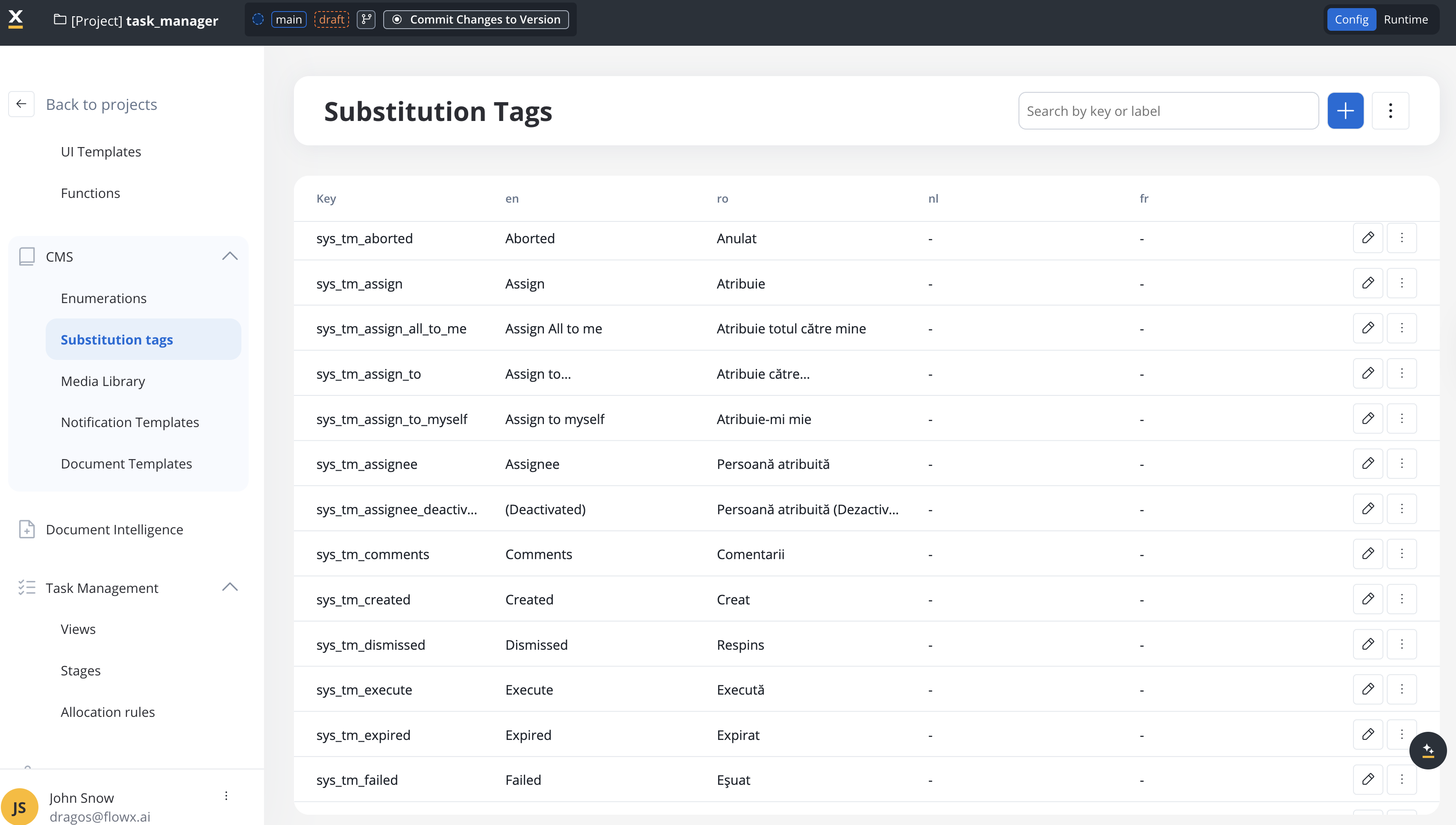
* **FlowX Substitution Tags** (51 keys) - Custom Task Management elements, **manually configured in CMS**
* **Table Grid Localization** - Data table components, **automatically localized based on container app language**
This feature enables complete Task Management localization for global deployments, meeting requirements for government, healthcare, and financial services applications requiring multi-language support.
Complete set of substitution tags for task actions, statuses, history events, and UI elements
Table grid localizes automatically based on container app language; FlowX tags configured manually in CMS
Angular and React renderers use system substitution tags on all task management texts
**FlowX Substitution Tags (51 Keys):**
* Table columns (title, stage, assignee, status, priority, last updated)
* Process states (created, started, finished, failed, expired, etc.)
* Task actions (assign, unassign, hold, unhold, execute, start)
* Bulk operations (assign to, unassign all, hold all, etc.)
* History events (task created, assigned, status changed, etc.)
* User selection dialogs and UI states
**Table Grid Localization**:
* Filters (set, text, number, date with all operators)
* Menus (column, context, aggregation, sorting)
* Pagination (navigation, page size, row counts)
* Data types (boolean, dates, numbers with formatting)
* ARIA labels for accessibility
Configure your container application language - FlowX.AI automatically handles table grid localization based on this setting
Add translations for all 51 sys\_tm\_\* tags in CMS for each supported language - this is the only manual configuration needed
Web renderers automatically apply system substitution tags to all task management UI elements
Localization
Complete implementation guide with all 51 substitution tags, supported languages, and troubleshooting
Configure substitution tags in CMS for multi-language support
***
### **AI Platform enhancements**
FlowX.AI 5.1.1 delivers significant improvements to the AI Platform, enhancing multi-agent collaboration, conversation management, and AI workflow stability. These enhancements ensure more reliable AI-assisted development workflows and better user experience.
Enhanced agent communication and thread management for improved collaborative AI workflows
Improved conversation handling with better error propagation and session management
Enhanced AI Developer capabilities with proper data model integration and expression generation
Multi-page document generation support and improved content handling
**Multi-Agent Conversation Management:**
* Enhanced conversation thread handling with proper parent action status updates
* Improved backend support for adding new messages on agent threads
* Better session management with new session button in Command Center
* Context switching prevention during execution plan generation
**AI Developer Enhancements:**
* Fixed data model integration for expressions and business rules generation
* Improved action target saving and destination setting
* Enhanced execution plan editing from user prompts
* Better handling of empty execution plans
**Error Handling & Stability:**
* Graceful error propagation from internal AI agent operations
* Improved CORS headers for document object downloads
* Enhanced telemetry support for debugging and monitoring
* Better handling of plan enhancement patches
**Document & Content Features:**
* Multi-page document generation support in AI nodes
* Source selector component for image and document inputs
* Improved messaging system for AI agents in command center
* Enhanced UI feedback for AI-generated resources
**Backend Enhancements:**
* Continuous patching support for action contexts during execution
* Improved navigation tree responses for overridden processes
* Enhanced dependency management for library overrides
* Better error handling and logging across AI services
**Frontend Improvements:**
* Fixed target selector closing behavior in implementation threads
* Improved preview mode handling after developer changes
* Enhanced command center messaging and error display
* Better UI state management for AI workflow interactions
**Integration Updates:**
* CORS headers properly configured for GraphQL object downloads
* Process task destinations automatically set to current process
* Improved integration between AI agents and execution plans
* Enhanced audit logging for resource overrides
AI Platform
***
### **Platform enhancements**
Improved Server-Sent Events disconnect handling to reduce error log flooding when clients disconnect
Implemented audit logs for library resource overrides to track configuration changes
Fixed high vulnerabilities in Designer 5.1.x and main branch
Web renderers now use system substitution tags on all task management texts
Enhanced outline and select/multiselect option highlight theming for visual consistency
**Code Quality:**
* Eliminated deprecated code for Kafka start process
* Improved error handling for Elasticsearch document updates
* Enhanced dependency management for library overrides
* Better logging and error reporting across services
**Performance:**
* Optimized SSE connection handling
* Improved query performance for navigation tree
* Better resource management in long-running processes
Platform Updates
## Additional information
**Upgrade Compatibility**: FlowX.AI 5.1.1 is fully compatible with 5.1.0. No configuration changes, schema migrations, or data transformations are required.
### Compatibility
Direct upgrade from 5.1.0 → 5.1.1 with no breaking changes or configuration updates
Compatible with FlowX.AI SDKs (Angular/React/iOS/Android), Designer, and Database 5.1.x
### Deployment information
Standard deployment procedures apply. No special migration steps required for this maintenance release.
### Known issues
The following items are in progress or backlog for future releases:
* Android and iOS accessibility properties implementation
* Additional Select component refinements
* UI Designer padding optimizations
### What's next
**FlowX.AI 5.1.x LTS** will continue to receive maintenance updates focused on:
* Security patches and vulnerability fixes
* Stability improvements and critical bug fixes
* Accessibility enhancements for mobile platforms
* Performance optimizations
Major new features are planned for future releases in the 5.x series. See the [5.2.0 Tech Preview](../v5.2.0-tech-preview/v5.2.0-tech-preview) for upcoming capabilities.