> ## Documentation Index
> Fetch the complete documentation index at: https://docs.flowx.ai/llms.txt
> Use this file to discover all available pages before exploring further.
# FlowX.AI 4.5.4 Release Notes
> This internal release brings various enhancements and new features to improve functionality, usability, and performance across the platform.
## What's new? 🆕
### Integration designer updates
* **Testing on Upper Environments**: Users can now test endpoints and workflows in upper environments with customizable configurations and detailed runtime logs, ensuring smooth and accurate testing.
* **System Enumeration Toggle**: Added a toggle to manage system enumeration mapping:
* Turning it ON includes the system in the enumeration table and enables the Enum Mapper.
* Turning it OFF removes the system, disables related mappings, and clears existing data with a warning.
* **Duplicate Workflow & Endpoint**: A new "Duplicate" option streamlines the creation of similar workflows or endpoints, supporting renaming, optional descriptions, and independent modifications. Success or error notifications ensure clarity during the duplication process.
* **Testing on Committed Versions**: Enables testing of endpoints and workflows on committed versions with editable inputs, detailed logs, and response previews in modals tailored to the selected version.
* **Enum Translation in Lists**: Expanded support for enum translation in lists of objects and arrays of enums, with simplified and efficient JSON path formatting.
* **Multiple Incoming Sequences**: Workflow nodes now support multiple incoming sequences, allowing for complex designs where conditions or actions converge.
* **Rename Workflow Nodes**: Introduced in-place editing for workflow node names, with validations to ensure uniqueness and compliance with naming rules.
* **Start/Call Subworkflow Node (Sync)**: Added a new node with the ability to reuse predefined workflows (local or library) within parent workflows. Subworkflows complete before proceeding and halt the parent workflow on failure.
* **Configurable Timeout & Retry**: Endpoint nodes now allow configurable timeouts (default: 10,000 ms) and retry mechanisms with exponential backoff, ensuring resilience during API interactions.
* **Missing Sequence Alerts**: Workflow nodes with unmapped branches now display a yellow warning icon and provide actionable guidance for resolution.
***
### AI agents
* **AI Designer**: Modified keys for Data Models.
* **AI Analyst**: Added support for boundary events.
* **AI Developer**: Enhanced business rule explanations.
***
### Analytics integration for container apps
This feature is compatible with the new Angular packages, scheduled for release in v4.5.5.
Container apps now support tracking "Screen Displayed" and "Action Executed" events, configurable in the UI Designer to improve insights into user interactions.
**UI Designer updates**:
* **Analytics Screen Name**: Configurable under Root UI components (Cards and Containers) to enable tracking in analytics platforms like Google Analytics.
"Screen Displayed" events support user task-based reporting, such as when a user task screen is shown.
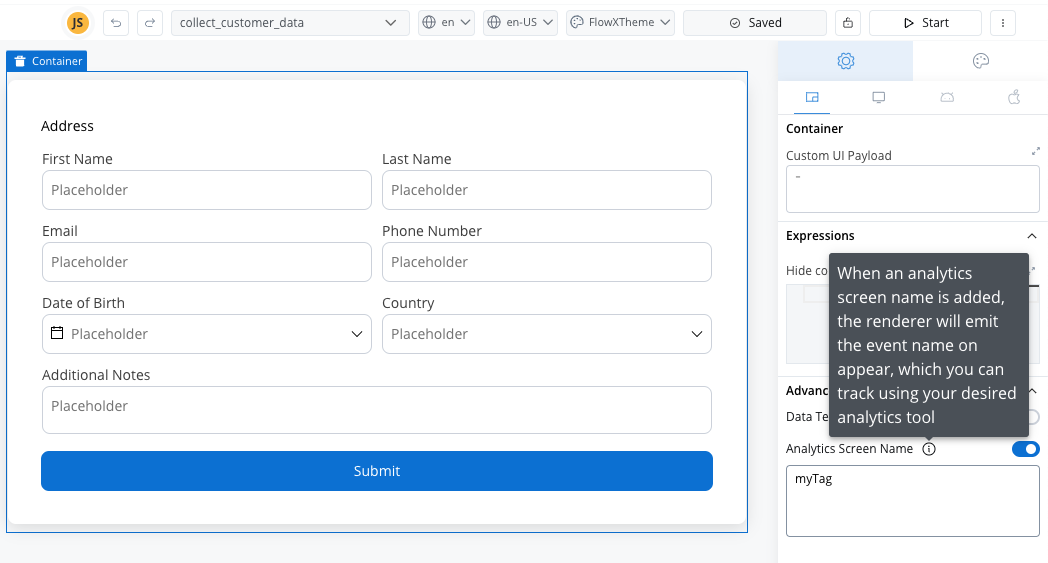
The configured values are stored in `flowxProps.analytics`, making them accessible for integration with analytics tools.
* **Action Analytics**: Tracks user actions (e.g., button clicks) with tags set directly in the UI Action Form.
Added analytics configuration in the **UX Section** for all UI action types.
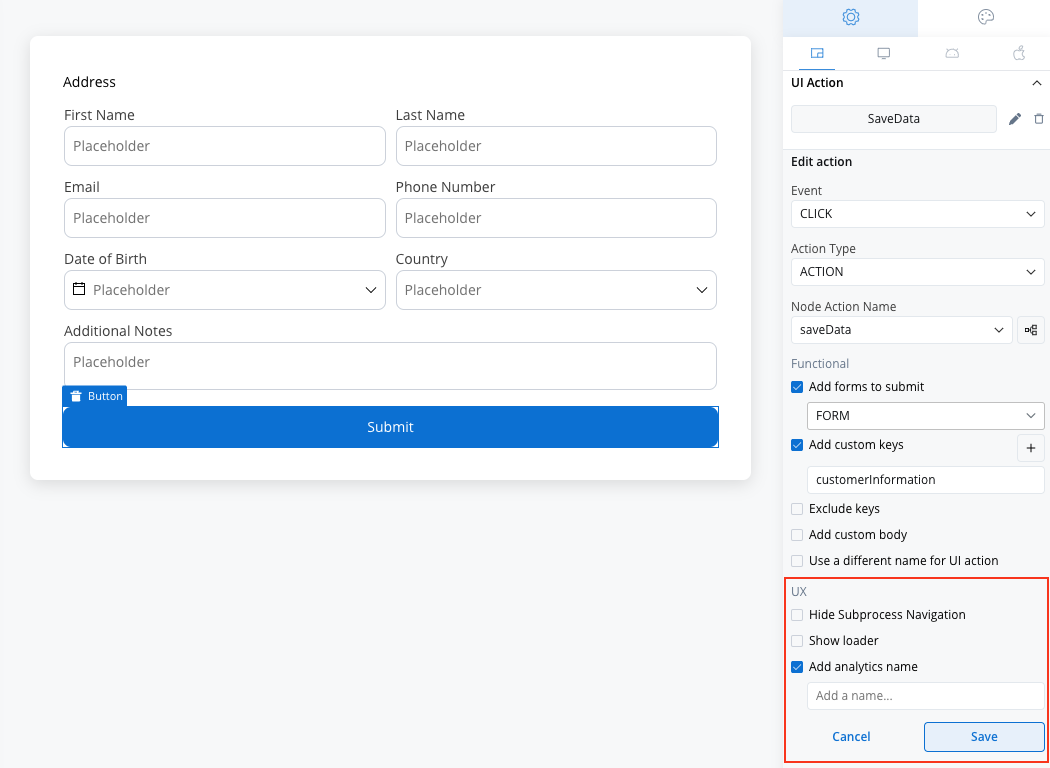
Values are saved in `params.analytics` via the PATCH `/actions` request.
**Renderers updates**:
Renderers now expose a public API for triggering analytics events:
* **Screen Events**: Triggered on user task display, using `flowxProps.analytics`.
* **Action Events**: Triggered on action execution, using `params.analyticcs`.
Dynamic values such as process store keys and replace tags are supported for more contextual tracking.
***
### UI action form updates
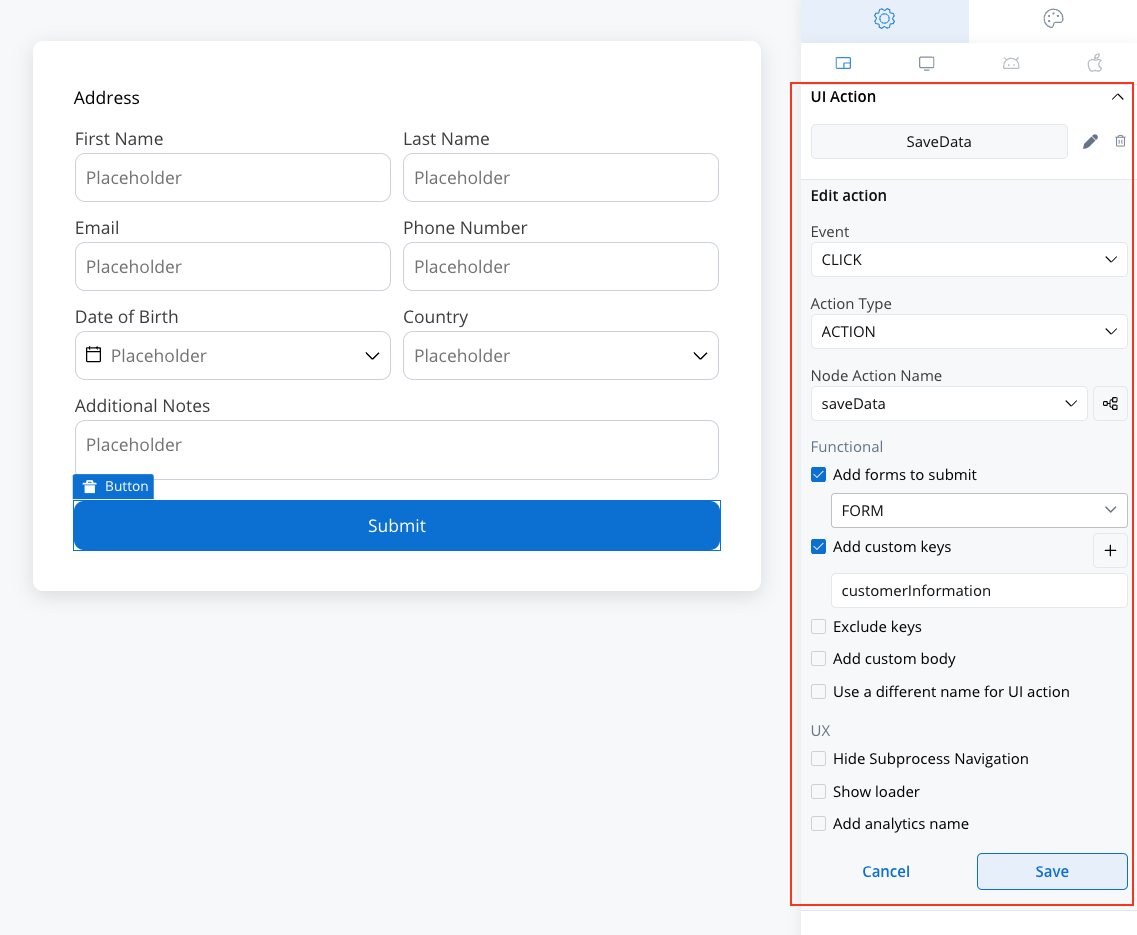
* Introduced **Functional** and **UX sections** for all action types, with a checkbox for **Add Analytics Name** in the UX section.
* Removed the **Start Process Inherit** UI action type.
* Simplified custom and exclude key management.
***
### Hide expressions enhancements
This feature is compatible with the new Angular packages, scheduled for release in v4.5.5.
The [**Hide Expressions**](../../4.6.0/docs/building-blocks/ui-designer/ui-component-types/form-elements/input-form-field#hidedisable-expressions) feature is now standardized across all FlowX components extending functionality to collection prototypes, table cell children, and more.
Supported components include:
* Card
* Collection
* Collection Prototype children (excluding the Collection Prototype itself)
* Text
* Link
* Image
* File Preview
* File Upload
* Button
* Table cell children (e.g.: texts, images, buttons, links)
***
### Grid improvements in preview
* Enhanced grid placeholder design.
* Added drag-and-drop support for placeholder column and row spans.
***
## Bug fixes 🐞
***
## Changes 🔧
* **Web Renderer Caching**: Improved CMS resource caching using browser mechanisms keyed to the build ID.
* **Process Designer**: Enhanced drop-node-on-sequence functionality.
***
## Additional information
For deployment guidelines, refer to: