> ## Documentation Index
> Fetch the complete documentation index at: https://docs.flowx.ai/llms.txt
> Use this file to discover all available pages before exploring further.
# FlowX.AI 4.0.0 Release Notes
> 🎉 Welcome to the much-anticipated FlowX.AI 4.0 release! 🚀 Get ready to experience a whole new level of innovation and efficiency with FlowX.AI 4.0.
**Release Date:** 18th April 2024
In this exhilarating update, we've added a bunch of cool stuff. From a **new theming feature** to a complete overhaul of **navigation**, killing the **milestones nodes** (we know you hated them), brace yourself for a transformative journey through the latest features and enhancements...and also a surprise for you, awaiting at the [**bottom of the page**](#coming-soon)!
## Bonus: meme of the day
Start with a laugh, because it will be a lot to read!
 Let's dive in and explore the exhilarating additions:
## **What's New?** 🆕
### Theme Management
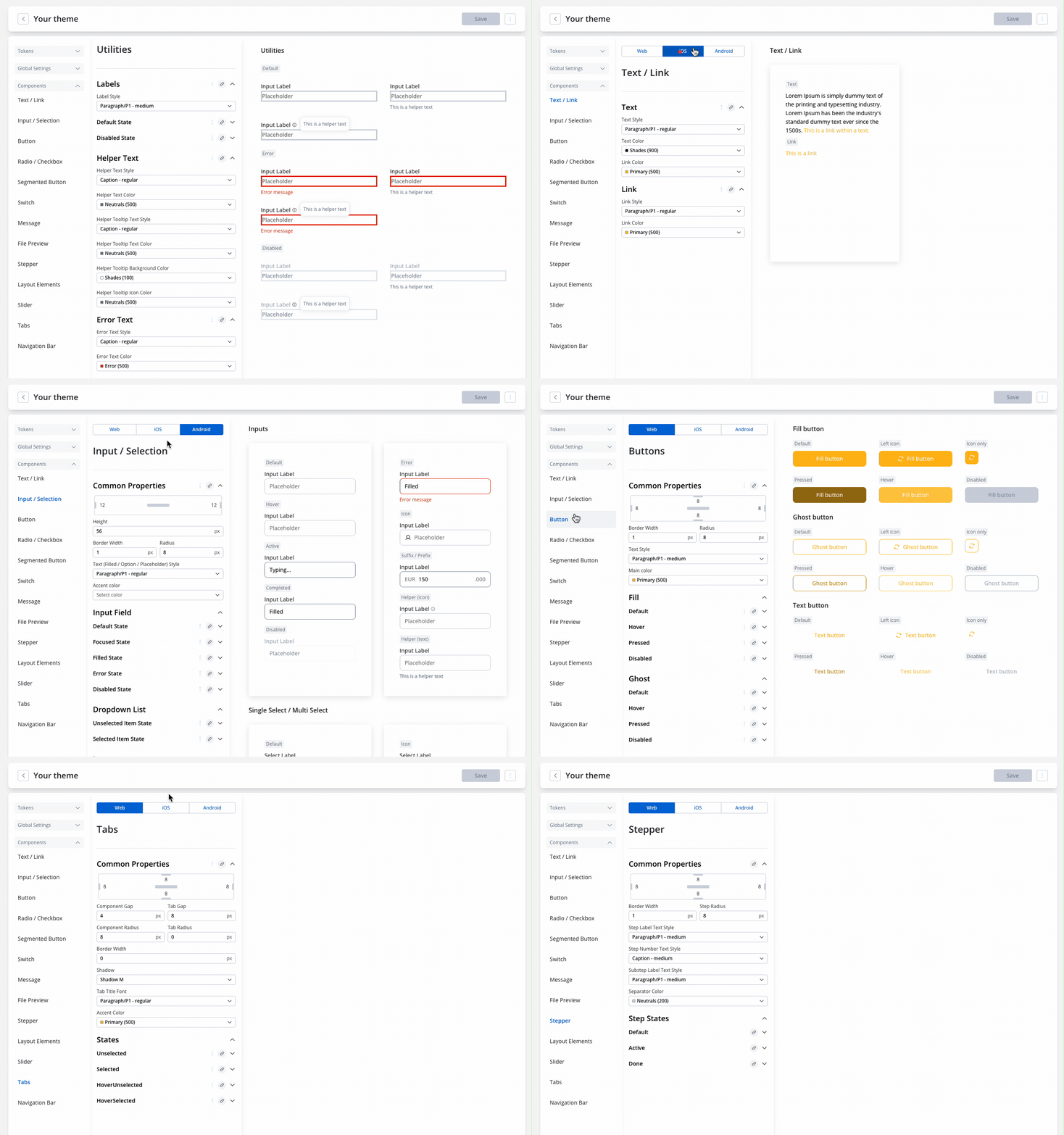
The new **Theme Management** feature enhances our design process by establishing a unified visual language across various platforms.
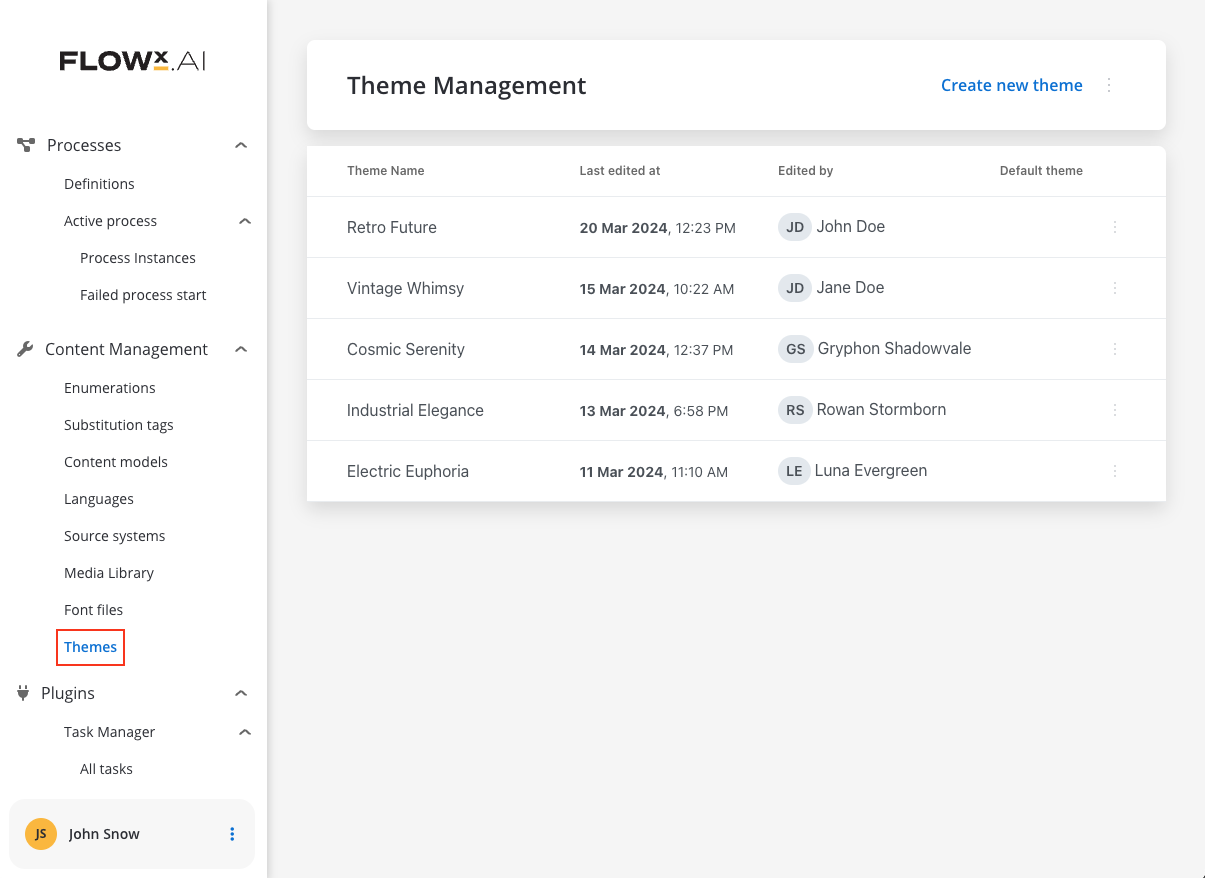
This approach simplifies development by enabling the establishment of a foundational **theme**, which can then be customized to accommodate specific platform requirements.
Ultimately, this streamlines the development process, saving significant time and effort.
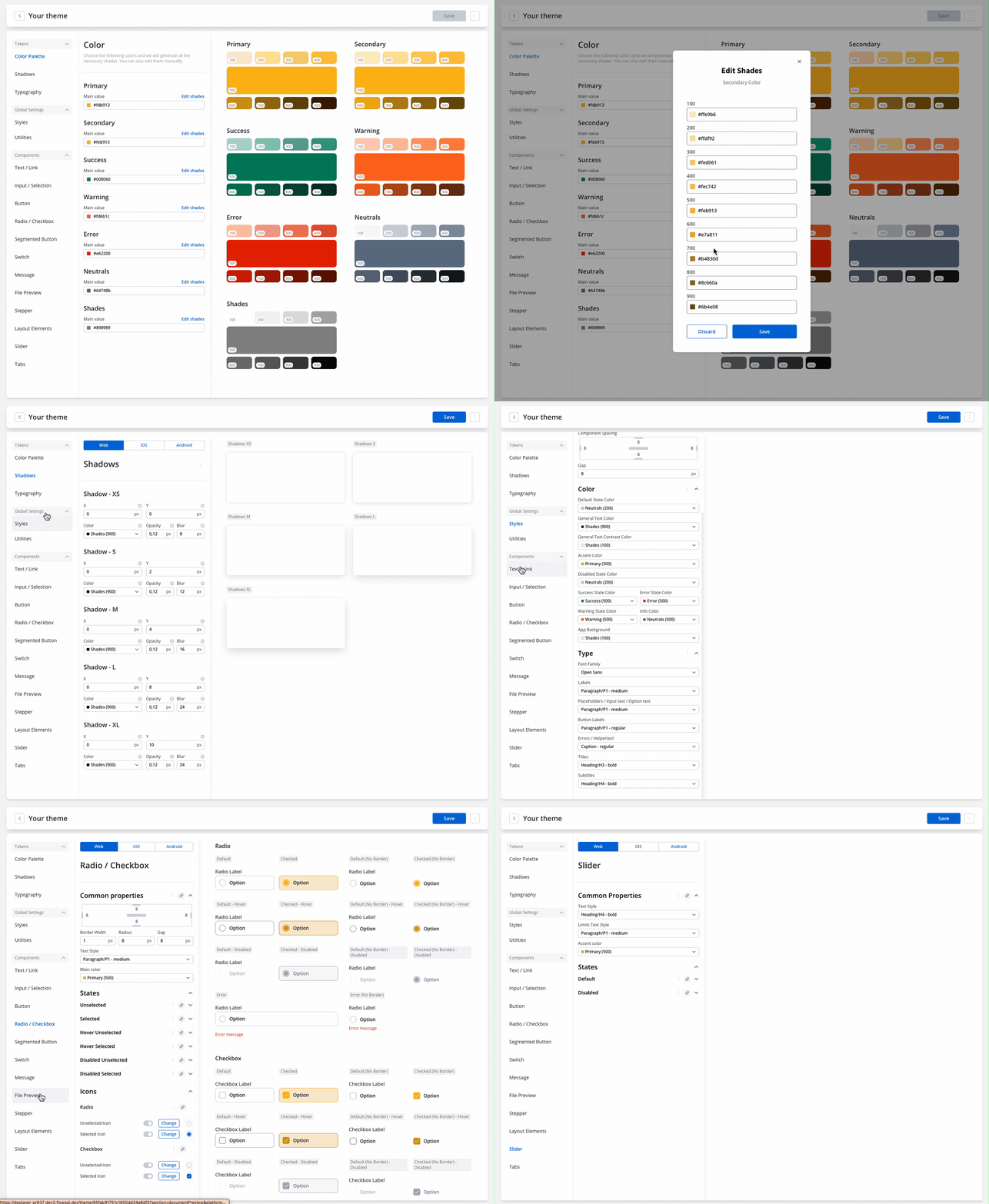
* **Design Tokens**: Represent the single source of truth for the theme, storing visual elements of the design system.
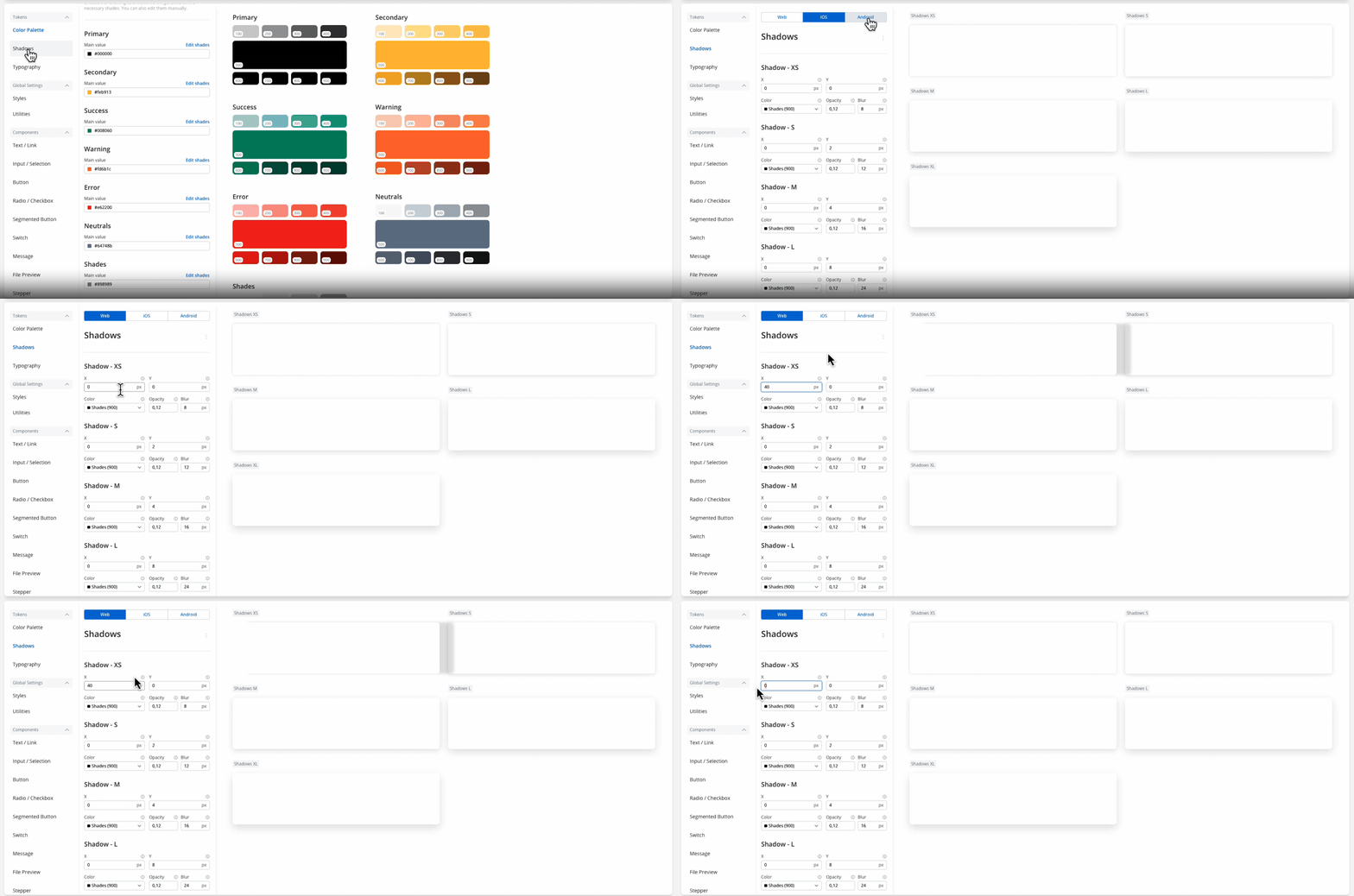
* **Color Palette, Shadows, Typography Tokens**: Configure these tokens based on your company's brand guidelines. They ensure reusability and consistency.
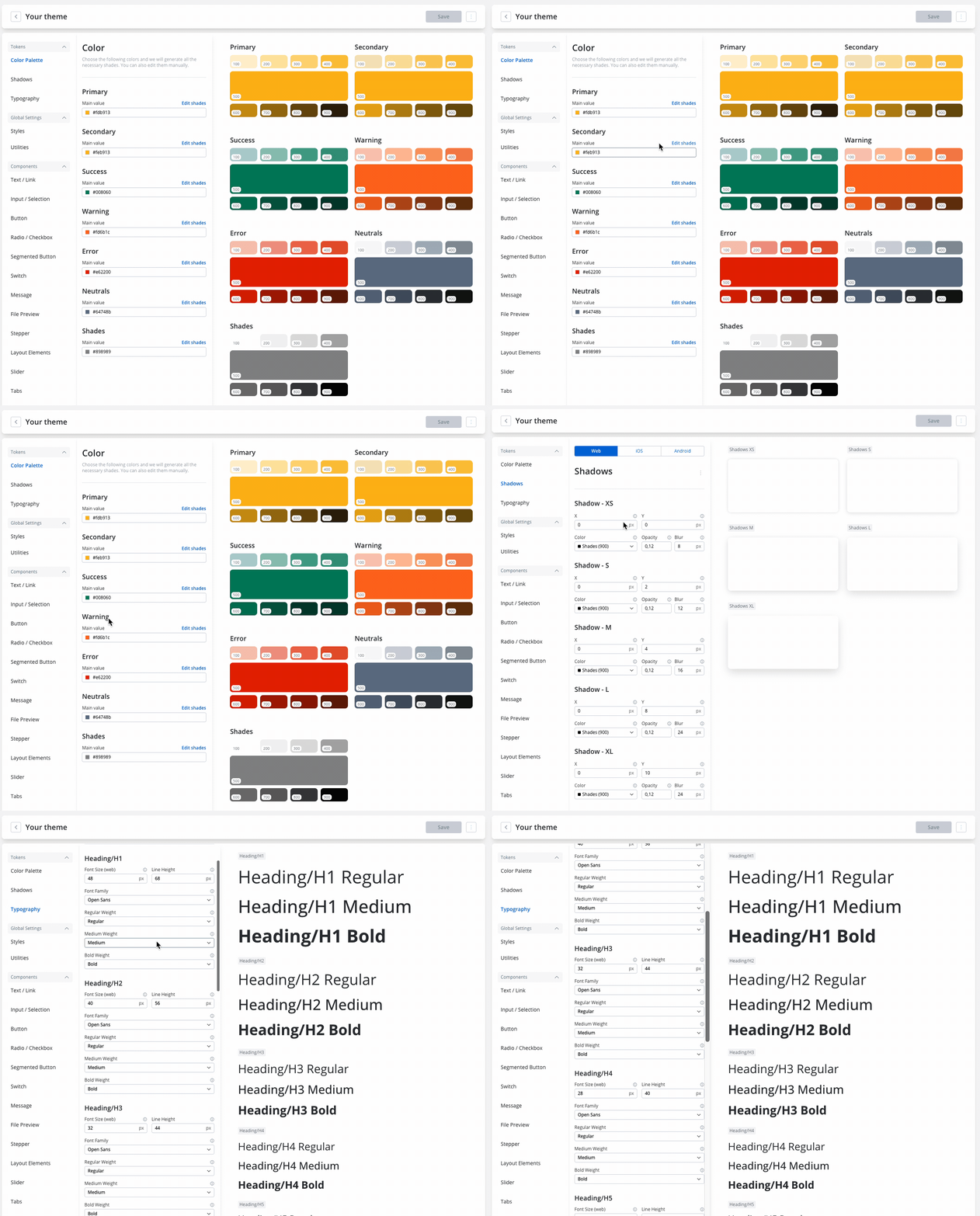
* **Platform-specific Settings**: Configure settings for each platform (web, iOS, Android) based on the global settings you've defined.
* **Styles and Utilities**: General settings applying to all components (styles) and labels, errors, and helper text settings (utilities).
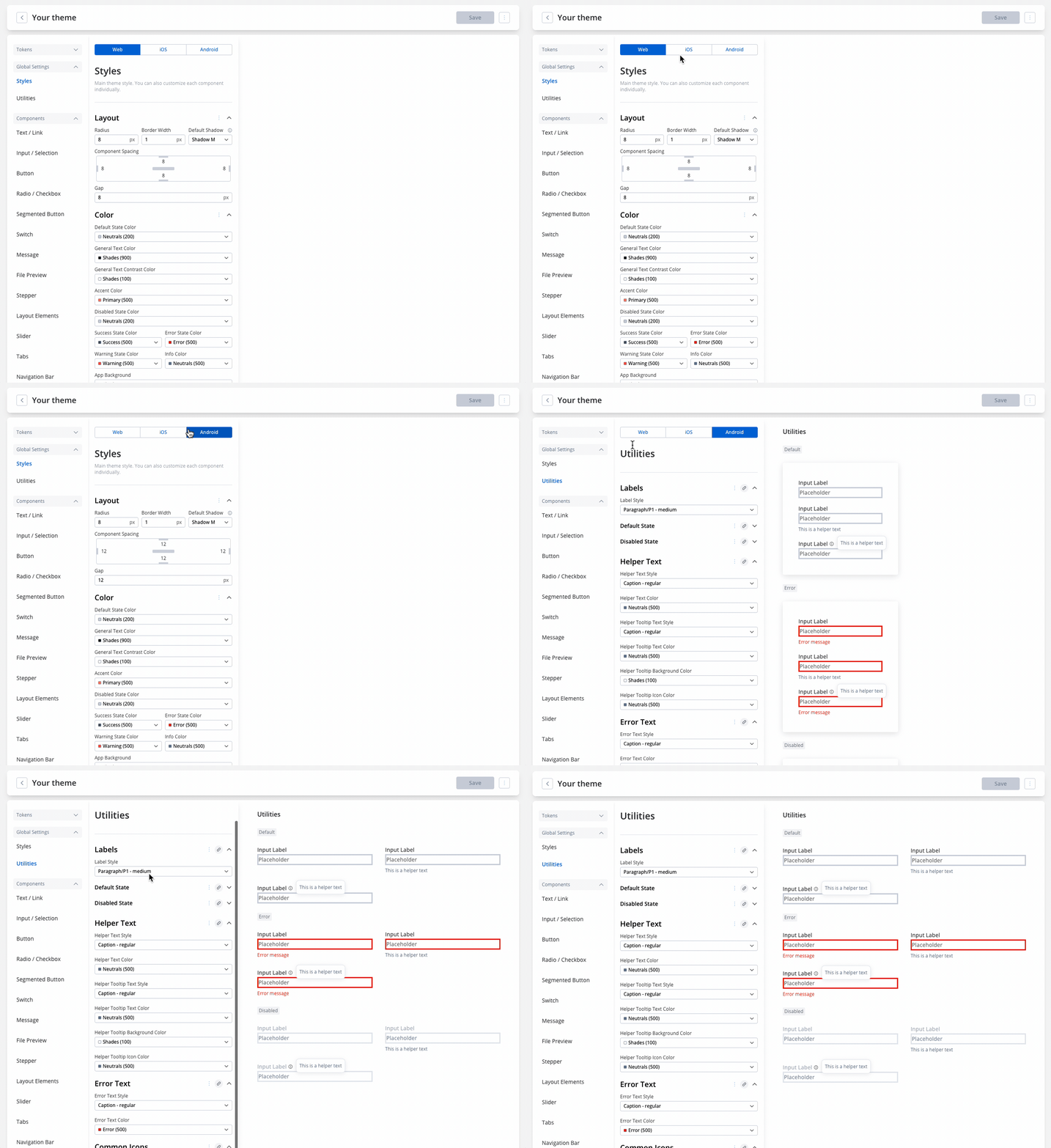
**Component-level Configuration**: Customize the style of each component type.
#### Universal Styling
Introduced the option for platform-specific theming customization for components across Web, iOS, and Android.
More information about Theming:
### Navigation areas (removed Milestones nodes)


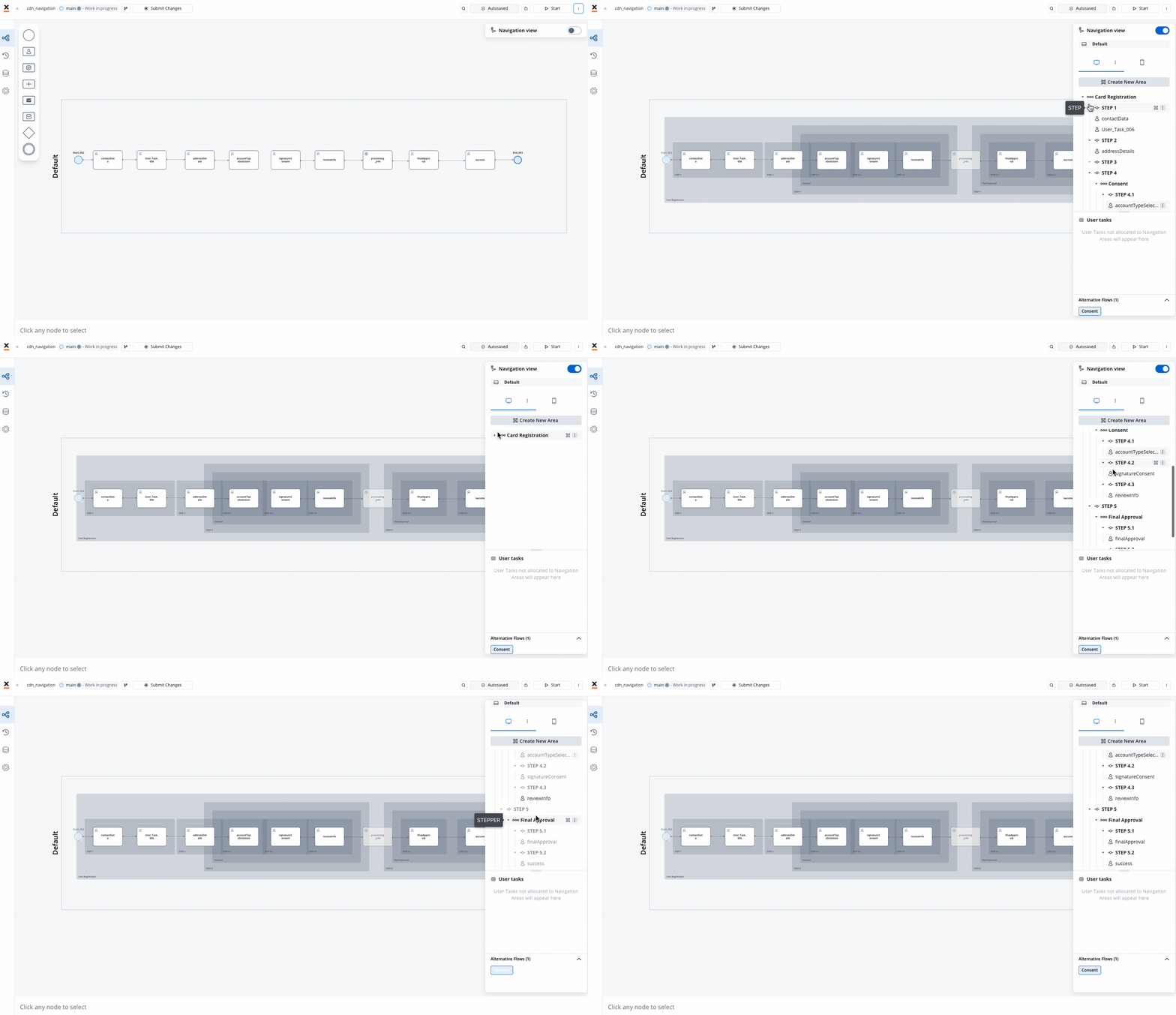
In this release, we've bid farewell to **Milestone Nodes**, ushering in a fresh and improved approach to organizing the user interface. Say hello to a sleeker and more efficient system with the introduction of [**Navigation areas**](../../4.0/docs/building-blocks/process/navigation-areas).
For process definitions originating from releases earlier than **4.0**, Milestone nodes will evolve into [**Zones**](../../4.0/docs/building-blocks/process/navigation-areas#zone) during migration, offering enhanced navigation capabilities.
### New navigation UI elements
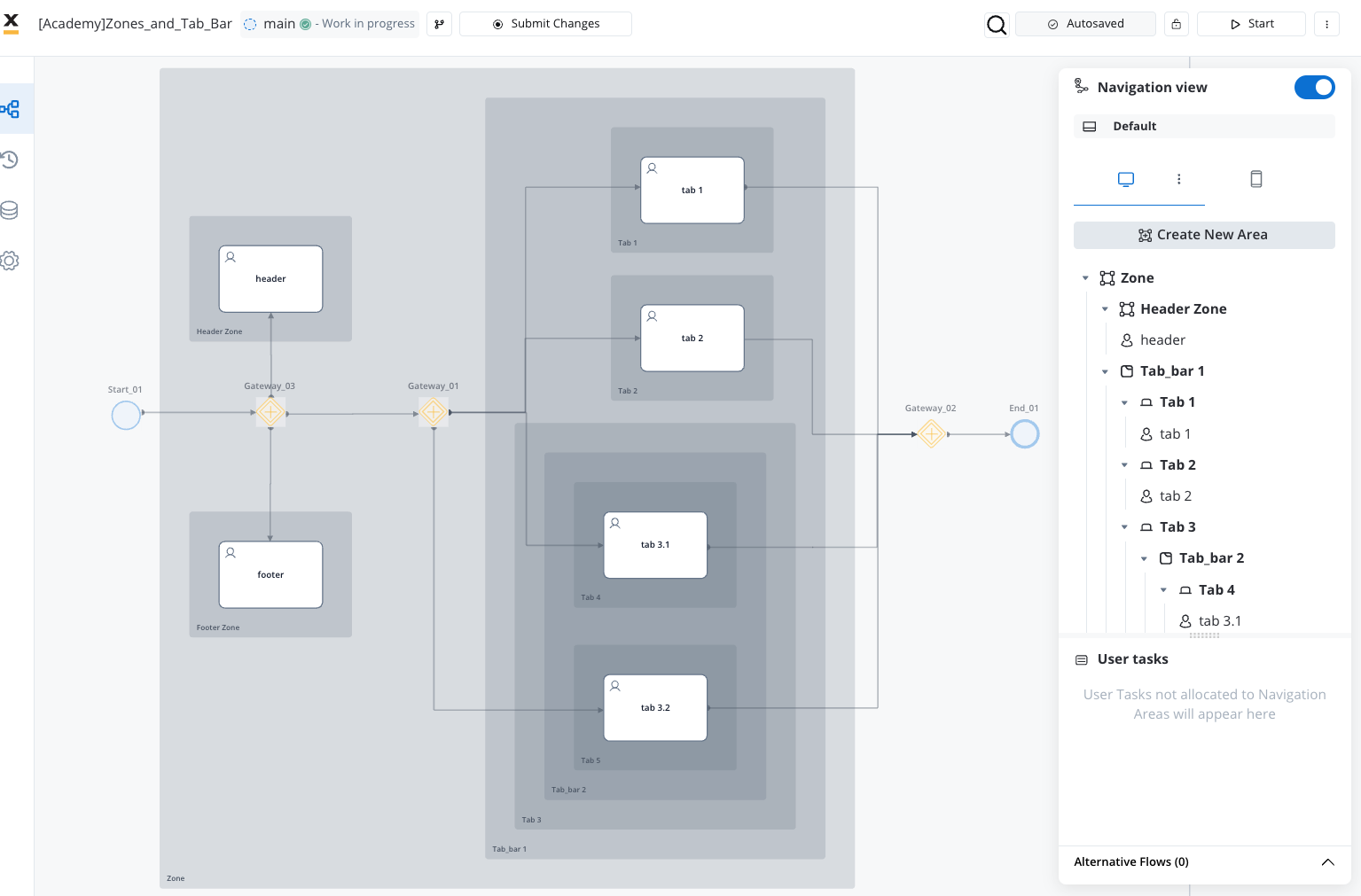
* Tab Bar & Tabs
* Zones
* Parent Process Area
#### Navigation areas per platform
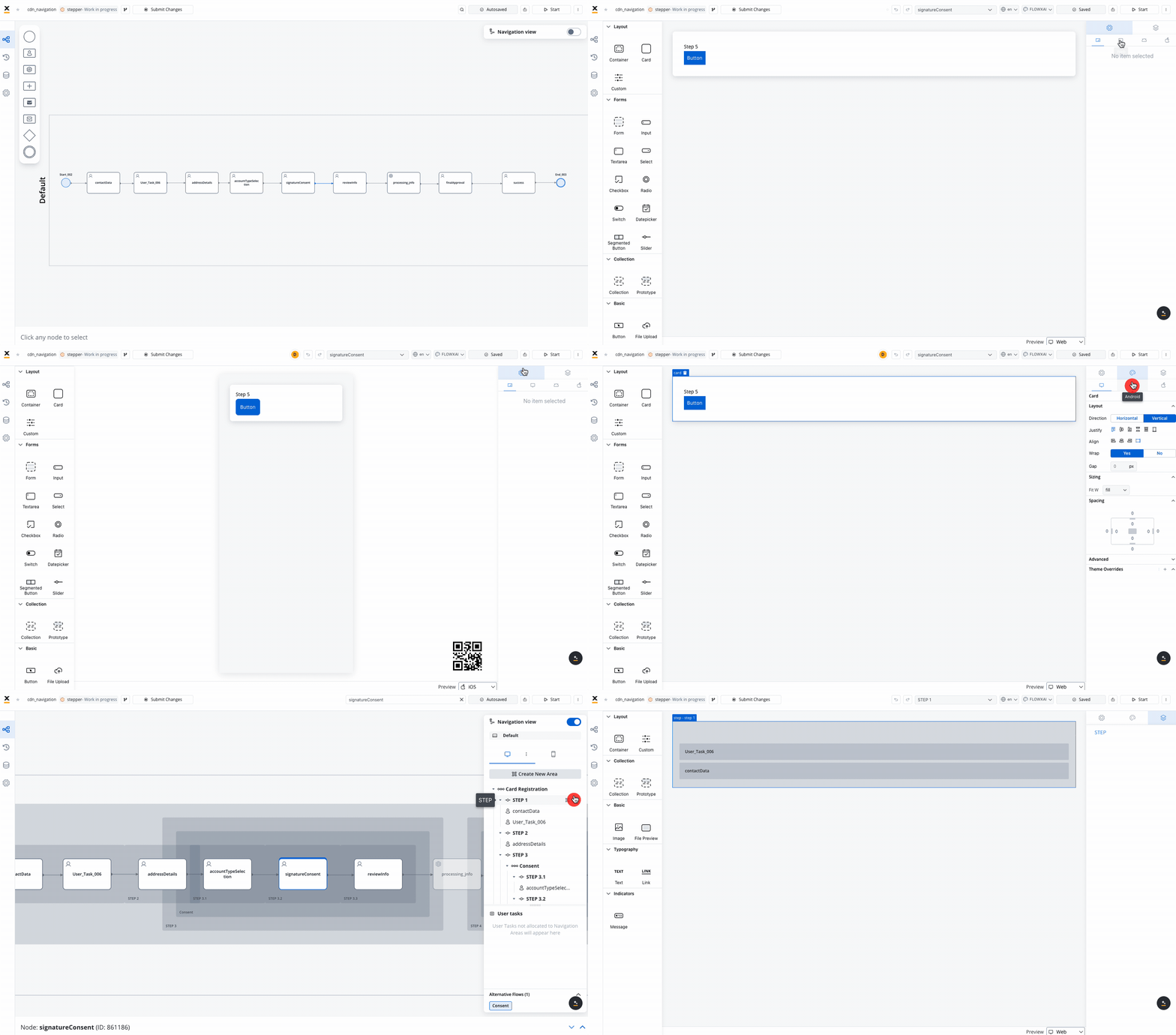
### UI Designer (enhancements)
* New enhanced UI designer, offering flexibility and control over your application's look and feel across all platforms.
* Added the possibility to customize the **navigation areas** through the **UI Designer**
#### UI Designer - universal configuration and styling
Introduced the option for platform-specific configuration and styling for components across Web, iOS, and Android.


The new navigation panel in the UI Designer allows you to manage navigation configurations efficiently across different platforms, ensuring consistency and clarity in your interface design.
### New node - Embedded subprocess
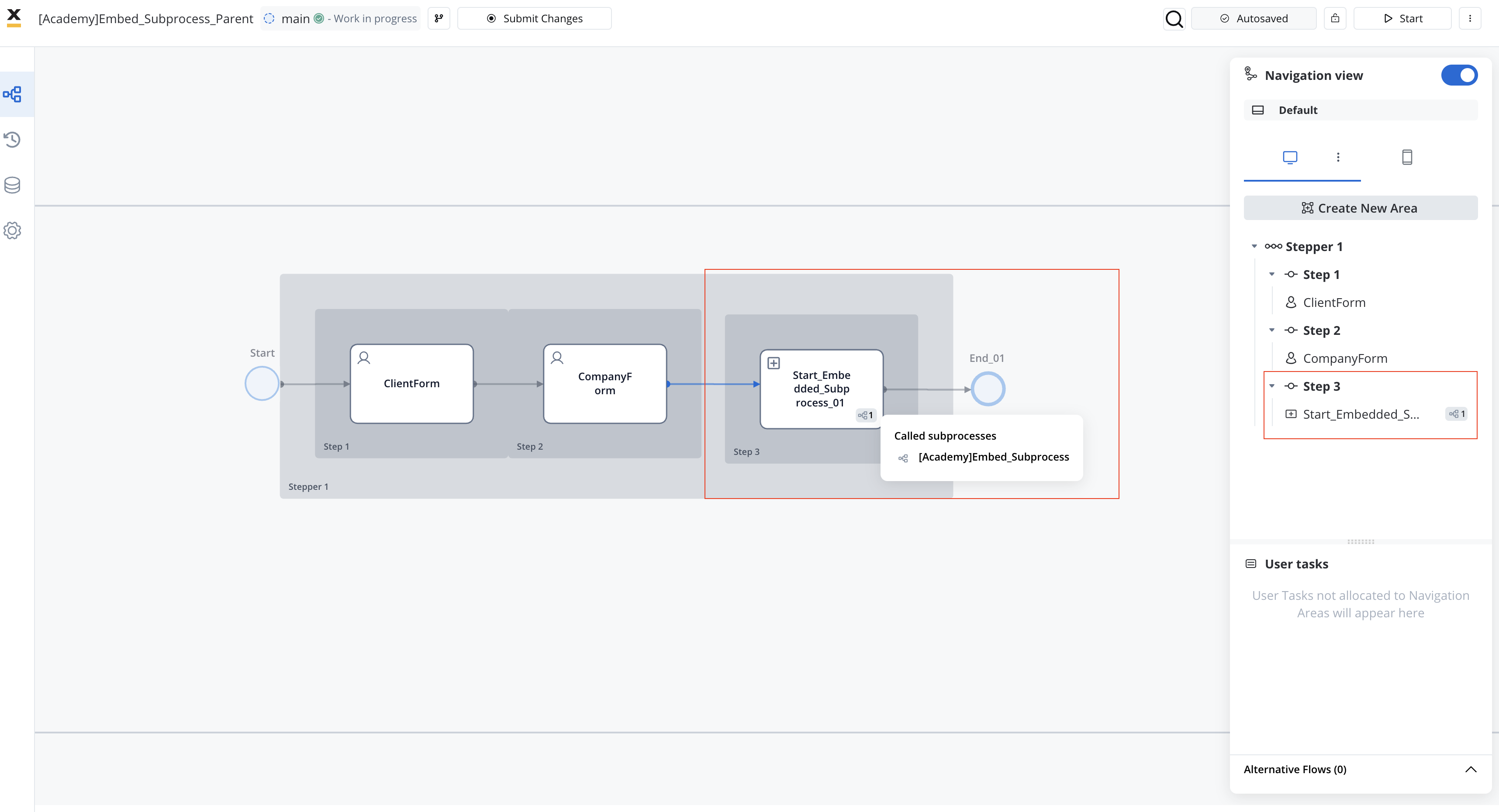
Introducing Embedded Subprocesses! Enhance your process management with the new embedd subprocess functionality and the new **Start Embedded Subprocess** node.
Let's dive in and explore the exhilarating additions:
## **What's New?** 🆕
### Theme Management
The new **Theme Management** feature enhances our design process by establishing a unified visual language across various platforms.

This approach simplifies development by enabling the establishment of a foundational **theme**, which can then be customized to accommodate specific platform requirements.

Ultimately, this streamlines the development process, saving significant time and effort.
* **Design Tokens**: Represent the single source of truth for the theme, storing visual elements of the design system.
* **Color Palette, Shadows, Typography Tokens**: Configure these tokens based on your company's brand guidelines. They ensure reusability and consistency.

* **Platform-specific Settings**: Configure settings for each platform (web, iOS, Android) based on the global settings you've defined.
* **Styles and Utilities**: General settings applying to all components (styles) and labels, errors, and helper text settings (utilities).

**Component-level Configuration**: Customize the style of each component type.

#### Universal Styling
Introduced the option for platform-specific theming customization for components across Web, iOS, and Android.

More information about Theming:
### Navigation areas (removed Milestones nodes)


In this release, we've bid farewell to **Milestone Nodes**, ushering in a fresh and improved approach to organizing the user interface. Say hello to a sleeker and more efficient system with the introduction of [**Navigation areas**](../../4.0/docs/building-blocks/process/navigation-areas).
For process definitions originating from releases earlier than **4.0**, Milestone nodes will evolve into [**Zones**](../../4.0/docs/building-blocks/process/navigation-areas#zone) during migration, offering enhanced navigation capabilities.

### New navigation UI elements
* Tab Bar & Tabs
* Zones
* Parent Process Area

#### Navigation areas per platform
### UI Designer (enhancements)
* New enhanced UI designer, offering flexibility and control over your application's look and feel across all platforms.
* Added the possibility to customize the **navigation areas** through the **UI Designer**
#### UI Designer - universal configuration and styling
Introduced the option for platform-specific configuration and styling for components across Web, iOS, and Android.


The new navigation panel in the UI Designer allows you to manage navigation configurations efficiently across different platforms, ensuring consistency and clarity in your interface design.

### New node - Embedded subprocess
Introducing Embedded Subprocesses! Enhance your process management with the new embedd subprocess functionality and the new **Start Embedded Subprocess** node.
 Seamlessly integrate self-contained subprocesses within parent processes for enhanced functionality and encapsulated operations. The Start Embedded Subprocess node enables the initiation of subprocesses within a parent process, offering a range of features and options for enhanced functionality.
### New nodes - Error Events
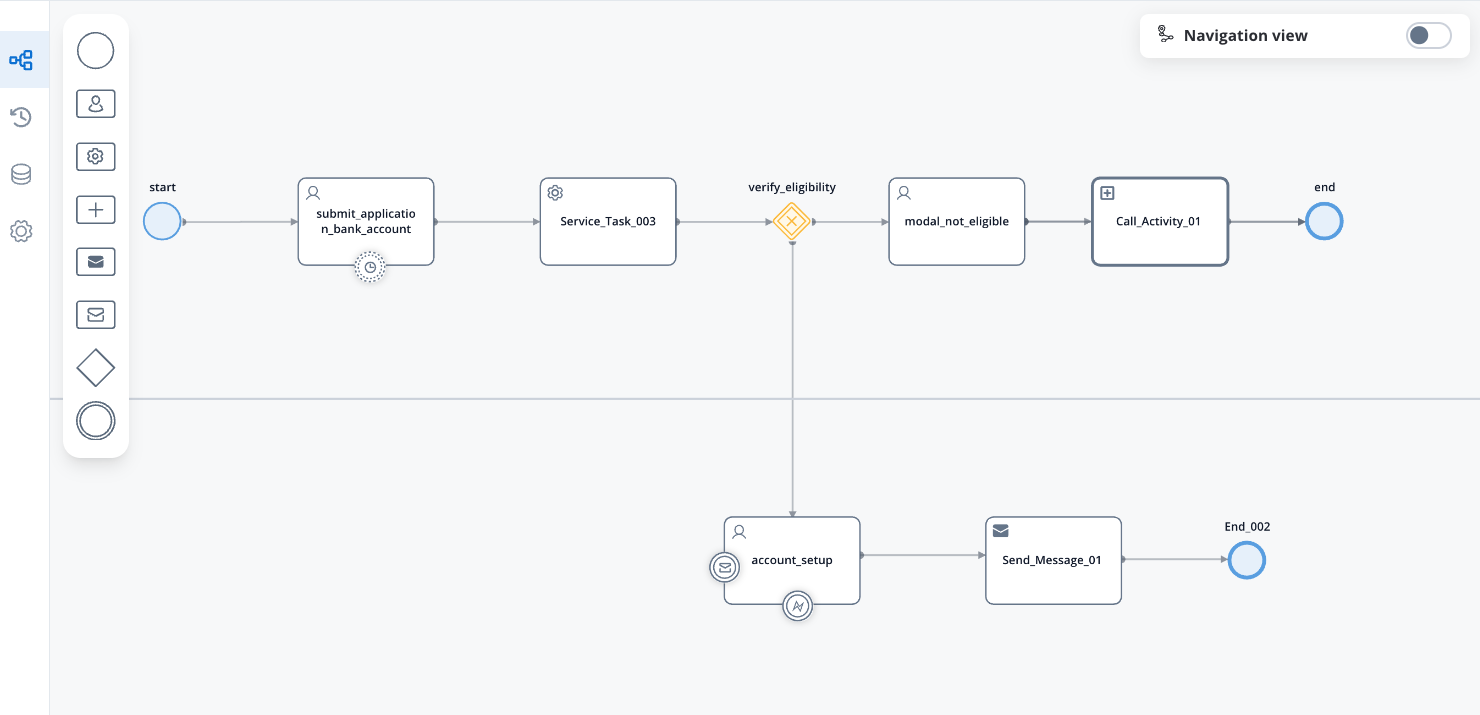
We are excited to introduce support for a new type of node in BPMN 2.0, specifically Error Events: Error Intermediate boundary event, which expand the capabilities of process modeling and error handling within your BPMN diagrams.

These Error Event nodes enhance the BPMN standard and offer improved control over error management.
### Nodes Redesign: Redefining Connectivity
Experience a redesigned interface for smoother interaction with **nodes** and **Process Designer**.
### Favorites Tab
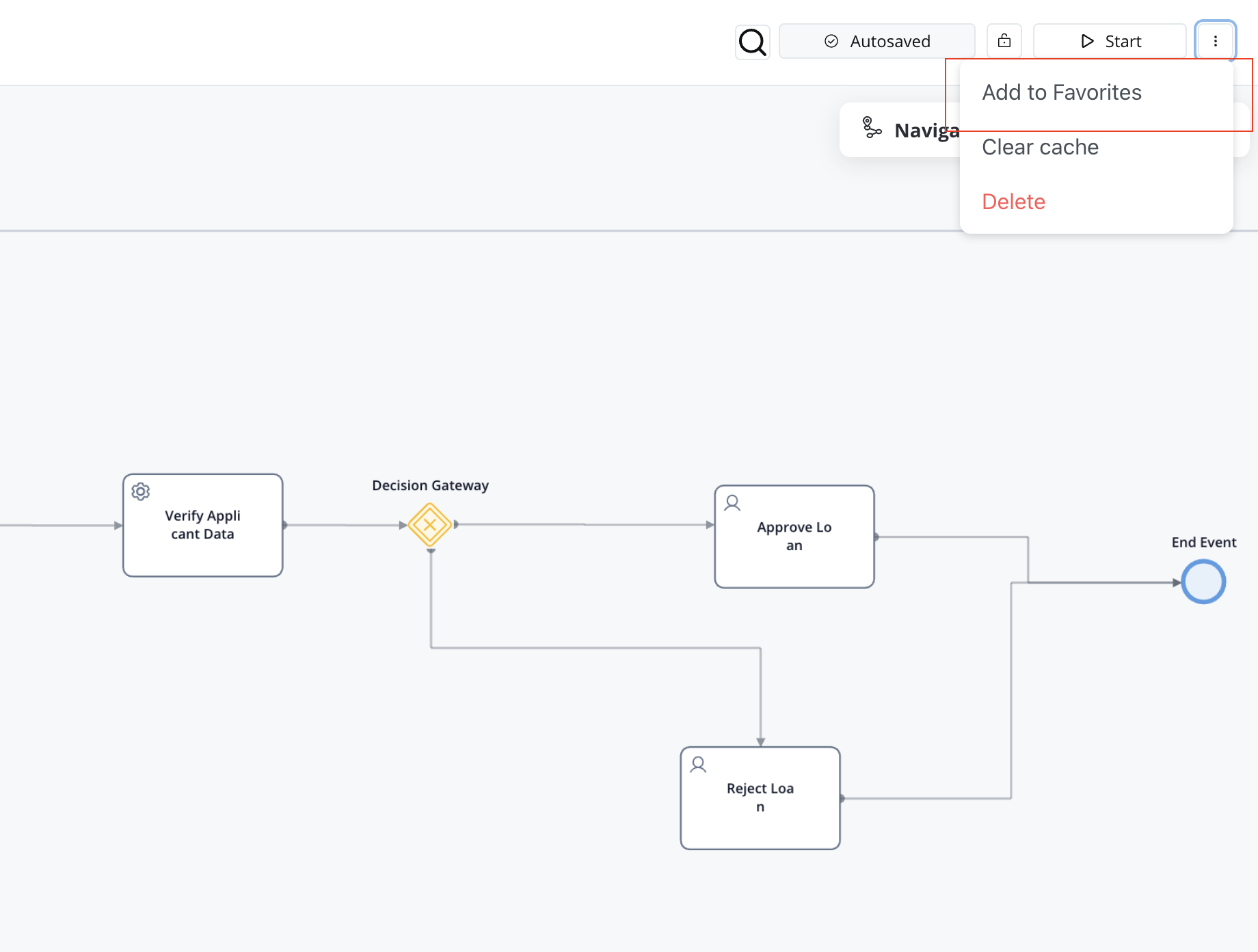
Keep track of your favorite process definitions and streamline process development with the all-new **Favorites tab**, ensuring effortless collaboration among teams.
Seamlessly integrate self-contained subprocesses within parent processes for enhanced functionality and encapsulated operations. The Start Embedded Subprocess node enables the initiation of subprocesses within a parent process, offering a range of features and options for enhanced functionality.

### New nodes - Error Events
We are excited to introduce support for a new type of node in BPMN 2.0, specifically Error Events: Error Intermediate boundary event, which expand the capabilities of process modeling and error handling within your BPMN diagrams.

These Error Event nodes enhance the BPMN standard and offer improved control over error management.
### Nodes Redesign: Redefining Connectivity
Experience a redesigned interface for smoother interaction with **nodes** and **Process Designer**.

### Favorites Tab
Keep track of your favorite process definitions and streamline process development with the all-new **Favorites tab**, ensuring effortless collaboration among teams.
 ## **Changes** 🔧
For clients upgrading from an older release (v3.x), we recommend consulting our [**Migrating from v3.x**](./migrating-from-v3.4.x/) guide for comprehensive migration instructions.
Here's a summary of the changes introduced in version 4.0 after upgrading from v3.4.x for all microservices:
* **AuthToken Management**: The ui-sdk no longer relies on the authToken being stored in LOCAL\_STORAGE. Read more, [**here**](/4.0/sdks/angular-renderer#authorization).
* The **Subprocess Run** node is now called **Call activity** node.
* The **Start subprocess** action is now available only on [User Task](../building-blocks/node/user-task-node) nodes. For any other node types, you should use the [Call Activity node](../building-blocks/node/call-subprocess-tasks/call-activity-node) instead.
* Business Rules: Enhancements for structured data management and improved attribute access via `instanceMetadata` new object. Read more, [**here**](./migrating-from-v3.4.x/process-configuration#business-rules).
* **Timer event scheduler**: Significant optimizations have been implemented in the timer event scheduler, resulting in improved efficiency and responsiveness.
* **UI Designer** updates and improvements.
* UI components style and props changes - consult the [**UI components change log**](./ui-components-changelog) for more information.
* Revised cache key organization. Read more [**here**](./migrating-from-v3.4.x/migrating-from-v3.4.x#revised-cache-key-organization).
* New environment variables to prevent log flooding. Read more, [**here**](./migrating-from-v3.4.x/migrating-from-v3.4.x#logging).
* Java 17 integration: Integrated Java 17 (all backend services - base image: `eclipse-temurin - 17.0.10_7-jre-jammy`) as default buildpack.
Do not to forget to consult the [**migration guide**](./migrating-from-v3.4.x/) for more information.
### Admin - health monitoring
Improved health monitoring:
* Enabled role-based acccess control and added annotations to enable platform health by default.
* Established default annotations for platform health status.
* Adjusted liveness and readiness probes for improved reliability and responsiveness.
* Updated Prometheus scraping configuration for metric collection.
## **Bug Fixes** 🛠️
We've also squashed pesky bugs to ensure a smoother and more reliable experience across the board.
### Scheduler
* Tokens now leave the timer node promptly, no longer lingering like last-minute shoppers before closing time!
* Subprocesses can now rest easy knowing they won't trigger "Timer expression is not valid" errors when setting process expiry time in months—our code's time management just got a promotion!
### UI Designer
* Switch element label now obeys orders to move to the end—no more rebellious labels sticking to the start!
### Process Designer
* Small laptops users rejoice! Now you can scroll to see all subprocesses and audit logs without losing the last line—no more screen envy for external monitors!
* Start Subprocess Action now consistently saves selected version inputs and allows for multiple edits without page refreshes—no more need for extra clicks or browser gymnastics!
* Nodes now stay within swimlane borders when moved, preventing them from wandering off like lost sheep—no more unexpected node relocations disrupting your process layouts!
### FlowX Engine
* MVEL parser now (with the latest MVEL version update: 2.5.2) happily accepts arrays/lists after objects, eliminating JSON file frustrations and improving developer workflow—no more cryptic error messages ruining your day!
* `output.put` method is required to generate structured output data when using input to validate or filter incoming data based on certain conditions (commonly used to retrieve information needed for processing)
The direct property assignment syntax (input.property = value) is no longer supported. Instead, you must use the output.put method (output.put("property", value)) to generate structured output data.
* This represents a fundamental change in how MVEL scripts interact with data
* The input object should be treated as read-only for accessing incoming data
* The output object with its put method must be used for storing any results or modified values
* Python Business Rules now reliably execute during runtime, ensuring consistent behavior between test and live modes—no more mysterious token standstills!
### Web SDK
* You can now seamlessly execute actions in processes with radio buttons and validators, even after page reloads—eliminating the frustration of encountering unresponsive buttons.
* Also you can now successfully execute UI Actions on image components without encountering "undefined token uuid" errors—no more frustrations with unresponsive image interactions!
* Custom validators now retain their specified async execution type upon saving, ensuring consistency and reliability in process validation—no more frustrating switches back to sync execution!
* Forget playing favorites in the WEB\_SDK! Now you can save data from both form elements and UI action custom body simultaneously. Say goodbye to tough decisions—saving data just got a whole lot easier and funnier!
### FlowX Admin
* Fixed issues with Persistent Database (PDB) API and service account auto-mount.
* Disabled auto service links in containers (all SVC/PORT variables).
## Other
Our docs also received an upgrade...a new home...and a new AI search function! But we know that you like to read so do not be that lazy! 🔥
## Coming soon
Hey there, tired of drowning in "virtual paperwork"? Fear not! We've got you covered. Who said machines can't handle finances? 🤖💰
Coming soon: **FlowX AI Agents**. Want to find out more? Contact us about how we can make your journey smoother than ever before! 🚀
Get in contact
## Gremlins to Watch Out For
Keep an eye out for these quirks:
* Versioning: Merging branches without importing the latest committed version may result in a surprise merge conflict party. We're on it!
* UI Designer: When relocating UI elements between parents, the elements' order doesn't always get the memo, causing a mix-up in the family tree. We're untangling this knot!
## Resources
For deployment guidelines and a seamless transition to version 4.0:
## **Changes** 🔧
For clients upgrading from an older release (v3.x), we recommend consulting our [**Migrating from v3.x**](./migrating-from-v3.4.x/) guide for comprehensive migration instructions.
Here's a summary of the changes introduced in version 4.0 after upgrading from v3.4.x for all microservices:
* **AuthToken Management**: The ui-sdk no longer relies on the authToken being stored in LOCAL\_STORAGE. Read more, [**here**](/4.0/sdks/angular-renderer#authorization).
* The **Subprocess Run** node is now called **Call activity** node.
* The **Start subprocess** action is now available only on [User Task](../building-blocks/node/user-task-node) nodes. For any other node types, you should use the [Call Activity node](../building-blocks/node/call-subprocess-tasks/call-activity-node) instead.
* Business Rules: Enhancements for structured data management and improved attribute access via `instanceMetadata` new object. Read more, [**here**](./migrating-from-v3.4.x/process-configuration#business-rules).
* **Timer event scheduler**: Significant optimizations have been implemented in the timer event scheduler, resulting in improved efficiency and responsiveness.
* **UI Designer** updates and improvements.
* UI components style and props changes - consult the [**UI components change log**](./ui-components-changelog) for more information.
* Revised cache key organization. Read more [**here**](./migrating-from-v3.4.x/migrating-from-v3.4.x#revised-cache-key-organization).
* New environment variables to prevent log flooding. Read more, [**here**](./migrating-from-v3.4.x/migrating-from-v3.4.x#logging).
* Java 17 integration: Integrated Java 17 (all backend services - base image: `eclipse-temurin - 17.0.10_7-jre-jammy`) as default buildpack.
Do not to forget to consult the [**migration guide**](./migrating-from-v3.4.x/) for more information.
### Admin - health monitoring
Improved health monitoring:
* Enabled role-based acccess control and added annotations to enable platform health by default.
* Established default annotations for platform health status.
* Adjusted liveness and readiness probes for improved reliability and responsiveness.
* Updated Prometheus scraping configuration for metric collection.
## **Bug Fixes** 🛠️
We've also squashed pesky bugs to ensure a smoother and more reliable experience across the board.
### Scheduler
* Tokens now leave the timer node promptly, no longer lingering like last-minute shoppers before closing time!
* Subprocesses can now rest easy knowing they won't trigger "Timer expression is not valid" errors when setting process expiry time in months—our code's time management just got a promotion!
### UI Designer
* Switch element label now obeys orders to move to the end—no more rebellious labels sticking to the start!
### Process Designer
* Small laptops users rejoice! Now you can scroll to see all subprocesses and audit logs without losing the last line—no more screen envy for external monitors!
* Start Subprocess Action now consistently saves selected version inputs and allows for multiple edits without page refreshes—no more need for extra clicks or browser gymnastics!
* Nodes now stay within swimlane borders when moved, preventing them from wandering off like lost sheep—no more unexpected node relocations disrupting your process layouts!
### FlowX Engine
* MVEL parser now (with the latest MVEL version update: 2.5.2) happily accepts arrays/lists after objects, eliminating JSON file frustrations and improving developer workflow—no more cryptic error messages ruining your day!
* `output.put` method is required to generate structured output data when using input to validate or filter incoming data based on certain conditions (commonly used to retrieve information needed for processing)
The direct property assignment syntax (input.property = value) is no longer supported. Instead, you must use the output.put method (output.put("property", value)) to generate structured output data.
* This represents a fundamental change in how MVEL scripts interact with data
* The input object should be treated as read-only for accessing incoming data
* The output object with its put method must be used for storing any results or modified values
* Python Business Rules now reliably execute during runtime, ensuring consistent behavior between test and live modes—no more mysterious token standstills!
### Web SDK
* You can now seamlessly execute actions in processes with radio buttons and validators, even after page reloads—eliminating the frustration of encountering unresponsive buttons.
* Also you can now successfully execute UI Actions on image components without encountering "undefined token uuid" errors—no more frustrations with unresponsive image interactions!
* Custom validators now retain their specified async execution type upon saving, ensuring consistency and reliability in process validation—no more frustrating switches back to sync execution!
* Forget playing favorites in the WEB\_SDK! Now you can save data from both form elements and UI action custom body simultaneously. Say goodbye to tough decisions—saving data just got a whole lot easier and funnier!
### FlowX Admin
* Fixed issues with Persistent Database (PDB) API and service account auto-mount.
* Disabled auto service links in containers (all SVC/PORT variables).
## Other
Our docs also received an upgrade...a new home...and a new AI search function! But we know that you like to read so do not be that lazy! 🔥
## Coming soon
Hey there, tired of drowning in "virtual paperwork"? Fear not! We've got you covered. Who said machines can't handle finances? 🤖💰
Coming soon: **FlowX AI Agents**. Want to find out more? Contact us about how we can make your journey smoother than ever before! 🚀
Get in contact
## Gremlins to Watch Out For
Keep an eye out for these quirks:
* Versioning: Merging branches without importing the latest committed version may result in a surprise merge conflict party. We're on it!
* UI Designer: When relocating UI elements between parents, the elements' order doesn't always get the memo, causing a mix-up in the family tree. We're untangling this knot!
## Resources
For deployment guidelines and a seamless transition to version 4.0: