> ## Documentation Index
> Fetch the complete documentation index at: https://docs.flowx.ai/llms.txt
> Use this file to discover all available pages before exploring further.
# License and organization configuration
> ORGANIZATION_ID Liquibase parameter on the 9 services that backfill org_id columns, the license microservice that connects self-hosted deployments to FlowX SaaS, and the env vars that replace the legacy Configure Environment Info UI.
Four configuration areas need attention during the 5.1.x → 5.9.x upgrade: the `ORGANIZATION_ID` Liquibase parameter on services that backfill `organization_id` columns, the new `license` microservice that connects self-hosted deployments to FlowX SaaS, the deployment-time env vars that replace the legacy "Configure Environment Info" UI, and the organization registration step at first launch.
**Confirm your upgrade plan with FlowX before starting.** Some 5.1.x deployment configurations require a custom migration path that this guide does not cover. Your FlowX representative will validate compatibility and provide any tailored migration scripts ahead of the upgrade window.
***
## `ORGANIZATION_ID`: where it is actually required
`ORGANIZATION_ID` is a Liquibase parameter used to backfill new `organization_id` columns on existing tables. It is NOT a service-wide config. Only the services that ship a Liquibase changeset reading `${organization-id}` consume it.
Set the UUID issued by FlowX (see [Prerequisites](./prerequisites#get-your-organization-uuid)) on these **9 services**:
* `application-manager`
* `authorization-system`
* `cms-core`
* `document-plugin`
* `integration-designer`
* `notification-plugin`
* `organization-manager`
* `process-engine`
* `scheduler-core`
Each of these services refuses to start without `ORGANIZATION_ID` set in a non-SaaS deployment. **Behavior depends on the deployment scenario:**
| Scenario | Is `ORGANIZATION_ID` required? | What happens |
| ----------------------------------------- | ------------------------------------ | --------------------------------------------------------------------------------------------------------------------------- |
| **Upgrade from 5.1.x** (this guide) | **Required** on the 9 services above | Liquibase backfills `organization_id` on existing rows with your UUID, then enforces `NOT NULL`. Missing → migration fails. |
| **Fresh 5.9.x install** (empty databases) | Not required | Each affected Liquibase changeset pre-checks for rows; with no rows to backfill, it skips the value-required step. |
The remaining services (`admin`, `advancing-controller`, `audit-core`, `data-search`, `data-sync`, `email-gateway`, `events-gateway`, `license`, `nosql-db-runner`, `runtime-manager`, `task-management-plugin`, `webhook-gateway`) do NOT declare `ORGANIZATION_ID` as a Liquibase parameter. Setting it on those is harmless but unnecessary.
**Do not set `ORGANIZATION_ID` on a SaaS deployment** (`FLOWX_SAAS=true`). The value is intended only for self-hosted upgrades and will conflict with the SaaS provisioning flow if set.
| Environment Variable | Description | Default Value |
| -------------------- | ---------------------------------------------------------------------------------------- | -------------------- |
| `ORGANIZATION_ID` | Organization UUID issued by FlowX. Liquibase backfill parameter on the 9 services above. | `-` (FlowX-provided) |
***
## The `license` service uses a separate env var
The `license` service does NOT read the Liquibase `ORGANIZATION_ID` parameter. Instead, it consumes `FLOWX_LICENSE_ORGANIZATION_ID` at runtime as the OAuth client-id for the FlowX SaaS license handshake.
Both env vars carry the same UUID value, but they bind to different Spring properties on different services. See the next section for the full `license` service env var table.
***
## Liquibase migration
When you boot 5.9.x for the first time against your 5.1.x databases:
* **Active process instances** are migrated automatically. The default organization is replaced with your registered Organization UUID.
* **Inactive and archived process instances** are not migrated automatically. **FlowX provides custom migration scripts on demand**. Request these from your FlowX representative before resuming runtime traffic, otherwise inactive instances will not be visible to users post-upgrade.
Plan the upgrade window with enough margin for Liquibase to complete; large deployments with many active instances will see migration runtime measured in minutes per service.
**Verify migration completion** by running the data-sync job after services boot. It surfaces any migration that failed silently or was skipped.
**Run the data-sync job before users log in.** Organizations provisioned on 5.1.x do not have the "All end-users" runtime group — it is created during organization provisioning or by the data-sync job. Until data-sync finishes, every login (including FlowX Designer) fails with an Internal Server Error in `authorization-system`:
```
NullPointerException: ... DefaultRuntimeGroupService.getRuntimeGroupAllEndUsers(java.util.UUID)" is null
```
If a login was attempted before data-sync ran, the failed lookup stays cached in Redis until the cache TTL (`REDIS_TTL`) expires — after data-sync completes, clear the `authorization-system` cache entries (key prefix `flowx:core:cache:authorization-system:`), then log in again.
***
## The `license` microservice
5.9.x ships a `license` service (PostgreSQL + Redis + Kafka + SpiceDB) that connects self-hosted deployments to FlowX SaaS for:
* License validation against the registered Organization UUID.
* Usage reporting (process instances, active users, AI usage counters).
* Receipt of license events (renewal, expiry, plan changes).
Configure the connection. **All four values are provided by FlowX licensing** for the self-hosted deployment; none are derivable from the self-hosted environment:
| Environment Variable | Description | Default Value |
| ------------------------------- | ------------------------------------------------------------------------------------------------------------------------------------------------------------------------- | ------------- |
| `FLOWX_LICENSE_KEY` | License key issued by FlowX. Required — without it the license service cannot authenticate to FlowX SaaS, and the wizard's token validation step fails. | `-` |
| `FLOWX_LICENSE_ORGANIZATION_ID` | Organization UUID issued by FlowX. Same value used as the `ORGANIZATION_ID` Liquibase parameter. The default `notset` must be replaced before the license service starts. | `notset` |
| `FLOWX_LICENSE_AUTH_SERVER_URL` | Auth endpoint provided by FlowX licensing. | `-` |
| `FLOWX_LICENSE_SERVER_URL` | License API endpoint provided by FlowX licensing. | `-` |
**The `license` service authenticates against two Keycloak instances.** Inbound authentication uses the self-hosted Keycloak (configured via `SECURITY_OAUTH2_BASE_SERVER_URL` like every other service). Outbound calls to FlowX SaaS use a separate OAuth client, configured via the `FLOWX_LICENSE_*` env vars above.
**Outbound HTTPS to the FlowX-provided license endpoints** must be open from the `license` service. Confirm with your network team before the upgrade. Restricted environments may need an outbound proxy and an allow-list entry for the endpoints supplied with your license key.
***
## Required self-hosted env vars
The legacy environment-info UI is no longer available. Its values move to deployment-time env vars, set on the services below:
| Environment Variable | Description | Default Value | Component |
| ---------------------------------------------------- | ----------------------------------------------------------------------------------------------------------------------------- | -------------------------------- | -------------------- |
| `DEFAULT_ORGANIZATION_NAME` | Organization code registered with FlowX. Used for Designer routing and display. | `''` | designer |
| `FLOWX_DEFAULT_DESIGNER_HOME_URI` | URL of the Designer container app served to this deployment. | `-` | organization-manager |
| `FLOWX_DEFAULT_RUNTIME_HOME_URI` | URL of the generic runtime container app served to end users. | `-` | organization-manager |
| `FLOWX_DEFAULT_SECURITY_REALM_ALLOWED_REDIRECT_URIS` | Comma-separated list of redirect URIs allowed on the user realm. If empty, derived from the Designer/Runtime home URIs above. | `[]` | organization-manager |
| `SECURITY_OAUTH2_BASE_SERVER_URL` | Self-hosted Keycloak base URL. | `-` | organization-manager |
| `SECURITY_OAUTH2_PUBLIC_SERVER_URL` | Public-facing Keycloak URL. Falls back to `SECURITY_OAUTH2_BASE_SERVER_URL` if unset. | `-` | organization-manager |
| `LLM_ENCRYPTION_MASTER_KEY` | Master key used to encrypt AI Provider credentials at rest. **Change from default before production.** | `default-dev-key-change-in-prod` | organization-manager |
**`LLM_ENCRYPTION_MASTER_KEY` must be changed from its default value before going to production.** The default `default-dev-key-change-in-prod` encrypts BYOK LLM provider credentials in the AI Providers UI. Leaving it in place means anyone with read access to the source code or default deployment manifests can decrypt your provider keys.
**Env var naming convention.** Spring relaxed binding accepts both the canonical UPPER\_SNAKE form (`FLOWX_DEFAULT_DESIGNER_HOME_URI`) and the squished form (`FLOWX_DEFAULT_DESIGNER_HOMEURI`). Examples in this guide use the canonical form to match the k8s base templates; if you copy env vars from an older Helm chart and see the squished form, both bind to the same property.
In addition, the `authorization-system` service requires master-realm admin credentials and service-account secrets. See [Authentication & IAM migration](./authentication-iam) for the full list.
***
## Creating the self-hosted organization
FlowX licensing provisions the organization and license for your deployment. After the platform is deployed, the Designer's first-time **Environment Setup** wizard captures the environment name and organization-admin credentials, then completes provisioning automatically.
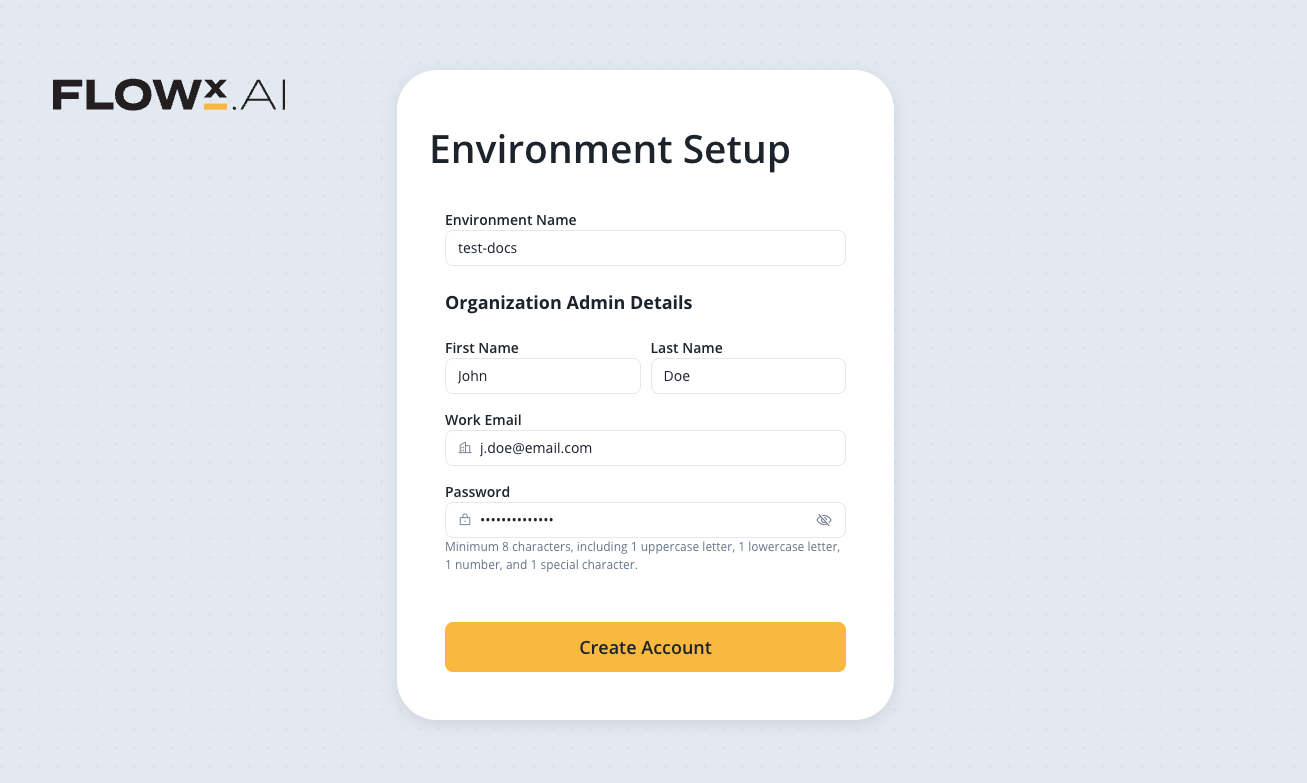
For environments where FlowX drives the installation, your FlowX representative leads this step. Self-installing operators receive the required values directly from FlowX licensing.
**Outbound HTTPS connectivity to FlowX SaaS is required during provisioning.** The wizard validates the license token and retrieves the subscription via the FlowX-provided endpoints. Without that connectivity the organization row is created and Keycloak realms are provisioned, but license validation fails. Restricted or air-gapped deployments must coordinate an offline-licensing path with FlowX before provisioning.
**Manual Keycloak alternative.** If your environment does not allow the self-hosted platform to administer Keycloak (no master-realm admin available), follow the [Manual Keycloak Configuration recipe](/5.9/setup-guides/access-management/configuring-an-iam-solution) instead of the wizard. Realms, clients, and roles are then created manually in Keycloak; the platform reads them on first boot.
***
## Deprecated: "Configure Environment Info"
The Configure Environment Info UI in Designer is no longer available. Environment naming now happens during organization registration with FlowX.
The legacy env vars are deprecated and still read for backward compatibility. Plan to remove them once organization registration is complete:
| Environment Variable | Replaced by |
| ------------------------ | ---------------------------------------------------------------- |
| `FLOWX_CLIENT_NAME` | Registered organization code (`DEFAULT_ORGANIZATION_NAME`) |
| `FLOWX_ENVIRONMENT_NAME` | Captured during organization registration; no env var equivalent |
The following API surface is changed; update any custom client tooling that relied on it:
* **`PATCH /api/platform/environment`**. Endpoint removed.
* **`/api/init` response**. The `environmentDetails` section is deprecated; values now come from organization registration rather than the legacy env vars. The field continues to be returned during the upgrade window.
***
## Verify the configuration
After services boot on 5.9.x, confirm:
Every service shows the new Organization UUID in its startup logs (search for `ORGANIZATION_ID` log lines).
**Designer → Platform Status** shows all components at their 5.9.x target versions.
Liquibase migrations completed on every service. No service is in a "migration pending" state.
The `license` service is reachable from your network to FlowX SaaS. License validation succeeds and usage events are being published.
`LLM_ENCRYPTION_MASTER_KEY` is set to a non-default value before any LLM provider is configured.
***
## Related resources
Component versions, third-party dependency versions, and the complete env var diff.
Full license service setup including PostgreSQL, Redis, and Kafka topology.
Deeper reference for organization-manager configuration.
Prerequisite. The Keycloak transition that supports this configuration.