> ## Documentation Index
> Fetch the complete documentation index at: https://docs.flowx.ai/llms.txt
> Use this file to discover all available pages before exploring further.
# Workflow instances
> A Runtime page listing every workflow run in the project, filterable by origin, status, and start date.
export const release_0 = "5.12"
SaaS · {release_0}
**Available on SaaS with FlowX.AI {release_0}.** This feature is live on managed (SaaS) deployments now. Self-hosted deployments will receive it with the next LTS release family.
## Overview
The **Workflow Instances** page lists every workflow run in the project, in one place. Until now a workflow's runs were visible only from inside that workflow in the Integration Designer, so finding a failed run meant already knowing which workflow it belonged to.
Open it from **Projects → Your Project → Runtime → Workflow Instances**. Viewing it requires the same read permission as the Process Instances page.
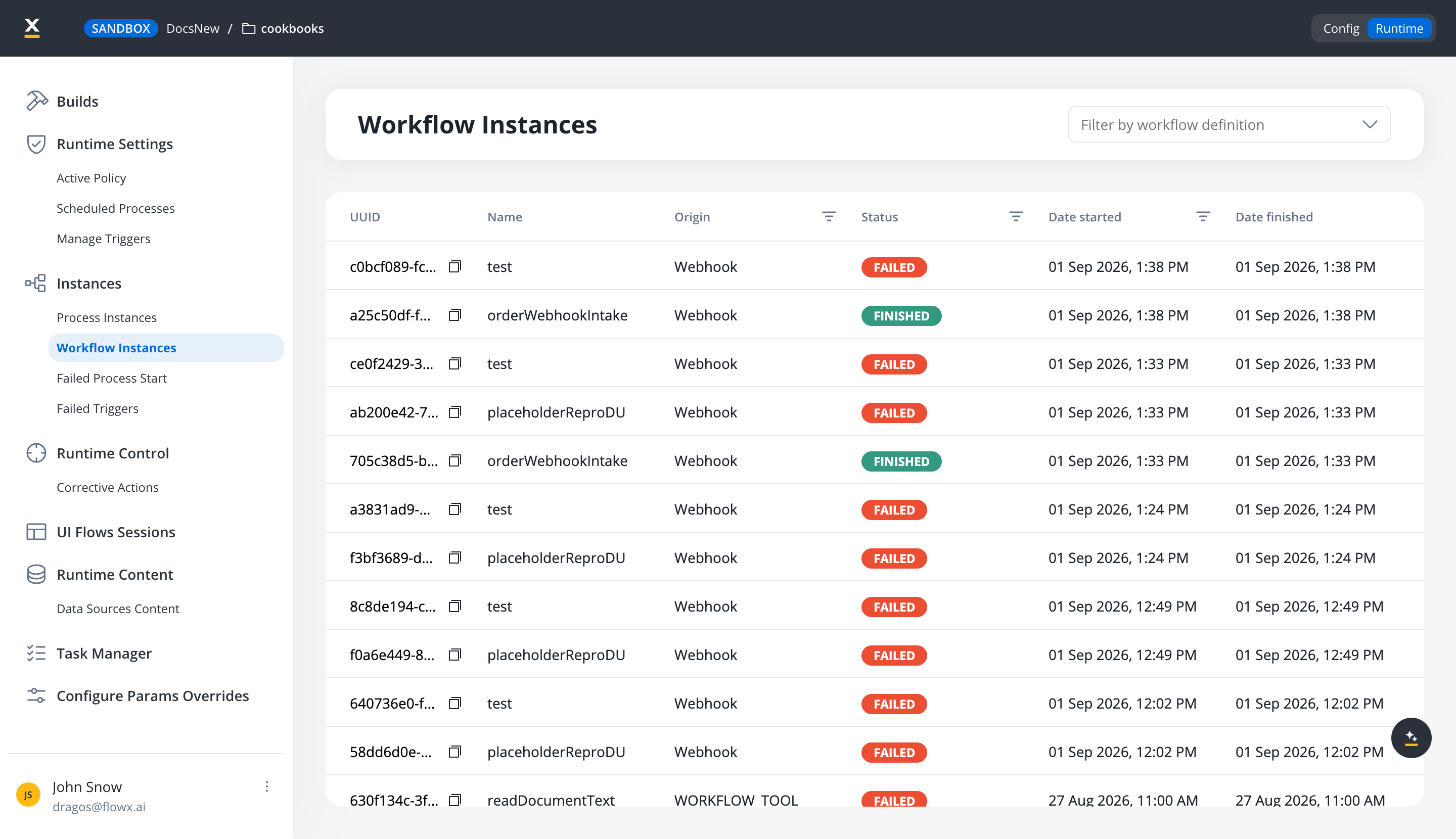
## The list
| Column | Description |
| ------------------------------------ | ---------------------------------------------------------------------------------------------------------------------------------------------------------------------------------------------------------------------------------------------------------------------------------------------- |
| **UUID** | The run's unique identifier. |
| **Name** | The workflow definition the run belongs to. |
| **Origin** | What started the run: **Process**, **UI Flow**, **Webhook**, **Email**, or **Manual** for a run started by hand from the Designer. A workflow invoked as an agent's [workflow tool](/5.9/docs/platform-deep-dive/integrations/custom-agent-node#how-workflow-tools-run) shows `WORKFLOW_TOOL`. |
| **Status** | **Started**, **Finished**, **Failed**, or **Cancelled**. |
| **Date started** / **Date finished** | When the run began and ended. |
## Finding the runs you care about
Three controls narrow the list:
* **Filter by workflow definition**, above the table.
* **Origin** and **Status** column filters, each a multi-select, so one view can show, say, every **Failed** run started by a **Webhook** or **Email** trigger.
* A date filter on **Date started**, for scoping to an incident window.
The **Origin** filter is the fastest way to audit [event-triggered workflows](/5.9/docs/platform-deep-dive/integrations/integration-designer#external-triggers): runs started by a webhook or an email trigger carry that origin, while runs started from a process or a UI Flow carry theirs.
## Related resources
The sibling page for process runs, with the same status and date filters
Sessions for UI Flows, also filterable by status and start date
## Related topics
- [Chat-driven workflows](/5.9/ai-platform/chat-driven-workflows.md)
- [Integration Designer](/5.9/docs/platform-deep-dive/integrations/integration-designer.md)
- [FlowX.AI 5.9.0 Release Notes](/release-notes/v5.x/v5.9.0-june-2026/v5.9.0-june-2026.md)
- [FlowX.AI 5.12.0 Release Notes](/release-notes/v5.x/v5.12.0-september-2026/v5.12.0-september-2026.md)
- [FlowX.AI 5.7.0 Release Notes](/release-notes/v5.x/v5.7.0-april-2026/v5.7.0-april-2026.md)