> ## Documentation Index
> Fetch the complete documentation index at: https://docs.flowx.ai/llms.txt
> Use this file to discover all available pages before exploring further.
# Resources
> Overview of Global and project resources, including their usage, dependencies, promotion, and configuration within the platform.
## Overview
Resources are categorized into **Global Resources** and **Project Resources**. Each type has unique characteristics that define its usage, dependencies, and promotion between environments. Understanding these distinctions ensures efficient project development, management, and deployment.
***
## Global resources
Global Resources are designed for **reuse across multiple projects** or business contexts.
These resources are often organized within **libraries**, enabling consistency and efficiency by providing a central repository of shared components.
### Key characteristics
* **Reusable**: Common design elements, themes, fonts, and other assets can be used in multiple projects.
* **Independent**: Global Resources exist outside individual projects, making them adaptable across different business cases.
* **No Dependencies**: These resources are not project-specific, making them versatile for broad use cases. Projects can reference libraries without requiring modifications to the core resources.
### Examples
#### Design assets
* **Themes**: Standardized themes for consistent styling.
* **Global Media Library**: Shared images, icons, and other assets.
* **Fonts**: Reusable font families to maintain branding.
#### Plugins
* **Languages**: Language packs or configurations that support multilingual capabilities across projects.
* **Templates**: Notification and document templates managed at a global level.
* **Out-of-Office Settings**: Platform-wide absence management settings.
#### General settings
* **Users**: User accounts and profiles that can be accessed across multiple projects.
* **Roles**: Defined roles that determine user permissions and access levels.
* **Groups**: User groupings that facilitate collective management and permissions.
* **Audit Log**: Logs that track changes and activities within the platform for security and compliance purposes.
#### Libraries
Organized resource containers including **enumerations**, **substitution tags**, and **CMS components** for multi-project use.
### Promotion workflow
* **Library Promotion**: Global Resources within libraries are promoted separately from projects. They are typically **imported into the Designer UI** in target environments as part of their own libraries.
* **Configuration Management**: When libraries are promoted, existing configurations, such as **generic parameters**, are replaced by project-level configurations in the target environment.
***
## Project resources
Project Resources are specific to a **business use case**. Unlike Global Resources, they belong to a single project, allowing for custom configurations and dependencies on libraries.
### Key characteristics
* **Project-Specific**: Tailored to a single project’s needs.
* **Library Dependencies**: Can reference and extend Global Resources.
* **Configurable**: Parameters can be updated in upper environments through environment variables or overrides.
### Examples
1. **Processes**: BPMN workflows customized for the project’s business logic.
2. **CMS Components**: Project-specific enumerations, substitution tags, and media items.
3. **Task Management**:
* **Views**: Configurable interfaces to display task-related data based on process definitions.
* **Stages**: Stages that allow task progression through different statuses.
* **Allocation rules**: Define how tasks are assigned to users or teams.
4. **Integration Designer**:
* **Systems**: A system is a collection of resources—endpoints, authentication, and variables—used to define and run integration workflows.
* **Workflows**: A workflow defines a series of tasks and processes to automate system integrations. Within the Integration Designer, workflows can be configured using different components to ensure efficient data exchange and process orchestration.
5. **Configuration Parameters**: Project-specific rendering settings like `applicationUuid`, `locale`, `language`, and `process parameters`.
6. **Project Builds**: Builds represent finalized versions of the project, including all associated metadata and linked library versions.
7. **Project Settings**: Configure various aspects of a project like platform type, default theme, formatting, etc.
### Promotion workflow
* **Build-Based Promotion**: Only **builds** (not commits) are promoted.
* **Design Asset Handling**: Referenced assets are created if missing but are not updated during import.
* **Configuration Parameters Overrides**: Environment variables replace default values in upper environments.
***
## Resources usage tracking
Track where resources are used to prevent unintended changes and ensure stability.
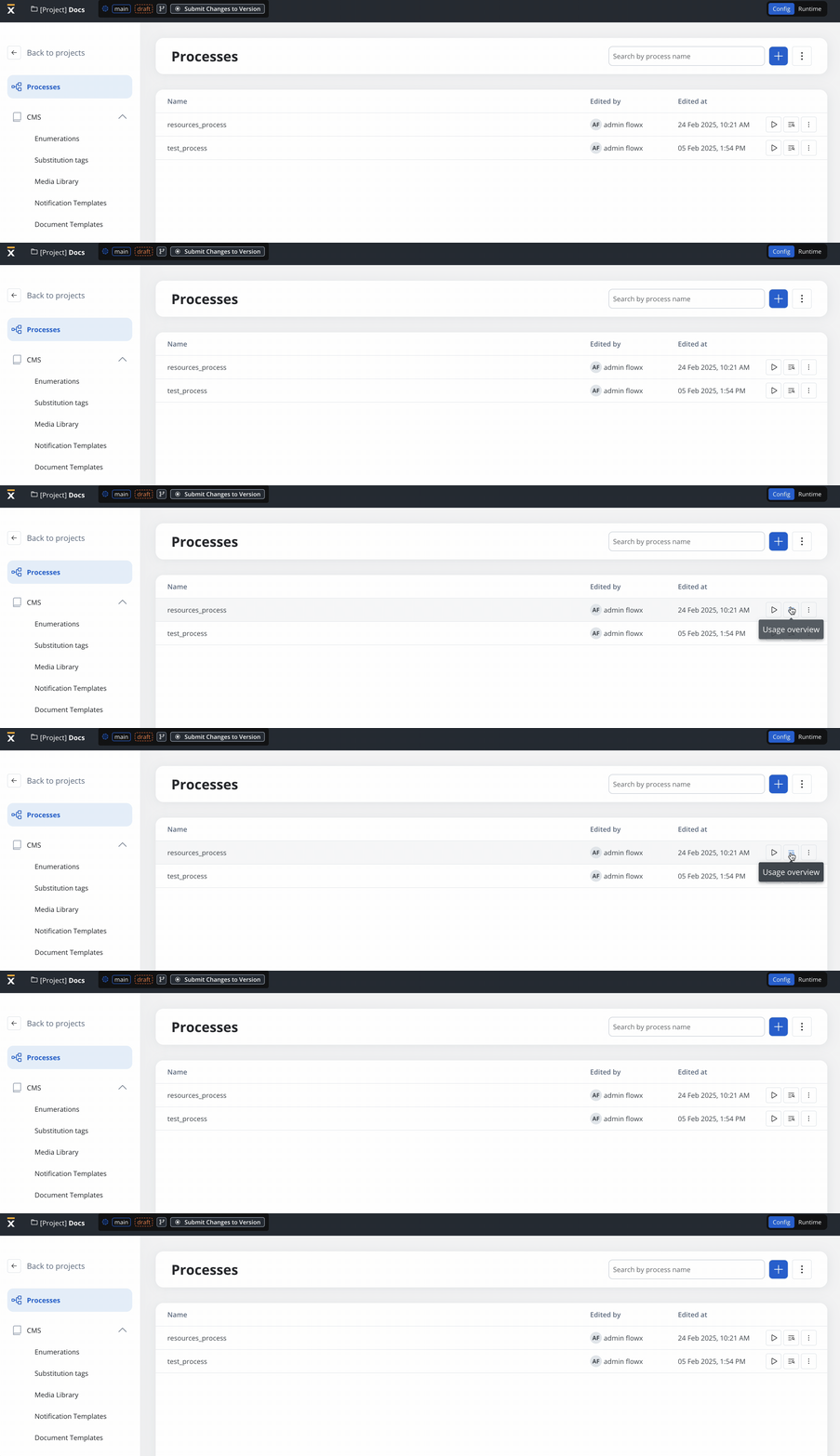
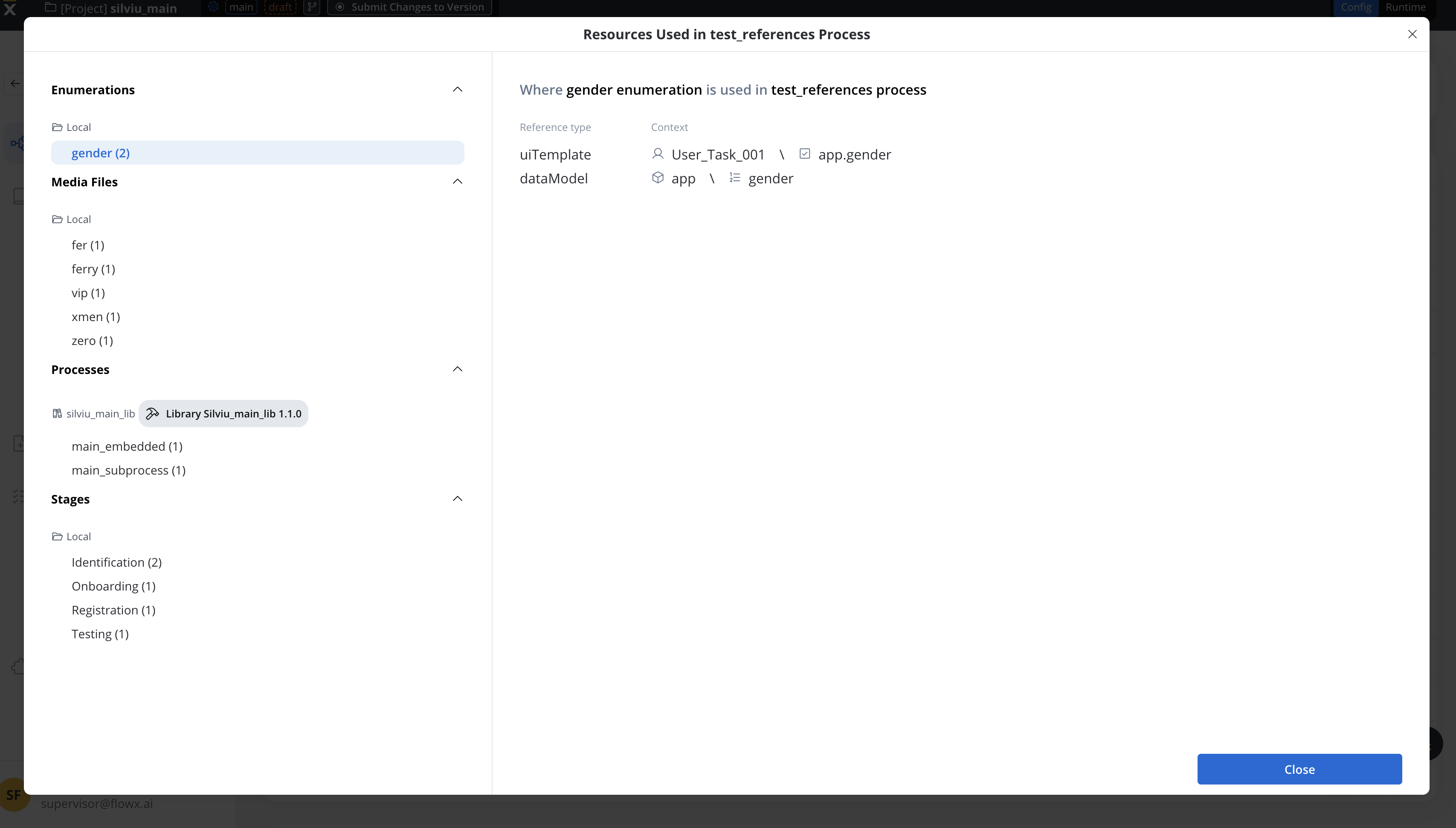
The **Resource Usage Tracking** feature provides real-time visibility into where and how resources are being used, preventing unintended changes and ensuring system stability.
**Key features**
* **View Dependencies** before making updates or deletions.
* **Understand Resource Interactions** across projects.
* **Prevent Issues** when modifying critical elements.
Each resource type includes a **Usage Overview modal**, which updates dynamically as references change.
### Process usage
1. **Access Usage Overview**
* Click the **Usage Overview icon** in the **Process List**.
2. **Usage Modal Details**
* Displays references by resource type (e.g., Process, UI Template, Workflow).
* Provides detailed context, including node configurations.
#### Deleting a process with references
* A **confirmation modal** warns users before deletion.
* The modal lists all affected references.
### Enumeration usage
1. **Access Usage Overview**
* Click the **Usage Overview icon** in the **Enumeration List**.
2. **Usage Modal Details**
* Shows where the enumeration is referenced (e.g., UI Designer, Data Model, Workflow)
### Media library usage
1. **Access Usage Overview**
* Click the **Usage Overview icon** in the **Media Library List**.
2. **Usage Modal Details**
* Displays where media files are used (e.g., UI Template, Process).
***
### Managing dependencies & tracking changes
* **Dynamic Updates**: Reference lists update automatically as resources change.
* **Dependency Checks**: Users see affected resources before deletion.
* **Bidirectional Tracking**: The **Usage Overview modal** also shows resources referenced **inside** a process.
## Copying resources
Use the **Copy to Another Project** feature to transfer resources while maintaining dependencies.
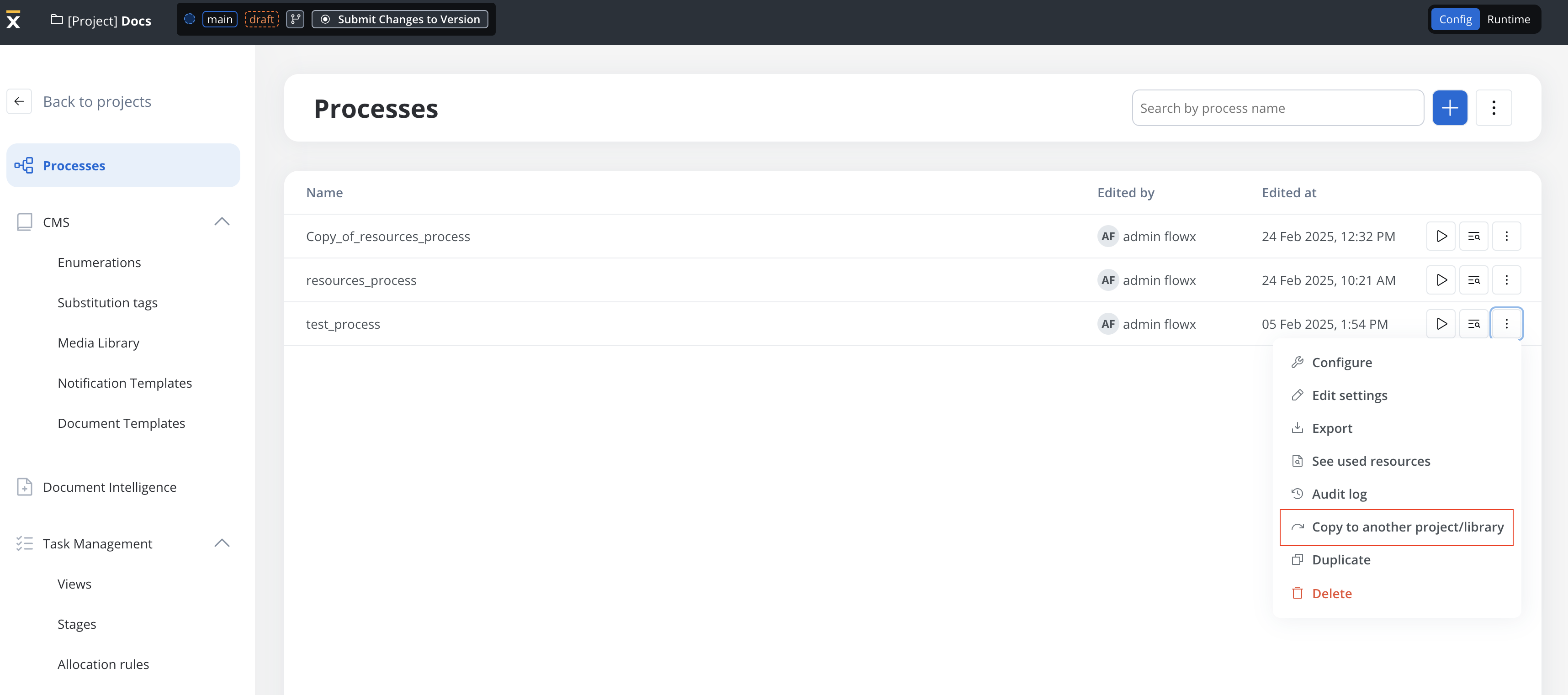
Choose the target project or library.
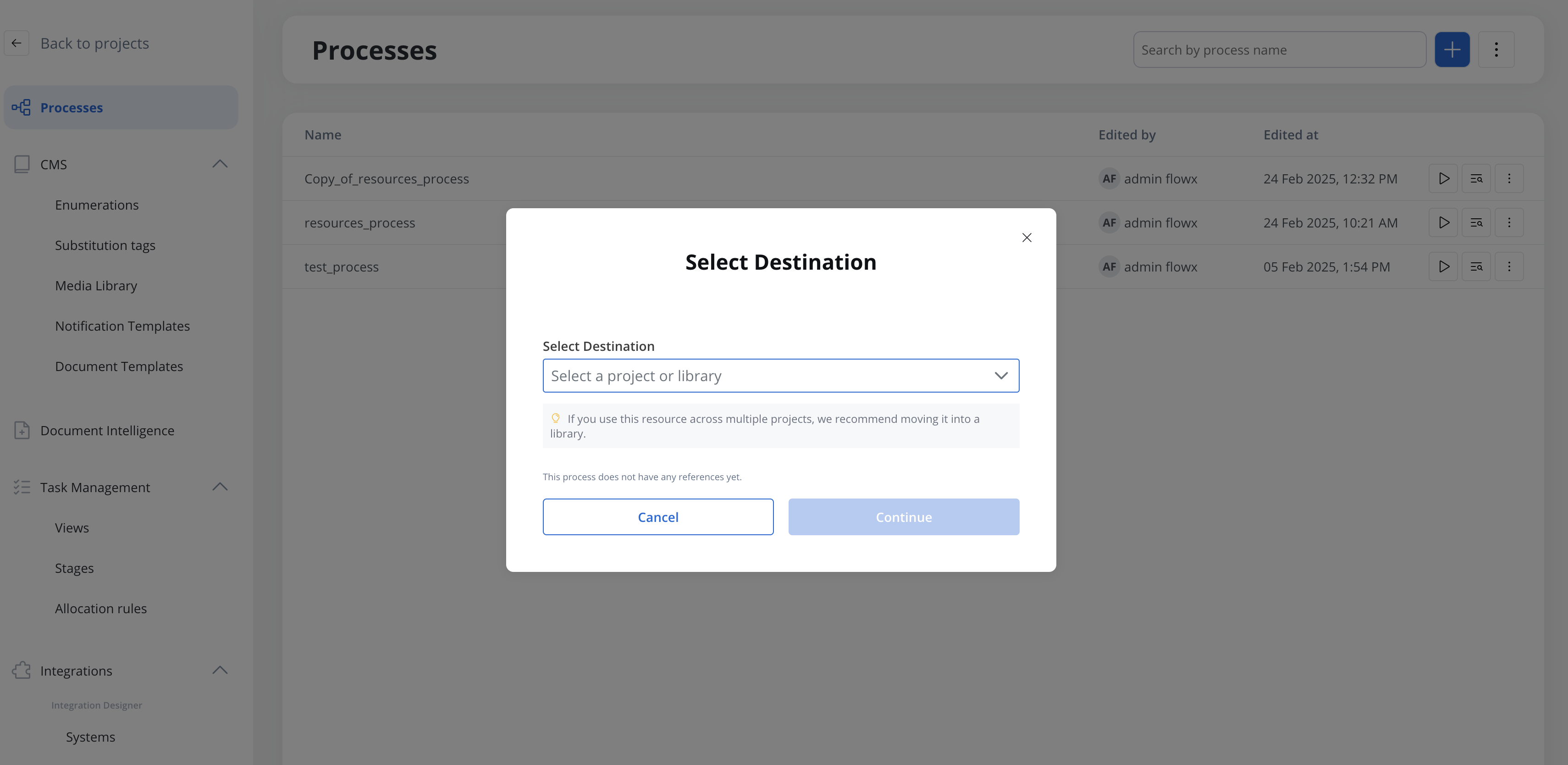
Select the target branch.
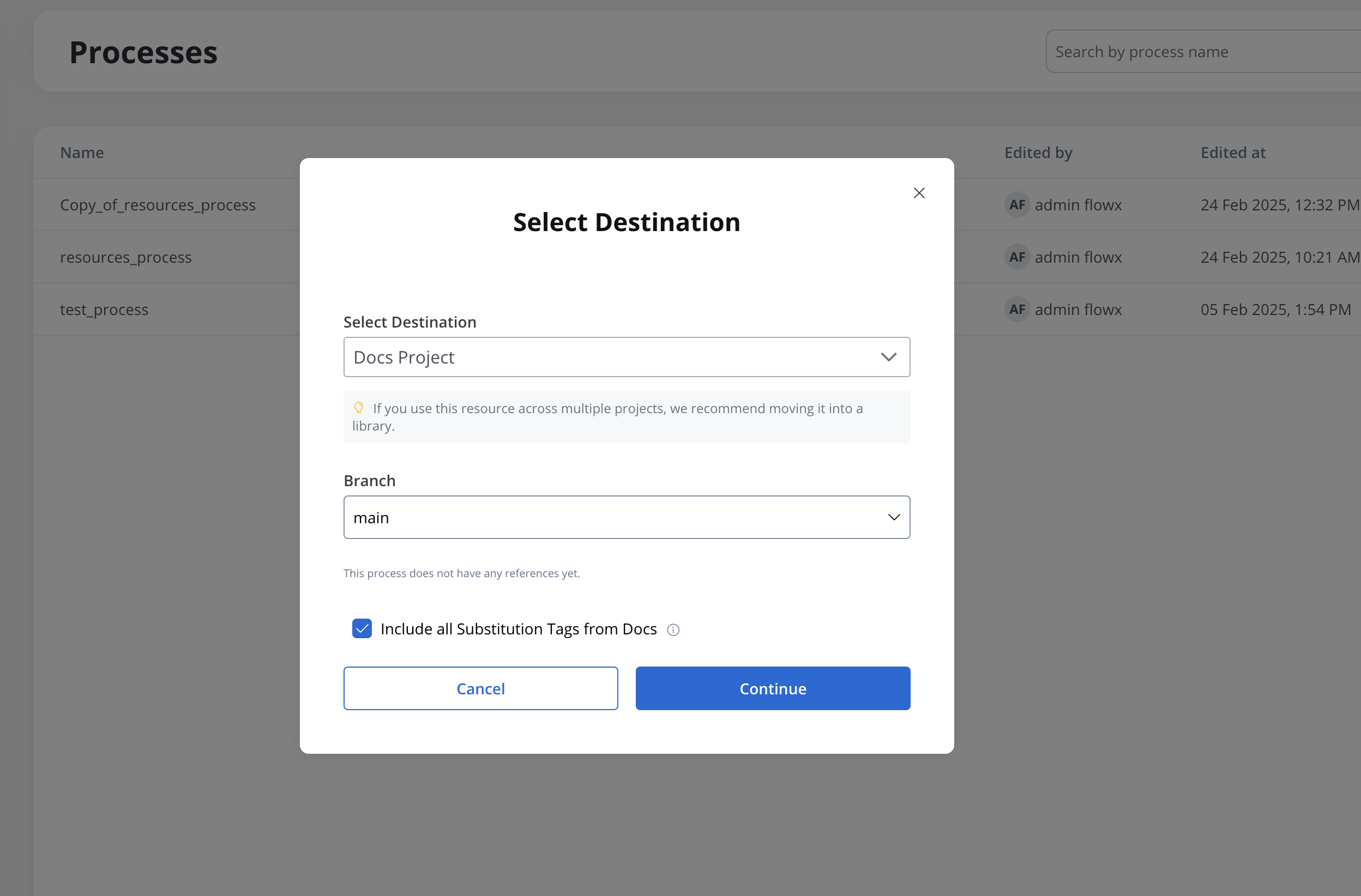
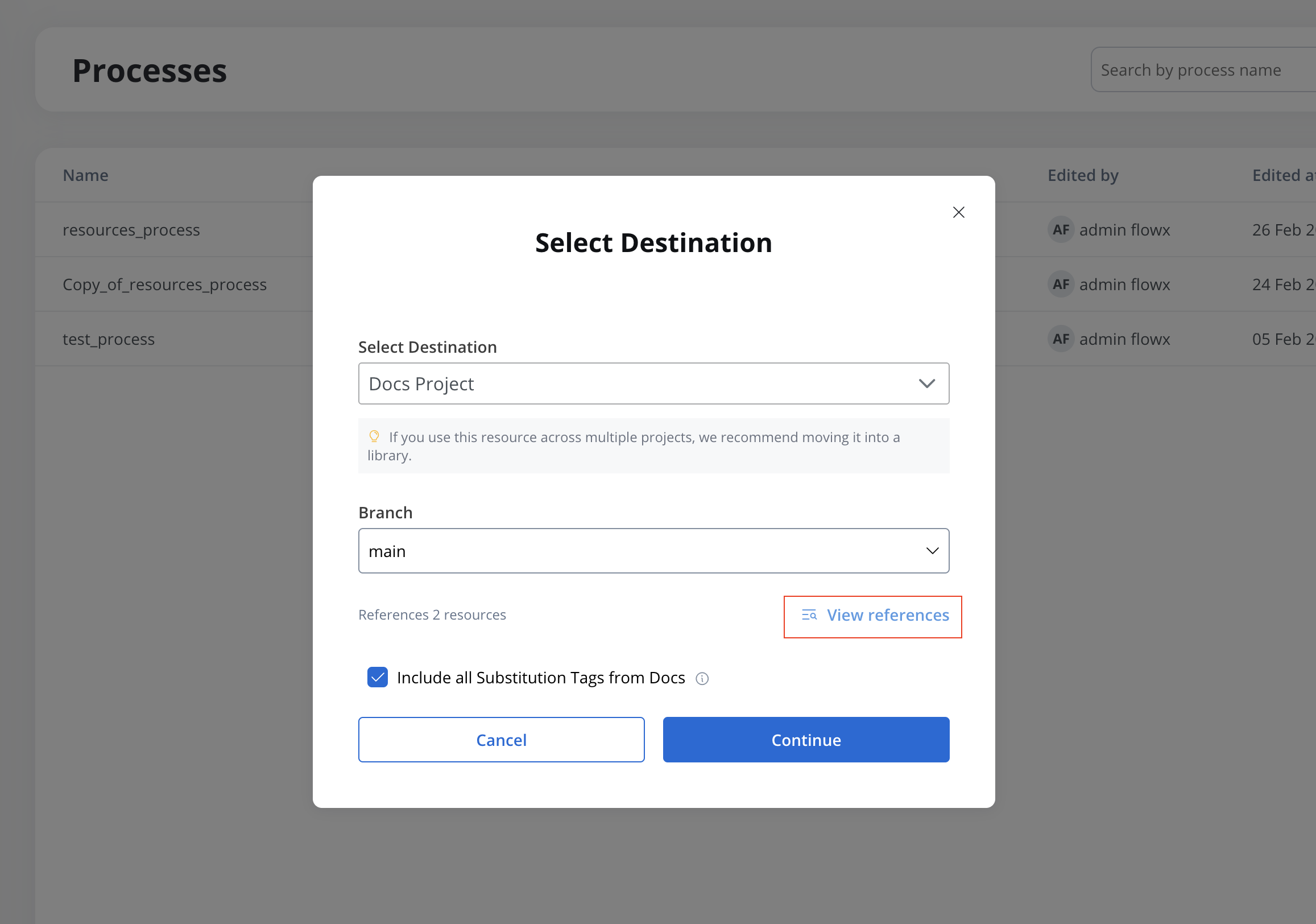
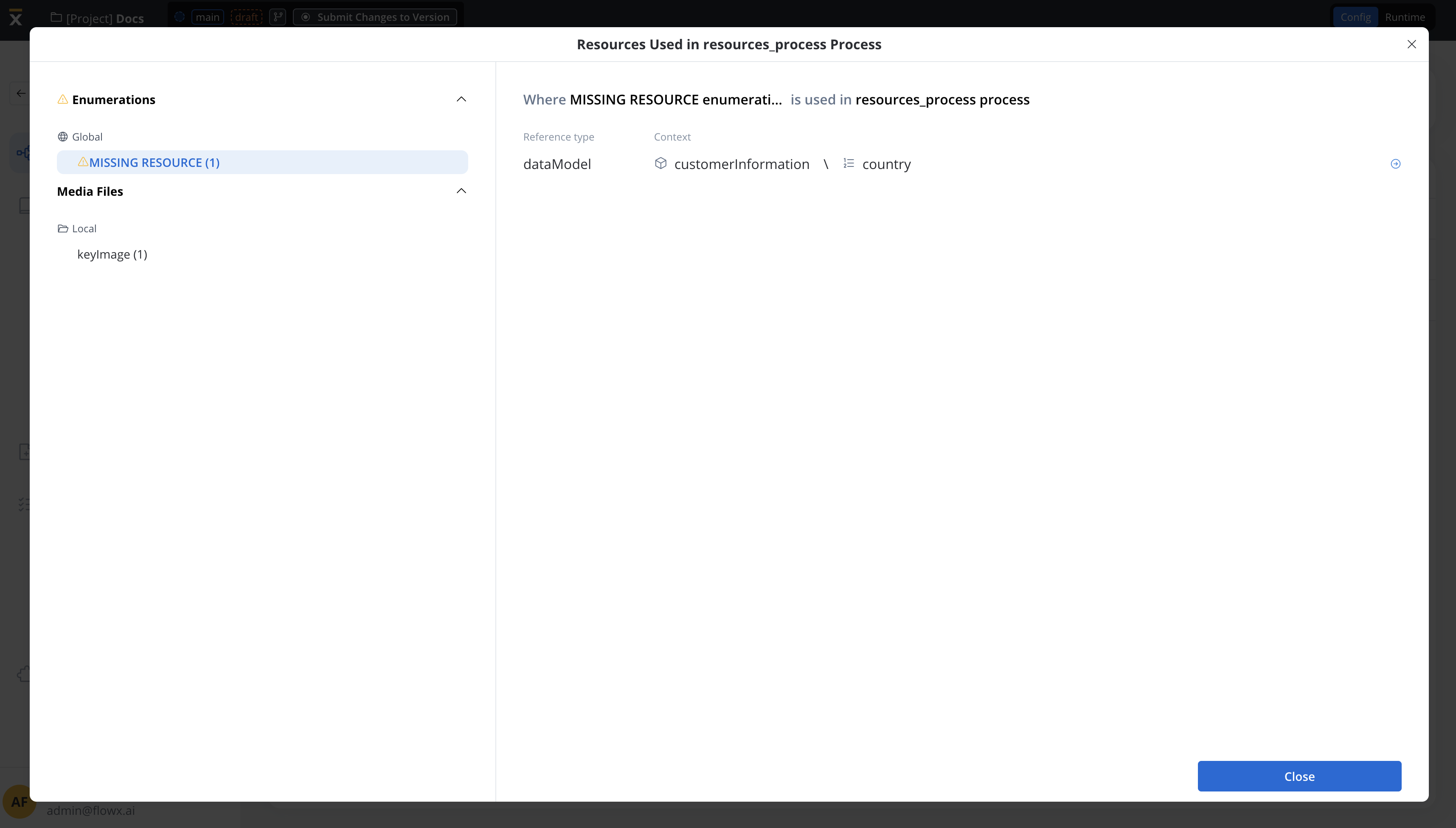
The system displays referenced resources and validates dependencies.
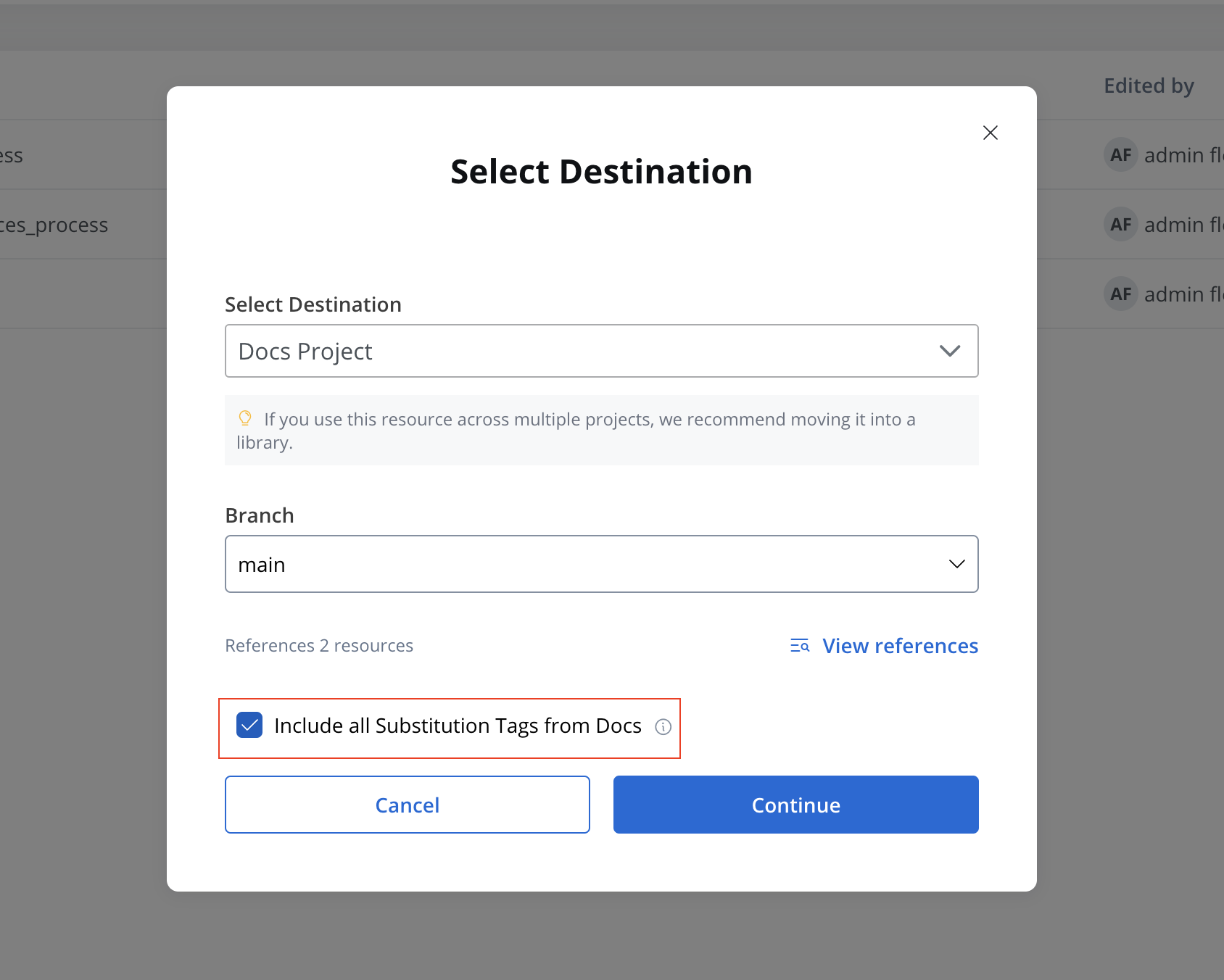
If necessary, copy all substitution tags from a project to the target project. Existing substitution tags in the target project with the same key will not be overwritten.
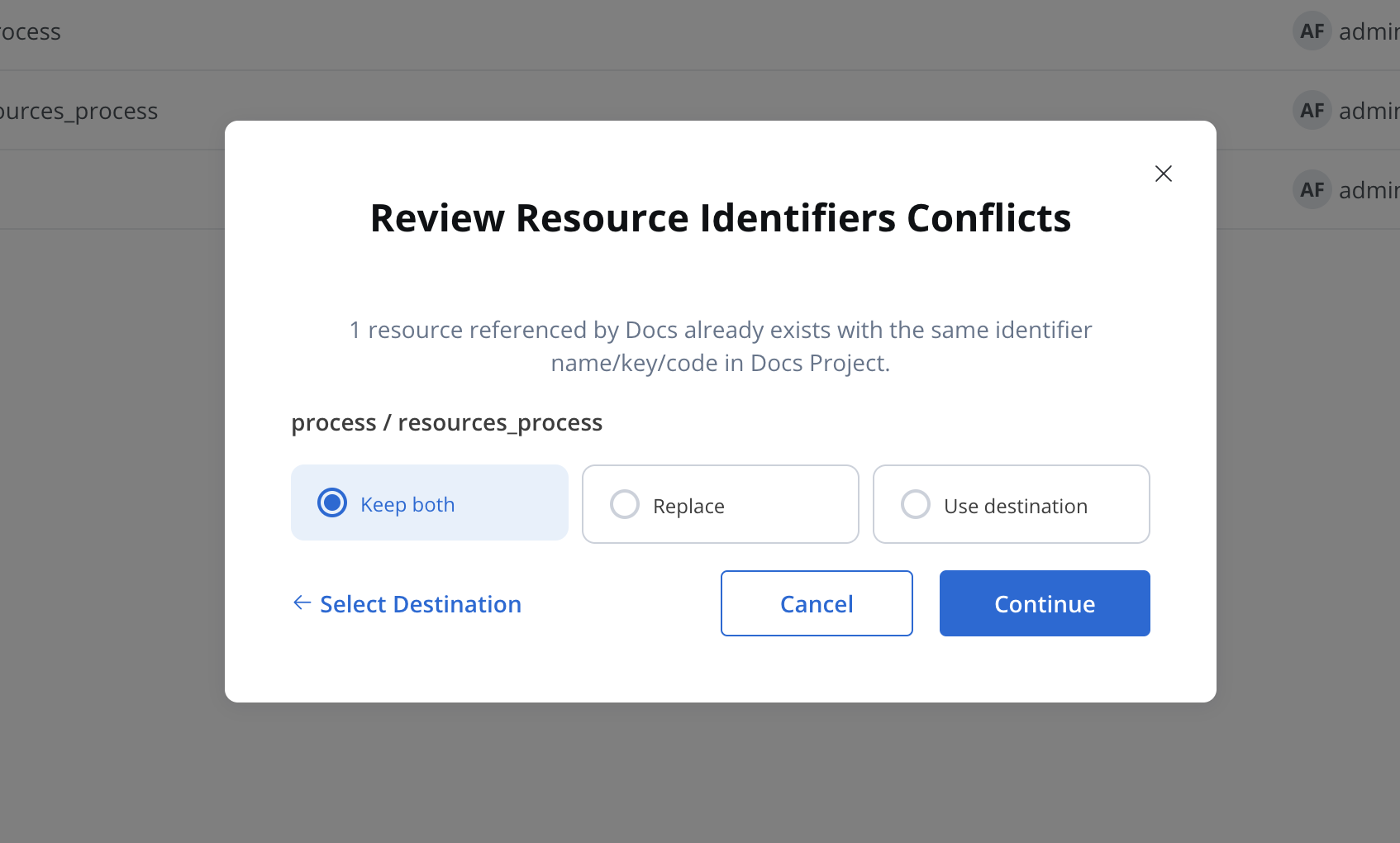
If an identifier already exists in the destination, you'll be prompted to either:
* **Keep Both**: Create a duplicate.
* **Replace**: Overwrite existing resource.
* **Use Destination**: Keep existing resource without copying.
**Handling conflicts:** The system automatically detects duplicate identifiers and provides a clear choice to avoid unintended overwrites.
### Supported resource types
The copy feature is available for the following resources:
* **Process definitions** (including referenced resources)
* **Systems**
* **Workflows**
* **Enumerations** (including child enumerations)
* **Media Library items**
* **Notification** and **Document** templates
## Duplicating resources
The **Duplicate Resource** feature allows users to quickly copy resources within the same project or library.
### Supported resource types
* **Processes**
* **Enumerations**
* **Media files (including Global media library files)**
* **Notification templates**
* **Document templates**
* **Views**
### Steps
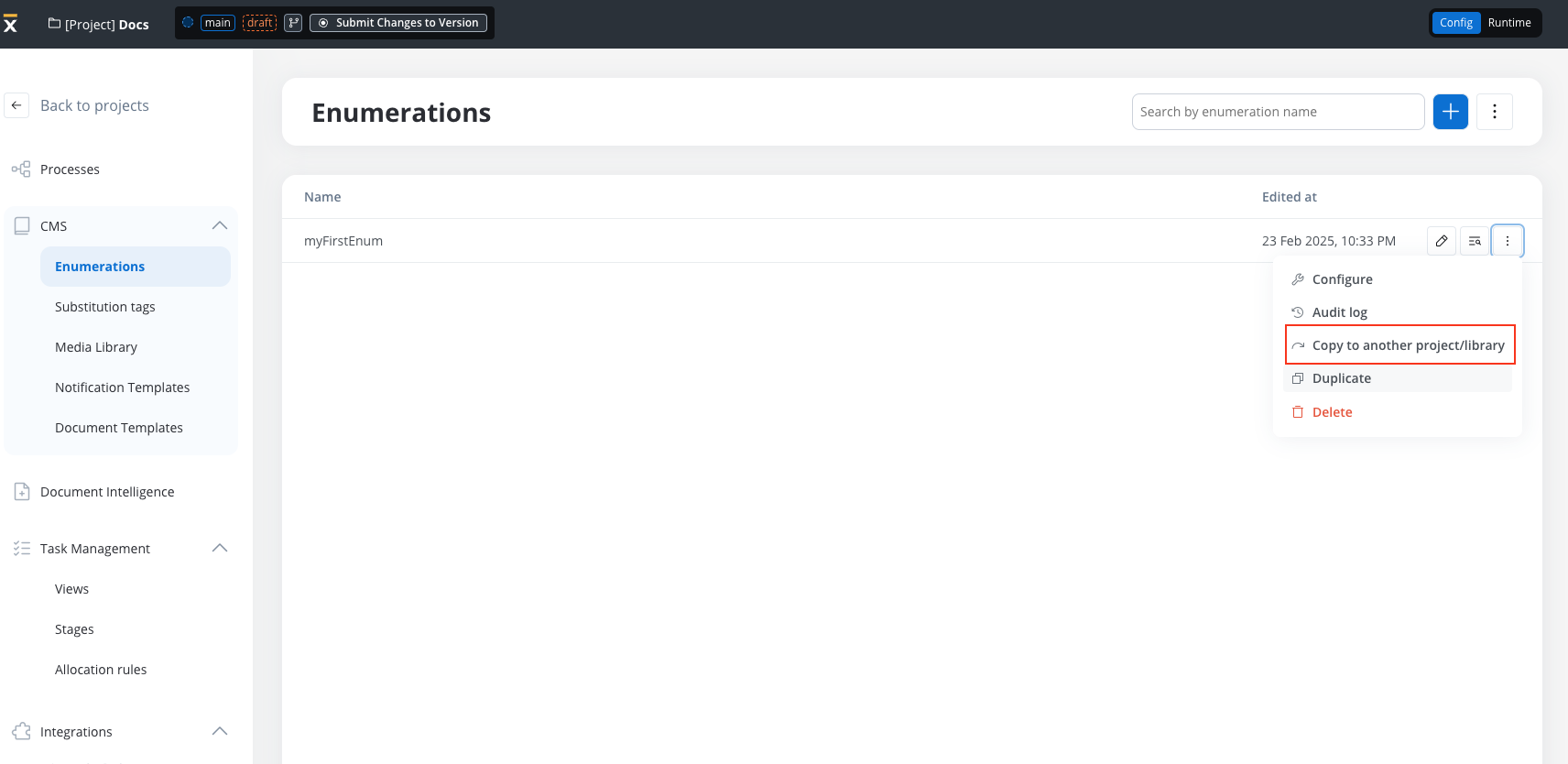
Duplicate options are available from each resource’s three-dot menu (table row & secondary navigation).
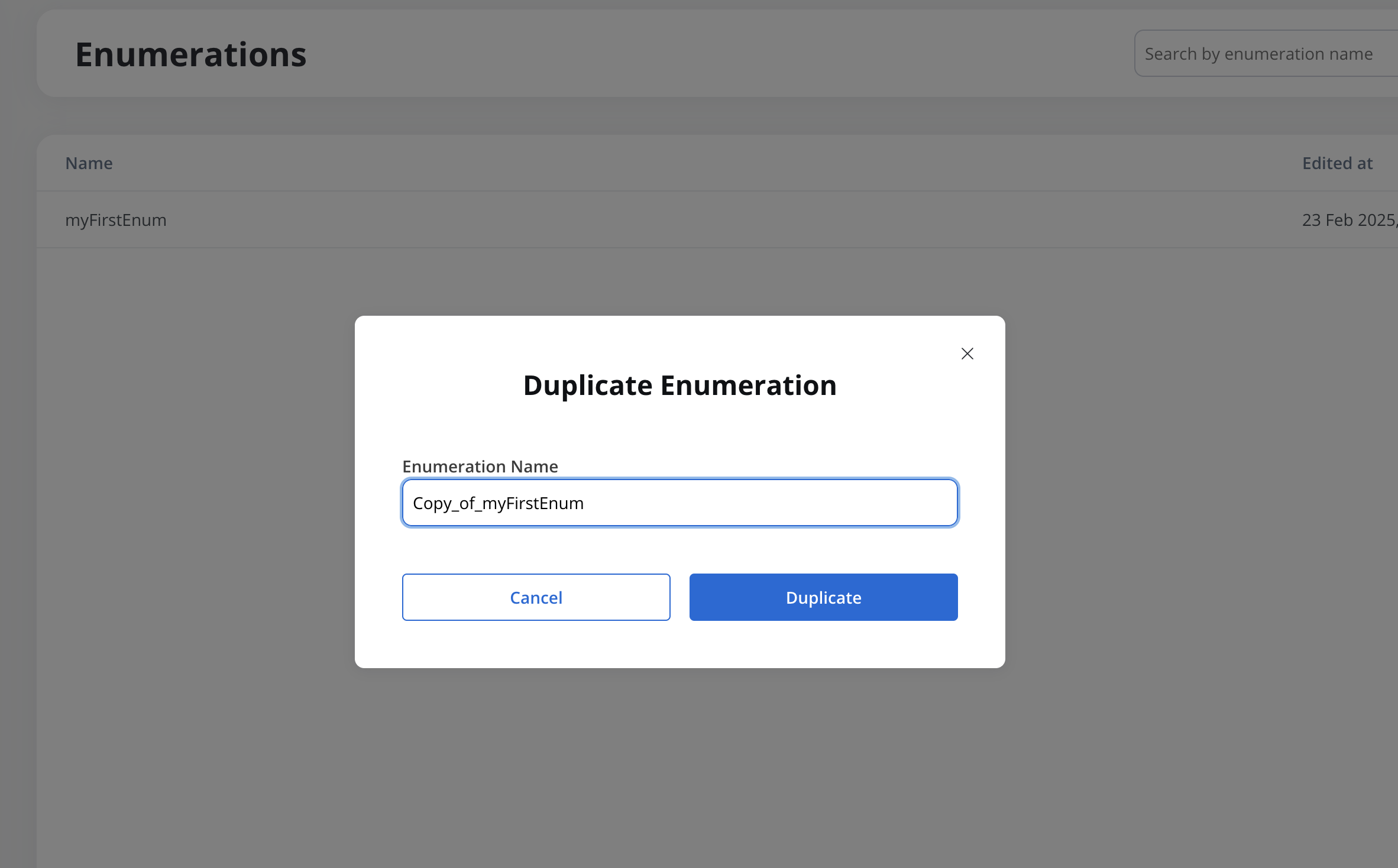
When selected, a **"Duplicate" modal** opens with a prefilled name: *Copy of \[Resource Name]* (which can be edited).
***
## Resources overrides
Resource overrides enable **localization and customization** of core business applications across multiple regions while maintaining centralized updates from headquarters.
Resource overrides are **only available at the project level**. Libraries cannot contain resource overrides.
### Why use resource overrides?
Resource overrides are essential for organizations that need to:
* **Build and maintain a business application HQ** that expands to multiple countries
* **Customize the core application** for each country's specific requirements
* **Keep receiving updates from HQ** without losing local customizations
Think of resource overrides as a way to maintain a "master copy" at headquarters while allowing each region to adapt specific business logic, compliance requirements, or local regulations.
***
## Managing resource overrides
Resource overrides are configured through the **Dependencies** page in your project's main navigation. This interface provides comprehensive management capabilities for all your library resource customizations.
### Accessing resource overrides
From your project's main menu, click on **Dependencies** to access the configuration interface.
The Dependencies page contains two tabs:
* **Dependencies**: Manages project library dependencies
* **Resource Overrides**: Configures and manages all resource overrides
### Resource overrides interface
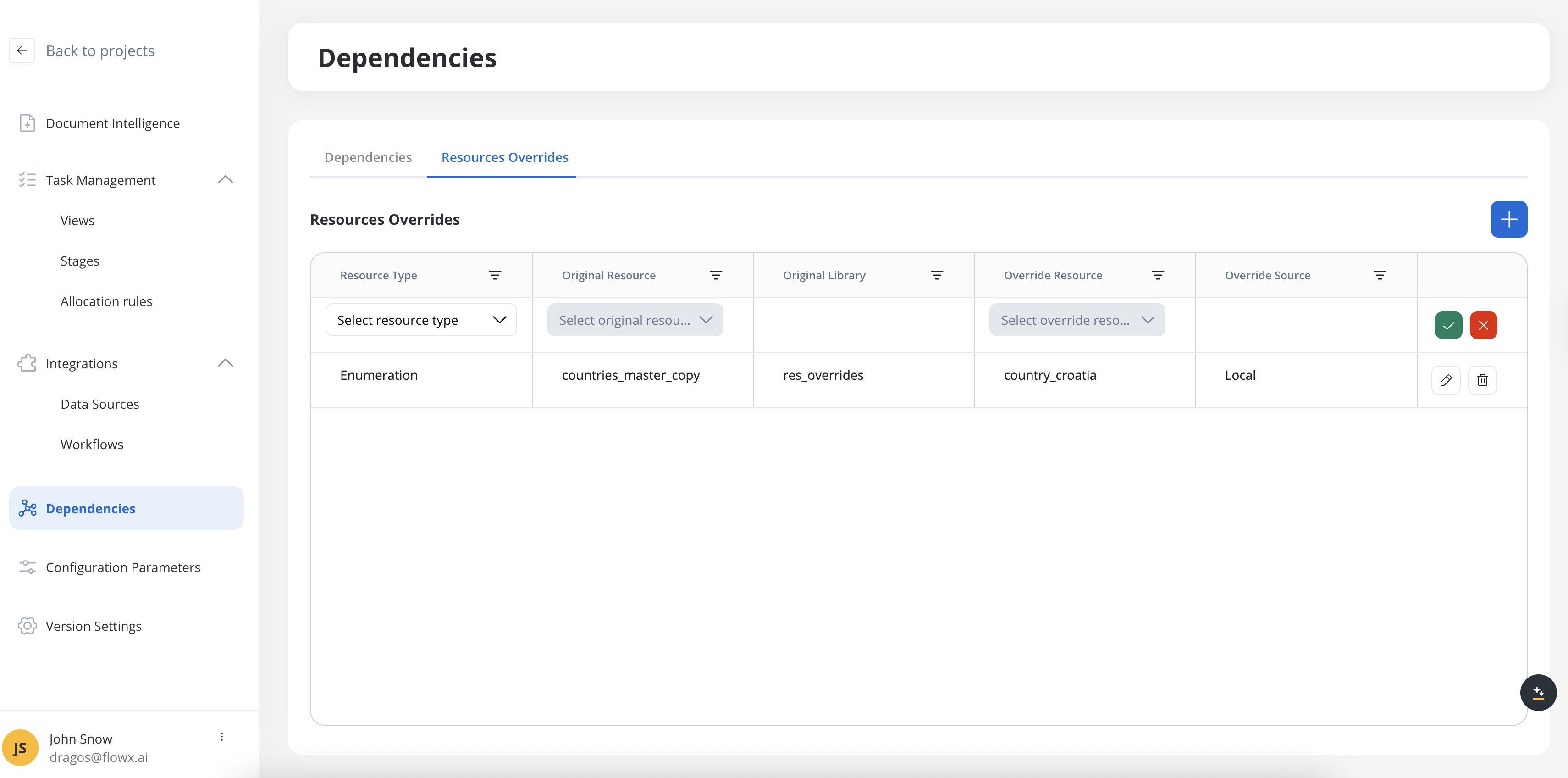
The Resource Overrides tab displays all configured overrides in a comprehensive table with the following columns:
* **Resource Type**: The type of resource being overridden (Process, Workflow, Enumeration)
* **Original Resource**: The name of the library resource being overridden
* **Original Library**: The library containing the original resource
* **Override Resource**: The name of the resource used as the override
* **Override Source**: The source of the override resource (library name or "Local" for project resources)
* **Actions**: Edit and delete options for each override
### Adding a new override
Click the **+** button to add a new editable row at the top of the table.

Choose from the available resource types:
* **Process**
* **Workflow**
* **Enumeration**
Changing the resource type will clear any selections in the Original Resource and Override Resource fields.
Select the library resource you want to override:
* Search through all available resources of the selected type
* Resources are grouped by their source library
* Already overridden resources appear disabled with a tooltip: *"An override already exists for \[resource name]"*
The **Original Library** field automatically populates with the selected resource's library.
Choose the resource to use as the override:
* Available resources include both local project resources and library resources
* Resources are grouped by source (project or library)
* Must match the selected resource type
The **Override Source** field automatically shows "Local" for project resources or the library name for library resources.
* **Save**: Validates required fields and persists the override
* **Cancel (X)**: Discards the new override without saving
Success message: "Resource override has been successfully added."
### Updating an existing override
Click the **Edit** icon on any override row to make it editable.
Update any of the override configuration fields following the same validation rules as adding a new override.
* **Save**: Applies your changes to the override
* **Cancel (X)**: Reverts to the original configuration
Success message: "Resource override has been successfully updated."
### Deleting an override
Deleting an override will revert the project to using the original library resource at runtime.
Click the **Delete** icon on the override you want to remove.
A confirmation modal appears asking you to confirm the deletion.
Click **Confirm Delete** to permanently remove the override.
Success message: "Resource override has been successfully deleted."
### Export and import with overrides
Resource overrides are automatically included when exporting and importing project versions or builds.
#### Export behavior
When exporting a project version or build:
* A JSON file containing all resource overrides is included in the export ZIP
* Override definitions include complete resource mapping information
* Both original and override resource metadata are preserved
#### Import behavior
When importing a project with resource overrides:
* All override configurations are restored from the JSON file
* Dependencies on referenced libraries are validated
* Override mappings are reestablished in the target environment
Always verify that required library dependencies are available in the target environment before importing projects with resource overrides.
### Enumeration override behavior
Enumerations have special handling due to their usage patterns across the platform:
#### Current enumeration resolution
* Enumerations are resolved **by name** at runtime
* If multiple enumerations exist with the same name in the dependency tree:
* The closest one to the project root is chosen
* If multiple exist at the same level, the one from the build with the most recent creation date is selected
#### Enumeration usage contexts
* **UI Components**: Radio buttons, dropdowns, and multi-select components reference enumerations by name
* **Kafka Actions**: Enumeration names are embedded in message request bodies
* **Data Sources**: Enumeration mapping in endpoint configurations for value transformation
* **CMS Translation**: Both Kafka and REST requests use enumeration names for translation services
**Current limitation**: For enumeration value transformation between different system codes, the enumeration must exist in the same library or project as the system configuration. Resource overrides will not work for cross-library enumeration transformations.
### Error handling and validation
The interface provides comprehensive error handling:
#### Validation errors
* **Required field missing**: *"This field is required"*
* **Duplicate override**: *"An override already exists for \[resource name]"*
#### System errors
* **Save error**: *"An error occurred while saving resource override. Please try again later."*
* **Update error**: *"An error occurred while updating resource override. Please try again later."*
* **Delete error**: *"An error occurred while deleting resource override. Please try again later."*
### Empty state
When no resource overrides are configured, the interface displays an empty state with guidance on how to create your first override.
***
## Technical concepts
Understanding the technical implementation of resource overrides helps ensure successful customization while maintaining system integrity.
### How resource overrides work
Resource overrides replace library resources at runtime while preserving the original library structure and dependencies.
#### Process overrides
When overriding processes from libraries:
* **Input/output mapping**: Ensure processes properly map input and output data
* **Node compatibility**: The override process must maintain compatibility with the original process structure
* **Data model validation**: Overrides are validated against the data model and number of nodes
You cannot completely replace a process with an entirely different process. The override must maintain the core structure and interface of the original process from the library.
#### Complex process scenarios
For processes with **multiple start nodes and end nodes**:
* Validation occurs on both data model structure and node count
* Each start/end node must have a corresponding match in the override
* Business logic can be customized while maintaining the process interface
#### Enumeration and workflow overrides
Unlike processes, **enumerations and workflows** offer more flexibility:
* Can override any enumeration with any other enumeration
* Workflow overrides allow complete replacement of business logic
* Useful for country-specific value lists and decision trees
### Override workflow
Ensure your project has a dependency on the library containing the resource to override.
Navigate to the library resource you want to customize for your project.
Use the override functionality to create a project-specific version while maintaining the library reference.
Modify the override to meet local requirements while preserving input/output compatibility.
Validate that the override works correctly with call activities and other dependent resources.
### Current limitations
Be aware of these limitations in the current implementation:
* **Runtime error detection**: Some overrides with errors may only be discovered at runtime rather than design time
* **Merge conflict visibility**: When comparing JSON configurations, you'll see UUIDs instead of human-readable resource names
* **Dynamic list updates**: If library resources change significantly, they may not appear in the available override list
* **Dependency validation**: If a start node is deleted in a newer library version and doesn't match your override dependency, the system will fail at runtime
### Best practices
* **Design with overrides in mind**: When creating library processes, consider which elements might need localization
* **Maintain interface compatibility**: Ensure overrides preserve the original process's input/output contract
* **Test thoroughly**: Validate overrides in a staging environment before production deployment
* **Version management**: Keep track of library versions and test override compatibility with updates
* **Documentation**: Document the specific business reasons for each override to help with maintenance
Start with a well-designed reference application in your library, then create minimal, targeted overrides rather than extensive modifications. This approach makes it easier to receive and integrate updates from headquarters.
***
## Use cases and examples
Resource overrides are particularly valuable in enterprise scenarios where centralized governance meets local customization needs.
### Multi-country application deployment
Consider a financial services company with headquarters developing a core onboarding application that needs to be deployed across different countries, each with unique requirements:
#### Architecture overview
The **reference application** (master copy) is maintained in a **library** at headquarters, containing:
* Core business logic
* Standard processes (e.g., client onboarding, overdraft management)
* Common UI components and workflows
* Base data models and enumerations
Each country has its own **project** with:
* Dependencies on the master library
* Country-specific overrides for local requirements
* Custom business rules and compliance logic
Country projects start processes using **call activities** that:
* Reference the master processes from the library
* Apply local overrides where needed
* Handle country-specific data transformations
#### Localization examples
Different countries often require customized logic for:
* **Exchange rates calculation**: Each country may use different formulas or data sources
* **Privacy policy collection**: Some countries have stricter data protection requirements
* **Compliance workflows**: Regulatory requirements vary by jurisdiction
* **Authentication methods**: Local preferences for OTP, biometric verification, etc.
### Common override scenarios
* **Regulatory compliance**: Adapting processes to meet local legal requirements
* **Language localization**: Customizing enumerations and UI elements for different markets
* **Business logic variations**: Implementing region-specific calculation methods or validation rules
* **Integration differences**: Connecting to different local systems or service providers
* **User experience adaptations**: Modifying workflows to match local business practices