> ## Documentation Index
> Fetch the complete documentation index at: https://docs.flowx.ai/llms.txt
> Use this file to discover all available pages before exploring further.
# Dependencies
> Manage dependencies between projects and libraries to enable resource sharing, modular development, and version control across your FlowX applications
Dependencies in FlowX enable projects and libraries to share and reuse resources, fostering modular development and reducing duplication. By establishing dependency relationships, you can access common assets like processes, enumerations, and media files from external libraries while maintaining version control and stability.
## Overview
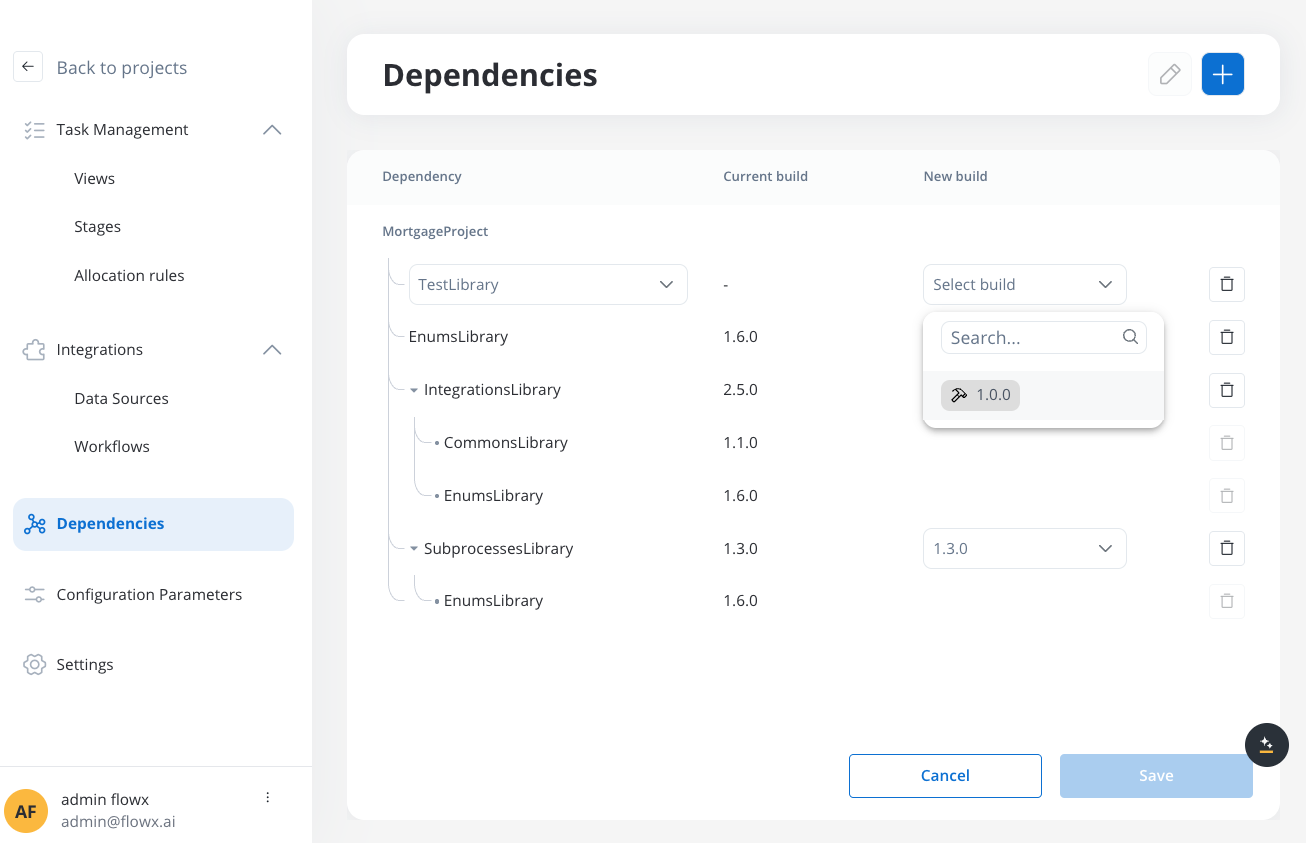
Dependencies allow you to:
* **Share resources** across projects and libraries without duplication
* **Maintain version control** by referencing specific builds
* **Create modular architectures** with reusable components
* **Ensure stability** through controlled dependency management
* **Build hierarchical structures** with library-to-library dependencies
## Types of dependencies
**Project Dependencies** allow projects to reference and use resources from libraries.
### Key Features
* **Library Access**: Projects can add libraries as dependencies to access their resources
* **Build-Specific**: Dependencies reference specific builds of libraries for stability
* **Version Control**: Projects control when to upgrade to newer library versions
* **Resource Availability**: All resources from dependent libraries become available in the project
### Use Cases
* Shared UI components and templates
* Common business processes and subprocesses
* Standardized enumerations and configuration
* Reusable integration workflows
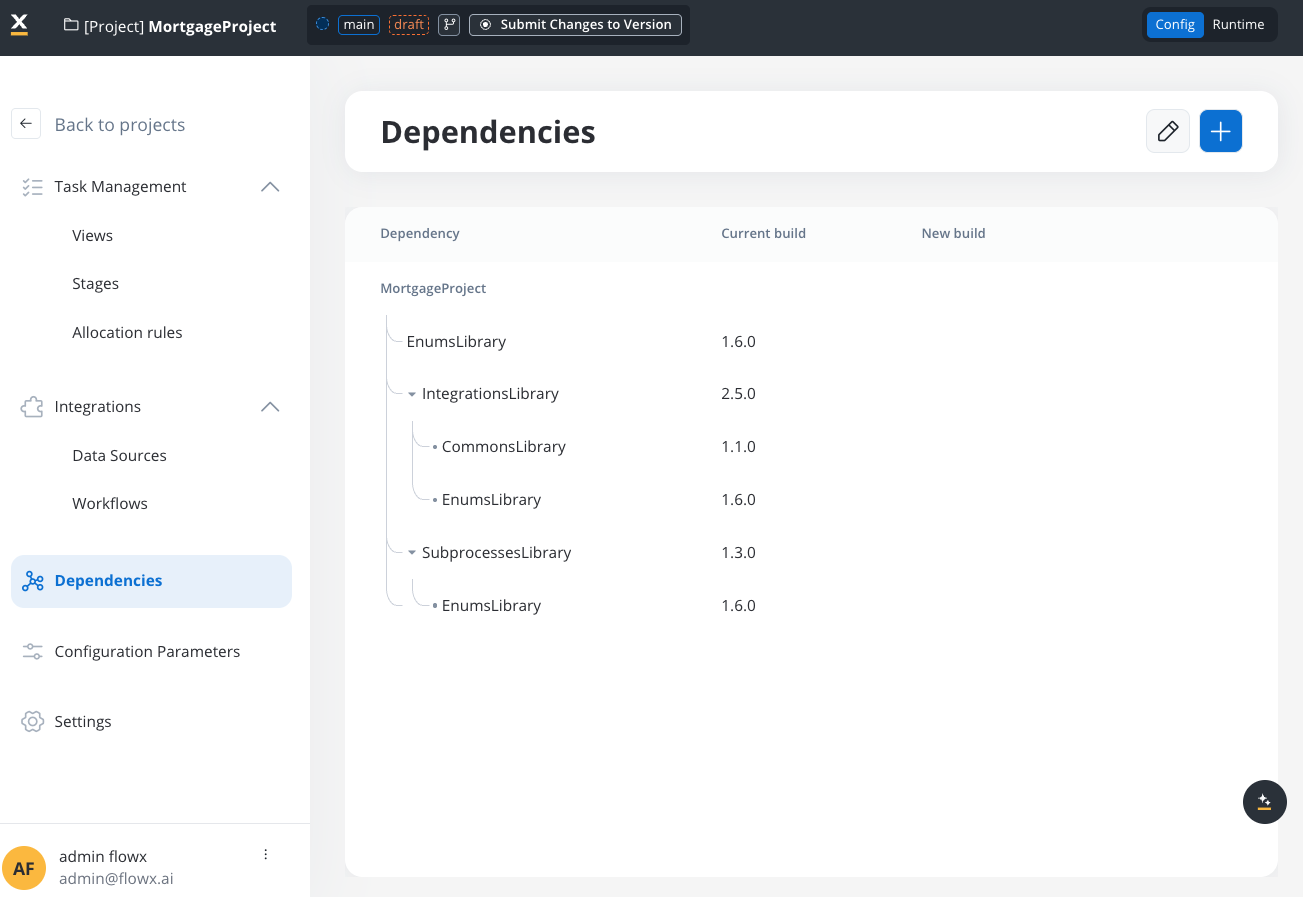
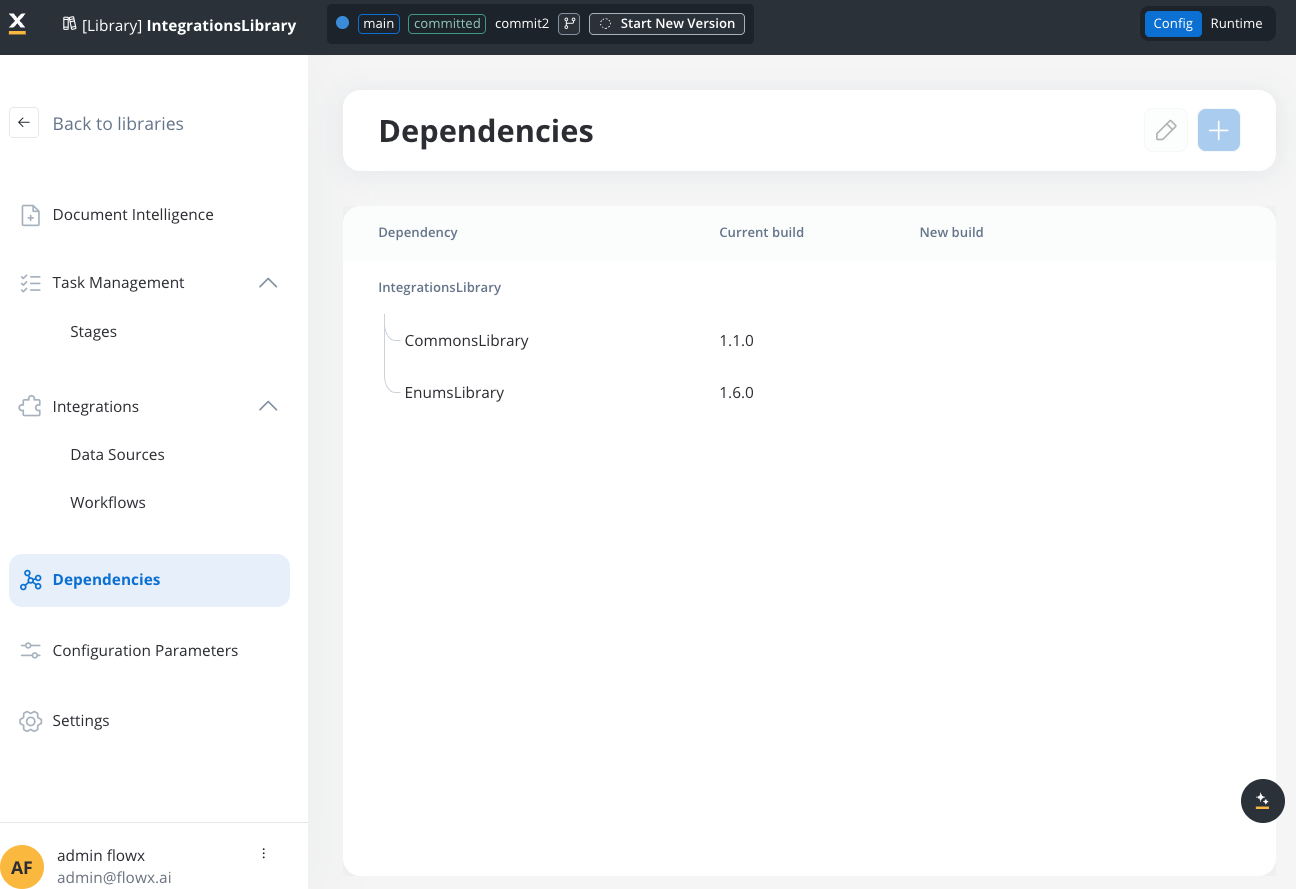
**Library Dependencies** enable libraries to depend on other libraries, creating hierarchical dependency structures.
### Key Features
* **Library-to-Library**: Libraries can now reference other libraries as dependencies
* **Dependency Tree**: Create complex hierarchical structures with multiple levels
* **Resource Inheritance**: Projects gain access to resources from the entire dependency hierarchy
* **Modular Design**: Break down complex functionality into smaller, focused libraries
### Use Cases
* Country-specific processes that use common base libraries
* Shared utility libraries used by multiple specialized libraries
* Hierarchical organization of business domains
* Team-based development with library ownership
## Dependency tree management
### Understanding dependency trees
A **dependency tree** represents the hierarchical structure of dependencies for a project or library. In FlowX 5.1, dependency trees can include multiple levels of library dependencies.
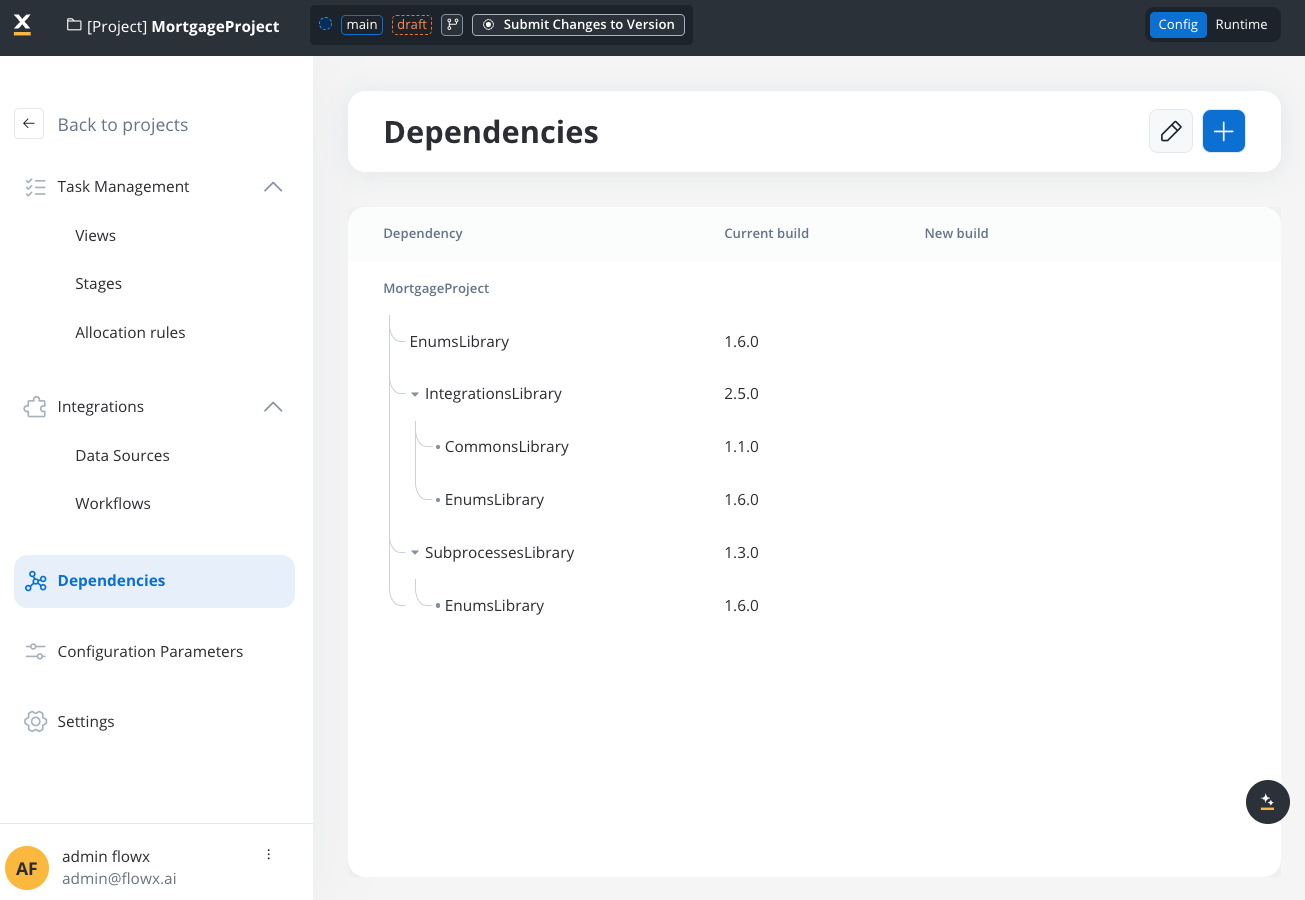
#### Example dependency tree
```
Mortgage Project
├── Enums Library (1.6.0)
├── Integrations Library (2.5.0)
│ ├── Commons Library (1.1.0)
│ └── Enums Library (1.6.0) # Transitive dependency
└── Subprocesses Library (1.3.0)
└── Enums Library (1.6.0) # Transitive dependency
```
### Dependency tree constraints
**Important Constraint**: FlowX 5.1 implements a **single-version constraint** for dependency trees. The same library cannot exist multiple times in a dependency tree with different builds.
#### Allowed scenarios
```
Mortgage Project
├── Subprocesses Library (1.3.0)
│ └── Enums Library (1.6.0)
└── Integrations Library (2.4.0)
└── Enums Library (1.6.0) # ✅ Same version - ALLOWED
```
This scenario is permitted because both references use the same build (1.5.0) of the Enums Library.
#### Blocked scenarios
```
Mortgage Project
├── Enums Library (1.6.0) # Direct dependency
└── Subprocesses Library (1.3.0)
└── Enums Library (1.5.0) # ❌ Different version - BLOCKED
```
This scenario is **blocked** because it would create a version conflict in the dependency tree.
```
Library A (1.0.0)
└── Library B (1.0.0)
└── Library A (1.1.0) # ❌ Circular reference - BLOCKED
```
Circular dependencies are **strictly prohibited** to prevent infinite loops and maintain dependency tree integrity.
### Conflict resolution
When dependency conflicts occur, you have several resolution options:
Update the direct library dependency to a version that uses the required transitive dependency version.
```
# Before (Conflict)
Project → Library A (1.0) → Commons (1.1)
→ Library B (2.0) → Commons (1.2) # Conflict
# After (Resolved)
Project → Library A (1.1) → Commons (1.2) # Updated A to use Commons 1.2
→ Library B (2.0) → Commons (1.2) # Now compatible
```
Create new builds of libraries that include the required dependency versions.
Reorganize your dependency structure to avoid conflicts, potentially by creating intermediate libraries.
## Managing dependencies
### Adding project dependencies
In your project workspace, go to the **Config** tab and select **Dependencies**.
Click **Add Dependency** and select the library you want to add.
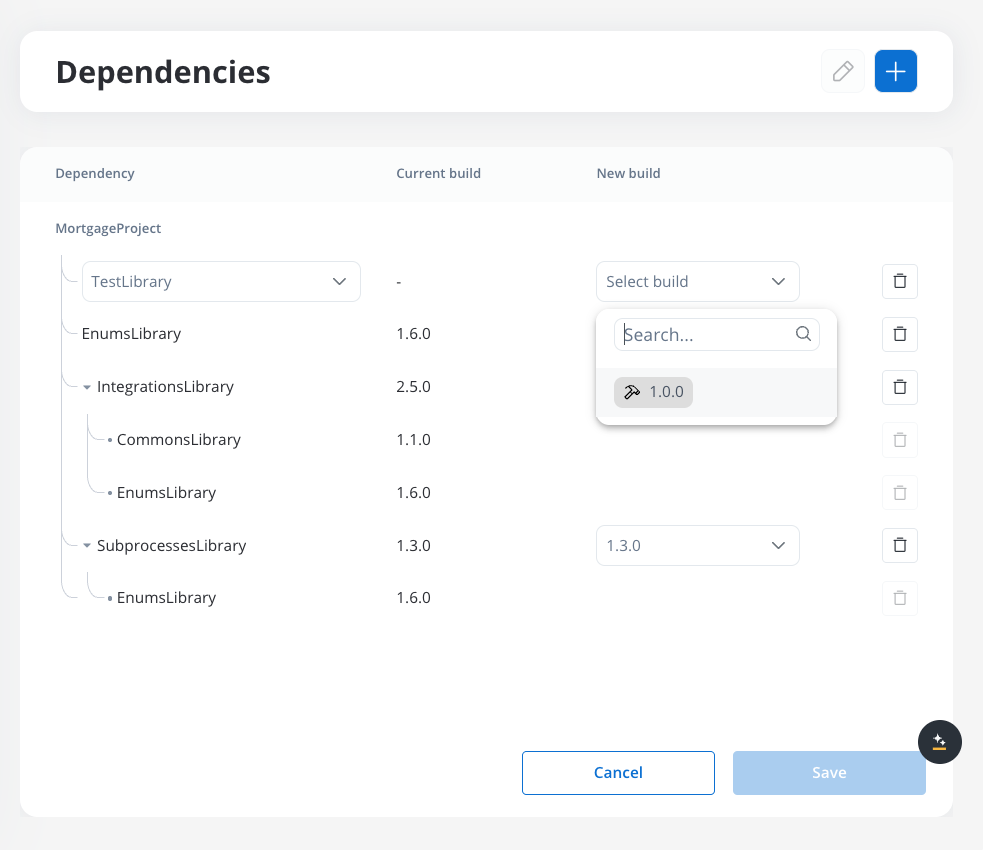
Choose the specific build version of the library you want to use.
Only committed builds are available.
FlowX will automatically validate that the new dependency doesn't create conflicts in your dependency tree.
Review the dependency tree preview and confirm the addition. The library's resources will become available in your project.
### Adding library dependencies
Navigate to your library and go to the **Config** tab, then select **Dependencies**.
Click **Add Dependency** and select another library as a dependency.
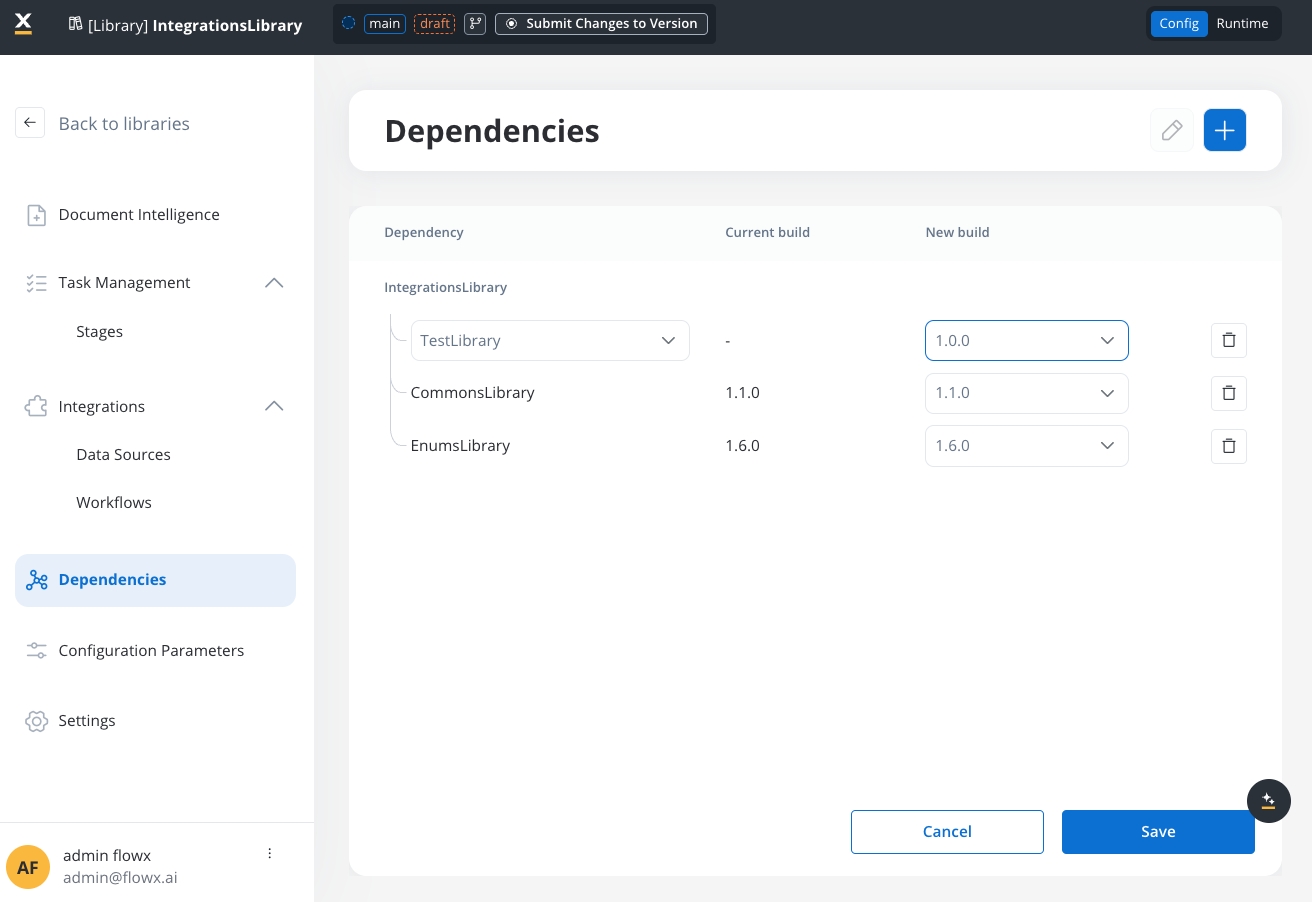
FlowX will check for potential conflicts, including:
* Version conflicts with existing dependencies
* Circular dependency detection
* Transitive dependency validation
Preview the complete dependency tree to understand all transitive dependencies.
### Updating dependencies
When updating a single dependency:
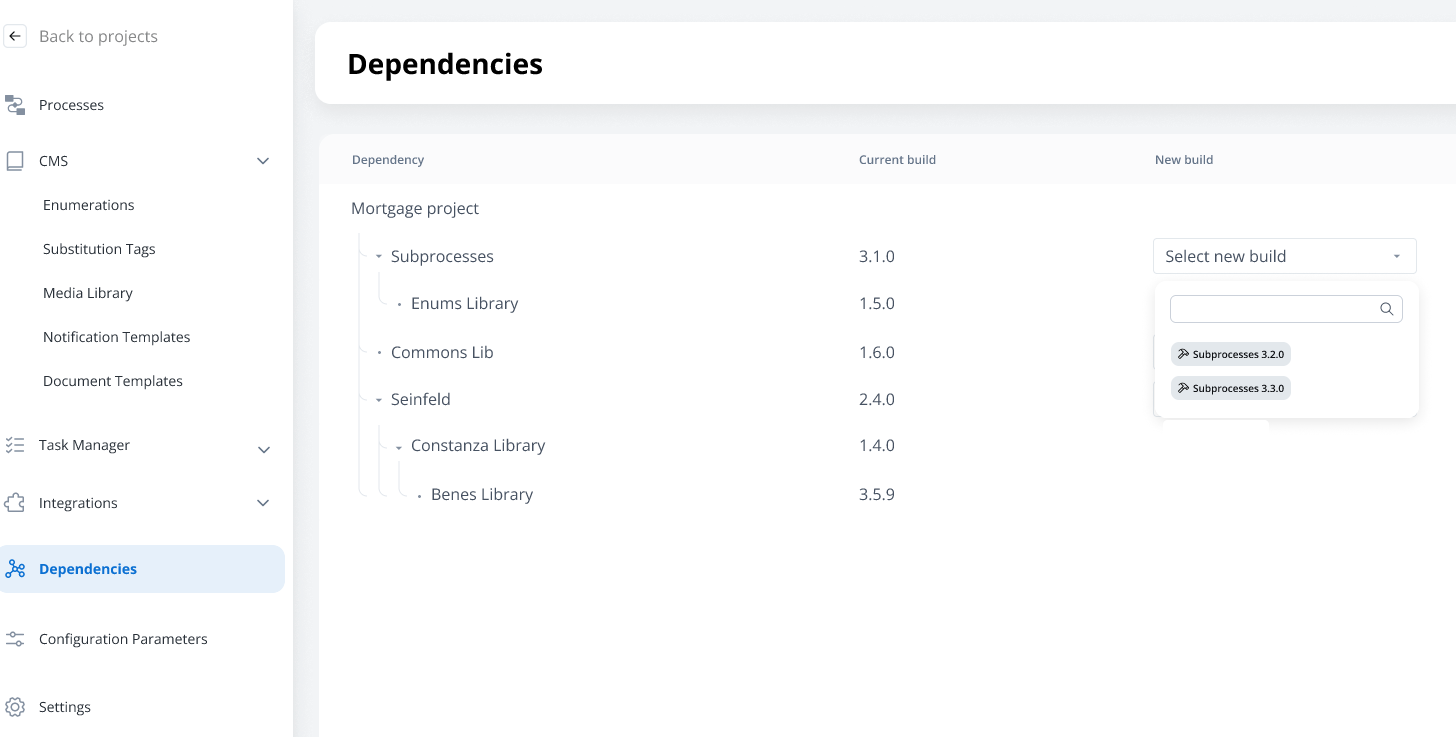
1. Navigate to the **Dependencies** section
2. Select the dependency to update
3. Choose the new build version
4. FlowX validates the dependency tree for conflicts
5. If conflicts exist, resolve them before proceeding
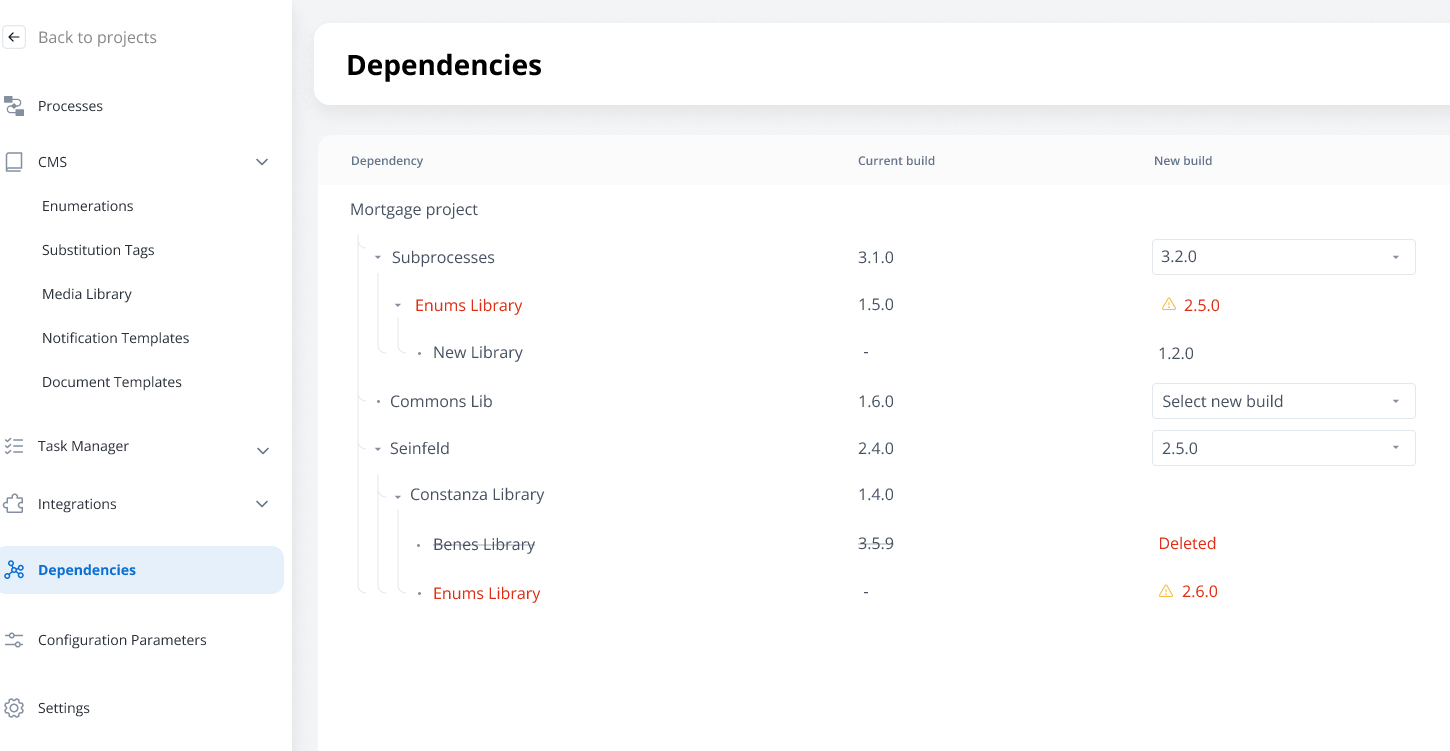
For complex dependency trees, you may need to update multiple dependencies simultaneously:
1. Plan your update strategy to avoid intermediate conflicts
2. Update dependencies in the correct order (typically from leaf to root)
3. Use the dependency tree view to validate changes
4. Test in a development environment before applying to production
## Resource resolution
### Resource types and references
Different resource types use different referencing mechanisms:
| Resource Type | Reference Method | Example |
| --------------------------- | ---------------------- | ------------------------------ |
| **Process** | Resource Definition ID | `proc_customer_onboarding_123` |
| **Media Library Item** | Resource Definition ID | `media_logo_456` |
| **System/Workflow** | Resource Definition ID | `sys_crm_integration_789` |
| **Enumeration** | Name | `CUSTOMER_TYPES` |
| **Substitution Tag** | Name | `WELCOME_MESSAGE` |
| **Notification Template** | Name | `EMAIL_CONFIRMATION` |
| **Document Template** | Name | `CONTRACT_TEMPLATE` |
| **Configuration Parameter** | Name | `MAX_RETRY_COUNT` |
### Resource precedence rules
When multiple resources with the same name exist in the dependency tree:
Resources from the **highest level** (closest to the project) take precedence.
```
Project (Level 0)
├── Library A (Level 1) - contains ENUM_X
└── Library B (Level 1)
└── Library C (Level 2) - contains ENUM_X
# ENUM_X from Library A (Level 1) is used
```
If resources exist at the same level, the resource from the **newest build** (by build creation date) takes precedence.
The resolution is deterministic and consistent across environments.
**Best Practice**: Avoid duplicate resource names across libraries in your dependency tree to maintain control and predictability over resource usage at runtime.
## Build and deploy considerations
### Build export/import
When exporting or importing builds:
* **All dependent libraries** are included in the export package
* **Transitive dependencies** are automatically resolved and included
* **Version consistency** is maintained across environments
* **Dependency tree structure** is preserved during import
### Runtime behavior
At runtime:
* **Resource resolution** follows the established precedence rules
* **Dependency tree** is flattened for efficient resource lookup
* **Version consistency** ensures predictable behavior
* **Build immutability** guarantees that deployed builds remain stable
## Best practices
### Dependency design
**Keep dependencies modular**: Design libraries with clear, focused responsibilities to avoid monolithic structures.
**Plan your hierarchy**: Design your dependency tree structure before implementation to avoid conflicts later.
**Use semantic versioning**: Follow consistent versioning practices to make dependency management predictable.
**Avoid circular dependencies**: Design your library architecture to prevent circular references.
**Document dependencies**: Maintain clear documentation of library purposes and dependency relationships.
### Version management
**Lock to specific builds**: Always reference specific builds rather than "latest" versions for stability.
**Test dependency updates**: Use development environments to test dependency updates before production.
**Plan upgrade paths**: Consider the impact on dependent projects when updating library versions.
**Maintain backward compatibility**: When possible, maintain backward compatibility to ease library updates.
### Team collaboration
**Establish ownership**: Clearly define which teams own which libraries to coordinate updates.
**Communication protocols**: Establish processes for communicating library changes to dependent teams.
**Shared standards**: Agree on naming conventions and design patterns across library-owning teams.
## Troubleshooting
### Common dependency issues
**Problem**: Cannot add dependency due to version conflicts.
**Solutions**:
* Update existing dependencies to compatible versions
* Create new library builds with compatible dependency versions
* Restructure your dependency hierarchy to avoid conflicts
* Review your dependency tree for optimization opportunities
**Problem**: System prevents adding a dependency due to circular reference.
**Solutions**:
* Analyze your dependency structure to identify the circular path
* Extract common functionality into a separate base library
* Restructure libraries to create a proper hierarchy
* Consider if the circular dependency indicates a design issue
**Problem**: Expected resources are not available after adding dependencies.
**Solutions**:
* Verify the dependency was added with the correct build version
* Check if resources exist in the expected library build
* Review resource name conflicts that might affect precedence
* Ensure the library build contains the expected resources
**Problem**: Build export fails due to dependency problems.
**Solutions**:
* Validate all dependencies are using committed builds (not WIP)
* Ensure all transitive dependencies are available
* Check for missing or deleted library builds
* Review access permissions for all dependent libraries
## FAQ
Yes, libraries can have multiple dependencies, just like projects. Each dependency is managed independently and contributes to the overall dependency tree.
FlowX prevents deletion of libraries that are referenced as dependencies. You must remove all dependency references before a library can be deleted.
No, dependencies must reference committed builds, not WIP (Work in Progress) versions. This ensures stability and prevents issues with changing dependencies.
There's no enforced limit on dependency tree depth, but for maintainability and performance, it's recommended to keep trees reasonably shallow (typically 3-4 levels maximum).
* **Direct dependencies**: Libraries explicitly added as dependencies to your project or library
* **Transitive dependencies**: Libraries that are dependencies of your direct dependencies (automatically included)
1. Establish clear communication channels between teams
2. Plan library updates and coordinate with dependent teams
3. Use development environments to test impact of changes
4. Consider creating shared governance processes for critical libraries
No, FlowX enforces the single-version constraint. If you need a different version of a transitive dependency, you must update the direct dependency that includes it.