> ## Documentation Index
> Fetch the complete documentation index at: https://docs.flowx.ai/llms.txt
> Use this file to discover all available pages before exploring further.
# Testing data sources from Runtime
> Run database operations and SQL queries against a deployed build to validate data sources without triggering a workflow.
export const release_0 = "5.10"
Data sources on a deployed build can be tested directly from **Runtime**: run a database operation or an SQL query and inspect the response, without wiring it into a workflow first. Use this to validate a data source after deploy or to investigate why an operation misbehaves in an environment.
## Where to find it
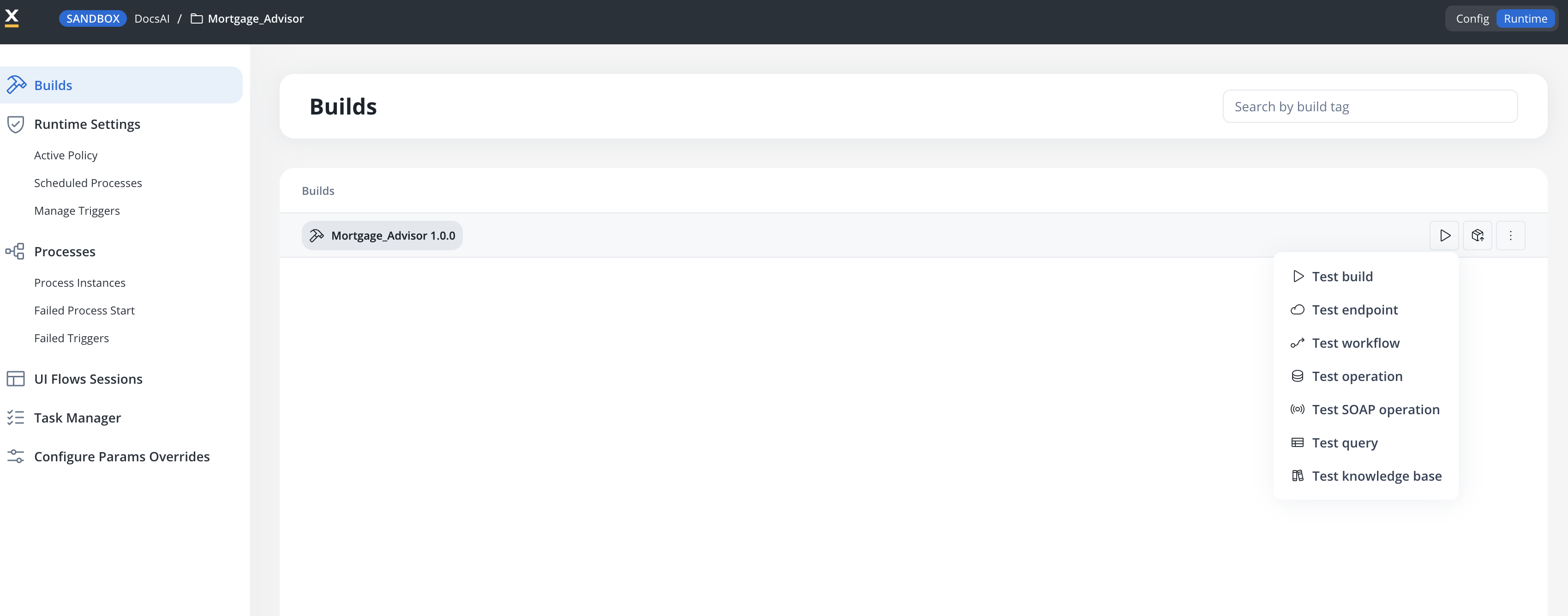
In your project, go to **Runtime** and open the **Builds** list.
On the build you want to test against, open the test actions menu.
The available entry depends on the data source type configured in the build.
| Data source | Test action |
| --------------------------------- | ------------------------------------------------------------------------------------------------------------- |
| FlowX Database, unmanaged MongoDB | **Test operation** (this page) |
| Oracle, PostgreSQL | **Test query** (this page) |
| RESTful system | **Test endpoint** |
| SOAP system | **Test SOAP operation** — see [SOAP system](./soap-system#testing-an-operation) |
| Knowledge Base | **Test knowledge base** — see [Testing a knowledge base](./knowledge-base-integration/testing-knowledge-base) |
The same menu also offers **Test build** (run a process from the build) and **Test workflow** (run an integration workflow) — see the [Builds](/5.9/docs/projects/runtime/builds) documentation for the full list.
Testing data sources requires the **data\_source\_read** permission. Test runs are recorded in the audit log.
***
## Testing SQL queries (Oracle and PostgreSQL)
**Available starting with FlowX.AI 5.9.2**
**Test query** opens a full-screen testing modal for the SQL data sources in the build:
1. Pick a query from the selector in the modal header — queries are grouped by data source, and you can filter with **Search query**. Data sources without queries show **No queries available**.
2. Review or edit the query in the **Query Arguments** editor (SQL, with autocomplete and a schema preview of the data source's entities), and fill in any **Input Parameters** the query uses.
3. Click **Test**. The **Response** pane shows the result as JSON, along with status, execution time, and size. Failures are shown with the database error message.
When opened from Runtime, the modal is read-only for the query definition — edits you make in the editor are for the test run only and cannot be saved to the build.
**Queries run against the live database of that environment, and they are not restricted to read-only statements.** An `UPDATE`, `INSERT`, or `DELETE` executes for real and may modify data — the modal shows the same warning. Test destructive queries only against non-production environments.
***
## Testing database operations (FlowX Database and unmanaged MongoDB)
**Test operation** opens the equivalent modal for NoSQL data sources: pick an operation from the selector in the modal header (filter with **Search operation**), provide any input parameters, and click **Test** to see the operation's response. The data source's schema is available for reference from the modal.
### Browsing documents
SaaS · {release_0}
**Available on SaaS with FlowX.AI {release_0}.** This feature is live on managed (SaaS) deployments now. Self-hosted deployments receive it with the next LTS release.
For FlowX Database and unmanaged MongoDB data sources, the test modal gains a **Documents** tab alongside **Test**: browse the collection's documents directly, filtering either visually with the **Query Builder** or by writing **JSON** filter and sort expressions, then click **Run**. Use it to check what an operation actually changed without writing a query for it.
***
## Related resources
Collections, operations, and usage in workflows
Add an Oracle data source and define queries
Add a PostgreSQL data source and define queries
The equivalent testing surface for knowledge bases
## Related topics
- [Builds](/5.9/docs/projects/runtime/builds.md)
- [MCP Data Sources](/5.9/docs/platform-deep-dive/integrations/mcp-integration/adding-mcp-data-source.md)
- [SOAP System](/5.9/docs/platform-deep-dive/integrations/soap-system.md)
- [Data mappers](/5.9/docs/building-blocks/process/data-mappers.md)
- [Testing a knowledge base](/5.9/docs/platform-deep-dive/integrations/knowledge-base-integration/testing-knowledge-base.md)