> ## Documentation Index
> Fetch the complete documentation index at: https://docs.flowx.ai/llms.txt
> Use this file to discover all available pages before exploring further.
# Task Management localization
> Comprehensive localization support for Task Management, enabling multi-language experiences through FlowX substitution tags.
Task Management in FlowX.AI includes comprehensive localization capabilities, allowing you to deliver fully translated task management interfaces in multiple languages. Configure 51 FlowX substitution tags in CMS for each language you want to support.
## Localization approach
Task Management localization operates through FlowX Substitution Tags:
### FlowX Substitution Tags (51 Keys) - manual configuration
Custom Task Management UI elements that **must be configured manually in CMS** for each language:
* Table column names (title, stage, assignee, status, priority)
* Task actions (assign, unassign, hold, execute)
* Bulk operations (assign all to me, unassign all, hold all)
* History events and status values
* Comments and user selection dialogs
If you need to configure FlowX substitution tags default text values (51 keys) in CMS, you can do so by navigating to **CMS** → **Substitution Tags** and adding the default text values for the substitution tags.
## FlowX substitution tags
FlowX substitution tags control custom Task Management interface elements outside the data table. These **51 tags** must be configured manually in CMS for each language.
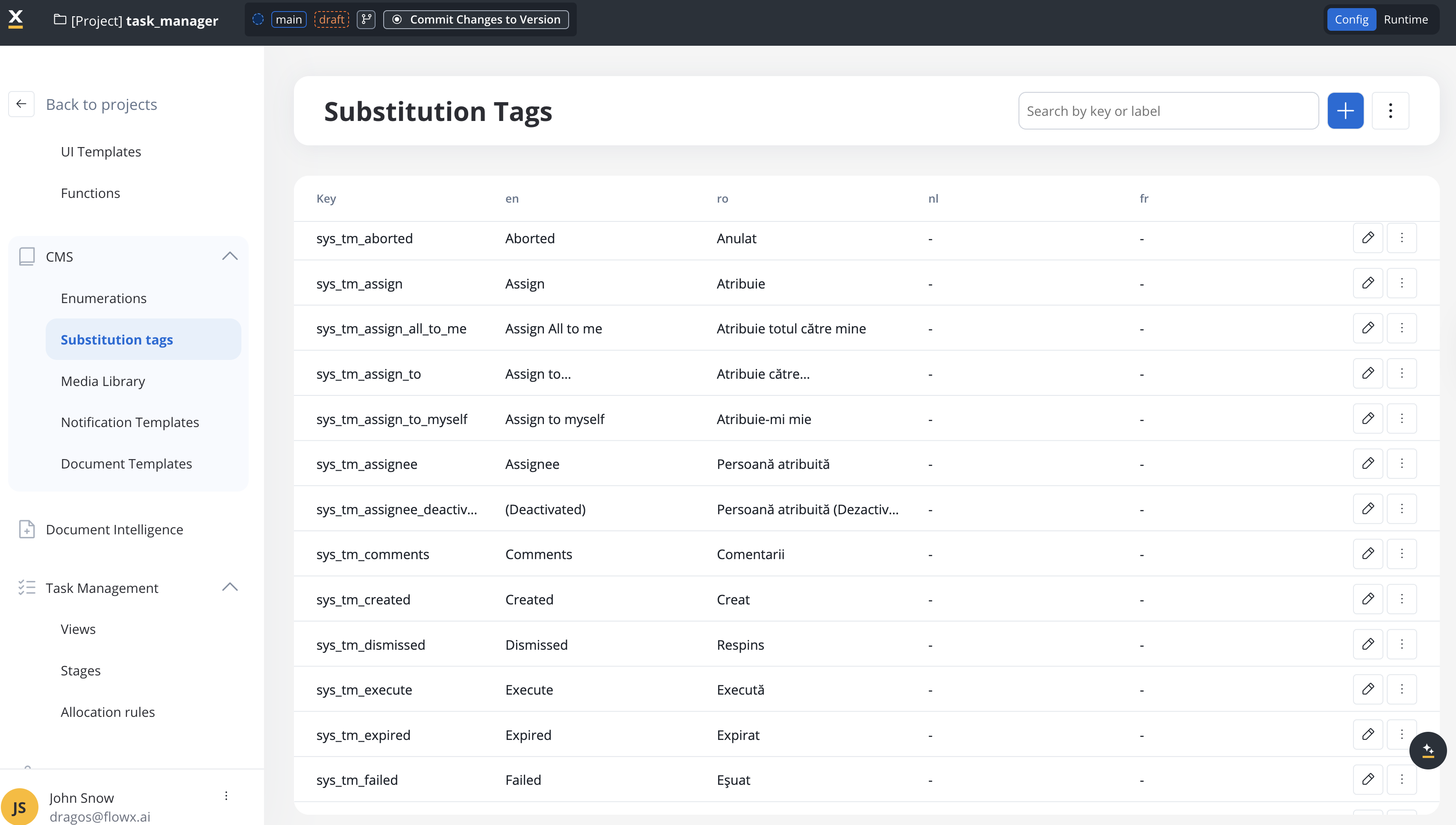
### Complete tag reference
**Search & Navigation**
* `sys_tm_search` - "Search"
**Table Columns**
* `sys_tm_title` - "Title"
* `sys_tm_stage` - "Stage"
* `sys_tm_assignee` - "Assignee"
* `sys_tm_status` - "Status"
* `sys_tm_priority` - "Priority"
* `sys_tm_last_updated` - "Last updated"
**Process States (Status Values)**
* `sys_tm_created` - "Created"
* `sys_tm_started` - "Started"
* `sys_tm_finished` - "Finished"
* `sys_tm_finished_with_error` - "Finished with error"
* `sys_tm_failed` - "Failed"
* `sys_tm_expired` - "Expired"
* `sys_tm_aborted` - "Aborted"
* `sys_tm_terminated` - "Terminated"
* `sys_tm_dismissed` - "Dismissed"
* `sys_tm_on_hold` - "On hold"
**Bulk Actions**
* `sys_tm_assign_to` - "Assign to…"
* `sys_tm_unassign_all` - "Unassign All"
* `sys_tm_assign_all_to_me` - "Assign All to me"
* `sys_tm_hold_all` - "Hold All"
* `sys_tm_unhold_all` - "Unhold All"
**Task Actions**
* `sys_tm_view_application` - "View Application"
* `sys_tm_unassign` - "Unassign"
* `sys_tm_assign_to_myself` - "Assign to myself"
* `sys_tm_unhold` - "Unhold"
* `sys_tm_hold` - "Hold"
* `sys_tm_assign` - "Assign"
* `sys_tm_execute` - "Execute"
* `sys_tm_start` - "Start"
**Task Details Sections**
* `sys_tm_assignee_deactivated` - "(Deactivated)"
* `sys_tm_comments` - "Comments"
* `sys_tm_write_a_comment` - "Write a comment…"
* `sys_tm_history` - "History"
**History Events**
* `sys_tm_task_created` - "Task created"
* `sys_tm_user_created_this_task` - "`${user}` created this task"
* `sys_tm_started_process_instance_with_id` - "Started Process Instance with ID"
* `sys_tm_started_process_instance_on_build` - "Started Process Instance on build"
* `sys_tm_task_ownership_changed_to` - "Task ownership changed to"
* `sys_tm_task_moved_to` - "Task moved to"
* `sys_tm_task_status_changed_to` - "Task status changed to"
* `sys_tm_task_assigned_to` - "Task assigned to"
* `sys_tm_task_owner_removed` - "Task owner removed"
**User Selection & Search**
* `sys_tm_select_person` - "Select person..."
* `sys_tm_search_person` - "Search users"
* `sys_tm_search_term_validation` - "Type at least 4 characters..."
**UI States**
* `sys_tm_loading` - "Loading..."
* `sys_tm_nothing_found` - "Nothing Found"
**Data display**
* `sys_tm_in` - "In" (custom filter operator)
* `sys_tm_yes` - "Yes" (boolean value)
* `sys_tm_no` - "No" (boolean value)
**Manual Configuration Required**: All 51 FlowX substitution tags must be configured manually in CMS for each language you want to support. They control custom Task Management UI elements outside of the data table.
## Implementation guide
To localize Task Management, configure the **51 FlowX substitution tags** in CMS for each language you want to support.
For each supported language:
1. Navigate to **CMS** → **Substitution Tags**
2. Add values for all 51 `sys_tm_*` tags for the target language
3. These control custom Task Management UI elements:
* Task actions (assign, hold, unassign)
* Bulk operations (assign all to me, unassign all, hold all, unhold all)
* History events (task created, user created this task, started process instance with id, started process instance on build, task ownership changed to, task moved to, task status changed to, task assigned to, task owner removed)
* Comments section (comments, write a comment...)
* User selection dialogs (select person, search users, search term validation)
* UI states (loading, nothing found)
* Data display (in, yes, no)
If you need columns beyond the default ones:
1. Define custom parameters in **Process Settings** → **Task Management**
2. Use substitution tags for column display names
3. These tags will also need CMS translations for each language
4. When you configure the column display name, use the substitution tag for the column name( it is called using "@@" prefix)
Verify that Task Management is properly localized:
* Task action buttons (assign, unassign, hold, execute)
* Bulk operation buttons (assign all to me, unassign all, hold all)
* Task history timeline and status values
* Comments section and user assignment dialogs
## Localization best practices
### 1. Maintain consistency
Ensure translation consistency across:
* CMS substitution tags
* Custom column display names
### 2. Handle dynamic content
For history events and comments that include dynamic values (user names, dates, IDs), use the variable placeholders:
```javascript theme={"system"}
// In CMS, use placeholders
sys_tm_user_created_this_task: "${user} created this task"
sys_tm_task_assigned_to: "Task assigned to ${user}"
// The system will replace ${user} with actual usernames at runtime
```
## Localization by component
### Task list view
| Component | Configuration Required |
| ------------------------ | ---------------------- |
| Column headers (default) | CMS translation |
| Column headers (custom) | CMS translation |
| Search placeholder | CMS translation |
| Status values | CMS translation |
### Task details panel
| Component | Configuration Required |
| ---------------- | ---------------------- |
| Action buttons | CMS translation |
| Section titles | CMS translation |
| History timeline | CMS translation |
| Comment input | CMS translation |
| User selector | CMS translation |
### Bulk operations
| Component | Configuration Required |
| ---------------------- | ---------------------- |
| Bulk action buttons | CMS translation |
| Confirmation dialogs | CMS translation |
| Success/error messages | CMS translation |
## Troubleshooting
**Problem**: Task actions, history, or comments display in English.
**Solutions**:
1. Verify all 51 `sys_tm_*` tags are configured in CMS
2. Check that translations exist for the current user's language
3. Ensure CMS language codes match your application's language selection
4. Verify substitution tag syntax is correct (no typos)
**Problem**: Some elements in one language, others in another.
**Solutions**:
1. This indicates incomplete CMS configuration - likely missing FlowX substitution tags
2. Verify all 51 `sys_tm_*` tags are translated in CMS for the target language
3. Use browser dev tools to identify which specific elements are untranslated
**Problem**: Custom columns display original names instead of translations.
**Solutions**:
1. Ensure custom column display names use substitution tags
2. Verify those substitution tags are configured in CMS for all languages
3. Check that column configuration points to correct substitution tag keys
## Example: complete Romanian localization
Here's an example of configuring Task Management for Romanian language:
In CMS, add translations for all 51 tags:
```json theme={"system"}
{
"sys_tm_search": "Căutare",
"sys_tm_title": "Titlu",
"sys_tm_stage": "Etapă",
"sys_tm_assignee": "Asignat",
"sys_tm_status": "Status",
"sys_tm_priority": "Prioritate",
"sys_tm_last_updated": "Ultima actualizare",
"sys_tm_created": "Creat",
"sys_tm_started": "Început",
"sys_tm_finished": "Finalizat",
"sys_tm_assign_to": "Atribuie către…",
"sys_tm_unassign": "Anulează atribuirea",
"sys_tm_comments": "Comentarii",
"sys_tm_history": "Istoric",
// ... add all 51 tags
}
```
Test all areas to confirm:
* ✅ Task actions show Romanian labels (from CMS)
* ✅ History events display in Romanian (from CMS)
* ✅ Comments section uses Romanian labels (from CMS)
## Additional resources
Learn about Task Management features and configuration
Configure substitution tags in Content Management System