> ## Documentation Index
> Fetch the complete documentation index at: https://docs.flowx.ai/llms.txt
> Use this file to discover all available pages before exploring further.
# FlowX.AI CMS
> The FlowX.AI Headless Content Management System (CMS) is a core component of the FlowX.AI platform, designed to enhance the platform's capabilities with specialized functionalities for managing taxonomies and diverse content types.
## Key features
The FlowX.AI CMS offers the following features:
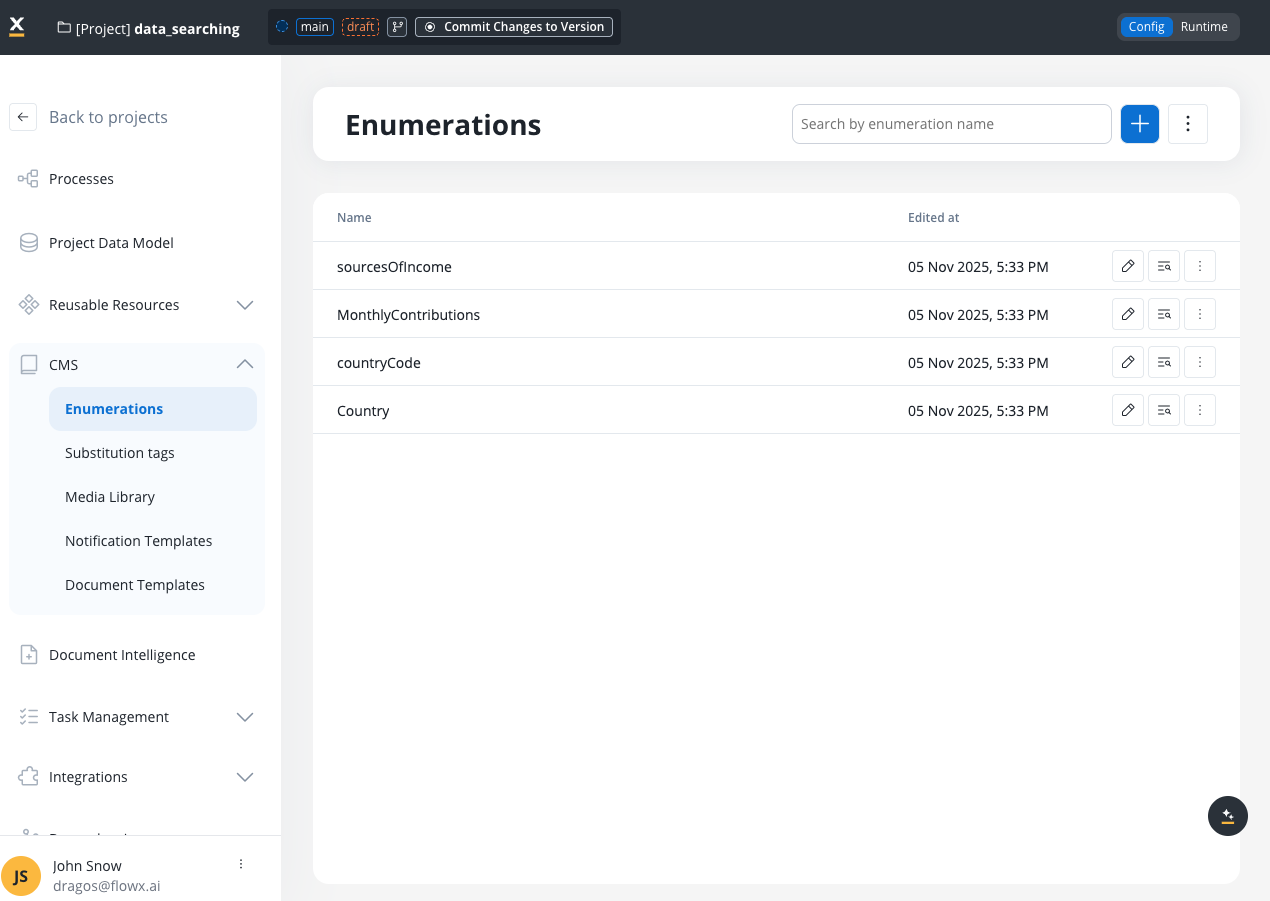
Manage and configure enumerations for various content types
Utilize tags to dynamically insert content values. Essential for Task Management localization with 51 system tags
Organize and manage media assets
Manage notification templates
Manage document templates
## Enumeration sources
The FlowX.AI platform supports three types of enumeration sources:
* **Project-level enumerations**: Enumerations defined directly at the project level within the FlowX.AI Designer
* **Library enumerations**: Enumerations defined in a shared library that must be set as a dependency for the project
* **Data source enumerations**: Enumerations that come from external data sources when using the Enumeration Mapper feature
## Deployment and integration
The CMS can be rapidly deployed on your chosen infrastructure, preloaded with necessary taxonomies or content via a REST interface, and integrated with the FlowX Engine using Kafka events.
For deployment and configuration, refer to the:
## Using the CMS service
Once the CMS is deployed in your infrastructure, you can define and manage custom content types, such as lists with different values based on external systems, blog posts, and more.
### Kafka integration
You can use Kafka to translate and extract content values based on your defined languages and source systems. This is useful for:
* Extracting values from specific enumerations for UI components
* Sending data to other integrations that require different label formats
* Generating documents with localized content
* Handling different label conventions from various external systems
Various external systems and integrations might use different labels for the same information. In processes, it is easier to use the corresponding code and translate this into the needed label when necessary: for example when sending data to other integrations, when generating documents, etc.
#### Kafka topics configuration
Manage content retrieval messages between the CMS and the FlowX Engine using the following Kafka topics:
| Environment Variable | Default FlowX.AI value (customizable) | Purpose |
| ----------------------------------- | -------------------------------------------------------------- | -------------------------------------------------------------------- |
| KAFKA\_TOPIC\_REQUEST\_CONTENT\_IN | ai.flowx.plugin.cms.trigger.retrieve.content.v1 | Topic where CMS listens for incoming content retrieval requests |
| KAFKA\_TOPIC\_REQUEST\_CONTENT\_OUT | ai.flowx.engine.receive.plugin.cms.retrieve.content.results.v1 | Topic where CMS sends content retrieval results back to FlowX Engine |
You can find the defined topics in two ways:
1. In the FlowX.AI Designer: Go to **Platform Status** → **cms-core-mngt** → **kafkaTopicsHealthCheckIndicator** → **Details** → **Configuration** → **Topic** → **Request** → **Content** (use the `in` topic).
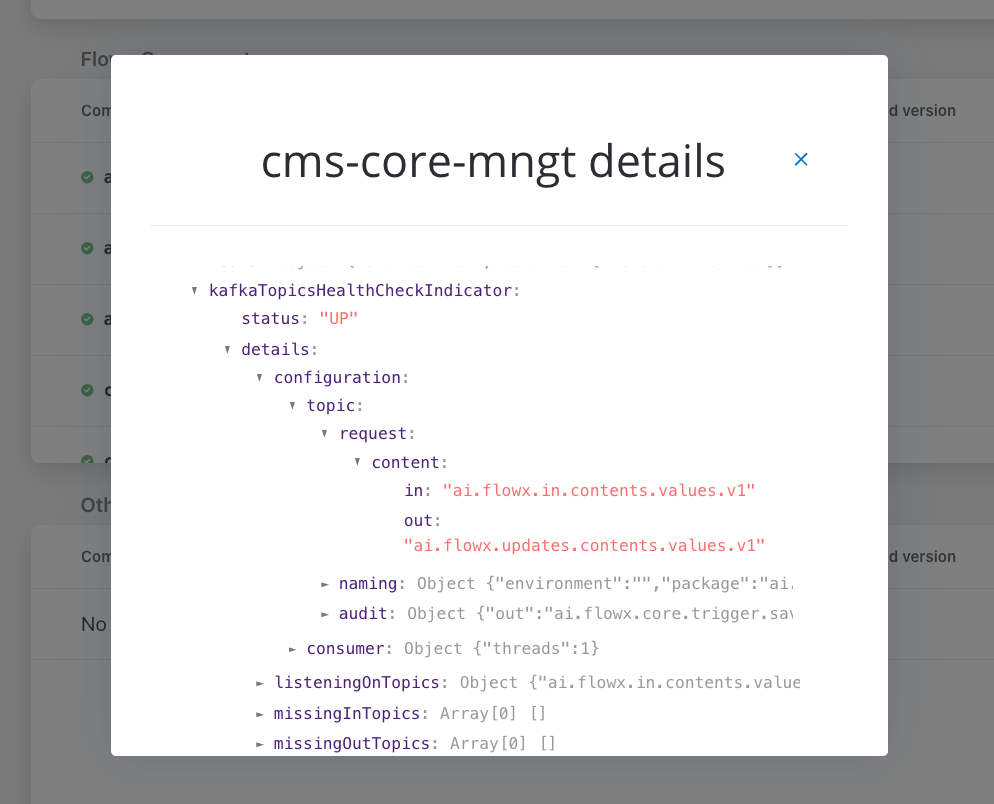
2. Alternatively, check the CMS microservice deployment for the `KAFKA_TOPIC_REQUEST_CONTENT_IN` environment variable.
#### Required Kafka headers
The following headers must be included in translation requests:
| Header | Required | Description |
| ---------------------- | -------- | -------------------------------------------------- |
| `BUILD_APP_VERSION_ID` | Yes\* | Application version build ID |
| `BUILD_ID` | Yes\* | Alternative to BUILD\_APP\_VERSION\_ID |
| `WORKSPACE_ID` | No | Workspace identifier for multi-tenant environments |
Either `BUILD_APP_VERSION_ID` or `BUILD_ID` must be provided in the Kafka message headers.
#### Translation request structure
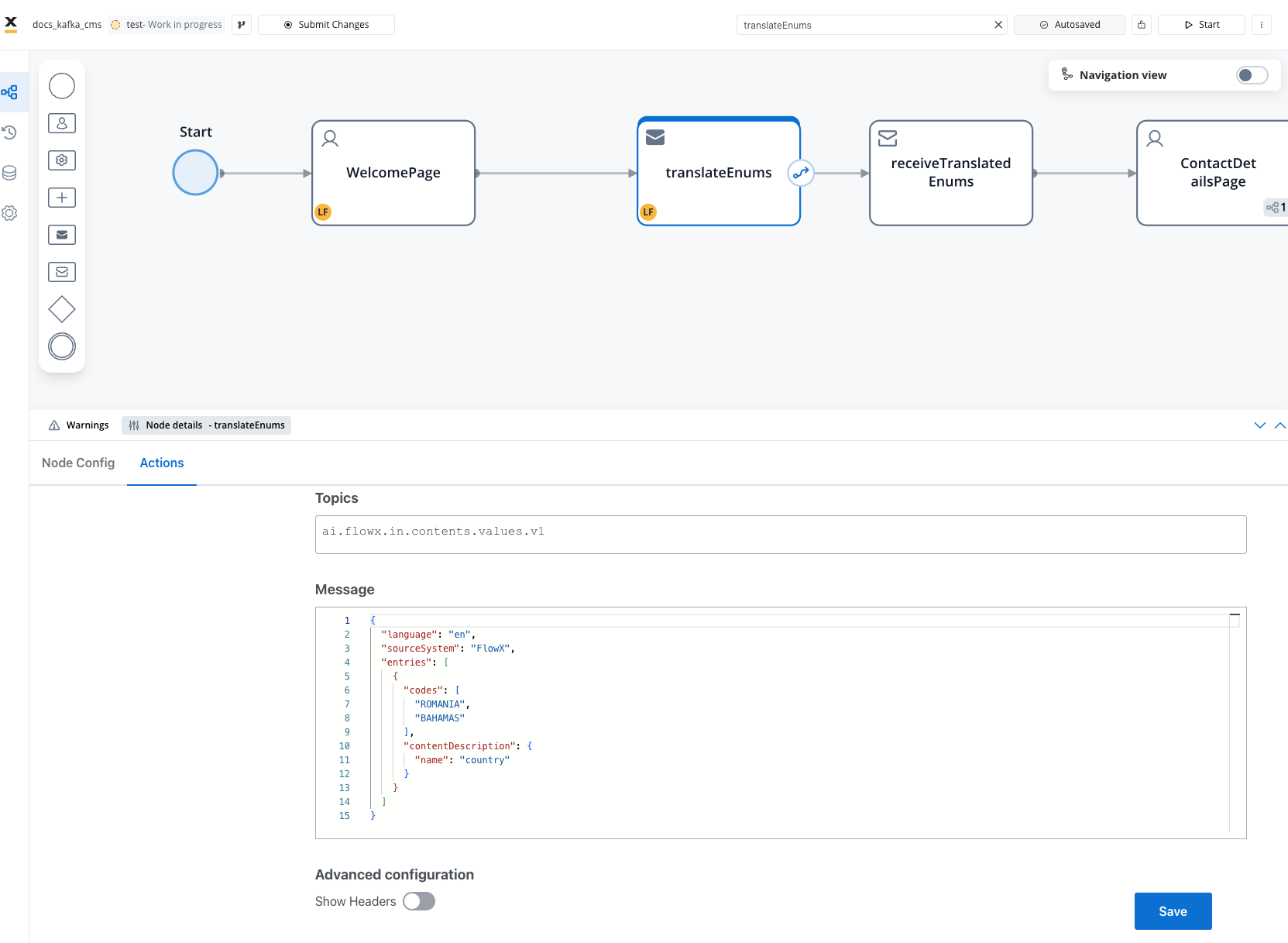
Add a [**Send Message Task** (kafka send event)](../../../building-blocks/node/message-send-received-task-node) and configure it to send content requests to the FlowX.AI Engine.
##### Request parameters
| Parameter | Type | Required | Description |
| ------------------ | ------ | -------- | -------------------------------------------------------------------------- |
| `sourceSystem` | String | No\* | Target source system for code translation |
| `fromSourceSystem` | String | No\* | Source system to translate codes from (cannot be used with `sourceSystem`) |
| `language` | String | No\* | Language code for label translation (e.g., "en", "fr", "ro") |
| `replyTopic` | String | No | Custom Kafka topic for response (overrides default) |
| `entries` | Array | Yes | List of content entries to translate |
**Validation rules:**
* At least one of `sourceSystem`, `language`, or `fromSourceSystem` must be provided
* `sourceSystem` and `fromSourceSystem` **cannot both be provided** (bidirectional conflict)
##### Entry structure
Each entry in the `entries` array contains:
| Parameter | Type | Required | Description |
| -------------------------------- | ------ | -------- | --------------------------------------------------- |
| `codes` | Array | Yes | Array of codes to translate |
| `contentDescription` | Object | Yes | Content metadata for lookup |
| `contentDescription.name` | String | Yes | Enumeration/content name |
| `contentDescription.application` | String | No | Application name (defaults to `defaultApplication`) |
| `children` | Object | No | Nested child content translations (hierarchical) |
#### Example: Basic translation request
**Request Body:**
```json theme={"system"}
{
"sourceSystem": "FlowX",
"language": "fr",
"entries": [
{
"codes": [
"RO",
"DE"
],
"contentDescription": {
"name": "tari"
}
}
]
}
```
#### Example: Hierarchical content request
For enumerations with nested/hierarchical structures (parent-child relationships), you can request content at multiple levels by specifying the `children` property. This is useful when you need to retrieve values from dependent dropdowns or cascading selections.
**Use cases:**
* Country → County → City selections
* Product Category → Subcategory → Product
* Department → Team → Employee
* Any cascading dropdown scenario
**Request Body for Hierarchical Content:**
```json theme={"system"}
{
"language": "ro",
"sourceSystem": "FlowX",
"entries": [
{
"codes": [
"RO"
],
"contentDescription": {
"name": "tari"
},
"children": {
"RO": [
{
"code": "AB",
"children": [
{
"code": "AB-Abrud"
},
{
"code": "AB-Aiud"
}
]
},
{
"code": "BV",
"children": [
{
"code": "BV-Brasov"
}
]
}
]
}
}
]
}
```
**Key points for hierarchical requests:**
* The `children` property is an object where **keys represent parent codes** and values are arrays of child items
* Each child item must have a `code` property and can optionally have a nested `children` array for deeper hierarchies
* This allows you to request specific branches of hierarchical data rather than entire enumerations
* Content metadata (name, application) is inferred from parent-child relationships configured in CMS
* Unlimited nesting depth is supported for complex hierarchical structures
**Best practice:** Request only the levels needed for the current UI state rather than the entire hierarchy upfront. Use progressive loading (parent → selected child → grandchild) for better performance.
#### Translation types
The CMS translation service supports multiple types of translations:
**Purpose:** Translate codes to human-readable labels in specific languages
**Request:**
```json theme={"system"}
{
"language": "en",
"entries": [
{
"codes": ["RO"],
"contentDescription": {"name": "country"}
}
]
}
```
**Response:**
```json theme={"system"}
{
"entries": [
{
"contentName": "country",
"code": "RO",
"label": "Romania",
"translatedCode": null
}
]
}
```
**Purpose:** Translate codes to target source system format
**Request:**
```json theme={"system"}
{
"sourceSystem": "SAP",
"entries": [
{
"codes": ["RO"],
"contentDescription": {"name": "country"}
}
]
}
```
**Response:**
```json theme={"system"}
{
"entries": [
{
"contentName": "country",
"code": "RO",
"label": null,
"translatedCode": "RO-SAP"
}
]
}
```
**Purpose:** Get both language labels and source system codes
**Request:**
```json theme={"system"}
{
"language": "en",
"sourceSystem": "SAP",
"entries": [
{
"codes": ["RO"],
"contentDescription": {"name": "country"}
}
]
}
```
**Response:**
```json theme={"system"}
{
"entries": [
{
"contentName": "country",
"code": "RO",
"label": "Romania",
"translatedCode": "RO-SAP"
}
]
}
```
**Purpose:** Translate from external source system code to internal code
**Request:**
```json theme={"system"}
{
"fromSourceSystem": "SAP",
"language": "en",
"entries": [
{
"codes": ["RO-SAP"],
"contentDescription": {"name": "country"}
}
]
}
```
**Response:**
```json theme={"system"}
{
"entries": [
{
"contentName": "country",
"code": "RO",
"label": "Romania",
"translatedCode": null
}
]
}
```
#### Translation response structure
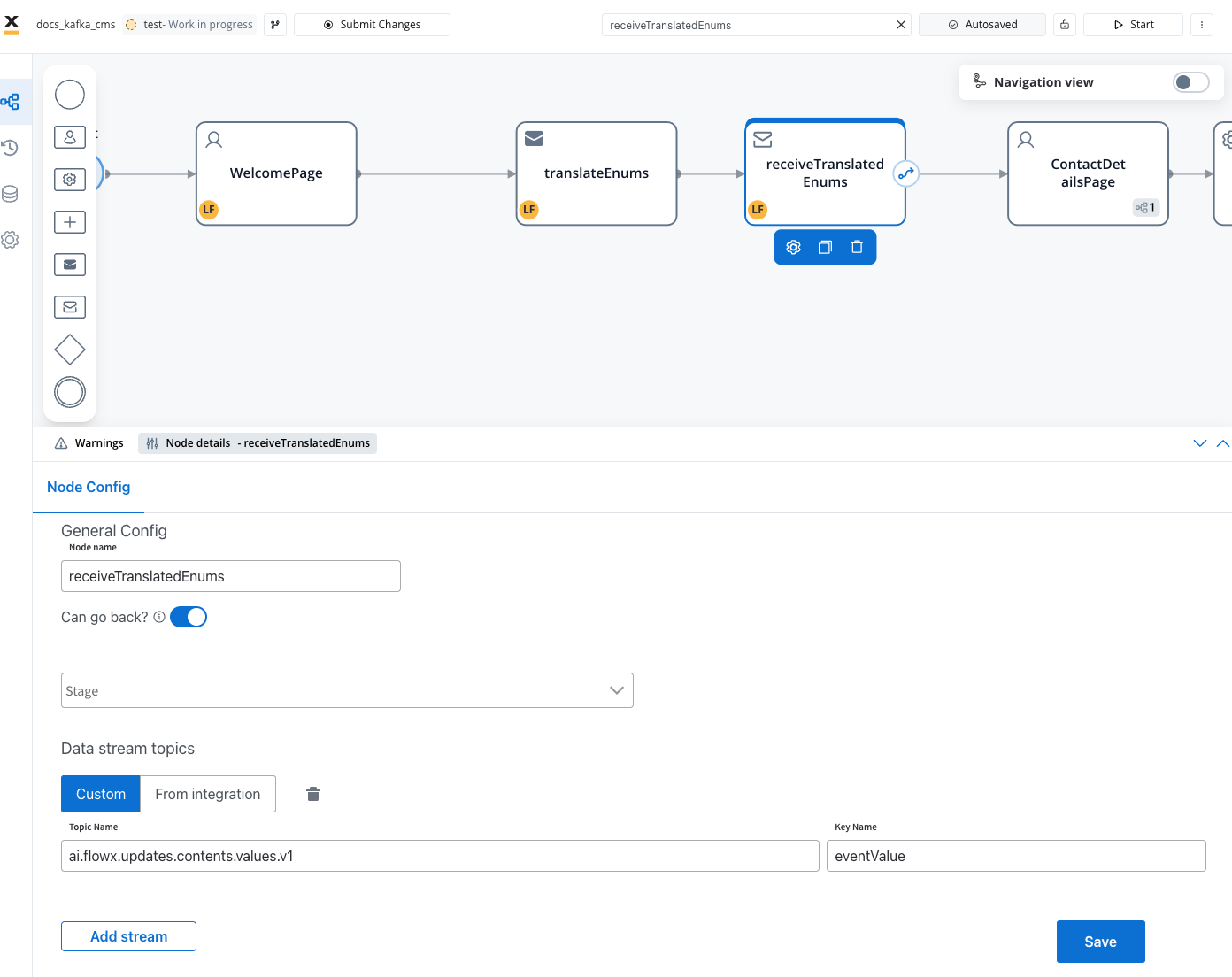
Add a **Receive Message Task** to handle the response from the CMS service. Configure it to listen to the topic where the Engine sends the response (e.g., `ai.flowx.updates.contents.values.v1`).
**Response Message Structure:**
```json theme={"system"}
{
"entries": [
{
"contentName": "country",
"code": "ROMANIA",
"label": "Romania",
"translatedCode": "ROMANIA-FlowX"
},
{
"contentName": "country",
"code": "BAHAMAS",
"label": "Bahamas",
"translatedCode": "BAHAMAS-FlowX"
}
],
"error": null
}
```
**Response fields:**
| Field | Type | Description |
| -------------------------- | ------ | ------------------------------------------------------------------- |
| `entries` | Array | List of translated content entries |
| `entries[].contentName` | String | Name of the content/enumeration |
| `entries[].code` | String | Original code value |
| `entries[].label` | String | Translated label based on language parameter |
| `entries[].translatedCode` | String | Code translated for source system (format: `{code}-{sourceSystem}`) |
| `entries[].children` | Object | Nested translated child content (for hierarchical requests) |
| `error` | String | Error message (null if successful) |
**Response for hierarchical content:**
```json theme={"system"}
{
"entries": [
{
"contentName": "countries",
"code": "RO",
"label": "România",
"translatedCode": "RO-FlowX",
"children": {
"AB": [
{
"contentName": "counties",
"code": "AB",
"label": "Alba",
"translatedCode": "AB-FlowX",
"children": [
{
"contentName": "cities",
"code": "AB-Abrud",
"label": "Abrud",
"translatedCode": "AB-Abrud-FlowX"
}
]
}
]
}
}
],
"error": null
}
```
#### Dynamic language switching example
The video demonstrates how to change the system language and modify your process to display translations dynamically on different screens.
#### Advanced features
##### Custom reply topics
You can override the default response topic by specifying a `replyTopic` parameter in your request:
```json theme={"system"}
{
"language": "en",
"replyTopic": "ai.flowx.custom.translate.response.v1",
"entries": [
{
"codes": ["RO"],
"contentDescription": {"name": "country"}
}
]
}
```
This is useful for:
* Process-specific handling
* Asynchronous workflows
* Custom routing logic
Ensure the Engine is configured to listen on custom reply topics before using this feature.
##### Build context and versioning
The CMS translation service uses build context headers to ensure correct content version resolution:
* `BUILD_APP_VERSION_ID` or `BUILD_ID` ensures translation uses the correct content version
* Critical for environments with multiple application versions running simultaneously
* Resolves content from build manifest resource overrides
* Ensures consistent translations across deployments
##### Resource overrides
The translation service supports content overrides via build manifest, enabling:
* Version-specific translations
* Multi-tenant workspace configurations
* Environment-specific content variations
* A/B testing with different content versions
#### Performance considerations
Request multiple codes in a single Kafka message to reduce overhead:
```json theme={"system"}
{
"language": "en",
"entries": [
{
"codes": ["RO", "DE", "FR", "IT", "ES"],
"contentDescription": {"name": "country"}
}
]
}
```
Request parent and child content together to minimize round trips:
```json theme={"system"}
{
"language": "en",
"entries": [
{
"codes": ["RO"],
"contentDescription": {"name": "country"},
"children": {
"RO": [{"code": "AB"}, {"code": "BV"}]
}
}
]
}
```
Store translated values in process data when they will be reused multiple times within the same process instance.
For deep hierarchies, load levels progressively based on user selections rather than requesting entire hierarchies upfront.
#### Error handling
Common translation errors:
| Error | Description | Resolution |
| ----------------------- | --------------------------------------------------- | --------------------------------------------------------- |
| Content not found | The specified content/enumeration does not exist | Verify content name and ensure it's published in CMS |
| Invalid source system | The source system is not configured | Check source system configuration in CMS |
| Missing required fields | Required parameters are missing from request | Ensure `codes` and `contentDescription.name` are provided |
| Build context missing | Required headers not present | Include `BUILD_APP_VERSION_ID` or `BUILD_ID` in headers |
| Validation conflict | Both `sourceSystem` and `fromSourceSystem` provided | Use only one direction of translation per request |
**Error response structure:**
```json theme={"system"}
{
"entries": [],
"error": "Content 'invalid_content_name' not found"
}
```
When translation fails, the `error` field contains a descriptive message and the `entries` array may be empty or contain partial results.
## Additional resources
Learn how to configure enumerations in CMS
Complete deployment and configuration guide