> ## Documentation Index
> Fetch the complete documentation index at: https://docs.flowx.ai/llms.txt
> Use this file to discover all available pages before exploring further.
# Moving a token backwards in a process
> Learn how to implement "Back" functionality in your processes to allow users to return to previous steps while preserving data.
While most process flows progress in a forward direction, FlowX.AI provides capabilities for moving backwards in a process flow. This feature allows users to revisit previous steps without losing their progress or data, enhancing the flexibility and user-friendliness of your apps.
## What is token resetting?
In FlowX.AI, a **token** represents the current position within a process instance. It moves from one node to another as the process executes, carrying process data and state information. Normally, tokens advance forward through the process flow, but sometimes you need to allow users to go back to previous steps.
Learn more about tokens and how they drive process flow
Understand how processes execute in FlowX.AI
## Why use backwards navigation?
Allows users to correct mistakes or review previous inputs without starting over
Creates more natural and less rigid process flows that adapt to user needs
Maintains important data while allowing selective changes to specific fields
Decreases process abandonment rates by allowing users to navigate freely
## How token resetting works
When a user navigates backwards in a process:
1. The current token is marked as **aborted**
2. A **new token** is created at the target node (the previous step)
3. Data is selectively copied from the original token to the new one
4. Any subprocesses started between the original and new positions are aborted
5. The process continues from the reset position with the new token
The token can only be reset to specific actions on specific nodes that have been configured to allow backwards navigation.
## Configuring backwards navigation
First, determine which nodes in your process should allow users to navigate back to them. Typically, these are:
* Key decision points
* Form submission steps
* Points where users might need to correct previous inputs
* The beginning of logical sections in your process
1. Select the node that should be a target for backwards navigation
2. Add or edit an action on this node
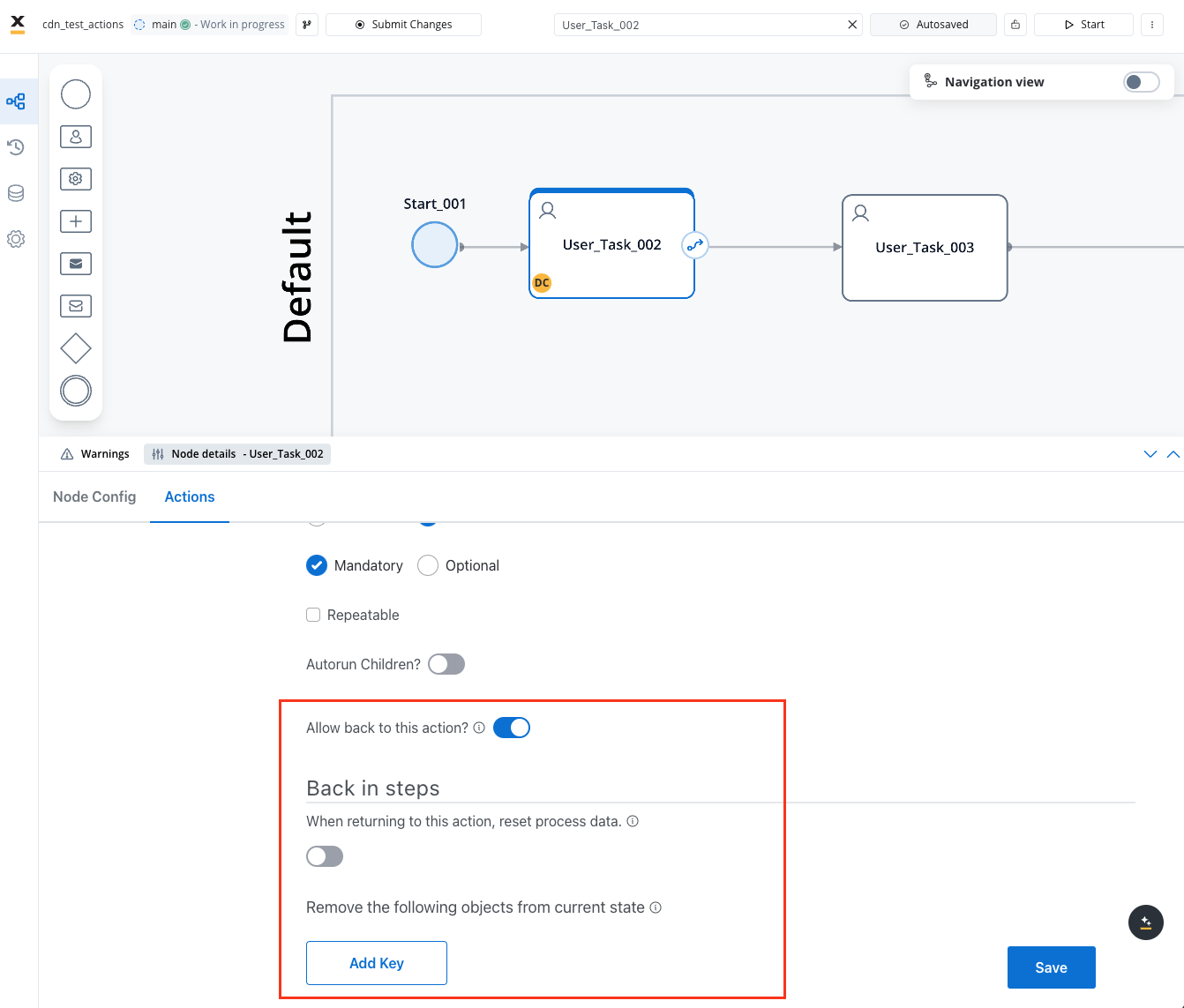
3. In the action configuration, enable the **Allow BACK on this action?** option

Only configure "back" functionality on actions that make logical sense as return points in your process. Too many back points can make process state management complex.
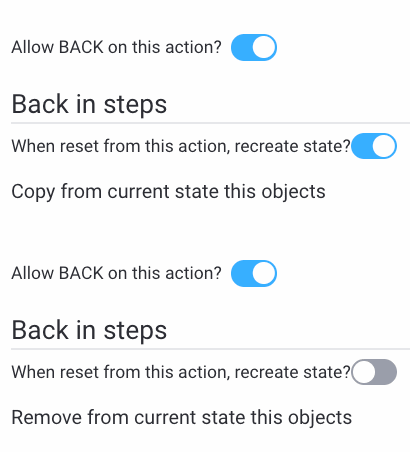
When a token is reset, you need to decide which data to retain and which to discard. Configure this using:
1. **Remove the following objects from current state**: Specify process keys that should be deleted when navigating back to this action
2. **Copy the following objects from current state**: Specify process keys that should retain their data from before the navigation
Carefully consider which data to preserve. Generally, you want to keep contextual or reference data while allowing changes to the specific data related to the step being revisited.
Add navigation controls in your user interface:
1. Add a "Back" button to relevant screens
2. Configure the button to trigger the action with back functionality
3. Ensure the UI updates appropriately when the user navigates back
## Use cases for backwards navigation
In applications with multi-step forms or wizards, backwards navigation allows users to review and edit their inputs across different steps before final submission.
When users make selections that lead down specific process paths, back functionality lets them change their mind and explore alternative options.
If validation occurs after a form submission and errors are found, users can navigate back to fix issues while preserving other valid inputs.
In complex workflows like loan applications or onboarding processes, users often need to review previous sections before completing the process.
## Best practices
**When implementing backwards navigation:**
* **Be selective** about which nodes allow back functionality
* **Consider data dependencies** between steps to avoid inconsistent states
* **Provide clear UI indicators** for steps users can navigate back to
* **Test thoroughly** to ensure data is properly preserved or reset
* **Consider subprocess implications** as they will be aborted during reset
* **Document back navigation points** for easier maintenance
* **Use intuitive button labeling** ("Back", "Previous Step", etc.)
## Technical considerations
**Keep in mind these technical aspects when implementing back functionality:**
1. **Performance Impact**: Token resetting involves creating new tokens and copying data, which may impact performance in complex processes
2. **Subprocess Handling**: Any subprocesses active between the current and target positions will be aborted
3. **Data Consistency**: Ensure your data model can handle partial updates without creating inconsistencies
4. **Action Sequencing**: Consider the order of actions that might be re-executed after navigating back