> ## Documentation Index
> Fetch the complete documentation index at: https://docs.flowx.ai/llms.txt
> Use this file to discover all available pages before exploring further.
# Handling decisions in the flow
> Learn how to implement conditional branching in your processes using exclusive gateways to create dynamic, decision-driven workflows.
Business processes often require making decisions based on data and conditions. FlowX.AI's exclusive gateway nodes allow you to create branching paths in your process flow, directing the execution based on specific conditions and business rules.

## What is an exclusive gateway?
An exclusive gateway (also known as an XOR gateway) creates conditional branches in your process flow. It directs the process token to exactly one of the outgoing paths based on evaluated conditions. Think of it as an "if-then-else" decision point in your process.
Complete reference for exclusive gateway configuration
Learn more about implementing decision logic
## How exclusive gateways work
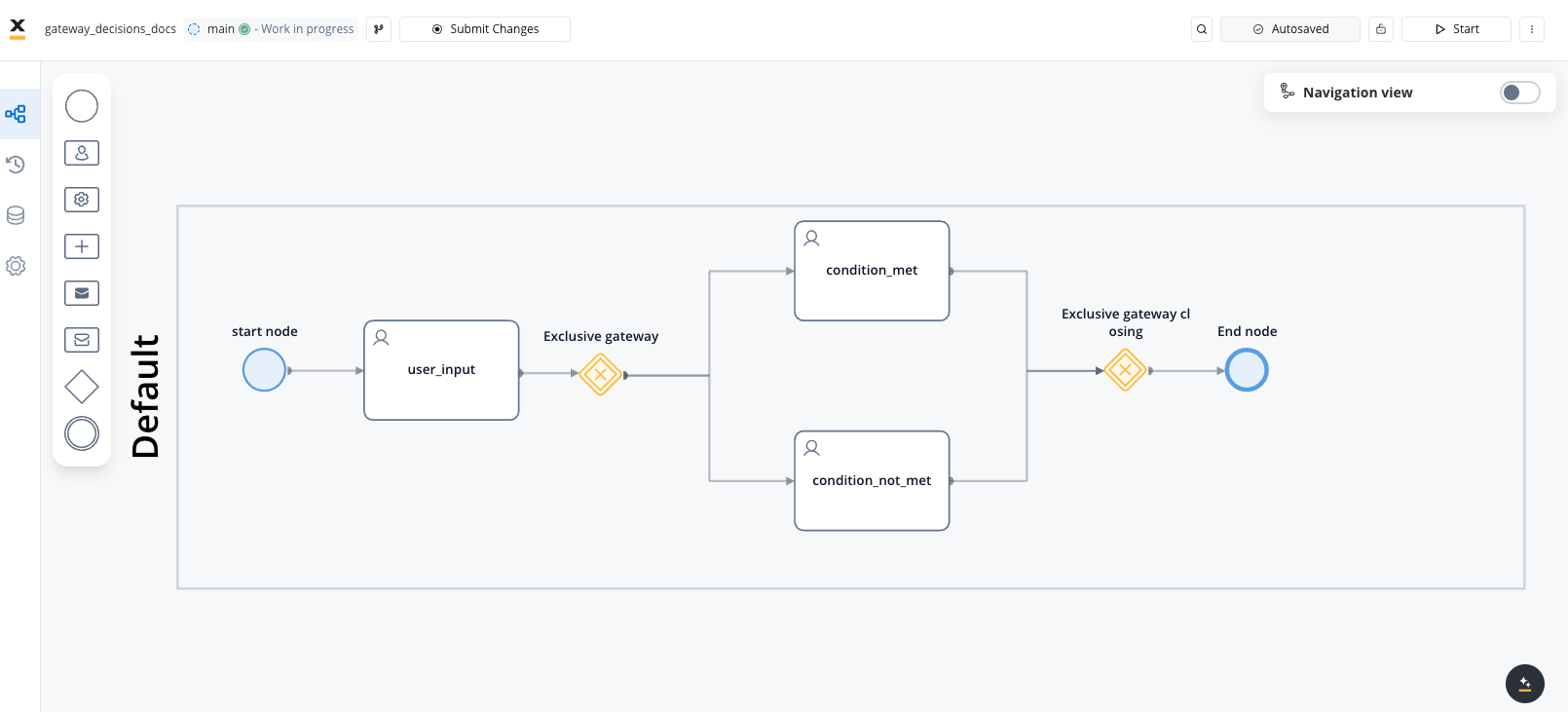
Exclusive gateways function as decision points in your process:
1. When the process flow reaches an exclusive gateway, it evaluates conditions associated with each outgoing path
2. The first condition that evaluates to `true` determines which path is taken
3. Only one path is followed, even if multiple conditions could evaluate to `true`
4. A default path can be specified to be taken if no conditions are met
Best practice is to always provide a default path to ensure your process doesn't get stuck if none of the specified conditions are met.
## Creating a flow with exclusive branches
1. Open **FlowX.AI Designer** and navigate to your project
2. Go to the **Processes** section and select your process or create a new one
3. Click the **Edit Process** button to open the Process Designer
1. Add a **Start Node** to your process canvas (if creating a new process)
2. Add a node before your decision point (typically a task or user task node)
3. Ensure the necessary data for your decision is available in the process at this point
The decision conditions will evaluate data that's already in your process context, so make sure any required data is collected or calculated before reaching the gateway.
1. From the node palette, drag an **Exclusive Gateway** node onto your canvas
2. Connect your previous node to this gateway
3. Give your gateway a descriptive name that indicates its decision purpose (e.g., "Evaluate Credit Score")
You must connect all outgoing paths from the exclusive gateway before configuring the decision conditions.
1. Add the task nodes that will be the targets for each decision branch
2. Connect the exclusive gateway to each of these nodes using sequence flows
3. Name each sequence flow to indicate the condition (e.g., "Premium Card Path", "Standard Card Path")
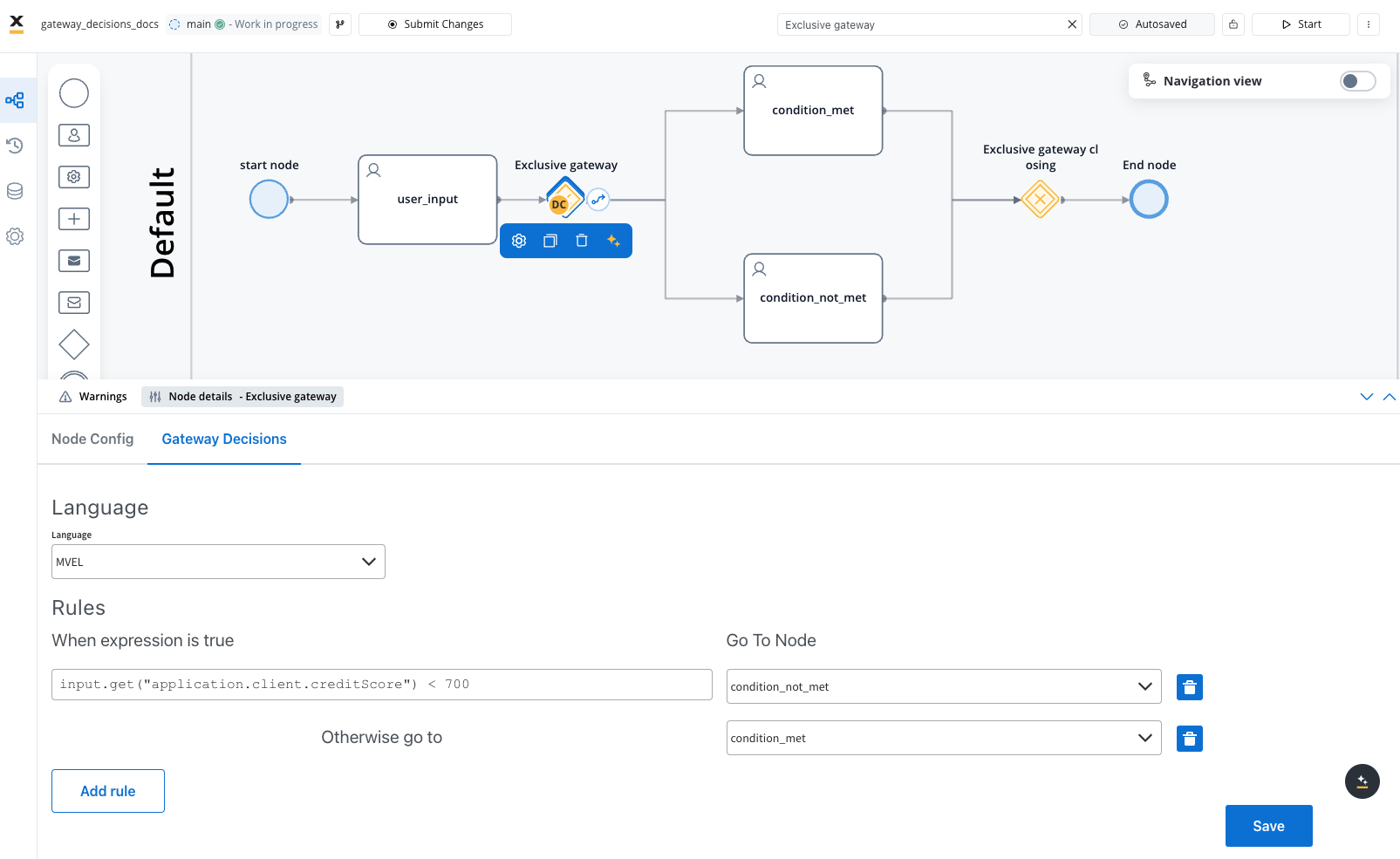
1. Select one of the sequence flows (arrows) from the gateway
2. In the properties panel, navigate to the **Condition** section
3. Select a **scripting language** from the dropdown (e.g., MVEL, JavaScript)
4. Enter your condition expression, for example:
```javascript theme={"system"}
input.get("application.client.creditScore") >= 700
```
5. Repeat for each outgoing path with the appropriate condition:
```javascript theme={"system"}
input.get("application.client.creditScore") < 700
```
Conditions are evaluated in the order they appear in the Designer. The first condition that evaluates to `true` determines the path taken, so order matters!
If your branches need to converge back to a single flow:
1. Add another **Exclusive Gateway** after your branch tasks
2. Connect each branch endpoint to this converging gateway
3. Continue the process flow from this gateway
A converging exclusive gateway doesn't require conditions since it's merely joining paths rather than splitting them.
1. Add any additional nodes needed after the decision branches
2. Ensure your process eventually reaches an **End Node**
3. Save your process definition
## Condition expression examples
Here are some example condition expressions for different decision scenarios:
```javascript theme={"system"}
// Check if age is over 18
input.get("customer.age") >= 18
// Check if balance is sufficient
input.get("account.balance") > input.get("transaction.amount")
// Check if score is within a range
input.get("application.score") >= 600 && input.get("application.score") < 750
```
```javascript theme={"system"}
// Check customer type
input.get("customer.type") == "premium"
// Check if country is in EU
["DE", "FR", "IT", "ES"].contains(input.get("customer.country"))
// Check if name starts with specific letters
input.get("customer.lastName").startsWith("A")
```
```javascript theme={"system"}
// Check multiple conditions with AND
input.get("customer.verified") == true && input.get("customer.active") == true
// Check multiple conditions with OR
input.get("application.status") == "pending" || input.get("application.status") == "review"
// Complex condition with nested logic
(input.get("customer.age") >= 21 || (input.get("customer.age") >= 18 && input.get("customer.parentalConsent") == true)) && input.get("customer.verified") == true
```
```javascript theme={"system"}
// Check if membership is expired
new java.text.SimpleDateFormat("yyyy-MM-dd").parse(input.get("membership.expiryDate")).before(new java.util.Date())
// Check if account is older than 1 year
dateDiffInDays(new java.text.SimpleDateFormat("yyyy-MM-dd").parse(input.get("account.openDate")), new java.util.Date()) > 365
```
## Best practices
**When implementing decision logic:**
* **Use clear, descriptive names** for gateways and sequence flows to document the decision logic
* **Keep conditions simple and focused** on a single aspect of the decision
* **Ensure conditions are mutually exclusive** when possible to avoid ambiguity
* **Always provide a default path** to handle unexpected scenarios
* **Test each decision branch** with various input data to verify correct routing
* **Document complex decision logic** in the process documentation or node descriptions
* **Consider using business rule actions** before the gateway for complex evaluations
## Common patterns
The simplest decision pattern with two outcomes - a condition is either met or not met
Multiple conditions evaluated in sequence, with one path chosen based on the first match
Branching based on approval status, typically with approve/reject/review paths
Evaluation of multiple criteria to determine if a process can proceed
## Next steps
After implementing decision logic in your process, you can:
Learn how to create parallel process branches with parallel gateways