> ## Documentation Index
> Fetch the complete documentation index at: https://docs.flowx.ai/llms.txt
> Use this file to discover all available pages before exploring further.
# Reusable Functions
> Create and manage business logic components that can be reused across multiple processes in your FlowX.AI applications.
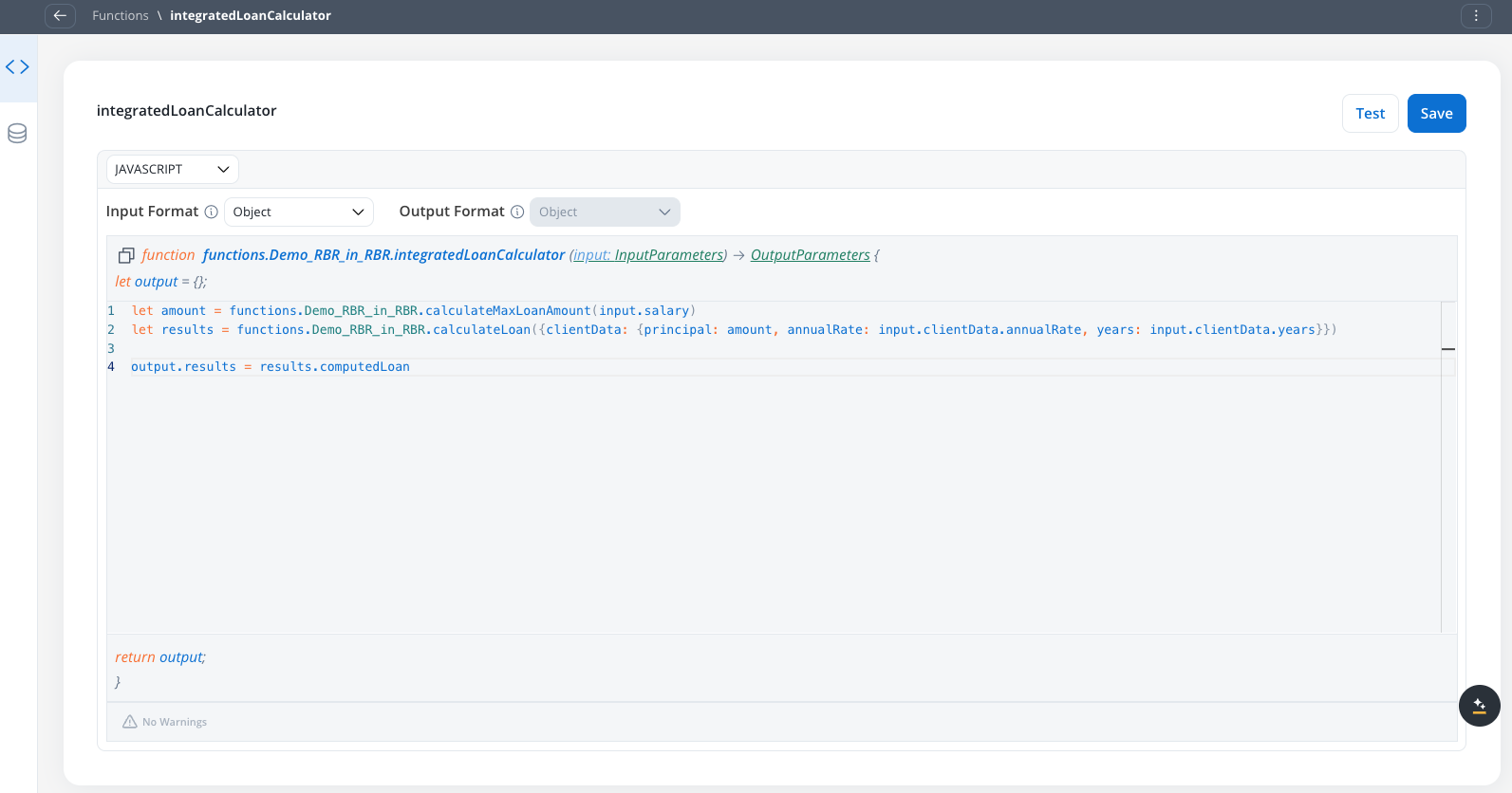
## What are Reusable Functions?
Reusable Functions are self-contained business logic components that process data according to your specified rules. Instead of writing the same logic multiple times across different processes, you can:
* Define the logic once in a reusable function
* Use the function in multiple processes through data mapping
* Automatically propagate updates to all instances when you modify the function
Functions execute in isolated environments and cannot be edited within individual process contexts. All changes must be made to the original function definition.
## Key benefits
Write business logic once and reuse it across multiple processes
Update logic in one place and automatically apply changes everywhere
Standardize business rules across your entire application
Spend less time rewriting similar logic for different processes
## Before you begin
Make sure you have:
* Access to the FlowX.AI Designer
* Appropriate permissions to create and manage reusable resources
* A clear understanding of the business logic you want to implement
## Create a reusable function
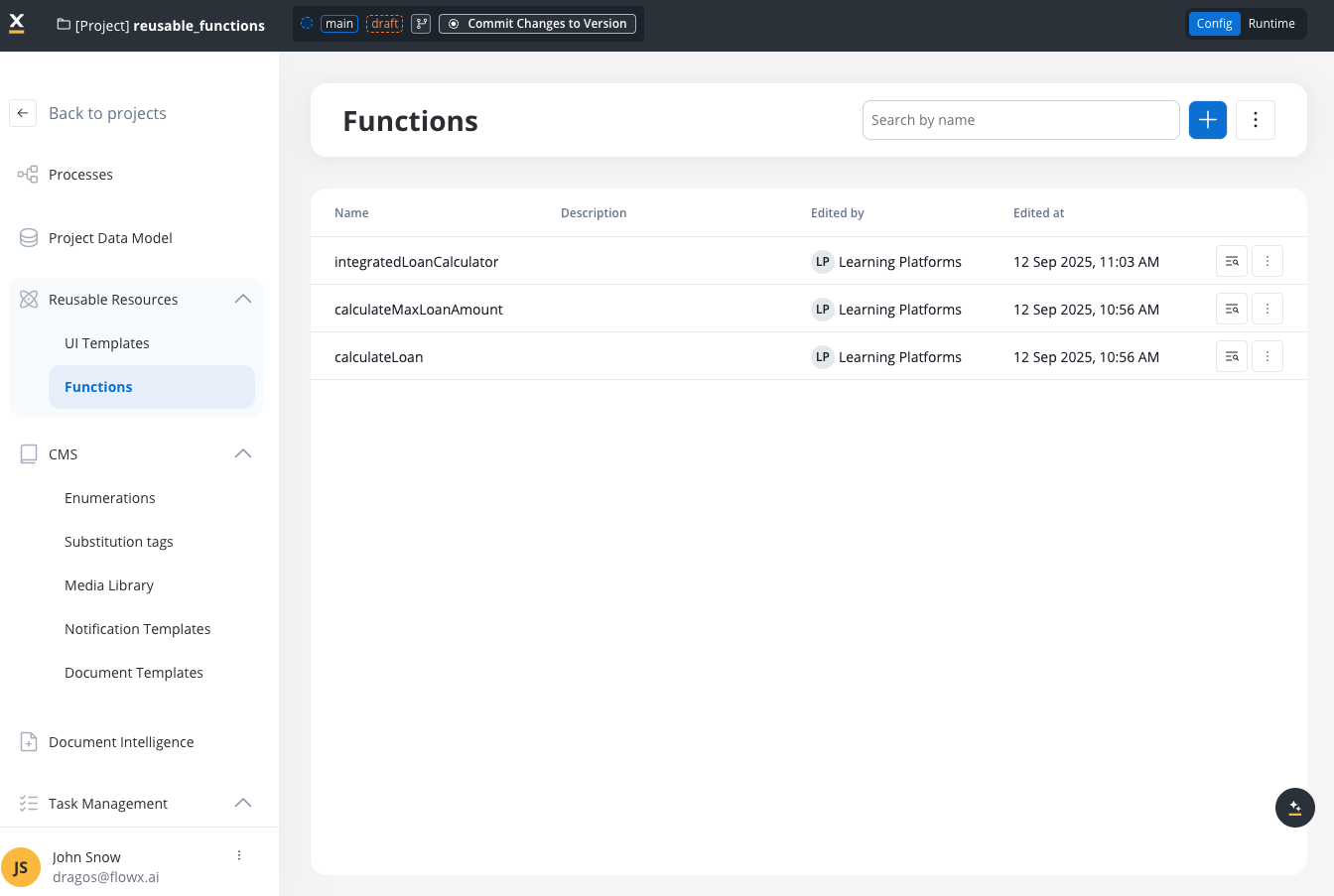
1. In FlowX.AI Designer, go to your project
2. Navigate to **Reusable Resources** > **Functions**
3. Click the **+** icon to create a new function
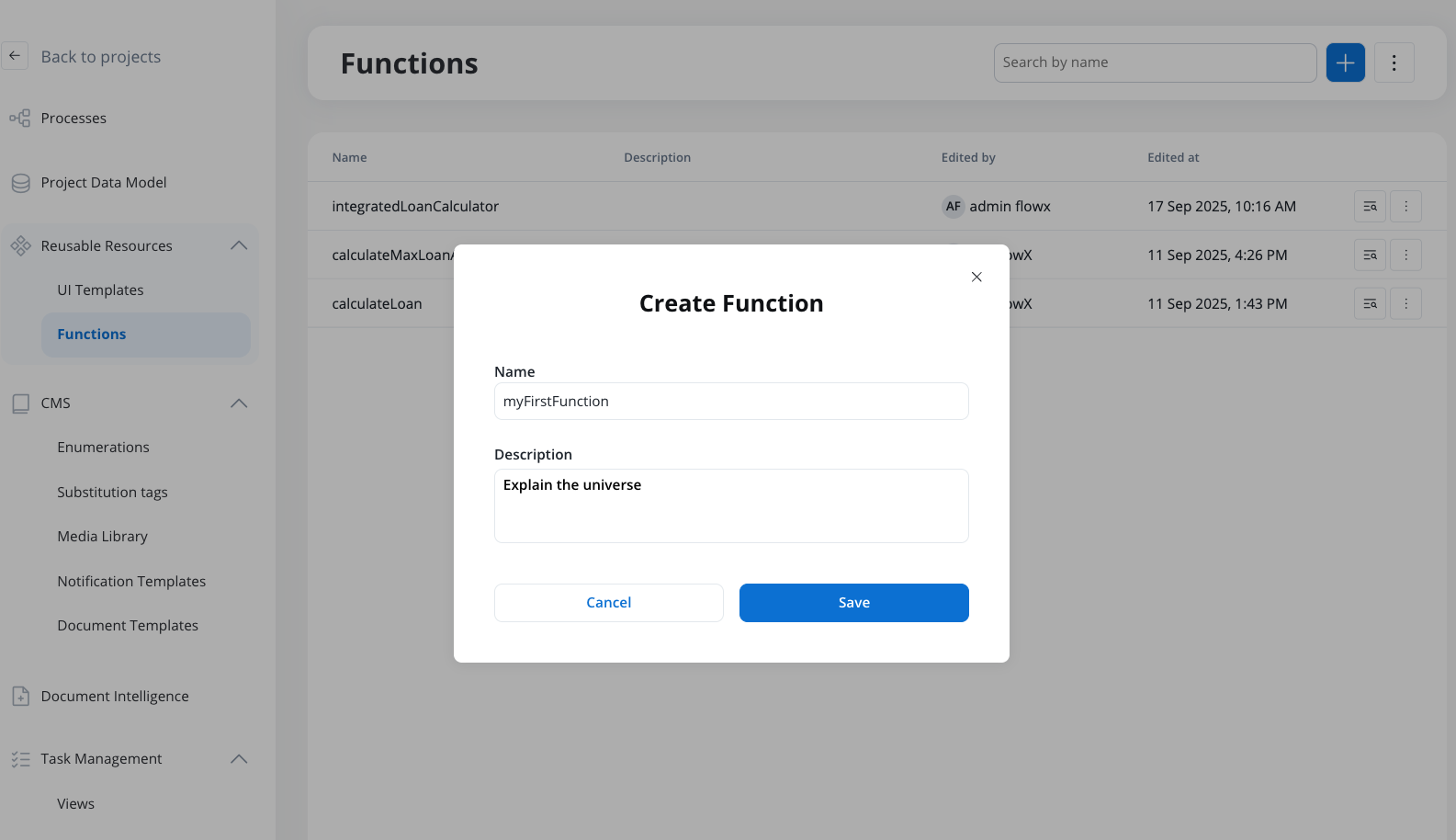
1. Enter a descriptive name for your function
2. Add an optional description explaining the function's purpose
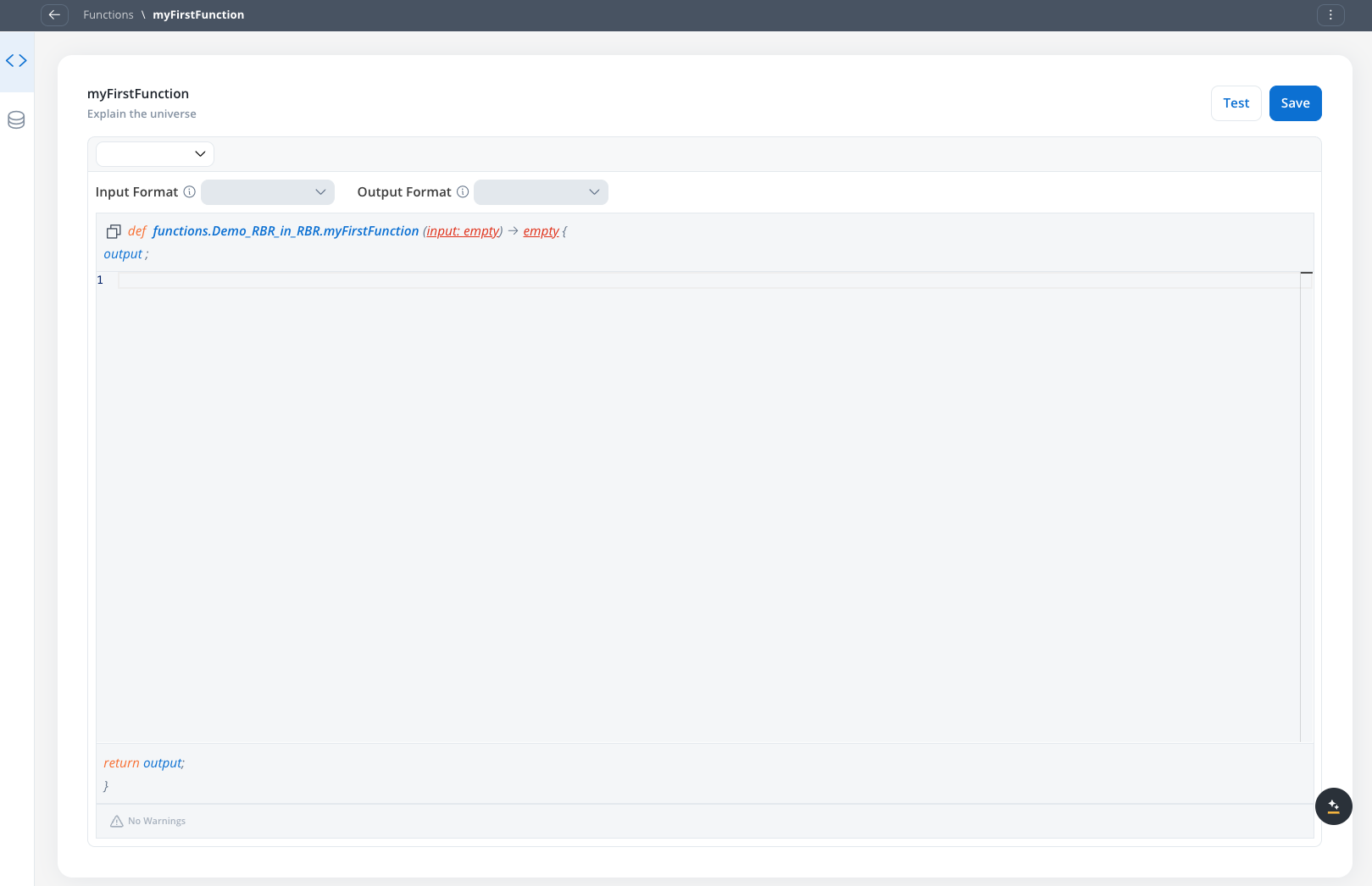
3. Click **Save** to create the function and open the editor
1. Go to the **Model** tab
2. Add attributes that your function will work with:
* Click **Add Attribute** to create new fields
* Set attribute types by selecting existing objects from your project
* Define nested structures as needed
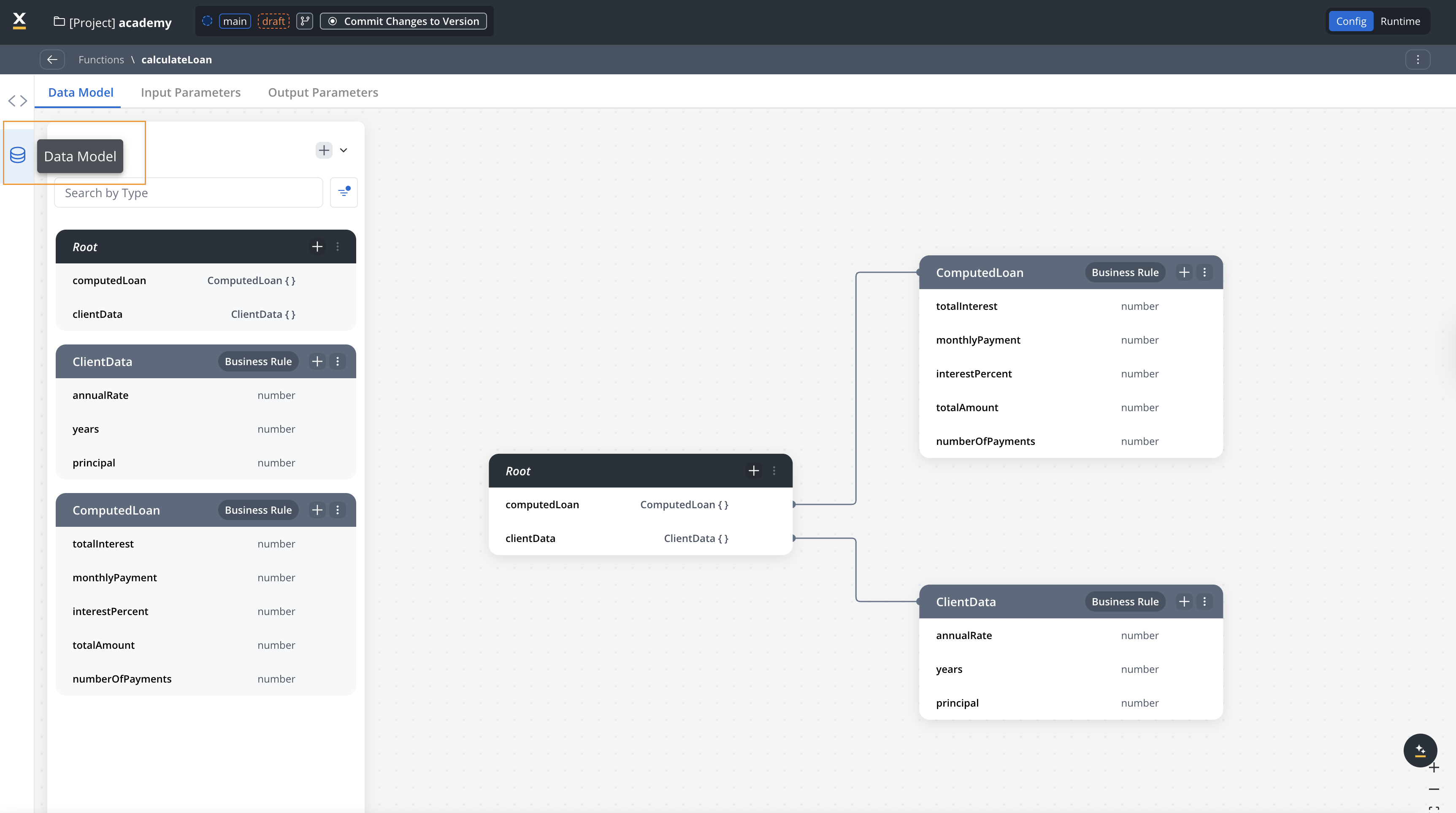
Functions support both primitive data types (string, number, boolean) and complex object data types for input and output parameters. See [Understanding Data Types](#understanding-data-types) for more information.
Define **both input and output fields** in your data model. Later, you'll select which fields are inputs (Input Parameters tab) and which are outputs (Output Parameters tab).
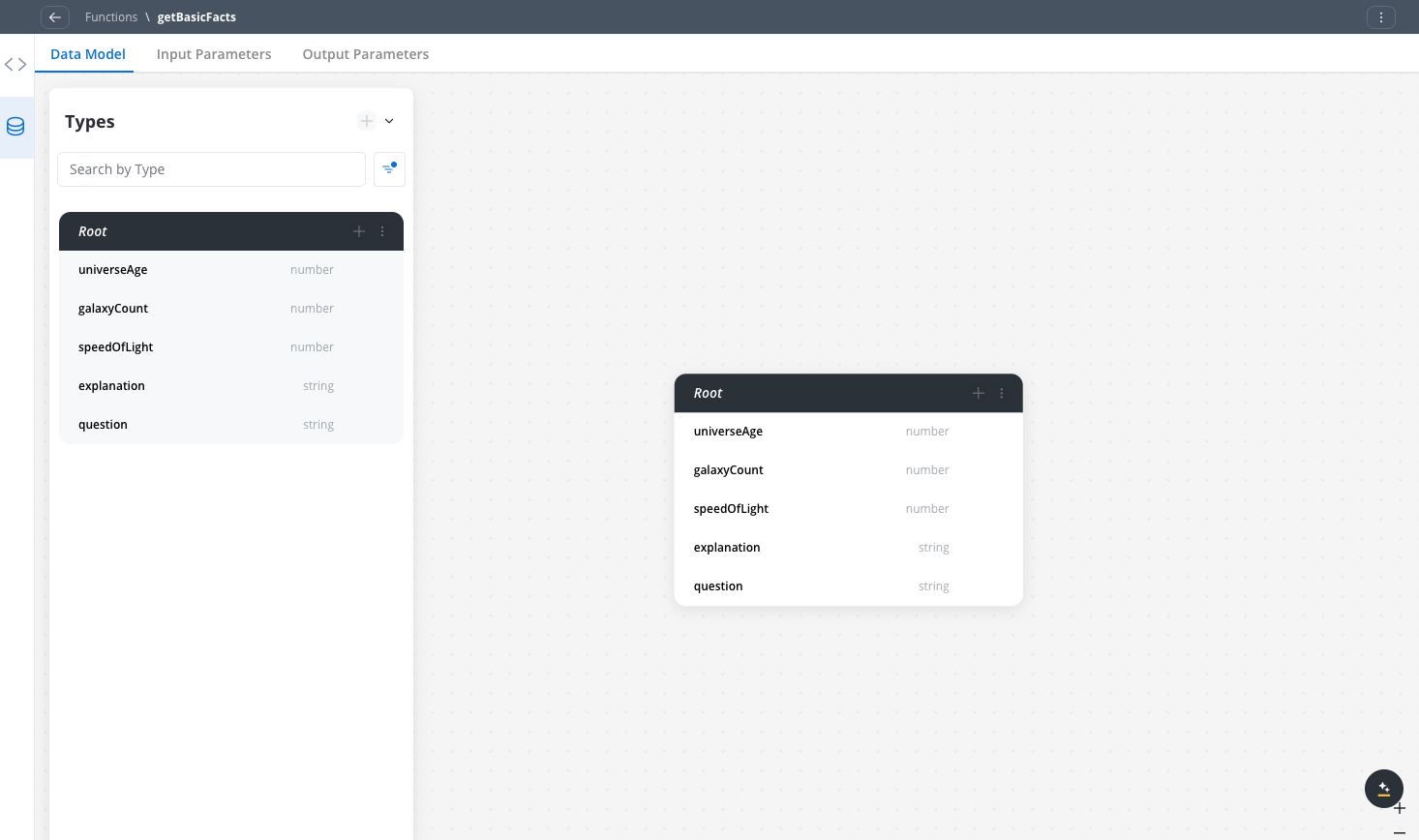
**Primitive types only** — all fields are flat (string/number), no nesting. Use this pattern when your function takes a single input value and returns several scalar results.
```json theme={"system"}
{
"question": "string",
"universeAge": "number",
"galaxyCount": "number",
"speedOfLight": "number",
"explanation": "string"
}
```
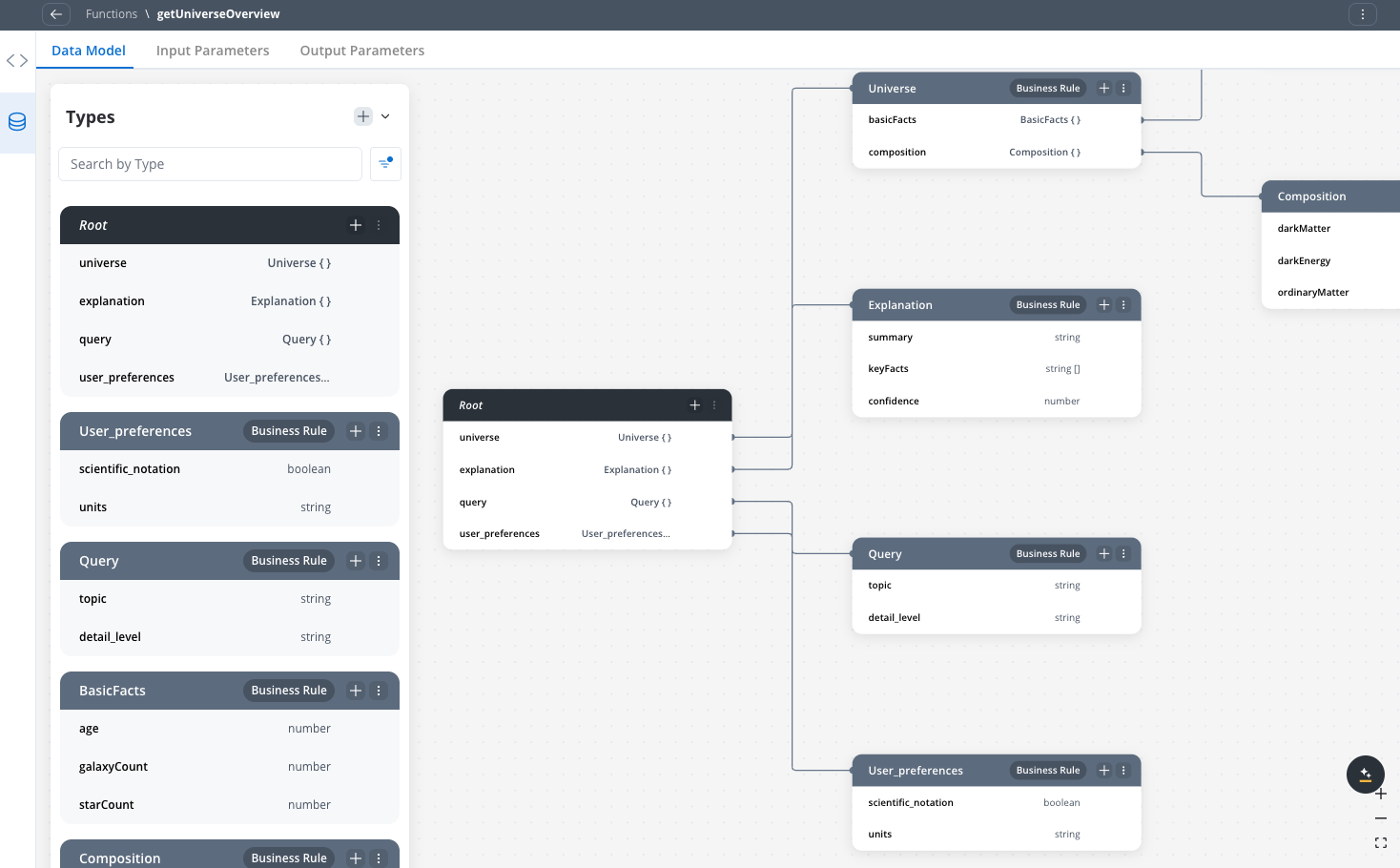
**Object types with one level of nesting** — inputs and outputs are objects, each containing a small set of related fields. Use this pattern when your function takes structured query parameters and returns a structured result object.
* **Inputs**: `query` (topic + detail level) and `user_preferences` (formatting options)
* **Outputs**: `universe` (facts + composition) and `explanation` (summary + key facts)
```json theme={"system"}
{
"query": {
"topic": "string",
"detail_level": "string"
},
"user_preferences": {
"scientific_notation": "boolean",
"units": "string"
},
"universe": {
"basicFacts": {
"age": "number",
"galaxyCount": "number",
"starCount": "number"
},
"composition": {
"darkMatter": "number",
"darkEnergy": "number",
"ordinaryMatter": "number"
}
},
"explanation": {
"summary": "string",
"keyFacts": "array",
"confidence": "number"
}
}
```
**Deeply nested objects with multiple input groups** — inputs are split across three distinct objects (`request`, `user_context`, `constraints`), with `user_context` containing a nested `preferences` sub-object. Outputs include three separate result objects (`universe`, `timeline`, `explanation`). Use this pattern when you need to model richer context or pass multiple independent parameter groups to a single function.
Compared to `getUniverseOverview`, this example shows: more input objects, deeper nesting (e.g. `user_context.preferences`), and more output fields covering a broader data structure.
Comprehensive data model for explaining the universe:
```json theme={"system"}
{
"request": {
"topic": "string",
"scope": "string",
"scientific_level": "string"
},
"user_context": {
"background": "string",
"preferences": {
"include_equations": "boolean",
"visual_aids": "boolean"
}
},
"constraints": {
"max_length": "number",
"language": "string"
},
"universe": {
"fundamentalConstants": {
"speedOfLight": "number",
"gravitationalConstant": "number",
"hubbleConstant": "number"
},
"composition": {
"darkMatter": "number",
"darkEnergy": "number",
"ordinaryMatter": "number"
},
"structures": {
"galaxies": "number",
"stars": "number",
"planets": "number"
}
},
"timeline": {
"bigBang": "number",
"firstStars": "number",
"earthFormation": "number"
},
"explanation": {
"summary": "string",
"keyInsights": "array",
"confidence": "number"
}
}
```
1. Switch to the **Input Parameters** tab
2. Select the fields from your data model that your function needs as input
3. Expand objects to choose specific properties
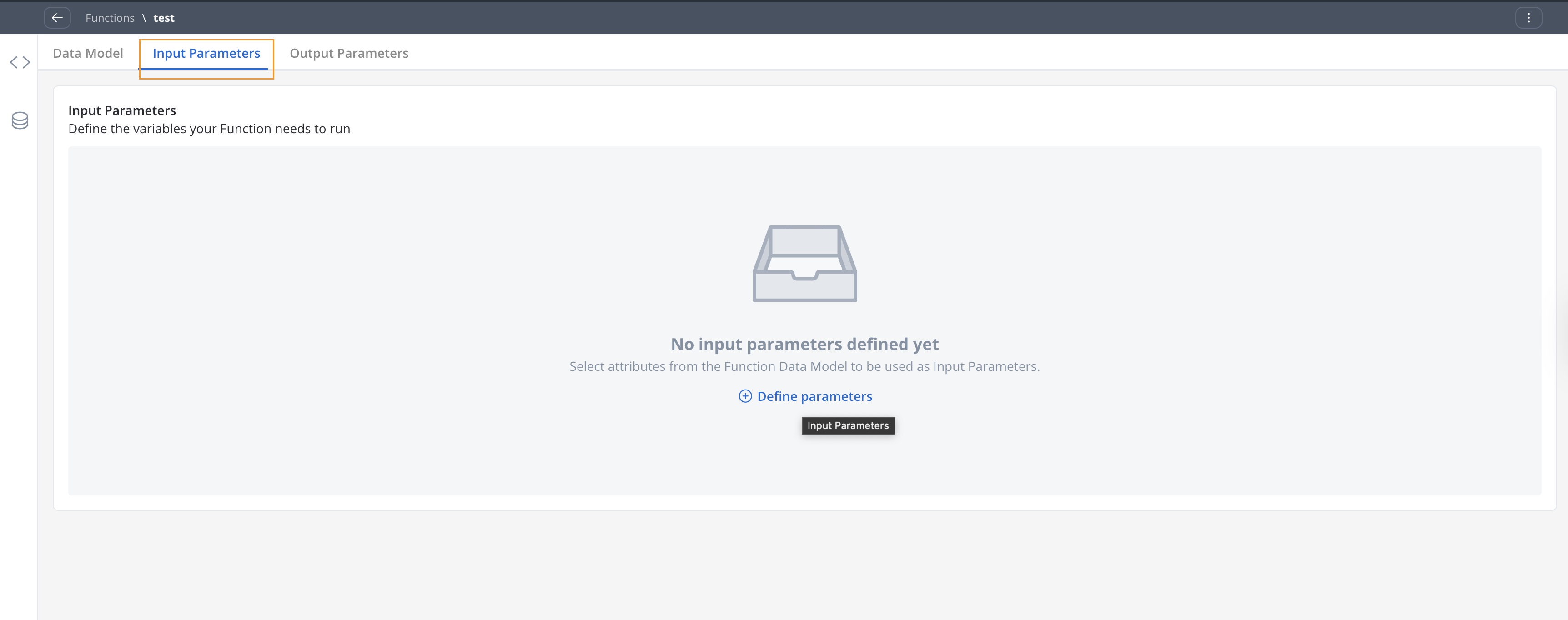
Select input fields from the data model for basic universe queries:
```json Input parameter selection from data model theme={"system"}
[
"question"
]
```
From the data model fields:
* ✅ **question** (string) - SELECT as input
* ❌ **universeAge** (number) - Do NOT select (output only)
* ❌ **galaxyCount** (number) - Do NOT select (output only)
* ❌ **speedOfLight** (number) - Do NOT select (output only)
* ❌ **explanation** (string) - Do NOT select (output only)
Example input mapping from process:
```json theme={"system"}
{
"question": "processData.userQuery"
}
```
Select only the fields your function needs as input from the data model. The output fields will be selected in the Output Parameters tab.
Select input fields from the data model for detailed queries:
```json Input parameter selection from data model theme={"system"}
[
"query",
"user_preferences"
]
```
From the data model fields:
* ✅ **query** (object) - SELECT as input
* ✅ **user\_preferences** (object) - SELECT as input
* ❌ **universe** (object) - Do NOT select (output only)
* ❌ **explanation** (object) - Do NOT select (output only)
Example input mapping from process:
```json theme={"system"}
{
"query": "processData.universeQuery",
"user_preferences": "processData.userSettings"
}
```
Select the input objects from your data model. The function will use these to customize its output behavior.
Select input fields from the data model for complex universe explanations:
```json Input parameter selection from data model theme={"system"}
[
"request",
"user_context",
"constraints"
]
```
From the data model fields:
* ✅ **request** (object) - SELECT as input
* ✅ **user\_context** (object) - SELECT as input
* ✅ **constraints** (object) - SELECT as input
* ❌ **universe** (object) - Do NOT select (output only)
* ❌ **timeline** (object) - Do NOT select (output only)
* ❌ **explanation** (object) - Do NOT select (output only)
Example input mapping from process:
```json theme={"system"}
{
"request": "processData.universeRequest",
"user_context": "processData.userProfile",
"constraints": "processData.outputConstraints"
}
```
Select the input objects that control how the function behaves. The output objects will be configured in the Output Parameters tab.
Define clear input contracts to make your functions truly reusable across different contexts. Match input complexity to function complexity.
1. Go to the **Output Parameters** tab
2. Select the fields from your data model that the function returns
3. Choose individual fields or entire objects as needed
Select output fields from the data model for basic universe facts:
```json Output parameter selection from data model theme={"system"}
[
"universeAge",
"galaxyCount",
"speedOfLight",
"explanation"
]
```
From the data model fields:
* ❌ **question** (string) - Do NOT select (input only)
* ✅ **universeAge** (number) - SELECT as output
* ✅ **galaxyCount** (number) - SELECT as output
* ✅ **speedOfLight** (number) - SELECT as output
* ✅ **explanation** (string) - SELECT as output
Select the fields that your function calculates and returns. These were the fields showing incorrectly in your Input Parameters tab.
Select output fields from the data model for detailed universe data:
```json Output parameter selection from data model theme={"system"}
[
"universe",
"universe.basicFacts",
"universe.composition",
"explanation",
"explanation.summary",
"explanation.keyFacts",
"explanation.confidence"
]
```
From the data model fields:
* ❌ **query** (object) - Do NOT select (input only)
* ❌ **user\_preferences** (object) - Do NOT select (input only)
* ✅ **universe** (object) - SELECT as output
* ✅ **explanation** (object) - SELECT as output
Select the objects that your function generates. You can choose entire objects or specific nested properties based on what your process needs.
Select output fields from the data model for complete universe explanation:
```json Output parameter selection from data model theme={"system"}
[
"universe",
"universe.fundamentalConstants",
"universe.composition",
"universe.structures",
"timeline",
"explanation",
"explanation.keyInsights"
]
```
From the data model fields:
* ❌ **request** (object) - Do NOT select (input only)
* ❌ **user\_context** (object) - Do NOT select (input only)
* ❌ **constraints** (object) - Do NOT select (input only)
* ✅ **universe** (object) - SELECT as output
* ✅ **timeline** (object) - SELECT as output
* ✅ **explanation** (object) - SELECT as output
Select the objects that contain the universe explanation results. You can choose entire objects or drill down to specific properties you need.
You can select entire objects (like `universe`) or specific properties (like `universe.basicFacts.age`) depending on what your process needs.
1. Navigate to the **Script** tab
2. Choose your programming language (JavaScript or Python)
3. Write your business logic using the appropriate data format
Simple function with basic universe facts:
```javascript getBasicFacts theme={"system"}
// Function format: functions.projectName.functionName(input)
function functions.cosmos.getBasicFacts(question) {
// Access input parameter: input.question
const userQuestion = input.question || "What is the universe?";
// Basic universe facts
output.universeAge = 13.8; // billion years
output.galaxyCount = 2000; // billion galaxies
output.speedOfLight = 299792458; // m/s
output.explanation = "The universe is 13.8 billion years old and contains about 2 trillion galaxies.";
}
```
```python getBasicFacts (Python) theme={"system"}
# Function format: functions.projectName.functionName(input)
# function functions.cosmos.getBasicFacts(question)
# Access input parameter: input.question
user_question = input.question or "What is the universe?"
# Basic universe facts
output.universeAge = 13.8 # billion years
output.galaxyCount = 2000 # billion galaxies
output.speedOfLight = 299792458 # m/s
output.explanation = "The universe is 13.8 billion years old and contains about 2 trillion galaxies."
```
Function with structured universe data:
```javascript getUniverseOverview theme={"system"}
// Function format: functions.projectName.functionName(input)
function functions.cosmos.getUniverseOverview(query) {
// Access input parameters: input.query.topic, input.query.detail_level, input.user_preferences
const detailLevel = input.query?.detail_level || "basic";
const userPrefs = input.user_preferences || {};
// Structured universe data
output.universe = {
basicFacts: {
age: 13.8, // billion years
galaxyCount: 2000, // billion
starCount: 200000000 // billion billion (2×10^23)
},
composition: {
darkMatter: 26.8, // percentage
darkEnergy: 68.3, // percentage
ordinaryMatter: 4.9 // percentage
}
};
output.explanation = {
summary: "The universe is mostly dark matter and dark energy, with ordinary matter making up less than 5%.",
keyFacts: [
"Universe is 13.8 billion years old",
"Contains 2 trillion galaxies",
"Dark energy causes expansion"
],
confidence: 0.9
};
}
```
```python getUniverseOverview (Python) theme={"system"}
# Access input parameters: input.query.detail_level, input.user_preferences
detail_level = input.query.get('detail_level', 'basic') if input.query else 'basic'
user_prefs = input.user_preferences or {}
# Structured universe data
output.universe = {
'basicFacts': {
'age': 13.8, # billion years
'galaxyCount': 2000, # billion
'starCount': 200000000 # billion billion
},
'composition': {
'darkMatter': 26.8,
'darkEnergy': 68.3,
'ordinaryMatter': 4.9
}
}
output.explanation = {
'summary': 'The universe is mostly dark matter and dark energy.',
'keyFacts': ['Universe is 13.8 billion years old', 'Contains 2 trillion galaxies'],
'confidence': 0.9
}
```
Comprehensive function with detailed universe data:
```javascript myFirstFunction theme={"system"}
// Function format: functions.projectName.functionName(input)
function functions.cosmos.myFirstFunction(request) {
// Access comprehensive input parameters
const topic = input.request?.topic || "general";
const scope = input.request?.scope || "basic";
const scientificLevel = input.request?.scientific_level || "beginner";
const userBackground = input.user_context?.background || "general";
const maxLength = input.constraints?.max_length || 10000;
// Comprehensive universe explanation
output.universe = {
fundamentalConstants: {
speedOfLight: 299792458, // m/s
gravitationalConstant: 6.674e-11,
hubbleConstant: 70 // km/s/Mpc
},
composition: {
darkMatter: 26.8,
darkEnergy: 68.3,
ordinaryMatter: 4.9
},
structures: {
galaxies: 2e12, // 2 trillion
stars: 1e24, // 1 septillion
planets: 1e24 // estimated
}
};
output.timeline = {
bigBang: 13.8e9, // years ago
firstStars: 13.6e9, // years ago
earthFormation: 4.6e9 // years ago
};
output.explanation = {
summary: "The universe began 13.8 billion years ago and is dominated by dark matter and dark energy.",
keyInsights: [
"Universe is expanding and accelerating",
"Most matter is invisible (dark matter)",
"Contains billions of galaxies with trillions of stars"
],
confidence: 0.85
};
}
```
```python myFirstFunction (Python) theme={"system"}
# Access comprehensive input parameters
topic = input.request.get('topic', 'general') if input.request else 'general'
scope = input.request.get('scope', 'basic') if input.request else 'basic'
scientific_level = input.request.get('scientific_level', 'beginner') if input.request else 'beginner'
user_background = input.user_context.get('background', 'general') if input.user_context else 'general'
max_length = input.constraints.get('max_length', 10000) if input.constraints else 10000
# Comprehensive universe explanation
output.universe = {
'fundamentalConstants': {
'speedOfLight': 299792458,
'gravitationalConstant': 6.674e-11,
'hubbleConstant': 70
},
'composition': {
'darkMatter': 26.8,
'darkEnergy': 68.3,
'ordinaryMatter': 4.9
},
'structures': {
'galaxies': 2e12,
'stars': 1e24,
'planets': 1e24
}
}
output.timeline = {
'bigBang': 13.8e9,
'firstStars': 13.6e9,
'earthFormation': 4.6e9
}
output.explanation = {
'summary': 'The universe began 13.8 billion years ago.',
'keyInsights': ['Universe is expanding', 'Most matter is dark matter'],
'confidence': 0.85
}
```
Always use `input.attribute` format to access function parameters and `output.attribute` to set return values.
1. Go to the **Test** tab
2. Add sample data for your input parameters
3. Click **Test** to execute the function
4. Review the output to ensure your logic works correctly
5. Save your function when testing is successful
## Use functions in processes
After creating a reusable function, you can use it in your business processes through Business Rule actions, or reference it within other reusable functions.
### Where you can reference functions
Reusable functions can be referenced in two contexts:
* **Business Rule actions** within process nodes
* **Other reusable functions** to create composite logic
### Function referencing syntax
When referencing a reusable function, use this format:
```javascript theme={"system"}
functions.projectName.functionName(input.params)
```
Where:
* `functions` - Convention to reference any reusable function
* `projectName` - Name of the project/library where the function is defined
* `functionName` - Name of the reusable function
* `input.params` - Input parameters using local process variables
```javascript Primitive parameter example theme={"system"}
functions.academy.calculateMaxLoanAmount(input.monthlySalary)
```
```javascript Object parameter example theme={"system"}
functions.loanLibrary.calculateLoan(input.client)
```
```javascript Multiple parameters example theme={"system"}
functions.library1.calculateAgeFromSSN(input.client.ssn)
```
### Add a function to a process
1. Open your process definition in FlowX.AI Designer
2. Select the node where you want to add business logic
3. Create a new **Business Rule** action
4. Reference your reusable function using the syntax above
5. Configure data mapping between your process and the function
### Configure data mapping
Data mapping connects your process data to the function's input and output parameters.
Map process variables to function input parameters:
Simple input mapping for basic universe queries:
```json getBasicFacts input mapping theme={"system"}
{
"question": "processData.userQuestion"
}
```
Process context example:
```json theme={"system"}
{
"processData": {
"userQuestion": "What is the universe?"
}
}
```
Structured input mapping for detailed queries:
```json getUniverseOverview input mapping theme={"system"}
{
"query": "processData.universeRequest",
"query.topic": "processData.selectedTopic",
"query.detail_level": "processData.requestedDetail",
"user_preferences": "processData.userProfile.preferences"
}
```
Process context example:
```json theme={"system"}
{
"processData": {
"universeRequest": {
"topic": "dark_matter",
"detail_level": "intermediate"
},
"selectedTopic": "composition",
"requestedDetail": "moderate",
"userProfile": {
"preferences": {
"scientific_notation": true,
"units": "metric"
}
}
}
}
```
Comprehensive input mapping for complex universe explanations:
```json myFirstFunction input mapping theme={"system"}
{
"request": "processData.universeInquiry",
"request.topic": "processData.specificSubject",
"request.scope": "processData.explanationScope",
"request.scientific_level": "processData.userExpertiseLevel",
"user_context": "processData.userContext",
"constraints": "processData.outputLimitations"
}
```
Process context example:
```json theme={"system"}
{
"processData": {
"universeInquiry": {
"topic": "cosmic_evolution",
"scope": "comprehensive",
"scientific_level": "advanced"
},
"specificSubject": "big_bang_theory",
"explanationScope": "timeline_focused",
"userExpertiseLevel": "graduate_level",
"userContext": {
"background": "physics_student",
"preferences": {
"include_equations": true,
"visual_aids": false
}
},
"outputLimitations": {
"max_length": 5000,
"language": "english"
}
}
}
```
Ensure data types match between your process variables and function parameters to avoid runtime errors. Use dot notation for nested object properties.
Specify where to store function outputs in your process data:
Map primitive outputs to process variables:
```json getBasicFacts output mapping theme={"system"}
{
"processData.universeAge": "output.universeAge",
"processData.totalGalaxies": "output.galaxyCount",
"processData.lightSpeed": "output.speedOfLight",
"processData.summary": "output.explanation"
}
```
Map structured outputs to process data:
```json getUniverseOverview output mapping theme={"system"}
{
"processData.cosmicData": "output.universe",
"processData.universeAge": "output.universe.basicFacts.age",
"processData.composition": "output.universe.composition",
"processData.explanation": "output.explanation",
"processData.confidence": "output.explanation.confidence"
}
```
Map comprehensive outputs to process variables:
```json myFirstFunction output mapping theme={"system"}
{
"processData.universeData": "output.universe",
"processData.constants": "output.universe.fundamentalConstants",
"processData.timeline": "output.timeline",
"processData.explanation": "output.explanation",
"processData.insights": "output.explanation.keyInsights"
}
```
You can map entire objects or specific properties. Use dot notation to access nested properties from complex function outputs.
### Use functions within functions
You can create composite business logic by calling one reusable function from within another reusable function. This enables you to build complex functionality from smaller, focused components.
Use the standard function referencing syntax within your script:
```javascript theme={"system"}
// Call another function and use its output
const maxLoan = functions.academy.calculateMaxLoanAmount(input.monthlySalary);
// Use the result in further calculations
const loanDetails = functions.loanLibrary.calculateLoan({
principal: maxLoan,
rate: input.interestRate,
term: input.loanTerm
});
// Set the final output
output.integratedLoanData = loanDetails;
```
Ensure proper data flow between functions:
* **Input format**: Always use `input.attribute` to access function parameters
* **Function calls**: Use `functions.projectName.functionName(parameters)` format
* **Output assignment**: Set results to `output.attribute`
Test thoroughly to ensure all nested function calls work correctly:
1. Test each individual function first
2. Test the composite function with realistic data
3. Verify the data flows correctly between function calls
4. Check error handling when nested functions fail
```javascript integratedLoanCalculator example theme={"system"}
// Function that calculates loan based on salary using other functions
function functions.loanProject.integratedLoanCalculator(clientData) {
// Calculate how much loan a person can get based on their salary
const maxAmount = functions.academy.calculateMaxLoanAmount(input.clientData.monthlySalary);
// Use that amount with calculateLoan function to compute detailed loan information
const loanDetails = functions.loanLibrary.calculateLoan({
principal: maxAmount,
monthlyRate: input.clientData.monthlyRate,
numberOfPayments: input.clientData.numberOfPayments,
client: input.clientData
});
// The final computed result is passed into the output
output.integratedLoanData = loanDetails;
}
```
```python integratedLoanCalculator (Python) theme={"system"}
# Calculate how much loan a person can get based on their salary
max_amount = functions.academy.calculateMaxLoanAmount(input.clientData.monthlySalary)
# Use that amount with calculateLoan function to compute detailed loan information
loan_details = functions.loanLibrary.calculateLoan({
'principal': max_amount,
'monthlyRate': input.clientData.monthlyRate,
'numberOfPayments': input.clientData.numberOfPayments,
'client': input.clientData
})
# The final computed result is passed into the output
output.integratedLoanData = loan_details
```
When using functions within functions, ensure all referenced functions exist in your project and have compatible input/output formats.
## Manage functions
### View function usage
To see where a function is used:
1. Select the function in **Reusable Resources** > **Functions**
2. Click the **Usages** tab
3. Review all processes and nodes that reference the function
The system displays a resource usage modal when you make changes that might affect existing implementations.
### Update functions
When you modify a reusable function:
* Changes automatically propagate to all instances
* Existing process instances may need to restart to pick up updates
* The system preserves instance-specific configurations like data mapping
### Change programming languages
You can change a function's programming language after creation:
1. Open the function editor
2. Go to the **Script** tab
3. Select a different language from the dropdown
4. Rewrite your logic in the new language
5. Test thoroughly before saving
The system shows a usage modal to help you understand the impact of language changes on existing implementations.
## Understanding data types
Reusable functions support two categories of data types for input and output parameters:
### Primitive data types
Primitive types represent single, simple values. They are the basic building blocks of data.
Available primitive types:
* **string** - Text values (for example, "John Doe," "active")
* **number** - Numeric values (for example, 42, 3.14, 13.8)
* **boolean** - True/false values (for example, true, false)
When to use primitives:
* Simple calculations requiring single values
* Basic status flags or indicators
* Individual measurements or counts
* Simple user inputs
Example - Primitive function:
```json theme={"system"}
{
"salary": 5000, // number
"approved": true, // boolean
"status": "active" // string
}
```
### Complex object data types
Complex types are structured collections of related data, containing multiple fields that can include both primitives and nested objects.
Available complex types:
* **object** - Structured data with named properties
* **array** - Ordered collections of values
* **nested objects** - Objects containing other objects
When to use complex types:
* Grouping related information together
* Representing real-world entities (customers, orders, products)
* Handling structured business data
* Managing hierarchical relationships
Example - Complex object function:
```json theme={"system"}
{
"customer": { // object
"personalInfo": { // nested object
"name": "John Doe", // string
"age": 35 // number
},
"accounts": [ // array
{
"type": "checking",
"balance": 5000.00
}
]
},
"preferences": { // object
"notifications": true, // boolean
"language": "en" // string
}
}
```
### Key differences
| Aspect | Primitive Types | Complex Object Types |
| ------------------ | ------------------------- | --------------------------------------------------------------------- |
| Structure | Single value | Multiple related values |
| Nesting | Not applicable | Can contain nested structures |
| Access pattern | Direct value access | Dot notation for properties (for example, customer.personalInfo.name) |
| Use case | Simple, standalone data | Related data that should be grouped |
| Mapping complexity | Simple one-to-one mapping | Can map entire objects or individual properties |
### Choosing the right data type
* Working with single, independent values
* Performing basic calculations
* Storing simple flags or settings
* Handling individual measurements
**Example:** Calculating tax on a single amount, validating a single field
* Data represents a business entity
* Multiple related values should stay together
* You need hierarchical data structures
* Function processes grouped information
**Example:** Processing a loan application, validating customer information
**Best practice:** Start with primitives for simple functions. Upgrade to complex objects when you find yourself passing multiple related parameters or need better data organization.
## Export and import
You can export and import reusable functions to transfer them between projects or environments.
### Exporting
To export a reusable function:
1. Navigate to **Reusable Resources** > **Functions**
2. Open the context menu for the function you want to export
3. Select **Export**
4. The function is downloaded as a ZIP file
### Importing
To import reusable functions:
1. Navigate to **Reusable Resources** > **Functions**
2. Open the context menu and select **Import from ZIP**
3. Select the ZIP file exported from another project or environment
4. If functions with the same identifiers already exist, a **Review Resource Identifiers Conflicts** modal appears
5. Choose a strategy for each conflicting function (or use **Apply to all**):
* **Keep both** - imports the function as a new copy alongside the existing one
* **Replace** - overwrites the existing function with the imported version
* **Skip this one** - keeps the existing function unchanged
6. Click **Continue** to complete the import
Importing is only available for work-in-progress (WIP) project versions. You cannot import into a committed version.
***
## Best practices
### Design principles
Each function should serve one specific, well-defined purpose. Avoid creating functions that handle multiple unrelated tasks.
Define precise input and output parameters. Well-defined interfaces make functions easier to understand and use correctly.
Functions shouldn't depend on external state or global variables. All necessary data should come through input parameters.
The same inputs should always produce the same outputs. Avoid non-deterministic behavior in your business logic.
### Development workflow
1. **Define data model first**: Always establish your data structure before writing code
2. **Specify parameters early**: Define inputs and outputs before implementing logic
3. **Use descriptive names**: Choose clear, business-oriented function names
4. **Test thoroughly**: Validate functions with realistic data before deployment
5. **Handle errors gracefully**: Implement thorough error handling in your business logic
### Organization strategies
* **Group related functions**: Organize functions by business domain or use case
* **Follow naming conventions**: Establish consistent patterns for function names
* **Document extensively**: Include clear descriptions and usage examples
* **Version carefully**: Use project versioning to manage function changes safely
## Troubleshooting
### Common issues
**Possible causes:**
* Incorrect input parameter mapping
* Data type mismatches between process and function
* Missing required input parameters
* Runtime errors in function logic
**Solutions:**
* Verify all input mappings are correct
* Check data types match between source and target
* Ensure all required parameters have values
* Review function logs for error details
**Possible causes:**
* Incorrect output parameter mapping
* Logic errors in function implementation
* Invalid test data during development
**Solutions:**
* Validate output parameter configuration
* Test function with realistic data
* Review business logic implementation
* Check data transformations within the function
**Possible causes:**
* Complex data processing logic
* Inefficient algorithms
* Large data structures
**Solutions:**
* Optimize function algorithms
* Simplify data models where possible
* Consider breaking complex functions into smaller components
* Monitor execution times in process context
### Debugging strategies
1. **Use the test environment**: Always test functions thoroughly before deploying to production
2. **Start simple**: Build and test functions incrementally rather than implementing everything at once
3. **Use realistic data**: Test with data that matches your production scenarios
4. **Verify outputs**: Carefully check that function outputs match your expectations
5. **Add logging**: Include console output in your function logic to trace execution
## Function execution context
### Function format and syntax
All reusable functions follow a consistent format and syntax:
```javascript Function declaration format theme={"system"}
function functions.projectName.functionName(parameterName) {
// Function implementation
}
```
```javascript Function reference format theme={"system"}
functions.projectName.functionName(input.params)
```
**Key format rules:**
* **Function declaration**: `functions.projectName.functionName(parameters)`
* **Input access**: Always use `input.attribute` to access function parameters
* **Output assignment**: Use `output.attribute` to set return values
* **Function calls**: Reference other functions using `functions.projectName.functionName(params)`
### Data access patterns
When functions execute within processes, they have access to:
* **Input parameters**: Mapped from process data according to your configuration
* **Output object**: Used to return processed data back to the process
* **Standard libraries**: Built-in functions available in JavaScript or Python
* **Error handling**: Mechanisms to report execution problems back to the process
Access function input using the `input.attribute` format:
```javascript theme={"system"}
// Access input parameters
const salary = input.monthlySalary;
const client = input.client;
```
Set function output using the `output` object:
```javascript theme={"system"}
// Primitive output
output = monthlySalary * 48;
// Object output
output.computedLoan = {
principal: input.principal,
monthlyPayment: monthlyPayment
};
```
Always verify that your input format (`input.attribute`) matches the parameter names defined in your function to avoid runtime errors.
## Frequently asked questions
Yes, you can change a function's programming language after creation. Navigate to the **Script** tab, select a different language from the dropdown, rewrite your logic in the new language, and test thoroughly before saving. The system will show a usage modal to help you understand the impact on existing implementations.
Reusable functions can be referenced in two contexts:
* **Business Rule actions** within process nodes
* **Other reusable functions** to create composite logic
Use the format: `functions.projectName.functionName(input.params)`
Example: `functions.library1.calculateAgeFromSSN(input.client.ssn)`
Where:
* `functions` - Convention to reference a function
* `library1` - Name of the project/library where the function is defined
* `calculateAgeFromSSN` - Name of the reusable function
* `input.client.ssn` - Input parameters using local process variables
Yes, you can use functions within functions to create composite business logic. Simply reference other functions using the standard syntax: `functions.projectName.functionName(parameters)` within your function script.
You can use both primitive and object data types as parameters for input and output:
**Primitive types**: string, number, boolean
**Object types**: Complex structures with nested properties, arrays, and custom business objects
Functions automatically handle the data format based on your model definition.