> ## Documentation Index
> Fetch the complete documentation index at: https://docs.flowx.ai/llms.txt
> Use this file to discover all available pages before exploring further.
# Config-time agents
> AI agents built into FlowX Designer that help you create processes, UIs, and business rules faster.
Config-time agents are AI assistants embedded directly in FlowX Designer. They help developers and business analysts build applications faster by automating repetitive tasks and providing intelligent suggestions.

 ***
## Available agents
Build and optimize BPMN processes using AI to generate, validate, and enhance workflows
Answer questions about FlowX platform and your organization based on documentation
Convert natural language prompts, Figma designs, or sketches into UI layouts
Generate business rules and code expressions using natural language
***
## Access AI in FlowX Designer
Use **Cmd/Ctrl+K** anywhere in FlowX Designer to open the Command Palette and access AI features.
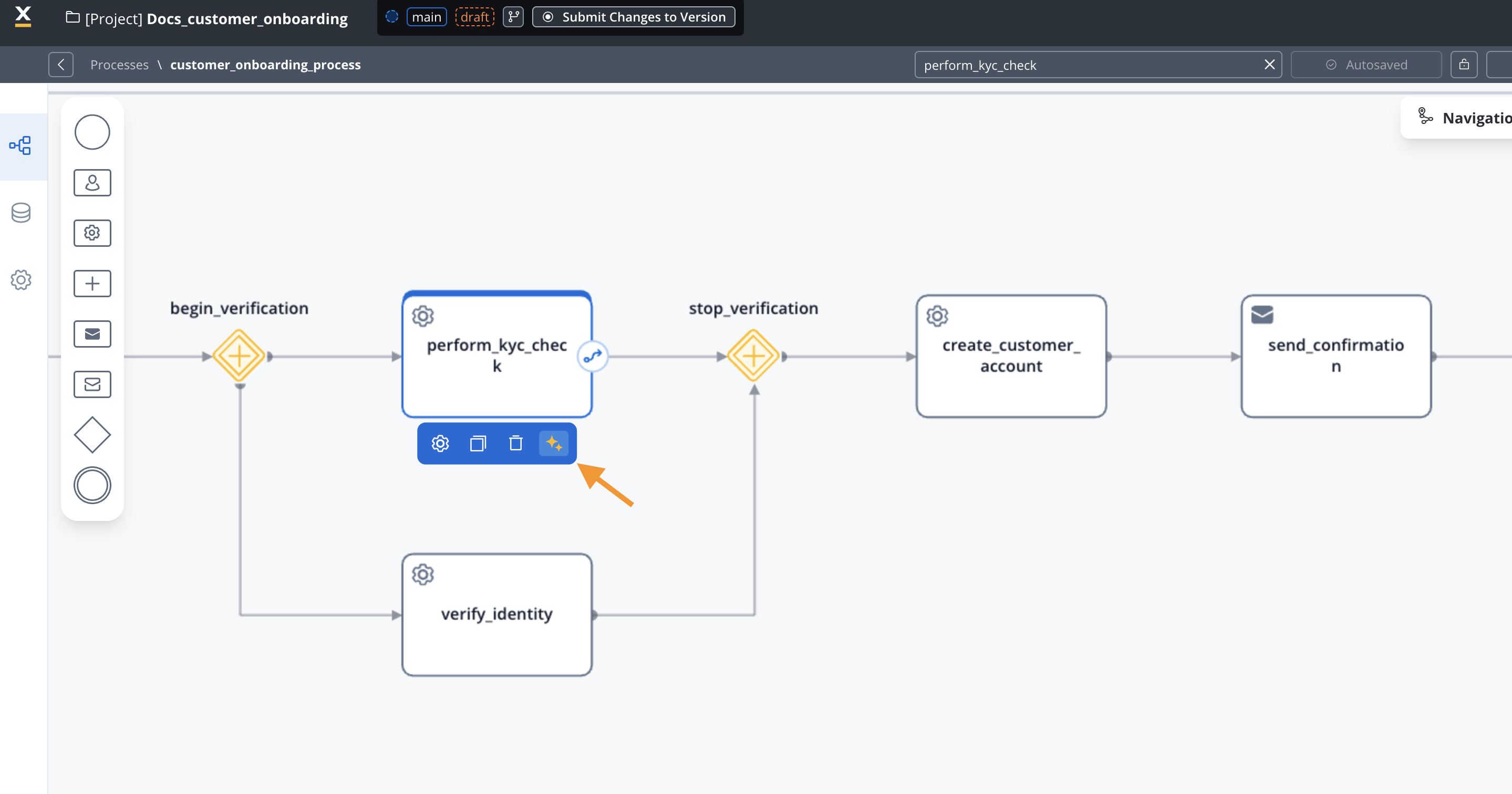
You can also look for the **✨ icon** throughout the interface to find AI-powered features.
***
## LLM flexibility
Config-time agents support multiple LLM deployment options:
| Option | Description |
| ------------------- | ------------------------------------------------------------- |
| **Custom models** | Run your own LLM models through the model registry |
| **Internal LLMs** | Connect to your organization's LLMs via OpenAI-compatible API |
| **Cloud providers** | Use OpenAI, Google, Microsoft, Anthropic, or other providers |
Access to LLMs can be configured through a proxy or gateway. Configure endpoints via environment variables.
***
## Related resources
Overview of all AI capabilities
Create custom business agents
***
## Available agents
Build and optimize BPMN processes using AI to generate, validate, and enhance workflows
Answer questions about FlowX platform and your organization based on documentation
Convert natural language prompts, Figma designs, or sketches into UI layouts
Generate business rules and code expressions using natural language
***
## Access AI in FlowX Designer
Use **Cmd/Ctrl+K** anywhere in FlowX Designer to open the Command Palette and access AI features.

You can also look for the **✨ icon** throughout the interface to find AI-powered features.
***
## LLM flexibility
Config-time agents support multiple LLM deployment options:
| Option | Description |
| ------------------- | ------------------------------------------------------------- |
| **Custom models** | Run your own LLM models through the model registry |
| **Internal LLMs** | Connect to your organization's LLMs via OpenAI-compatible API |
| **Cloud providers** | Use OpenAI, Google, Microsoft, Anthropic, or other providers |
Access to LLMs can be configured through a proxy or gateway. Configure endpoints via environment variables.
***
## Related resources
Overview of all AI capabilities
Create custom business agents