> ## Documentation Index
> Fetch the complete documentation index at: https://docs.flowx.ai/llms.txt
> Use this file to discover all available pages before exploring further.
# Web Page Extractor
> Collect readable content from web page URLs with configurable crawling depth, link following, and scrape speed.
## Overview
The **Web Page Extractor** node is a workflow node that collects readable content from web page URLs. It supports static URL lists and dynamic URL generation, configurable crawling depth with link following, and adjustable scrape speed presets.
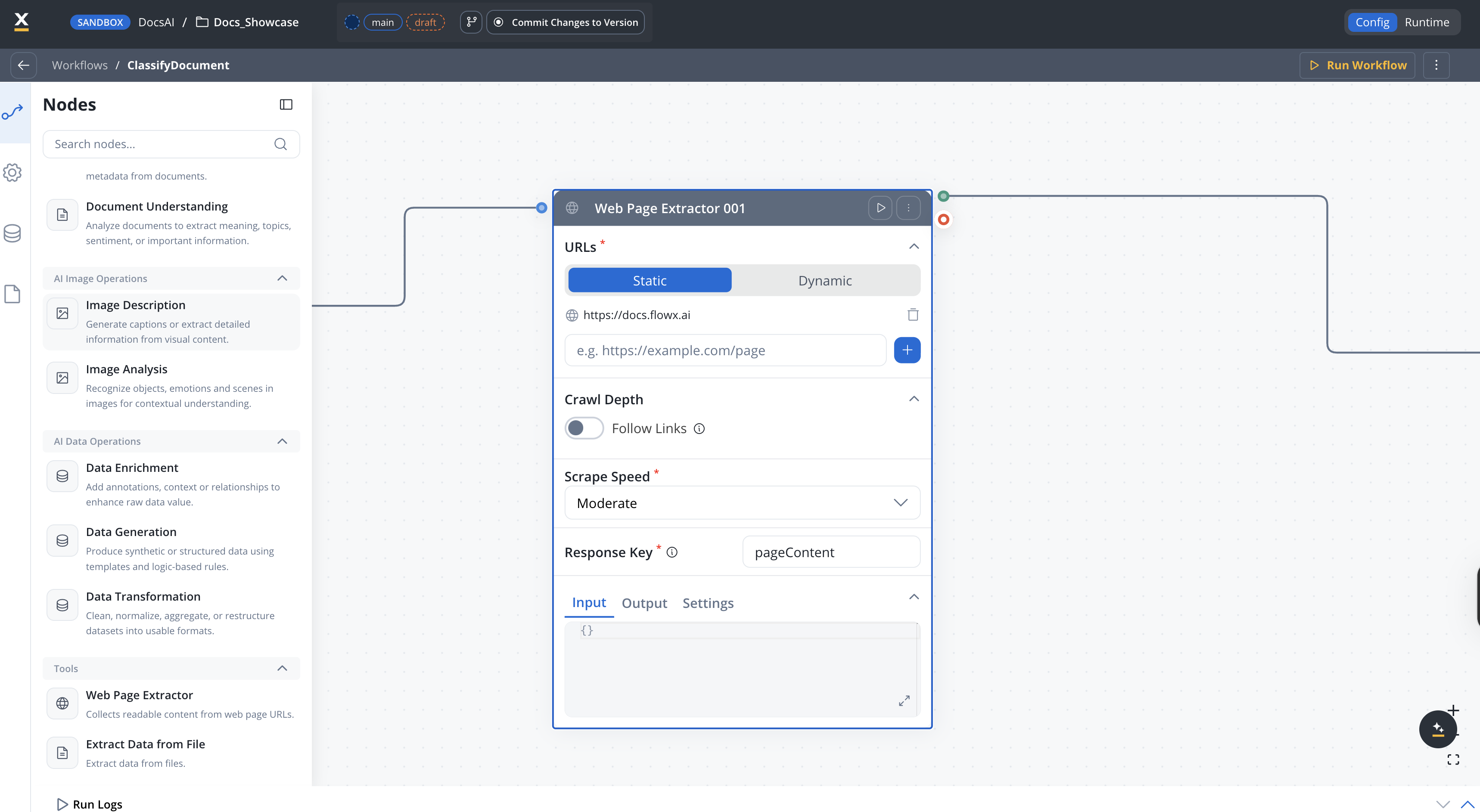
Provide a fixed list of URLs or generate them dynamically from workflow data
Optionally follow links on pages up to a configurable depth
Extract content from PDF files linked on the page
Choose from speed presets or define custom rate limits and concurrency
Download attached files (.docx, .xlsx, .pdf) found during crawling and store them automatically
***
## Configuration
Open your workflow in **Integration Designer**.
Add a **Web Page Extractor** node from the **Tools** category in the left panel.
Configure the settings described below.
***
### URL source
How URLs are provided to the node.
| Mode | Description |
| ----------- | ------------------------------------------------------------------- |
| **Static** | Provide a fixed list of up to 20 URLs |
| **Dynamic** | Generate URLs from a workflow data key using `${expression}` syntax |
**Default:** `Static`
List of URLs to extract content from. Only available when **URL Mode** is `Static`.
**Maximum:** 20 URLs
URLs must use `http://` or `https://` protocol. Supports `${variable}` placeholders for dynamic values.
A workflow data key or expression that resolves to a URL at runtime. Only available when **URL Mode** is `Dynamic`.
**Example:** `${inputData.targetUrl}`
***
### Crawl depth
When turned on, the extractor follows links found on the page up to the configured depth.
**Default:** OFF
How many levels of links to follow from the starting page. Only available when **Follow Links** is turned on. Displayed in the panel as a slider with the current value shown to the right (for example, *2 levels*).
**Range:** 0–10
**Default:** `0`
Optional list of substring filters applied to discovered links — only URLs that contain at least one of the configured fragments are followed. Click **Set Filters** to open the filter editor. Only available when **Follow Links** is turned on.
When turned on, extracts content from PDF files linked on the page. Only available when **Follow Links** is turned on.
**Default:** OFF
***
### Download attached files
When turned on, the extractor downloads attached files (.docx, .xlsx, .pdf) found during crawling and stores them using the configured document destination.
When turned on, files discovered during crawling are downloaded and stored automatically. Supported file types include `.docx`, `.xlsx`, and `.pdf`.
**Default:** OFF
Where downloaded files are stored. Only available when **Download Attached Files** is turned on.
| Option | Description |
| ------------------- | ------------------------------------------------------------------------ |
| **Document Plugin** | Store files through the FlowX Document Plugin. Requires **Folder Name**. |
| **S3 Protocol** | Store files directly using S3-compatible storage. |
Identifier used to associate the file with its business owner. Only available when **Download Attached Files** is turned on and **Document Destination** is `Document Plugin`.
***
### Scrape speed
Controls how aggressively the node requests pages from the target server.
| Preset | Description |
| ------------ | ----------------------------------------------------------------------- |
| **Slow** | Conservative rate limiting — best for fragile or rate-limited servers |
| **Moderate** | Balanced speed and reliability |
| **Fast** | Aggressive crawling — assumes the target server can handle high traffic |
| **Custom** | Define your own rate limit and concurrency |
**Default:** `Moderate`
Maximum requests per second. Displayed in the panel as a slider labelled in `req/s`. Only available when **Scrape Speed** is `Custom`.
**Default:** `2 req/s`
Number of concurrent requests. Displayed in the panel as a slider labelled in `parallel`. Only available when **Scrape Speed** is `Custom`.
**Default:** `3 parallel`
***
### Response key
The key where extracted content is stored in the workflow data.
**Example:** `extractedContent`
***
### Timeout and retry
Request timeout in milliseconds. If the extraction exceeds this duration, the node fails.
Optional retry strategy for failed requests.
| Field | Description | Default |
| ---------------------- | ------------------------------------------ | -------- |
| **Retry Type** | `Fixed` or `Exponential` backoff | — |
| **Max Attempts** | Maximum retry attempts | `2` |
| **Backoff Period** | Delay between retries (ms) | `1000` |
| **Max Backoff Period** | Maximum delay for exponential backoff (ms) | `120000` |
| **Backoff Multiplier** | Multiplier for exponential backoff | `2` |
***
## Best practices
Use the Moderate preset unless you know the target server's capacity. Switch to Fast only for internal or robust servers.
Keep **Depth of Crawling** low (1–3) to avoid excessive page requests. Deep crawls can be slow and may trigger rate limiting.
When the target URL comes from user input or a previous workflow step, use Dynamic mode with `${expression}` placeholders.
Always configure a timeout when crawling external websites to avoid blocking the workflow on slow or unresponsive servers.
***
## Related resources
Extract text and data from documents and images
Overview of all AI workflow node types
Build and manage integration workflows