> ## Documentation Index
> Fetch the complete documentation index at: https://docs.flowx.ai/llms.txt
> Use this file to discover all available pages before exploring further.
# Building with FlowX.AI
> Let's explore how to build innovative solutions with FlowX.AI.
[Create a project](../projects/managing-applications/application).
[Design a BPMN Process](../flowx-designer/managing-a-project-flow).
Define and manage a process flow using [**FLOWX Process Designer**](../building-blocks/process/process).
Run a process instance with [**FlowX Engine**](../platform-deep-dive/core-components/flowx-engine).
Create the **Front-End Application**.
Connect **Plugins**.
## FlowX.AI implementation methodology
The implementation of FlowX.AI follows a structured approach comprising several phases, using a hybrid methodology that has proven effective in past implementations. These phases include:
* Mobilization
* Analysis & Solution Design
* Project Execution
* Production & Go-live
* Transition to Business as Usual (BaU)
These phases address various aspects of the implementation process, ensuring a comprehensive and successful deployment of FlowX.AI solutions.
Explore our Academy course on Implementation Methodology for in-depth insights:
* What are the project stages in a FlowX implementation?
* What are the key roles of an implementation team?
* What are the main responsibilities of each role in the team?
## Designing the BPMN Process: Requesting a New Credit Card from a Bank App
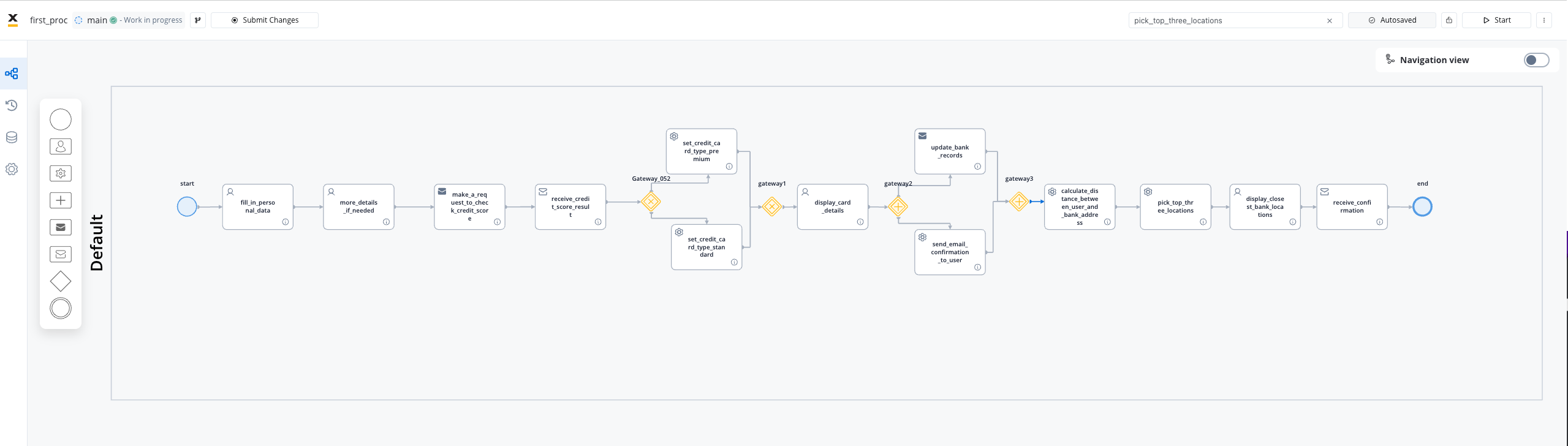
Let's initiate by designing the BPMN process diagram for a sample use case: requesting a new credit card from a bank app.
## Sample Process Steps
Taking a **business process example** of a credit card application, it involves the following steps:
Create a business process example of a credit card application.
A user initiates a request for a new credit card - ***Start Event***
The user fills in a form with their personal data - ***User Task***
The bank system performs a credit score check automatically using a send event that communicates with the credit score adapter, followed by a receive event to collect the response from the adapter - ***Automatic Task***
The process bifurcates based on the credit score using an ***Exclusive Gateway***
Each branch entails a service task that saves the appropriate credit card type to the process data - ***Automatic Task***
The branches reconvene through a ***Closing Gateway***
The user views the credit card details and confirms - ***User Task***
After user confirmation, the process divides into two parallel branches - ***Parallel Gateway***. One registers the request in the bank's systems (bank system adapter/integration), and the other sends a confirmation email (notification plugin) to the user
An additional automatic task follows: a call to an external API to compute the distance between the user's address and the bank locations ([Google Maps Distance Matrix API](https://developers.google.com/maps/documentation/distance-matrix/overview)) - ***Automatic Task***
A task is utilized to sort the location distances and present the top three to the user - ***Automatic Task***
The user selects the card pickup point from the bank location suggestions - ***User Task***
A receive task awaits confirmation from the bank that the user has collected the new card, concluding the process flow - ***End Event***
## Sample Process Diagram
Here's what the **BPMN** diagram illustrates:
## Related topics
- [AI in FlowX.AI](/4.7.x/docs/getting-started/ai-in-flowx.md)
- [FlowX.AI 5.0.0 Release Notes](/release-notes/v5.x/v5.0.0-july-2025/v5.0.0-july-2025.md)
- [FlowX.AI 5.1.0 Release Notes](/release-notes/v5.x/v5.1.x-lts/v5.1.0-october-2025/v5.1.0-october-2025.md)
- [FlowX.AI 5.3.0 Release Notes](/release-notes/v5.x/v5.3.0-december-2025/v5.3.0-december-2025.md)
- [FlowX.AI 5.9.1 Release Notes (LTS)](/release-notes/v5.x/v5.9.1-june-2026/v5.9.1-june-2026.md)