> ## Documentation Index
> Fetch the complete documentation index at: https://docs.flowx.ai/llms.txt
> Use this file to discover all available pages before exploring further.
# Append params to parent process
> It is a type of action that allows you to send data from a subprocess to a parent process.
**Why is it important?** If you are using subprocesses that produce data that needs to be sent back to the main **process**, you can do that by using an **Append Params to Parent Process** action.
## Configuring an Append params to parent process
After you create a process designed to be used as a [subprocess](../process/subprocess), you can configure the action. To do this, you need to add an **Append Params to Parent Process** on a [**Task node**](../node/task-node) in the subprocess.
The following properties must be configured:
* [Action Edit](#action-edit)
* [Back in steps (for Manual actions)](#back-in-steps)
* [Parameters](#parameters)
* [Data to send (for Manual actions)](#data-to-send)
### Action edit
* **Name** - used internally to make a distinction between different actions on nodes in the process. We recommend defining an action naming standard to be able to quickly find the process actions
* **Order** - if multiple actions are defined on the same node, the running order should be set using this option
* **Timer expression** - it can be used if a delay is required on that action. The format used for this is [ISO 8601 duration format ](https://www.w3.org/TR/NOTE-datetime)(for example, a delay of 30 seconds will be set up as `PT30S`)
* **Action type** - should be set to **Append Params to Parent Process**
* **Trigger type** (options are Automatic/Manual) - choose if this action should be triggered automatically (when the process flow reaches this step) or manually (triggered by the user); in most use cases, this will be set to automatic
* **Required type** (options are Mandatory/Optional) - automatic actions can only be defined as mandatory. Manual actions can be defined as mandatory or optional.
* **Repeatable** - should be checked if the action can be triggered multiple times;
* **Autorun Children** - when this is switched on, the child actions (the ones defined as mandatory and automatic) will run immediately after the execution of the parent action is finalized
### Back in steps
* **Allow BACK on this action** - back in process is a functionality that allows you to go back in a business process and redo a series of previous actions in the process. For more details, check [**Moving a token backwards in a process**](../../flowx-designer/managing-a-project-flow/moving-a-token-backwards-in-a-process) section
### Parameters
* **Copy from current state** - data that you want to be copied back to the parent process
* **Destination in the parent state** - on what key to copy the param values
To recap: if you have a **Copy from current state** with a simple **JSON** -`{"age": 17}`, that needs to be available in the parent process, on the `application.client.age` key, you will need to set this field (**Destination in the parent state**) with `application.client`, which will be the key to append to in the parent process.
**Advanced configuration**
* **Show Target Process** - ID of the parent process where you need to copy the params, this was made available on to the `${parentProcessInstanceId}` variable, if you defined it when you [started the subprocess](./start-subprocess-action)
### Data to send
* **Keys** - are used when data is sent from the frontend via an action to validate the data (you can find more information in the [User Task configuration](../node/user-task-node) section)
**Data to send** option is configurable only when the action **trigger type** is **Manual.**
## Example
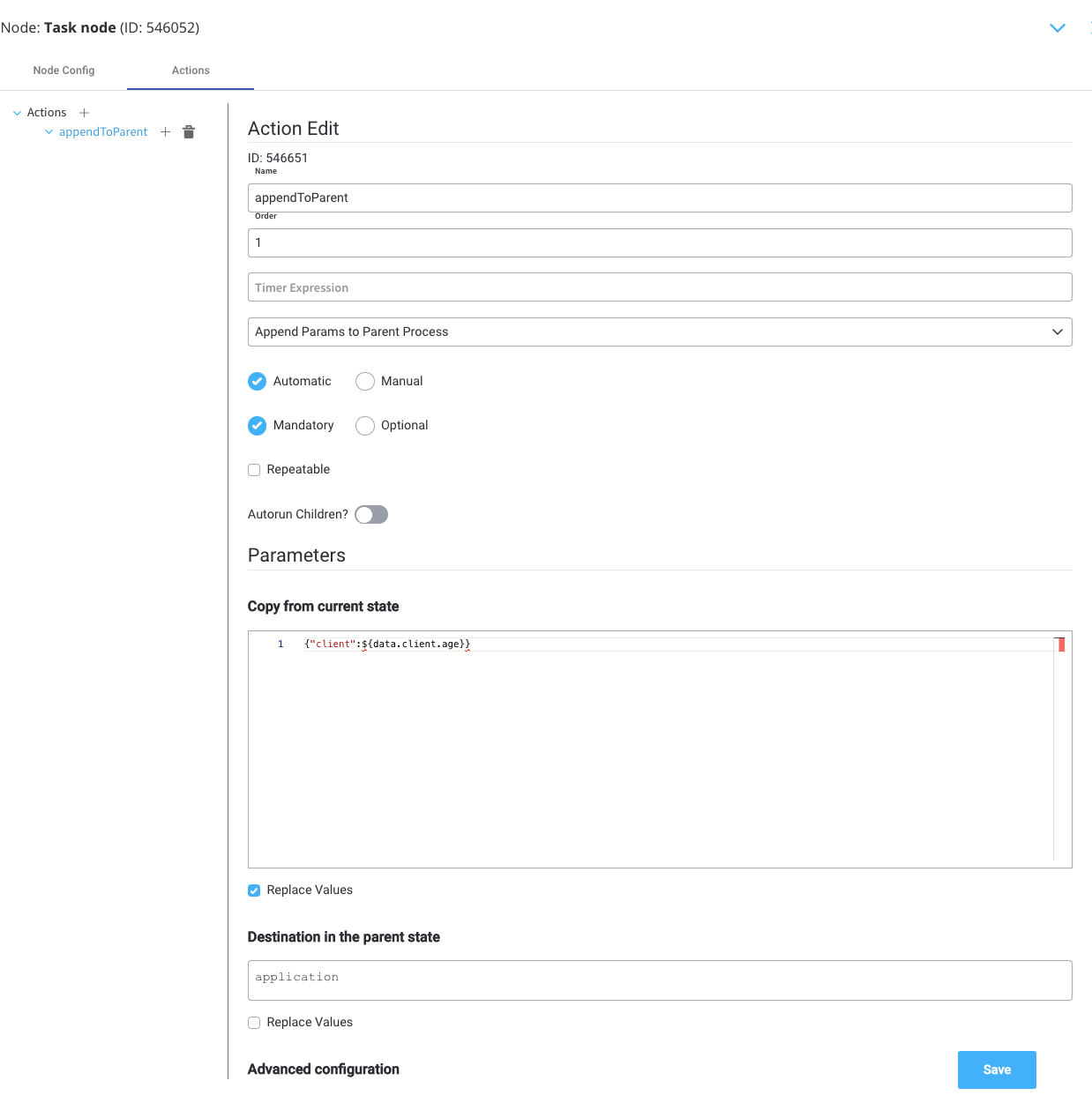
We have a subprocess that allows us to enter the age of the client on the **data.client.age** key, and we want to copy the value back to the parent process. The key to which we want to receive this value in the parent process is **application.client.age**.
This is the configuration to apply the above scenario:
**Parameters**
* **Copy from current state** - `{"client": ${data.client.age}}` to copy the age of the client (the param value we want to copy)
* **Destination in the parent state** - `application` to append the data o to the **application** key on the parent process
**Advanced configuration**
* **Show Target Process** - `${parentProcessInstanceId}`to copy the data on the parent of this subprocess