> ## Documentation Index
> Fetch the complete documentation index at: https://docs.flowx.ai/llms.txt
> Use this file to discover all available pages before exploring further.
# Angular SDK
> FlowxProcessRenderer is a low code library designed to render UI configured via the Flowx Process Editor.
**Breaking changes**: Starting with version 4.0 the ui-sdk will no longer expect the authToken to be present in the LOCAL\_STORAGE. Instead, the authToken will be passed as an input to the flx-process-renderer component. This is mandatory for the SSE to work properly.
## Prerequisites
* Node.js min version 20 - [**Download Node.js**](https://nodejs.org/en/blog/release/v20.9.0)
* Angular CLI version 19. Install Angular CLI globally using the following command:
```npm theme={"system"}
npm install -g @angular/cli@19
```
This will allow you to run ng related commands from the terminal.
## Angular project requirements
Your app MUST be created using the NG app from the @angular/cli\~19 package. It also MUST use SCSS for styling.
```npm theme={"system"}
npm install -g @angular/cli@19
ng new my-flowx-app
```
To install the npm libraries provided by FLOWX you will need to obtain access to the private FLOWX Nexus registry. Please consult with your project DevOps.
The library uses Angular version **@angular\~19**, **npm v10.1.0** and **node v20.9.0**.
If you are using an older version of Angular (for example, v16), please consult the following link for update instructions:
[**Update Angular from v16.0 to v19.0**](https://angular.dev/update-guide?v=16.0-17.0\&l=1)
## Installing the library
Use the following command to install the **renderer** library and its required dependencies:
```bash theme={"system"}
npm install \
@flowx/core-sdk@5.64.5 \
@flowx/core-theme@5.64.5 \
@flowx/angular-sdk@5.64.5 \
@flowx/angular-theme@5.64.5 \
@flowx/angular-ui-toolkit@5.64.5 \
@angular/cdk@19 \
ng2-pdfjs-viewer@18.0.0 \
@types/event-source-polyfill
```
A few configurations are needed in the projects `angular.json`:
* in order to successfully link the pdf viewer, add the following declaration in the assets property:
```json theme={"system"}
{
"glob": "**/*",
"input": "node_modules/ng2-pdfjs-viewer/pdfjs",
"output": "/assets/pdfjs"
}
```
## Initial setup
Once installed, `FlxProcessModule` will be imported in the `AppModule` as `FlxProcessModule.withConfig({})`.
You **MUST** also import the dependencies of `FlxProcessModule`: `HttpClientModule` from `@angular/common/http`.
### Theming
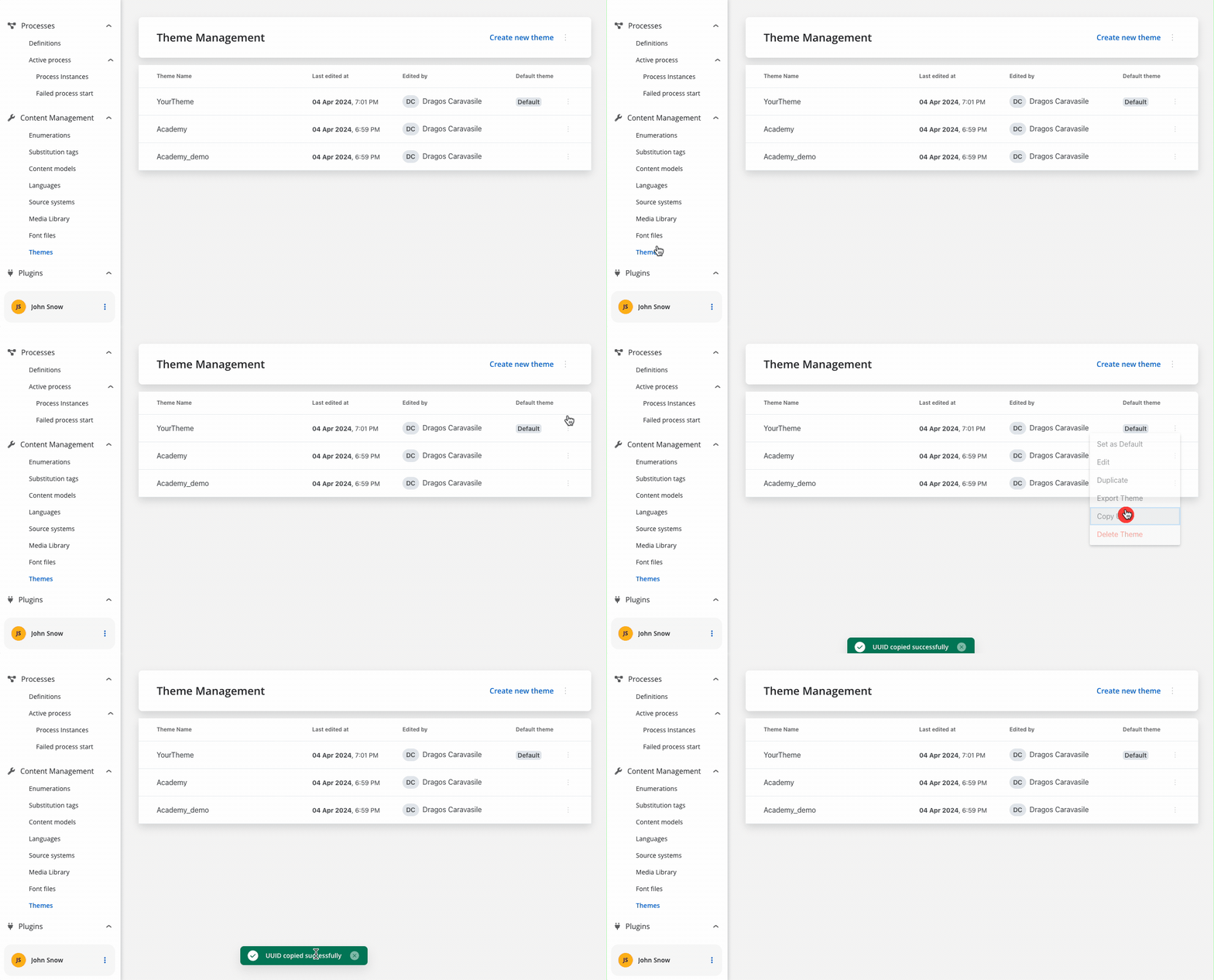
Component theming is done through the `@flowx/ui-theme` library. The theme id is a required input for the renderer SDK component and is used to fetch the theme configuration. The id can be obtained from the admin panel in the themes section.
### Authorization
Every request from the **FlowX** renderer SDK will be made using the **HttpClientModule** of the client app, which means those requests will go through every interceptor you define here. This is most important to know when building the auth method as it will be the job of the client app to intercept and decorate the requests with the necessary auth info (eg. `Authorziation: Bearer ...`).
It's the responsibility of the client app to implement the authorization flow (using the **OpenID Connect** standard). The renderer SDK will expect the authToken to be passed to the `flx-process-renderer` as an input.
```typescript theme={"system"}
import { BrowserModule } from '@angular/platform-browser';
import { NgModule } from '@angular/core';
import { HttpClientModule, HTTP_INTERCEPTORS } from '@angular/common/http';
import { FlxProcessModule } from '@flowx/angular-sdk';
import { AppRoutingModule } from './app-routing.module';
import { AppComponent } from './app.component';
@NgModule({
declarations: [
AppComponent,
],
imports: [
BrowserModule,
AppRoutingModule,
// will be used by the renderer SDK to make requests
HttpClientModule,
// needed by the renderer SDK
FlxProcessModule.withConfig({
components: {},
services: {},
}),
],
// this interceptor with decorate the requests with the Authorization header
providers: [
{ provide: HTTP_INTERCEPTORS, useClass: AuthInterceptor, multi: true },
],
bootstrap: [AppComponent]
})
export class AppModule {}
```
The `withConfig()` call is required in the application module where the process will be rendered. The `withConfig()` method accepts a config argument where you can pass extra config info, register a **custom component**, **service**, or **custom validators**.
**Custom components** will be referenced by name when creating the template config for a user task.
**Custom validators** will be referenced by name (`currentOrLastYear`) in the template config panel in the validators section of each generated form field.
```typescript theme={"system"}
// example with custom component and custom validator
FlxProcessModule.withConfig({
components: {
YourCustomComponentIdenfier: CustomComponentInstance,
},
services: {
NomenclatorService,
LocalDataStoreService,
},
validators: {currentOrLastYear },
})
// example of a custom validator that restricts data selection to
// the current or the previous year
currentOrLastYear: function currentOrLastYear(AC: AbstractControl): { [key: string]: any } {
if (!AC) {
return null;
}
const yearDate = moment(AC.value, YEAR_FORMAT, true);
const currentDateYear = moment(new Date()).startOf('year');
const lastYear = moment(new Date()).subtract(1, 'year').startOf('year');
if (!yearDate.isSame(currentDateYear) && !yearDate.isSame(lastYear)) {
return { currentOrLastYear: true };
}
return null;
}
```
The error that the validator returns **MUST** match the validator name.
The entry point of the library is the `` component. A list of accepted inputs is found below:
```
```
**Parameters**:
| Name | Description | Type | Mandatory | Default value | Example |
| ----------------- | ------------------------------------------------------------------------------------------------------------------------------------------------------------------------------------ | ------- | --------- | ------------- | ------------------------------------------------ |
| apiUrl | Your base url | string | true | - | [https://yourDomain.dev](https://yourdomain.dev) |
| processApiPath | Process subpath | string | true | - | onboarding |
| authToken | Authorization token | string | true | - | 'eyJhbGciOiJSUzI1NiIsIn....' |
| themeId | Theme id used to style the process. Can be obtained from the themes section in the admin | string | true | - | '123-456-789' |
| processName | Identifies a process | string | true | - | client\_identification |
| processStartData | Data required to start the process | json | true | - | `{ "firstName": "John", "lastName": "Smith"}` |
| debugLogs | When set to true this will print WS messages in the console | boolean | false | false | - |
| language | Language used to localize the application. | string | false | ro-RO | - |
| keepState |
By default all process data is reset when the process renderer component gets destroyed. Setting this to true will keep process data even if the viewport gets destroyed
| boolean | false | false | - |
| isDraft | When true allows starting a process in draft state. \*Note that isDraft = true requires that processName be the **id** (number) of the process and NOT the name. | boolean | false | false | - |
| legacyHttpVersion | Set this to `true` only for HTTP versions \< 2 in order for SSE to work properly. Can be omitted otherwise. | boolean | false | false | - |
| projectInfo | Information about the project that contains the process that is being run. | object | true | - | `{ projectId: '1234-5678-9012' }` |
| locale | Locale used to localize the application. | string | false | en-US | 'en-US' |
| cache | Caching of static resources | boolean | false | true | - |
### Data and actions
Custom components will be hydrated with data through the \$data input observable which must be defined in the custom component class.
```typescript theme={"system"}
@Component({
selector: 'my-custom-component',
templateUrl: './custom-component.component.html',
styleUrls: ['./custom-component.component.scss'],
})
export class CustomComponentComponent {
data$ = input | null>(null)
}
```
Component actions are always found under `data` -> `actionsFn` key.
Action names are configurable via the process editor.
```typescript theme={"system"}
# data object example
data: {
actionsFn: {
action_one: () => void;
action_two: () => void; }
}
```
#### Custom component validation
Custom components can validate their own status. We can inject the `FLX_VALIDATOR_SERVICE` service and use it to validate the component. Whe service exposes the following properties:
* `validate(isValid: boolean)` - used to validate the component
* `saveData(data: any)` - used to save data
* `validated$` - used to monitor external submission from the process
Example of the a custom component that validates an input with a required validator:
```ts theme={"system"}
@Component({
selector: 'flx-custom-validation',
imports: [CommonModule, ReactiveFormsModule],
template: `
Custom validation:
@if (formSubmitted() && fc.invalid) {
error
}
`
})
export class FlxCustomValidationComponent implements OnInit {
data$ = input | null>(null) // can be used to get process data & actions
validationService = inject(FLX_VALIDATOR_SERVICE) // service used to validate the custom component - ony use in components that need validation
fc = new FormControl('', Validators.required) // the form control has a required validator.
formSubmitted = signal(false)
ngOnInit(): void {
// update validity
this.fc.statusChanges.subscribe((status) => {
this.validationService.validate(status === 'VALID')
})
// save data
this.fc.valueChanges.subscribe((value) => {
this.validationService.saveData({ app: { test1: value, test2: `${value}${value}` } })
})
// monitor external submission
this.validationService.validated$.subscribe(() => {
this.formSubmitted.set(true)
})
}
}
```
### Custom Interceptors
* Starting from the FlowX SDKs version 4.6, the Angular `HttpClientModule` is no longer use internally to make HTTP requests. Thus, we have a new mechanism that allows you to create custom interceptors for handling HTTP requests.
#### Request Interceptors
* Here is an example that illustrates how to create an interceptor that adds a custom header to all outgoing requests:
```typescript theme={"system"}
// Import the necessary types
import { FLX_REQUEST_INTERCEPTORS_CONFIG } from '@flowx/angular-sdk'
import { HttpRequestInterceptor } from '@flowx/core-sdk'
// create the interceptor factory function
const customHeaderInterceptor: HttpRequestInterceptor[] = [
{
onFulfilled: (response) => {
response.headers['custom-header'] = 'custom-value'
return response
},
}
]
// Add the interceptor to the providers array in the main app module
{
provide: FLX_REQUEST_INTERCEPTORS_CONFIG,
useValue: customHeaderInterceptor,
}
```
#### Response Interceptors
* Here is an example that illustrates how to create an interceptor that shows a message when a response errors out:
```typescript theme={"system"}
import { FLX_RESPONSE_INTERCEPTORS_CONFIG } from '@flowx/angular-sdk'
import { HttpResponseInterceptor } from '@flowx/core-sdk'
const customHErrorInterceptor: HttpResponseInterceptor[] = [
{
onRejected: (response) => {
if (response.status !== 200) {
console.error('Something went wrong, we should handle this!', response.message)
}
return response
}
}
]
// Add the interceptor to the providers array in the main app module
{
provide: FLX_RESPONSE_INTERCEPTORS_CONFIG,
useValue: customHErrorInterceptor,
}
```
#### Interceptors that use Dependency injection
* If you need to use a service in your interceptor, you can use provider factories coupled with the `deps` property to inject the service into the interceptor:
```typescript theme={"system"}
// the interceptor factory function that receives the custom service as an argument through dependency injection:
const interceptor: (custom: any) => HttpRequestInterceptor[] = (customService: CustomService) => [{
onFulfilled: (response) => {
// do something with the custom service
// interceptor logic
return response
}
}]
// Add the interceptor to the providers array in the main app module
{
provide: FLX_REQUEST_INTERCEPTORS_CONFIG,
useFactory: (customService: CustomService) => [
interceptorFactory(customService),
],
deps: [CustomService], // provider factory dependencies
}
```
### Interacting with the process
Data from the process is communicated via **Server Send Event** protocol under the following keys:
| Name | Description | Example | |
| --------------- | :--------------------------------------------------------------------------------------: | :-----: | - |
| Data | data updates for process model bound to default/custom components | | |
| ProcessMetadata | updates about process metadata, ex: progress update, data about how to render components | | |
| RunAction | instructs the UI to perform the given action | | |
### Task management component
The `flx-task-manager` component is available in the `FlxTaskManagementComponent`. To use it, import the required module in your Angular project:
```bash theme={"system"}
import { FlxTasksManagementComponent } from '@flowx/angular-sdk';
```
#### Usage
Include the component in your template:
```xml theme={"system"}
```
**Parameters**:
| Name | Description | Type | Mandatory | Example |
| ------------------ | -------------------------------------- | -------- | --------- | ------------------------------ |
| `apiUrl` | Endpoint where the tasks are available | `string` | ✅ | `https://yourDomain.dev/tasks` |
| `authToken` | Authorization token | `string` | ✅ | (retrieved from local storage) |
| `appId` | The application ID | `string` | ✅ | (retrieved dynamically) |
| `viewDefinitionId` | The view configuration identifier | `string` | ✅ | (retrieved dynamically) |
| `themeId` | The theme identifier | `string` | ❌ | (retrieved dynamically) |
| `language` | The selected language | `string` | ❌ | (retrieved dynamically) |
| `locale` | The localization setting | `string` | ❌ | (retrieved dynamically) |
| `buildId` | The current build identifier | `string` | ❌ | (retrieved dynamically) |
| `staticAssetsPath` | Path for static resources | `string` | ❌ | (set via environment) |
#### Coding style tests
Always follow the Angular official [coding styles](https://angular.io/guide/styleguide).
Below you will find a Storybook which will demonstrate how components behave under different states, props, and conditions, it allows you to preview and interact with individual UI components in isolation, without the need for a full-fledged application: