> ## Documentation Index
> Fetch the complete documentation index at: https://docs.flowx.ai/llms.txt
> Use this file to discover all available pages before exploring further.
# Exclusive gateway
> In the world of process flows, decisions play a crucial role, and that's where the Exclusive Gateway comes into play. This powerful tool enables you to create conditional pathways with ease.
## Configuring an Exclusive Gateway node

To configure this node effectively, it's essential to set up both the **input** and **output** sequences within the gateway process.

### General configuration
* **Node name**: Give your node a meaningful name.
* **Can go back**: Enabling this option allows users to revisit this step after completing it.
When a step has "Can Go Back" set to false, all preceding steps become inaccessible.
* [**Swimlane**](../../platform-deep-dive/user-roles-management/swimlanes): Choose a swimlane, ensuring that specific user roles have access only to certain process nodes. If there are no multiple swimlanes, the value is **Default**.
* [**Stage** ](../../platform-deep-dive/plugins/custom-plugins/task-management/using-stages): Assign a stage to the node.

### Gateway decisions
* **Language**: When configuring conditions, you can use [MVEL](/4.0/docs/platform-overview/frameworks-and-standards/business-process-industry-standards/intro-to-mvel) (or [DMN](#dmn-example)) expressions that evaluate to either **true** or **false**.
* **Conditions**: In the **Gateway Decisions** tab, you can see that the conditions (**if, else if, else**) are already built-in and you can **select** the destination node when the condition is **true**.
The order of expressions matters; the first **true** evaluation stops execution, and the token moves to the selected node.

After the exclusive portion of the process, where one path is chosen over another, you'll need to either end each path (as in the example below) or reunite them into a single process (as in the example above) using a new exclusive gateway without any specific configuration.

## MVEL example
### Getting input from a Switch UI element
Let's consider the following example: we want to create a process that displays 2 screens and one modal. The gateway will direct the token down a path based on whether a switch element (in our case, VAT) is toggled to true or false.

If, during the second screen, the VAT switch is toggled on, the token will follow the second path, displaying a modal.
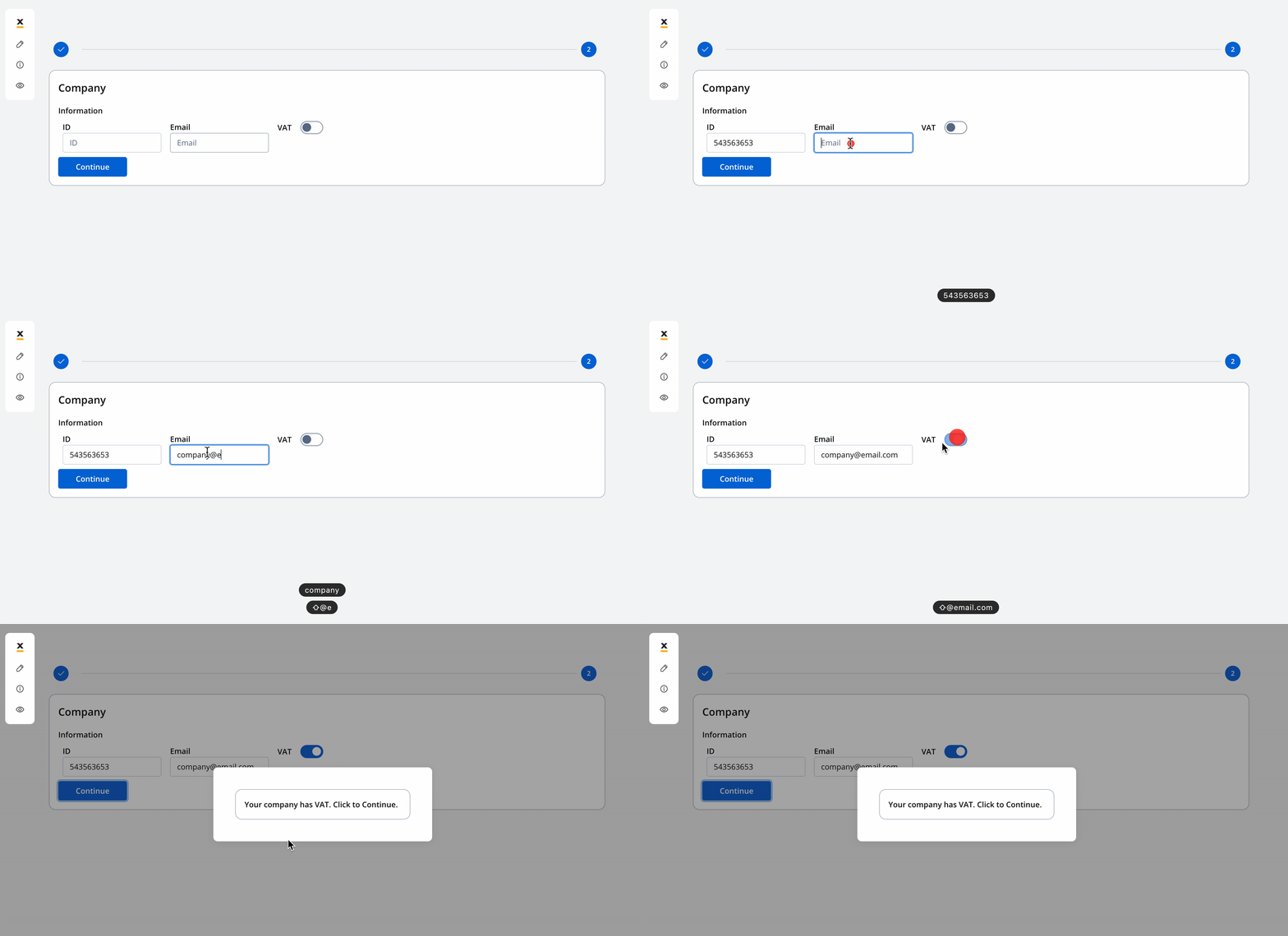
After interacting with the modal, the token will return to the main path, and the process will continue its primary flow.

#### Example configuration
* **Language**: MVEL
* **Expression**:
```java theme={"system"}
input.application.company.vat == true // you can use the same method to access a value for other supported scripts in our platform: JavaScript, Python and Groovy
```
Essentially, you are accessing a specific value or property within a structured data object. The format is usually `input.{{key from where you want to access a value}}`. In simpler terms, it's a way to verify if a particular property within your input data structure (input.application.company.vat key attached to Switch UI element) is set to the value true. If it is, the condition is met and returns true; otherwise, it returns false.
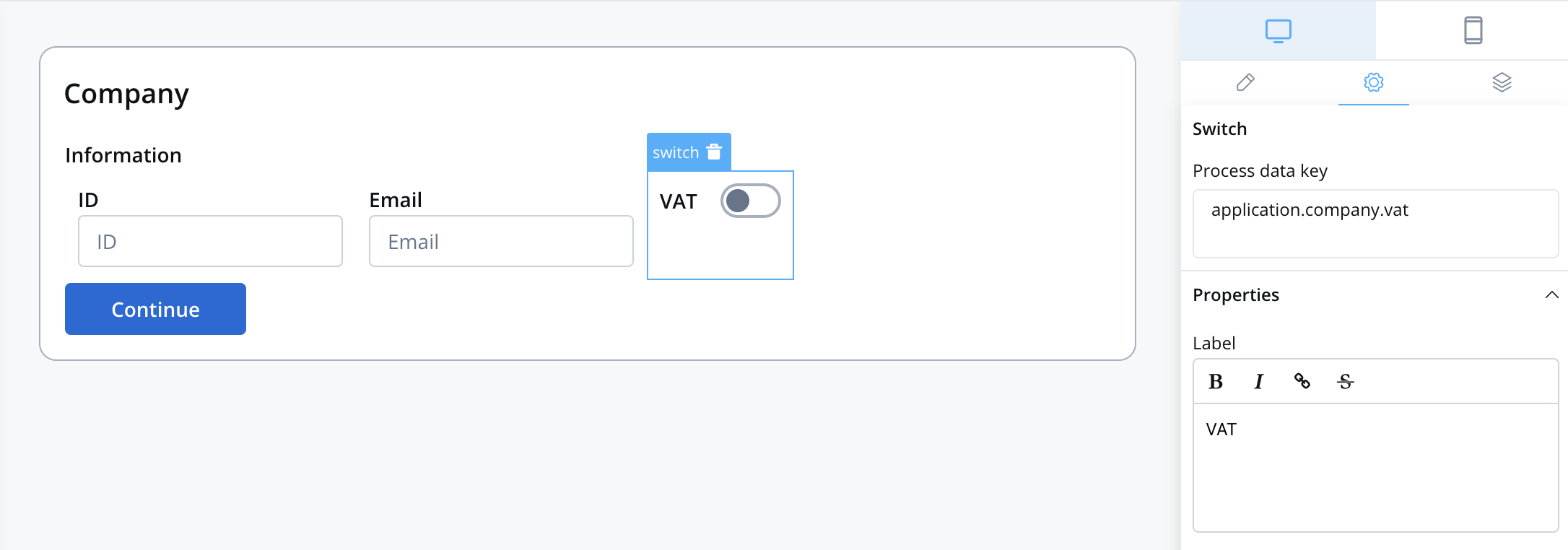
To ensure that the stored data can be accessed by the `.input method`, add a "Data to send" action on the node where you define your keys and your UI.

The `application.company.vat` key corresponds to the switch UI element.
## DMN example
If you prefer to use [DMN](../../platform-overview/frameworks-and-standards/business-process-industry-standards/intro-to-dmn) to define your gateway decisions, you can do so using exclusive gateways.

### Getting input from a Switch UI element
**Gateway Decision - DMN example** [(Applicable only for Exclusive Gateway - XOR)](./exclusive-gateway-node)

#### Configuration example
* **Language**: DMN
* **Expression**: `application.company.vat`
In our case, the expression field will be filled in with `application.company.vat` key, which corresponds to the switch UI element.
* **Hit Policy**: Unique
* **Type**: Boolean
* **Next Node name**: Enter the name of the nodes to which you prefer the token to be directed.
### Getting input from multiple UI elements
Consider another scenario in which the process relies on user-provided information, such as age and membership status, to determine eligibility for a discount. This decision-making process utilizes a DMN (Decision Model and Notation) decision table, and depending on the input, it may either conclude or continue with other flows.

#### Configuration example

In our case, the expressions fields will be populated with the `application.company.vat` and `application.client.membership` keys, which correspond to the user input collected on the initial screen.
The process is visualized as follows:
