> ## Documentation Index
> Fetch the complete documentation index at: https://docs.flowx.ai/llms.txt
> Use this file to discover all available pages before exploring further.
# Kafka send action
> The FlowX Designer offers various options to configure the Kafka Send Action through the Actions tab at the node level.
* [Action Edit](#action-edit)
* [Parameters](#parameters)
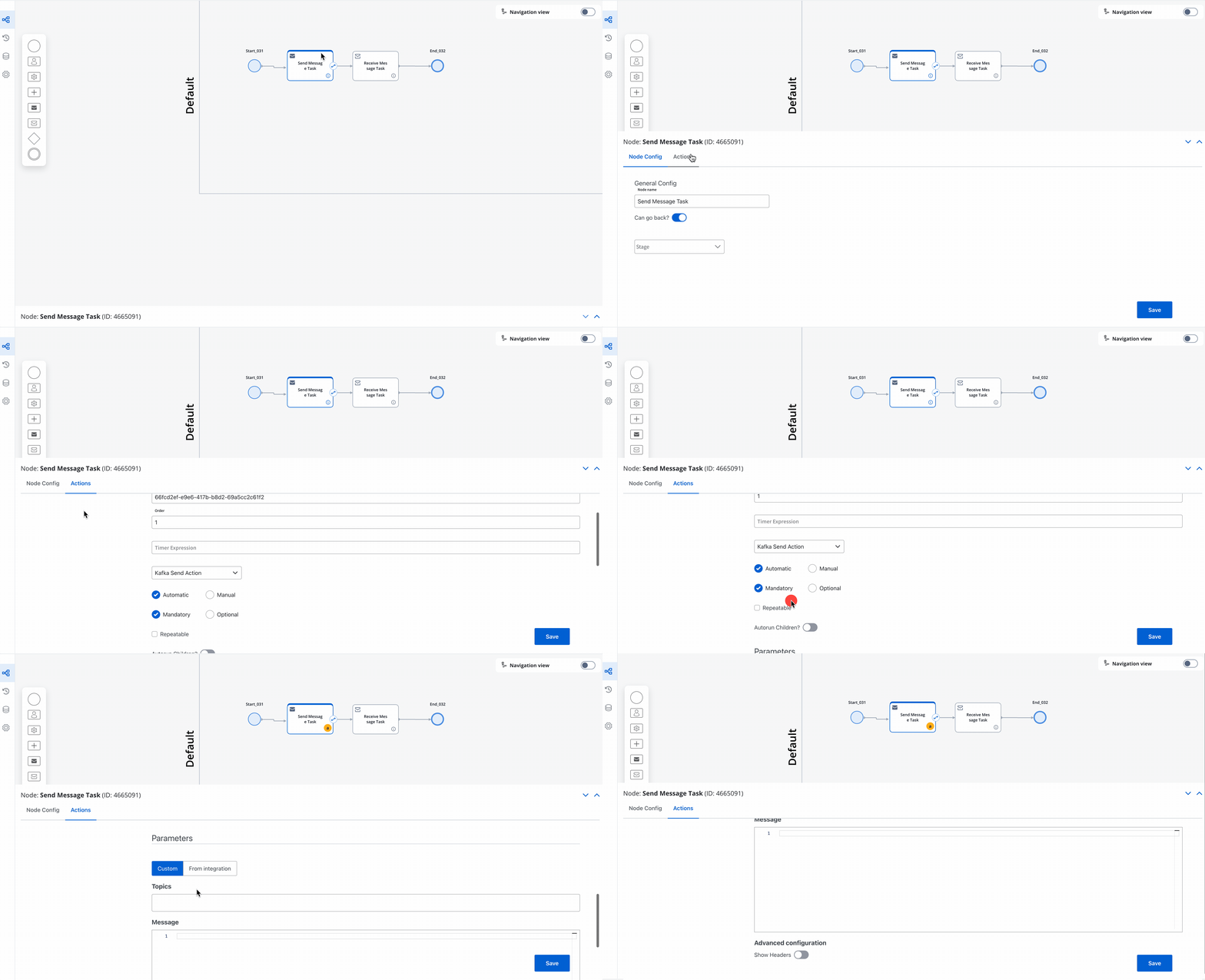
### Action Edit
* **Name** - Used internally to distinguish between different [actions](../actions/actions) within the process. Establish a clear naming convention for easy identification.
* **Order** - Sets the running order for multiple actions on the same node.
* **Timer Expression** - Enables a delay, using [ISO 8601 duration format](../node/timer-events/timer-expressions#iso-8601) (e.g., `PT30S` for a 30-second delay).
* **Action Type** - Designate as **Kafka Send Action** for sending messages to external systems.
* **Trigger Type** - Always set to Automatic.
The Kafka Send Action type is always **Automatic**. Typically, Kafka Send Actions automatically trigger when the process reaches this step.
* **Required Type** (Mandatory/Optional) - **Automatic** actions are typically set as **mandatory**. Manual actions can be either mandatory or optional.
* **Repeatable** - Allows triggering the action multiple times if required.
* **Autorun Children** - When activated, child actions (mandatory and automatic) execute immediately after the parent action concludes.
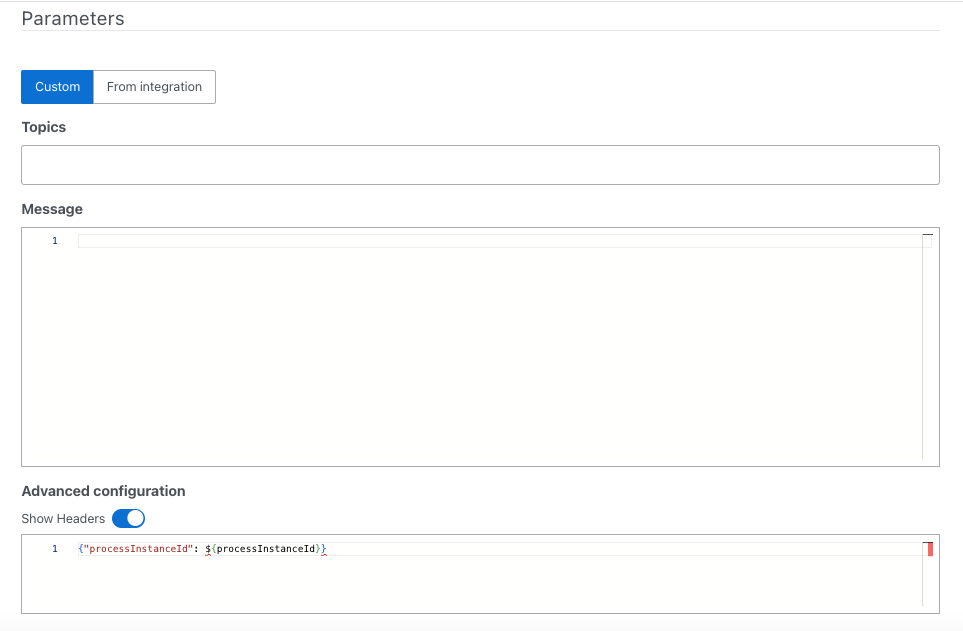
### Parameters
You can add parameters via the **Custom** option or import predefined parameters from an integration.
For detailed information on **Integrations management**, refer to [**this link**](../../platform-deep-dive/core-extensions/integration-management/).
* **Topics** - Specifies the Kafka topics listened to by the external system for requests.
* **Message** - Contains the message payload to be dispatched.
* **Advanced Configuration (Headers)** - Represents a JSON value sent within the Kafka message headers.
## Kafka Send Action Scenarios
The Kafka Send action serves as a versatile tool that facilitates seamless communication across various systems and plugins, enabling efficient data transfer, robust document management, notifications, and process initiation.
This action finds application in numerous scenarios while configuring processes:
* **Communicating with External Services**
* **Interacting with Connectors** - For example, integrating a connector in the FlowX.AI Designer [here](../../platform-deep-dive/integrations/building-a-connector#integrating-a-connector-in-flowxai-designer).
* **Engaging with Plugins:**
* **Document Plugin:**
* Generating, uploading, converting, and splitting documents - Explore examples [here](../../platform-deep-dive/plugins/custom-plugins/documents-plugin/documents-plugin-overview).
* Updating/deleting documents - Find an example [here](../../platform-deep-dive/plugins/custom-plugins/documents-plugin/deleting-a-file)
* Optical Character Recognition (OCR) integration - View an example [here](../../platform-deep-dive/plugins/custom-plugins/ocr-plugin#scenario-for-flowxai-generated-documents).
* **Notification Plugin:**
* Sending notifications - Example available [here](../../platform-deep-dive/plugins/custom-plugins/notifications-plugin/sending-a-notification) and emails with attachments [here](../../platform-deep-dive/plugins/custom-plugins/notifications-plugin/sending-an-email-with-attachments).
* One-Time Password (OTP) validation - Refer to this [example](../../platform-deep-dive/plugins/custom-plugins/notifications-plugin/sending-a-notification).
* Forwarding notifications to external systems - Explore this [example](../../platform-deep-dive/plugins/custom-plugins/notifications-plugin/forwarding-notifications-to-an-external-system).
* **OCR Plugin**
* **Customer Management Plugin**
* **Task Management Plugin:**
* Bulk operations update - Find an example [here](../../platform-deep-dive/core-extensions/task-management/task-management-overview#bulk-updates).
* **Requesting Process Data for Forwarding or Processing** - For example, Data Search [here](../../platform-deep-dive/core-extensions/search-data-service).
* **Initiating Processes** - Starting a process via Kafka or using hooks. Find examples [here](../../flowx-designer/managing-a-process-flow/starting-a-process).
The Kafka Send action stands as a versatile facilitator, enabling smooth operations in communication, document management, notifications, and process initiation across diverse systems and plugins.