> ## Documentation Index
> Fetch the complete documentation index at: https://docs.flowx.ai/llms.txt
> Use this file to discover all available pages before exploring further.
# BPMN nodes
> A Business Process Model and Notation (BPMN) node is a visual representation of a point in your process. Nodes are added at specific process points to denote the entrance or transition of a record within the process.
For a comprehensive understanding of BPMN, start with the following section:
[**Intro to BPMN**](/4.0/docs/platform-overview/frameworks-and-standards/business-process-industry-standards/intro-to-bpmn).
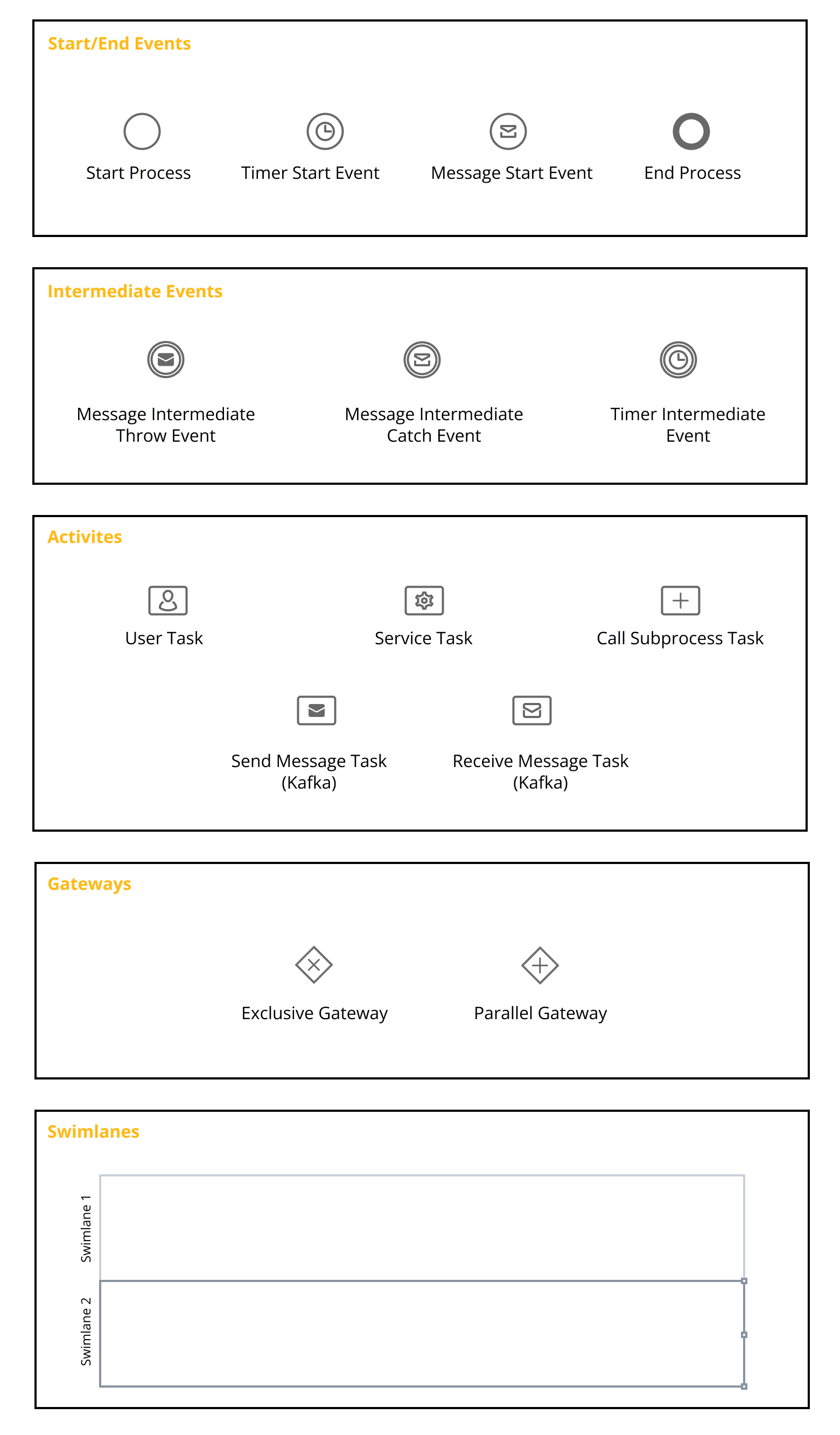
FLOWX platforms support various node types, each requiring distinct configurations to fulfill its role in the business flow.
## Types of BPMN nodes
Let's explore the key types of BPMN nodes available in FlowX:
* **Start and End nodes** - Mark the initiation and conclusion of a [process flow](../../platform-overview/frameworks-and-standards/business-process-industry-standards/intro-to-bpmn). A [process definition](../process/process-definition) may have multiple start nodes (each linked with a start condition) and end nodes based on the flow outcomes.
* **Send Message and Receive Message tasks** - Used for communication with external systems, integrations, and plugins.
* **Message Events** - Capture interactions between different process participants by referencing messages.
* **Task** nodes - Added when a [business rule](../actions/business-rule-action/business-rule-action) needs to execute during a process flow.
* **User Task** nodes - Configure the appearance and behavior of the UI and send data to custom components.
* **Exclusive Gateways** - Mark decision points in the process flow, determining the branch to be followed.
* **Parallel Gateways** - Split the process flow into two or more [branches](../../flowx-designer/managing-a-process-flow/adding-more-flow-branches) occurring simultaneously.
* **Call Subprocess Tasks**:
* **Call Activity** - Call activity is a node that provides advanced options for starting **subprocesses**.
* **Start Embedded Subprocess** - The Start Embedded Subprocess node initiates subprocesses within a parent process, allowing for encapsulated functionality and enhanced process management.
For comprehensive insights into BPMN and its various node types, explore our course at FlowX Academy:
* What's BPMN (Business Process Model Notation) and how does it work?
* How is BPMN used in FlowX?
After gaining a comprehensive overview of each node, you can experiment with them to create a process. More details are available in the following section:
[Managing a process flow](../../flowx-designer/managing-a-process-flow/)
## Related topics
- [FlowX.AI 5.3.0 Release Notes](/release-notes/v5.x/v5.3.0-december-2025/v5.3.0-december-2025.md)
- [FlowX.AI 5.9.0 Release Notes](/release-notes/v5.x/v5.9.0-june-2026/v5.9.0-june-2026.md)
- [FlowX.AI 5.8.0 Release Notes](/release-notes/v5.x/v5.8.0-may-2026/v5.8.0-may-2026.md)
- [FlowX.AI 4.7.10 Release Notes](/release-notes/v4.x/v4.7.x-lts/v4.7.10-november-2025/v4.7.10-november-2025.md)
- [FlowX.AI 4.6.0 Release Notes](/release-notes/v4.x/v4.6.x/v4.6.0-january-2025/v4.6.0-january-2025.md)