> ## Documentation Index
> Fetch the complete documentation index at: https://docs.flowx.ai/llms.txt
> Use this file to discover all available pages before exploring further.
# Enumerations
> A collection of values that can be utilized as content in UI components or templates is managed using **enumerations**. Values can be defined for certain [source systems](./source-systems) or [languages](./languages).

On the main screen inside **Enumerations**, you have the following elements:
* **Name** - the name of the enumeration
* **Version** - the version of the enumeration
* **Draft** - switch button used to control the status of an enumeration, could be **Draft** or **Published**
* **Last Updated** - the last time an enumeration has been updated
* **Open** - button used to access an enumeration to configure it/ add more values, etc.
* **Delete** - button used to delete an enumeration
* **New enumeration** - button used to create a new enumeration
* **Breadcrumbs** - **Import/Export**
For each entry (when you hit the **Open** button) inside an enumeration we have to define the following properties:
* **Code** - not displayed in the end-user interface, but used to assure value uniqueness
* **Labels** - strings that are displayed in the end-user interface, according to the language set for the generated solution
* **External source systems codes** - values that are set for each external system that might consume data from the process; these codes are further used by connectors, in other to send to an external system a value that it can validate

### Adding a new enumeration
To add a new enumeration, follow the next steps:
1. Go to **FLOWX Designer** and select the **Content Management** tab.
2. Select **Enumerations** from the list.
3. Add a suggestive name for your enumeration and then click **Add**.

### Configuring an enumeration
After creating an enumeration, you can add values to it.
To configure an enumeration value, follow the next steps:
1. Go to FLOWX.AI Designer and select the **Content Management** tab.
2. Select **Enumerations** from the list and open an enumeration.
3. Click **New value** and fill in the necessary details:
* **Code** - as mentioned above, this is not displayed in the end-user interface but is used to assure value uniqueness
* **Labels** - set the value of the string for each language you would like to use
* **Source Systems** - values that are set for each external system that might consume data from the process

### Creating a child collection
Enumerations can also be defined as a hierarchy - for each entry, we can define a list of children values (for example, name of the countries defined under the continents' enumeration values); hierarchies further enable cascading values in the end-user interface (for example, after selecting a continent in the first select [UI component](../../../building-blocks/ui-designer/ui-designer.mdx#ui-component-types), the second select component will contain only the children of this continent).

### Importing/exporting an enumeration
You can use the import/export feature to import or export enumerations using the following formats:
* JSON
* CSV

### Enumerations example
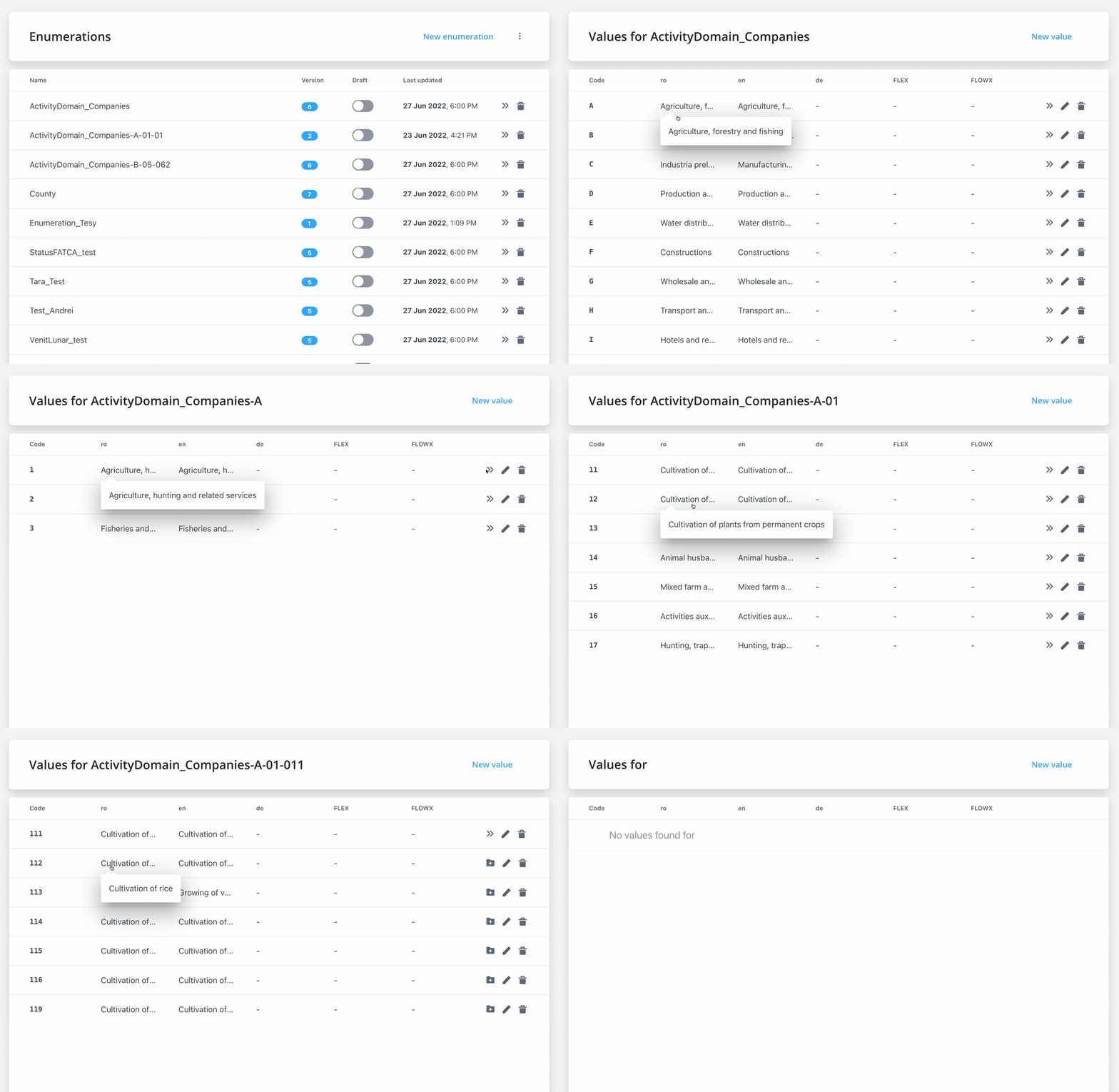
Enumerations, for instance, can be used to build elaborate lists of values (with children). Assuming you wish to add enumerations for Activity Domain Companies, you can create children collections by grouping lists and other related domains and activities.
We have the following example for ***Activity Domain Companies***:
#### **Activity Domain Companies → Agriculture forestry and fishing:**
* **Agriculture, hunting, and related services →**
Cultivation of non-perennial plants:
* Cultivation of cereals (excluding rice), leguminous plants and oilseeds
* Cultivation of rice
* Growing of vegetables and melons, roots and tubers
* Cultivation of tobacco
Cultivation of plants from permanent crops:
* Cultivation of grapes
* Cultivation of grapes
* Cultivation of seeds and stone fruits
* Cultivation of oil seeds
Animal husbandry:
* Raising of dairy cattle
* Raising of other cattle
* Raising horses and other horses
* **Forestry and logging →**
Forestry and other forestry activities:
* Forestry and other forestry activities
Logging:
* Logging
Collection of non-wood forest products from spontaneous flora:
* Collection of non-wood forest products from spontaneous flor
* **Fisheries and aquaculture →**
Fishing:
* Sea fishing
* Freshwater fishing
Aquaculture:
* Maritime aquaculture
* Freshwater aquaculture
This is the output after adding all the lists/collections from above:
## Related topics
- [FlowX.AI 4.6.0 Release Notes](/release-notes/v4.x/v4.6.x/v4.6.0-january-2025/v4.6.0-january-2025.md)
- [FlowX.AI 4.6.1 Release Notes](/release-notes/v4.x/v4.6.x/v4.6.1-february-2025/v4.6.1-february-2025.md)
- [FlowX.AI 4.7.0 Release Notes](/release-notes/v4.x/v4.7.x-lts/v4.7.0-february-2025/v4.7.0-february-2025.md)
- [FlowX.AI 4.7.3 Release Notes](/release-notes/v4.x/v4.7.x-lts/v4.7.3-april-2025/v4.7.3-april-2025.md)
- [FlowX.AI 4.7.9 Release Notes](/release-notes/v4.x/v4.7.x-lts/v4.7.9-october-2025/v4.7.9-october-2025.md)