> ## Documentation Index
> Fetch the complete documentation index at: https://docs.flowx.ai/llms.txt
> Use this file to discover all available pages before exploring further.
# FlowX CMS
> The Headless Content Management System is part of the core components of the **FlowX.AI** platform. It can be easily added to your custom FLOWX deployment to **enhance the core platform capabilities with functionality specific to taxonomies and managing various content types**.
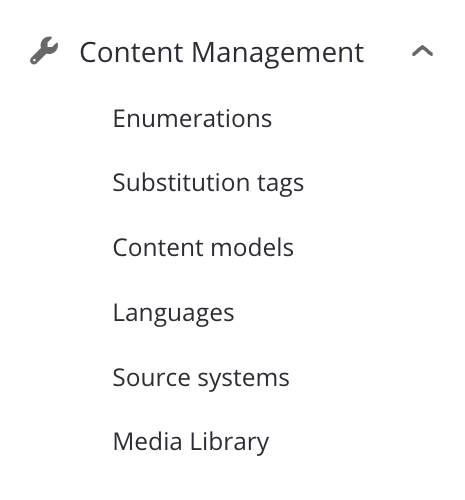
The service includes the following features:
It can be quickly deployed on the chosen infrastructure, preloaded with the needed taxonomies or contents using a REST interface, and then connected to the **FlowX Engine** through **Kafka** events.
Let's go through the steps needed to deploy and set up the service:
## Using the service
After you deployed the CMS service in your infrastructure, you can start defining and using custom content types, such as different lists (which can have different values for the same code depending on the external system that is used), blog posts etc.
You can also set the default application name to be used in your configuration. This is needed when retrieving the contents.
```yaml theme={"dark"}
application:
defaultApplication: DEFAULT_APPLICATION_NAME
```
If this configuration is not set, the service will use `flowx` as the default value.
## Define needed Kafka topics
Kafka topic names can be set by using environment variables:
| Default parameter (env var) | Default FLOWX.AI value (can be overwritten) |
| ----------------------------------- | ------------------------------------------------------------------ |
| KAFKA\_TOPIC\_REQUEST\_CONTENT\_IN | ai.flowx.dev.plugin.cms.trigger.retrieve.content.v1 |
| KAFKA\_TOPIC\_REQUEST\_CONTENT\_OUT | ai.flowx.dev.engine.receive.plugin.cms.retrieve.content.results.v1 |
The Engine is listening for messages on topics with names of a certain pattern, make sure to use an outgoing topic name that matches the pattern configured in the Engine.
### Example: Request a label by language or source system code
Used to translate custom codes into labels using the specified [language](./languages.mdx) or a certain [source system](./source-systems).
Various external systems and integrations might use different labels for the same information. In the processes, it is easier to use the corresponding code and translate this into the needed label when necessary: for example when sending data to other integrations, when generating documents, etc.
You will need to add a [Kafka send event](../../../building-blocks/node/message-send-received-task-node) CMS service.
The following values are expected in the request body:
* at least one of `language` and `sourceSystem` should be defined (if you only need the sourceSystem to be translated, you can leave language empty and vice versa, but they cannot both be empty)
* a list of `entries` to be translated
Example:
```json theme={"dark"}
{
"language": "en-US",
"sourceSystem": "CS"
"entries": [
{
"codes": [
"ROMANIA",
"BAHAMAS"
],
"contentDescription": {
"name": "country",
"application": "flowx",
"version": 1,
"draft": true
}
}
]
}
```
If the value for `application` is not sent, the `defaultApplication` value will be used when retrieving the contents from the database.
`version` and `draft` are not mandatory, if they are not specified, the latest published content will be used.
The service will respond with the following message structure:
```json theme={"dark"}
{
"entries": [
{
"code": "ROMANIA",
"label": "ROMANIA -en"
"translatedCode": "ROMANIA-CS"
},
{
"code": "BAHAMAS",
"label": "BAHAMAS -en"
"translatedCode": "BAHAMAS-CS"
}
],
"error": null
```
## Related topics
- [FlowX.AI 5.9.0 Release Notes](/release-notes/v5.x/v5.9.0-june-2026/v5.9.0-june-2026.md)
- [FlowX.AI 5.1.0 Release Notes](/release-notes/v5.x/v5.1.x-lts/v5.1.0-october-2025/v5.1.0-october-2025.md)
- [FlowX.AI 5.2.0 Release Notes](/release-notes/v5.x/v5.2.0-november-2025/v5.2.0-november-2025.md)
- [FlowX.AI 4.7.1 Release Notes](/release-notes/v4.x/v4.7.x-lts/v4.7.1-march-2025/v4.7.1-march-2025.md)
- [FlowX.AI 4.7.9 Release Notes](/release-notes/v4.x/v4.7.x-lts/v4.7.9-october-2025/v4.7.9-october-2025.md)