> ## Documentation Index
> Fetch the complete documentation index at: https://docs.flowx.ai/llms.txt
> Use this file to discover all available pages before exploring further.
# Adding more flow branches
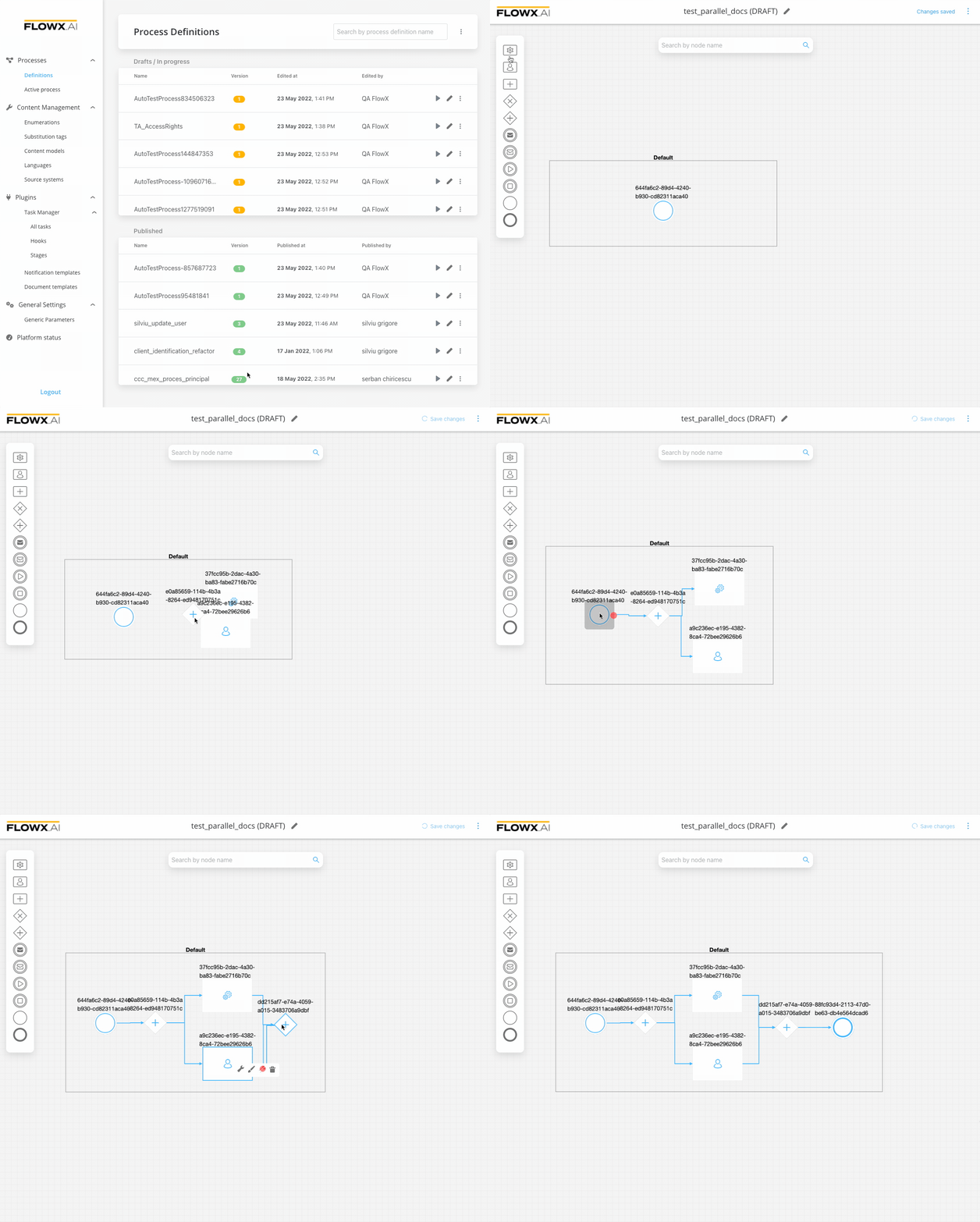
To split the Process flow into more steps, you just need to use a parallel gateway node type.

### Steps for creating a flow with two branches
To create a flow with two branches:
Open **FlowX Designer** and go to the **Definitions** tab.
Click on the **New process** button, using the **breadcrumbs** from the top-right corner.
Add a **start node** and a **parallel gateway node**.
Add two different **task nodes** and link them after the **parallel gateway node**.
Add a **parallel gateway** to merge the two flow branches back into one branch.
Add an **end node**.
## Related topics
- [FlowX.AI 4.7.9 Release Notes](/release-notes/v4.x/v4.7.x-lts/v4.7.9-october-2025/v4.7.9-october-2025.md)
- [FlowX.AI 4.6.1 Release Notes](/release-notes/v4.x/v4.6.x/v4.6.1-february-2025/v4.6.1-february-2025.md)
- [FlowX.AI 4.6.0 Release Notes](/release-notes/v4.x/v4.6.x/v4.6.0-january-2025/v4.6.0-january-2025.md)
- [FlowX.AI 5.6.0 Release Notes](/release-notes/v5.x/v5.6.0-march-2026/v5.6.0-march-2026.md)
- [FlowX.AI 4.7.0 Release Notes](/release-notes/v4.x/v4.7.x-lts/v4.7.0-february-2025/v4.7.0-february-2025.md)